




The National Testing Agency (NTA) will open the JEE Main correction window for session 1 on December 1 till December 2 (11:50 PM). If you want to make corrections in your JEE Main application forms, you can do so by logging in with your application number and password at the official website — jeemain.nta.nic.in.
- You are NOT be allowed to change your mobile number, e-mail address, permanent and present address, emergency contact details, or photograph.
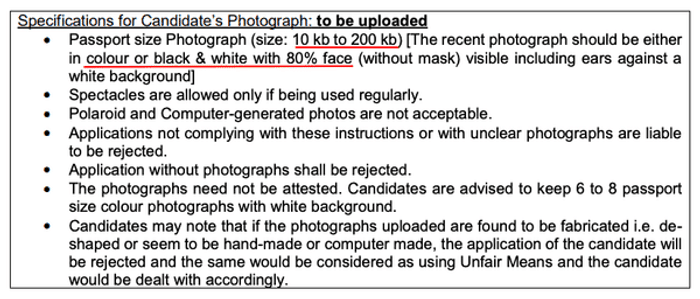
- Those with defective photographs are required to make the required changes through JEE Main login- Check JEE Main Photosize guidelines
JEE Main correction window will be allowed only for certain details, such as exam city, medium, education qualification, etc.
This year, the authority is allowing applicants to edit their identity details (if Aadhaar was not chosen) and the State Code of Eligibility. An additional fee is to be paid by candidates during JEE Main form correction 2026. The additional fee (wherever required) can be paid through Credit/Debit Card/Net Banking/UPI. The JEE Main examination is scheduled to take place from April 1 to April 8, 2026.
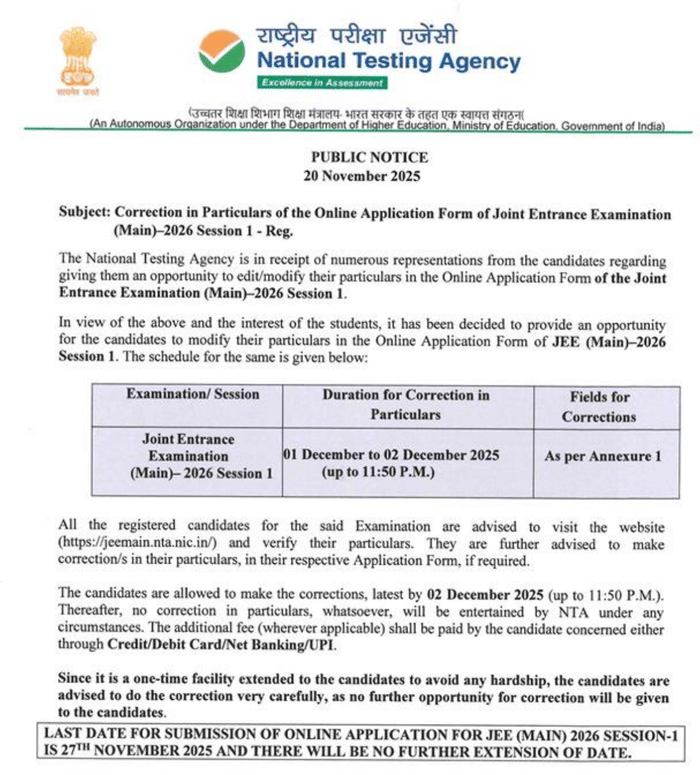
Source: jeemain.nta.nic.in/
- JEE Main 2026 Form Correction Dates
- What Details Cannot be corrected in the JEE Main Correction Window?
- What Details CAN be corrected in the JEE Main 2026 Form?
- Already Registered for JEE? Check the Details can be Edited
- JEE Main Form Correction Fee
- JEE Main 2026 Application Form Status
- JEE Main 2026 Form Correction- Photo-size Guidelines
- Most Common Mistakes Students Make in JEE Main Correction Window
- JEE Main Correction Window: Safe vs Risky Changes
- Ideal Timeline to Make JEE Main Application Form Corrections
- FAQs related to JEE Main 2026 Form Correction
JEE Main 2026 Form Correction Dates
JEE Main in 2026 will also be held in two phases, and the correction window will also open twice. The first JEE Main session will be held from January 21 to 30, 2026. The next JEE Main session will be held between April 2 and 9, 2026.
| Event | Dates |
|---|---|
| JEE Main 2026 Form Correction Window (Session 1) | December 1–2, 2025 |
| JEE Main 2026 Form Correction Window (Session 2) | February 27–28, 2026 (tentative) |
| Event | Dates |
| JEE Main 2026 Form Correction Window (Session 1) | December 1–2, 2025 |
| JEE Main 2026 Form Correction Window (Session 2) | February 27–28, 2026 (tentative) |
Related Links
What Details Cannot be corrected in the JEE Main Correction Window?
JEE Main Form Correction Details that cannot be corrected by the candidates during the JEE Main form correction window include:
- Mobile Number
- Email Address
- Permanent Address
- Correspondence Address
- Emergency Contact Details
- Session
- Photograph
Also Read:
Ques: Can I change my category from general to EWS in JEE Main during counselling?
Ans: No, you cannot change your category from General to EWS during JoSAA counselling; this change must be made during the JEE Main correction window for a later session, provided you have a valid EWS certificate. You must obtain and upload the required EWS certificate during the designated correction window to change your category before the counseling process begins.
Ques: Can I edit my father’s or mother’s occupation and income details in the correction window?
Ans: Yes, NTA generally allows changes to parental occupation, income range, or qualification details. These corrections help ensure accurate documentation for data verification. But you must verify that the updated information matches supporting documents to avoid issues later during counselling.
Ques: What if I make a mistake again after the correction window closes?
Ans: Once the correction window closes, no further changes can be made. Your form will be accepted as it is. So review everything before submitting corrections.
What Details CAN be corrected in the JEE Main 2026 Form?
Details that can be corrected in JEE Main Form Correction have been categorised by NTA in different types.
| S.No | Actions | Fields |
|---|---|---|
| 1. | Candidates shall NOT be allowed to change: | – Mobile Number- Email Address- Address (Permanent and Present)- Emergency Contact Details- Session- Photograph of candidate |
| 2. | Candidate shall be allowed to change any one of the fields: | – Candidate Name or– Father Name or– Mother Name |
| 3. | Candidates shall be allowed to change all the fields: | – Class 10 / equivalent details- Class 12 / equivalent details |
| 4. | Candidates shall be allowed to change examination cities based on their Permanent and Present addresses | – Examination City Selection- Medium of the Examination |
| 5. | Candidates shall be allowed to change all the fields: | – Date of Birth- Gender- Category- Sub-category / PwD- Signature |
| 6. | Candidate shall be allowed to add the field: | – Paper |

Source: jeemain.nta.nic.in/
Already Registered for JEE? Check the Details can be Edited
NTA has specified details that can be corrected during the form correction process for students who also registered during the session 1 JEE Main registration process. You can check the specified details in the section below.
| Particular | Details |
|---|---|
| Existing candidates i.e. students who already registered and applied for both Session 1 and Session 2 during the JEE Main 2026 Session 1 registration period | Candidates are allowed to edit or modify the following:
|
| Existing candidates i.e. students who registered and applied for Session 1 but did not apply for Session 2 | Candidates are allowed to edit or modify the following:
|
Ques: Can I change the exam paper from B.E./B.Tech to B.Arch or B.Plan?
Ans: Yes. You can modify your exam paper choice (B.Tech, B.Arch, B.Plan or combinations). You must pay additional fees if you add more papers.
Ques: How do I know if my correction in the JEE Main form is successfully submitted?
Ans: After submitting corrections, you must download the updated confirmation page. If the changes reflect correctly on the confirmation page and no payment is pending, your correction is considered successful. Keep a screenshot of the final confirmation page for safety.
Ques: What if I uploaded the wrong category certificate before the correction window?
Ans: You can upload the correct or updated category certificate during the form correction period. If the certificate was invalid, outdated, or missing, replace it with a valid version. If not corrected in time, NTA may treat you as an unreserved category candidate during result processing.
JEE Main Form Correction Fee
The JEE Main application correction fee is applicable for certain modifications. Candidates seeking specific changes are advised to note the following scenarios that require an extra charge:
| Scenario | Required Action |
|---|---|
| Changing Category | Pay an extra fee if changing from a reserved group (SC, ST, Girls, PwD) to a general category (General or OBC-NCL). |
| Opting for Multiple Papers | Pay an extra fee for any additional papers you decide to appear for (e.g., adding B.Arch or B.Planning). |
| Changing Exam City Preference | Pay an additional fee if changing your preferred exam city to one outside of India (a foreign city). |
Also Check: NTA Announces New Rule for JEE Main 2026; Mandates CBSE Class 11 Registration Number
JEE Main 2026 Application Form Status
- To access the form status (or recheck the form), log in using the application number and password.
- After that, click on the Status tab.
- The status of JEE Main Application Form 2026 will be mentioned.
Any of the following messages will be displayed on the user’s window:
- Received – If the application form is successfully submitted
- Unsuccessful – If the application form is Incomplete/Rejected/Not Submitted
- Remove Image Discrepancy
Also Check: JEE Main 2026 Category Certificate Format for SC/ST, OBC-NCL, EWS and PwD Guidelines
JEE Main 2026 Form Correction- Photo-size Guidelines
Also Check: Mode of Preparation in JEE Main Form 2026
Most Common Mistakes Students Make in JEE Main Correction Window
| Mistake | How to Fix in the Correction Window | Risk if Not Corrected |
|---|---|---|
| Blurry/white background photo | Upload new photo | The application may be rejected |
| Signature with capital letters or on a blank | Upload new running-hand signature | Application rejected |
| Wrong category (filled General instead of OBC/EWS) | Change category | Lose the reservation benefit |
| Selected the wrong paper (wanted B.Arch but chose only Paper-1) | Add Paper 2A/2B | Cannot appear for B.Arch/B.Planning |
| Wrong exam medium (filled in Hindi instead of English) | Change language | The question paper is in the wrong language |
| Typo in the Class 12 roll number or passing year | Correct education details | Admit card/result issues |
JEE Main Correction Window: Safe vs Risky Changes
Based on the student experience from 2023 to 2025, we have provided a table with Safe vs Risky changes or mistakes made.
| Change Type | Safe? | Student Advice |
|---|---|---|
| Changing exam center preferences | Very Safe | 99% students do this, no issues |
| Uploading a new photo/signature | Safe | Do it on Day 1, the server is fast |
| Changing category (with valid cert.) | Safe | NTA accepts later during counselling |
| Changing from General to SC/ST | Safe | You get a refund after the result |
| Changing from SC/ST to General | Risky | Have to pay a huge fee, no refund if you change your mind again |
| Changing gender | Risky | Only if Aadhaar mismatch; else the application may get flagged |
Ideal Timeline to Make JEE Main Application Form Corrections
| Day of Correction Window | Best Time to Login | What to Do |
|---|---|---|
| Day 1 (Evening) | 7 PM – 11 PM | Upload new photo & signature (server fast) |
| Day 2 (Morning) | 9 AM – 12 PM | Change centre, paper, category, education details |
| Day 2 (Afternoon) | 2 PM – 5 PM | Double-check everything, take a screenshot |
| Last Day (before 11:50 PM) | Before 9 PM | Only if an emergency; avoid last-minute payment issues |
If you have any queries about JEE Main 2026, you can send an email at ntanationaltestingagency@gmail.com. If a candidate is facing issues in JEE Main 2026 Form Correction, they can ask their doubts via email by mentioning the following details:
- Name of Candidate
- Registration ID/Application Number
- Mistakes made in the Application Form
FAQs related to JEE Main 2026 Form Correction
Ques. Can I correct my online application form for JEE Main 2026?
Ans. Yes, you can make changes to certain details in your online application form of JEE Main 2026. You can check the details that can be changed and that cannot be changed during the JEE Main correction window.
Ques. Can I add more Paper (Paper 1 or Paper 2A or Paper 2B) during JEE Main form correction?
Ans. Yes, you can add more papers during JEE Main 2026 form correction. Along with the addition of the paper you must pay the additional registration fee too for the addition of the paper.
Ques. Is there any fee for JEE Main application form correction?
Ans. NTA may require additional fee payment from candidates who make specific changes to their JEE Main applications. These changes include
- altering the category from SC/ST/Girls/PwD to General/OBC NCL, or
- opting for Paper 2 in addition to or instead of Paper 1.
In such cases, candidates must pay the difference between the initial application fee and the revised fee. Since the application fee for reserved categories is lower than the fee for General category students, reserved category candidates may need to pay an additional amount. For other changes in JEE Main application form, no additional fee will be charged.



Comments
Found 1 Comment
The JEE Main 2022 Phase 2 Application Form Correction Window was live from July 1 to July 3, 2022. Since the window has been closed you are not allowed to make any changes.