





Facial-biometric checks at JEE Main 2026 at the exam centres capture your live photo at the exam centre and match it against your photo from registration to confirm your identity.
- To successfully clear the facial-biometric checks at JEE Main 2026 April sessions, make sure you are not wearing any scarf, mask, or cap during facial verification.
- Your hands should be clean and dry to get your fingerprints scanned successfully as part of the JEE Main biometric checks.
- Make sure your Aadhaar card biometrics are not locked. You can unlock your Aadhaar biometrics either through the UIDAI website or through the mAadhaar app.
- Carry your printed JEE Main 2026 April session admit card along with your valid photo ID to clear the biometric verification at the exam centre.
Also Read:
- Check JEE Main 2026 April 2nd shift 1 Paper Analysis
- Check JEE Main 2026 April 2 shift 1 Question paper with Solution
What is the Facial-Biometric Check at JEE Main Exam Centres?
NTA started facial biometric checks as part of the JEE Main biometric verification from the January session itself. The same rule applies to the April 2026 session as well.
- Your live photo will be captured right at the exam centre along with your fingerprint.
- Your live photo at the exam centre will be compared against the photo captured/uploaded at the time of registration.
- This is an extra layer of security to prevent impersonation in the JEE Main exam.
| Key features of JEE Main Biometric Checks | Details |
|---|---|
| Fingerprint Scan | Your thumb or index finger is scanned |
| Live Facial Photo | A live photo is taken right there |
| Aadhaar Matching | Data is checked against your registered Aadhaar record |
| Purpose | To confirm you are the real candidate and to stop cheating. |
Also Read:
- Check the expected percentile for JEE Main April 2nd shift 1 for 150 marks
- Check the JEE Main expected cutoff or the general category to qualify for NITs
Ques. Were the facial biometric checks necessary for JEE Main?
Ans. NTA introduced biometric checks for the JEE Main exams mainly to remove impersonation and cheating. To make sure it's the same person who registered for the exam is the same person attending the exam.
What to do During Facial Biometric Verification on JEE Main Exam Day?
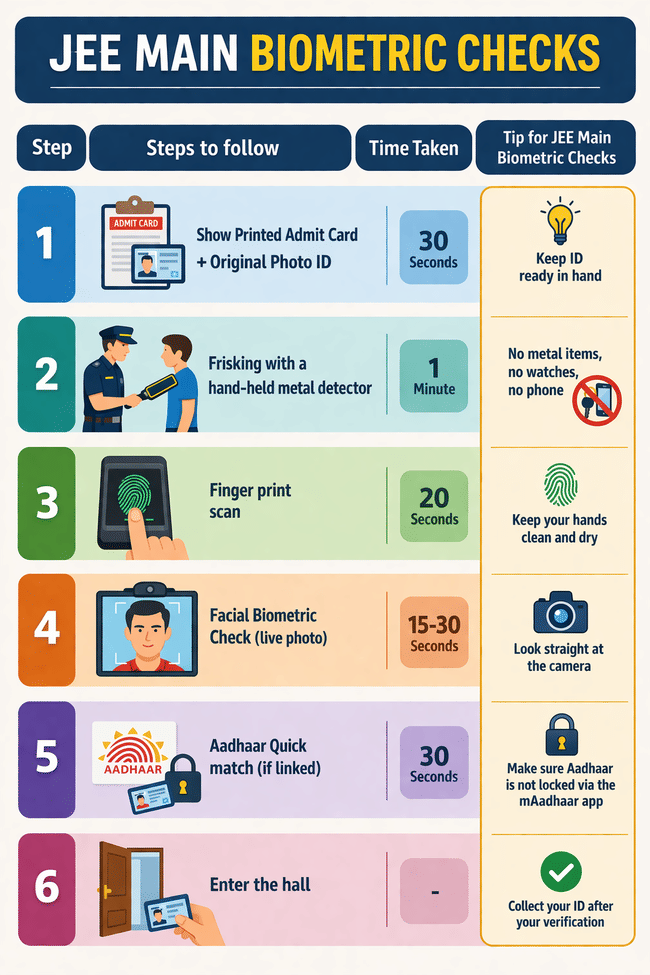
Reach the JEE Main Centre at least 1.5-2 hours before your shift starts. Follow these exact steps below for JEE Main biometric checks during the April session.
| Step | Steps to follow | Time Taken | Tip for JEE Main Biometric Checks |
|---|---|---|---|
| 1 | Show Printed Admit Card + Original Photo ID | 30 seconds | Keep ID ready in hand |
| 2 | Frisking with a hand-held metal detector | 1 Minute | No metal items, no watches, no phone |
| 3 | Finger print scan | 20 seconds | Keep your hands clean and dry |
| 4 | Facial Biometric Check (live photo) | 15-30 seconds | Look straight at the camera, no glasses if possible |
| 5 | Aadhaar Quick match (if linked) | 30 seconds | Make sure Aadhaar is not locked via the mAadhaar app |
| 6 | Enter the hall | - | Collect your ID after your verification |
Check: the documents required at the JEE Main exam centre
Ques. How long does the full biometrics checks take in the JEE Main exam?
Ans. Usually, 1-2 minutes for JEE Main biometric checks if everything works smoothly. It may take time if your fingerprint is not getting scanned, or the photo does not match.
Ques. Do I need to update my Aadhaar photo or biometrics for JEE Main Biometric checks?
Ans. Yes. It is recommended to update your Aadhaar photo and fingerprints if your Aadhaar is not yet updated and it has old data.
Ques. What is the exact order for JEE Main biometric verification at the exam centre?
Ans. The exact order may vary depending on the exam centre, but the typical verification process looks like this:
document check → frisking →fingerprint scan → live facial photo → Match and entry.
Biometric Details Collected during JEE Main 2026 April Sessions at Exam Centres
As per the Jogran Josh newspaper, during the facial biometric verification at the exam centres, the following data might be collected
- Your live photo Capture
- Fingerprint impression
- Your signature verification
- Iris Scan (if applicable at some exam centres)
Documents You Must Carry for JEE Main Biometric Checks
- You mainly need 2 documents to clear facial biometric verification at the JEE Main exam centre. You need your printed admit card (soft-copy is not allowed) and a valid Photo ID.
- Apart from that, you need to carry at least 2 passport-size photos, 1 photo should already be pasted in the admit card.
- Even though it's not part of biometric checks, the self-declaration form is compulsory for students; carry a printed and signed copy of the self-declaration form to the JEE Main exam centre.
| Documents for JEE Main Biometric Checks | Must be Original? | Extra Note |
|---|---|---|
| Printed JEE Main 2026 April Session Admit Card | Yes | Printed on A4 sheet paper (Colour printed is recommended) |
| Valid Photo ID ( Aadhaar, PAN, Voter ID, Passport, Driving License) | Yes | It's preferred to carry the same as you uploaded during registration. |
| Mismatch Certificate (if the live photo did not match the Aadhaar photo) | Yes | Fill the form and get it signed by the principal/head master/gazetted officer |
| Passport Size Photographs | Yes | Preferred the same as the one you used during registration. |
| Self-declaration form | Yes | Make sure it's filled and signed |
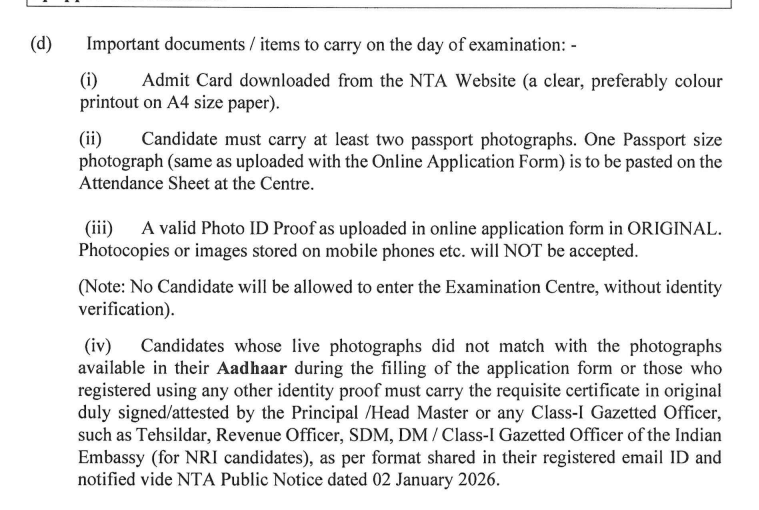
Source: JEE Main 2026 April Session exam notice
Also Read:
- What to carry with the JEE Main Admit Card 2026 on exam day?
- Safe Score and Rank for Top NITs in 2026
Ques. Do I need a physical Aadhaar card to attend the JEE Main exam centre?
Ans. Any photo ID works. But if you choose the Aadhaar card, you should carry the physical original Aadhaar card; a photocopy or soft copy is not allowed.
Ques. My live photo and Aadhaar photo didn’t match. What documents should I carry?
Ans. Carry the requisite certificate (mismatch certificate) along with a valid photo ID. Make sure the certificate is filled and attested by the Principal/head master/gazetted officer.
Common Problems Students Face in Facial Biometric Checks at JEE Main Exam Centres and Easy Fixes
Sometimes it's common for students to face issues during facial biometric verification. Be it a face not matching, a fingerprint not being scanned, or an Aadhaar authentication failing.
- Remove caps and glasses if needed during the live photo capture.
- Keep your fingers dry and clean for fingerprint verification as part of the biometric verification.
- If the facial biometric fails, staff at the exam centre allow for manual verification, so students should remain calm and cooperate with the verification process.
| Problems During JEE Main Biometric Checks | Why does it happen? | Quick Fix |
|---|---|---|
| Face does not match | Glasses, Cap, lighting, or beard change | Remove glasses/cap, and stand in good light |
| Aadhaar Card locked | Biometrics are locked, and the system doesn’t detect your fingerprint | Unlock Biometrics either on the official Aadhaar website or the mAadhaar app |
| The fingerprint is not being read | Sweaty or dirty hands | Wash and dry your hands properly |
| Photo Mismatch | Old Photo in Aadhaar | Carry a passport-size photo, a valid Photo ID, and a Certificate attested by the principal |
| Delay (long queue ) | Late arrival | Reach at least 1.5 hours earlier than your shift starts. |
Ques. Can I wear normal specs for JEE Main biometric checks at the exam centre?
Ans. Normal specs are fine, but make sure to remove them if the staff tells you to make sure of easy facial recognition. Don’t wear caps, masks, or scarves during facial recognition.
Also Check:
| JEE Main Chemistry Sample Paper 2026 PDF by NTA |
| JEE Main Physics Sample Paper 2026 PDF by NTA |
| JEE Main Mathematics Sample Paper 2026 PDF by NTA |
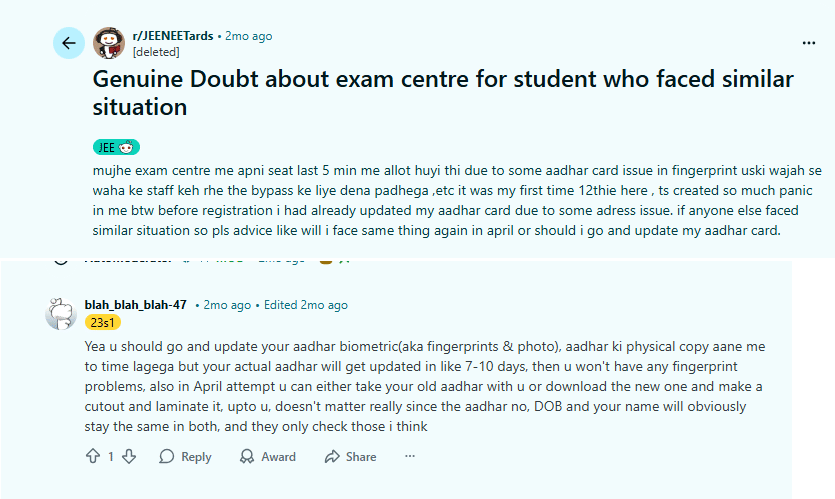
A user on the r/JEENEETards thread on Reddit had faced an Aadhaar authentication problem during biometrics checks in the JEE Mains 2026 January session.
Final Checklist Before You Leave for JEE Main 2026 April Sessions for Biometric Checks
- JEE Main 2026 April session Admit card download and printed.
- Aadhaar card is unlocked (if it's locked)
- No masks, caps, or scarves during Facial-biometric Verification
- Your hands are clean and dry (Make sure there is no ink, oil stains, or any chemical stains)
- Original Photo ID
- No metal items, watches, phones, or any written materials in pockets.
- Reached the exam centre early.
Related News:



Comments