




The National Eligibility cum Entrance Test, NEET 2026, will be conducted by the National Testing Agency (NTA) on May 3, 2026. The NEET application has already started from 8th February, 2026 and will continue till 8th March, 2026.
With more than 24 lakh candidates expected to register for NEET 2026, a smooth application process is required to avoid any delays. The NEET 2026 application process involves capturing a live photo and uploading documents in the required size and format. The NEET 2026 Official Guidelines will help you strictly adhere to the guidelines of NTA for uploading the photograph and signature.
- Upload Scanned Images (Clearly legible) of Candidate’s Photograph, Signature, Left and Right Hands, Fingers and Thumb Impressions
- Signature file should be in JPG/JPEG format between 10 kb to 100 kb
- You need to upload a recent passport photograph (Not more than 3 months old), address proof, scanned signature, etc.
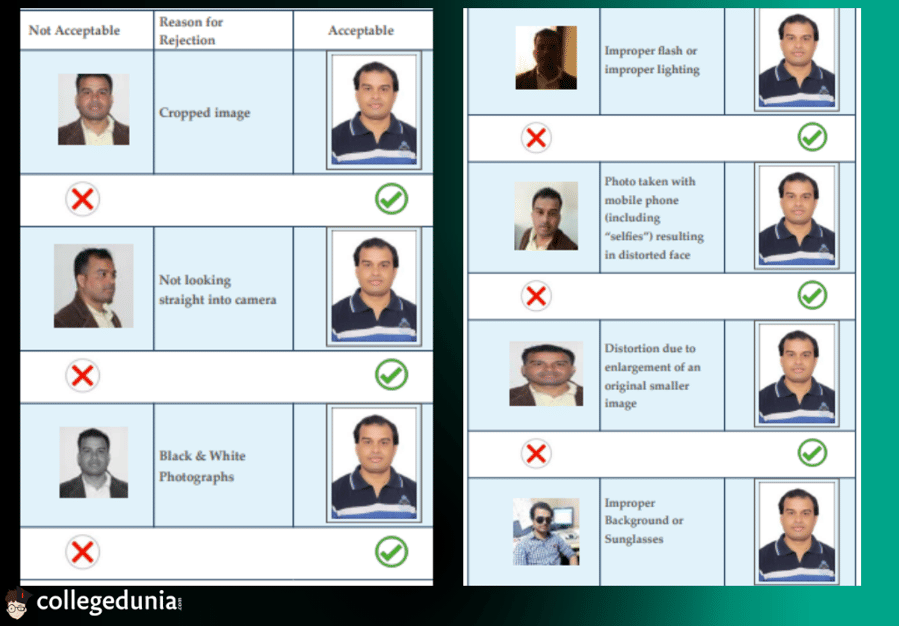
- The image must contain the full face, ears, neck, and shoulders of the entrant in frontal view with a neutral expression.
The photographs need not be attested. Students are advised to keep 6 to 8 passport-sized and 4 to 6 postcard-sized (4” X6”) colour photographs with white backgrounds.
What's New in NEET Registration 2026 Photo Upload Guidelines?
NTA has released the application for NEET 2026, and along with it, the changes in the verification process. Some of the new introductions to NEET photo and signature guidelines are:
- Aadhaar-based eKYC: The greatest change this year is the addition of Aadhaar-based eKYC for identity authentication. You must ensure your Aadhaar details are accurate and accessible at the time of application.
- Live photo capture: Live photo capture has been made a mandatory requirement during online form submission. Students have to allow the system to capture their photograph in real time rather than uploading a pre-clicked image.
- Live Photo Verification with Aadhar: The captured live photo would then get automatically matched with the Aadhaar photograph. In case the system raises a discrepancy, the candidate has to upload a valid supporting certificate for the change.
- Smarter city and language allocation: The selection of the examination city shall be strictly in line with the candidate's present and permanent address mentioned in the application form.
The details have been taken from a recent post on the Times of India official website describing the new introductions in NEET 2026.
What are the Documents Required for NEET Registration 2026?
For NEET 2025, candidates must upload certain documents along with their applications. These documents must be scanned and conform to the specified size and format as outlined in the guidelines issued by the National Testing Agency (NTA).
| Document | Specifications | File Size | Format |
|---|---|---|---|
| Passport-size Photograph | Recently coloured, with 80% face visibility, white background, including ears against a white background. | 10 KB – 200 KB | JPG/JPEG |
| Postcard-size Photograph | Recent, colored, with a white background | 10 KB – 200 KB | JPG/JPEG |
| Signature | In black ink on white paper, clear, no digital editing | 10 KB – 100 KB | JPG/JPEG |
| Class 10 Marksheet | A scanned copy of the Class 10 certificate or equivalent | 50 kb to 300 kb | |
| Category Certificate (if applicable) | For candidates applying under reserved categories (SC/ST/OBC) | 50 kb to 300 kb | |
| Photo ID Proof | Government-issued ID (Aadhaar, Voter ID, Passport, etc.) | 10 kb to 200 kb | JPG/PDF |
To prevent delays in the NEET 2026 registration procedure, be sure to have all documents available in the appropriate size and format.
Also Check:
NEET 2026 Photo-Size and Signature Guidelines - Highlights
According to NTA, for NEET 2026, the requirements for the photograph and the signature must be followed. Not meeting these requirements can result in rejection and a not-so-smooth application process. Here are the important specifications:
| Document | Specifications | File Size | Format |
|---|---|---|---|
| Photograph | Recent passport-size (2.5 x 3.5 inches) and postcard-size (4 x 6 inches), colour photo with 80% face visibility and a white background. Name & date printed. | 10 KB – 200 KB | JPG/JPEG |
| Signature | Should be in JPG/JPEG format between 10 kb and 100 kb | 10 KB – 100 KB | JPG/JPEG |
Source: https://nbe.edu.in/
NEET 2026 Application: Live Photo Guidelines
The candidate will have to upload his/her live photograph at the time of filling in the
application form.
- You should switch on your camera or connect your webcam to the device used for filling out the Application Form.
- If your device does not support a webcam, the QR code on the right side of the Application Form can be scanned by the candidate using a mobile device/tablet etc.
- Make sure there is a light-colored background with proper lighting, and 80% face visibility (including ears, without a mask).
Source: INFORMATION BULLETIN NEET (UG)-2026
Ques: What are the new rules for NEET 2026?
Ans: For NEET UG 2026, the National Testing Agency (NTA) introduced new security measures, including
- mandatory Aadhaar-based eKYC
- live photograph capture during application with face recognition against Aadhaar data
- linked exam city/medium selection based on applicant address
Ques: Is a Class 12 mark sheet required at the time of NEET registration?
Ans: No. Class 12 mark sheet is not required during registration. However, candidates must meet the eligibility criteria and may need to produce documents during counselling.
NEET 2026 Photo Specifications
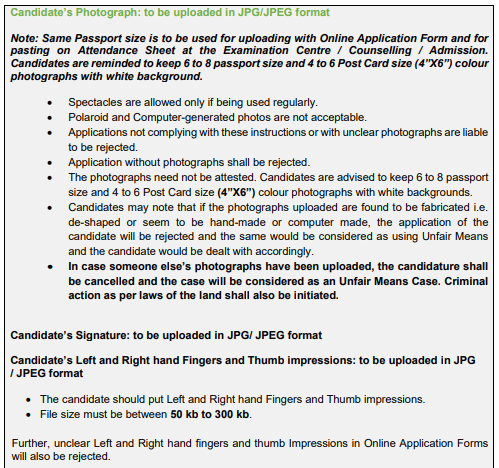
You must note that the same passport-size photograph is to be used for uploading with the Online Application Form and for pasting on the Attendance Sheet at the Examination Centre / Counselling / Admission. Hence, you must keep multiple copies of the photograph.
- Spectacles are allowed only if being used regularly.
- Polaroid and Computer-generated photos are not acceptable.
- If you are not complying with these instructions or provide an unclear photograph or no photograph, you are liable to be rejected.
- If the photographs uploaded are found to be fabricated, the application will be rejected and will be considered as using Unfair Means
- In case someone else’s photographs have been uploaded, the candidature shall be cancelled, and the case will be considered as an Unfair Means Case. Criminal action as per the laws of the land, shall also be initiated.
Source: INFORMATION BULLETIN NEET (UG)-2026
Do's and Don'ts While Uploading a Photograph for NEET 2026
| Do's | Don'ts |
|---|---|
| Make sure the photo is recent and well-lit with good lighting. | Avoid posting a picture that is too old or blurry. |
| 80% of the face must be visible with no shadow on the face. | Avoid wearing caps or goggles, unless medically required. |
| Upload the picture in JPG/JPEG format within the size limit. | Don't use a picture with a colored background other than white. |
| The candidate's name and date should be printed on the photograph. | Do not post an edited or digitally enhanced image. |
Also Read:
NEET 2026 Signature Upload Guidelines
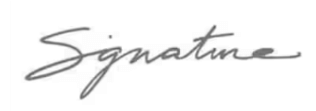
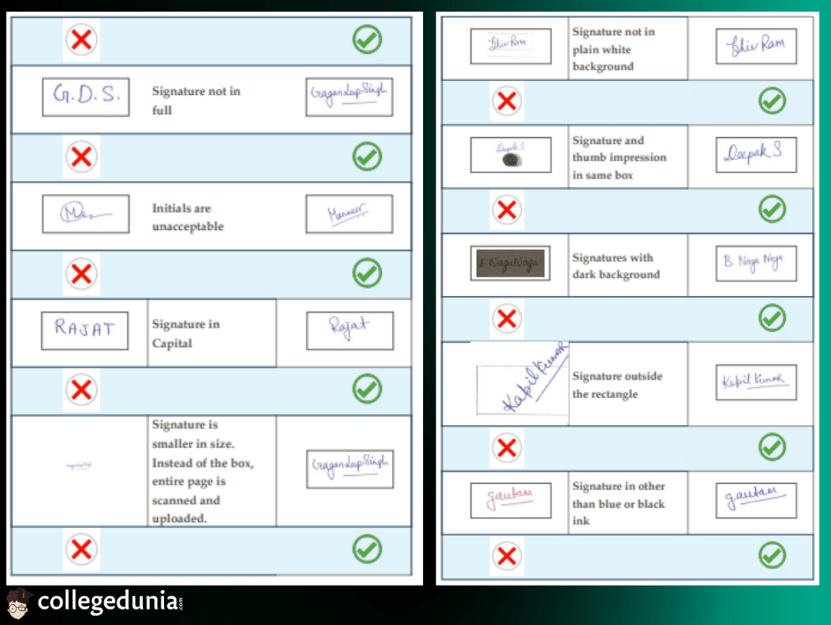
Candidates need to upload the scanned signature on their NEET online form. The signature uploaded should be legible, in resemblance to what has been used during the sitting of the exam. The scanned image should have a full signature in running handwriting on white paper.
| Particulars | Features |
|---|---|
| Size of signature | 10 KB to 100 KB |
| Format | JPG |
| Other Guidelines | No capital lettersSign on white paper with a black pen |
Do's and Don'ts While Uploading a Signature for NEET 2026
| Do's | Don'ts |
|---|---|
| Ensure the signature is in black ink on white paper. | Do not use a colored ink pen or digital signatures. |
| The signature must be clear and legible without smudges. | Do not upload a blurry or unclear signature. |
| Scan and upload the signature in JPG/JPEG format and within the file size limit. | Do not use an edited or digitally altered signature. |
Source: https://nbe.edu.in/
Ques: What type of signature is required for NEET 2026?
Ans: You must upload a recent signature done in black ink on white paper only. The signature should be clear, natural, and match your usual signing style used in official records.
Ques: What are the size specifications for the signature file?
Ans: The signature file size must fall within the limits mentioned in the NEET 2026 Information Bulletin. The signature must be clear and legible without smudges within 10 kB to 100 KB.
Ques: Can I upload a signature written in capital letters or digital font?
Ans: No. The signature must be handwritten, not typed, and should not be in capital letters only. Digital or stylised signatures are not allowed.
NEET Thumb Impressions Guidelines 2026
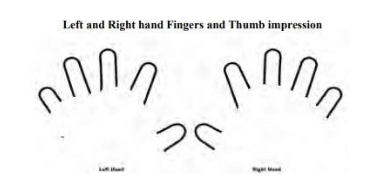
Students need to upload the scanned images of left-hand fingers, right-hand fingers and thumb impressions on the NEET 2026 online application form. Have a look at these document specifications below-
| Particulars | Features |
|---|---|
| Size | 50 KB to 300 KB |
| Format | JPG |
| Other Guidelines | Unclear image of left and right hand fingers and thumb impressions will be rejected |
Do's and Don'ts for NEET 2026 Thumb Impression Upload
| Do's | Don'ts |
|---|---|
| Make sure that thumbprint impressions are distinct and not smeared. | Do not use a pencil or any other colour ink apart from blue or black. |
| Write clearly in blue or black ink. | Do not upload unclear or blurry impressions. |
| Scan the impressions in JPG/JPEG format and of the right file size. | Do not allow thumb impressions to overlap or blur. |
| Make sure the thumb impressions fall within the set limit size. | Do not crop or alter the image in any way. |
NEET 2026 Document Upload Common Mistakes and How to Avoid Them?
Some of the common mistakes noticed in the last few years are provided below. We have also shared the ways to avoid these mistakes.
| Mistake Category | Common Mistake | How to Avoid / Correct Way |
|---|---|---|
| Photo - Age / Recency | Uploading an old photograph (e.g., more than 3 months old or before Jan 2026) | Use a recent photograph taken after January 1, 2026 (ideally within last 3 months). Print name & date below if required. |
| Photo - Background & Quality | Using colored/dark background, shadows, blurry image, selfie, over-edited/filtered photo | White/light background only; clear, professional passport-size photo; 80% face coverage (including ears visible); no mask, no cap. Avoid heavy editing. |
| Photo - Format & Size | Wrong file format (not JPG/JPEG), size outside 10–200 KB | Must be JPG/JPEG; file size 10 KB to 200 KB for both passport & postcard size photos. Scan properly, don't compress excessively. |
| Photo - Type / Dimension | Uploading the wrong type (e.g., only passport size, missing postcard size) or incorrect dimensions | Upload both passport size (e.g., ~3.5×4.5 cm) and postcard size (4×6 inches); keep 6–8 passport & 4–6 postcard prints ready. |
| Signature - Style | Writing signature in capital letters or block letters | Must be in running/cursive handwriting (full signature, not initials). |
| Signature - Ink & Background | Using colored ink, signing on a non-white background, blurred/unclear scan | Use black/blue ink on white paper; scan clearly; no smudges. |
| Signature - Format & Size | Wrong format (not JPG/JPEG), size outside limit (e.g., <4 KB or >30/50 KB) | JPG/JPEG only; size typically 4 KB to 30 KB (some sources say up to 50 KB); ensure legible. |
| General - Using Others' Docs | Uploading someone else's photo, signature, or thumb impression | Upload only your own documents; never use morphed, computer-generated, or fabricated images. |
| General - Clarity & Scanning | Blurry, low-resolution, or poorly scanned images | Scan at good resolution (e.g., 72 DPI); preview before final upload; use proper scanner/app. |



Comments