


The CBSE Class 12 Result 2026 was announced on May 13, 2026. The overall pass percentage for the year is 85.20%.
To check the CBSE 12th results 2026 via Digilocker, students are required to create an account on the app with their AADHAR-linked mobile number. Students can also access their CBSE Class XII results online with their roll number, SMS, IVRS, and UMANG App.
Digilocker CBSE marksheet 2026 is available now as the official 12th result is already announced on cbseresults.nic.in, cbse.gov.in and results.cbse.nic.in.
Class 12th Result View Result’ is being displayed on DigiLocker:

Source: results.digilocker.gov.in
- To check the CBSE Class 12 result 2026 online via the CBSE result link, you need to enter your admit card ID, school number, roll number, and date of birth.
- However, on the result day, the CBSE official website usually goes slow or crashes due to heavy traffic.
- In such a case, Digilocker can be 100% safer option for checking the CBSE Class 12th result 2026.
- To view your CBSE Class 12 results 2026 via Digilocker, you need to enter your 6-digit security PIN.
Related Links:
- CBSE Class 12 Result 2026 Out
- CBSE 12th Result 2026 Pass Percentage Toppers List State wise Statistics Released
Is Digilocker CBSE Result Valid?
Yes, Digilocker CBSE 12th result 2026 will be fully valid and acceptable for admissions and jobs. The Digilocker marksheet contains the digital signature of the Controller of Examinations, CBSE. The weightage will also be the same as the physical CBSE 12th result 2026 downloaded online or issued by schools.
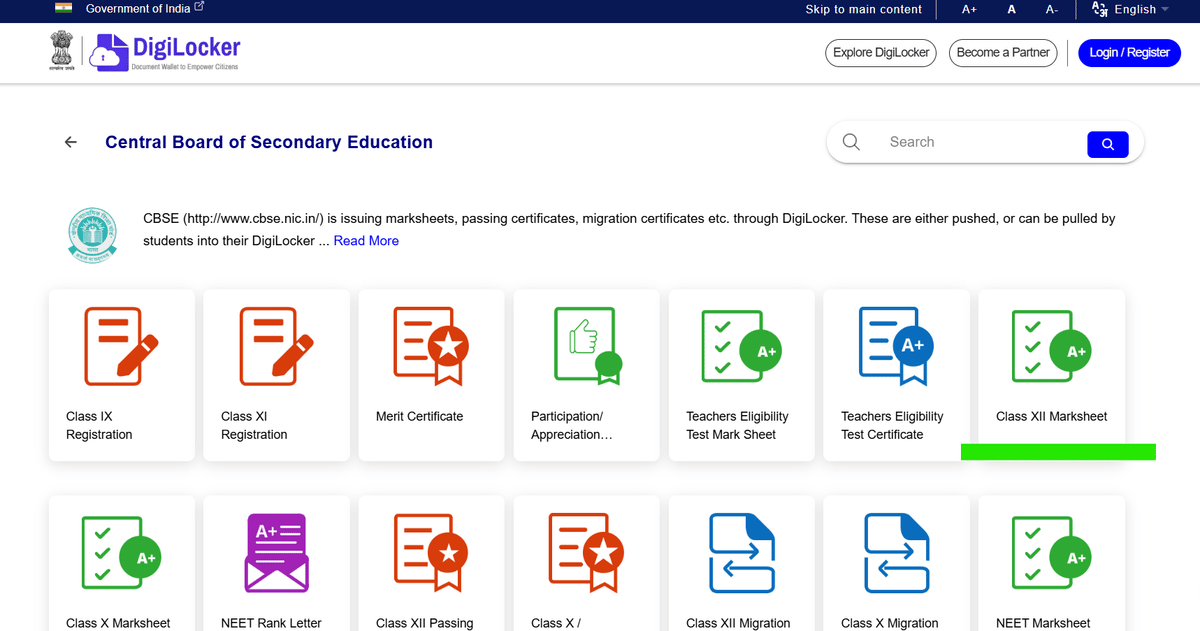
Source: Digilocker Class XII Marksheet
Ques: Do I need to activate my Digilocker account before the results are available?
Ans: Yes, students are advised to activate their Digilocker account before the declaration of CBSE results. This will help you access the CBSE 12th results 2026 hassle-free.
Ques: What documents can I get on DigiLocker for CBSE class 12?
Ans: The CBSE class 12 documents, which can be downloaded via Digilocker, are as follows:
- Class XII Marksheet
- Passing Certificate
- Migration Certificate
How to Check CBSE Class 12 Result 2026 via Digilocker?
Digilocker is a fully government initiative towards paperless governance. CBSE XII Class results 2026 can be downloaded via the DigiLocker App with roll number and 6-digit security PIN.
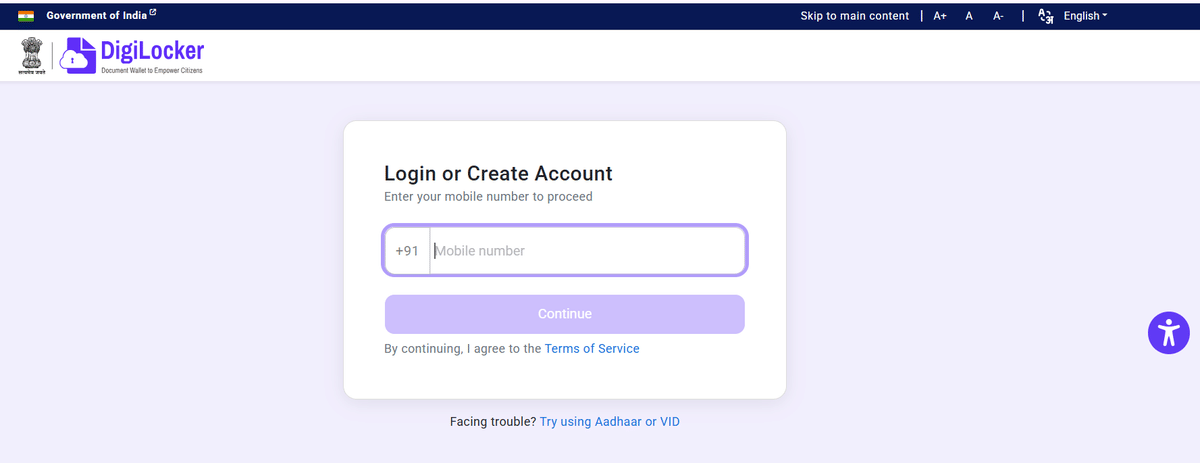
Source: Digilocker Sign-up
- Students are required to first create an account on Digilocker and link it through an AADHAR-linked mobile number.
- To download 12th CBSE results, navigate to the “Education” tab on the home page and search for “CBSE”.
- Once you find the CBSE 12th results link, click on it and enter your 12th class roll number and unique 6-digit PIN.
- Wait for 2-3 minutes. The detailed marksheet for class 12 will be displayed on the screen.
- Download and print 2-3 copies of the 12 CBSE results 2026 for future use.
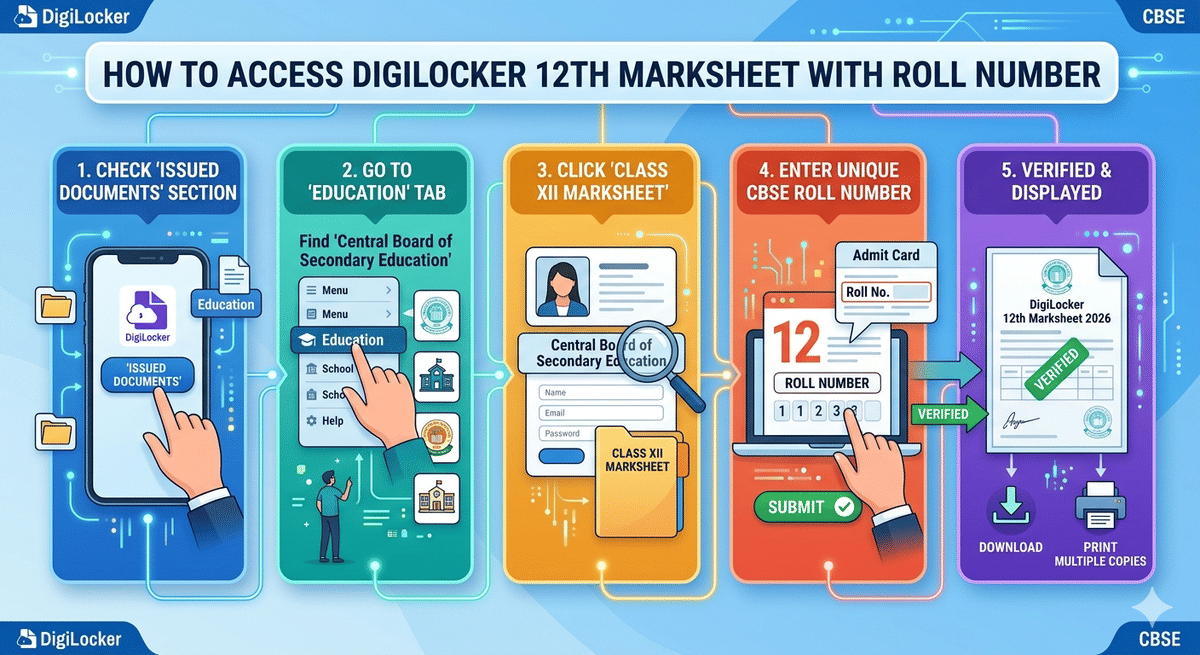
How to Access Digilocker 12th Marksheet with Roll Number?
To access the Digilocker 12th marksheet, check the “Issued Documents” section under the Education Tab.
- Once you get the Class XII Marsheet under the Central Board of Secondary Education section, click on it.
- Enter your unique CBSE Class 12 Roll number mentioned on your admit card correctly.
- Once verified, your Digilocker 12th marksheet 2026 will be displayed on the screen.
- Download and take multiple copies of printouts for future use.
Ques: What should I do if my result is not showing on DigiLocker even after declaration?
Ans: Wait 30-60 minutes after official release, clear app cache, or try the website. Ensure your account is activated with the school access code. Contact the CBSE helpline if it still does not appear.
Ques: Can I download both the marksheet and passing certificates from Digilocker?
Ans: Yes, immediately after the declaration of CBSE results, the provisional 10th and 12th mark sheets will be available to download via Digilocker. Students can download both passing certificates as well as the marksheet by entering the 6-digit security pin shared by their schools.
Required Credentials for Checking CBSE Class 12 Result 2026 via DigiLocker
A few details are required for checking the CBSE Class 12 result 2026 via the Digilocker App:
| Credentials | Requirements |
|---|---|
| Aadhaar-linked Mobile Number | Mandatory for login & OTP verification |
| Roll Number | From the Class 12 admit card |
| School Number / Centre No. | As mentioned on the admit card |
| 6-Digit Access Code | Issued by the school (for account activation) |
| APAAR ID (optional) | If already linked with CBSE records |
| Date of Birth | Required during verification. |
Ques: What details are required to access the CBSE Class 12 result 2026 via Digilocker?
Ans: To download the Digilocker CBSE 12 marksheet 2026, the following details are required:
- Roll Number
- School Code
- 6-Digit Pin
- AADHAR-linked Mobile Number
Ques: Is Digilocker CBSE Marksheet 2026 valid?
Ans: The Digilocker CBSE marksheet 2026 is fully valid and can be used for admission into higher studies.
CBSE Class 12 Result 2026 via DigiLocker: Reddit Discussion
One Reddit user claimed that CBSE has released DigiLocker access PINs to schools for Class 10 and 12 students, increasing expectations that CBSE Result 2026 may be announced soon. The user also mentioned that students can activate their DigiLocker accounts to access digital marksheets and certificates once the results are declared.

Source: Reddit
Details Mentioned on Digilocker CBSE Class 12 Result 2026
Details mentioned on the 2026 CBSE Class 12 Result download via Digilocker are as follows:
- Student Name
- Roll Number
- Subject Names
- Marks Obtained
- Total Marks
- Aggregate score
- Result Status (Pass/Compartment)
Ques: From where can I get a 6-digit security pin for checking the CBSE result via Digilocker?
Ans: To check CBSE 10th and 12th results via Digilocker, students are required to activate their account first using a 6-digit security PIN. The PIN is generated by the Central Board of Secondary Education and shared with schools. Thus, students can get their 6-digit security pin to access the CBSE results via Digilocker from their respective schools.



Comments