



.png?h=35&w=35&mode=stretch)
To appear in CUET 2026, you have to upload a recent passport-size photograph (colour or B&W) with around 80% face visibility against a white background, having 10 KB to 200 KB in JPG/JPEG Format having dimensions of 200 × 230 pixels (3.5 cm × 4.5 cm).
- Along with a photograph, you must also capture a mandatory live photo, as well as a scanned signature (10 KB–50 KB).
- Ensure the photo is clear, recent, unedited, and properly lit, with no shadows or accessories visible on the face.
- The Signature should be taken on a plain-white sheet using black or blue ink, in a proper JPG/JPEG Format.
- You should have a valid Photo ID(Aadhar Card), along with updated details and use an updated browser for uploading.
The Photograph and Live image will be used for AI-Based Identity verification, in different stages including application scrutiny, admit card generation, and exam-day guidelines.
Check:
Key Summary
In this Article, we have discussed the CUET Photo-Size and Signature guidelines along with the Document Upload Guidelines.
- The CUET uses an automated and AI-based validation, without any manual checks for the uploaded images.
- The uploaded photo, live capture and signature will be digitally linked across the application, admit card and exam day.
- The Files that meet the required size limit but will fail the clarity or the facial detection check can be rejected.
- The Live photo cannot be edited or replaced, which makes the lighting and background important.
- The accuracy in the uploading will directly impact the accuracy of the admit card and seat allotment.
- What are CUET Photo-Size and Signature Guidelines?
1.1 CUET Photo & Signature Specifications
- CUET Documents Required and Upload Guidelines
2.1 Documents Required for CUET Registration & Specifications
- CUET Photograph Specification for online registration
3.1 CUET Photograph Size & Format Specifications
- CUET Signature Requirements & Guidelines
4.1 CUET Signature Size & Format Specifications
- Guidelines to Follow While Uploading Other Documents for CUET
5.1 Other Documents Required for CUET & Upload Guidelines
- FAQs for CUET Photo-Size & Signature Guidelines
What are CUET Photo-Size and Signature Guidelines?
The CUET Photo-Size and Signature guidelines are set by NTA, ensuring the proper document verification for lakhs of candidates.
These guidelines are for automated scrutiny, biometric matching and printing of the admit card without any error.
CUET Photo & Signature Specifications
| Component | File Size | Format | Dimensions (Approx.) | Key Requirements |
|---|---|---|---|---|
| Photograph | 10 KB – 200 KB | JPG/JPEG | 200 × 230 pixels (3.5 × 4.5 cm) | 80% face visible, ears included, no mask, white background |
| Live Photo | System captured | Portal-based | Auto-adjusted by the system | Must closely match the uploaded photo |
| Signature | 10 KB – 50 KB | JPG/JPEG | 140 × 60 pixels (CUET PG standard) | Clear signature on white paper, black/blue ink |
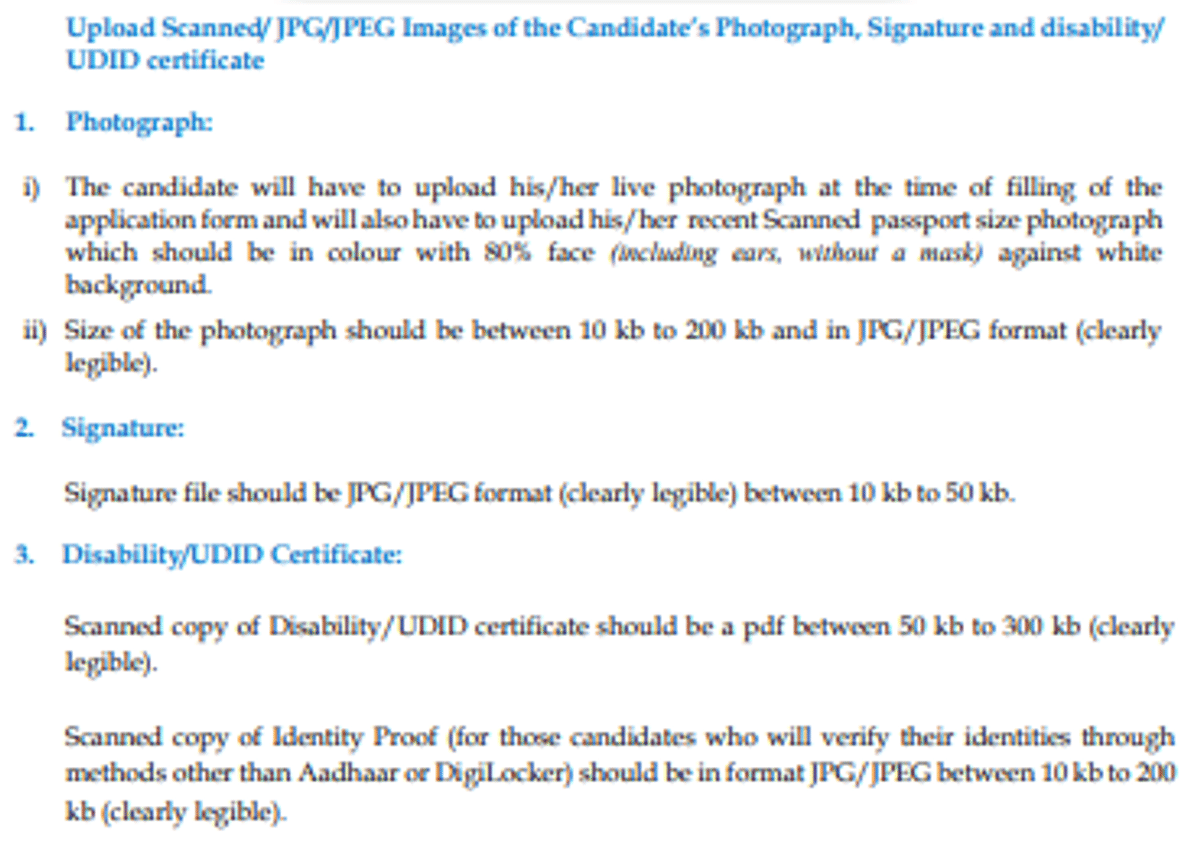
Source: CUET Information Bulletin
For more information, check this video by @helpingsikar, to know about how to upload the photo & signature in the CUET UG Application form 2026.
Ques. What happens if the uploaded photo or signature does not meet CUET size specifications?
Ans. The CUET Application will be screened by an automatic validation system, which checks the file size, format and clarity.
- The Upload can be rejected instantly from the portal.
- If the size is not correct, the form submission can remain incomplete.
- The Issues can delay the generation of the admit card.
Ques. Can I upload an old photograph or signature used in another exam application?
Ans. The CUET allows the previous images only if they meet the current appearance, along with the size and clarity.
- As the mismatch with the live photo can lead to diversification of the image.
- So, the photo should be recent and can be recognised.
Check:
CUET Documents Required and Upload Guidelines
For CUET Registration, NTA has included a proper set of documents to verify the candidate’s identity, academic eligibility and category status.
These Documents will be uploaded and will be validated digitally, so the candidates should meet the exact format and size specifications.
Having all the proper documents ready before the start of the application process will reduce errors and prevent rejection.
Documents Required for CUET Registration & Specifications
| Document | Purpose | Format | Size Limit | Key Specifications |
|---|---|---|---|---|
| Passport-size Photograph | Identity verification | JPG/JPEG | 10 KB – 200 KB | Recent, white background, 80% face visible |
| Live Photograph | Real-time identity matching | Portal-captured | System-defined | Must match the uploaded photo |
| Signature | Official record & verification | JPG/JPEG | 10 KB – 50 KB | Black/blue ink on white paper |
| Class 10 Marksheet | DOB verification | PDF/JPG | As per the portal | Clear scan, readable details |
| Class 12 Marksheet / Appearing Proof | Academic eligibility | PDF/JPG | Required for UG admissions | |
| Valid Photo ID (Aadhaar/Passport) | Identity authentication | PDF/JPG | Aadhaar preferred | |
| Category Certificate (if applicable) | Reservation benefits | As per the format | SC/ST/OBC-NCL/EWS | |
| PwD Certificate (if applicable) | Disability benefits | Issued by the competent authority |
Check: CUET Form Correction
Ques. Which documents are mandatory to upload while filling out the CUET application form?
Ans. The CUET requires the core identity and academic documents at registration, whereas others will be validated during the counselling.
| Document | Required At Registration |
|---|---|
| Photograph | Yes |
| Live Photo | Yes |
| Signature | Yes |
| Class 10 Marksheet | Usually Yes (DOB proof) |
| Class 12 Marksheet / Appearing Proof | If available |
| Valid Photo ID | Yes |
| Category Certificate (if applicable) | Yes |
Ques. Are Class 12 appearing candidates required to upload marksheets at registration?
Ans. The Class 12 appearing candidates will not be required to upload the final marksheet during registration. The Eligibility will be verified later.
- You should select the appearing status correctly.
- The Marksheets will be required during the counselling & admission process.
- The Incorrect status can affect your eligibility.
CUET Photograph Specification for online registration
In CUET, there is a uniform photo size that will ensure the digital identification of the candidate at every stage of the exam process.
These requirements are as per the UGC Admission norms, in which the uploaded image will be used for automated verification, admit card generation and exam-day guidelines.
CUET Photograph Size & Format Specifications
- The CUET will use the AI-Based image match, so the uploaded photo should match the live photograph during registration.
- The Blurred, shadowed or over-compressed image will be rejected during the automated scrutiny.
- The Photograph with a dark background or partially covered faces can be uploaded, but fails the backend verification.
| Parameter | Prescribed Requirement |
|---|---|
| File Size | 10 KB – 200 KB |
| File Format | JPG / JPEG |
| Dimensions | Around 200 × 230 pixels (3.5 cm × 4.5 cm) |
| Background | White or very light-coloured |
| Appearance | Recent photo, colour or B&W |
| Face Coverage | Minimum 80% face visible (ears included, no mask) |
| Live Photo | Mandatory during application submission |
CUET Signature Requirements & Guidelines
The CUET Signature upload is a mandatory step used to verify the validation of the application, admit card generation, attendance sheet and counselling record.
The NTA will check the clarity, size and format of the signature. It should be recent, properly scanned and of proper size; if distorted and oversized, it can fail the automatic check.
CUET Signature Size & Format Specifications
- The Signature will be printed on the admit card and official attendance sheet, so the clarity will affect the exam-day verification.
- The Over-compressed or faint signature can fail the backend validation.
- The signature in capital letters or background shadows can mismatch with the system.
| Parameter | Prescribed Requirement |
|---|---|
| File Size | 10 KB – 50 KB (some sessions allow 4 KB – 30 KB) |
| File Format | JPG / JPEG |
| Dimensions | Around 140 × 60 pixels (commonly used for CUET-PG) |
| Ink Colour | Black or Blue |
| Paper Used | Plain white paper |
| Clarity | Clear, no smudging or overwriting |
Guidelines to Follow While Uploading Other Documents for CUET
Apart from the photographs and signatures, the CUET requires the candidates to upload the academic, identity and category-related documents to support the eligibility and claim for reservation.
These documents will be scanned digitally, and with an incorrect format or unclear upload, can affect the attendance and counselling eligibility.
Other Documents Required for CUET & Upload Guidelines
- The Academic and category documents are verified during counselling, but incorrect uploads can reject your submission.
- The Category certificates will be valid for the current financial year; the outdated format will be rejected.
- The Unclear scan and cropped documents can lead to manual scrutiny and delays.
- You should keep the original documents ready, as the uploaded files will be verified later on.
| Document | Purpose | Preferred Format | Key Upload Guidelines |
|---|---|---|---|
| Class 10 Marksheet | Date of Birth verification | PDF / JPG | Clear scan, all details visible |
| Class 12 Marksheet / Appearing Proof | Academic eligibility | Required for UG admissions | |
| Valid Photo ID (Aadhaar/Passport) | Identity authentication | Aadhaar preferred with an updated photo | |
| Category Certificate (SC/ST/OBC-NCL/EWS) | Reservation benefits | Must follow the central govt/UGC format | |
| PwD Certificate (if applicable) | Disability reservation | Issued by a competent medical authority | |
| Domicile Certificate (if required) | State quota verification | As per the counselling authority norms |
Check: CUET Exam Day Guidelines
FAQs for CUET Photo-Size & Signature Guidelines
Ques. What are the acceptable dimensions for the passport-size photograph required for CUET registration?
Ans. For CUET Registration, the acceptable size range for the passport-size photograph is specified to be between 10 KB and 200 KB.
This ensures that the photograph maintains good quality while meeting the specified size requirements for uploading during the registration process.
Ques. Can I submit a colored photograph, or is it necessary for it to be in black and white?
Ans. Yes, you can submit a colored photograph for CUET enrollment; it doesn't have to be black and white.
- You can choose any colored photo that you think best captures your look, as the criteria don't indicate which colour scheme is preferred.
- A colourful photo can be submitted as long as it satisfies the other conditions, which include clarity, composition, and backdrop.
Ques. Is there a specific file format required for uploading the photograph and signature?
Ans. For CUET Registration, a certain file format is necessary for uploading both the photograph and the signature.
- JPG/JPEG is the designated file type for the signature and the photo.
- To comply with submission criteria, make sure your photo and signature are saved in one of these formats before uploading them during the registration process.
- If you use any other file type, your application can be rejected.
Ques. Are there any specific background colour requirements for the photograph?
Ans. The photo background colour criteria for CUET Registration are precise. It is best to take a picture with a white background.
- To keep uniformity and adhere to the specified requirements, the background must be a consistent shade of white devoid of any patterns or shadows.
- Your photo could be rejected throughout the application process if you don't follow this requirement.
Ques.A re there any specific guidelines for the clarity and composition of the photograph?
Ans. Specific standards for photograph clarity and composition apply to CUET registration.
- The candidate's face should be prominently displayed in the shot, with 80% of their face showing (unmasked) against a white backdrop.
- To enable accurate identification, it is crucial to make sure the photo is clear and undistorted.
- According to these recommendations, you can make sure that the photo satisfies the requirements for composition and clarity, which will improve the application's overall quality.
Ques. Is there any particular procedure for uploading category certificates, like
SC/ST/OBC/EWS or PwBD certificates?
Ans. Before submitting your application for CUET UG, make sure to check the signature and photo, as any mistakes or inconsistencies in these files could result in your application being denied.
- It is easier to properly identify and authenticate a candidate if the photo is clear, the face is recognisable, and the signature is readable.
- Examining these documents prior to submission enables candidates to address any ambiguity or inconsistency, lowering the possibility of rejection without the chance to make corrections.
- In the end, paying close attention to details when examining these documents guarantees that the application process runs smoothly and prevents needless issues or delays.



Comments