




Invalid application numbers or passwords, server timeouts, or blank pages are some of the common CUET UG 2026 admit card login errors. These errors can be resolved by clearing cache, trying any other browser or try at low traffic timing.
- CUET UG credentials are case sensitive so candidates must check if they are using the correct caps lock.
- There are a lot of candidates trying to check their CUET UG 2026 admit card so candidates must try at off-hours mostly at night.
- If the issue is still not solved, try to connect NTA helpline through mail or contact number.
CUET UG 2026 exam will be held on May 11 to 31, 2026. All the admit card re;ated issue must be solved before the exam date and candidates must bring the printed copy of CUET PG admit card 2026 to the exam hall.
Related Links:
- Check How to Prepare for CUET UG 2026, Study Plan, Timetable & Books
- Download CUET Previous Year Question Papers [2025-2022]
Key Summary
- CUET UG 2026 admit card download has started with multiple login issues reported by students across the portal, especially during peak hours.
- The most common problems include website not loading, login failures due to wrong details, and admit card not showing even after successful login.
- Data patterns show that server-related issues increase sharply when traffic is highest, particularly just after admit card release.
Check YouTube:
CUET UG 2026 Admit Card Login Errors
- Errors like wrong password or application number are common but easy to fix, as they depend on the student, not the system.
- In many cases, students can log in but cannot see the admit card, which shows there may be a temporary delay or glitch in the system.
| Error Type | Core Issue | Main Cause | Impact | Fix |
|---|---|---|---|---|
| Server Issues | Site not loading or crashing | Heavy traffic, peak-time access | High | Try off-peak hours, retry later |
| Credential Errors | Login failure | Wrong/forgotten details | Moderate | Use recovery option, recheck details |
| Display Issues | Admit card not visible | Backend delay, temporary glitch | Moderate–High | Refresh, re-login, switch browser |
| Technical Glitches | Session timeout, errors | Browser/cache issues | Moderate | Clear cache, use updated browser |
| Internet/Device Issues | Slow or incomplete loading | Poor connection, mobile limits | Low–Moderate | Use stable internet, prefer desktop |
Ques. Why is the CUET UG 2026 admit card website not loading?
Ans. The website may not load due to heavy traffic during peak hours, especially after the admit card release, which puts pressure on the server.
Read More:
Why CUET UG 2026 Login Errors Occur
- Such issues are common in national-level exams due to the large number of users accessing the system simultaneously.
- Server-related problems have the biggest impact, as they affect many students at once.
| Factor | What Happens | Impact on Students |
|---|---|---|
| High Competition | Lakhs of students log in at the same time | Website slows down or stops working |
| Server Load Spike | Sudden traffic increase during admit card release | Temporary crashes and login delays |
| User Mistakes | Wrong or forgotten login details | Login failure for individual users |
| Technical Limitations | Browser/device compatibility issues | Errors, timeouts, or improper loading |
| Backend Delays | Data not synced instantly | Admit card not visible after login |
Ques. What should I do if I am unable to log in to download my admit card?
Ans. You should first check your login details. If the issue continues, try logging in during non-peak hours, clearing cache, or switching browsers.
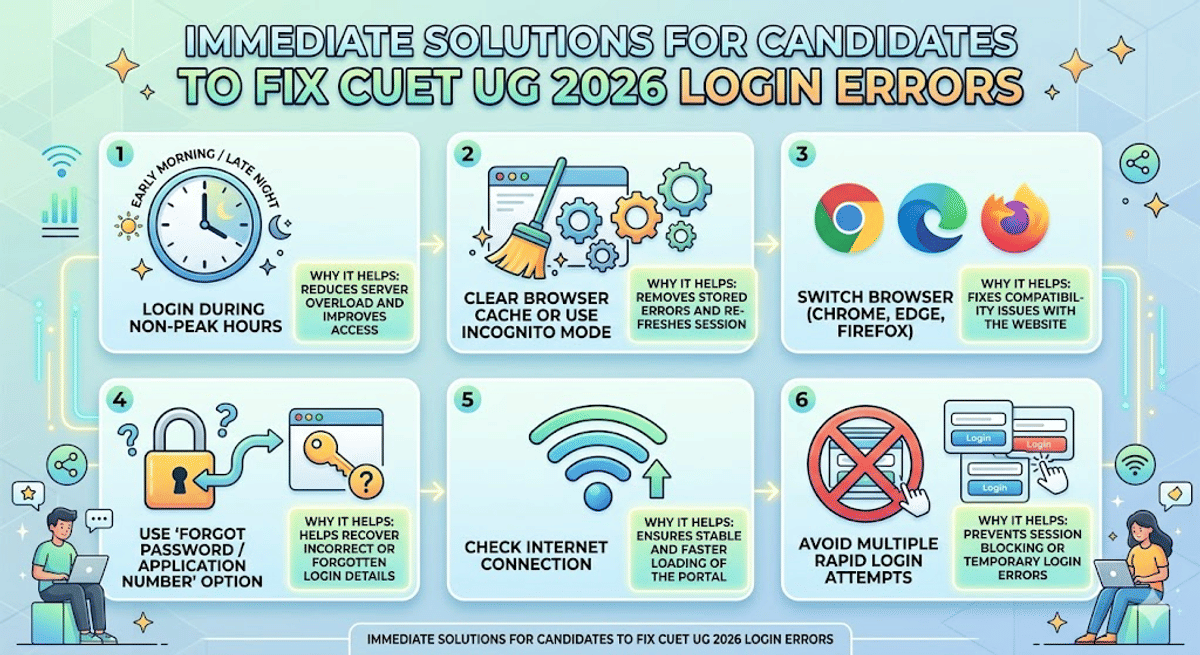
Immediate Solutions for Candidates to Fix CUET UG 2026 Login Errors
- Most login problems happen because of too much traffic at one time, not because the system is completely broken.
- Trying at a different time works because it reduces crowd on the website, making it easier to log in.
- Steps like clearing cache or changing browser show that many issues come from the student’s device or settings, not just the server.
| Action Step | Why It Helps |
|---|---|
| Login during non-peak hours (early morning/late night) | Reduces chances of server overload and improves access |
| Clear browser cache or use incognito mode | Removes stored errors and refreshes the session |
| Switch browser (Chrome, Edge, Firefox) | Fixes compatibility issues with the website |
| Use “Forgot Password/Application Number” option | Helps recover incorrect or forgotten login details |
| Check internet connection | Ensures stable and faster loading of the portal |
| Avoid multiple rapid login attempts | Prevents session blocking or temporary login errors |
Ques. I can log in, but my admit card is not visible. What does this mean?
Ans. This usually indicates a temporary backend delay or system glitch, where the admit card is not loading properly despite successful login.
Read More:
- CUET Exam Pattern 2026: Check Section-Wise Pattern, Marking Scheme
- CUET Mock Test 2026, Practice English, Hindi, Economics, Biology & more Tests for Free
What to Do If CUET UG 2026 Login Errors Persist
If all the other solutions are not working then students must contact the NTA helpline. Make sure to report the issue immediately and keep the application details ready before contacting the helpline.
- Contact NTA Helpdesk (011-40759000): Direct support to fix technical or login issues.
- Email Support (cuet-ug@nta.ac.in): Direct support to fix technical or login issues
Reddit Discussion on CUET UG Admit Card Error
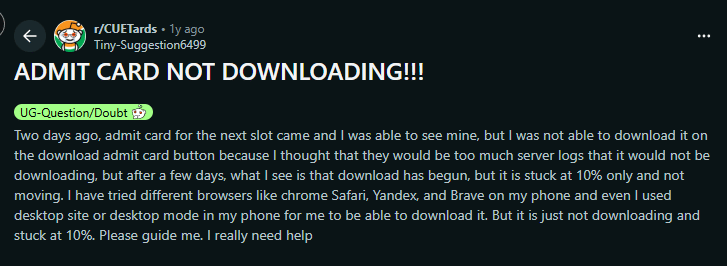
Users on Reddit are discussing about the admit card error. A user mentioned “Two days ago, admit card for the next slot came and I was able to see mine, but I was not able to download it on the download admit card button because I thought that they would be too much server logs that it would not be downloading, but after a few days, what I see is that download has begun, but it is stuck at 10% only and not moving. I have tried different browsers like chrome Safari, Yandex, and Brave on my phone and even I used desktop site or desktop mode in my phone for me to be able to download it. But it is just not downloading and stuck at 10%. Please guide me. I really need help.”
A user mentioned in the comment section “I tried multiple times on laptop also tried incognito mode but still I was unable to download the admit card.” He again edited the comment and mentioned that “I tried on cell phone after 5 minutes and it worked”

Source: Reddit Discussion
Ques. How can I recover my CUET UG login credentials?
Ans. You can use the “Forgot Password” or “Forgot Application Number” option available on the official portal.
Ques. Can repeated login attempts cause issues?
Ans. Yes, multiple rapid attempts can block your session temporarily or increase login errors, so it is better to wait before trying again.
Ques. Does device or browser affect the login process?
Ans. Yes, outdated browsers or mobile devices can cause issues. It is better to use an updated browser on a desktop with stable internet.
Ques. What should I do if none of the solutions work?’
Ans. You should contact the NTA helpdesk (011-40759000) or email cuet-ug@nta.ac.in with your application details.
Read More:



Comments