




Candidates registering for CAT 2026 must upload a passport-size photograph and signature in JPG/JPEG format (10 KB–80 KB). The photograph should be 1200 × 1200 pixels with a plain white background, while the signature must be in running handwriting with dimensions of 80 mm × 35 mm.
- NC-OBC, SC/ST, EWS, and PwD certificates must be uploaded as self-attested PDFs (up to 200 KB) with clear scans and all details visible.
- Scan documents at 300 DPI to avoid blurry uploads. Use simple filenames without spaces or special characters like #, @, or &.
- Ensure EWS certificates are valid for FY 2026–27 and NC-OBC/EWS certificates are issued on or after April 1, 2026.
- Avoid selfies, unclear images, outdated certificates, and incorrect formats to prevent rejection.
Related Links:
- How to Apply for CAT 2026: Registration Guide for MBA Aspirants
- CAT 2026: Exam Date, Registration, Application Form, Eligibility, Syllabus
- IIM Indore Releases CAT 2026 Notification; Registration from August 3

Key Summary
- Upload photographs/signatures only in JPG/JPEG format (10 KB–80 KB) and certificates in PDF format (up to 200 KB).
- Passport photos must be 1200 × 1200 pixels, with a white background, minimum 150 ppi, while signatures must be 80 mm × 35 mm in running handwriting.
- NC-OBC, SC/ST, EWS, and PwD certificates must be clear, self-attested PDF copies meeting CAT 2026 validity requirements.
- Incorrect formats, oversized files, unclear scans, wrong file names, and outdated certificates are major reasons for document upload failures.
CAT 2026 Documents Upload Guidelines
Below are the CAT 2026 documents upload guidelines:
- Upload the passport photograph and signature in JPG/JPEG format, following the prescribed size and dimensions.
- Category and PwD certificates must be uploaded as self-attested PDF copies within the size limit.
| Document | File Format | Maximum File Size | Dimensions / Requirements |
|---|---|---|---|
| Passport Photograph | JPG / JPEG | Up to 80 KB | 1200 × 1200 pixels, minimum 150 ppi resolution |
| Signature | JPG / JPEG | Up to 80 KB | 80 mm × 35 mm |
| Category Certificate | Up to 200 KB | Self-attested scanned copy | |
| PwD Certificate | Up to 200 KB | Self-attested scanned copy |
Ques. What is the CAT 2026 photo upload format?
Ans. The CAT 2026 passport photograph must be uploaded in JPG/JPEG format only.
Related Links:
- CAT Registration 2026: Check How to Apply @iimcat.ac.in, Eligibility Criteria, Document Required and Fees
- CAT 2026 Application Timeline: Registration, Correction Window, Admit Card and Result Dates
CAT 2026 Photo Specifications
Follow the photo specifications below while uploading the CAT 2026 photo:
- Use a recent passport-size photograph with a white background, clear face visibility, and the prescribed specifications.
- Avoid accessories, coloured backgrounds, old photos, or unclear images to prevent upload rejection.
| Specification | Requirement |
|---|---|
| Dimensions | 1200 × 1200 pixels (square) or 35 mm × 45 mm when scanned |
| File Size | Up to 80 KB |
| File Format | JPG / JPEG only |
| Resolution | Minimum 150 dpi (ppi) |
Ques. What is the CAT 2026 photo size limit?
Ans. The passport photograph file size should be up to 80 KB.
Related Article: CAT 2026 Eligibility Criteria: Educational Qualification, Minimum Marks, Age Limit
Do’s and Don’ts for Uploading CAT 2026 Photograph
Below is what the students should and shouldn’t do when they upload their CAT 2026 photograph:
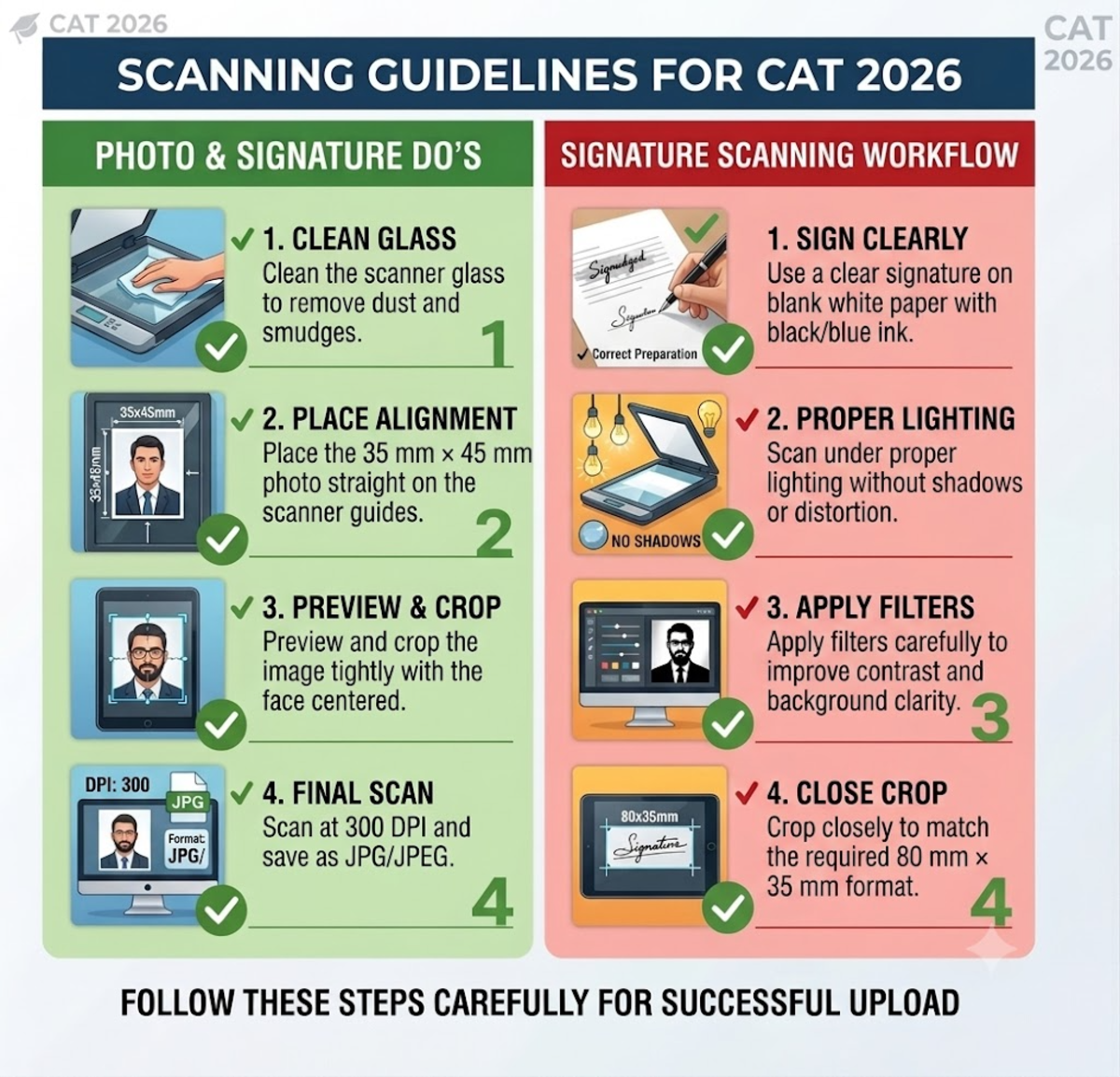
| Do's | Don'ts |
|---|---|
| Use a plain white background. | Don't use dark, coloured, or cluttered backgrounds. |
| Upload a recent photograph (taken within the last 6 months). | Don't upload old or outdated photographs. |
| Ensure your face covers at least 80% of the photo and facial features are clearly visible. | Don't upload photos where the face is too small, cropped, or unclear. |
| Look straight at the camera with a neutral expression. | Don't use side poses, tilted head positions, or exaggerated smiles. |
| Wear only transparent reading glasses, if required. | Don't wear sunglasses, caps, hats, or tinted glasses. |
Ques. What are the required CAT 2026 photo dimensions?
Ans. The photograph should have dimensions of 1200 × 1200 pixels with a minimum resolution of 150 pixels/inch (ppi). The print equivalent should be approximately 30 mm × 45 mm to 35 mm × 45 mm.
Related Article: CAT 2026 Eligibility for Final Year Students: Documents Required
CAT 2026 Signature Specifications
Follow the CAT 2026 signature specifications below while uploading:
- Upload the signature in JPG/JPEG format with dimensions of 80 mm × 35 mm and file size between 10 KB–80 KB.
- Use a clear signature on blank white paper with black or blue ink and a minimum 150 dpi resolution.
- Ensure the signature is in running handwriting and cropped properly without extra blank space.
| Specification | Requirement |
|---|---|
| Dimensions | 80 mm × 35 mm (Width × Height) |
| File Size | 10 KB – 80 KB |
| File Format | JPG / JPEG only |
| Resolution | Minimum 150 dpi |
| Ink Color | Black pen preferred; blue ballpoint pen also accepted |
| Paper Requirement | Sign on a clean, blank white sheet (no lined, graph, or coloured paper) |
| Signature Style | Use running handwriting; Avoid block letters or capital letters |
| Cropping | Crop closely around the signature without excessive blank margins |
Ques. What is the CAT 2026 signature size requirement?
Ans. The signature must be uploaded in JPG/JPEG format with a maximum file size of 80 KB and physical dimensions of 80 mm × 35 mm.
Scanning Guidelines for CAT 2026 Photo & Signature Upload
Below are some CAT 2026 documents upload guidelines for scanning your photo and signature:
- Scan both photo and signature at exactly 300 DPI for better clarity.
- Use JPEG/JPG format only for uploaded files.
- Keep the photo file size below 80 KB and signature size between 10 KB–80 KB.
- Use the correct colour mode: True Colour for photos and Grayscale/True Colour for signatures.
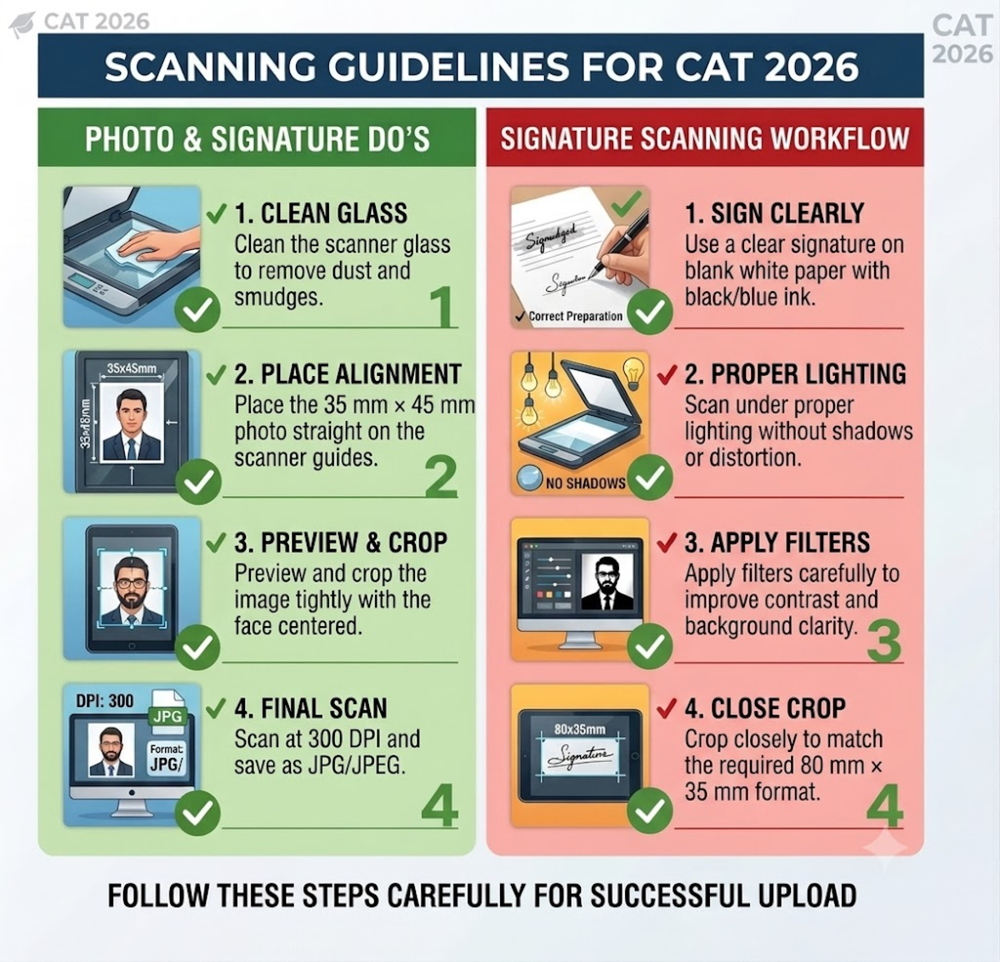
| Document | Scanning Steps |
|---|---|
| Photo Scanning Workflow |
|
| Signature Scanning Workflow |
|
Ques. Which ink colour should be used for the CAT 2026 signature?
Ans. Candidates should use black ink preferably for the signature. Blue ink may also be accepted. The signature must be made on plain white paper and should not be written in block capital letters.
Also Check: CAT Application Form Correction Window 2026: Check Date, How to Edit, Details, Link @iimcat.ac.in
How to Check and Resize Files Safely for CAT 2026
For files exceeding the file size limit, follow the steps below:
- Check the file size and dimensions before uploading to ensure they meet the required limits.
- Resize images using desktop tools instead of lowering resolution to maintain clarity.
- Compress and save the file to reduce size while preserving image quality.
| Step | Action |
|---|---|
| 1. Check File Size | View the current file size and pixel dimensions using Properties (Windows) or Command + I (Mac). |
| 2. Resize Image | Open the file in MS Paint (Windows) or Preview (Mac) and resize using the Pixels option while maintaining dimensions. |
| 3. Compress & Save | Save the resized file again to automatically reduce the size while maintaining image quality and required resolution. |
Ques. Is self-attestation required for CAT 2026 certificates?
Ans. Yes. Candidates must upload self-attested copies of applicable certificates. The original certificate should be signed by the candidate with a self-attestation mark before scanning and uploading.
Related Article: CAT Documents Required 2026: Check Documents Required for CAT Registration and Exam Day
Common Application Rejections in CAT Due to Upload Errors (2025)
Below are some common application rejection reasons faced by students due to upload errors:
- Some of the reasons include Incorrect Photo Background, Casual Selfies or Phone Photos, Low Resolution / Pixelated Image, Invalid Signature Format, and Invalid Category Certificate.
| Common Error | Issue | Correction / Solution |
|---|---|---|
| Incorrect Photo Background | Using blue, dark, red, or cluttered backgrounds instead of a plain white background | Retake the photo against a plain white wall or clean white backdrop |
| Casual Selfies or Phone Photos | Uploading selfies or informal photos with facial distortion and uneven lighting | Get a formal photo taken using the back camera from a distance or visit a professional studio; Keep your face straight and shoulders aligned |
| Low Resolution / Pixelated Image | Excessive compression causing blurry or unclear images | Scan at 300 DPI, resize to 1200 × 1200 pixels, and save as a high-quality JPEG under 80 KB |
| Invalid Signature Format | Uploading typed capital letters or unclear signatures | Sign in running handwriting using black/blue ink on white paper and crop tightly before uploading |
Ques. What happens if my CAT document file size exceeds the limit?
Ans. If the file size exceeds the prescribed limit, the portal will show an upload error. Candidates must compress or resize the document while maintaining clarity before uploading.
CAT 2026 Documents Upload Format: PDF vs JPG/JPEG
Below is the format of the document to be uploaded for CAT 2026:
- Passport photo and signature must be uploaded in JPG/JPEG format within the 10 KB–80 KB size limit.
- Category certificates (NC-OBC/SC/ST/EWS) must be uploaded as self-attested PDFs under 200 KB.
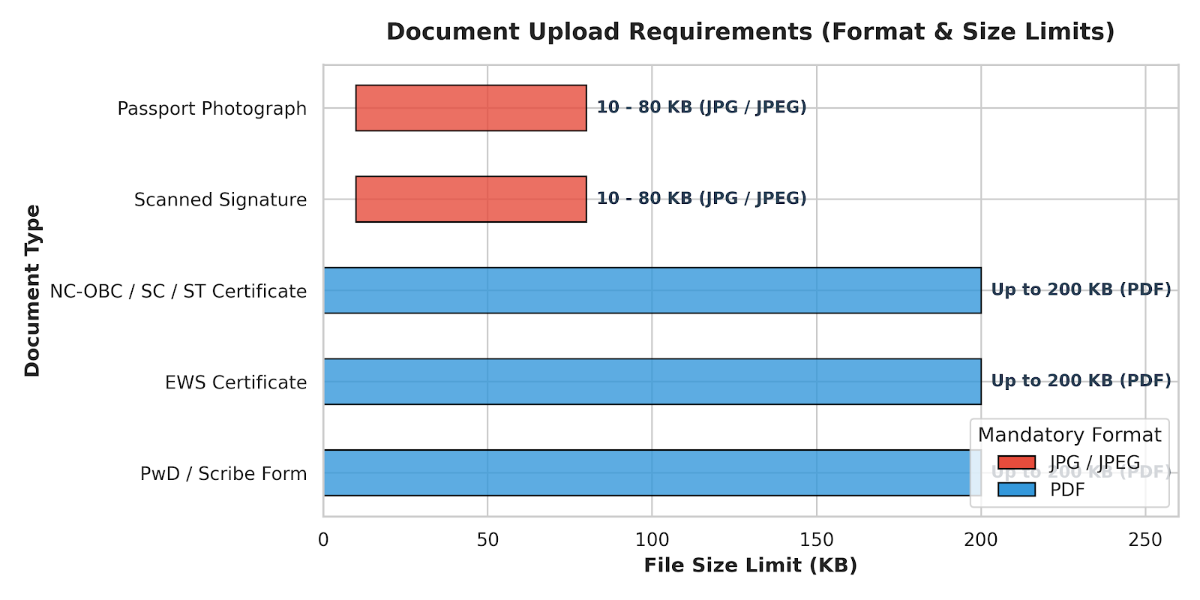
| Document Type | Mandatory Format | File Size Limit | Key Verification Constraint |
|---|---|---|---|
| Passport Photograph | JPG / JPEG | 10 KB – 80 KB | 1200 × 1200 pixels with plain white background |
| Scanned Signature | JPG / JPEG | 10 KB – 80 KB | Running handwriting using black or blue ink |
| NC-OBC / SC / ST Certificate | Up to 200 KB | Scanned copy of original, self-attested | |
| EWS Certificate | Up to 200 KB | Must include Financial Year 2026–27 validation | |
| PwD / Scribe Form | Up to 200 KB | Use the official template downloaded from the IIM portal |
Ques. Can I upload documents with special characters in the filename?
Ans. No. Candidates should avoid spaces and special characters such as #, @, &, and brackets in filenames. Use only letters, numbers, underscores, or hyphens (Example: CategoryCertificate.pdf).
Check: IIM CAT 2026 Application Fee Increased at iimcat.ac.in; Check Last Date to Register
Reservation Certificate Uploading Guidelines for CAT 2026
The issues below account for most document submission failures: format, file size, filename, scan quality, and certificate validity.
- Most validation errors are preventable by using the prescribed file format/size and a valid, clearly scanned, self-attested certificate.
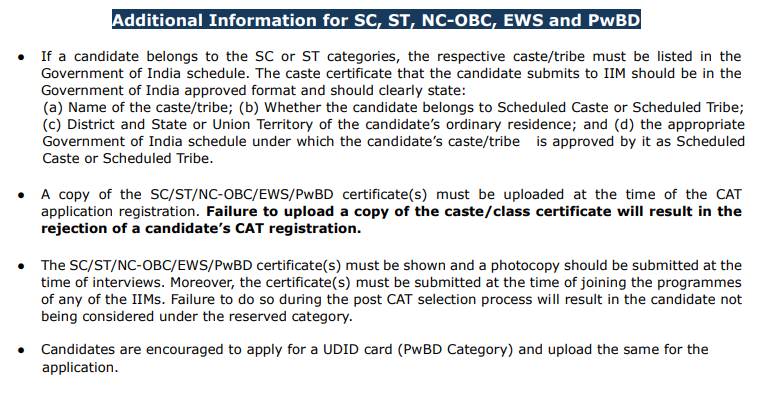
Source: Official CAT 2026 Eligibility PDF
| Issue Category | Common Problem | How to Fix It |
|---|---|---|
| Unsupported File Format | Uploading .docx, .webp, or unsupported image formats instead of the required .PDF, .JPG, or .PNG. | Convert the document to the accepted format before uploading. |
| File Size Exceeded | Uploaded file exceeds the portal's maximum size limit. | Compress or rescan the file to meet the prescribed size limit. |
| Special Characters in Filename | File names contain spaces or symbols such as #, @, (), or &, causing upload errors. | Rename the file using only letters, numbers, underscores, or hyphens (e.g., OBC_Certificate_2026.pdf). |
| Poor Scan Quality | Blurry, cropped, low-contrast, or partially visible documents fail OCR or automated verification. | Upload a clear, complete, high-resolution scan with all details visible. |
| Invalid Category Certificate | An outdated, incorrect, or non-attested reservation certificate is uploaded. | Use a valid NC-OBC/EWS certificate issued on or after April 1, 2026, self-attest it, sign and date it, and upload a clear PDF under 200 KB. |
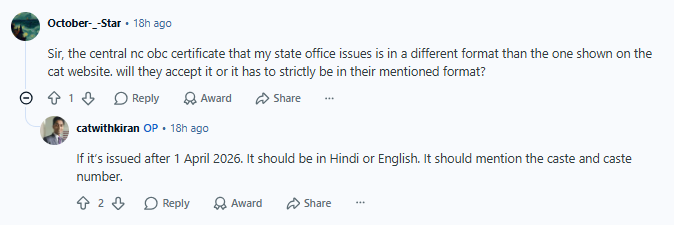
As per the below Reddit thread, candidates discuss whether their state-issued Central OBC certificate, which differs in format from the one shown on the CAT website, will still be accepted.
- The reply clarifies that the certificate will be valid if issued after 1 April 2026, written in Hindi or English, and explicitly mentions caste and caste number.
Source: Reddit
Ques. What format is required for CAT 2026 category certificates?
Ans. NC-OBC, SC/ST, EWS, and other applicable category certificates must be uploaded in PDF format only, as per the CAT 2026 documents upload guidelines.
Also Check: CAT 2026 vs GMAT 2026: Which Exam Is Better for MBA in India?
Other Documents Required for CAT 2026
Other document required at the CAT registration step is a valid PwD certificate, if applicable:
- PwD Certificate: Upload a valid government-issued Disability Certificate confirming 40% or more benchmark disability, if you are applying under the Persons with Disabilities (PwD) reservation category.
Apart from this, no other documents like Class 10, 12 marksheets or proof of work experience are required at the preliminary registration stage.
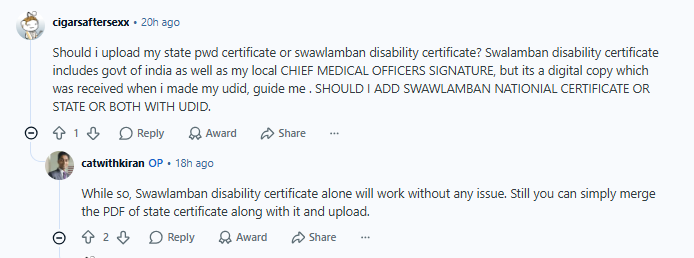
As per the Reddit thread below, students discuss whether to upload a state PWD certificate or a Swawlamban disability certificate. They note that the Swawlamban certificate is digital and includes both the Government of India and the Chief Medical Officer’s signature.
- The reply confirms that the Swawlamban certificate alone is sufficient for CAT registration. However, it suggests merging the state certificate PDF with it before uploading as a precautionary step to ensure completeness.
Source: Reddit
CAT 2026 Documents Upload Guidelines FAQs
Ques. Are Class 10 and Class 12 marksheets required during CAT 2026 registration?
Ans. No. Candidates do not need to upload Class 10 or Class 12 marksheets during the registration process. However, they must keep the details available to enter academic information in the application form.
Ques. What PwD certificate is required for CAT 2026?
Ans. Candidates applying under the PwD category must upload a valid government-issued Disability Certificate showing at least 40% benchmark disability in the prescribed format mentioned by the CAT authority.
Ques. Can I upload a typed signature in the CAT 2026 application?
Ans. No. Typed signatures, digital fonts, or electronically generated signatures are not accepted as per CAT 2026 documents upload guidelines. Candidates must upload a clear scan of their original handwritten signature.
Ques. What background is required for the CAT 2026 photograph?
Ans. Candidates must upload a photograph with a plain white background. Light off-white backgrounds may be accepted in some cases, but white is the officially recommended background.



Comments