


UP Board Class 10 Science Question Paper 2023 PDF (Code 836) with Answer Key and Solutions PDF is available for download here. UP Board Class 10 exams were conducted between February 24th to March 12th 2023. The total marks for the theory paper were 70. Students reported the paper to be easy to moderate.
UP Board Class 10 Science Question Paper 2023 (Code 836) with Solutions PDF
| UP Board Class 10 Science (836) Question Paper with Solutions PDF |  Download Download |
Check Solutions |

What is the TCP/IP Protocol which is used for remote terminal connection service?
View Solution
The correct answer is TELNET.
TELNET is a network protocol that allows a user to establish a remote terminal connection to a computer over a TCP/IP network. It operates on port 23 and provides a bidirectional communication channel between the client and server. The protocol allows users to remotely log into a device and access its resources and services as if they were physically present at the machine. TELNET uses a text-based interface, which is why it’s sometimes referred to as a "command-line" protocol.
Here is a breakdown of the other options:
(A) FTP (File Transfer Protocol): FTP is a standard network protocol used to transfer files from one host to another over a TCP-based network, like the internet. While FTP can be used for file management tasks, it is not used for terminal connections.
(C) UDP (User Datagram Protocol): UDP is a communication protocol used in the transport layer of the TCP/IP model. Unlike TCP, which is connection-oriented, UDP is connectionless and does not guarantee delivery, order, or error checking. It is used for applications like video streaming or online gaming but is not used for remote terminal connections.
(D) RARP (Reverse Address Resolution Protocol): RARP is a network protocol used to map a MAC address to an IP address. It is used in situations where a device does not know its IP address and needs to request it from a RARP server. RARP is not related to remote terminal services.
Thus, the correct answer is TELNET, which is specifically designed for remote access to terminals and services over a network. Quick Tip: While TELNET was widely used in the past, it is considered insecure due to its lack of encryption. \textbf{SSH} (Secure Shell) is a more secure alternative for remote terminal connections.
Who founded the Linux Kernel?
View Solution
The correct answer is Linus Torvalds.
Linus Torvalds, a Finnish software engineer, founded the Linux Kernel in 1991. The Linux Kernel is the core component of the Linux operating system, which is open-source and free to use. Linus started the development of the kernel as a personal project while studying at the University of Helsinki. Initially, it was a small project to create a free and open alternative to the proprietary Unix systems, but it quickly gained popularity and became the foundation of many operating systems, now referred to as Linux distributions (such as Ubuntu, Debian, and CentOS).
Explanation of Other Options:
(B) Richard Stallman: Richard Stallman is the founder of the Free Software Foundation (FSF) and the GNU Project, which created many of the free software tools that are used in conjunction with the Linux Kernel. However, Stallman did not create the Linux Kernel itself. He developed the GNU operating system, and while Linux uses many GNU tools, he is not the founder of the kernel.
(C) Bill Gates: Bill Gates is the co-founder of Microsoft and is primarily known for his work with the Windows operating system. He did not have any direct involvement in the creation of the Linux Kernel. His company, Microsoft, developed proprietary operating systems, unlike the open-source Linux Kernel.
(D) Ben Thomas: Ben Thomas is not associated with the creation of the Linux Kernel. This name is not widely recognized in the context of the development of the Linux operating system or the kernel.
Summary:
- Linus Torvalds is the creator of the Linux Kernel, which is the foundation of the Linux operating system.
- Richard Stallman played a crucial role in the free software movement, but he did not create the Linux Kernel.
- Bill Gates is known for creating Microsoft Windows, not Linux.
- Ben Thomas is not related to the Linux Kernel’s development. Quick Tip: The Linux Kernel, developed by Linus Torvalds, is the heart of Linux-based operating systems. Many of the world's servers, smartphones, and even supercomputers run on Linux.
Which of the following commands is used to change the working directory?
View Solution
The correct answer is cd.
The \texttt{cd (change directory) command is used in many command-line interfaces (CLI) such as Unix, Linux, and Windows to change the current working directory. When you execute the \texttt{cd command followed by a directory path, the shell or command prompt will switch to that directory. For example: \[ \texttt{cd /home/user/documents} \]
This command would change the working directory to the specified path.
Explanation of Other Options:
(B) dir: The \texttt{dir command is used to list the contents of the current directory, not to change it. It is commonly used in command-line interfaces like DOS, Windows, or Linux to display files and directories in the current working directory.
(C) changed: There is no \texttt{changed command in common shell environments (like Linux, Windows, or Unix) for changing the working directory. This is not a valid command.
Summary:
- cd is the correct command used to change the current working directory.
- dir lists the contents of the directory and does not change the directory.
- changed is not a valid command in any major shell environment. Quick Tip: To move up one level in the directory tree, use \texttt{cd ..}. This command takes you to the parent directory of the current working directory.
The full form of OSS is:
View Solution
The correct answer is Open Source Software.
OSS stands for Open Source Software, which refers to software that is made available to the public with a license that allows anyone to view, modify, and distribute the source code. Open-source software is typically developed collaboratively by a community of developers. Examples of OSS include the Linux operating system, the Firefox browser, and the Apache web server.
Explanation of Other Options:
(B) Original Source Software: This is not a standard term in the software industry. The term "source software" generally refers to the source code, but "original source" doesn't refer to any widely accepted category of software.
(C) Open System Software: "Open system software" is not a standard term either. While "open" refers to software with an accessible source code, "system software" typically refers to operating systems or utilities, but the term “open system software” is not commonly used in the context of OSS.
(D) Original System Software: This option is also incorrect. System software typically refers to the software that manages computer hardware and provides a platform for running application software (such as operating systems). "Original system software" is not a widely recognized term.
Summary:
- The correct full form of OSS is Open Source Software.
- Original Source Software, Open System Software, and Original System Software are not standard terms used in the software industry. Quick Tip: Open Source Software (OSS) fosters innovation by allowing developers worldwide to collaborate and improve software. Popular examples include Linux, Apache, and VLC Media Player.
Which Linux command is used to count the total number of lines, words, and characters contained in a file?
View Solution
The correct answer is wc.
In Linux, the \texttt{wc (word count) command is used to display the number of lines, words, and characters in a file. By default, it counts and displays the following:
1. The number of lines in the file.
2. The number of words in the file.
3. The number of characters in the file.
For example, to count the lines, words, and characters in a file named \texttt{file.txt, you would use the following command: \[ \texttt{wc file.txt} \]
This will return output similar to: \[ 10 50 300 file.txt \]
Where:
- 10 is the number of lines.
- 50 is the number of words.
- 300 is the number of characters.
Explanation of Other Options:
(B) countw: This is not a valid Linux command. There is no command named \texttt{countw for counting lines, words, or characters in a file.
(C) wcount: Similarly, \texttt{wcount is not a valid Linux command. The correct command for counting lines, words, and characters is \texttt{wc.
(D) count: There is no \texttt{count command in Linux specifically for counting lines, words, or characters in a file. \texttt{wc is the correct command to perform this task.
Summary:
- The correct command is wc, which counts the number of lines, words, and characters in a file.
- countw, wcount, and count are not valid commands for this task. Quick Tip: To count only specific elements (e.g., only lines, only words), you can use options with the \texttt{wc} command. For example, \texttt{wc -l file.txt} will count only the lines in the file.
Which topology is best suited for large businesses, that must carefully control and coordinate the operation of distributed branch outlets?
View Solution
The correct answer is Hierarchical.
The Hierarchical topology is ideal for large businesses that need to manage multiple distributed branch outlets. In a hierarchical network, the network structure is organized into layers, which makes it easy to scale, manage, and control. Typically, a central headquarters or data center controls the upper layers, and the branches are connected through a structured, tiered approach, which ensures effective communication and management across multiple locations.
In this topology:
1. The central system (usually at the top layer) acts as a control point.
2. Communication and data flow are organized through different levels, making it easier to implement policies, monitor performance, and handle the coordination between the headquarters and branch outlets.
3. The network is designed to ensure reliable communication while maintaining control over the distributed locations.
Explanation of Other Options:
(A) Ring: The \texttt{Ring topology is less suitable for large businesses with distributed branches. It involves each device being connected to two other devices, forming a circular data path. While efficient for small networks, it doesn't provide the scalability and centralized control needed for large businesses.
(B) Local Area: \texttt{Local Area Network (LAN) is a term that describes a network confined to a small geographic area, like a single building or office. While LANs are used within offices and specific locations, they are not the best solution for controlling and coordinating distributed branch outlets across large geographical distances.
(D) Star: \texttt{Star topology involves each device being connected to a central node (usually a hub or switch). While it offers good performance and easy maintenance, it doesn't have the structured, hierarchical control that is ideal for managing multiple branch outlets. Star topology is useful in smaller, centralized environments but lacks the scalability and control required for large businesses with distributed branches.
Summary:
- The best topology for managing distributed branch outlets in a large business is Hierarchical topology, as it allows for effective control, coordination, and scalability.
- \texttt{Ring topology and \texttt{Star topology may be useful in certain scenarios but do not provide the structure required for large-scale, distributed businesses.
- \texttt{LAN topology is limited to smaller, localized networks and does not address the needs of a large, distributed enterprise. Quick Tip: For large organizations with distributed branches, consider using a combination of hierarchical and other topologies like star or mesh within each branch for flexibility and reliability.
A collection of hyperlinked documents on the internet forms the:
View Solution
The correct answer is World Wide Web (WWW).
The World Wide Web (WWW) is a collection of hyperlinked documents that are accessible via the internet. These documents, which are typically written in HTML (Hypertext Markup Language), are linked to each other using hyperlinks, allowing users to navigate from one document to another. The WWW is a system of interlinked hypertext documents that can be viewed using a web browser. Examples of documents on the WWW include websites, blogs, news articles, and multimedia content.
Explanation of Other Options:
(B) E-mail system: An \texttt{E-mail system is a communication system used for sending and receiving electronic messages over the internet. While email systems are an important part of internet infrastructure, they do not involve hyperlinked documents and are not part of the WWW.
(C) Mailing list: A \texttt{mailing list is a system used for distributing information to a group of people through email. It is not a collection of hyperlinked documents, but rather a way of sending emails to multiple recipients at once.
(D) Hypertext Markup Language (HTML): \texttt{HTML is the standard markup language used to create documents on the web. While HTML is used to structure the documents that make up the World Wide Web, it is not a collection of documents itself. HTML defines the structure and content of web pages, but it is the WWW that forms the collection of these interlinked documents.
Summary:
- The collection of hyperlinked documents on the internet is the World Wide Web (WWW).
- \texttt{E-mail system, \texttt{Mailing list, and \texttt{HTML are related to communication and web development, but they do not describe a collection of hyperlinked documents on the internet. Quick Tip: The World Wide Web uses the HTTP (Hypertext Transfer Protocol) to access web pages, and HTML is used to create and structure the content of those pages.
Which software prevents the external access to a system?
View Solution
The correct answer is Firewall.
A firewall is a network security system that monitors and controls incoming and outgoing network traffic based on predetermined security rules. It acts as a barrier between a trusted internal network (such as a corporate network) and untrusted external networks (such as the internet), preventing unauthorized access to the system. Firewalls can be hardware- or software-based and are commonly used to prevent malicious attacks, data breaches, and unauthorized external access.
Firewalls function by filtering traffic based on IP addresses, port numbers, and other protocol details. They can also block or allow traffic based on specific applications or services, and in some cases, they also provide intrusion detection and prevention.
Explanation of Other Options:
(A) FTTR: \texttt{FTTR (Fiber to the Router) is not a software solution and has nothing to do with preventing external access to a system. FTTR is a type of internet connectivity service, and it refers to the use of fiber optic cables to connect the internet to a router. It does not provide security against external access.
(B) Gateway: A \texttt{Gateway is a network device that serves as a bridge between different networks. While it can route traffic between networks, a gateway does not inherently provide security to prevent external access. It may perform some filtering or translation but does not function as a full-fledged firewall.
(D) Virus Checker: A \texttt{Virus Checker, also known as antivirus software, is used to detect and remove malicious software (viruses, malware, etc.) on a system. However, it does not prevent external access to a system. It is designed to protect against threats that have already penetrated the system, not to prevent unauthorized access from external sources.
Summary:
- A Firewall is the software designed to block unauthorized external access to a system and protect the network.
- \texttt{FTTR and \texttt{Gateway are related to network connectivity and routing, not security.
- \texttt{Virus Checker protects the system from internal threats but does not block external access. Quick Tip: A properly configured firewall can block harmful traffic and allow only legitimate connections to pass through, acting as the first line of defense against external cyber threats.
The full form of HTTP is:
View Solution
The correct answer is Hyper Text Transfer Protocol.
HTTP stands for Hypertext Transfer Protocol. It is the protocol used for transferring hypertext requests and information on the World Wide Web. HTTP defines how messages are formatted and transmitted, and it is the foundation of data communication on the web. When you access a website, your browser uses HTTP to request files (like HTML documents) from web servers.
HTTP works by using a request-response model, where the client (usually a web browser) sends a request to the server, and the server responds with the requested resources, such as HTML pages, images, or other data.
Explanation of Other Options:
(A) Hyper Terminal Tracing Program: This option is incorrect. There is no such protocol or program called "Hyper Terminal Tracing Program" related to the web or data communication. It seems to be a mix-up of terms.
(B) Hyper Text Tracing Protocol: This is also incorrect. While it is close, the term "Tracing" is not part of the correct full form of HTTP. HTTP stands for "Hyper Text Transfer Protocol", and "tracing" is not part of the standard definition.
(D) Hyper Text Transfer Program: This option is incorrect. The correct term is "Hyper Text Transfer Protocol", not "Program". A protocol defines a set of rules for data exchange, while a program is an application or software.
Summary:
- The correct full form of HTTP is Hyper Text Transfer Protocol.
- \texttt{Hyper Terminal Tracing Program, \texttt{Hyper Text Tracing Protocol, and \texttt{Hyper Text Transfer Program are not correct and do not accurately describe HTTP. Quick Tip: HTTP is used to request and deliver resources such as web pages and images over the internet. When you see "http://" before a website address, it's a signal that the protocol for data transfer is HTTP.
What kind of transmission medium is most appropriate to carry data in a computer network that is exposed to electrical interferences?
View Solution
The correct answer is Optical fibre.
Optical fibre is the most appropriate transmission medium in environments where there is a high level of electrical interference. Unlike electrical cables (e.g., unshielded twisted pair, coaxial), optical fibre uses light to transmit data, making it immune to electromagnetic interference (EMI). Optical fibres are made of glass or plastic, and the data is transmitted as light pulses rather than electrical signals, which ensures that it is not affected by external electrical noise.
Explanation of Other Options:
(A) Unshielded twisted pair (UTP): \texttt{Unshielded twisted pair is a common transmission medium, but it is susceptible to electrical interference because it uses electrical signals to transmit data. The twisted pair of wires does provide some protection, but it is not as resistant to EMI as optical fibre.
(C) Coaxial cable: \texttt{Coaxial cables are shielded cables that can provide better resistance to electrical interference compared to UTP cables, but they are still susceptible to some amount of EMI. They are more robust than UTP cables but are not as effective as optical fibre in environments with significant electrical interference.
(D) Microwave: \texttt{Microwave transmission refers to the use of high-frequency radio waves to transmit data, typically used in wireless communications. While microwave communication can be effective for long-distance data transfer, it is also susceptible to interference from physical obstacles and weather conditions, and it is not suitable for networks exposed to electrical interference.
Summary:
- Optical fibre is the best medium for environments with electrical interference due to its immunity to electromagnetic noise.
- \texttt{Unshielded twisted pair (UTP) and \texttt{Coaxial cables are both electrical transmission mediums, and while coaxial cables offer some shielding, they are still susceptible to EMI.
- \texttt{Microwave is used for wireless communication but is not ideal for environments with electrical interference. Quick Tip: In environments with high electromagnetic interference, optical fibre is the preferred choice as it uses light to transmit data and is not affected by external electrical noise.
In the e-mail address “xyz@dfg.edu”, "xyz" is the:
View Solution
The correct answer is username.
In an email address like \texttt{xyz@dfg.edu, the part before the "@" symbol (in this case, \texttt{xyz) represents the username. This is the identifier for the person or account that is receiving the email. The \texttt{xyz corresponds to the mailbox or user account on the mail server, which is responsible for receiving and storing the emails sent to that address.
Explanation of Other Options:
(A) Password: The \texttt{password is a private piece of information used for authentication when accessing the email account or system. It is not part of the email address and does not appear in the address itself.
(B) Server Name: The \texttt{server name refers to the domain part of the email address, after the "@" symbol (in this case, \texttt{dfg.edu). This is the mail server that handles email delivery and routing for the domain.
(D) Client Computer: The \texttt{client computer refers to the device from which the email is being sent or received. It is not represented by any part of the email address itself.
Summary:
- In the email address \texttt{xyz@dfg.edu, \texttt{xyz is the username, which identifies the specific user or account.
- \texttt{Password, \texttt{server name, and \texttt{client computer are not parts of the email address itself. Quick Tip: The part of the email address before the "@" symbol is always the \textbf{username}, while the part after the "@" symbol identifies the \textbf{domain} and mail server.
FSF stands for:
View Solution
The correct answer is Free Software Foundation.
FSF stands for the Free Software Foundation, which is a nonprofit organization founded by Richard Stallman in 1985. The FSF is dedicated to promoting the development and use of free software. It advocates for the freedom of users to run, modify, and share software, and it plays a central role in the free software movement. The FSF also supports the development of the GNU (GNU's Not Unix) operating system, which is a collection of free software that can be used as an alternative to proprietary software.
The FSF's primary goal is to ensure that software remains free and open, providing users with the right to freely use, modify, and distribute the software. They also work to protect the legal rights of software users through the use of licenses like the GNU General Public License (GPL).
Explanation of Other Options:
(B) File Server First: This is incorrect. There is no organization or widely-known term in the software community referred to as "File Server First." This option seems unrelated to the free software movement.
(C) Free Software File: This is also incorrect. While the FSF is concerned with free software, it does not stand for "Free Software File." The FSF is an organization, not a file type or format.
(D) File Software File: This is incorrect and seems like a misstatement. There is no organization or standard term by this name related to FSF or the free software movement.
Summary:
- FSF stands for Free Software Foundation, an organization that promotes the development and use of free software.
- \texttt{File Server First, \texttt{Free Software File, and \texttt{File Software File are incorrect and do not relate to the free software movement. Quick Tip: The Free Software Foundation is a key organization in the promotion of software freedom, advocating for users' rights to run, modify, and share software.
.net domain name is used for:
View Solution
The correct answer is Internet infrastructure and service providers.
The \texttt{.net domain name is one of the original top-level domains (TLDs) established in 1985. Originally, it was intended to be used by organizations involved in networking technologies, particularly those providing internet infrastructure and services. This includes internet service providers (ISPs), network infrastructure companies, and companies providing networking solutions.
While \texttt{.net is not strictly reserved for network-related entities anymore, it is still commonly used by companies and organizations involved in internet infrastructure, communications, and related services.
Explanation of Other Options:
(A) Educational institution: The domain \texttt{.edu is specifically reserved for educational institutions, particularly those in the United States. \texttt{.net is not used for educational purposes, so this option is incorrect.
(C) International organization: International organizations typically use the \texttt{.org or country-code TLDs (e.g., \texttt{.int for international organizations). The \texttt{.net domain is not specifically designated for international organizations.
(D) None of these: This is incorrect because the \texttt{.net domain is indeed used by internet infrastructure and service providers, so option \texttt{B is correct.
Summary:
- \texttt{.net is primarily used by internet infrastructure providers, network companies, and service providers.
- \texttt{.edu is for educational institutions, \texttt{.org is for organizations, and \texttt{.int is used for international organizations. Quick Tip: When you see a website with the \texttt{.net} domain, it is often related to internet services or network infrastructure. However, many other industries also use it today.
World Wide Web was proposed by:
View Solution
The correct answer is Tim Berners-Lee.
Tim Berners-Lee is the person who proposed and created the World Wide Web (WWW). He is a British computer scientist who, in 1989 while working at CERN (the European Organization for Nuclear Research), developed the idea of the World Wide Web as a way to enable researchers to easily share and access documents over the internet. Tim Berners-Lee is also the inventor of the first web browser, called "WorldWideWeb," and the HTTP protocol that powers the web.
He proposed the concept of hyperlinked documents and a system of browsing these documents over the internet, which led to the development of the World Wide Web as we know it today.
Explanation of Other Options:
(A) Bill Gates: Bill Gates is the co-founder of Microsoft and played a major role in personal computing, but he did not propose or create the World Wide Web. Bill Gates is associated with the development of the Windows operating system and Microsoft software products.
(B) Bill Rogers: Bill Rogers is not a well-known figure associated with the development of the World Wide Web or any major technological innovations related to the internet. This option is incorrect.
(D) Steve Jobs: Steve Jobs was the co-founder of Apple Inc. and played a key role in the development of personal computers, smartphones, and other devices. However, he did not propose the World Wide Web. Jobs is more famous for his work on products like the iPhone, iPad, and Macintosh.
Summary:
- Tim Berners-Lee is the inventor and proposer of the World Wide Web, and his contributions have shaped the modern internet.
- Bill Gates, Bill Rogers, and Steve Jobs, while influential figures in the tech industry, did not propose or create the World Wide Web. Quick Tip: Tim Berners-Lee is often called the "father" of the World Wide Web for his revolutionary work in creating the system of hyperlinks and web pages we use today.
Which of the following is not an internet browser?
View Solution
The correct answer is Drupal.
Drupal is not an internet browser. It is an open-source content management system (CMS) used to create and manage websites. Drupal allows users to build dynamic websites and is known for its flexibility and extensibility in managing large-scale websites and applications.
On the other hand, the other options listed are all internet browsers:
- Netscape Navigator was one of the first popular web browsers, released in the mid-1990s.
- Chrome is a widely used modern web browser developed by Google.
- Opera is another internet browser known for its speed and security features.
Summary:
- \texttt{Drupal is a content management system, not a web browser.
- \texttt{Netscape Navigator, \texttt{Chrome, and \texttt{Opera are all internet browsers. Quick Tip: When you hear the term "browser," think of software like Chrome, Opera, and Firefox, which allow users to navigate the internet.
Which command is used to display the name of the operating system?
View Solution
The correct answer is Uname.
The \texttt{uname command is used in Unix-based operating systems (such as Linux and macOS) to display information about the system, including the name of the operating system, the machine's architecture, and other system details. When used with the \texttt{-s option (i.e., \texttt{uname -s), it will display the operating system name.
Explanation of Other Options:
(A) OS: There is no command called \texttt{OS to display the operating system's name. \texttt{OS is just a general term used for the operating system.
(B) Unix: \texttt{Unix refers to a family of operating systems, not a command. You cannot use \texttt{Unix to display the system's name.
(C) Kernel: The kernel is the core part of an operating system but is not a command that can be used to display the operating system's name. The kernel handles low-level system operations, such as process management and hardware interaction.
Summary:
- The correct command to display the name of the operating system is \texttt{uname.
- \texttt{OS, \texttt{Unix, and \texttt{Kernel are not valid commands for displaying the operating system's name. Quick Tip: Use the \texttt{uname} command in Unix-based systems to get important system information, including the operating system's name.
Unix is which kind of operating system?
View Solution
The correct answer is All of these.
Unix is a versatile, multiuser, multitasking, and multiprocessing operating system. Let’s break it down:
1. Multiuser : Unix is a multiuser operating system, meaning it allows multiple users to log in and use the system simultaneously without interfering with each other’s activities. Each user can have their own environment and files, and the system can manage multiple users without conflict.
2. Multiprocessing : Unix can support multiprocessing, which means it can handle multiple processors (CPUs) simultaneously. This allows Unix systems to efficiently perform parallel processing, improving performance for tasks that can be divided into smaller sub-tasks that run concurrently.
3. Multitasking : Unix is also a multitasking operating system, meaning it can run multiple tasks or processes at the same time. Each task runs independently, allowing the system to switch between them to give the appearance that all tasks are happening simultaneously.
Explanation of Other Options:
(A) Multiuser: Unix is indeed a multiuser operating system, but this is only one aspect of its capabilities. It’s not the only feature.
(B) Multiprocessing: Unix supports multiprocessing, but this doesn’t cover all the features that make Unix a complete operating system.
(C) Multitasking: While Unix supports multitasking, this alone does not fully describe Unix. It has all the capabilities mentioned in \texttt{(D).
Summary:
- Unix is a multiuser , multitasking , and multiprocessing operating system.
- All the options mentioned (\texttt{Multiuser, \texttt{Multiprocessing, and \texttt{Multitasking) apply to Unix, so the correct answer is \texttt{D. Quick Tip: Unix is a powerful operating system that is designed to handle multiple users, tasks, and processors simultaneously, making it suitable for both large servers and personal workstations.
Every webpage has a unique address called:
View Solution
The correct answer is URL.
A URL (Uniform Resource Locator) is the unique address used to identify and access a webpage or any other resource on the internet. It is the string that you type into the address bar of your web browser to visit a particular webpage. A URL consists of several components, including the protocol (such as HTTP or HTTPS), the domain name, and the path to the specific resource on the server.
Explanation of Other Options:
(B) ARL: ARL is not a valid term in the context of web addresses. This option is incorrect.
(C) RVL: RVL is not related to web addresses and does not exist as a term associated with internet protocols or webpages.
(D) LUR: LUR is also not a valid term and is not used in the context of URLs or internet addresses.
Summary:
- Every webpage has a unique address called a \texttt{URL, which is used to locate resources on the web.
- The other options (\texttt{ARL, \texttt{RVL, and \texttt{LUR) are not valid terms for web addresses. Quick Tip: A URL is the "web address" you use to visit websites. It’s unique for every page and includes elements like the domain name and path to specific content.
Which feature is used to identify messages by category or topic?
View Solution
The correct answer is Flag.
The Flag feature is used in email systems to identify or mark messages by category, topic, or importance. When you flag an email, it is essentially categorized as something important, urgent, or belonging to a specific topic. This helps in organizing messages and makes it easier to search for emails related to a particular category or topic.
Explanation of Other Options:
(B) Block: The block feature is used to prevent unwanted emails or messages from specific senders from being delivered to your inbox. It does not categorize or identify messages by topic.
(C) Vacation: The vacation feature is used to set up an automatic reply when you are on leave or unavailable. It informs senders that you are out of the office but does not help in categorizing emails by topic or category.
(D) Forward: The forward feature is used to send an email to another person. It does not categorize or organize messages by topic; it simply redirects messages to other recipients.
Summary:
- The \texttt{Flag feature is the most appropriate for identifying and categorizing messages by topic or importance in email systems.
- \texttt{Block, \texttt{Vacation, and \texttt{Forward are features related to different actions in email systems, but they do not help in categorizing emails by topic. Quick Tip: If you need to organize your inbox by topic or urgency, use the flagging feature to mark important messages. You can later search for all flagged messages easily.
Write the full form of WAN.
View Solution
The correct answer is Wide Area Network.
A WAN (Wide Area Network) is a telecommunications network that covers a broad geographic area, such as a country or even global connections. It is used to connect local area networks (LANs) that are geographically separated. WANs are typically used by large organizations or businesses to enable communication and data exchange over long distances.
Explanation of Other Options:
(B) Wireless Area Network: This is not a standard term in networking. While wireless technology can be used in WANs, the term "Wireless Area Network" is not used to refer to WANs.
(C) World Area Network: There is no such thing as a World Area Network. This option is incorrect.
(D) Web Area Network: A Web Area Network does not exist in networking terminology. The correct term is Wide Area Network.
Summary:
- WAN stands for \texttt{Wide Area Network, which is a network that spans a large geographic area.
- The other options are not standard terms in networking. Quick Tip: WANs are commonly used by companies, governments, and organizations to facilitate communication and data sharing across large distances, such as between branch offices.
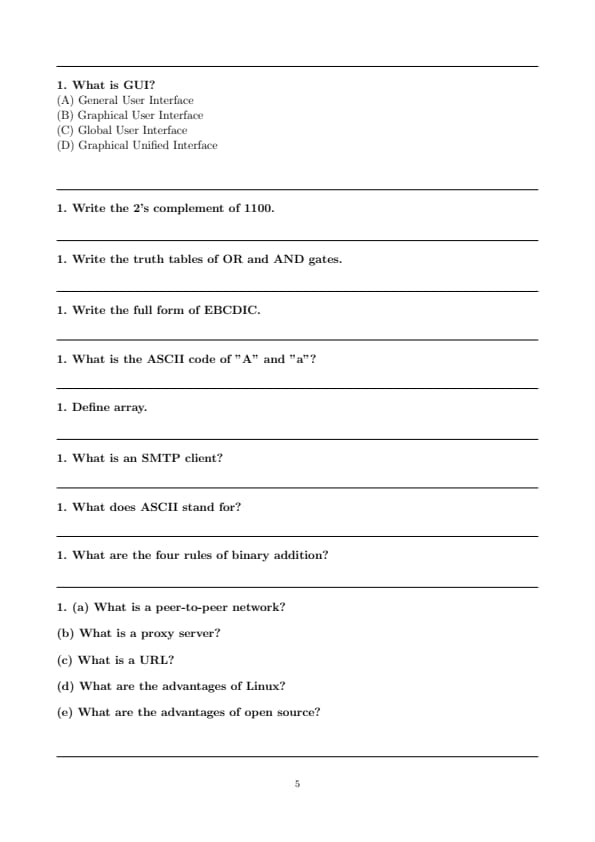
What is GUI?
View Solution
The correct answer is Graphical User Interface.
GUI stands for Graphical User Interface . It is a type of user interface that allows users to interact with electronic devices using visual elements like icons, buttons, windows, and menus, rather than relying solely on text-based commands. GUIs make interacting with computers and software more intuitive, as users can click on icons and use mouse movements rather than memorizing command-line instructions.
Explanation of Other Options:
(A) General User Interface: This is not the correct term. While "user interface" is a correct concept, "general" does not specify the graphical nature of the interface.
(C) Global User Interface: This is also incorrect. A global user interface does not exist in the context of computing. The term GUI specifically refers to graphical elements in an interface.
(D) Graphical Unified Interface: While this sounds similar to GUI, it is not a commonly used term. The correct term is \texttt{Graphical User Interface.
Summary:
- GUI stands for \texttt{Graphical User Interface, which allows users to interact with computers using graphical elements such as icons and windows.
- The other options do not accurately describe the GUI concept. Quick Tip: GUIs are used in almost all modern computing devices like computers, smartphones, and tablets, making them more user-friendly and accessible for the average person.
Write the 2's complement of 1100.
View Solution
To find the 2's complement of a binary number, follow these steps:
Step 1: Invert the digits (1’s complement): Flip each bit of the binary number.
\[ Original: 1100 \quad \Rightarrow \quad 1's complement: 0011 \]
Step 2: Add 1 to the result:
\[ 0011 + 1 = 0100 \]
So, the 2's complement of 1100 is 0100.
Final Answer:
- The 2's complement of the binary number \texttt{1100 is \texttt{0100. Quick Tip: To find the 2's complement, first invert all the bits (change 1’s to 0’s and 0’s to 1’s), then add 1 to the least significant bit.
Write the truth tables of OR and AND gates.
View Solution
Truth Table for OR Gate:
The OR gate outputs 1 if at least one of its inputs is 1. Otherwise, it outputs 0.
\[ \begin{array}{|c|c|c|} \hline A & B & A \, OR \, B
\hline 0 & 0 & 0
0 & 1 & 1
1 & 0 & 1
1 & 1 & 1
\hline \end{array} \]
Truth Table for AND Gate:
The AND gate outputs 1 only if both of its inputs are 1. Otherwise, it outputs 0.
\[ \begin{array}{|c|c|c|} \hline A & B & A \, AND \, B
\hline 0 & 0 & 0
0 & 1 & 0
1 & 0 & 0
1 & 1 & 1
\hline \end{array} \] Quick Tip: - In an OR gate, the output is true (1) if at least one input is true (1). - In an AND gate, the output is true (1) only when both inputs are true (1).
Write the full form of EBCDIC.
View Solution
The correct full form of EBCDIC is Extended Binary Coded Decimal Interchange Code .
EBCDIC is a character encoding system developed by IBM. It was primarily used in mainframe and mid-range computer systems. EBCDIC is an extension of the BCD (Binary Coded Decimal) encoding system and supports a wider range of characters. While ASCII has become more commonly used, EBCDIC was widely used in older IBM mainframe systems.
Explanation of Other Options:
(A) Extended Binary Coded Decimal Interchange Code: This is the correct answer. EBCDIC is a character encoding system developed by IBM.
(B) Extended Binary Coded Direct Interchange Code: This is not a valid term in the context of character encoding.
(C) Enhanced Binary Coded Decimal Interchange Code: While similar, "Enhanced" is not the correct term for EBCDIC.
(D) Extended Binary Coded Direct Interchange Code: This is an incorrect term. It does not represent the actual full form of EBCDIC.
Summary:
- EBCDIC stands for Extended Binary Coded Decimal Interchange Code , a character encoding system used by IBM mainframe computers.
- The other options are not valid terms for EBCDIC. Quick Tip: EBCDIC was widely used in legacy IBM mainframe systems, but it has been largely replaced by ASCII in modern computing systems.
What is the ASCII code of "A" and "a"?
View Solution
The ASCII code is a character encoding standard that represents each character as a number.
ASCII code of "A":
The uppercase letter "A" in ASCII has the decimal value 65.
\[ "A" = 65 \]
ASCII code of "a":
The lowercase letter "a" in ASCII has the decimal value 97.
\[ "a" = 97 \]
The difference between the ASCII codes of the uppercase and lowercase versions of the same letter is 32. This difference is consistent across the entire alphabet.
Summary:
- The ASCII code for the uppercase letter "A" is \texttt{65.
- The ASCII code for the lowercase letter "a" is \texttt{97. Quick Tip: In the ASCII table, the ASCII codes for uppercase letters (A-Z) range from 65 to 90, while the ASCII codes for lowercase letters (a-z) range from 97 to 122.
Define array.
View Solution
An array is a data structure that can store a fixed-size sequence of elements, all of the same type, such as integers, floats, or strings. The elements in an array are stored in contiguous memory locations, and each element can be accessed using an index or a key.
Characteristics of an Array:
Fixed Size: The size of an array is defined when the array is declared and cannot be changed dynamically (in most languages).
Homogeneous Elements: All elements of an array must be of the same data type, such as all integers or all floating-point numbers.
Indexed Access: Each element in an array is accessed by an index, starting from 0 in most programming languages. For example, the first element of an array `arr` is accessed using `arr[0]`.
Contiguous Memory Allocation: Arrays store elements in adjacent memory locations, which allows for efficient access.
Types of Arrays:
1. One-dimensional (1D) Array: A simple list of elements. Example:
\[ int arr[5] = \{1, 2, 3, 4, 5\;} \]
2. Two-dimensional (2D) Array: An array of arrays, which can be thought of as a table or matrix. Example:
\[ int matrix[3][3] = \{ \{1, 2, 3\, \{4, 5, 6\}, \{7, 8, 9\} \};} \]
3. Multi-dimensional Arrays: Arrays with more than two dimensions, commonly used for complex data storage like images or matrices.
Example:
A simple one-dimensional array of integers in C would look like this: \[ int arr[] = \{5, 10, 15, 20, 25\;} \]
To access the second element of the array, you would use the index: \[ arr[1] = 10 \]
(The index starts at 0, so `arr[1]` refers to the second element.)
Summary:
An array is a collection of elements, all of the same data type, stored at contiguous memory locations, and accessed using an index. Quick Tip: Arrays are useful when you need to store multiple values of the same type, and they offer efficient access via indexes. However, their size is fixed once declared, unlike more flexible data structures like lists in Python or vectors in C++.
What is an SMTP client?
View Solution
An SMTP Client is a software application or program that uses the Simple Mail Transfer Protocol (SMTP) to send emails to a mail server for delivery to recipients. SMTP (Simple Mail Transfer Protocol) is the protocol used for sending outgoing email messages between email servers.
Key Functions of an SMTP Client:
Sending Emails: The primary function of an SMTP client is to allow users to compose and send email messages to one or more recipients. The client communicates with the SMTP server to relay the email.
Relaying Emails: The SMTP client relays emails from the user's device to the appropriate email server, which will then forward the email to the recipient’s server (via DNS or MX records) for final delivery.
Authentication: The SMTP client typically requires authentication (username and password) to ensure that only authorized users can send emails via the server.
Interface for Email Composition: An SMTP client often provides a user-friendly interface where users can write, format, and attach files to their emails before sending.
Examples of SMTP Clients:
- Email Programs/Apps: Outlook, Thunderbird, Apple Mail, and others that allow users to send email through an SMTP server.
- Web-based Clients: Services like Gmail, Yahoo Mail, and Outlook.com that function as email clients but are accessed through a web browser. These clients also use SMTP for sending emails.
SMTP vs. Other Email Protocols:
- SMTP (Simple Mail Transfer Protocol): Used for sending emails.
- IMAP (Internet Message Access Protocol): Used for retrieving emails from the server and syncing messages across multiple devices.
- POP3 (Post Office Protocol 3): Also used for retrieving emails, but unlike IMAP, POP3 typically downloads and removes the message from the server.
Example:
When you send an email from your email application (like Outlook or Gmail), the SMTP client connects to an SMTP server, such as `smtp.gmail.com`, and sends the email message to the mail server for delivery.
Summary:
An SMTP client is software or an application used to send emails over the internet using the Simple Mail Transfer Protocol. It acts as an interface for composing and sending emails to mail servers, which in turn deliver them to the recipients. Quick Tip: When you set up an email client, you'll often need to specify the SMTP server's address and authentication details to enable email sending. The SMTP server could be something like `smtp.gmail.com` or `smtp.mail.yahoo.com`, depending on the service you're using.
What does ASCII stand for?
View Solution
ASCII (American Standard Code for Information Interchange) is a character encoding standard used for representing text and control characters in computers and other electronic devices. It uses numerical values to represent letters, digits, punctuation marks, and control characters (such as newline and carriage return).
Key Features of ASCII:
Character Encoding: ASCII assigns a unique number (between 0 and 127) to each character. For example:
The letter "A" is represented by the number 65.
The letter "a" is represented by the number 97.
The space character is represented by the number 32.
Standardized Code: ASCII was developed in the 1960s and became the most widely used character encoding system for computers and communication equipment.
7-bit Encoding: ASCII originally used a 7-bit code, which allows for 128 possible characters. Extended versions of ASCII use 8 bits to represent 256 characters.
Control Characters: ASCII includes non-printable characters (such as bell, backspace, and escape), which are used for controlling devices like printers or terminals.
Example ASCII Values: \[ \begin{array}{|c|c|} \hline \textbf{Character} & \textbf{ASCII Code}
\hline A & 65
B & 66
a & 97
b & 98
Space & 32
Enter & 13 \, (Carriage Return)
\hline \end{array} \]
Summary:
- ASCII stands for American Standard Code for Information Interchange .
- It is a 7-bit encoding system that represents text and control characters using numeric values.
- ASCII has been foundational in text representation and continues to be used today, with extensions like UTF-8 that support a wider range of characters. Quick Tip: Although ASCII uses only 128 characters in its standard form, extended versions can represent up to 256 characters, including additional symbols, accented characters, and control codes.
What are the four rules of binary addition?
View Solution
Binary addition is a fundamental operation in binary arithmetic, where we add two binary numbers following a set of specific rules. These rules are similar to decimal addition but are simpler because each digit is either 0 or 1.
The Four Rules of Binary Addition:
When adding two binary digits (bits), the following rules apply:
\[ \begin{array}{|c|c|c|} \hline \textbf{Binary Addition} & \textbf{Sum} & \textbf{Carry}
\hline 0 + 0 & 0 & 0
0 + 1 & 1 & 0
1 + 0 & 1 & 0
1 + 1 & 0 & 1 \, (carry)
\hline \end{array} \]
Explanation of the Rules:
1. 0 + 0 = 0 : Adding two zeros results in a sum of 0, with no carry.
2. 0 + 1 = 1 or 1 + 0 = 1 : Adding a zero and a one results in a sum of 1, with no carry.
3. 1 + 1 = 0 with a carry of 1: Adding two ones results in a sum of 0, but there is a carry of 1 that is added to the next higher bit in the addition.
4. Carry Over : When the sum of two bits results in 2 (which is 10 in binary), a carry of 1 is generated, and the sum for that digit becomes 0.
Example:
Consider adding the two binary numbers \( 1011_2 \) and \( 1101_2 \):
\[ \begin{array}{c} \phantom{+}1011_2
+ 1101_2
\hline \phantom{+}11000_2
\end{array} \]
Let's break down the addition step-by-step: \[ \begin{array}{|c|c|c|} \hline Bit Position & Adding & Result
\hline 1st bit & 1 + 1 & 0 \, (carry 1)
2nd bit & 0 + 0 + 1 \, (carry) & 1
3rd bit & 1 + 1 & 0 \, (carry 1)
4th bit & 1 + 1 + 1 \, (carry) & 1
\hline \end{array} \]
The final sum is \( 11000_2 \), with a carry of 1 at the 5th bit position.
Summary:
The four rules of binary addition are:
1. \( 0 + 0 = 0 \) (no carry)
2. \( 0 + 1 = 1 \) or \( 1 + 0 = 1 \) (no carry)
3. \( 1 + 1 = 0 \) with a carry of 1
4. The carry is added to the next higher bit position. Quick Tip: When performing binary addition, remember to keep track of the carry-over, especially when adding ones. The carry is added to the next higher bit in the sequence.
(a) What is a peer-to-peer network?
View Solution
A Peer-to-Peer (P2P) network is a decentralized network where each computer or device (also called a "peer") has equal privileges and can act both as a server and a client. In a P2P network, there is no central server; instead, each peer shares resources such as files, printers, and internet access directly with other peers.
Key Features of a Peer-to-Peer Network:
- Decentralization: No central server or management system; each peer manages its own resources.
- Resource Sharing: Peers can share data, files, printers, and other resources with one another.
- Scalability: As more devices join the network, the capacity to share resources increases.
- Reliability: The failure of one peer does not affect the functioning of others, as the network is distributed.
Example:
In a file-sharing P2P network like BitTorrent, each user shares parts of the files they are downloading with others, creating a decentralized exchange of data. Quick Tip: In a Peer-to-Peer network, each device can act as both a client and a server, making it ideal for decentralized file sharing, like in applications such as BitTorrent, where users share parts of files to download them more efficiently.
(b) What is a proxy server?
View Solution
A Proxy Server is an intermediary server that sits between a client and a destination server. It forwards requests from the client to the destination server and then returns the response to the client. Proxy servers are commonly used to improve security, manage network traffic, and anonymize the client's identity.
Key Functions of a Proxy Server:
Security \& Privacy: Proxy servers can hide the client's IP address, providing anonymity and privacy.
- Content Filtering: Proxies can block or filter content based on certain criteria, like URL or IP address.
- Caching: Proxy servers can store frequently requested resources (like web pages) to reduce network latency and improve performance.
- Access Control: Proxies can be used to restrict access to certain websites or services based on IP addresses, protocols, or other factors.
Example:
When you visit a website, your request is sent to the proxy server, which forwards it to the actual web server. The web server responds to the proxy, which then sends the response to you. This can help with load balancing and security. Quick Tip: A proxy server acts as a gateway between you and the internet, improving security by hiding your IP address, enhancing performance by caching frequently accessed resources, and providing content filtering to block unwanted sites or services.
(c) What is a URL?
View Solution
URL stands for Uniform Resource Locator. It is the address used to access resources on the internet, such as websites, images, videos, and files.
Structure of a URL:
A typical URL consists of the following parts: \[ protocol://domain.top-level domain/path \]
For example, in the URL `https://www.example.com/index.html`:
- Protocol: `https` (HyperText Transfer Protocol Secure)
- Domain: `www.example.com` (the domain name of the server hosting the resource)
- Path: `/index.html` (the specific resource or file requested on the server)
Example:
The URL `https://www.google.com/search?q=example` leads to Google's search page with the query "example" entered. Quick Tip: A URL (Uniform Resource Locator) is the web address that you type into a browser to access websites or specific resources on the internet. It consists of the protocol, domain, and path to the resource.
(d) What are the advantages of Linux?
View Solution
Linux is an open-source, Unix-like operating system that offers a range of advantages for both personal and enterprise use.
Key Advantages of Linux:
- Open Source: Linux is free to use, and its source code is open for modification and redistribution.
- Security: Linux is known for its robust security features, with regular updates and strong user permission controls.
- Stability and Reliability: Linux is highly stable and is used in servers and systems where uptime is critical.
- Customizability: Users can customize almost every aspect of the system to suit their needs, from the kernel to the desktop environment.
- Large Community Support: With a large, active community, Linux users can rely on forums, documentation, and open-source software for solutions.
- Performance: Linux is lightweight and can run efficiently on older hardware, making it a good choice for performance-sensitive applications.
Example:
Many web servers and enterprise systems run on Linux due to its reliability and security features. Popular distributions include Ubuntu, Fedora, and Debian. Quick Tip: When using Linux, security and performance are often the two most compelling reasons to switch from other operating systems. Regular security updates, coupled with powerful user permission controls, make Linux a top choice for both personal and enterprise use. Plus, its ability to run efficiently on older hardware means you can give a second life to legacy systems.
(e) What are the advantages of open source?
View Solution
Open Source Software refers to software whose source code is made available to the public for viewing, modification, and distribution. This model offers a variety of advantages over proprietary software.
Key Advantages of Open Source:
- Free to Use and Modify: Open-source software is generally free to use, and users have the right to modify it to meet their needs.
- Community Support: Open-source projects often have large communities of developers and users who contribute to the improvement and troubleshooting of the software.
- Transparency: The availability of source code ensures that the software is transparent, and users can inspect and verify its operations.
- No Vendor Lock-in: Open-source software is not tied to a particular vendor, which gives users the freedom to change or adapt the software without being reliant on a commercial company.
- Security: Since the source code is open, security vulnerabilities are often identified and fixed quickly by the community, making open-source software often more secure than proprietary alternatives.
Example:
Linux, Apache, MySQL, and Firefox are all popular open-source software used by millions of people around the world. Quick Tip: Linux: If you're looking for a free, secure, and highly customizable operating system, Linux is a great choice. Its open-source nature means you can modify it as you wish, and it's known for its reliability, especially on servers. Open Source Software: Open Source Software offers the flexibility to modify and improve the software, making it more secure and community-driven. You avoid vendor lock-in, and it's often free. Popular examples include Linux, Apache, MySQL, and Firefox. Proxy Servers (Security & Privacy): Proxy servers provide a simple way to enhance privacy and security. By masking your IP address, they allow you to browse anonymously and protect sensitive data from third parties.
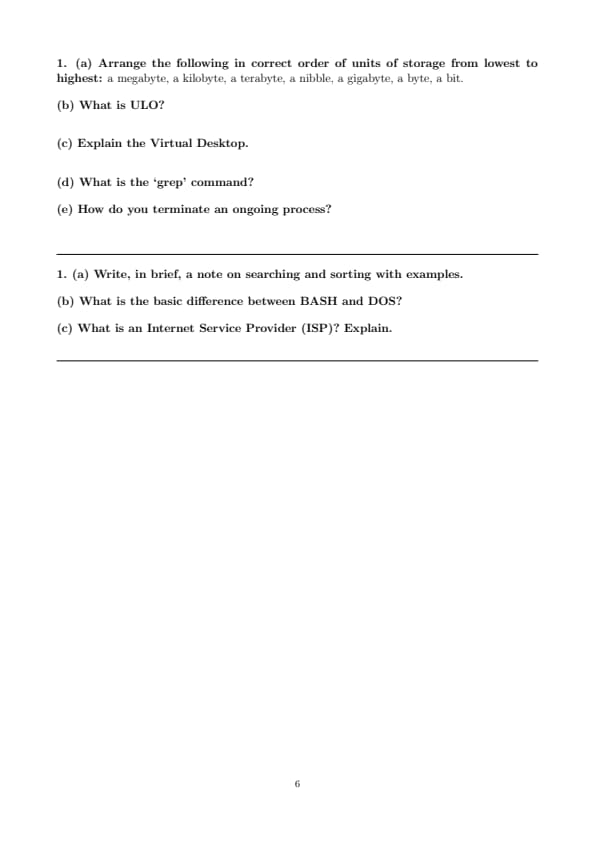
(a) Arrange the following in correct order of units of storage from lowest to highest:
a megabyte, a kilobyte, a terabyte, a nibble, a gigabyte, a byte, a bit.
View Solution
To arrange these units of storage from lowest to highest, let's first define each unit and its relationship with others:
- Bit (b): The smallest unit of data, either 0 or 1.
- Nibble: A group of 4 bits.
- Byte (B): A group of 8 bits, equivalent to 2 nibbles.
- Kilobyte (KB): 1,024 bytes.
- Megabyte (MB): 1,024 kilobytes.
- Gigabyte (GB): 1,024 megabytes.
- Terabyte (TB): 1,024 gigabytes.
Correct Order (Lowest to Highest): \[ Bit \to Nibble \to Byte \to Kilobyte (KB) \to Megabyte (MB) \to Gigabyte (GB) \to Terabyte (TB) \]
Explanation:
- A bit is the smallest unit, and it is the building block for all larger units.
- A nibble consists of 4 bits, and a byte consists of 8 bits (or 2 nibbles).
- Larger units, like kilobytes , megabytes , gigabytes , and terabytes , increase by a factor of 1,024 at each level. Quick Tip: To arrange storage units from lowest to highest, remember the order: \[ Bit \to Nibble \to Byte \to Kilobyte (KB) \to Megabyte (MB) \to Gigabyte (GB) \to Terabyte (TB) \] Each unit increases by a factor of 1,024.
(b) What is ULO?
View Solution
ULO stands for User Level Object . It is used in the context of object-oriented programming (OOP) and database systems. A ULO represents an object or an entity that is defined and managed at the user level, as opposed to system-level objects that are managed by the underlying operating system or software system.
Key Features:
- ULOs are often used to represent real-world entities or user-defined objects in a software system.
- They can have properties and methods associated with them, allowing users to define and manipulate data.
ULO is not a common acronym across all fields, and its meaning can vary depending on the context in which it's used. It could also be related to user-level management systems or objects in programming languages. Quick Tip: \textbf{ULO} stands for User Level Object. It represents objects or entities defined and managed at the user level in object-oriented programming (OOP) or database systems. ULOs allow users to define and manipulate data with properties and methods.
(c) Explain the Virtual Desktop.
View Solution
A Virtual Desktop is a feature that allows users to create multiple desktop environments on a single physical computer or device. Each virtual desktop acts as an independent workspace where users can organize open applications, files, and windows.
Key Features of Virtual Desktops:
- Multiple Workspaces: Users can switch between different virtual desktops, allowing them to organize their tasks and work on separate projects.
- Improved Productivity: By segregating tasks across multiple desktops, users can maintain focus and avoid clutter on their primary desktop.
- Easy Switching: Virtual desktops allow for seamless switching between different environments without the need for multiple physical monitors.
- Customization: Virtual desktops can be customized to suit different workflows, such as one desktop for work, one for entertainment, and another for development.
Example:
In Windows 10 or later, you can create virtual desktops using the "Task View" feature. On macOS, the "Mission Control" feature allows you to manage virtual desktops. Quick Tip: A \textbf{Virtual Desktop} is a feature that allows users to create multiple independent desktop environments on a single device. This helps organize tasks, improve productivity, and easily switch between workspaces without needing extra monitors. It can be customized for different workflows like work, entertainment, or development.
(d) What is the ‘grep’ command?
View Solution
The `grep` command stands for Global Regular Expression Print . It is used in Unix-like operating systems to search for specific patterns within files or input streams. It prints lines that match the given pattern.
Syntax:
\[ \texttt{grep [options] pattern [file]} \]
- pattern : The string or regular expression to search for.
- file : The file(s) in which to search. If no file is specified, `grep` searches the standard input.
Key Options:
- -i : Ignore case (case-insensitive search).
- -r : Search recursively in directories.
- -v : Invert the match (return lines that do not match the pattern).
- -n : Show line numbers along with matching lines.
Example:
To search for the word "error" in a file `log.txt`:
\[ \texttt{grep "error" log.txt} \]
This will return all lines in the file `log.txt` that contain the word "error". Quick Tip: The \texttt{grep} command is used to search for patterns in files or input streams in Unix-like systems. It prints lines that match a given pattern. Key options include: - \texttt{-i} for case-insensitive search. - \texttt{-r} to search recursively in directories. - \texttt{-v} to invert the match. - \texttt{-n} to show line numbers with matches.
(e) How do you terminate an ongoing process?
View Solution
To terminate an ongoing process in a Unix-like operating system (like Linux or macOS), you can use several methods, depending on how the process was started and the environment you are working in.
Methods to Terminate a Process:
1. Using `Ctrl+C`:
- This is the most common way to terminate a process running in the foreground in a terminal. It sends a SIGINT (Signal Interrupt) to the process, which causes it to terminate.
2. Using `kill` command:
- You can use the `kill` command to send a signal to a process, usually to terminate it.
- First, find the Process ID (PID) using the `ps` or `top` command, then use `kill`:
\[ \texttt{kill PID} \]
- To forcefully terminate a process, use:
\[ \texttt{kill -9 PID} \]
3. Using `killall` command:
- If you want to terminate all processes with a particular name, you can use the `killall` command: \[ kill all process\_name \]
4. Using `htop` or `top`:
- In more advanced systems, you can use `htop` (a more interactive process viewer) to kill processes. Select the process and press F9 to kill it.
Example:
To terminate a process with PID 1234: \[ \texttt{kill 1234} \]
To forcefully kill the same process: \[ \texttt{kill -9 1234} \] Quick Tip: To terminate a process in a Unix-like system: 1. Use \texttt{Ctrl+C} to stop a foreground process. 2. Use the \texttt{kill} command with the process ID (PID): \texttt{kill PID}. 3. Use \texttt{killall} to terminate all processes by name: \texttt{killall process\_name}. 4. Use \texttt{htop} or \texttt{top} for an interactive process viewer, then kill processes using F9.
(a) Write, in brief, a note on searching and sorting with examples.
View Solution
Searching and Sorting are two fundamental operations in computer science, commonly used to manipulate and retrieve data from collections such as arrays, lists, and databases.
\subsection*{1. Searching:
Searching is the process of finding a specific element in a collection of data. There are different search algorithms based on the type of data and its organization.
Common Searching Algorithms:
- Linear Search:
- In this search method, each element of the collection is checked sequentially until the target element is found.
- Example:
If we want to find the number 8 in the list \([1, 3, 5, 8, 10]\), we check each element in the list until we find 8.
- Time Complexity: \(O(n)\) where \(n\) is the number of elements.
- Binary Search:
- This method works on sorted data. It repeatedly divides the list in half and checks if the middle element is the target. If not, it continues the search in the left or right half based on the comparison.
- Example:
For a sorted list \([1, 3, 5, 8, 10]\), to find 8, the middle element (5) is compared, and the search moves to the right half of the list.
- Time Complexity: \(O(\log n)\) where \(n\) is the number of elements.
\subsection*{2. Sorting:
Sorting is the process of arranging elements in a specific order, usually in ascending or descending order. It is often a precursor to efficient searching.
Common Sorting Algorithms:
- Bubble Sort:
- In this method, each pair of adjacent elements is compared and swapped if they are in the wrong order. The process repeats until no swaps are needed.
- Example:
For the list \([5, 2, 9, 1]\), the algorithm will compare adjacent elements and swap them until the entire list is sorted.
- Time Complexity: \(O(n^2)\) where \(n\) is the number of elements.
- Merge Sort:
- This is a divide-and-conquer algorithm that splits the list into two halves, recursively sorts them, and then merges the sorted halves.
- Example:
For a list \([5, 2, 9, 1]\), it will first split into \([5, 2]\) and \([9, 1]\), then sort and merge the halves.
- Time Complexity: \(O(n \log n)\) where \(n\) is the number of elements. Quick Tip: Searching and Sorting are essential operations in computer science. 1. \textbf{Searching Algorithms}: - \texttt{Linear Search}: Checks each element sequentially, \(O(n)\) time complexity. - \texttt{Binary Search}: Works on sorted data, repeatedly divides the list in half, \(O(\log n)\) time complexity. 2. \textbf{Sorting Algorithms}: - \texttt{Bubble Sort}: Compares and swaps adjacent elements until sorted, \(O(n^2)\) time complexity. - \texttt{Merge Sort}: Divides the list, recursively sorts, and merges, \(O(n \log n)\) time complexity.
(b) What is the basic difference between BASH and DOS?
View Solution
BASH (Bourne Again SHell) and DOS (Disk Operating System) are both command-line interfaces, but they have significant differences in terms of functionality, syntax, and the environment in which they are used.
Key Differences:
- Environment:
- BASH: Primarily used in Unix-like operating systems, such as Linux and macOS. It is the default shell in most Linux distributions and offers a powerful scripting environment.
- DOS: Used in older Microsoft operating systems like MS-DOS and early versions of Windows. It is a command-line interpreter with more limited functionality compared to BASH.
- Syntax:
- BASH: Has a more flexible and powerful syntax with support for piping, redirection, file manipulation, variables, and functions.
- DOS: Commands are simpler and generally more limited, focusing primarily on file and disk operations.
- Script Capabilities:
- BASH: BASH scripting is widely used for automating tasks, system administration, and performing complex operations. It allows for loops, conditionals, functions, and more.
- DOS: DOS scripting is more primitive and lacks many features that are present in modern shells like BASH. Batch files (.bat) are used but are less powerful.
- File System Operations:
- BASH: Supports a wide range of file operations, including working with symbolic links, regular expressions, and pipes.
- DOS: Offers basic file management capabilities with commands like `dir`, `copy`, `del`, and `ren`.
Example:
- BASH Command: `ls -l` (lists files in a detailed format)
- DOS Command: `dir` (lists files in a directory) Quick Tip: \textbf{BASH} vs \textbf{DOS}: Key differences include: - \textbf{Environment}: BASH is used in Unix-like systems (Linux, macOS), while DOS is found in older Microsoft OS (MS-DOS, early Windows). - \textbf{Syntax}: BASH offers a powerful and flexible syntax, supporting piping, redirection, and functions. DOS commands are simpler and more limited. - \textbf{Scripting}: BASH supports advanced scripting with loops, functions, and conditionals; DOS scripting is more primitive (batch files). - \textbf{File Operations}: BASH offers advanced file handling (e.g., symbolic links), whereas DOS provides basic commands like \texttt{dir}, \texttt{copy}, and \texttt{del}. Example: - \texttt{BASH}: \texttt{ls -l} (lists files in detail) - \texttt{DOS}: \texttt{dir} (lists files)
(c) What is an Internet Service Provider (ISP)? Explain.
View Solution
An Internet Service Provider (ISP) is a company or organization that provides access to the internet to individuals, businesses, and other organizations. ISPs are the intermediaries between users and the global internet, providing the necessary infrastructure for connecting to the internet.
Key Functions of an ISP:
- Providing Internet Access:
- ISPs offer various types of internet access, such as dial-up, broadband (DSL, cable), fiber-optic, and wireless connections.
- They assign IP addresses to users and provide the necessary hardware like modems or routers.
- Domain Name Resolution (DNS):
- ISPs often provide DNS services, allowing users to convert domain names (like www.example.com) into IP addresses.
- Email Services:
- Many ISPs offer email accounts, where users can send and receive emails through their own email servers.
- Web Hosting:
- Some ISPs provide web hosting services, allowing businesses or individuals to host their websites on the internet.
- Technical Support:
- ISPs provide customer support for troubleshooting connection issues, managing accounts, and addressing service disruptions.
Example:
If you have a broadband connection at home, your ISP could be companies like Comcast, Verizon, or AT\&T, which provide the necessary infrastructure for internet access and other services. Quick Tip: An \textbf{Internet Service Provider (ISP)} offers internet access and other services such as: - Providing various types of internet access (DSL, fiber-optic, wireless). - Assigning IP addresses and providing hardware (modems, routers). - Offering DNS services to convert domain names into IP addresses. - Providing email accounts and web hosting services. - Offering technical support for troubleshooting and account management. Example: Companies like Comcast, Verizon, or AT\&T provide broadband and other services.



Comments