




The COMEDK UGET 2026 response sheet was released on May 16, 2026, along with the provisional answer key at comedk.org. Candidates can download their response sheet by logging into the official portal.
The response sheet shows every answer you marked during the exam, which you can compare with the answer key to calculate your expected score before the result on May 29, 2026.
- Your response sheet displays the actual answers you selected during the exam, not the correct ones.
- Match your response sheet with the final answer key to calculate your accurate expected score.
- COMEDK has no negative marking. Every correct match between your response and the answer key adds 1 mark.
- If your recorded response differs from what you actually marked, you can raise a challenge against the provisional answer key by paying ₹500 per question.
- The objection window closed on May 18, 2026, at 2 PM.
Related Links:
- COMEDK 2026 Answer Key Out; Challenge Objections Till May 18
- How to Calculate COMEDK Score Using Response Sheet
- COMEDK UGET Result 2026: Release Date, Toppers, Answer Key, Marks Vs Rank, Cut off & Score Calculation
COMEDK UGET 2026 Response Sheet Release Date
The response sheet is available for download until the result is declared on May 29, 2026. You should download and save your response sheet immediately, as the link may become unavailable after a certain period.
| Event | Date |
|---|---|
| COMEDK Response Sheet 2026 Released | May 16, 2026 (11 AM) |
| Provisional Answer Key Released | May 16, 2026 (11 AM) |
| Last Date to Raise Objections | May 18, 2026 (2 PM) |
| Final Answer Key Release | May 23, 2026 (2 PM) |
| COMEDK UGET 2026 Result | May 29, 2026 (4 PM) |
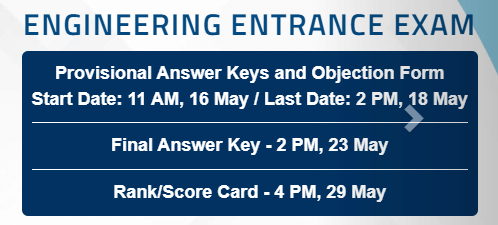
Source: COMEDK Official Website – comedk.org
Related Links:
How to Download COMEDK UGET 2026 Response Sheet
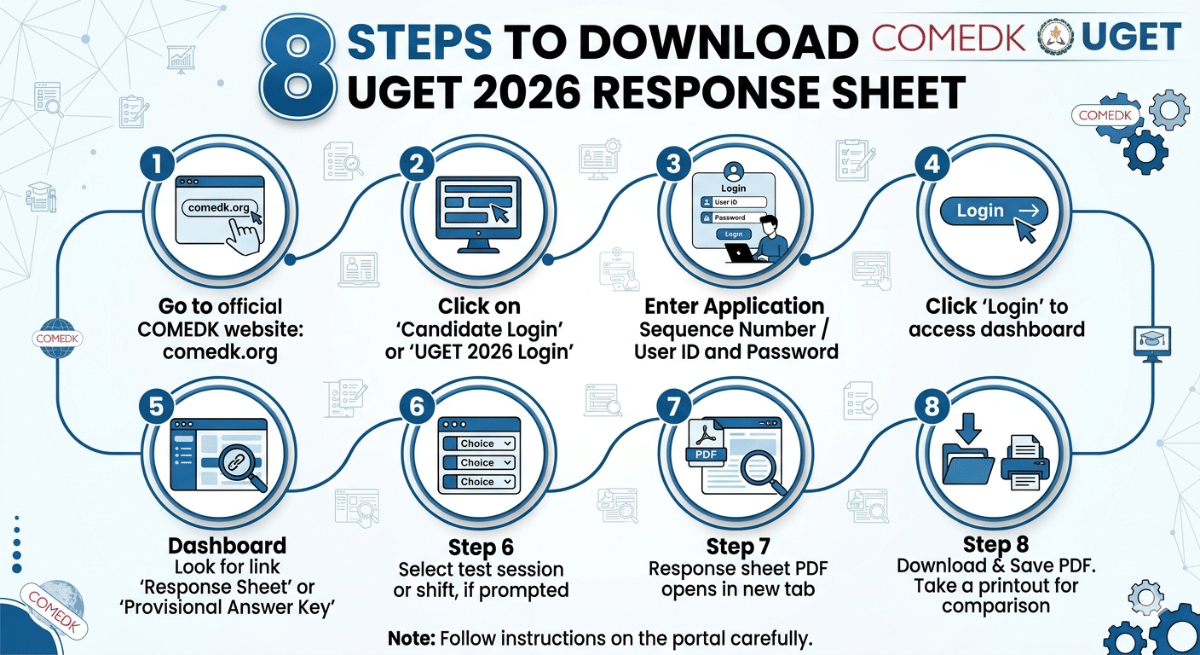
The response sheet is not available publicly — you must log in with your User ID and password. Follow the steps below. If you face login issues, clear your browser cache and try again. You can also try a different browser. If the problem continues, contact COMEDK support through the official website.
Related Links: COMEDK UGET 2026 Provisional Answer Key Releasing on May 16: Check Response Sheet, Challenge Window & Score Calculation
How to Use the COMEDK Response Sheet with the Answer Key to Estimate the Score?
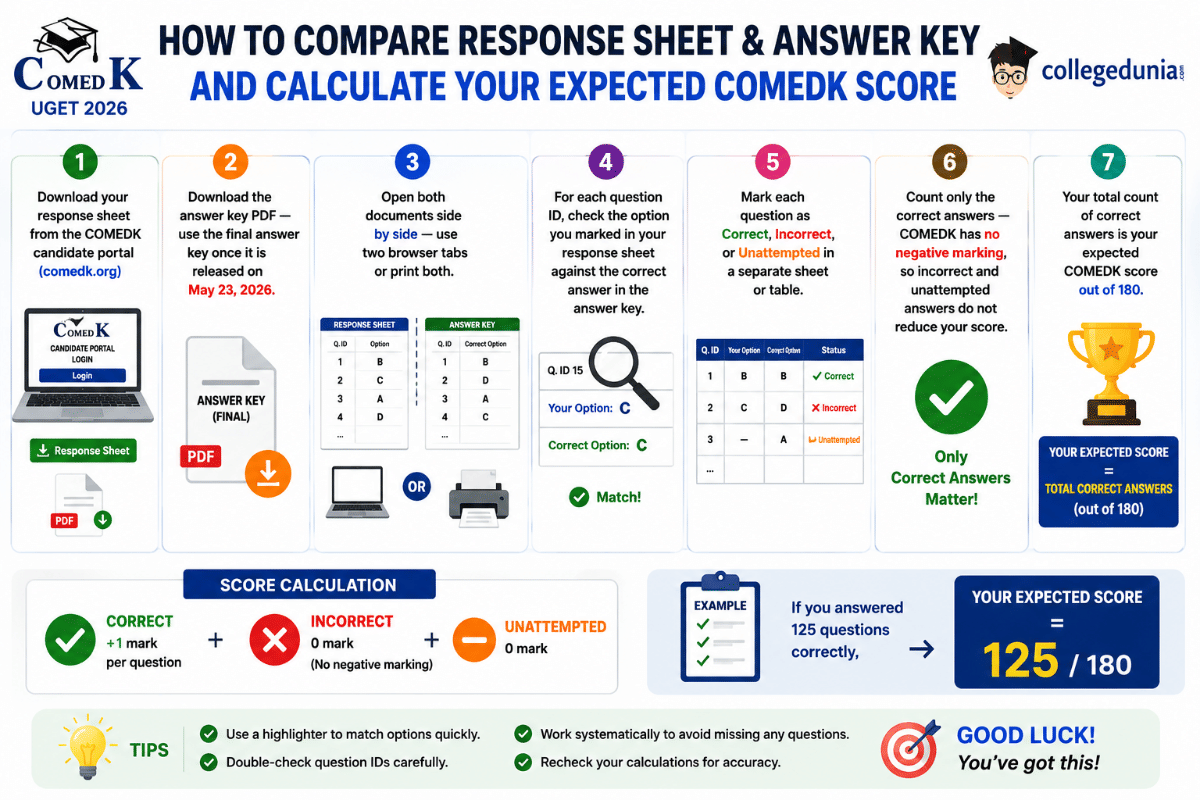
Once you have downloaded your response sheet, you need the COMEDK 2026 answer key to estimate your score. Always use the final answer key with your response sheet– not the provisional one, as scores based on the provisional key may change after objections are resolved.
Also Check: COMEDK Score Calculator 2026: View detailed analysis based on your response sheet
How to Calculate Score from COMEDK UGET 2026 Response Sheet?
COMEDK UGET uses a straightforward marking scheme with no negative marking. Score calculation is simple once you have compared your response sheet with the answer key. Here is the formula:
COMEDK Score = Total Correct Answers × 1
- Incorrect answers = 0 marks
- Unattempted questions = 0 marks
COMEDK 2026 Marking Scheme
| Response Type | Marks Awarded |
|---|---|
| Correct Answer | +1 Mark |
| Incorrect Answer | 0 (No deduction) |
| Unattempted / Skipped | 0 (No deduction) |
| Total Questions | 180 (60 Physics + 60 Chemistry + 60 Mathematics) |
| Maximum Score | 180 Marks |
Score Calculation Example
| Subject | Questions Attempted | Correct Answers | Score |
|---|---|---|---|
| Physics | 55 | 42 | 42 |
| Chemistry | 58 | 45 | 45 |
| Mathematics | 60 | 38 | 38 |
| Total | 173 | 125 | 125 / 180 |
In this example, the student attempted 173 questions and got 125 correct. Their expected COMEDK score is 125 out of 180. Since there is no negative marking, the 48 incorrect answers do not reduce the score at all.
Related Links: COMEDK Rank Predictor 2026: Predict Top B.Tech Colleges based on COMEDK Marks
What If Your COMEDK Response Sheet Shows a Wrong Answer?
If your response sheet shows an answer you did not mark, you must raise a grievance immediately.
- The response sheet reflects the server-recorded response.
- If you believe there is a system error, you can report it through the COMEDK helpdesk.
Source: COMEDK Helpline Number
How to Raise an Objection Against the Provisional Answer Key
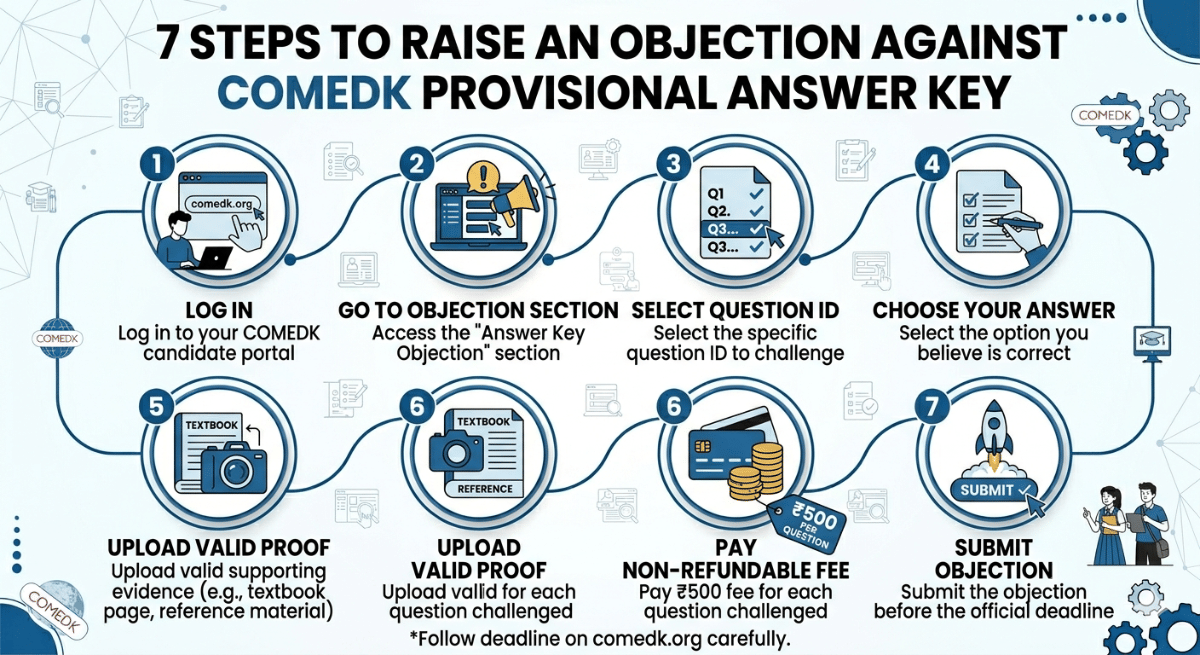
Note: COMEDK's Academic Committee will review all valid objections. If your objection is upheld, the fee of ₹500 will be refunded. If the objection is rejected, the fee is forfeited. No objections are accepted after the final answer key is released on May 23, 2026.
What to Do After Downloading the COMEDK Response Sheet
Once you download the response sheet, here is what you should do next to make the most of it before the result on May 29, 2026:
- Save a copy: Download and save the PDF to your device. The link may not stay active after the result is declared.
- Calculate your score: Compare your response sheet with the provisional answer key and estimate your score. Use the COMEDK score calculator for a faster result.
- Wait for the final answer key: Wait for the final answer key on May 23, 2026 for an accurate score estimate.
- Use the rank predictor: Enter your expected score in the COMEDK rank predictor to get an estimated rank range.
- Check the cutoff: Compare your estimated rank with the COMEDK 2026 cutoff for your target colleges and branches.
- Counselling plan: If your estimated rank looks good for your target college, start reading about the COMEDK counselling 2026 process so you are ready when it begins in June 2026.
Related Links:
FAQs
Ques. What does the COMEDK UGET response sheet show?
Ans. The COMEDK UGET response sheet shows the answers you marked during the exam for all 180 questions across Physics, Chemistry, and Mathematics. It contains each question ID and the option you selected. It does not show the correct answers; you need the answer key for that.
Ques. Will the COMEDK mail me my response sheet?
Ans. No, they will not. You will have to go to their official website and download your response sheet using your application number and password.
Ques. A candidate on Reddit was asking, “Is it true that we don't need to calculate marks manually in the response sheet, and the marks will be written already at the top?”
Ans. No, that is not true; your response sheet will only show the questions alongside your marked options and the status. You must manually compare it with the official answer key to calculate your total marks, as your final score will not be written at the top.
Ques. Is the response sheet the same as the answer key?
Ans. No, the response sheet shows your marked answers, while the answer key shows the correct answers. You need both documents to calculate your expected score. To estimate your score, compare each question's response in your sheet against the correct answer in the key.
Ques. Is the response sheet available for free?
Ans. Yes. The COMEDK UGET response sheet is free to download for all registered students. There is no charge to access it. You only need your login credentials (User ID and password) to download it from the official candidate portal.
Ques. Does COMEDK apply normalisation after calculating scores from the response sheet?
Ans. Yes, the COMEDK conducts the exam in multiple shifts, so a normalisation process is applied to ensure fairness across all sessions. This means your final rank card score may differ slightly from the raw score you calculate using your response sheet and the answer key. The official score on your rank card on May 29 is the final figure for counselling.



Comments