




The WBJEE 2026 result will be made available for download on the official WBJEEB website after the announcement of the WBJEE 2026 result. The WBJEE 2026 Results are likely to be announced in the 3rd week of June 2026.
- WBJEE Rank card can be downloaded by candidates from wbjeeb.nic.in using application number and date of birth.
- WBJEE 2026 Scorecard will show your subject wise marks in Mathematics, Physics and Chemistry out of total 200 marks along with your General rank and category wise rank.
- Keep your application number ready to download the WBJEE rank card.
Also Read:
- Check WBJEE 2026 Results Updates
- Check Category-wise WBJEE 2026 Cutoff and College-wise Opening & Closing Ranks
What is WBJEE 2026 Scorecard and Rank Card?
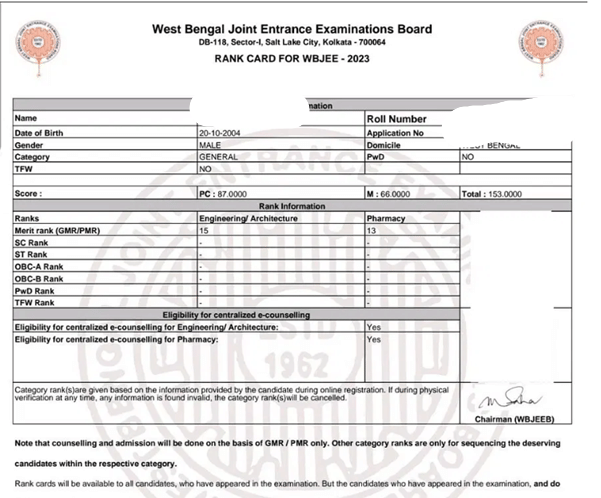
The WBJEE 2026 scorecard and Rank card is the same document is released by WBJEEB that records your marks in each subject and shows your rank in the WBJEE 2026 merit list across general and reserved categories.
- Colleges and counselling authorities verify your scorecard and rank card during document submission.
- WBJEEB releases Rank card document along with the WBJEE 2026 results.
Also Read: How to Check WBJEE 2026 Results on wbjee.nic.in?
Ques. Is there a separate scorecard and rank card for WBJEE or is it the same PDF? And how many times can I download it?
Ans. It’s usually the same document (Rank Card / Scorecard). It contains your subject-wise scores, total score, and ranks. You can download it multiple times as needed. Save multiple copies and take printouts for counselling.
How to Download WBJEE 2026 Scorecard and Rank Card
The rank card download process follows the same steps as the scorecard. Follow these instructions:
- Open the official WBJEEB website at wbjeeb.nic.in.
- Find the "WBJEE 2026 Rank Card" link on the homepage or in the result section.
- Click the link to open the candidate login portal.
- Enter your application number and date of birth in the required fields.
- Complete the captcha and click Login.
- Your WBJEE 2026 rank card will display with your general and category rank.
- Download the rank card as a PDF and take a printout for counselling use.

Also Read:
- WBJEE 2026 Pass Percentage: Overall, Category-wise and State-wise
- WBJEE 2026 vs 2025 Marks vs Rank: Expected Changes & Trend
Ques. I forgot my WBJEE application number/password. How do I recover it to download my scorecard?
Answer. You’ll need your Application Number (from your admit card or registration email). For password, use the “Forgot Password” option on the login page. You can recover using your registered mobile number or email.
Ques. Can I download WBJEE rank card using my roll number only or do I need application number + DOB?
Answer. You need your WBJEE Application Number + Password or Date of Birth + Captcha. Roll number alone is not sufficient for login.
Details on WBJEE 2026 Scorecard and Rank Card
Cross-check the following details after downloading your documents. Report any discrepancy to WBJEEB immediately through the official portal.
| Document | Details Mentioned |
|---|---|
| WBJEE 2026 Scorecard & Rank Card |
|
WBJEE 2026 is held for a total of 200 marks. Paper 1 (Mathematics) carries 100 marks and Paper 2 (Physics and Chemistry) carries 100 marks. Your rank is calculated from these combined marks. In case two students score equally, WBJEEB applies a tie-breaking rule based on subject-wise performance.
Troubleshooting WBJEE 2026 Scorecard Login and Download Issues
If you face problems while downloading your WBJEE 2026 scorecard or rank card, try the fixes below:
| Problem | Fix |
|---|---|
| Login page not loading | Clear your browser cache, switch to Chrome or Firefox, and check your internet connection. |
| Application number or date of birth not accepted | Re-enter carefully using the date format shown on screen (DD/MM/YYYY). Cross-check with your WBJEE 2026 admit card. |
| Scorecard or rank card not displaying | Disable pop-up blockers and PDF viewer extensions. Allow pop-ups for wbjeeb.nic.in in your browser settings. |
| Download button not working | Press Ctrl+P (or Cmd+P on Mac), select "Save as PDF" as the printer, and save the document manually. |
| Website showing error or very slow | Server traffic is typically high right after the result. Wait a few minutes and retry during off-peak hours. |
If none of these fixes work, contact WBJEEB through the helpline or grievance section listed on wbjeeb.nic.in.
Related News:
- WBJEE 2026 Colleges List: Best Government & Private Colleges by Marks vs Rank
- Check WBJEE 2026 Expected Rank for 120 Marks
- WBJEE 2026 Result Login: Forgot Password and Application Number Fix
WBJEE 2026 Scorecard and Rank Card FAQs
Ques. Where can I download the WBJEE 2026 scorecard?
Ans. You can download the WBJEE 2026 scorecard from the official WBJEEB portal at wbjeeb.nic.in. Log in with your application number and date of birth to access and download it.
Ques. What details do I need to download the WBJEE 2026 rank card?
Ans. You need your WBJEE 2026 application number and date of birth to log in and download the rank card from the official WBJEEB portal.
Ques. Does WBJEEB send the scorecard by post?
Ans. No. WBJEEB does not send physical copies of the scorecard or rank card. You must download and print them yourself from wbjeeb.nic.in.
Ques. I forgot my WBJEE 2026 application number. How can I find it?
Ans. Your application number is printed on your WBJEE 2026 admit card. You can also check the registration confirmation email or SMS sent to you at the time of registration.
Ques. For how long will the WBJEE 2026 scorecard be available to download?
Ans. WBJEEB typically keeps the scorecard available through the counselling period. Download and save it immediately after the result is declared to avoid missing the window.



Comments