




BITS Pilani will release the BITSAT 2026 Iteration 1 seat allotment on June 20th 2026 at bitsadmission.com . Students who have been allotted a seat have to log in and choose to Freeze, Float or Slide their seat and pay the admission fee before the deadline to confirm their admission at a BITS Pilani campus.
- Iteration 1 is the first round of seat allotment based on BITSAT 2026 scores and preferences submitted by students.
- Students who receive a seat must act within the acceptance window; missing it leads to automatic cancellation of the allotment.
- Admission fee payment is mandatory to confirm any of these three choices; choosing Float or Slide keeps you eligible for a better allotment in Iteration 2.
- After all iterations, students with a confirmed seat must report to their allotted campus: Pilani, Goa, or Hyderabad with original documents.
Also Read
- Check BITSAT Counselling 2026: Choice Filling & Iteration Results
- Check BITSAT Cutoff Course-wise & Category-wise Cutoff
BITSAT 2026 Iteration 1 Seat Allotment — Key Dates
The table below covers the important events and tentative dates for BITSAT 2026 seat allotment. Students must track the acceptance deadline closely — no extensions are typically granted.
| Event | Date |
|---|---|
| Iteration 1 Seat Allotment Announcement | June 20, 2026 (Tentative) |
| Last Date to Accept/Reject Seat — Iteration 1 | As notified on bitsadmission.com |
| Admission Fee Payment Window — Iteration 1 | Within the acceptance deadline |
| Iteration 2 Seat Allotment (tentative) | July 2026 |
| Campus Reporting and Document Verification | August 2026 (before semester commencement) |
All dates above are based on past BITSAT admission cycles and are tentative for 2026. BITS Pilani will publish confirmed dates on bitsadmission.com.
Also Read
- BITSAT 2026 Low Score? Top Engineering Alternatives After First Iteration
- BITSAT 2026 Admission Documents: Complete Checklist for Campus Reporting
How to Check BITSAT 2026 Iteration 1 Seat Allotment
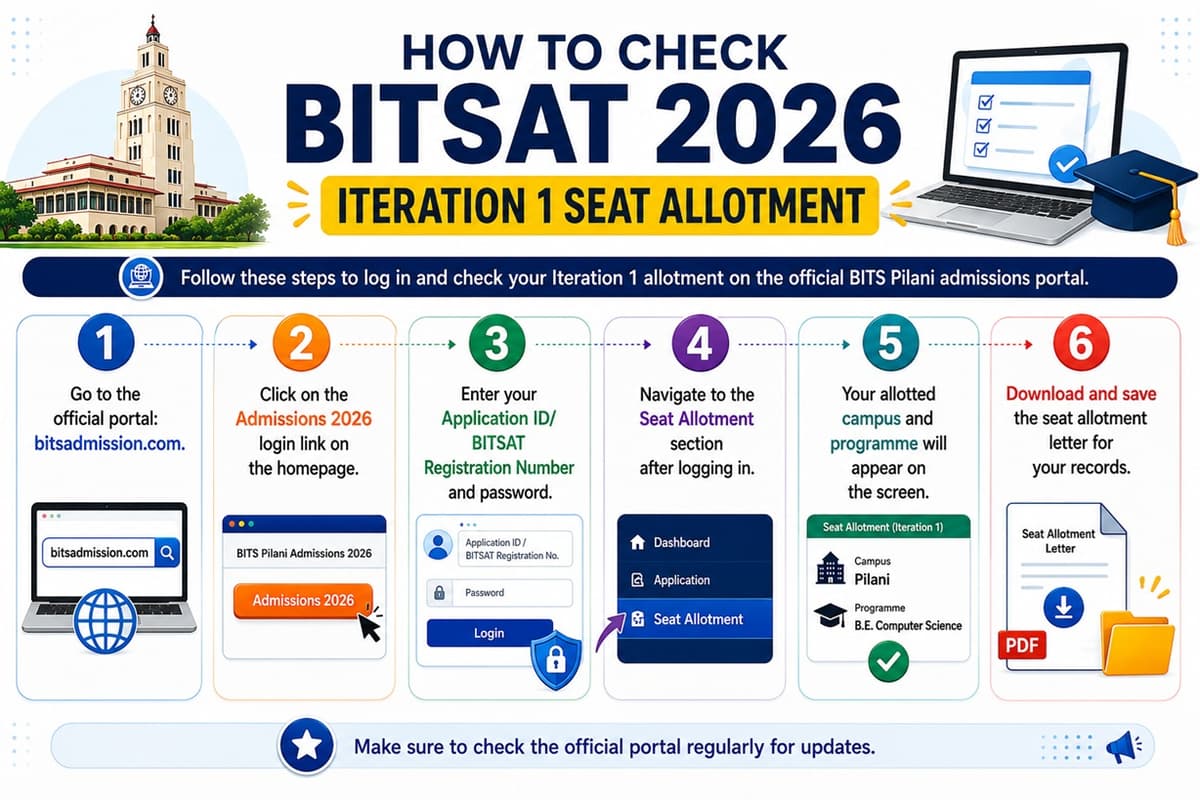
Follow these steps to log in and check your Iteration 1 allotment on the official BITS Pilani admissions portal.
- Go to the official portal: bitsadmission.com.
- Click on the Admissions 2026 login link on the homepage.
- Enter your Application ID/BITSAT Registration Number and password.
- Navigate to the Seat Allotment section after logging in.
- Your allotted campus and programme will appear on the screen.
- Download and save the seat allotment letter for your records.
If you cannot log in, use the Forgot Password option on the portal. Your registered email address or mobile number will be required for identity verification.
Also Read
- BITSAT 2026 Iteration Process Seat Allotment Round by Round
- BITSAT 2026 BITS Pilani ECE Cutoff and Year-wise Score Trends
Seat Acceptance Options: Freeze, Float, and Slide
After viewing your Iteration 1 allotment, you must choose one of four options. Your choice determines whether you participate in further iterations and which seat you ultimately receive.
| Option | What It Means | Eligible for Next Iteration? |
|---|---|---|
| Freeze | Accept the current allotment as your final seat. No further iterations apply to you. | No |
| Float | Accept the current seat but remain in the pool for a higher-preference programme or campus in the next iteration. | Yes |
| Slide | Accept the current campus but want to upgrade to a higher-preference programme at the same campus in the next iteration. | Yes |
| Reject | Decline the allotted seat entirely. You will not be considered for any further iteration. | No |
Students who choose Float or Slide must still pay the admission fee for Iteration 1. If a better seat is allotted in Iteration 2, the fee is adjusted accordingly. Once you Freeze, your admission is confirmed and no changes to campus or programme are possible.
Also Read: BITSAT 2026 Iteration Round Dates: Schedule and Deadlines for FD Allotment
Ques. What is the difference between Freeze and Float in BITSAT seat allotment?
Ans. Freeze means you accept the allotted seat as your final confirmed seat and will not participate in further iterations. Float means you accept the current seat but wish to be considered for a higher-preference choice in Iteration 2. In both cases, paying the admission fee is mandatory.
Ques. Can I switch campuses after accepting a seat in Iteration 1?
Ans. Yes, if you choose Float in Iteration 1, BITS Pilani will try to allot you a higher-preference programme or campus in Iteration 2. However, once you Freeze your seat, the campus and programme cannot be changed under any circumstances.
How to Accept Your BITSAT 2026 Iteration 1 Seat
After deciding your option, you must complete seat acceptance by paying the admission fee online. Here is the full step-by-step process.
- Log in to your account on bitsadmission.com.
- Open the Seat Allotment section and review your Iteration 1 allotment details.
- Select your preferred option: Freeze, Float, or Slide.
- Click on the Proceed to Pay button to reach the fee payment gateway.
- Pay the admission acceptance fee using net banking, credit card, or debit card.
- Download and save the fee payment receipt and allotment confirmation.
- If you selected Float or Slide, your application will automatically be considered in Iteration 2 without any additional action.
Do not delay fee payment until the last hour. Technical issues or banking downtimes near the deadline can result in loss of your allotted seat. The fee is non-refundable once paid, if you subsequently withdraw.

Also Read
BITSAT 2026 Branch-wise Cutoff for Pilani, Goa and Hyderabad Campuses
Ques. Is the BITSAT 2026 admission fee refundable if I withdraw after accepting a seat?
Ans. The admission fee paid at seat acceptance is generally non-refundable if you withdraw subsequently. Students should check the specific refund policy published in the official BITS Pilani 2026 admission notification before making a decision.
Ques. What happens if I do not respond to the Iteration 1 seat allotment before the deadline?
Ans. If you do not accept or reject your Iteration 1 seat before the stated deadline, your allotment will lapse automatically. You will not be eligible for Iteration 2 or any subsequent allotment round.
Documents Required for Campus Reporting
Once your seat is finalised, either through Freeze in Iteration 1 or at the end of all iterations, you must report to your BITS campus for physical document verification and joining formalities. Carry originals and self-attested photocopies of the following.
| Document | Copies Required |
|---|---|
| BITSAT 2026 Scorecard (downloaded from portal) | 1 original + 1 photocopy |
| BITSAT 2026 Seat Allotment Letter | 1 printout |
| Admission Fee Payment Receipt | 1 printout |
| Class 10 Marksheet and Pass Certificate | Original + 2 photocopies |
| Class 12 Marksheet | Original + 2 photocopies |
| Date of Birth Certificate | Original + 1 photocopy |
| Transfer Certificate from last institution | Original |
| Character Certificate from school/college | Original |
| Medical Fitness Certificate | As per BITS Pilani admission notice |
| Category Certificate — SC/ST/OBC/PwD (if applicable) | Original + 1 photocopy |
| Aadhaar Card | Original + 1 photocopy |
| Recent Passport-size Photographs | 6 to 8 photographs |
Always verify the exact document checklist in the official BITS Pilani 2026 admission notice before travelling to campus. Some documents may need notarisation or a specific prescribed format.
Also Read
How to Report to Your Allotted BITS Campus
Campus reporting is the final step to complete your BITSAT 2026 admission. Here is what to expect on reporting day at your allotted BITS Pilani campus.
- Travel to your allotted campus — Pilani (Rajasthan), Goa, or Hyderabad — on the reporting date announced by BITS Pilani in August 2026.
- Go to the Admissions or Registration Office with all original documents and photocopies.
- Submit documents for verification by BITS Pilani officials. Originals will be returned after checking.
- Complete biometric registration and photo capture as required.
- Pay any remaining dues — hostel deposit, semester fee balance — at the designated fee counter.
- Collect your student ID card and joining confirmation receipt.
- Attend the orientation programme for new students as per the campus schedule.
Students who miss the campus reporting deadline forfeit their admission. Plan your travel, accommodation, and document collection well in advance. Parents are generally permitted to accompany students during the reporting process.

Ques. When do I need to physically report to the BITS Pilani campus?
Ans. Campus reporting for BITSAT 2026 is expected in August 2026, before the start of the academic semester. The exact reporting schedule will be published on bitsadmission.com after all seat allotment iterations are complete.
Related News
- Is 300 Marks in BITSAT a safe score for BITS Goa or Hyderabad?
- 150 Marks in BITSAT 2026: Borderline Score and Campus-wise Admission Chances
- BITSAT 2026 Marks vs Campus: Which Campus Can You Get at 250 Score?



Comments