




The Indian Institute of Technology (IIT) Kharagpur will release the IIT JAM Admit Card 2027 for all registered candidates on the official website, jam.iitkgp.ac.in. The admit card is expected to be released on January 15, 2027, a few weeks before the entrance exam. Candidates will be able to download their admit cards by logging in with their enrolment ID/email ID and password.
| Direct Link to IIT JAM Admit Card 2027 (Soon) |
- In 2026, the IIT JAM admit card was released on January 13, while the examination was conducted on February 15, giving candidates around 33 days between the two dates.
- The admit card will contain key details including the candidate's name, exam paper, session timing, reporting time, exam centre, and address.
- Candidates must carry a printed copy of the IIT JAM Admit Card 2027 and a valid photo ID proof to the examination centre.
- On exam day, candidates should check the details printed on their admit card and follow all examination-day instructions issued by the conducting institute.
- Digital copies on phones or tablets will not be accepted.

Related Links:
Key Summary
- Candidates can download their admit cards by logging in to the official portal using their Enrollment ID and password once the download link is activated.
- The admit card contains essential details, including the candidate’s name, Enrollment ID, exam paper, exam centre address, session timing, and reporting time.
- Candidates must carry a printed colour copy of the admit card and a valid photo ID to the examination centre, as both are required for entry.
- If any discrepancies are found on the admit card, candidates should immediately contact the organising IIT’s helpdesk to get them corrected.
IIT JAM Admit Card 2027: Overview
The IIT JAM 2027 admit card is the official hall ticket issued by the organizing IIT to all JAM registered students.
- It is your mandatory entry pass to the exam centre, and no student will be permitted inside the examination hall without a valid printed admit card.
- It is released on the official JOAPS portal, at least 4-5 weeks before the scheduled exam date.
- It will not be sent by post or email as an attachment. Students must download and print it themselves.
| Particular | Details |
|---|---|
| Released By | Organising IIT for the respective year |
| Download Portal | JOAPS portal via official website |
| Release Date | January 15, 2027 (Expected) |
| Exam Date | February 14, 2027 |
| Candidate Details | Name, category, photograph, signature |
| Registration Details | Roll number, Enrolment ID |
| Paper Details | Subject name and paper code |
| Exam Centre | Centre name, address and code |
| Print Requirement | Clear A4-size printed copy |
| Verification | Check name, photograph and signature |
Ques. What credentials do I need to log in and download the IIT JAM 2027 admit card?
Ans. You need your Enrollment ID and password. The Enrollment ID is generated by JOAPS after you complete registration — it is sent to your registered email address. The password is the one you set during the registration process. Use the "Forgot Password" option on the JOAPS login page if you need to reset it.
Also Read: IIT JAM Last Month Strategy, Mock Tests, Previous Papers
IIT JAM Admit Card 2027 Release Date
The IIT Kharagpur is expected to release the IIT JAM 2027 admit card on the official JOAPS portal on January 15, 2027.
- The JAM 2026 admit card was released on January 13, 2026, five weeks before the February 15, 2026 exam.
- Before the admit card is released, a short application correction window opens following the registration deadline to ensure each data point is of correct knowledge to the candidate.
| Event | Expected Timeline |
|---|---|
| Online Application Registration Open | September 11, 2026 |
| Registration Deadline | October 19, 2026 |
| Application Modification/Correction Window | November 20, 2026 |
| Admit Card Availability on JOAPS | January 15, 2027 (Expected) |
| IIT JAM 2027 Exam Date | February 14, 2027 |
Ques. What details are printed on the IIT JAM 2027 admit card?
Ans. The IIT JAM 2027 admit card will include your name, Enrollment ID, exam paper (BT / CY / EN / GG / MA / MS / PH), exam date, session (Morning or Afternoon), session timing, reporting time, exam centre name and address, category, gender, photograph, signature, and important exam-day instructions.
IIT JAM Admit Card Release Date: Last 5 Years’ Release Trends
IIT JAM rotates among 7 zonal IITs in a random order: IIT Bombay, Delhi, Guwahati, Kanpur, Kharagpur, Madras, Roorkee, and IISc Bangalore.
- Each year’s organizing institute launches a dedicated JOAPS portal with a year-specific URL.
- The admit card has consistently been released four to six weeks before the exam, following a stable January–February cycle.
| Year | Admit Card Release Date | Exam Date | Difference (Days) |
| 2027 | January 15, 2027 (Expected) | February 14, 2027 | 30 Days |
| 2026 | January 13, 2026 | February 15, 2026 | 33 Days |
| 2025 | January 6, 2025 | February 2, 2025 | 27 Days |
| 2024 | January 8, 2024 | February 11, 2024 | 34 Days |
| 2023 | January 11, 2023 | February 12, 2023 | 32 Days |
| 2022 | January 16, 2022 | February 13, 2022 | 28 Days |

How to Download IIT JAM Admit Card 2027?
Once the admit card is released, you can download your hall ticket by following these steps:
- Visit the official JOAPS (JAM Online Application Processing System) portal via the 2027 organizing IIT website.
- Log in using your registered Enrolment ID / Email ID and Password.
- Click on the 'Download Admit Card' link displayed on your candidate dashboard.
- Print a clear copy on an A4-size sheet (digital copies on mobile devices are strictly not accepted at the exam venue).
Ques. What should I carry along with the IIT JAM 2027 admit card on exam day?
Ans. Carry your printed admit card and one original, valid photo ID — Aadhaar card, PAN card, passport, voter ID, driving licence, or college ID. Do not carry any electronic devices, stationery, or study material.
Also Check: IIT JAM Exam Pattern 2027: 60 Questions, 100 Marks, Marking Scheme and Question Types
Details Mentioned on IIT JAM Admit Card 2027
The IIT JAM 2027 admit card will carry all details required for your identification and exam-day entry:
- The exam runs in 2 sessions on a single day: Session 1 (Morning) and Session 2 (Afternoon). Your admit card specifies which session you are allotted to.
- IIT JAM Admit card is usually released on the prescribed date mentioned in the information brochure. However, in some cases, it can be slightly delayed.
- In 2025, the admit card was available from January 6, while in 2026, its release was postponed from January 5 to January 13.
| Category | Details Mentioned on IIT JAM Admit Card 2027 |
|---|---|
| Candidate Name | Full name entered during registration |
| Photograph & Signature | Uploaded photograph and signature |
| Category | General, OBC-NCL, EWS, SC, ST or PwD |
| Registration/Roll Number | Unique candidate identification number |
| Enrolment ID | JOAPS login/identification ID |
| Test Paper & Code | Registered subject and code, e.g., PH, MA |
| Exam Date & Day | Tentatively February 14, 2027 (Sunday) |
| Session I | 9:30 AM – 12:30 PM |
| Session II | 2:30 PM – 5:30 PM |
| Exam Centre Name | Name of the allotted test centre |
| Centre Address | Complete address and city code of the exam centre |
Ques. What if my photograph is unclear or missing on the IIT JAM 2027 admit card?
Ans. Report it to the organizing IIT’s helpdesk immediately with a copy of your admit card. On exam day, carry your original photo ID and additional passport-size photographs. Inform the invigilator about the issue before the exam begins — they will record it and verify your identity through your photo ID.
What to Check After Downloading IIT JAM Admit Card 2027?
Candidates should verify the admit card immediately after downloading it. Check the following details:
- Candidate name
- Photograph and signature
- Registration/application details
- Test paper and paper code
- Exam date
- Exam session
- Examination centre
- Complete centre address
- Instructions printed on the admit card
If any information appears incorrect or the photograph/signature is unclear, candidates should contact the JAM 2027 helpdesk using the official contact details.
Documents to Carry Along with IIT JAM Admit Card 2027
To secure entry into the examination hall, you must carry a valid original photo ID proof along with your printed IIT JAM 2027 admit card.
- Digital copies or screenshots of your documents on mobile devices are strictly prohibited at the security checkpoints.
- You must carry your printed admit card and a valid original photo ID to the exam centre. The invigilator will verify both at the gate.
- Students can carry any one of the valid photo ID proofs: Aadhaar Card, PAN Card, Voter ID, Passport, or Driving Licence.
IIT JAM is a Computer-Based Test, and all stationery, including rough sheets, is provided at the centre. Do not carry your own calculator or paper. Mobile phones, smartwatches, and all electronic devices are strictly prohibited inside the exam hall.
| Document | Notes |
|---|---|
| Printed Admit Card | A4-size printout; photograph must be clear; carry 2–3 copies |
| Passport-Size Photographs | 2–3 recent copies matching the uploaded photograph |
| Aadhaar Card | Government-issued photo ID; e-Aadhaar may be carried |
| PAN Card | Government-issued photo ID |
| Voter ID | Valid photo identity proof |
| Passport | Valid and unexpired |
| Driving Licence | Valid photo identity proof |
| College/University Photo ID | May be accepted as an alternative ID, subject to official instructions |

Also Read: IIT JAM 2027 Question Attempt Strategy
IIT JAM Admit Card 2027: Important Instructions
The organizing IIT prints a set of exam-day instructions on the admit card and in the official notification.
- Report to the exam centre at least 60 minutes before the exam, as late entry is not permitted under any circumstances.
| Guideline | Instruction |
|---|---|
| Reporting Time | Report at the exam centre at least 60 minutes before your session begins — late entry is not permitted |
| Gate Closure | Centre gates close 30 minutes before the exam starts; students who arrive after gate closure will not be allowed entry |
| Admit Card | Carry a colour printout; digital copies on phones or tablets are not accepted |
| Photo ID | Carry one original government-issued or college photo ID; photocopies are not accepted |
| Electronic Devices | Mobile phones, smartwatches, Bluetooth devices, and all electronic gadgets are strictly prohibited inside the hall |
| Stationery | The centre provides rough sheets, but students have to bring their own pens. |
| Virtual Calculator | A virtual scientific calculator is available on-screen during the CBT — physical calculators are not allowed |
| Rough Work | Use only the scribble pad provided at the centre; do not carry your own sheets or write on any external paper |
| Biometric Verification | Photograph capture and fingerprint biometrics will be done at the centre as per IIT JAM protocol |
| Dress Code | Light clothing is recommended; avoid thick jackets, accessories with metal, or wristbands during biometric verification |
| Prohibited Items | Do not bring food, beverages (other than transparent water bottles), textbooks, or notes inside the hall |
| Exam Interface | You will answer on a computer — wait for the invigilator’s instruction before starting; do not touch the keyboard or mouse until asked |
Ques. What if there is a spelling mistake in my name on the IIT JAM 2027 admit card?
Ans. Contact the organizing IIT’s helpdesk immediately after downloading your admit card. Email them with a copy of the admit card and a supporting document such as your Class 10 certificate showing the correct spelling. Act as soon as possible — the window for corrections before the exam is short.
This video discusses how to download the IIT JAM admit card, by when will it be available for students to download. It also answers any query that may arise during the process.
IIT JAM Admit Card 2027: Exam Centre Details
The IIT JAM 2027 admit card will provide the allotted examination centre and its address.
- Candidates should check these details carefully after downloading the admit card and plan their travel accordingly.
- The official JAM 2027 website currently lists tentative examination cities across 8 zones.
- IIT Kharagpur's zone includes cities such as Bhubaneswar, Brahmapur, Kolkata, Kharagpur-Midnapore, Raipur, Ranchi, Jamshedpur, Vijayawada and Visakhapatnam.
- The examination city list is tentative and may be changed due to operational requirements.
- Candidates should rely on the centre and address printed on the admit card for the final examination venue.
Also Check: IIT JAM Exam Centers 2027: City List Expected, Zone-wise Test Cities and Center Change Policy
IIT JAM 2027 Admit Card for PwD Candidates
PwD candidates should check the official JAM 2027 PwD and scribe guidelines before the examination.
Candidates eligible for scribe assistance have to exercise the relevant option during the application process. The JAM 2027 website also states that eligible candidates can receive compensatory time of one hour for the three-hour examination, subject to the applicable conditions.
Candidates requiring a scribe are advised to complete the required declaration and supporting documentation within the timeline specified by IIT Kharagpur. The current official PwD page mentions December 30, 2026 (tentative) for uploading applicable documents
IIT JAM Previous Year Papers (2026) with Solutions
| Subject | QuestIon Paper PDF | Solution PDF |
|---|---|---|
| Chemistry (CY) | Download PDF | View Solution |
| Geology (GG) | Download PDF | View Solution |
| Mathematics (MA) | Download PDF | View Solution |
| Biotechnology (BT) | Download PDF | View Solution |
| Economics (EN) | Download PDF | View Solution |
| Mathematical Statistics (MS) | Download PDF | View Solution |
| Physics (PH) | Download PDF | View Solution |
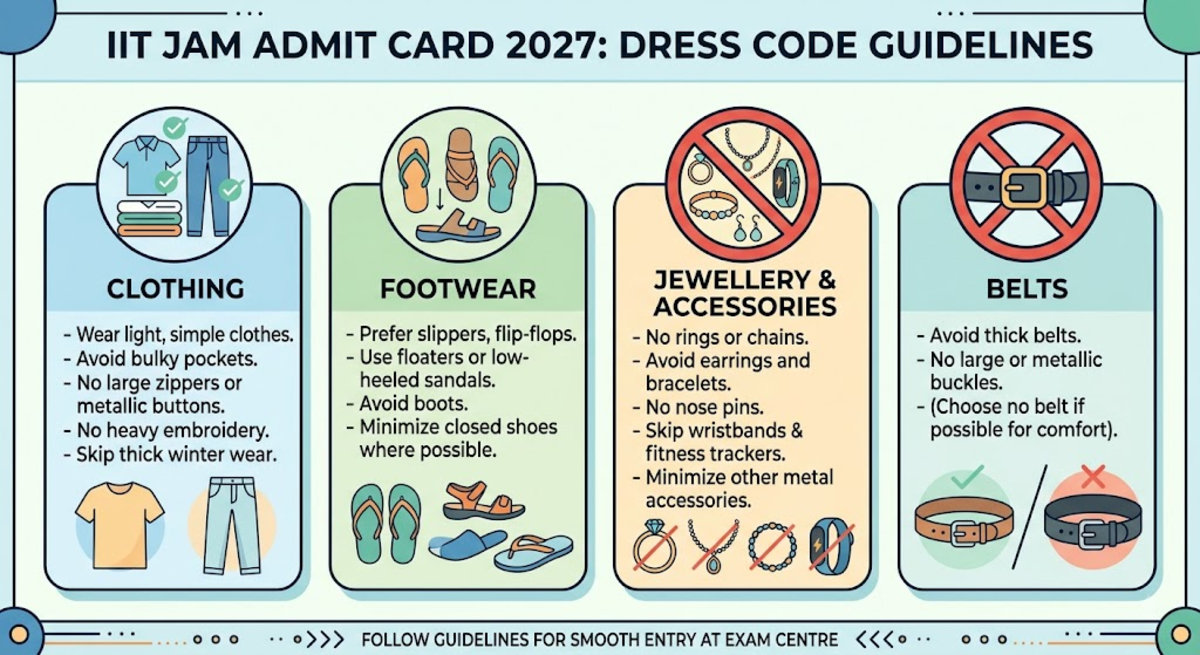
IIT JAM Admit Card 2027: Dress Code Guidelines
The organizing IIT enforces strict dress code protocols at exam centers to ensure rapid security frisking and prevent cheating.
- Wearing the wrong attire can delay your biometric verification or lead to extra security checks at the gate.
- If your religious or cultural practices require you to wear specific attire, the IIT guidelines require you to report to the exam center at least 30 to 45 minutes before the standard reporting time.
| Category | Guidelines |
|---|---|
| Clothing | Wear light, simple clothes; avoid bulky pockets, large zippers, metallic buttons, heavy embroidery, and thick winter wear. |
| Footwear | Prefer slippers, flip-flops, floaters or low-heeled sandals; avoid boots and closed shoes where possible. |
| Jewellery & Accessories | Avoid rings, chains, earrings, bracelets, nose pins, wristbands, fitness trackers and other metal accessories. |
| Belts | Avoid thick belts with large or metallic buckles. |
Also Check:
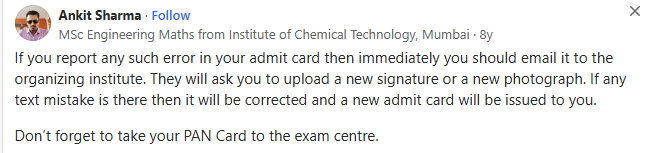
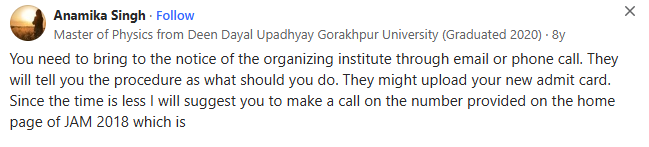
What to Do If There Is a Discrepancy in IIT JAM Admit Card 2027
If you notice any error on your IIT JAM 2027 admit card, such as a misspelled name, wrong date of birth, incorrect category, or unclear photograph, contact the organizing IIT’s helpdesk immediately. Do not wait until exam day to raise the issue; the window for corrections is narrow.
- Download and check your admit card as soon as it is released in January 2027.
- Identify the specific error, note which field is incorrect, and specify the correct information.
- Email the organizing IIT’s helpdesk using the official contact ID listed on the JAM 2027 website.
- Attach a copy of your admit card and the relevant supporting document. For example, your Class 10 certificate for a name or date-of-birth discrepancy.
- Follow up within 48–72 hours if you do not receive a response.
- If there is an unresolved discrepancy on your admit card, you will not be allowed to enter the exam hall at all

Source: Quora
Ques. Can I appear for IIT JAM 2027 without an admit card?
Ans. No. Entry to the exam centre will be denied without a valid printed admit card. There are no exceptions — even if you have registered and paid the fee, the invigilator will not allow you inside without the admit card. Download it as soon as it is released and keep multiple copies safe.
IIT JAM 2027 Admit Card: Quick Checklist
Before leaving for the examination centre, candidates should check:
- Printed copy of the IIT JAM 2027 admit card
- Original and valid photo ID specified during application
- Candidate name and photograph on the admit card
- Correct test paper and exam session
- Examination centre name and complete address
- Reporting instructions mentioned on the admit card
- Any additional instructions issued by IIT Kharagpur
Candidates should avoid carrying items prohibited under the official JAM 2027 examination instructions.
IIT JAM 2027 Helpline
The organizing IIT publishes a dedicated helpline number and official email ID on the JAM 2027 website for queries about the admit card, registration, and exam process.
- Last year, IIT Bombay organised the IIT JAM exam. The primary helpdesk email was jam2026@iitb.ac.in; the Helpline Call Center Numbers and Regional Zonal Support Contacts were the points of contact.
- The helpdesk is active only during dedicated office intervals on official government working days:
- Morning Window: 10:00 AM to 12:30 PM
- Afternoon Window: 2:30 PM to 5:30 PM
- Days Active: Monday through Friday
IIT JAM 2027 Admit Card FAQs
Ques. When will the IIT JAM 2027 admit card be released?
Ans. The IIT JAM 2027 admit card is expected to be released in January 2027 — approximately four to six weeks before the exam. Based on the JAM 2026 pattern, where the admit card was released on January 13, 2026, for a February 15 exam, a similar window is expected for 2027. The exact date will be confirmed in the official notification, expected in August–September 2026.
Ques. How do I download the IIT JAM 2027 admit card?
Ans. You can download the IIT JAM 2027 admit card from the official JOAPS portal of the organizing IIT. Log in with your Enrollment ID and password, navigate to the "Admit Card" section in your dashboard, and download the PDF. Take a colour printout on A4 paper and carry it to the exam centre.
Ques. Can I use a digital copy of the IIT JAM admit card on my phone at the exam centre?
Ans. No. Digital or soft copies on mobile phones or tablets are not accepted at the IIT JAM exam centre. You must carry a printed hard copy on A4 paper. Additionally, mobile phones and all electronic devices are strictly prohibited inside the exam hall — carrying one risks being barred from the exam.
Ques. Will the IIT JAM 2027 admit card be sent by post?
Ans. No. The organizing IIT does not send the admit card by post or dispatch a physical copy to any address. You must download it yourself from the official JOAPS portal once it is released in January 2027.
Ques. Can I change my exam centre after the IIT JAM 2027 admit card is released?
Ans. No. The exam centre allotment is final once the admit card is issued. The organizing IIT does not process centre transfer requests after the admit card is released. Check your allotted centre as soon as you download the admit card and plan your travel.



Comments