




These Notes for Class 12 Computer Science Chapter 8 Database Concepts give you a fast, concept-first revision of the whole chapter, built on the latest 2026-27 CBSE syllabus. They cover the limitations of a file system, what a DBMS is, the relational data model with relation, tuple and attribute, the meaning of degree and cardinality, and every type of key from candidate to foreign.
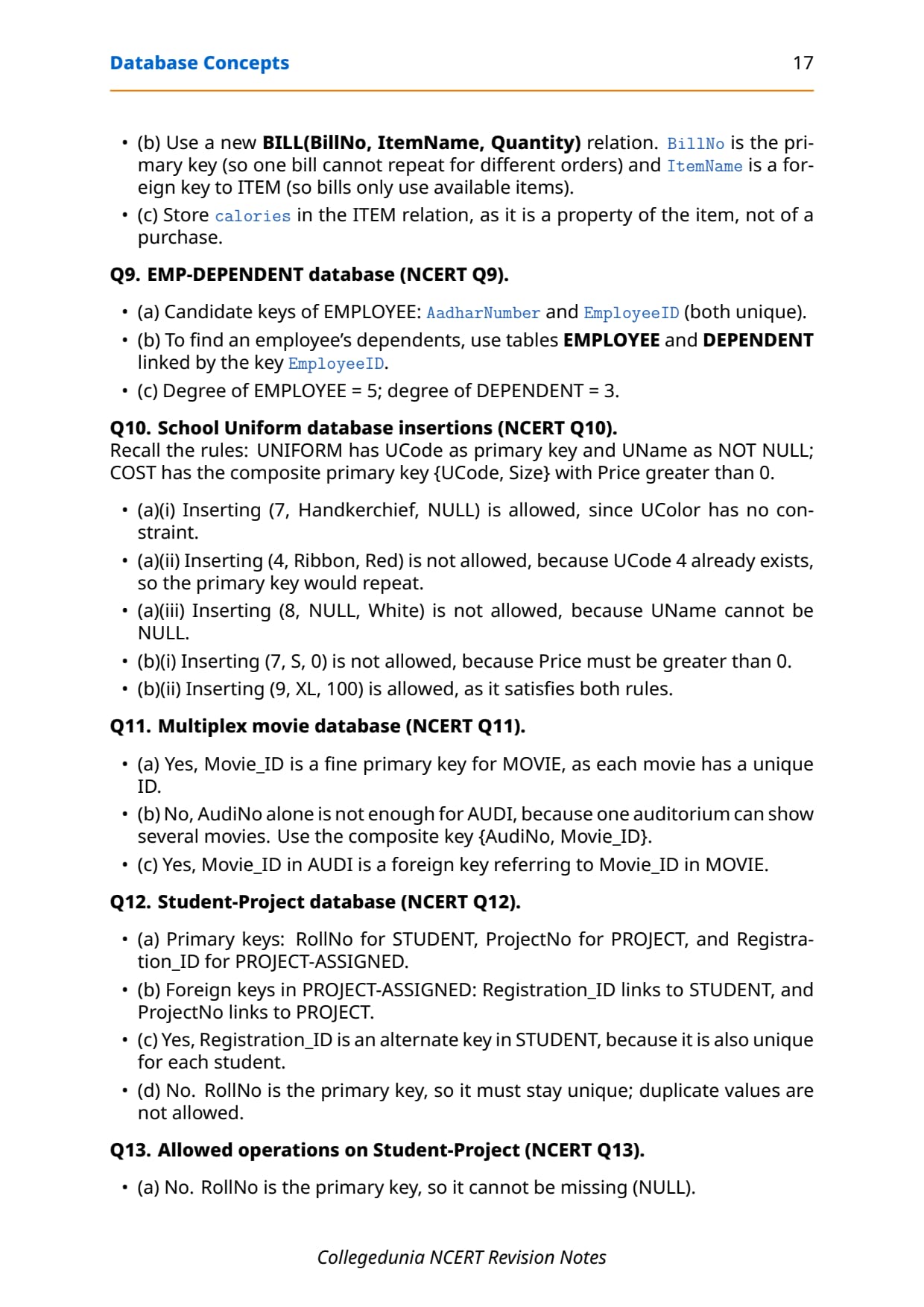
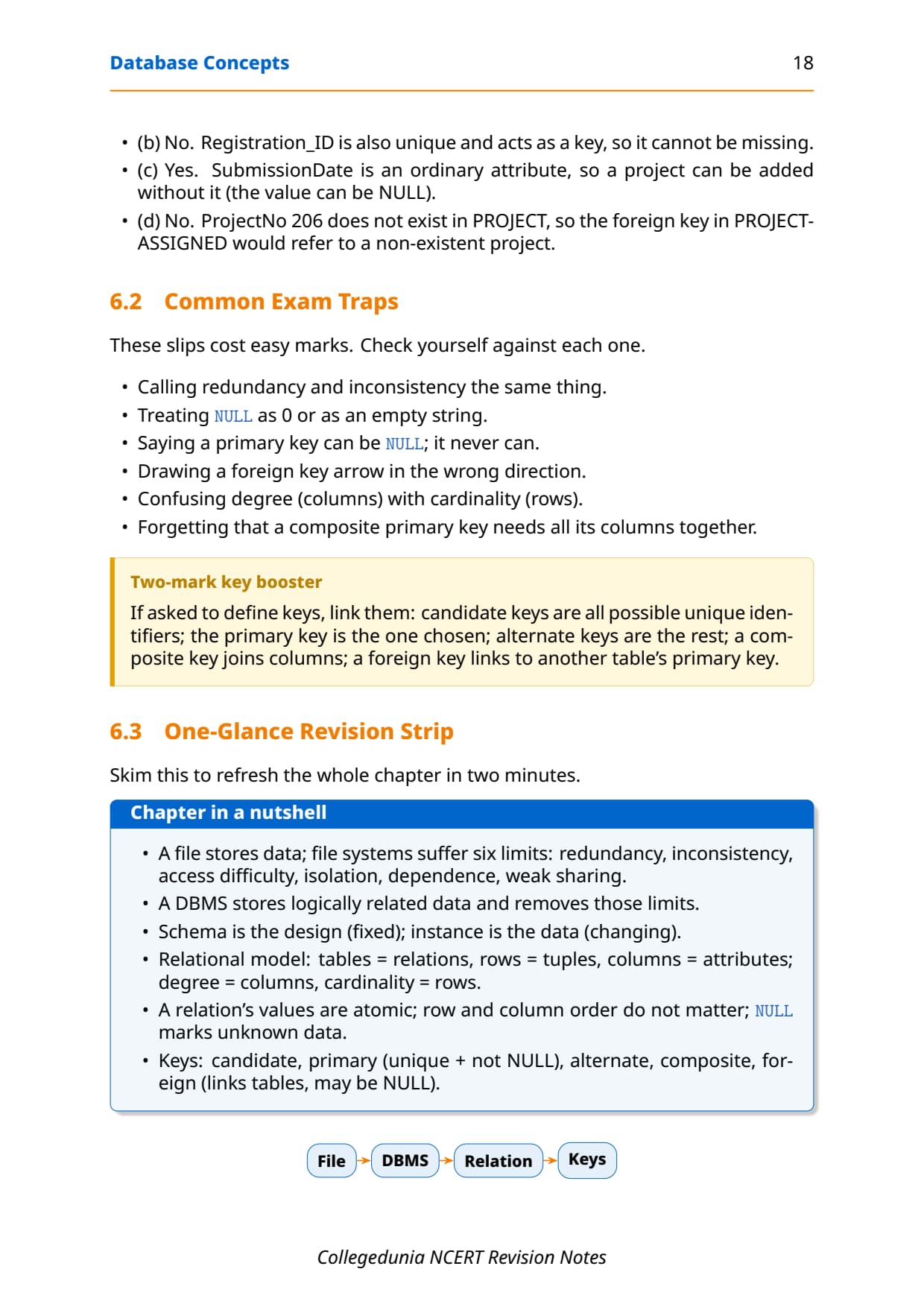
- Every term explained with a one-line meaning, a worked example from the NCERT school database, and a quick table so you can answer the one-mark and two-mark questions the board asks.
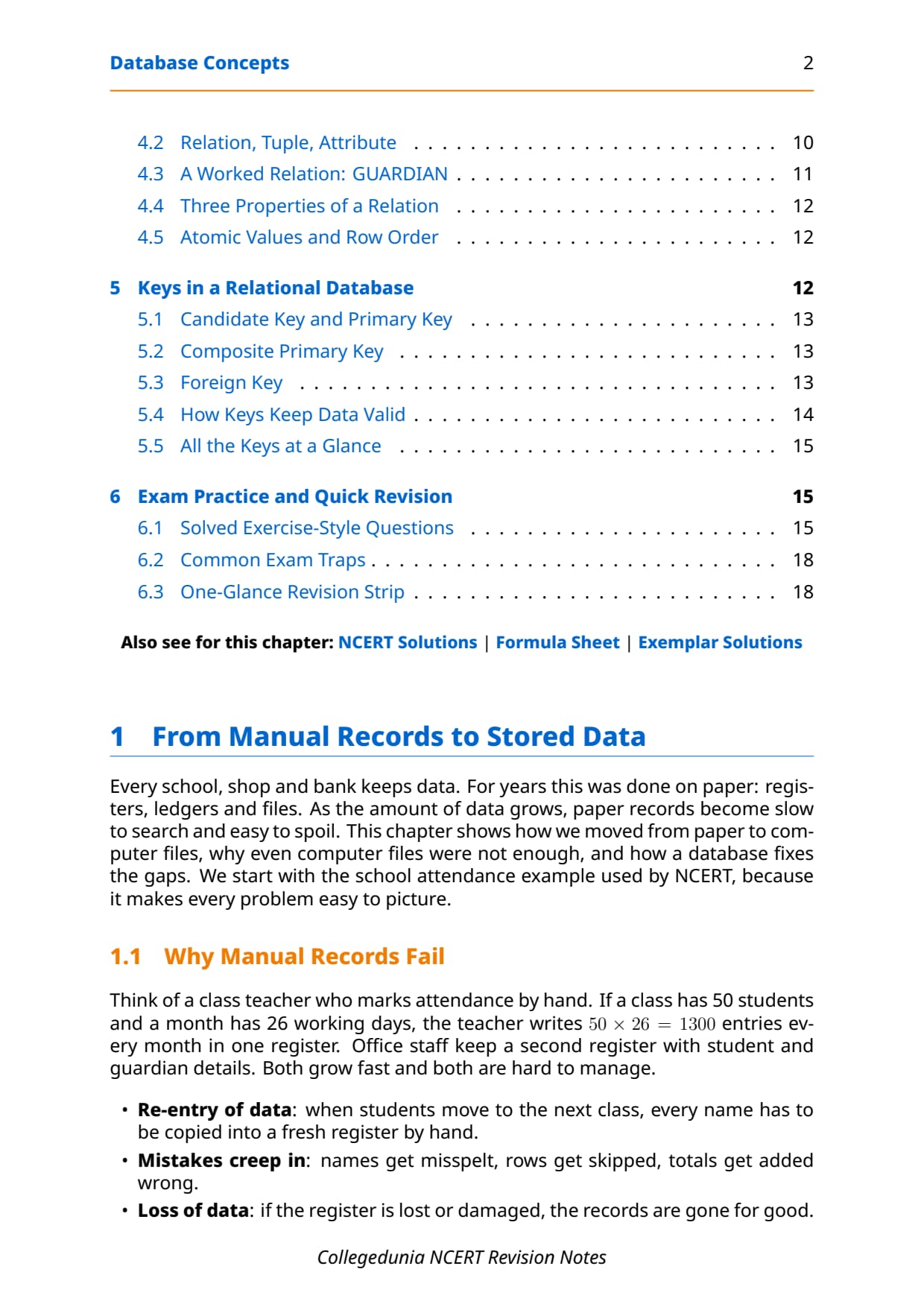
- Full coverage of file system limits, schema vs state, relation properties, NULL, candidate, primary, alternate, composite and foreign keys, plus entity and referential integrity.
- Notes aligned with the 2026-27 CBSE Class 12 Computer Science syllabus and useful for JEE and CUET database questions; no NEET references because Computer Science is not a medical subject.
These Collegedunia revision notes are curated by Computer Science subject experts, mapped to the 2026-27 NCERT textbook, and refined against the last five years of CBSE Class 12 Computer Science board papers.
Student Feedback: What 12,100 students told us about this chapter
71% of Class 12 students said they kept confusing the different key types, especially candidate, primary and alternate keys, while revising. 3 out of 5 students told us a one-page table of all five keys helped them lock the chapter the night before the exam.
Toppers found that learning degree and cardinality with one worked relation, instead of just the definitions, saved them marks on the trickier two-mark questions, and the average student spent 1 to 2 hours on these notes across the first read and the final revision.
Source: 2026-27 Class 12 Computer Science student poll. Sample of 12,100 students from CBSE schools across 13 states, conducted before the 2026 boards.
|
Table of Contents |
What the Notes for Class 12 Computer Science Chapter 8 Database Concepts Cover
This chapter answers one question: how do we store data so it stays related, consistent and easy to fetch? These notes keep the NCERT order but compress it into revision-ready blocks, so you can read the whole chapter in one sitting and recall it fast in the exam.
- Why files fail: the six limitations of a file system, from redundancy to weak controlled sharing, that push us toward a database.
- What a DBMS is: the software that creates and manages a database, and how it beats a plain file system point by point.
- The relational model: relation, tuple and attribute, plus
degree,cardinality,domainand the three properties of a relation. - Keys and integrity: candidate, primary, alternate, composite and foreign keys, and the entity and referential integrity rules they enforce.
Source: Magnet Brains on YouTube
Why a File System Falls Short in Class 12 Computer Science
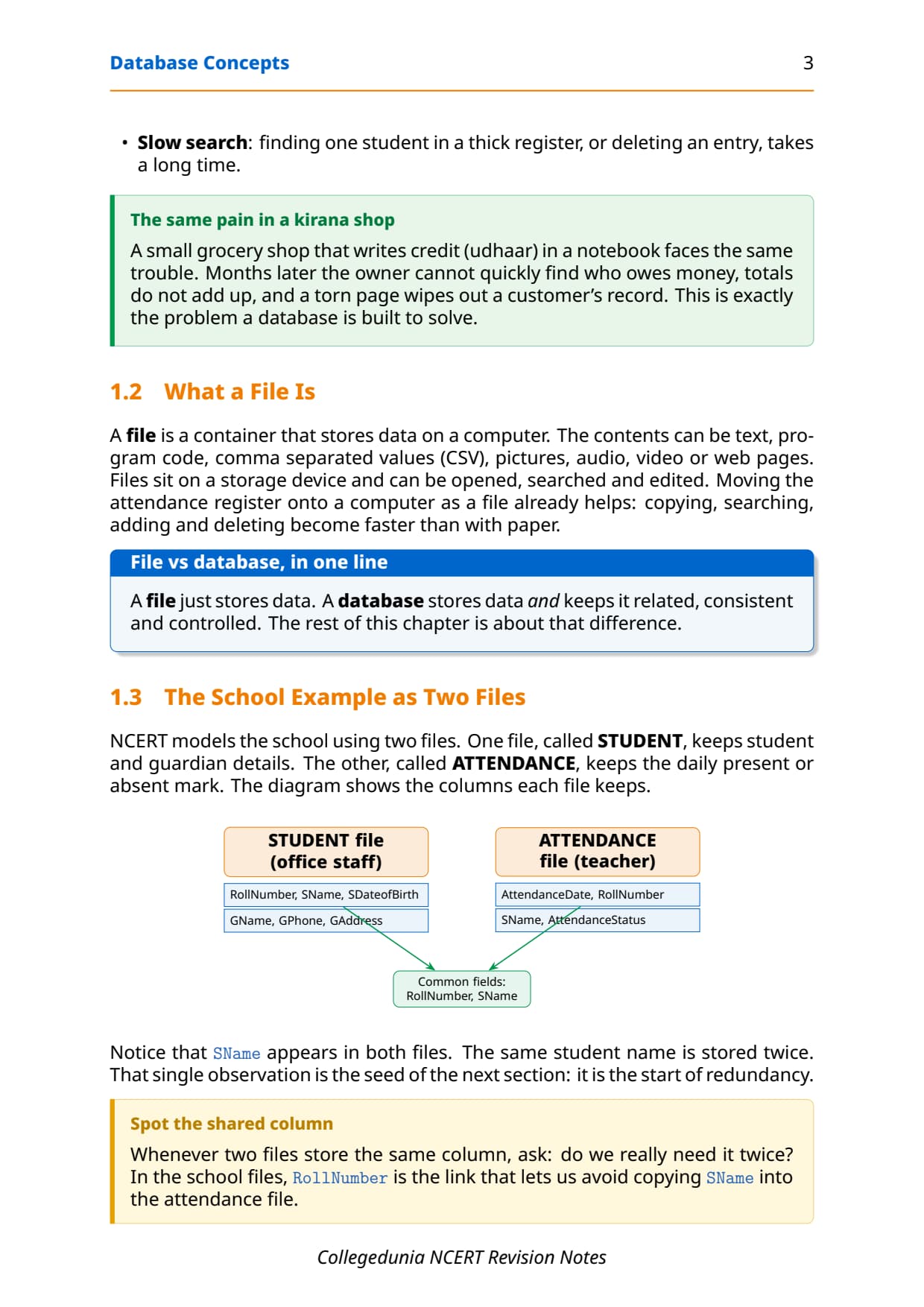
Before databases, schools and shops kept data in plain files, the same way they once kept paper registers. A file is just a container that stores data on a computer: text, CSV, images, audio or web pages. Moving an attendance register into a file helps a little, but as the number of files and the volume of data grow, the file system starts to fail in clear, named ways.
NCERT lists six limitations of a file system, and the board often asks you to define each one with the school example. Learn all six, because they are also the exact reasons a DBMS exists. The table pins each limitation to the school case so the meaning is concrete, not abstract.
| Limitation | What it means (school example) |
|---|---|
| Difficulty in access | No built-in way to fetch data; you must write a new program for every new query. |
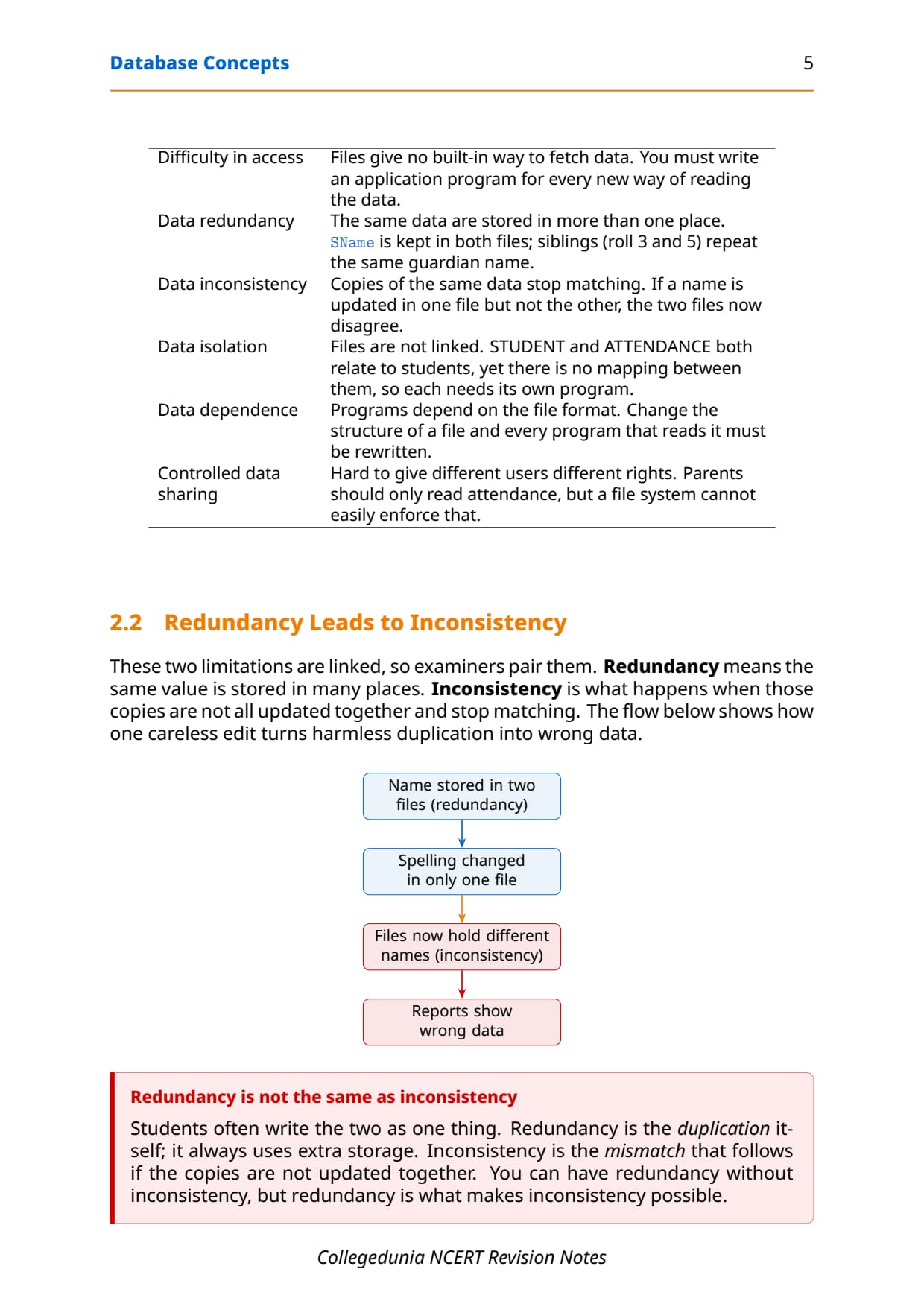
| Data redundancy | The same data are stored in more than one place, like a student name kept in two files. |
| Data inconsistency | Copies of the same data stop matching when one file is updated and the other is not. |
| Data isolation | Files are not linked, so each related file needs its own program and cannot easily combine. |
| Data dependence | Programs depend on the file format; change the structure and every program must be rewritten. |
| Weak controlled sharing | Hard to give different users different rights, such as read-only access for parents. |
A handy way to recall all six is the string RICA DD: Redundancy, Inconsistency, Controlled sharing, Access difficulty, Dependence, and Data isolation. Six letters, six limitations a DBMS is built to remove.
What Is a DBMS and What It Does
A database keeps logically related data together in one organised place. The software used to create and manage such databases is the Database Management System, or DBMS for short. It lets users and programs create a database, then store, update, delete and retrieve data from it. Common examples are MySQL, Oracle, PostgreSQL, SQL Server, Microsoft Access and MongoDB.
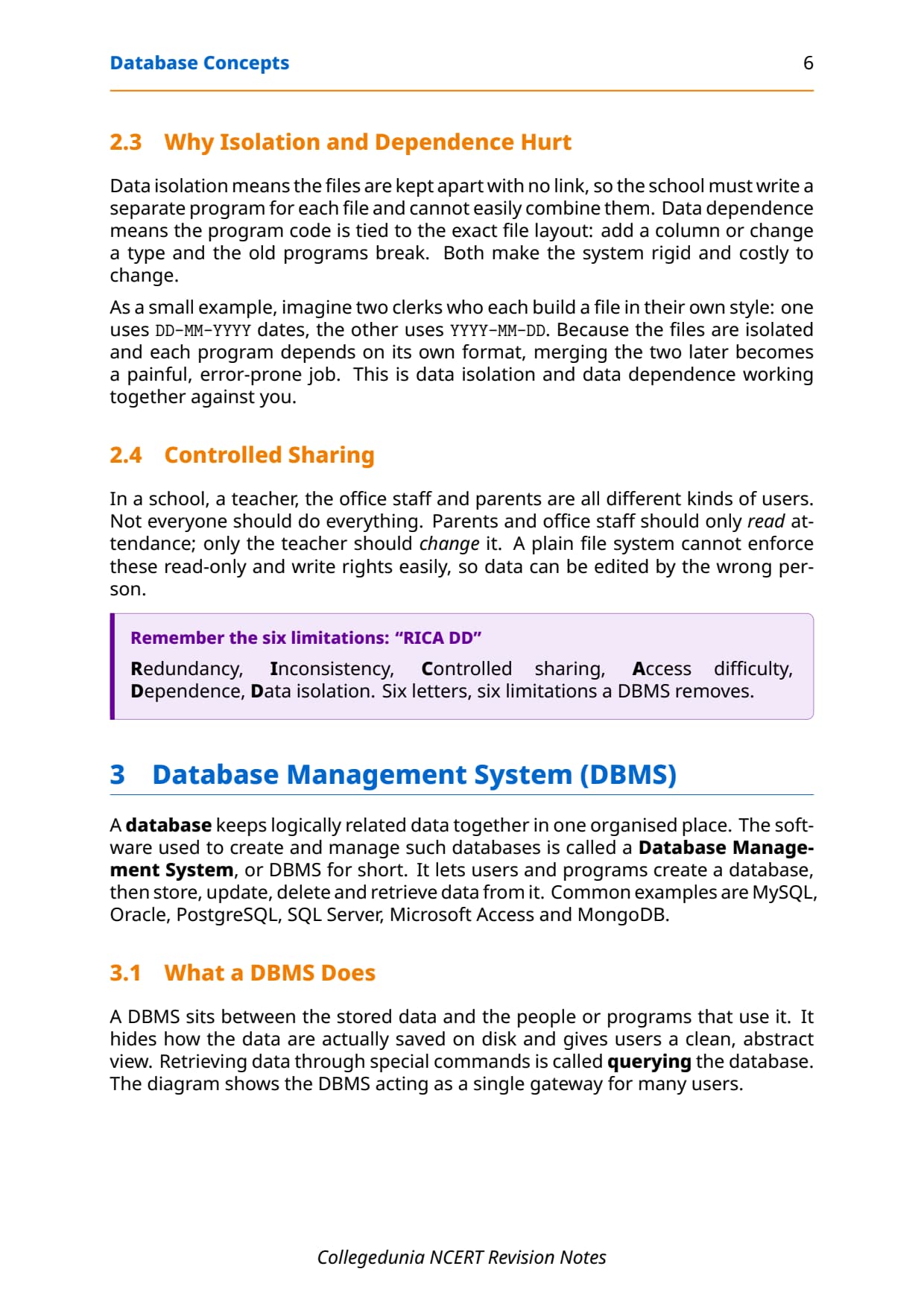
A DBMS sits between the stored data and the people or programs that use it. It hides how the data are saved on disk and gives users a clean, abstract view. Fetching data through special commands is called querying the database.
- Single gateway: many users (a teacher, the office staff) all reach one shared database through the DBMS.
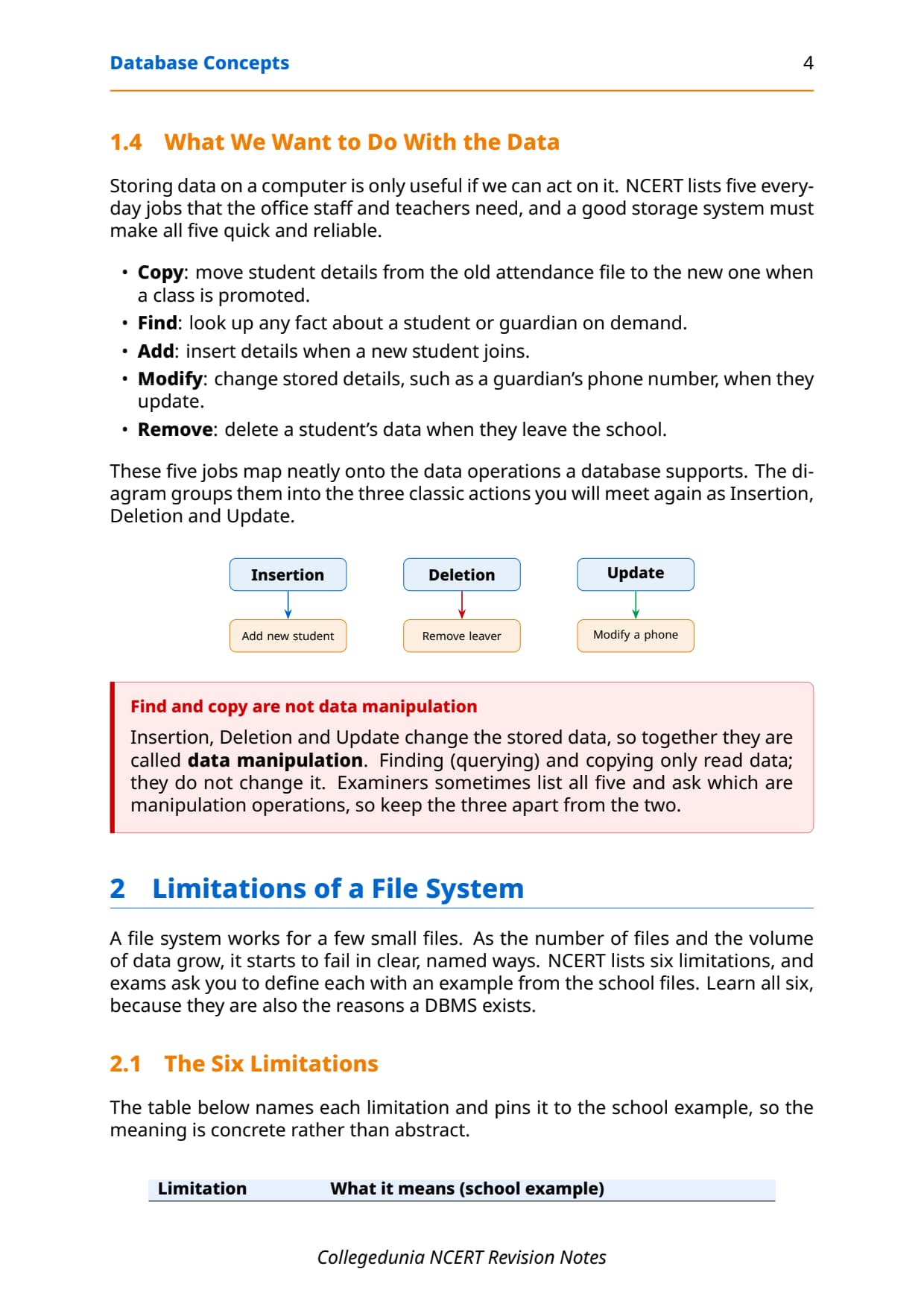
- Data manipulation: changing the stored data through Insertion, Deletion or Update. Finding and copying only read data, so they are not manipulation.
- Everyday uses: banking, crop loans, inventory, organisation resource records and online shopping all run on databases.
A DBMS is powerful but not free of cost. NCERT lists trade-offs you should be able to state: a high setup cost for hardware, software and training; a recurring cost for backup and recovery; increased complexity in managing security and integrity; and increased vulnerability, because data stored centrally means a single failure can stop work for every user at once.
File System vs DBMS Compared in Class 12 Computer Science
The whole point of moving to a DBMS is to fix the six file-system limits. A "compare file system and DBMS" question is a favourite three-mark question, so set the two side by side point by point rather than writing two separate paragraphs.
| Point | File system | DBMS |
|---|---|---|
| Redundancy | Same data stored many times | Stored once, shared through keys |
| Consistency | Copies can disagree | One copy keeps data consistent |
| Linking | Files are isolated, no mapping | Tables linked by keys |
| Access | Needs a program for each query | Query language fetches data directly |
| Constraints | No built-in rules | NOT NULL, UNIQUE and more |
| Sharing | Hard to give per-user rights | Fine-grained access control |
| Dependence | Code tied to file format | Data and programs kept separate |
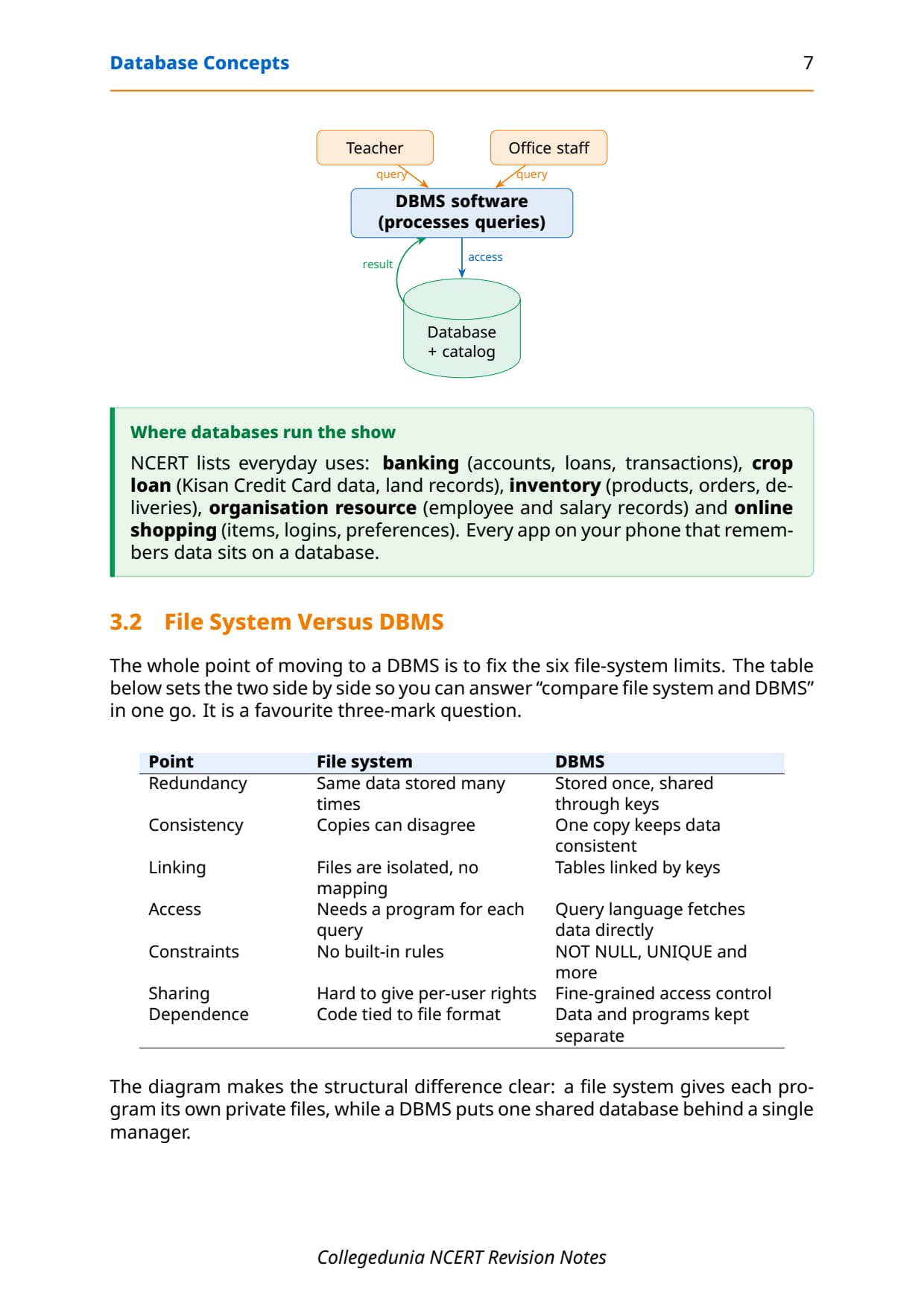
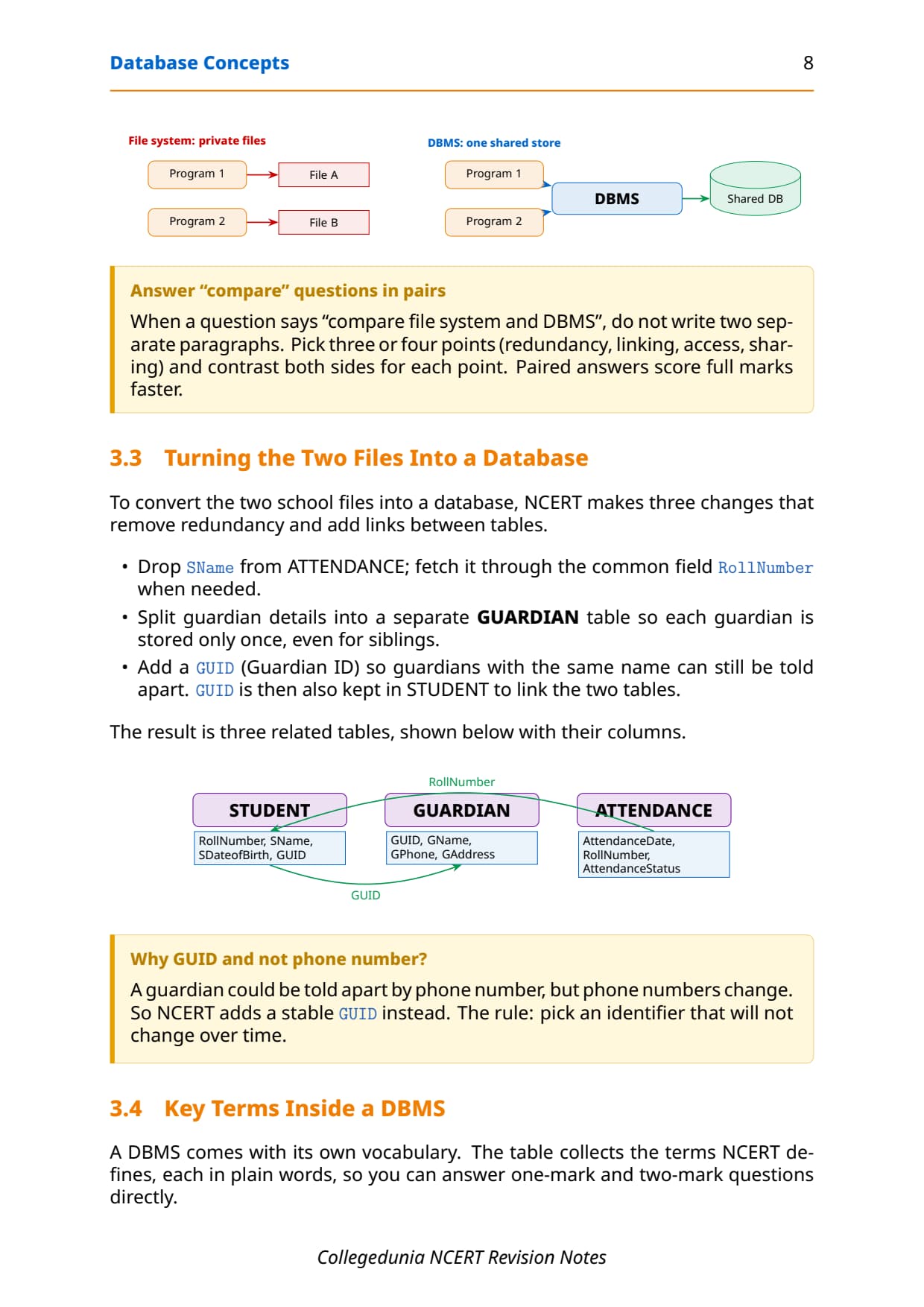
The structural difference is simple: a file system gives each program its own private files, while a DBMS puts one shared database behind a single manager. To turn two school files into a database, NCERT removes redundancy in three steps:
- Drop the duplicated student name from the attendance file and fetch it through the common field
RollNumber. - Split guardian details into a separate
GUARDIANtable so each guardian is stored only once, even for siblings. - Add a stable
GUID(Guardian ID) to tell apart guardians with the same name, then keepGUIDin the student table to link them.
GUID instead. The rule for any identifier: pick a value that will not change over time.
The Relational Data Model: Relation, Tuple and Attribute
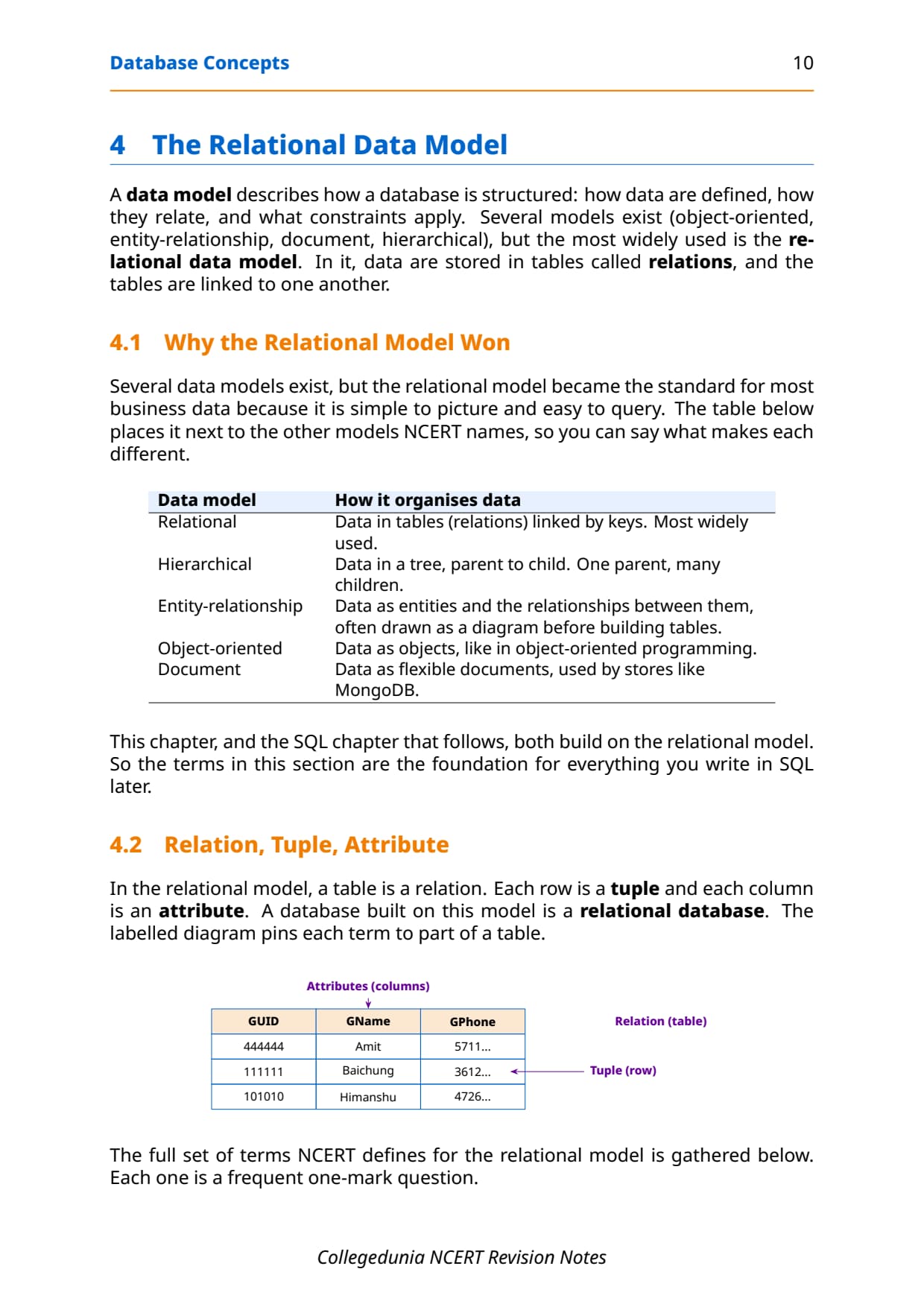
A data model describes how a database is structured: how data are defined, how they relate, and what constraints apply. Several models exist, but the most widely used is the relational data model, where data are stored in tables called relations that link to one another. This chapter and the SQL chapter that follows both build on it.
In the relational model, a table is a relation, each row is a tuple, and each column is an attribute. A database built on this model is a relational database. The table below collects every term NCERT defines, and each one is a frequent one-mark question.
| Term | Meaning |
|---|---|
| Relation | A table that stores data; rows are related sets of values. |
| Attribute | A column of a relation; a feature for which data are stored. |
| Tuple | A row of a relation; one set of related column values. |
| Domain | The set of allowed values an attribute may take, usually fixed by its data type. |
| Degree | The number of attributes (columns) in a relation. |
| Cardinality | The number of tuples (rows) in a relation. |
Several data models exist beside the relational one, and the board sometimes asks you to name and place them. The relational model won for most business data because it is simple to picture and easy to query.
| Data model | How it organises data |
|---|---|
| Relational | Data in tables (relations) linked by keys; the most widely used. |
| Hierarchical | Data in a tree, parent to child; one parent, many children. |
| Entity-relationship | Data as entities and the relationships between them, often drawn as a diagram first. |
| Object-oriented | Data as objects, like in object-oriented programming. |
| Document | Data as flexible documents, used by stores like MongoDB. |
Degree, Cardinality and the Three Properties of a Relation
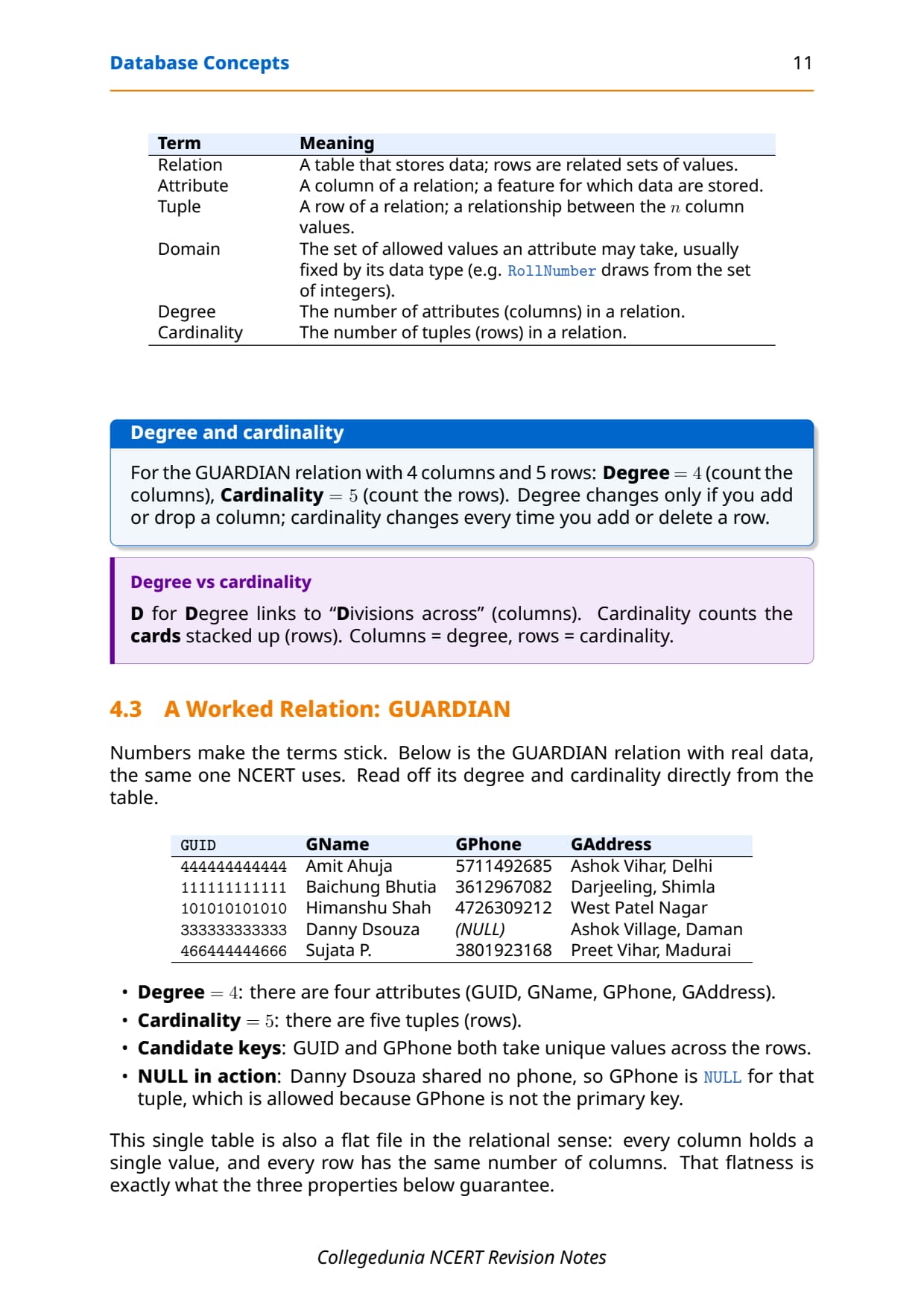
Two counts describe the shape of any relation, and they are a steady source of marks. Degree is the number of columns (attributes), and cardinality is the number of rows (tuples). Take the GUARDIAN relation NCERT uses, with four columns and five rows.
| GUID | GName | GPhone | GAddress |
|---|---|---|---|
| 444444444444 | Amit Ahuja | 5711492685 | Ashok Vihar, Delhi |
| 111111111111 | Baichung Bhutia | 3612967082 | Darjeeling, Shimla |
| 101010101010 | Himanshu Shah | 4726309212 | West Patel Nagar |
| 333333333333 | Danny Dsouza | (NULL) | Ashok Village, Daman |
| 466444444666 | Sujata P. | 3801923168 | Preet Vihar, Madurai |
For this relation, degree = 4 (count the columns) and cardinality = 5 (count the rows). Degree changes only if you add or drop a column; cardinality changes every time you add or delete a row. Notice Danny Dsouza's phone is NULL, which is allowed because GPhone is not the primary key.
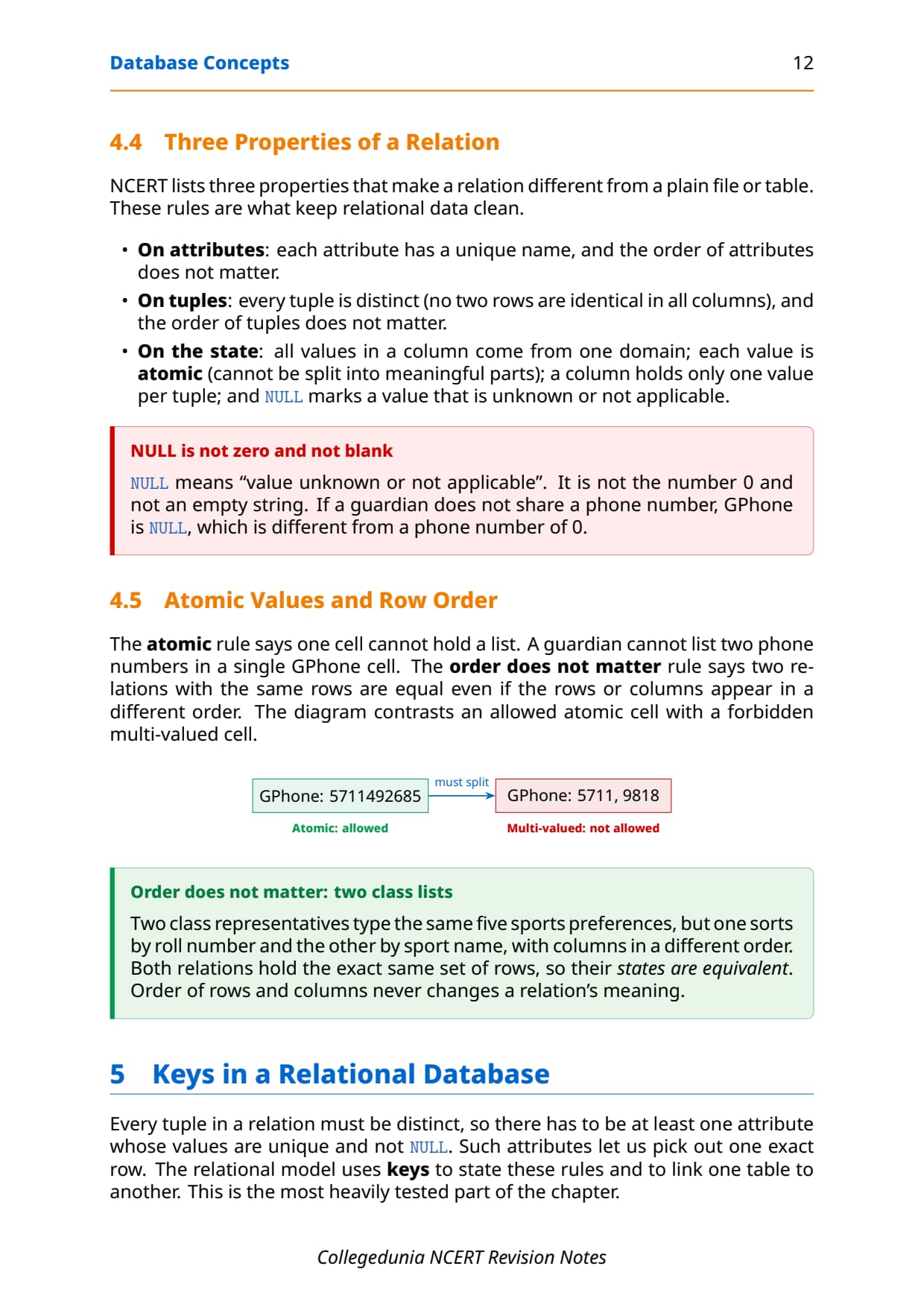
A relation is not just any table. NCERT lists three properties that keep relational data clean, and they explain why the school data is reliable.
- On attributes: each attribute has a unique name, and the order of attributes does not matter.
- On tuples: every tuple is distinct (no two rows are identical), and the order of tuples does not matter.
- On the state: all values in a column come from one domain; each value is atomic (cannot be split); a cell holds only one value; and
NULLmarks a value that is unknown or not applicable.
NULL is not zero and not an empty string. It means "value unknown or not applicable". A guardian who shares no phone has GPhone as NULL, which is different from a phone number of 0. The atomic rule also means one cell can never hold a list of two phone numbers.Keys in a Relational Database: Candidate, Primary, Alternate, Composite and Foreign
Every tuple in a relation must be distinct, so at least one attribute must hold unique, non-NULL values to pick out one exact row. The relational model uses keys to state these rules and to link one table to another. This is the most heavily tested part of the chapter.
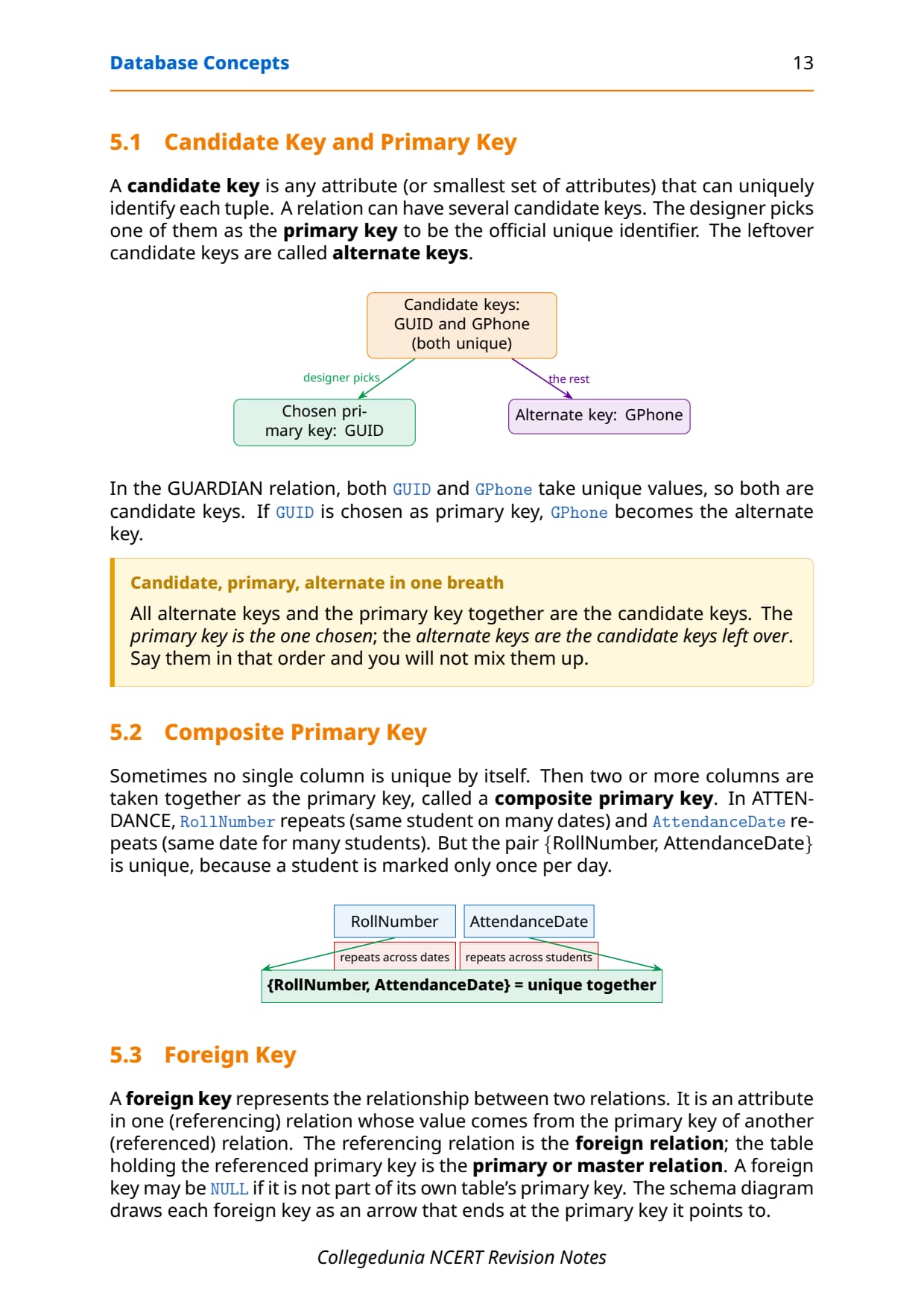
- A candidate key is any attribute, or smallest set of attributes, that can uniquely identify each tuple. A relation can have several.
- The primary key is the one candidate key the designer picks as the official unique identifier; it is unique and never
NULL. - The leftover candidate keys become alternate keys.
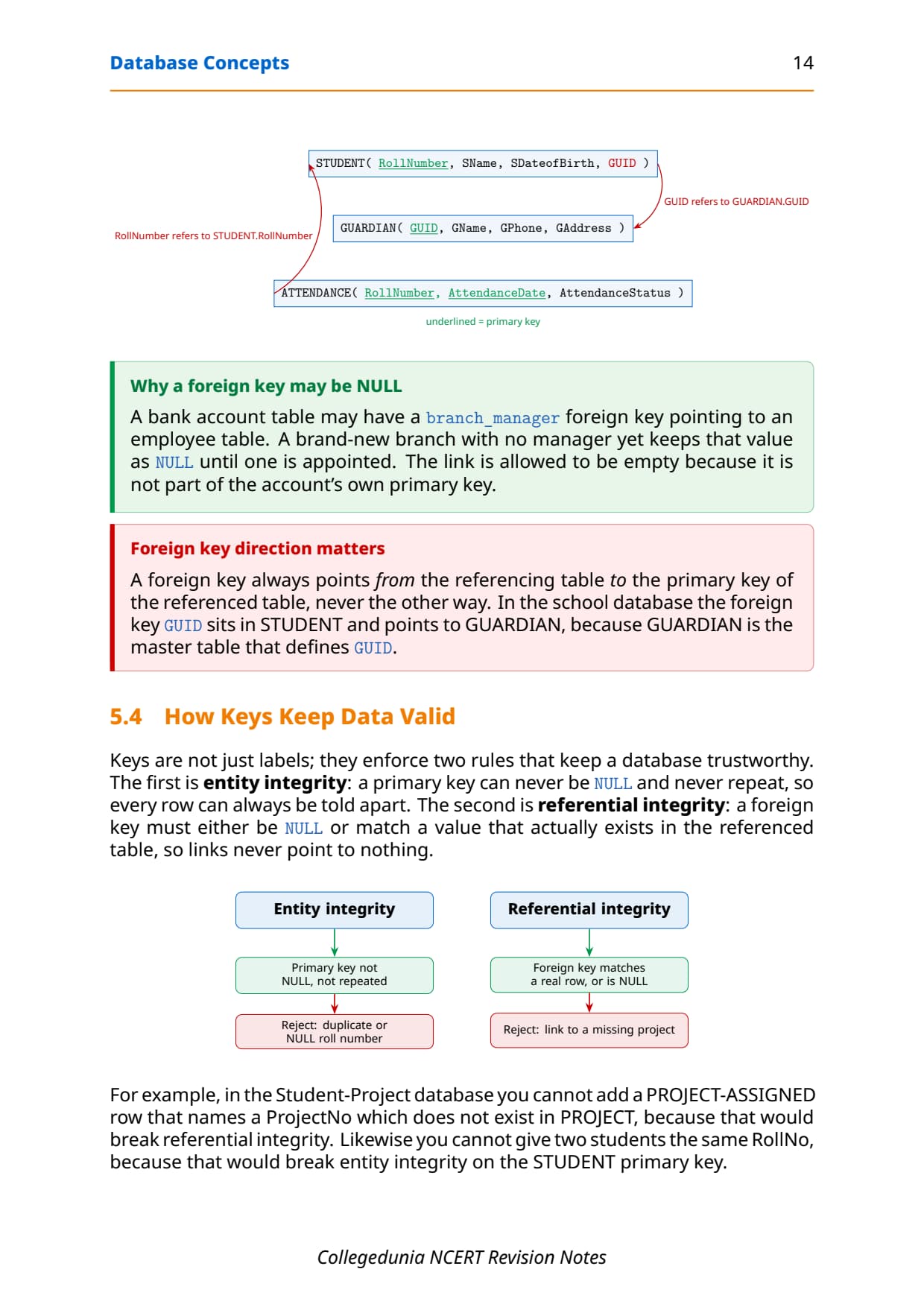
- A composite primary key uses two or more columns together when no single column is unique on its own.
- A foreign key is an attribute in one table whose value comes from the primary key of another table; it may be
NULL.
In the GUARDIAN relation, both GUID and GPhone hold unique values, so both are candidate keys. If GUID is chosen as the primary key, GPhone becomes the alternate key. The table below sums up every key type with a one-line rule and the school example.
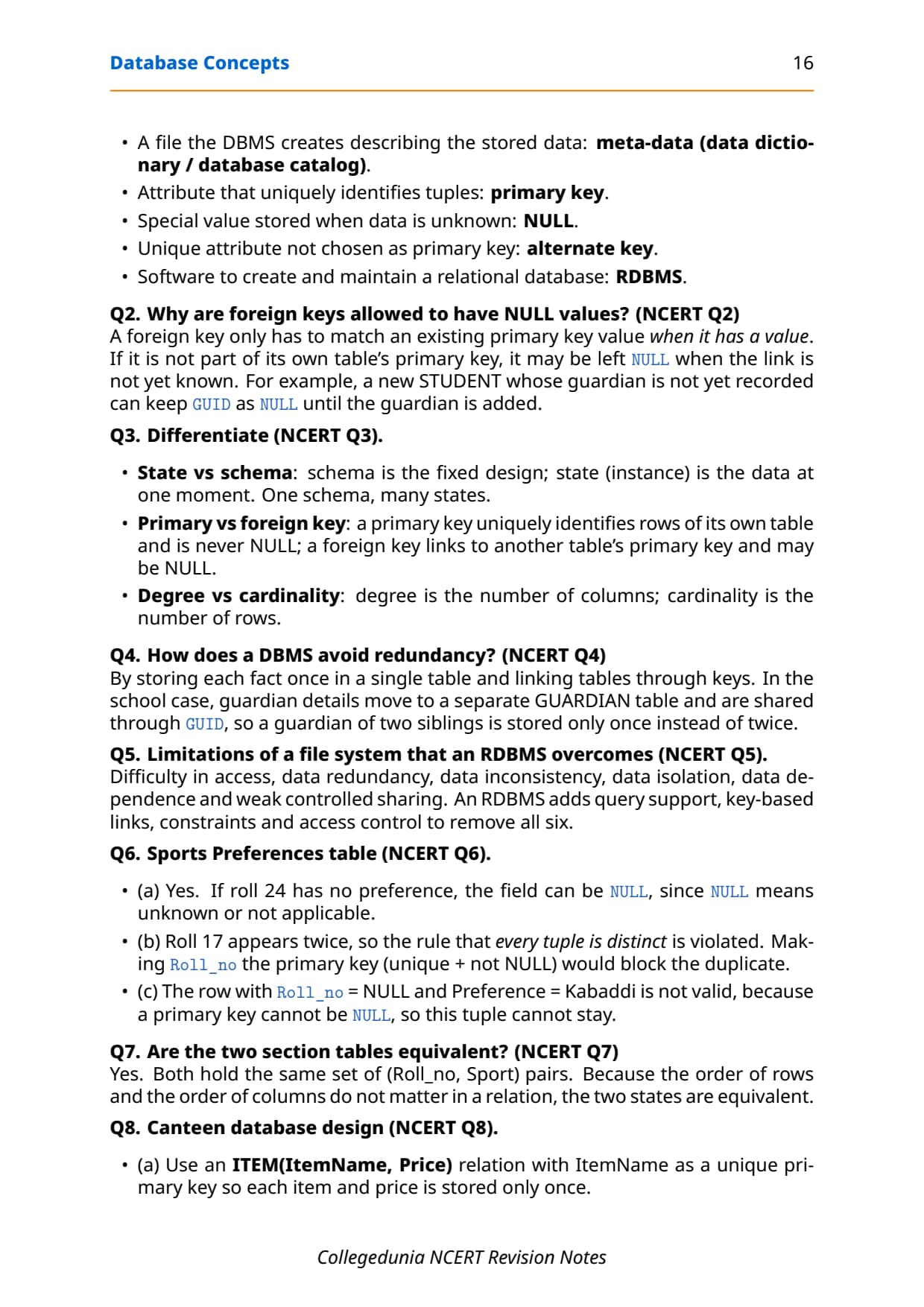
| Key | Rule | Example |
|---|---|---|
| Candidate key | Any attribute set that uniquely identifies a tuple | GUID, GPhone |
| Primary key | The candidate key chosen as the official identifier; unique and not NULL | GUID |
| Alternate key | Candidate keys not chosen as primary | GPhone |
| Composite primary key | Two or more columns used together as the primary key | {RollNumber, AttendanceDate} |
| Foreign key | An attribute referring to another table's primary key; may be NULL | GUID in STUDENT |
A composite primary key appears when no single column is unique. In an attendance table, RollNumber repeats across dates and AttendanceDate repeats across students, but the pair {RollNumber, AttendanceDate} is unique, because a student is marked only once per day.
Entity and Referential Integrity
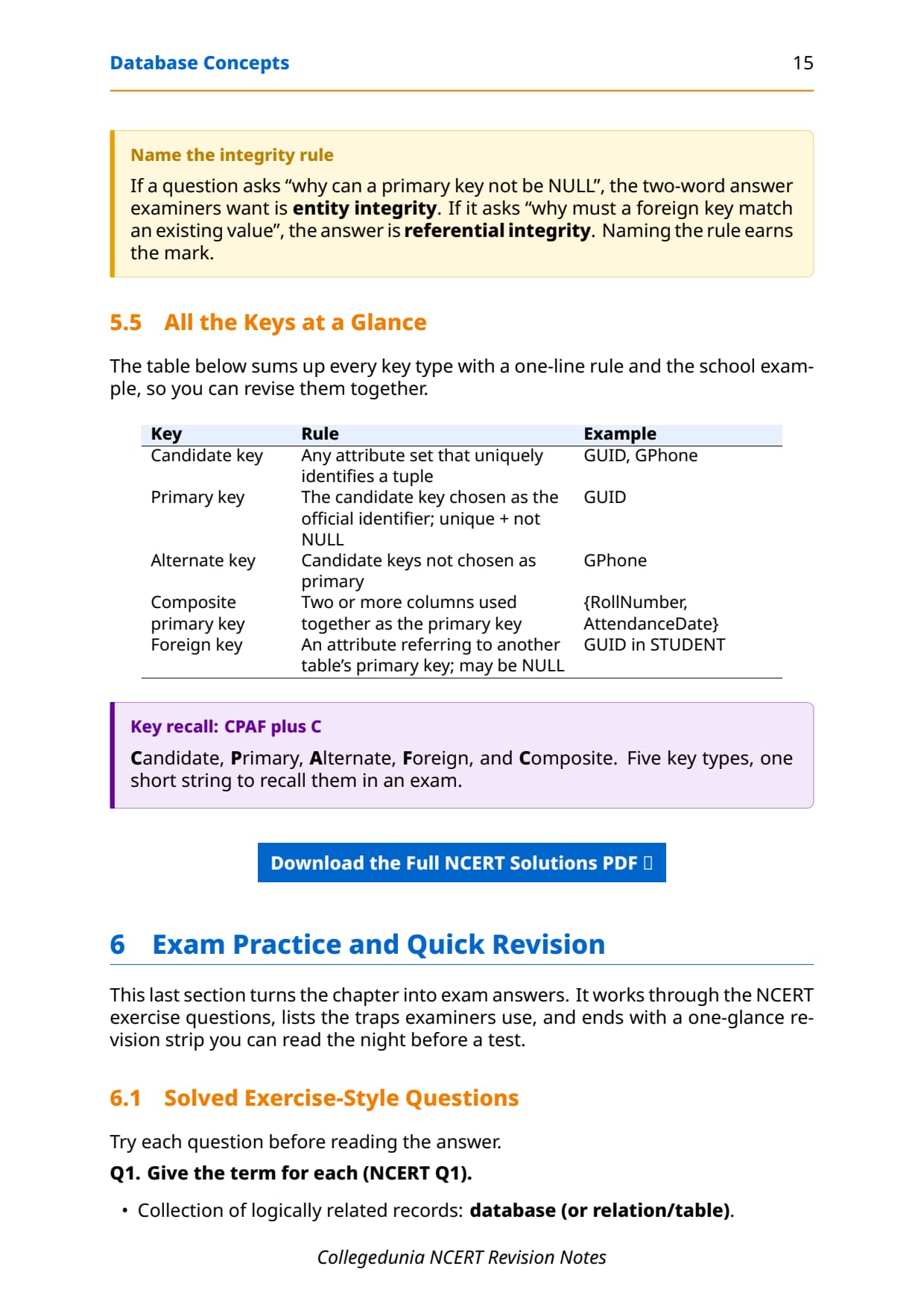
Keys are not just labels; they enforce two rules that keep a database trustworthy. Getting their names right earns easy marks, because the board often asks "why can a primary key not be NULL" or "why must a foreign key match an existing value".
| Integrity rule | What it guarantees | What it rejects |
|---|---|---|
| Entity integrity | A primary key is never NULL and never repeats, so every row can be told apart. | A duplicate or NULL roll number. |
| Referential integrity | A foreign key is either NULL or matches a value that really exists in the referenced table. | A link to a project number that does not exist. |
A foreign key always points from the referencing table to the primary key of the referenced (master) table, never the other way. In the school database, the foreign key GUID sits in STUDENT and points to GUARDIAN, because GUARDIAN is the master table that defines GUID.
GUID as NULL until the guardian is added, because the foreign key is not part of the student table's own primary key.
Schema, State and Other Key Terms in the DBMS
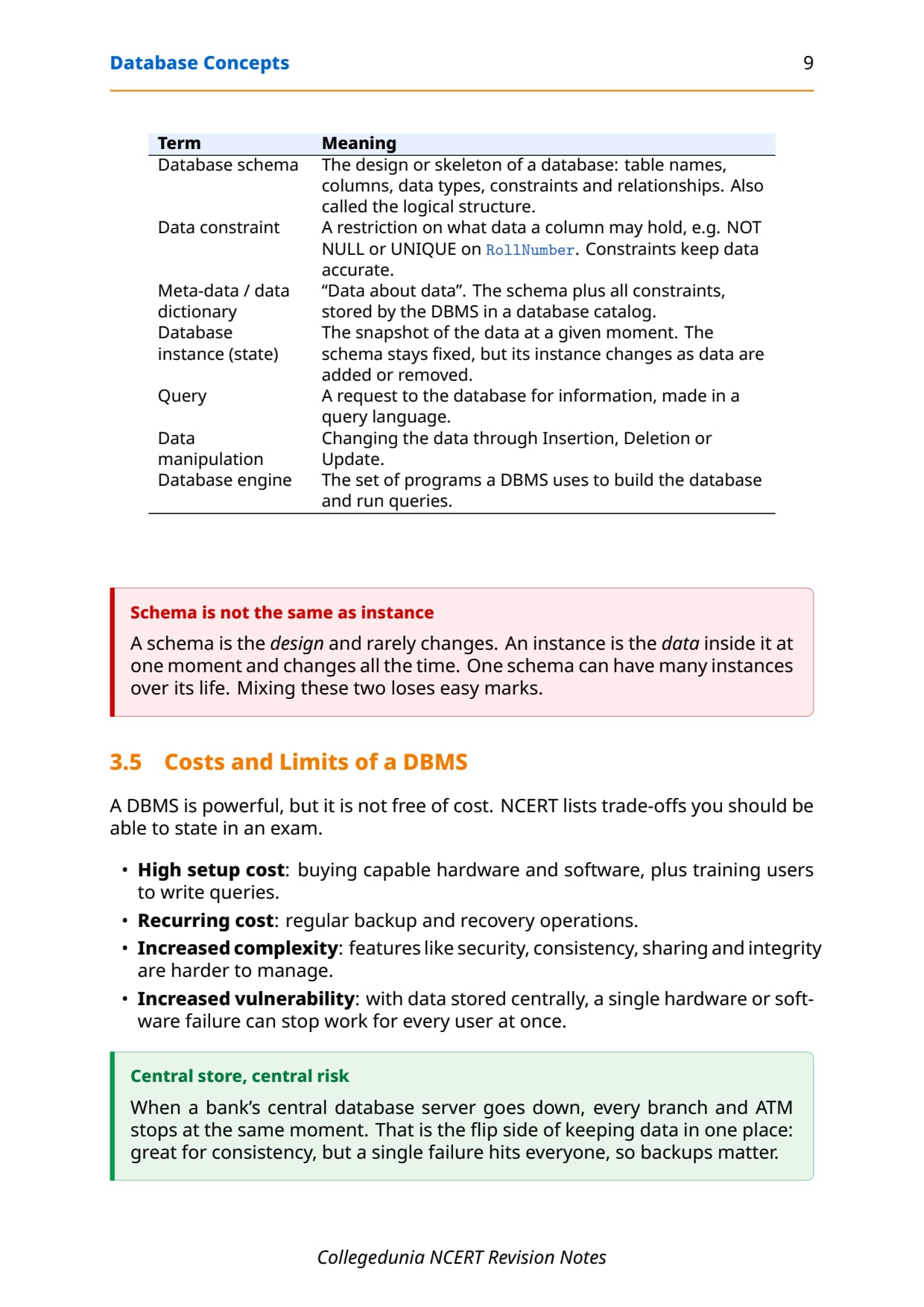
A DBMS comes with its own vocabulary, and a few terms appear in almost every paper. The most tested pair is schema versus state, so keep them apart. The table collects the terms NCERT defines in plain words.
| Term | Meaning |
|---|---|
| Database schema | The design or skeleton of a database: table names, columns, data types, constraints and relationships. Also called the logical structure. |
| Database state (instance) | The snapshot of the data at a given moment. The schema stays fixed, but its state changes as data are added or removed. |
| Data constraint | A restriction on what data a column may hold, such as NOT NULL or UNIQUE. |
| Meta-data / data dictionary | "Data about data": the schema plus all constraints, stored in a database catalog. |
| Query | A request to the database for information, made in a query language. |
| Database engine | The set of programs a DBMS uses to build the database and run queries. |
The same vocabulary also answers the very first NCERT exercise: a collection of logically related records is a database; the file the DBMS creates to describe stored data is the meta-data (data dictionary); the attribute that uniquely identifies tuples is the primary key; the special value for unknown data is NULL; a unique attribute not chosen as primary is the alternate key; and the software to create and maintain a relational database is an RDBMS.
Common Mistakes Students Make in the Database Chapter
The repeat-offender mistakes in Database Concepts board answers:
- Calling redundancy and inconsistency the same: redundancy is the duplication, inconsistency is the mismatch that can follow.
- Treating
NULLas 0 or an empty string:NULLmeans unknown or not applicable, nothing more. - Saying a primary key can be
NULL: it never can, because that breaks entity integrity. - Drawing the foreign key arrow the wrong way: it always points from the referencing table to the master table's primary key.
- Confusing degree (columns) with cardinality (rows): degree counts attributes, cardinality counts tuples.
- Forgetting a composite key needs all its columns together: one column alone is not unique.
How to Use the Database Concepts Notes PDF for Board Revision
The Database Concepts chapter is theory-heavy and definition-heavy, with no programs to trace. The best approach is two passes: one for the vocabulary and the comparison tables, one for the key types and the worked relation.
First pass: vocabulary and comparisons
Read these notes and lock the six file-system limits, the file system versus DBMS table, and the relational terms relation, tuple, attribute, degree and cardinality. Say one line of meaning aloud for each, because most one-mark questions are pure definitions.
Second pass: keys and the worked relation
Work the GUARDIAN relation by hand: read off its degree and cardinality, list its candidate keys, and decide the primary and alternate keys. Then practise the foreign-key direction and the two integrity rules. That single drill covers the most common two-mark and three-mark questions on this chapter.
JEE and CUET angle
For students preparing competitive exams, database terms appear in CUET Computer Science and in JEE-level computer-fundamentals rounds. Keys, degree and cardinality, and the file system versus DBMS contrast are exactly the concept questions those papers reuse, so this revision doubles as competitive prep.
Previous Year Question Trends from the Database Concepts Chapter
The Database Concepts chapter is tested in CBSE board papers mainly through definition, differentiate and short-answer questions, with a design or "give the term" question on keys and constraints. The table below maps the asked question types across recent board papers, so your revision can target the high-frequency areas.
| Year | Question type asked | Marks |
|---|---|---|
| 2025 | Define candidate key; differentiate primary key and foreign key | 1 + 2 |
| 2024 | Give the term for unknown data and for a unique non-primary attribute; degree and cardinality | 2 + 1 |
| 2023 | Why can a foreign key be NULL; difference between schema and state | 2 + 1 |
| 2022 | Compare a file system and a DBMS; list limitations of a file system | 3 |
| 2021 | Identify primary, alternate and foreign keys from a given table set | 3 |
Also Check: The full set of CBSE board paper questions for this chapter, with step-by-step answers, is included in the downloadable PDF above, updated for the 2026-27 cycle.
Other Resources for Class 12 Computer Science Chapter 8 Database Concepts
Pair these revision notes with the matching NCERT Solutions, handwritten notes and the official NCERT book chapter. All resources for Class 12 Computer Science Chapter 8 Database Concepts are linked below.
| Resource | What it covers | Open |
|---|---|---|
| Notes | Concept-first revision notes on file-system limits, the DBMS, the relational model, degree and cardinality, and every key type. | You are here |
| NCERT Solutions | Step-by-step answers to all exercise questions, with an Expert Solution for each. | Class 12 Computer Science Chapter 8 NCERT Solutions |
| Handwritten Notes | Scanned-style handwritten pages for last-minute board revision. | Class 12 Computer Science Chapter 8 Handwritten Notes |
| NCERT Book PDF | Official NCERT Computer Science Chapter 8 Database Concepts textbook in PDF form. | Class 12 Computer Science Chapter 8 NCERT Book PDF |
Notes for Class 12 Computer Science: All Chapters
Related Links: Use the table below to open the revision notes for the other chapters of Class 12 Computer Science. The previous chapter is Understanding Data and the next chapter is Structured Query Language (SQL). Every chapter ships with the same concept-first notes style, full PDF download, and revision FAQ.
| Chapter | Notes link |
|---|---|
| Chapter 1 | Exception Handling in Python Notes |
| Chapter 2 | File Handling in Python Notes |
| Chapter 3 | Stack Notes |
| Chapter 4 | Queue Notes |
| Chapter 5 | Sorting Notes |
| Chapter 6 | Searching Notes |
| Chapter 7 | Understanding Data Notes |
| Chapter 8 | Database Concepts Notes (You are here) |
| Chapter 9 | Structured Query Language (SQL) Notes |
| Chapter 10 | Computer Networks Notes |
| Chapter 11 | Data Communication Notes |
| Chapter 12 | Security Aspects Notes |
Notes Class 12 Computer Science Chapter 8 Database Concepts FAQs
Ques. What does Chapter 8 Database Concepts cover in Class 12 Computer Science?
Ans. Chapter 8 covers how data is stored so it stays related, consistent and easy to fetch. The notes explain the six limitations of a file system, what a Database Management System (DBMS) is and does, and how it beats a file system point by point. They also cover the relational data model with relation, tuple and attribute, the meaning of degree and cardinality, the three properties of a relation, the use of NULL, and every key type from candidate to foreign, along with entity and referential integrity, all aligned with the 2026-27 CBSE syllabus.
Ques. What are the limitations of a file system in Class 12 Computer Science?
Ans. A file system has six limitations that a DBMS removes: difficulty in access (you must write a program for each query), data redundancy (the same data stored in many places), data inconsistency (copies that stop matching), data isolation (files that are not linked), data dependence (programs tied to the file format), and weak controlled sharing (hard to give different users different rights). A handy way to recall them is the string RICA DD: Redundancy, Inconsistency, Controlled sharing, Access difficulty, Dependence and Data isolation.
Ques. What is the difference between degree and cardinality of a relation?
Ans. Degree is the number of attributes (columns) in a relation, while cardinality is the number of tuples (rows). For the GUARDIAN relation with four columns and five rows, the degree is 4 and the cardinality is 5. Degree changes only when a column is added or dropped, but cardinality changes every time a row is added or deleted. Both are common one-mark and two-mark questions in the board exam.
Ques. What is the difference between a primary key and a foreign key?
Ans. A primary key is the candidate key chosen to uniquely identify each row of its own table; it must be unique and can never be NULL. A foreign key is an attribute in one table whose value comes from the primary key of another table, and it links the two tables together. A foreign key may be NULL when the link is not yet known, as long as it is not part of its own table's primary key. The foreign key always points from the referencing table to the master table's primary key.
Ques. Why are foreign keys allowed to have NULL values?
Ans. A foreign key only has to match an existing primary key value when it actually has a value. If the foreign key is not part of its own table's primary key, it may be left NULL when the relationship is not yet known. For example, a new student whose guardian has not been recorded can keep the GUID foreign key as NULL until the guardian is added. This still satisfies referential integrity, because a foreign key is valid when it is either NULL or matches a real row in the referenced table.
Ques. What is the difference between database schema and database state?
Ans. A database schema is the design or skeleton of a database: the table names, columns, data types, constraints and relationships. It is also called the logical structure and rarely changes. A database state, also called an instance, is the snapshot of the actual data at a given moment, and it changes all the time as data are added, updated or removed. One fixed schema can have many different states over its life, so the schema is the design and the state is the data inside it.
Ques. How many pages is the Class 12th Computer Science Database Concepts Notes PDF?
Ans. The Database Concepts Notes PDF runs about 19 pages and covers the full chapter in concept-first revision blocks, with comparison tables, a worked GUARDIAN relation, diagrams of keys and integrity, common traps, the solved NCERT exercise questions and a one-glance revision strip. The PDF is free to download for the 2026-27 session, and a green Handwritten Notes button on this page opens the scanned-style version for last-minute revision.
Ques. Are these Notes for Class 12 Computer Science Chapter 8 aligned with the 2026-27 syllabus?
Ans. Yes. This page reflects the current 2026-27 CBSE syllabus for Class 12 Computer Science. The Database Concepts chapter is unchanged for the current cycle, and these notes follow the NCERT textbook, covering the limitations of a file system, the DBMS, the relational data model, degree and cardinality, the relation properties and NULL, and the candidate, primary, alternate, composite and foreign keys with entity and referential integrity. The notes are useful for the CBSE board exam, and the same ideas help with CUET Computer Science and JEE-level database questions.



Comments