




These Notes for Class 12 Computer Science Chapter 6 Searching give you a fast, concept-first revision of the whole chapter, built on the latest 2026-27 CBSE syllabus. They cover the three search methods, linear search, binary search, and search by hashing, with the Python programs, the dry-run tables, and the exact key-comparison counts that the board paper tests.
- All three methods explained with the algorithm, a worked dry run, the Python code, and the best and worst case for each.
- Full coverage of linear vs binary search, the hash function, the hash table, and collisions, the parts the CBSE board paper tests directly.
- Notes aligned with the 2026-27 CBSE Class 12 Computer Science syllabus and useful for JEE and CUET programming questions; no NEET references because Computer Science is not a medical subject.
These Collegedunia revision notes are curated by Computer Science subject experts, according to the 2026-27 NCERT textbook, and refined against the last five years of CBSE Class 12 Computer Science board papers.
Student Feedback: What 12,400 students told us about this chapter
68% of Class 12 students said they mixed up the best case of binary search, thinking it was the first element instead of the middle. 3 out of 5 students told us a one-line rule for counting key comparisons helped them lock the chapter the night before the exam.
Toppers found that a single side-by-side table of the three methods saved 10 to 15 minutes in revision, and the average student spent 1 to 2 hours on these notes across the first read and the final revision.
Source: 2026-27 Class 12 Computer Science student poll. Sample of 12,400 students from CBSE schools across 14 states, conducted before the 2026 boards.
What the Notes for Class 12 Computer Science Chapter 6 Searching Cover
This chapter answers one question: how does a computer find a particular element inside a large collection quickly? These notes keep the NCERT order but compress it into revision-ready blocks, so you can read the whole chapter in one sitting and recall it fast in the exam.
- Linear search: checks every element one by one; works on any list, sorted or not; the count of comparisons equals the position of the key.
- Binary search: needs a sorted list; compares the middle and discards a half each pass; about
log2(n)iterations in the worst case. - Search by hashing: uses a hash function like
h(element) = element % sizeto jump straight to a slot in the hash table, one comparison if there is no collision. - Key comparisons: the work measure used throughout, plus the best, worst, and absent cases for each method.
Source: Magnet Brains on YouTube
Searching: The Big Picture and Key Comparisons in Class 12 Computer Science
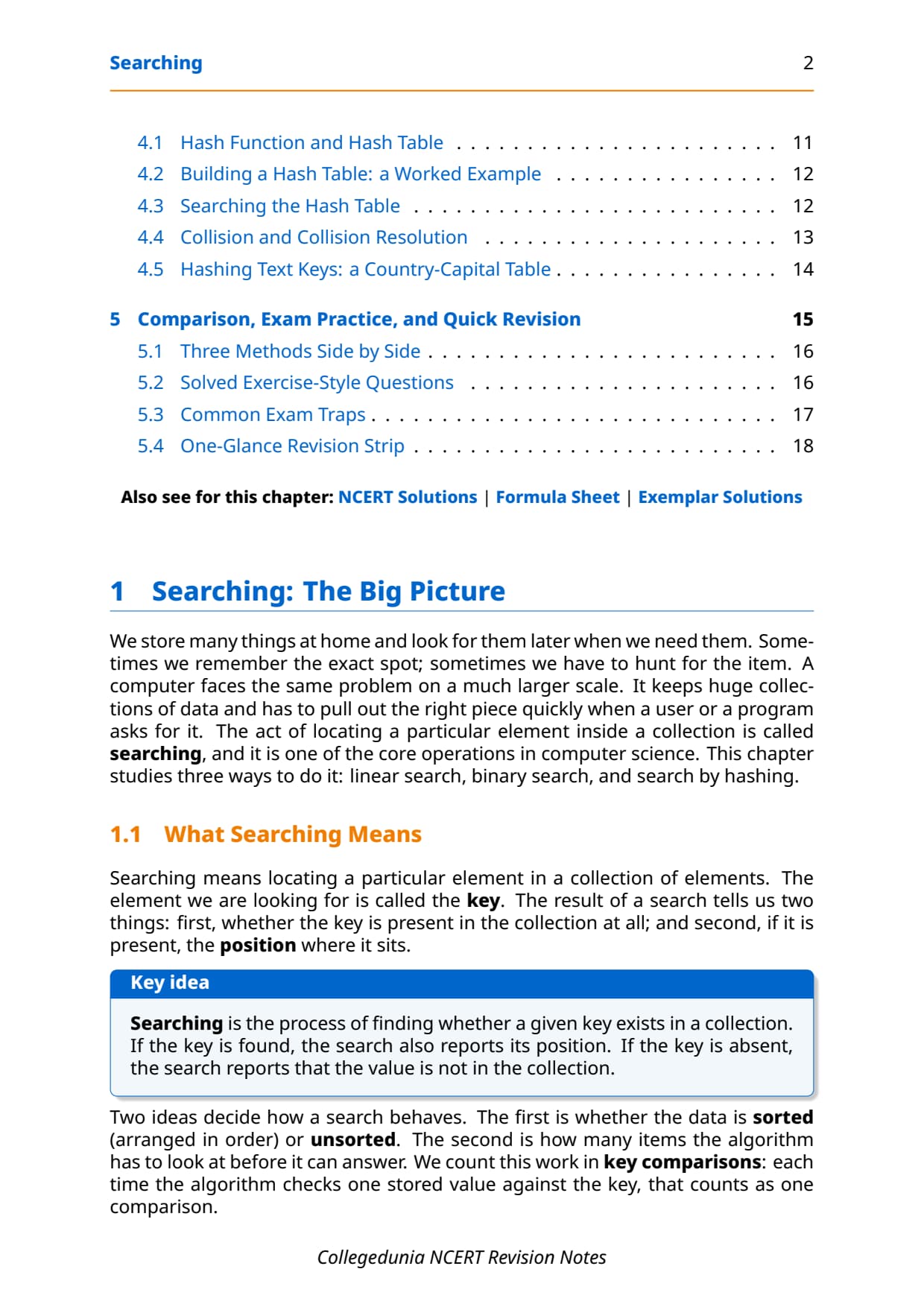
Before the methods, fix the vocabulary. Searching means locating a particular element inside a collection. The element you look for is called the key. The result tells you two things: whether the key is present at all, and if it is, the position where it sits.
- Key: the value you are searching for in the list.
- Sorted vs unsorted: whether the data is arranged in order decides which methods you can use.
- Key comparison: each time the algorithm checks one stored value against the key, that counts as one comparison; this is how we measure the work done.
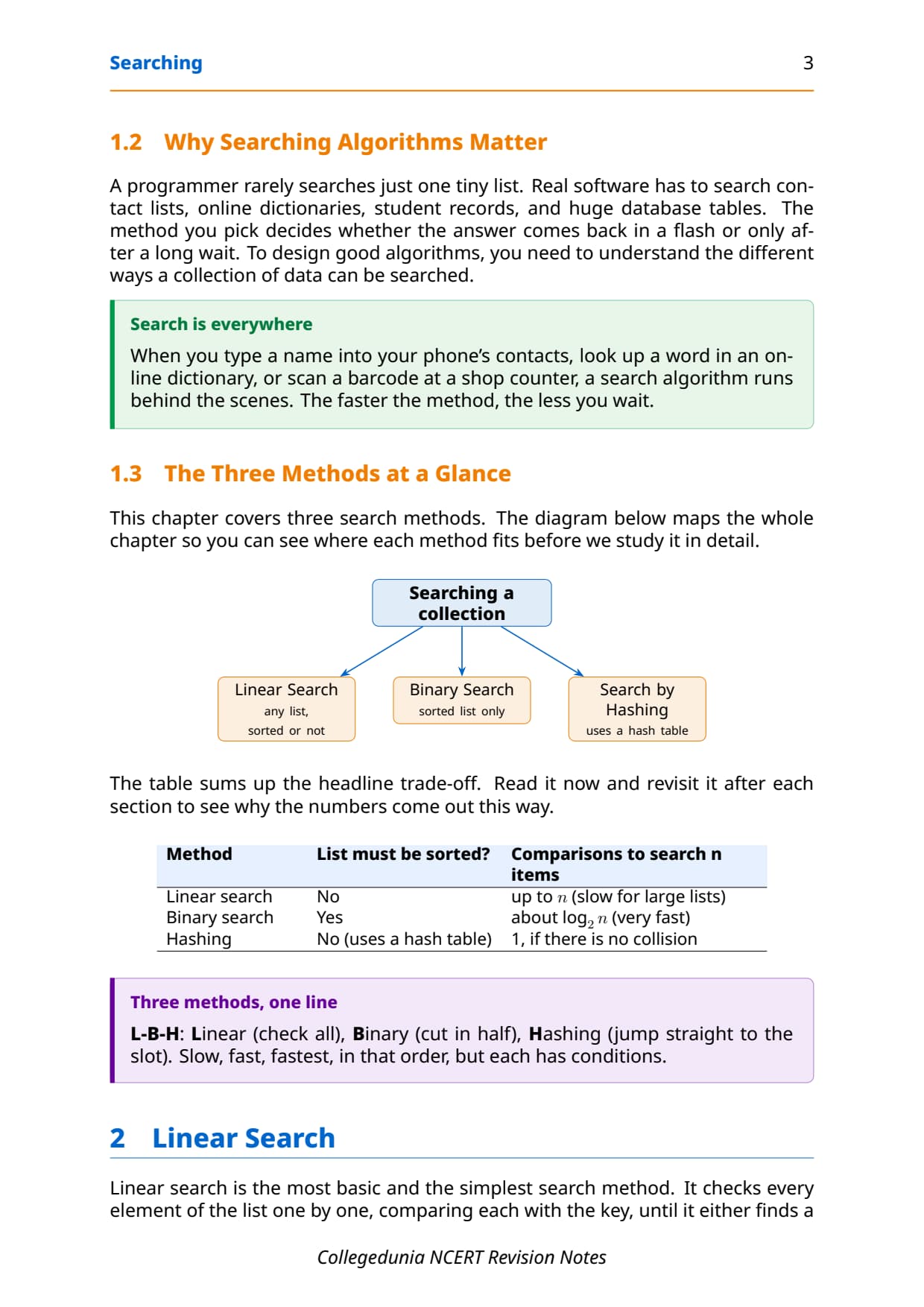
Two ideas decide how a search behaves: whether the data is sorted, and how many items the method must look at. The three methods trade off speed against conditions, as the table shows. Read it now and revisit it after each section to see why the numbers come out this way.
| Method | List must be sorted? | Comparisons to search n items |
|---|---|---|
| Linear search | No | up to n (slow for large lists) |
| Binary search | Yes | about log2(n) (very fast) |
| Hashing | No (uses a hash table) | 1, if there is no collision |
A handy one-line memory hook is L-B-H: Linear checks all, Binary cuts in half, Hashing jumps straight to the slot. That is slow, fast, fastest in order, but each method has its own condition to meet first.
Linear Search in Class 12 Computer Science
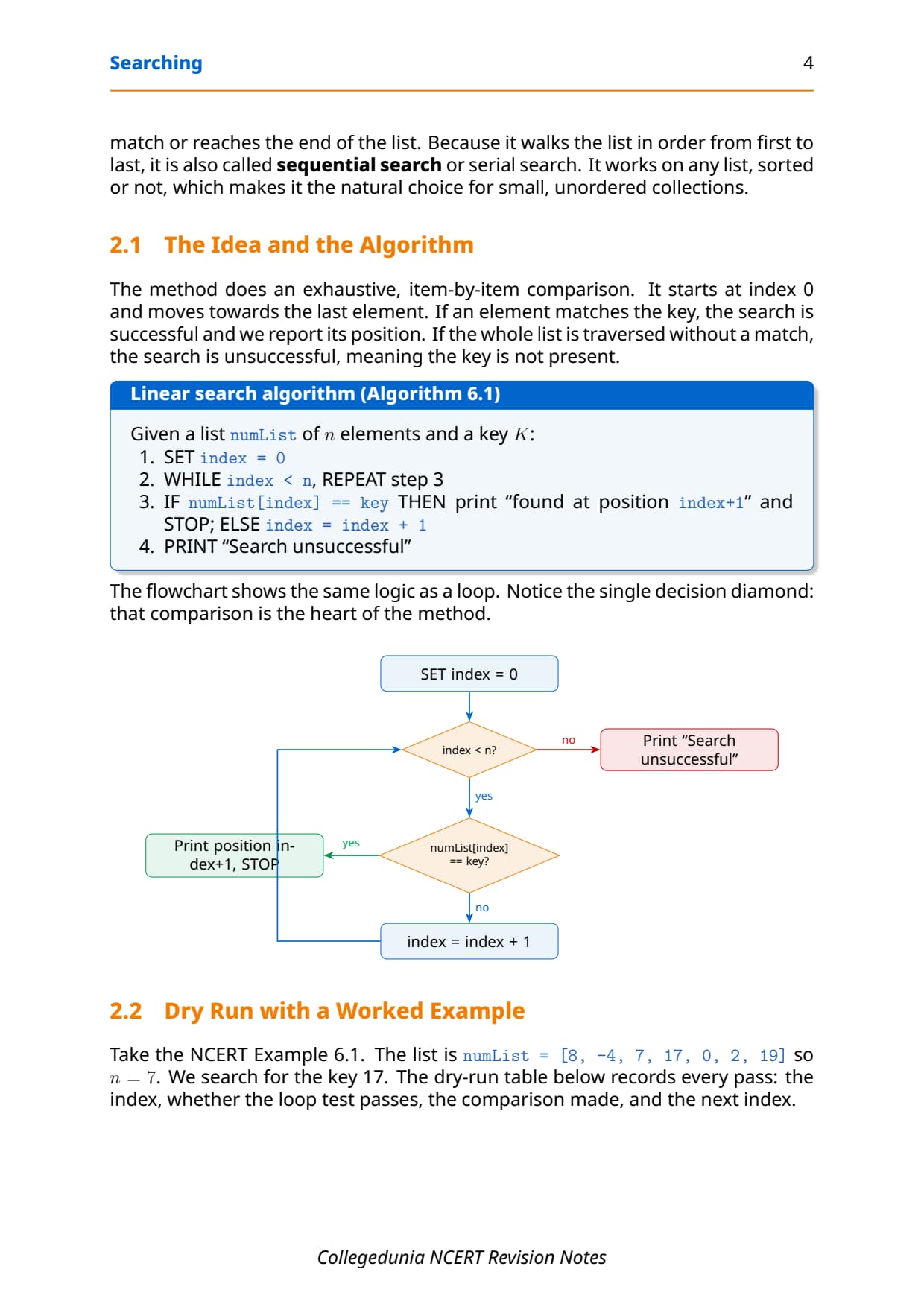
Linear search is the simplest method. It checks every element one by one, comparing each with the key, until it finds a match or reaches the end of the list. Because it walks the list in order, it is also called sequential search. It works on any list, sorted or not, which makes it the natural choice for small, unordered collections.
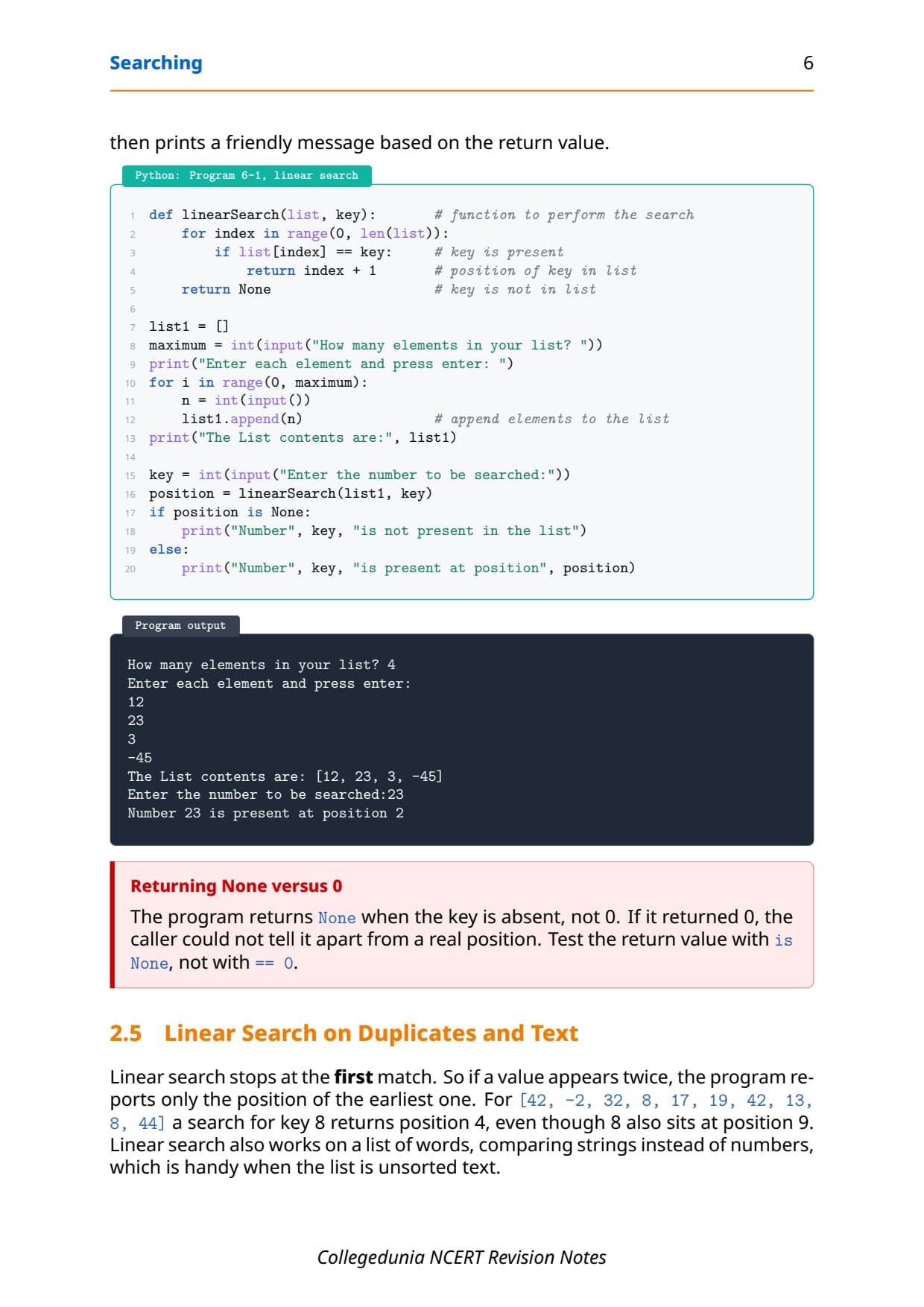
The method starts at index 0 and moves towards the last element. If an element matches the key, the search is successful and reports the position. If the whole list is scanned with no match, the search is unsuccessful. The Python program below wraps this in a function that returns the position (index + 1) on a hit and None when the key is absent.
def linearSearch(list, key):       # function to perform the search
    for index in range(0, len(list)):
        if list[index] == key:     # key is present
            return index + 1       # position of key in list
    return None                    # key is not in list

key = int(input("Enter the number to be searched:"))
position = linearSearch(list1, key)
if position is None:
    print("Number", key, "is not present in the list")
else:
    print("Number", key, "is present at position", position)
Enter the number to be searched: 23
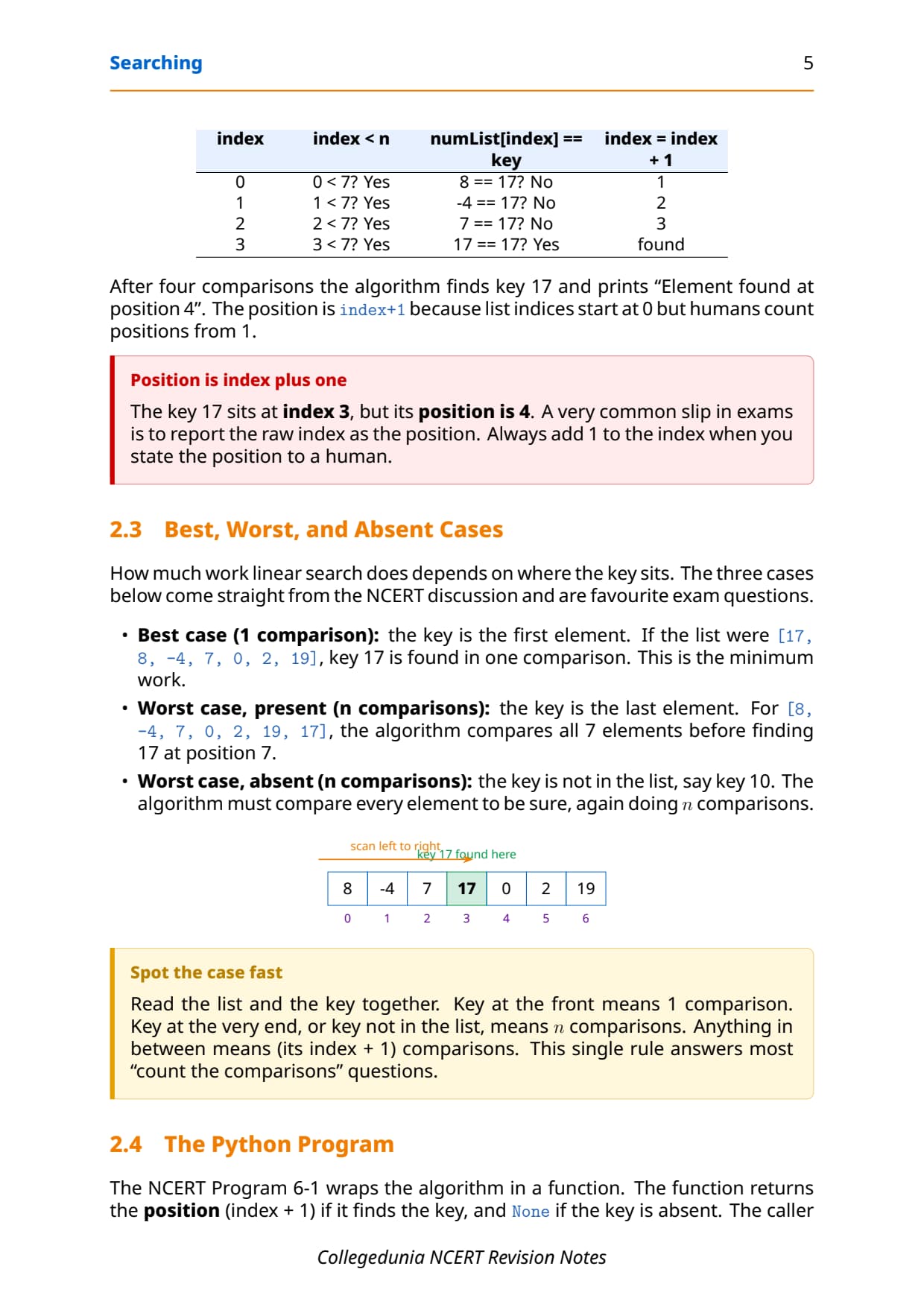
Number 23 is present at position 2How much work linear search does depends on where the key sits. Take the NCERT list [8, -4, 7, 17, 0, 2, 19] and search for 17: the scan checks 8, then -4, then 7, then 17, so it finds the key after 4 comparisons at position 4. The three standard cases below are favourite exam questions.
| Case | Where the key sits | Key comparisons |
|---|---|---|
| Best case | First element of the list | 1 |
| Worst case (present) | Last element of the list | n |
| Worst case (absent) | Key is not in the list | n (full scan) |
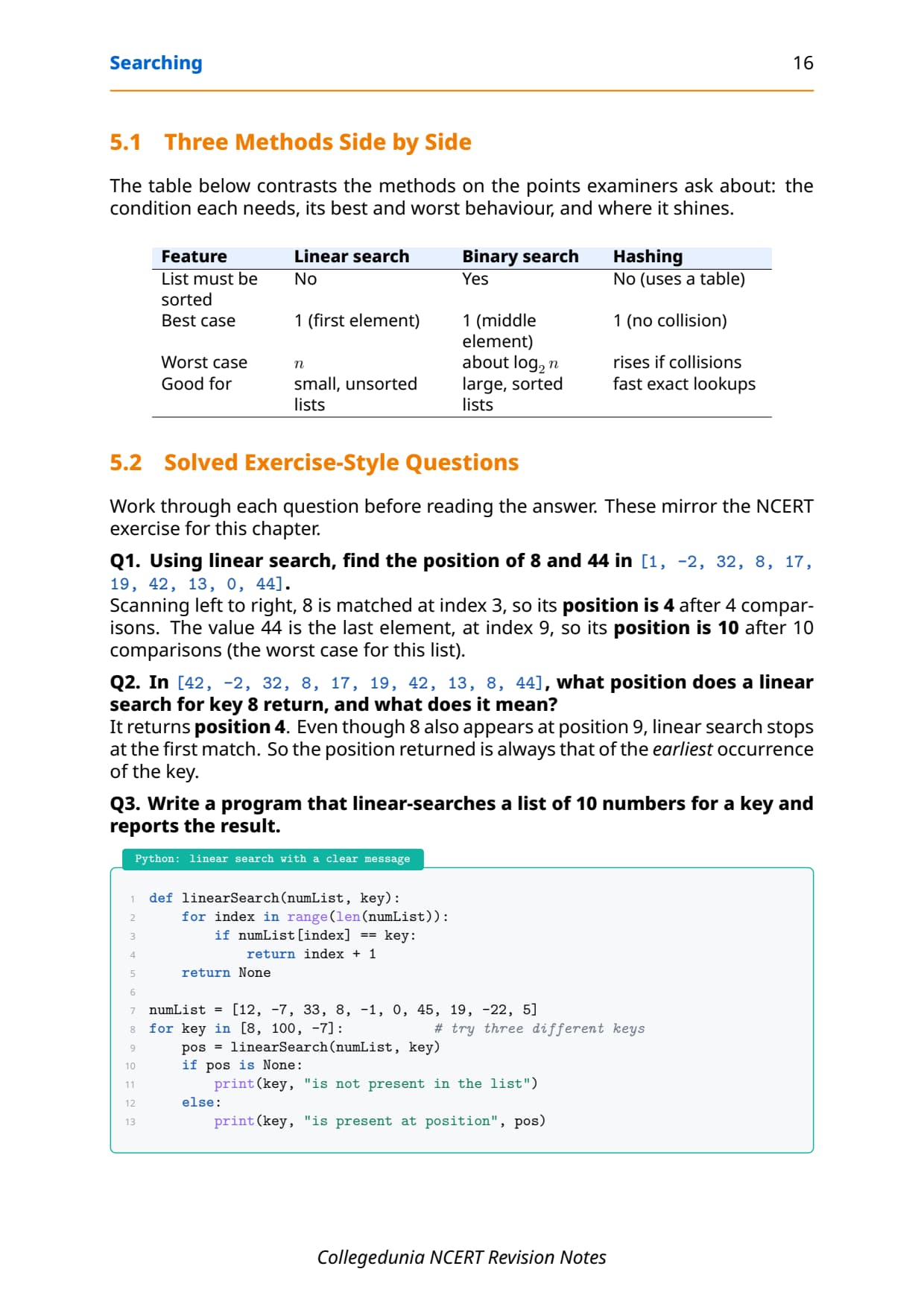
One more rule covers duplicates: linear search stops at the first match. For [42, -2, 32, 8, 17, 19, 42, 13, 8, 44] a search for key 8 returns position 4, even though 8 also sits at position 9. So the position returned is always that of the earliest occurrence.
Binary Search: Divide and Discard in Class 12 Computer Science
Think of finding the word Zoology in a dictionary. You jump to the back half, then narrow down, because the words are in order. Binary search copies this trick. It uses the ordering of elements to find a key quickly. The price for the speed is one strict condition: the list must be sorted.
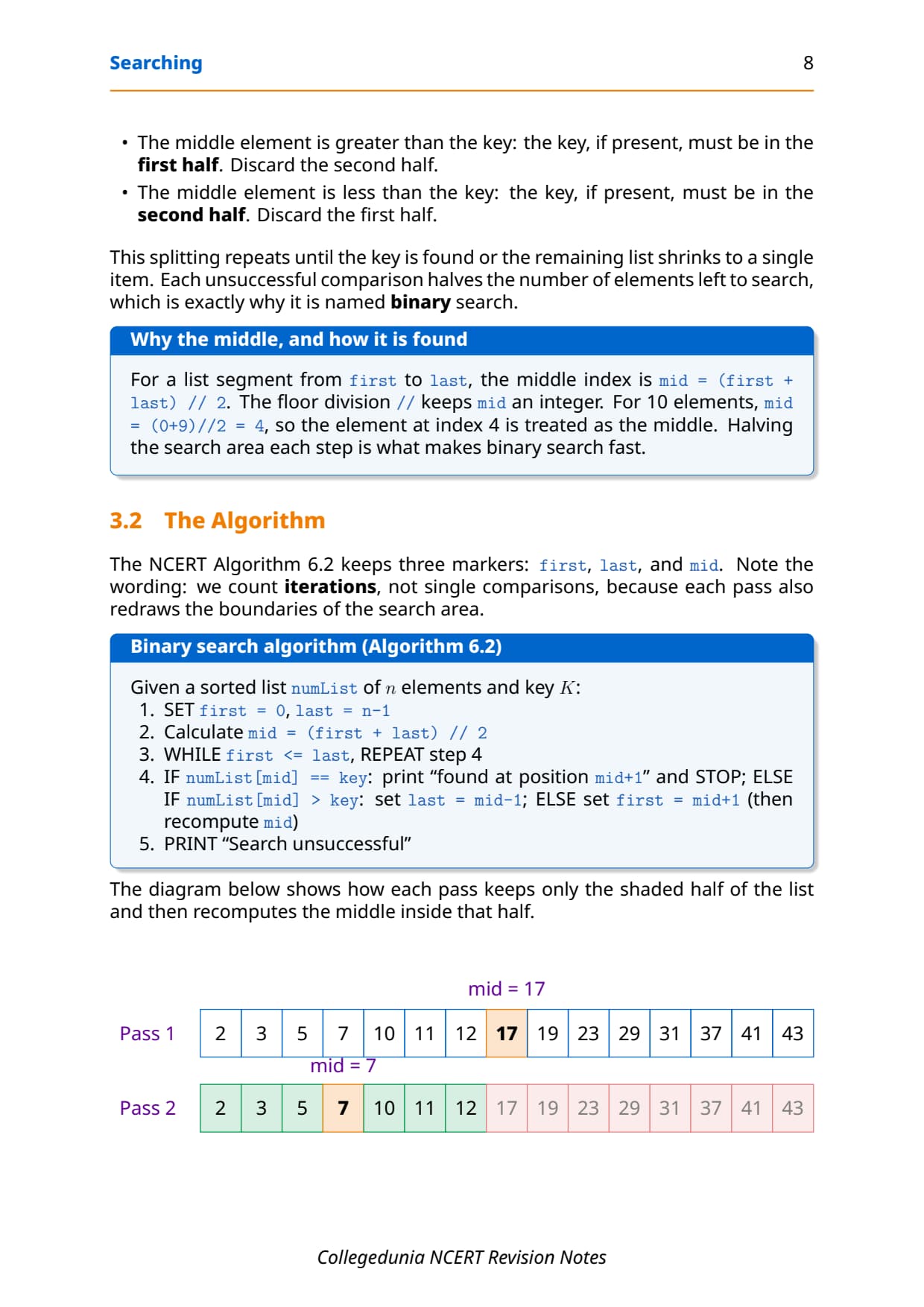
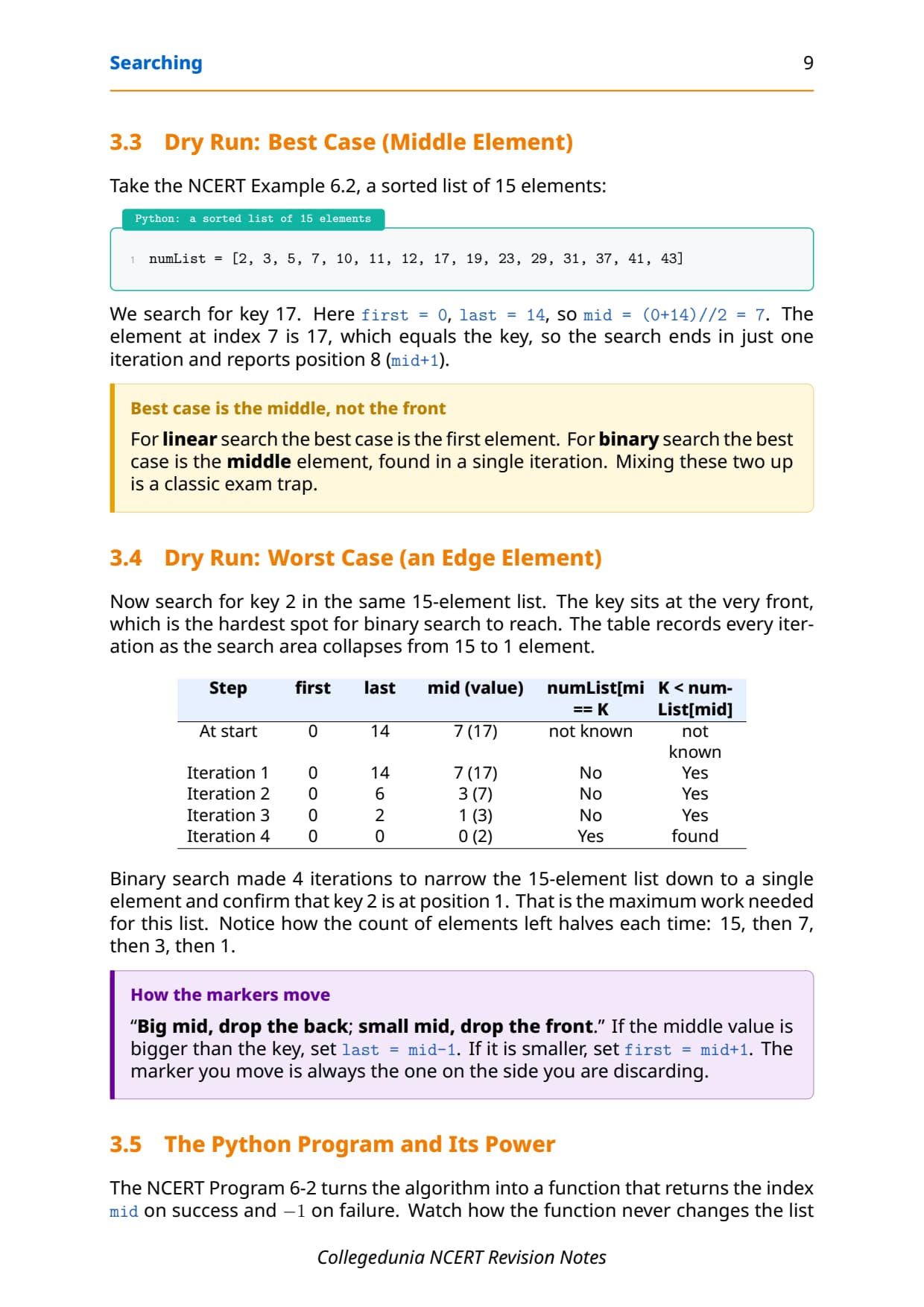
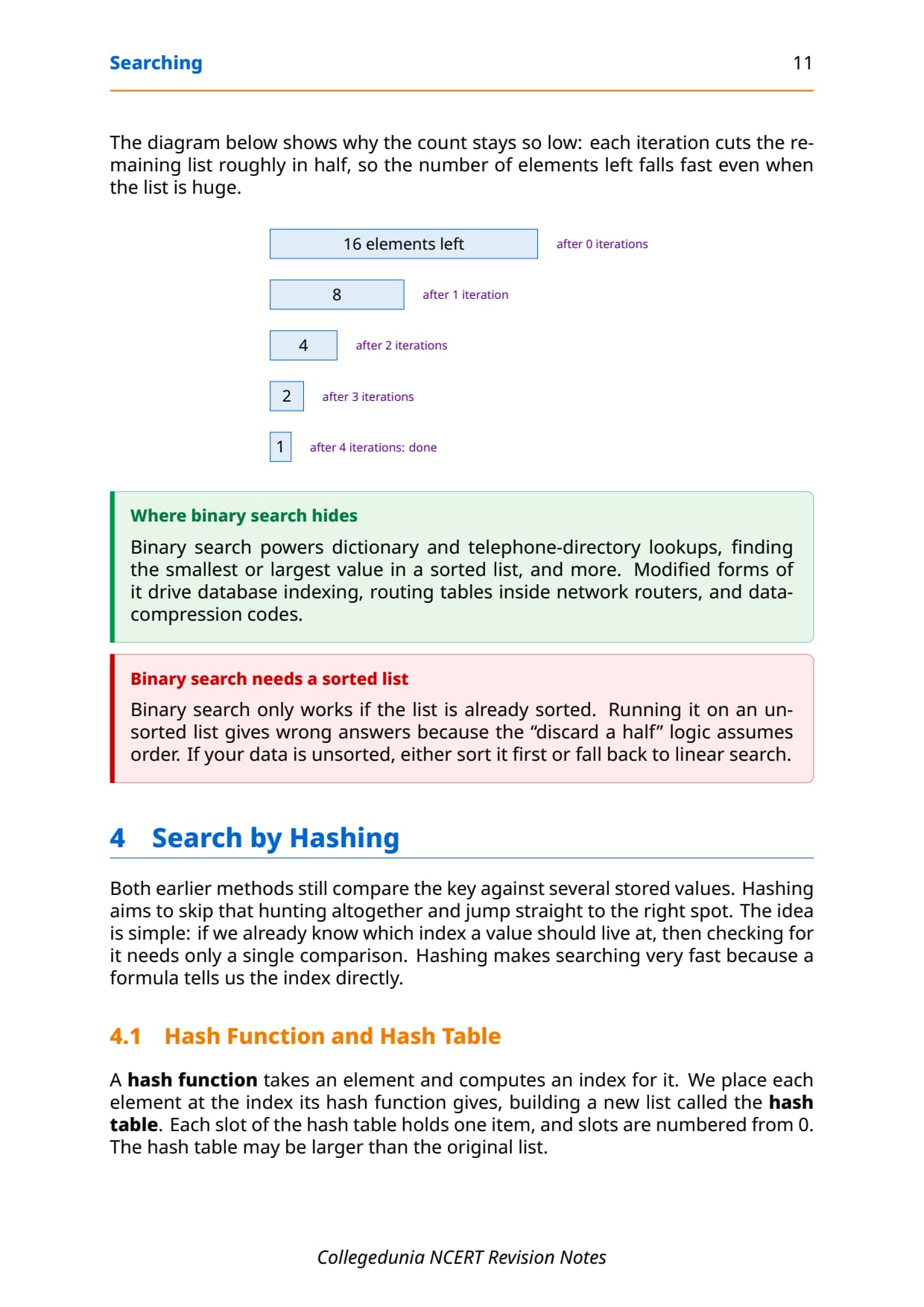
Binary search compares the key with the element in the middle of the sorted list. That single comparison gives one of three results, and each result lets you throw away half the list:
- Middle equals the key: the search is successful, stop here.
- Middle is greater than the key: the key must be in the first half; set
last = mid - 1. - Middle is less than the key: the key must be in the second half; set
first = mid + 1.
The middle index is mid = (first + last) // 2, where // is floor division so mid stays a whole number. Each unsuccessful comparison halves the elements left to search, which is exactly why it is called binary search. The Python program below returns the index on a hit and -1 on a miss.
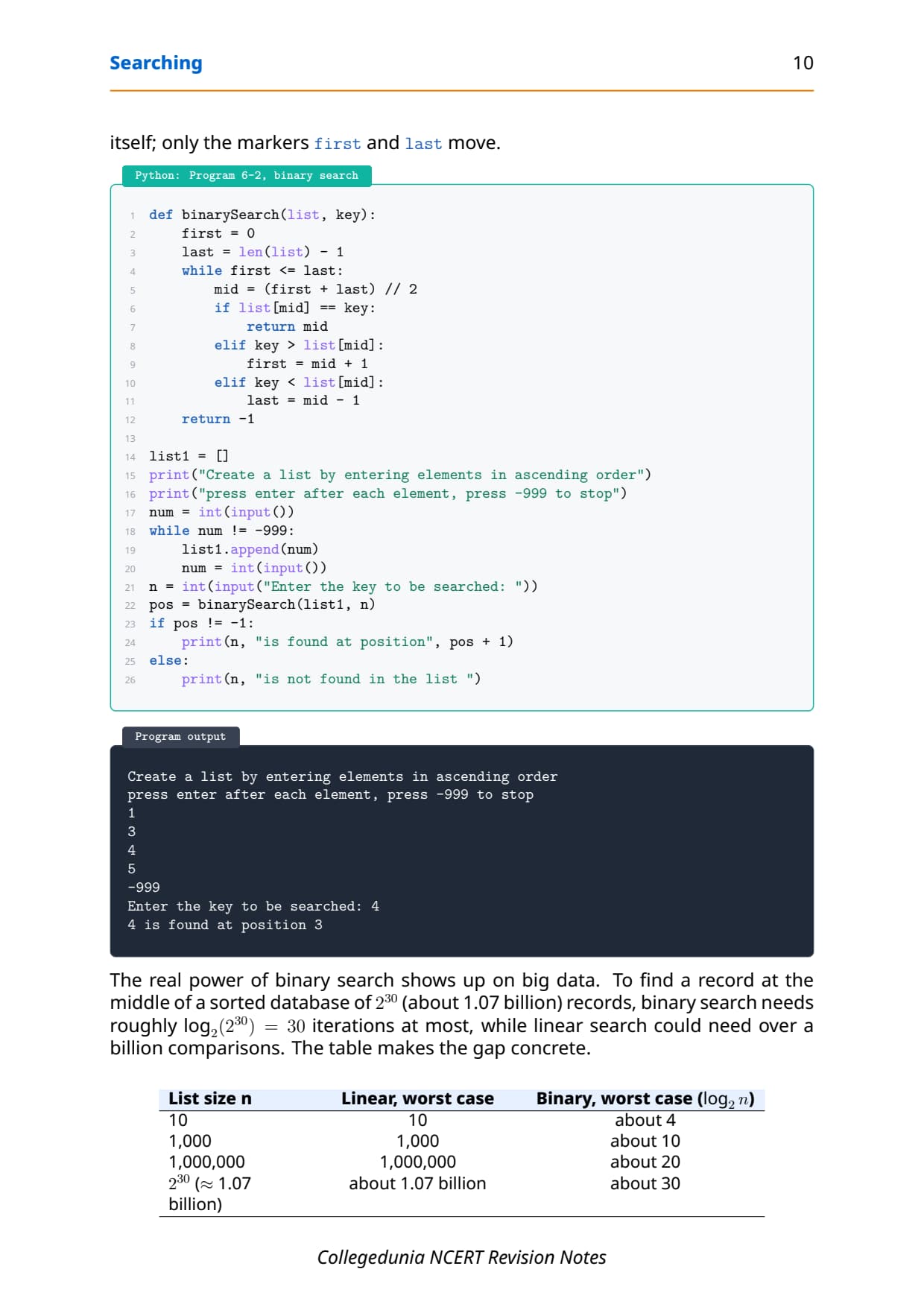
def binarySearch(list, key):
    first = 0
    last = len(list) - 1
    while first <= last:
        mid = (first + last) // 2
        if list[mid] == key:
            return mid
        elif key > list[mid]:
            first = mid + 1
        elif key < list[mid]:
            last = mid - 1
    return -1
Enter the key to be searched: 4
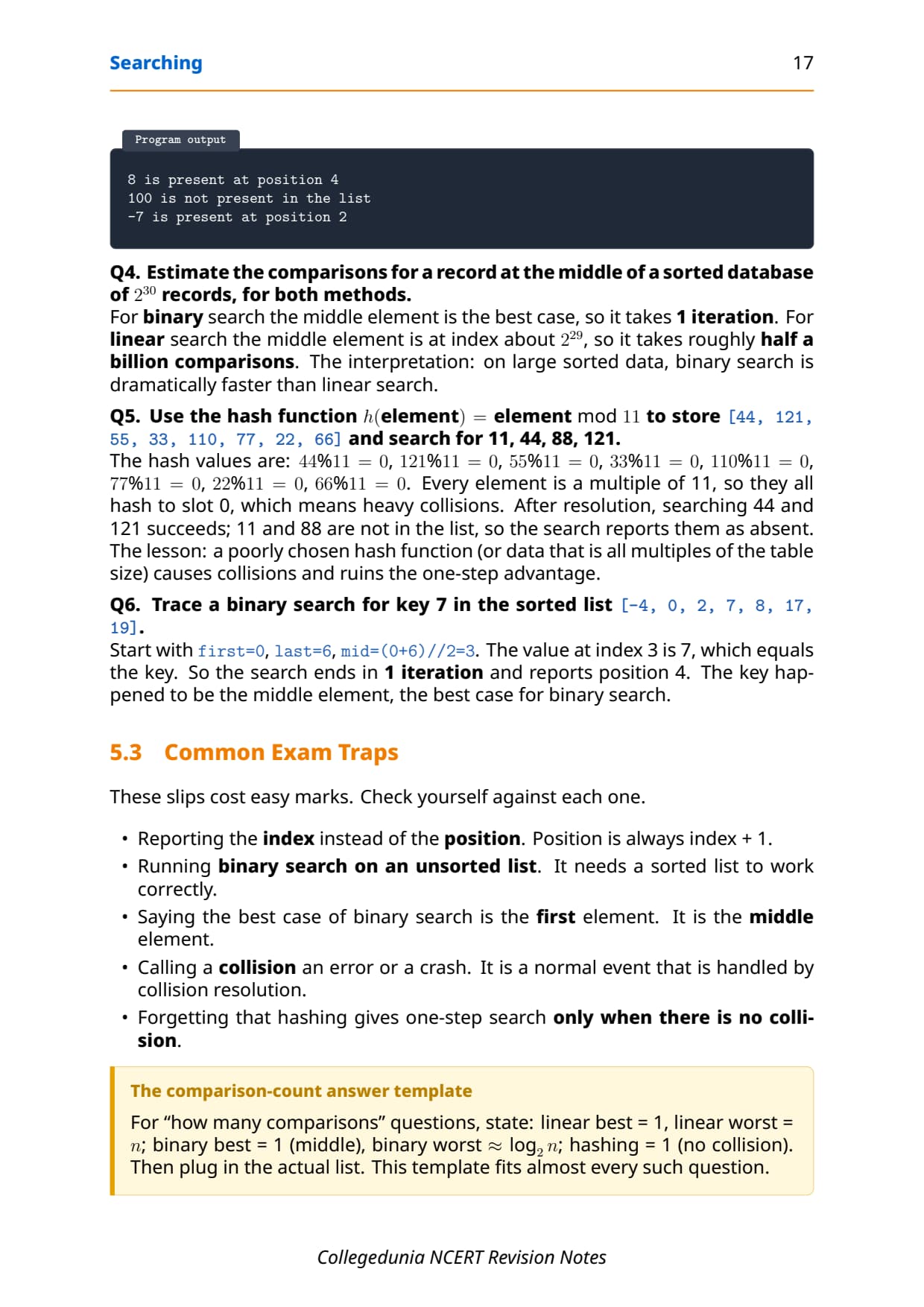
4 is found at position 3The real power shows up on big data. To find a record in the middle of a sorted database of 2^30 (about 1.07 billion) records, binary search needs about log2(2^30) = 30 iterations at most, while linear search could need over a billion comparisons. The table below makes the gap concrete.
| List size n | Linear, worst case | Binary, worst case (log2 n) |
|---|---|---|
| 10 | 10 | about 4 |
| 1,000 | 1,000 | about 10 |
| 1,000,000 | 1,000,000 | about 20 |
| 2^30 (~1.07 billion) | about 1.07 billion | about 30 |
Search by Hashing and the Hash Table in Class 12 Computer Science
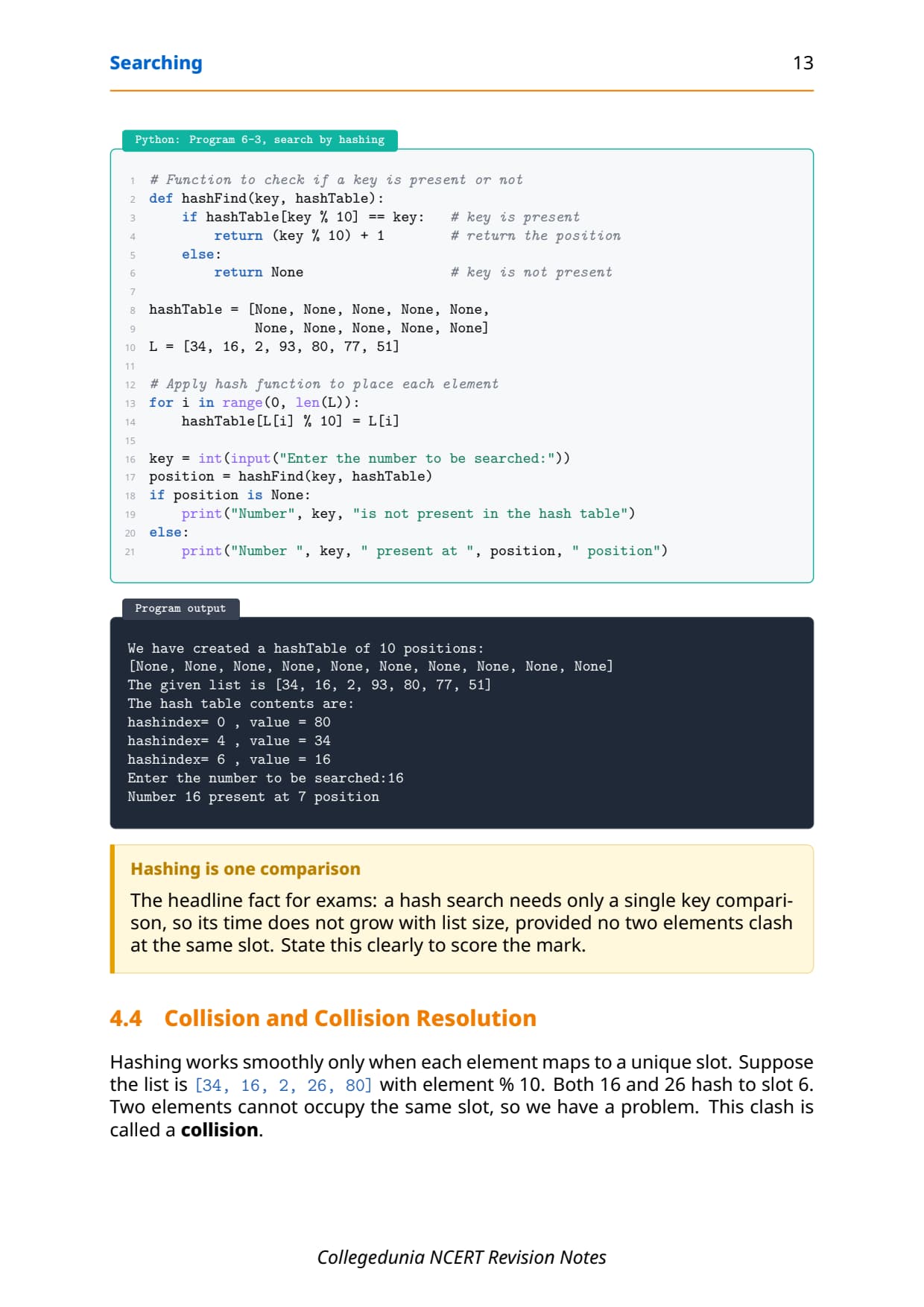
Both earlier methods still compare the key against several stored values. Hashing skips the hunting and jumps straight to the right spot. If you already know which index a value should live at, then checking for it needs only a single comparison, no matter how big the list is.
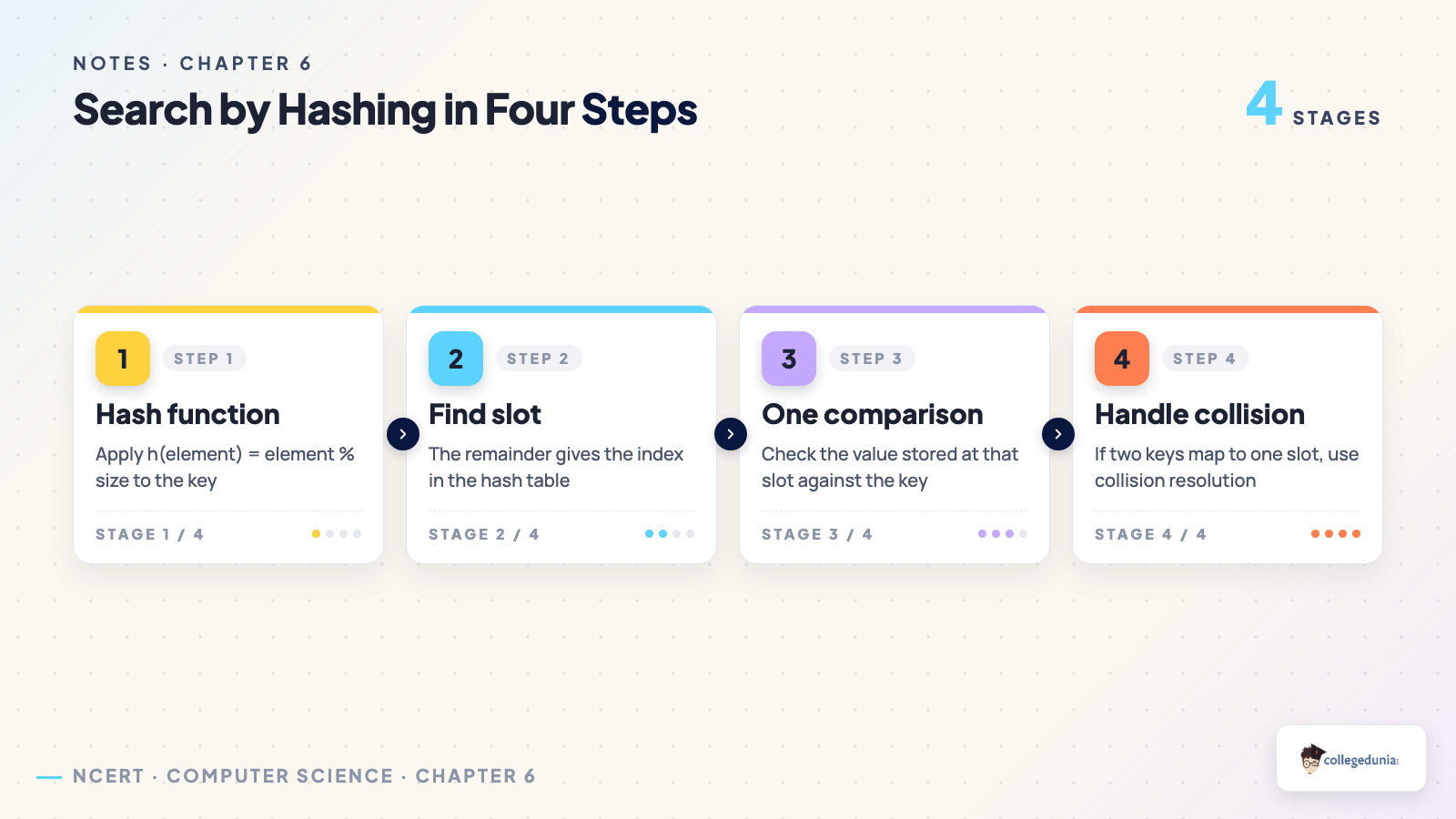
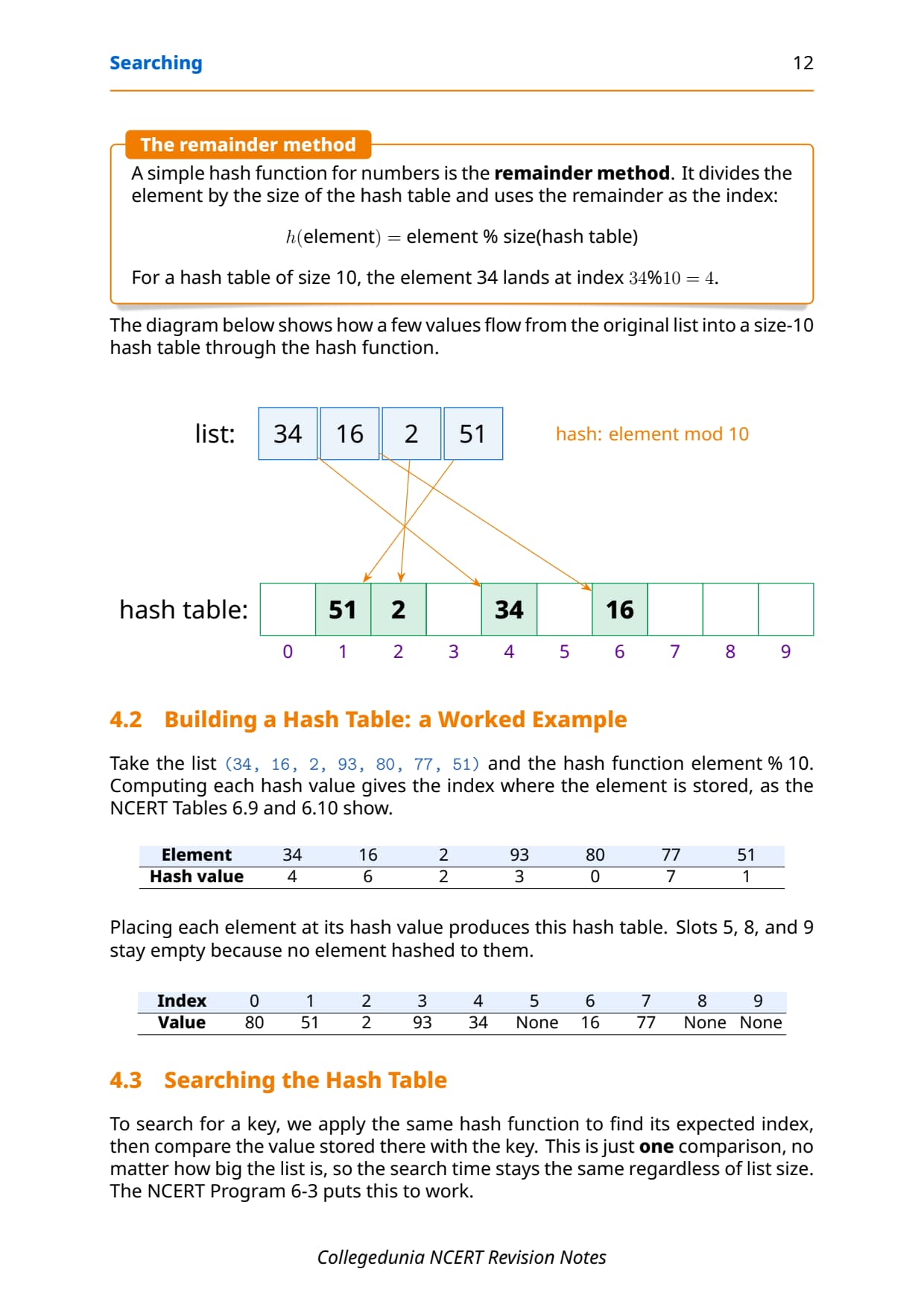
A hash function takes an element and computes an index for it. You place each element at the index its hash function gives, building a new list called the hash table. A simple hash function for numbers is the remainder method: h(element) = element % size. For a hash table of size 10, the element 34 lands at index 34 % 10 = 4.
Take the list [34, 16, 2, 93, 80, 77, 51] with the hash function element % 10. Computing each hash value gives the slot where the element is stored, as the table shows. Slots 5, 8, and 9 stay empty because no element hashed to them.
| Index | 0 | 1 | 2 | 3 | 4 | 5 | 6 | 7 | 8 | 9 |
|---|---|---|---|---|---|---|---|---|---|---|
| Value | 80 | 51 | 2 | 93 | 34 | None | 16 | 77 | None | None |
To search, apply the same hash function to find the expected index, then compare the value stored there with the key. The Python function below does exactly this, returning the position on a hit and None on a miss.
# Function to check if a key is present or not
def hashFind(key, hashTable):
    if hashTable[key % 10] == key:   # key is present
        return (key % 10) + 1        # return the position
    else:
        return None                  # key is not present
Enter the number to be searched: 16
Number 16 present at 7 positionCollision and Collision Resolution Explained
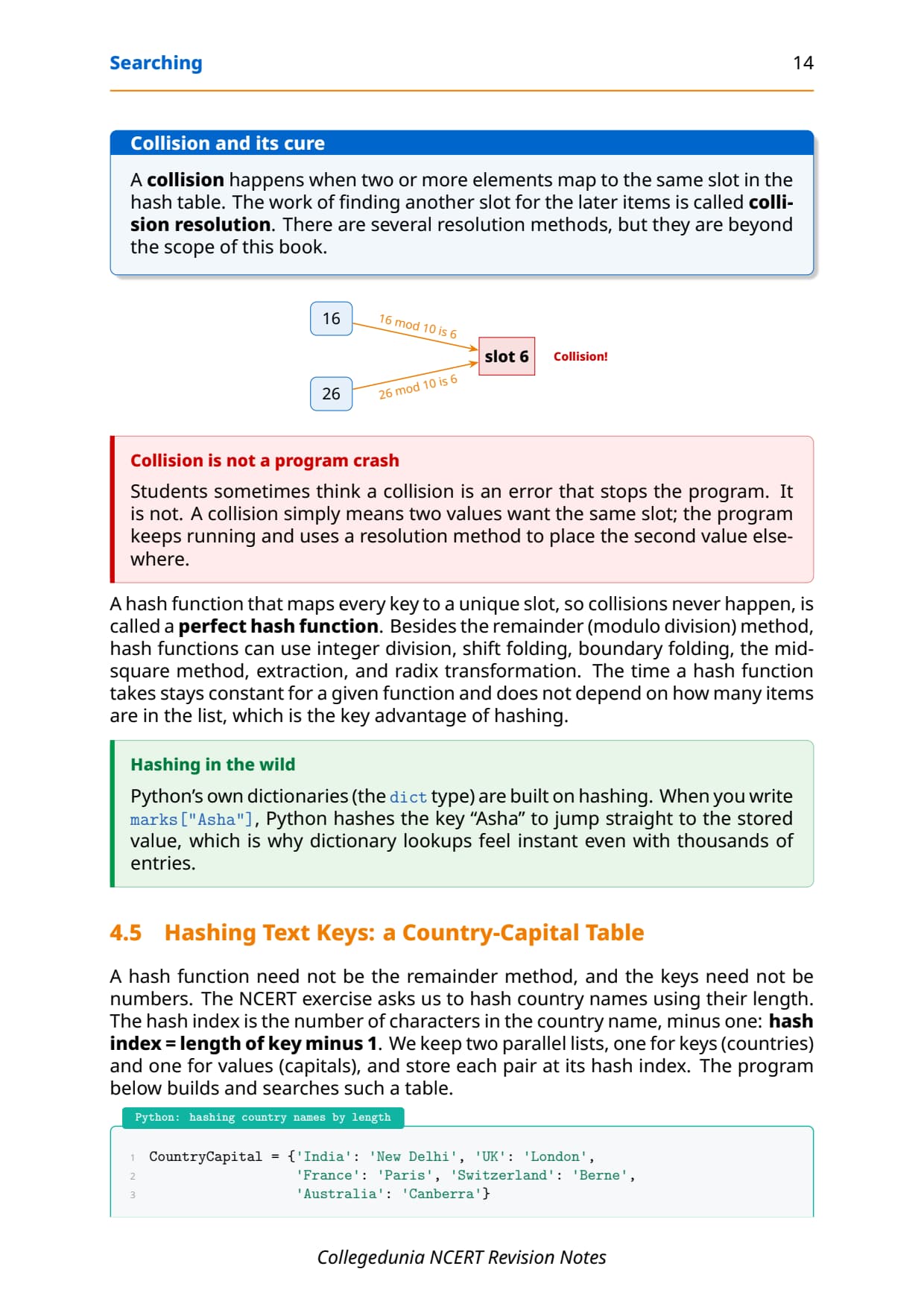
Hashing works smoothly only when each element maps to a unique slot. Suppose the list is [34, 16, 2, 26, 80] with element % 10. Both 16 and 26 hash to slot 6. Two elements cannot share one slot, so we have a problem. This clash is called a collision.
- Collision: two or more elements map to the same slot in the hash table.
- Collision resolution: the work of finding another slot for the later items; several methods exist but they are beyond the scope of the book.
- Perfect hash function: a hash function that maps every key to a unique slot, so collisions never happen.
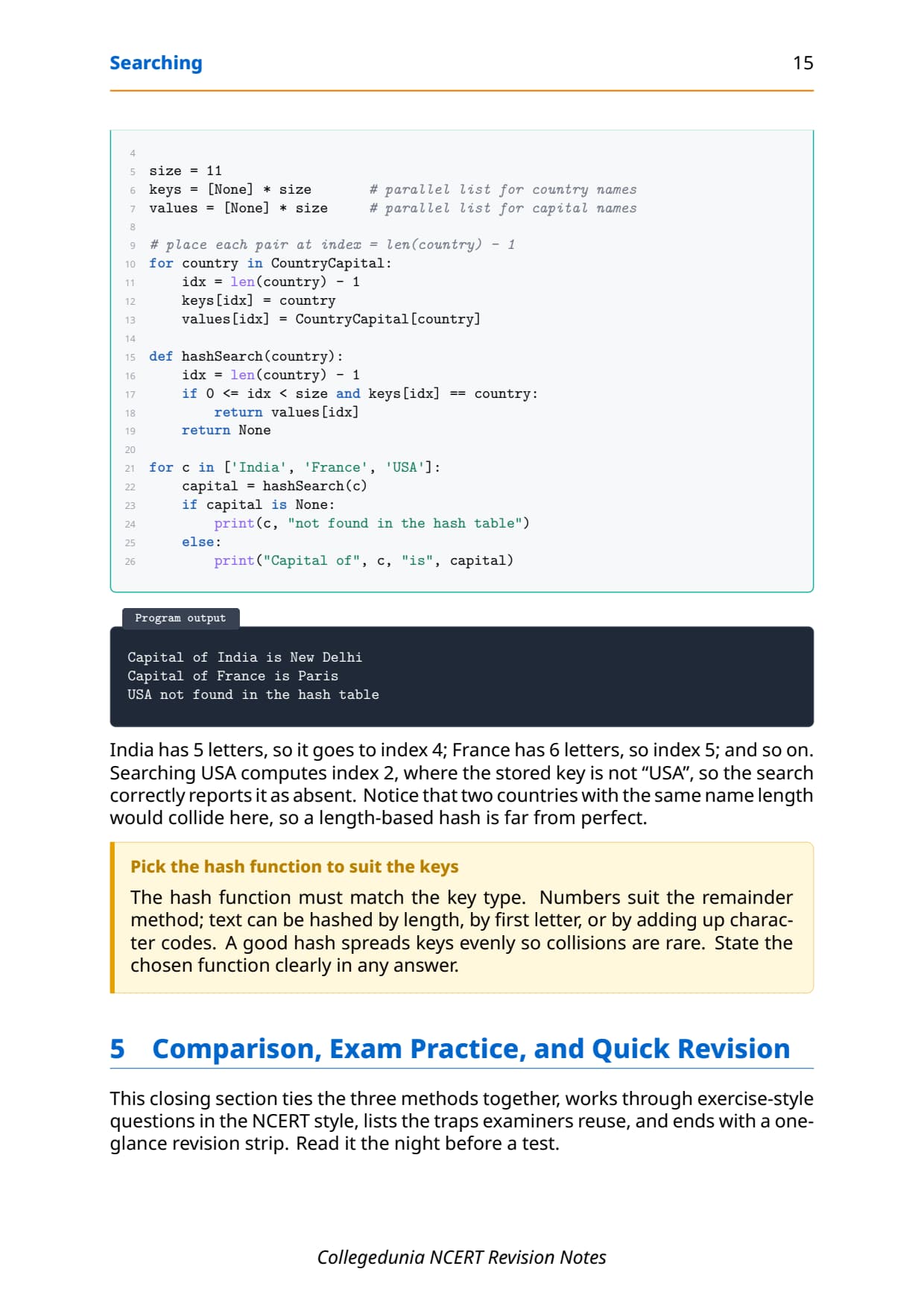
Besides the remainder (modulo division) method, hash functions can use integer division, shift folding, boundary folding, the mid-square method, extraction, and radix transformation. A hash function need not even use numbers. The NCERT exercise hashes country names by their length, using the rule hash index = length of key - 1, so India (5 letters) goes to index 4 and France (6 letters) goes to index 5. Two countries of the same name length would collide, so a length-based hash is far from perfect.
Tip: The hash function must match the key type. Numbers suit the remainder method; text can be hashed by length, by first letter, or by adding character codes. A good hash spreads keys evenly so collisions are rare.
Linear vs Binary Search vs Hashing Compared
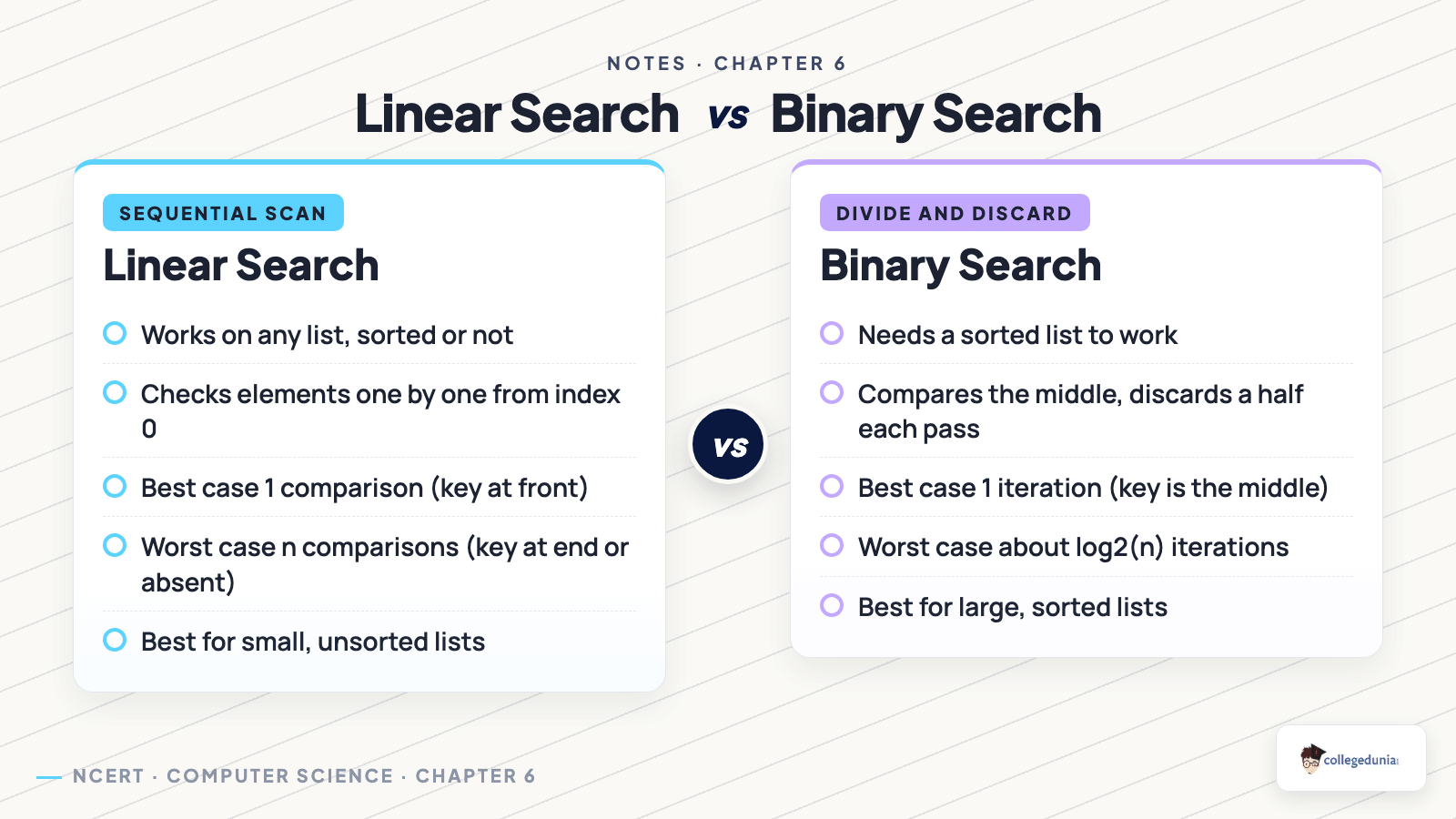
This is the table examiners build their questions around. It contrasts the three methods on the condition each needs, the best and worst case, and where each one shines. Learn this grid and most one-mark and two-mark questions answer themselves.
| Feature | Linear search | Binary search | Hashing |
|---|---|---|---|
| List must be sorted | No | Yes | No (uses a table) |
| Best case | 1 (first element) | 1 (middle element) | 1 (no collision) |
| Worst case | n | about log2(n) | rises if collisions |
| Good for | small, unsorted lists | large, sorted lists | fast exact lookups |
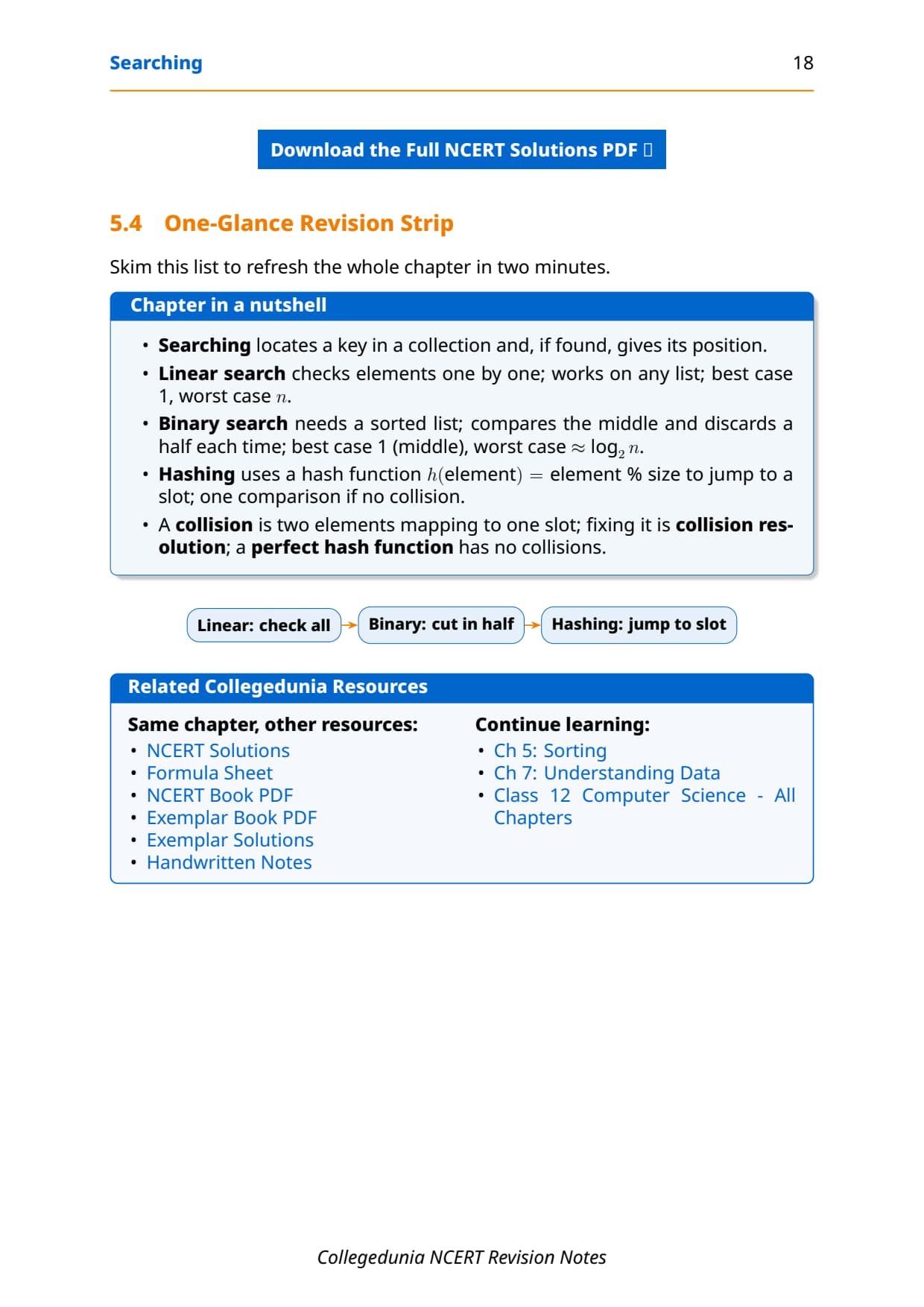
The headline trade-off is clear. Linear search is flexible but slow on big data; binary search is fast but demands a sorted list; hashing is the fastest for exact lookups but only when collisions are rare. Pick the method that matches the data you have.
One-Glance Revision Strip and Common Exam Traps
This is the strip to read in the last five minutes before the exam. It lines up the chapter in a nutshell, then lists the traps that cost students marks every year.
| Method | One-line summary |
|---|---|
| Searching | Locates a key in a collection; if found, gives its position |
| Linear | Check elements one by one; any list; best 1, worst n |
| Binary | Sorted list; compare middle, discard a half; best 1, worst log2(n) |
| Hashing | h(element) = element % size jumps to a slot; 1 comparison if no collision |
The repeat-offender mistakes in Searching chapter board answers:
- Reporting the index instead of the position: position is always index + 1.
- Running binary search on an unsorted list: it needs a sorted list, or the discard-a-half logic breaks.
- Saying binary search's best case is the first element: it is the middle element.
- Calling a collision an error or a crash: it is a normal event handled by collision resolution.
- Forgetting that hashing gives one-step search only when there is no collision: with heavy collisions the time rises.
How to Use the Searching Notes PDF for Board Revision
The Searching chapter is short but program-heavy and trap-heavy. The best approach is two passes: one for the methods and their conditions, one for tracing the small programs and counting comparisons by hand.
First pass: methods and conditions
Read these notes and lock the three methods, the one condition each needs, and the best, worst, and absent cases. Say one line aloud for each method so the words stick before you start tracing code. The side-by-side table is your anchor here.
Second pass: trace and count
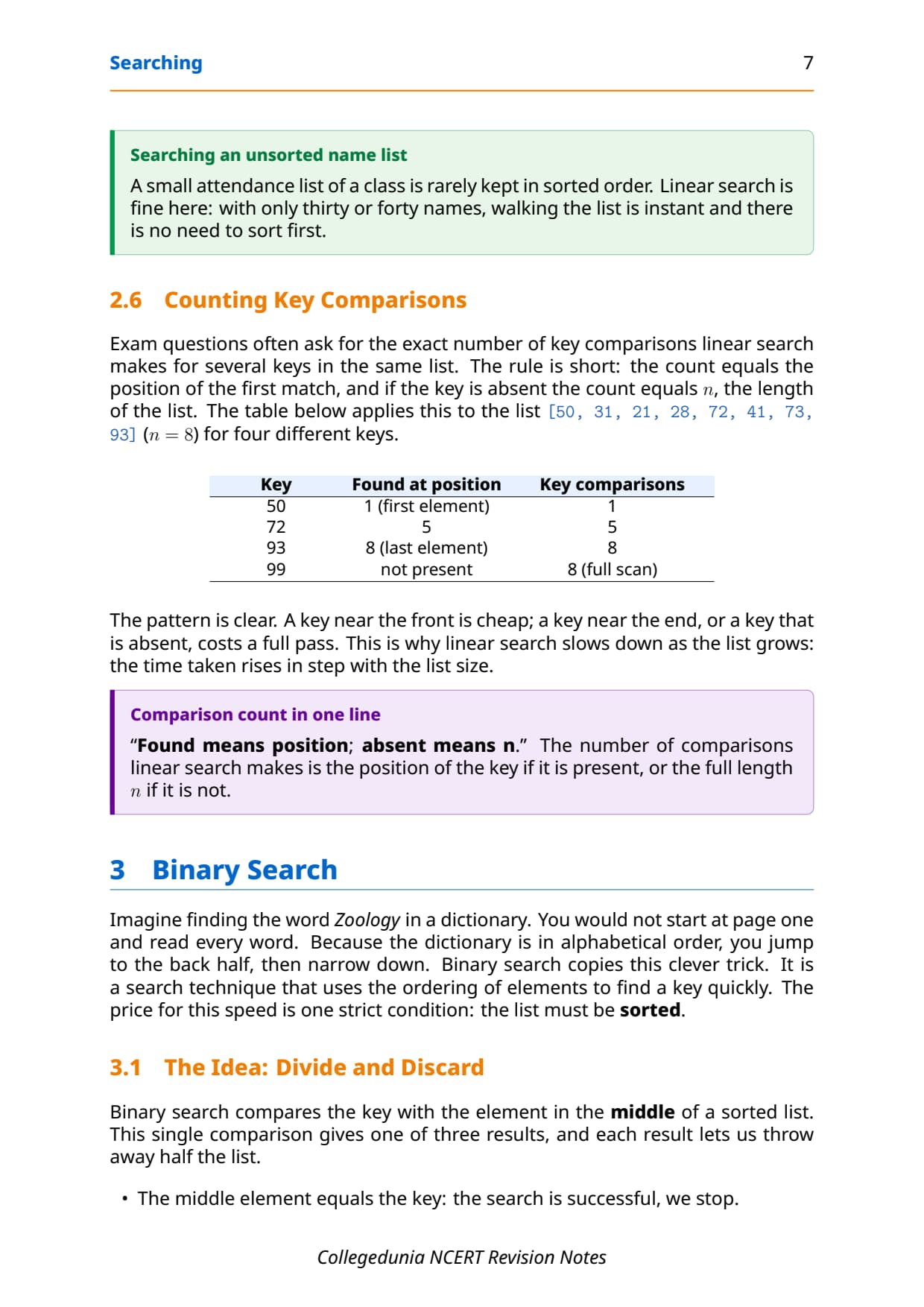
Take the linear-search dry run on [8, -4, 7, 17, 0, 2, 19] and the binary-search trace on a sorted list, and write the exact comparison count for each. That single exercise covers the most common 3-mark board question on this chapter, which asks you to count key comparisons.
JEE and CUET angle
For students preparing competitive exams, searching appears in Python-based programming rounds and in CUET Computer Science. The linear-vs-binary trade-off and the idea of log2(n) iterations are exactly the kind of concept questions those papers reuse, so this revision doubles as competitive prep.
Previous Year Question Trends from the Searching Chapter
The Searching chapter is tested in CBSE board papers mainly through dry-run and comparison-count questions, with a program question on linear or binary search. The table below maps the asked question types across recent board papers, so your revision can target the high-frequency areas.
| Year | Question type asked | Marks |
|---|---|---|
| 2025 | Difference between linear and binary search; when is each used | 2 + 1 |
| 2024 | Write a program using binary search; count iterations for a given key | 3 |
| 2023 | Define hashing and hash function; build a hash table with element % 10 | 1 + 3 |
| 2022 | Dry run of linear search; number of key comparisons for given keys | 3 |
| 2021 | What is a collision; best and worst case of binary search | 2 + 2 |
Also Check: The full set of CBSE board paper questions for this chapter, with step-by-step answers, is included in the downloadable PDF above, updated for the 2026-27 cycle.
Other Resources for Class 12 Computer Science Chapter 6 Searching
Pair these revision notes with the matching NCERT Solutions, handwritten notes and the official NCERT book chapter. All resources for Class 12 Computer Science Chapter 6 Searching are linked below.
| Resource | What it covers | Open |
|---|---|---|
| Notes | Concept-first revision notes on linear search, binary search, and search by hashing, with key-comparison counts. | You are here |
| NCERT Solutions | Step-by-step answers to all 9 exercise questions, with an Expert Solution for each. | Class 12 Computer Science Chapter 6 NCERT Solutions |
| Handwritten Notes | Scanned-style handwritten pages for last-minute board revision. | Class 12 Computer Science Chapter 6 Handwritten Notes |
| NCERT Book PDF | Official NCERT Computer Science Chapter 6 Searching textbook in PDF form. | Class 12 Computer Science Chapter 6 NCERT Book PDF |
Notes for Class 12 Computer Science: All Chapters
Related Links: Use the table below to open the revision notes for the other chapters of Class 12 Computer Science. Every chapter ships with the same concept-first notes style, full PDF download, and revision FAQ.
| Chapter | Notes link |
|---|---|
| Chapter 1 | Exception Handling in Python Notes |
| Chapter 2 | File Handling in Python Notes |
| Chapter 3 | Stack Notes |
| Chapter 4 | Queue Notes |
| Chapter 5 | Sorting Notes |
| Chapter 6 | Searching Notes (You are here) |
| Chapter 7 | Understanding Data Notes |
| Chapter 8 | Database Concepts Notes |
| Chapter 9 | Structured Query Language (SQL) Notes |
| Chapter 10 | Computer Networks Notes |
| Chapter 11 | Data Communication Notes |
| Chapter 12 | Security Aspects Notes |
Notes Class 12 Computer Science Chapter 6 Searching FAQs
Ques. What does Chapter 6 Searching cover in Class 12 Computer Science?
Ans. Chapter 6 covers how a computer finds a particular element, called the key, inside a collection. The notes explain three search methods: linear search, which checks every element one by one; binary search, which needs a sorted list and discards a half on each pass; and search by hashing, which uses a hash function to jump straight to a slot in the hash table. They also cover key comparisons, the best and worst cases of each method, collisions, and collision resolution, all aligned with the 2026-27 CBSE syllabus.
Ques. What is the difference between linear search and binary search?
Ans. Linear search checks elements one by one from the start, works on any list whether sorted or not, and takes up to n comparisons in the worst case. Binary search needs the list to be sorted, compares the key with the middle element, and discards one half of the list on every pass, so it takes only about log2(n) iterations in the worst case. The best case of linear search is the first element, while the best case of binary search is the middle element. Linear search suits small unsorted lists, and binary search suits large sorted lists.
Ques. How do you count key comparisons in linear search?
Ans. The number of key comparisons in linear search equals the position of the key if it is present, and equals n, the length of the list, if the key is absent. For example, in the list [8, -4, 7, 17, 0, 2, 19] a search for key 17 makes 4 comparisons because 17 sits at position 4. A key at the very front needs 1 comparison, a key at the last position or a key not in the list needs a full scan of n comparisons. This single rule answers most count-the-comparisons questions in the board exam.
Ques. What is a hash function and a hash table in Class 12 Computer Science?
Ans. A hash function takes an element and computes an index for it. A common one for numbers is the remainder method, h(element) = element % size, which divides the element by the size of the hash table and uses the remainder as the index. The hash table is the new list built by placing each element at the index its hash function gives. To search, you apply the same hash function to find the expected slot and compare the value there with the key. This needs only one comparison, so the search time does not grow with list size, provided there is no collision.
Ques. What is a collision in hashing and how is it handled?
Ans. A collision happens when two or more elements map to the same slot in the hash table. For example, with the function element % 10, both 16 and 26 hash to slot 6, but two values cannot share one slot. A collision is not a program crash; it is a normal event. The work of finding another slot for the later item is called collision resolution, and several methods exist, though they are beyond the scope of the NCERT book. A hash function that maps every key to a unique slot, so collisions never occur, is called a perfect hash function.
Ques. Why is binary search faster than linear search on large data?
Ans. Binary search halves the number of elements left to search on every pass, so the work grows as log2(n) rather than n. To find a record at the middle of a sorted database of 2^30 records, about 1.07 billion entries, binary search needs at most about 30 iterations, while linear search could need over a billion comparisons. This huge gap is why binary search is the standard choice for large sorted data. The one condition is that the list must be sorted first; on an unsorted list binary search gives wrong answers.
Ques. How many pages is the Class 12th Computer Science Searching Notes PDF?
Ans. The Searching Notes PDF runs about 22 pages and covers the full chapter in concept-first revision blocks, with Python code, sample output, dry-run tables, diagrams, common traps and a one-glance revision strip. The PDF is free to download for the 2026-27 session, and a green Handwritten Notes button on this page opens the scanned-style version for last-minute revision.
Ques. Are these Notes for Class 12 Computer Science Chapter 6 aligned with the 2026-27 syllabus?
Ans. Yes. This page reflects the current 2026-27 CBSE syllabus for Class 12 Computer Science. The Searching chapter is unchanged for the current cycle, and these notes follow the NCERT textbook, covering linear search, binary search, search by hashing, the hash function, the hash table, and collisions. The notes are useful for the CBSE board exam, and the same ideas help with JEE-level programming and CUET Computer Science.



Comments