




These Notes for Class 12 Computer Science Chapter 5 Sorting give you a fast, concept-first revision of the whole chapter, built on the latest 2026-27 CBSE syllabus. They explain bubble sort, selection sort and insertion sort with dry runs, Python programs, and the idea of time complexity that decides which sort is faster on a large list.
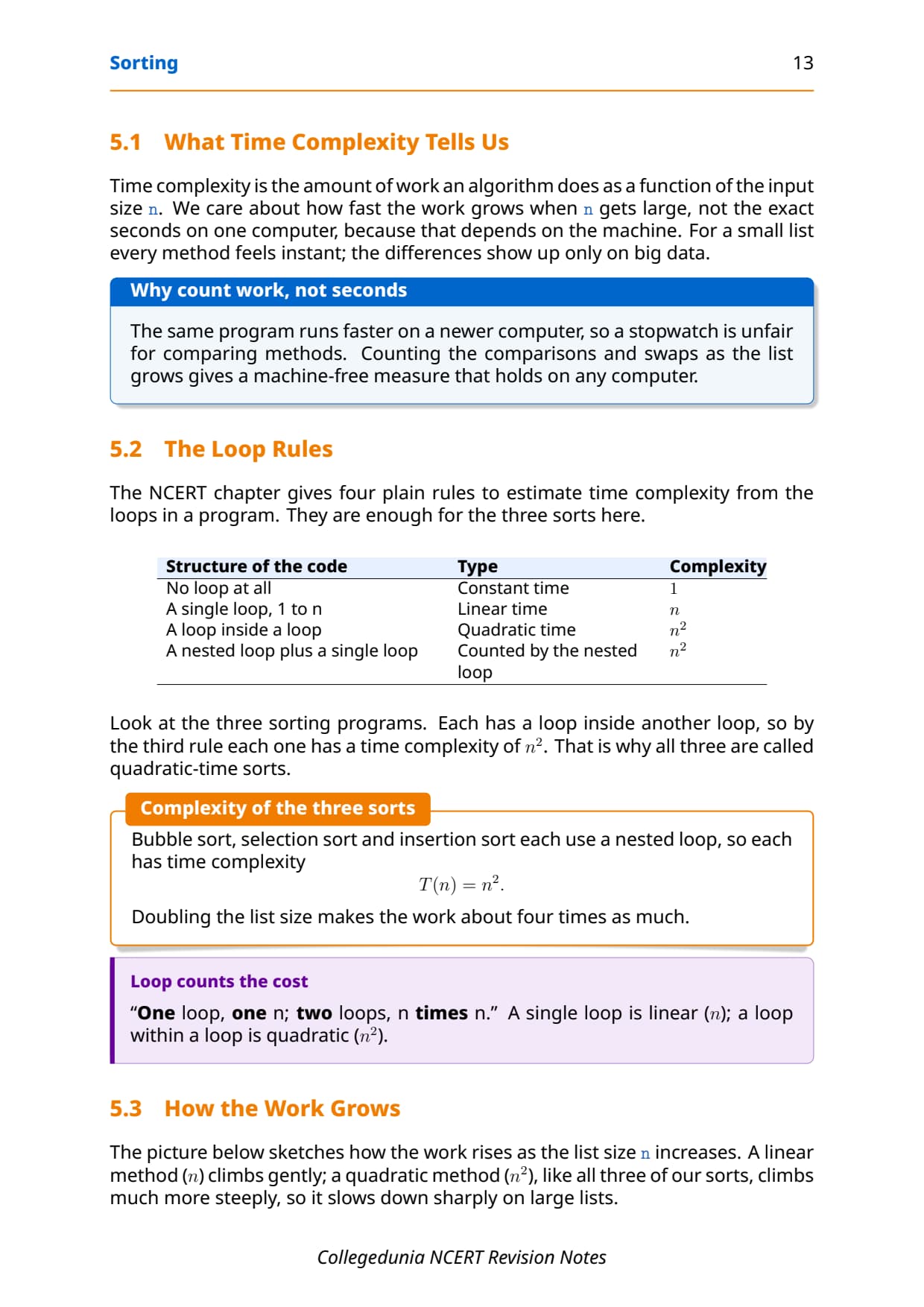
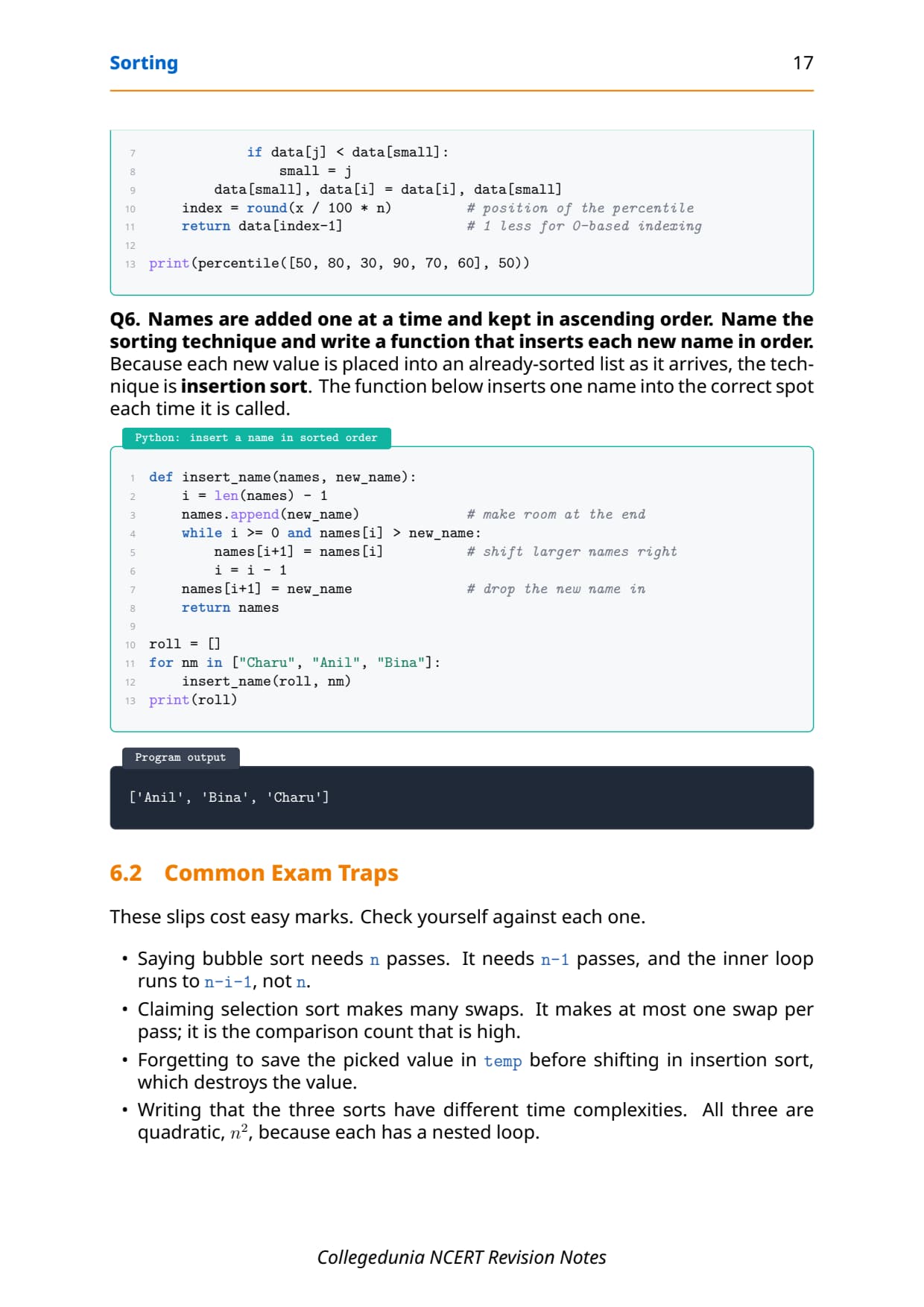
- All three sorts in one place with the core idea, a pass-by-pass dry run, the Python code, and the exact number of passes and swaps each one makes.
- Full coverage of ascending and descending order, comparisons, swaps, passes and the time complexity rules the CBSE board paper tests directly.
- Notes aligned with the 2026-27 CBSE Class 12 Computer Science syllabus and useful for JEE and CUET programming questions; no NEET references because Computer Science is not a medical subject.
These Collegedunia revision notes are curated by Computer Science subject experts, mapped to the 2026-27 NCERT textbook, and refined against the last five years of CBSE Class 12 Computer Science board papers.
Student Feedback: What 11,800 students told us about this chapter
68% of Class 12 students said they mixed up selection sort and insertion sort while revising. 3 out of 5 students told us a single side-by-side table of passes, swaps and best-case data helped them lock the chapter the night before the exam.
Toppers found that tracing one short dry run by hand fixed the whole method faster than re-reading the theory, and the average student spent 1 to 2 hours on these notes across the first read and the final revision.
Source: 2026-27 Class 12 Computer Science student poll. Sample of 11,800 students from CBSE schools across 14 states, conducted before the 2026 boards.
What the Notes for Class 12 Computer Science Chapter 5 Sorting Cover
This chapter answers one question: how do you arrange a list of values into order, and which method does it with the least work? These notes keep the NCERT order but compress it into revision-ready blocks, so you can read the whole chapter in one sitting and recall it fast in the exam.
- What sorting means: arranging values in ascending, descending or alphabetical order, and why a sorted list is faster to search.
- Bubble, selection and insertion sort: the core idea, a pass-by-pass dry run, the Python program, and the output for each one.
- Passes, comparisons and swaps: the three basic moves that all three methods share, with the count each method needs.
- Time complexity: the simple loop rules that show why all three sorts are quadratic, and how to choose between them.
Source: Magnet Brains on YouTube
Sorting: The Big Picture for Class 12 Computer Science
Before the methods, fix the idea. Sorting is the process of arranging a collection of elements in a particular order. You can put numbers in ascending order, like 1, 4, 7, 8, or descending order, like 8, 7, 4, 1, and you can put strings in alphabetical order the way a dictionary lists its words. Almost every program that shows a list to a user sorts it first, because a sorted list is far easier to read and to search.
| Order | What it means | Example |
|---|---|---|
| Ascending | Smallest first, then larger | marks 35, 48, 60, 91 |
| Descending | Largest first, then smaller | 91, 60, 48, 35 |
| Alphabetical | Strings from a to z | Anil, Bina, Charu, Deepa |
Sorting a large list does cost some extra time, called overhead. But that cost is small next to the time you save later when you search the sorted list again and again. This chapter teaches three classic methods: bubble sort, selection sort and insertion sort, and a way to judge which is faster using time complexity.
Pass, Comparison and Swap: The Three Moves in Python
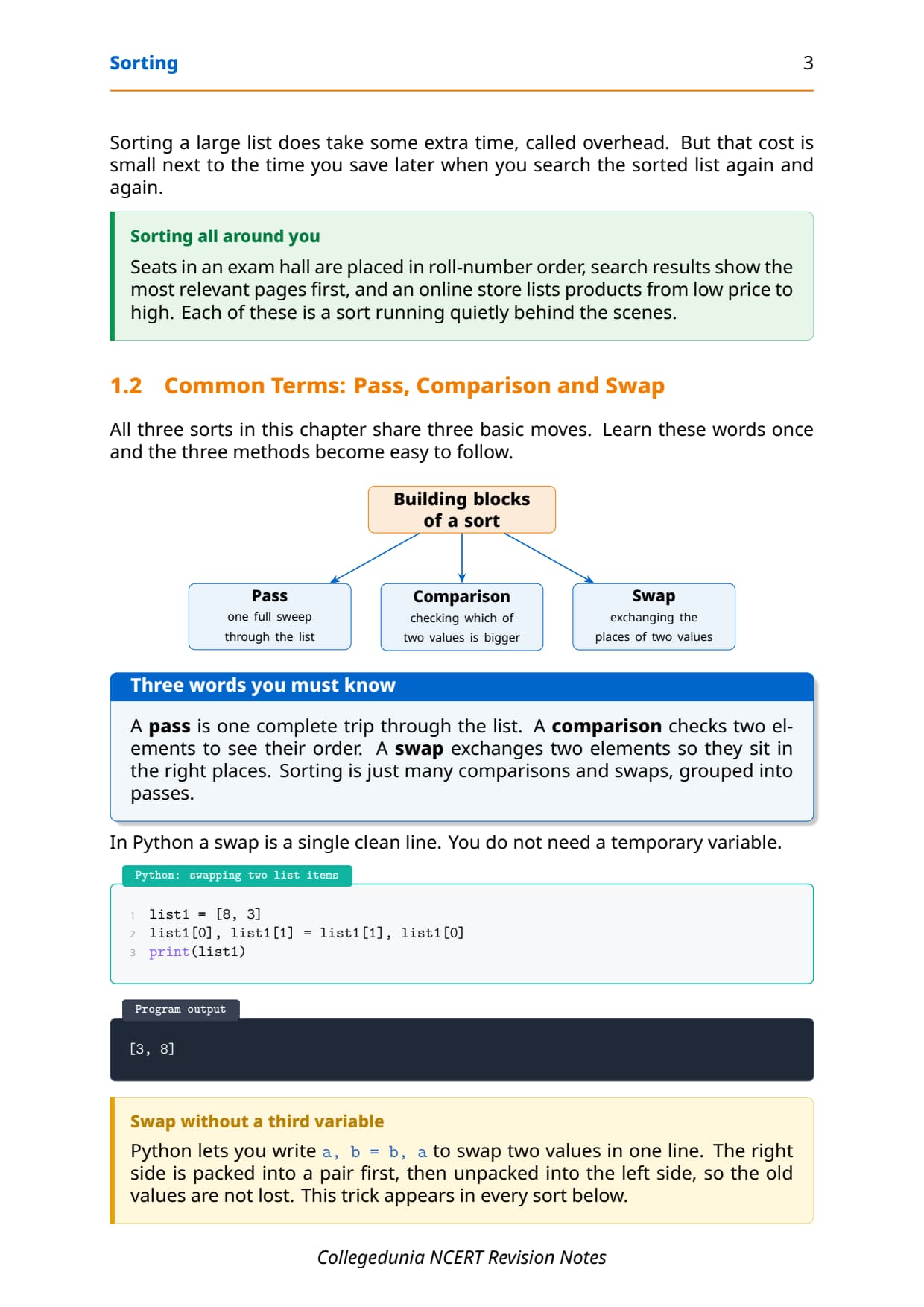
All three sorts in this chapter share three basic moves. Learn these words once and the methods become easy to follow. A pass is one full sweep through the list. A comparison checks two elements to see which is bigger. A swap exchanges the places of two elements.
- Pass: one complete trip through the list, after which a little more of the list is in order.
- Comparison: checking which of two values is bigger so you know whether to move them.
- Swap: exchanging two values so they sit in the right places.
In Python a swap is a single clean line, and you do not need a temporary variable. The right side is packed into a pair first, then unpacked into the left side, so the old values are never lost. This one-line trick appears in every sort below.
list1 = [8, 3]
list1[0], list1[1] = list1[1], list1[0]
print(list1)
[3, 8]Bubble Sort in Class 12 Computer Science
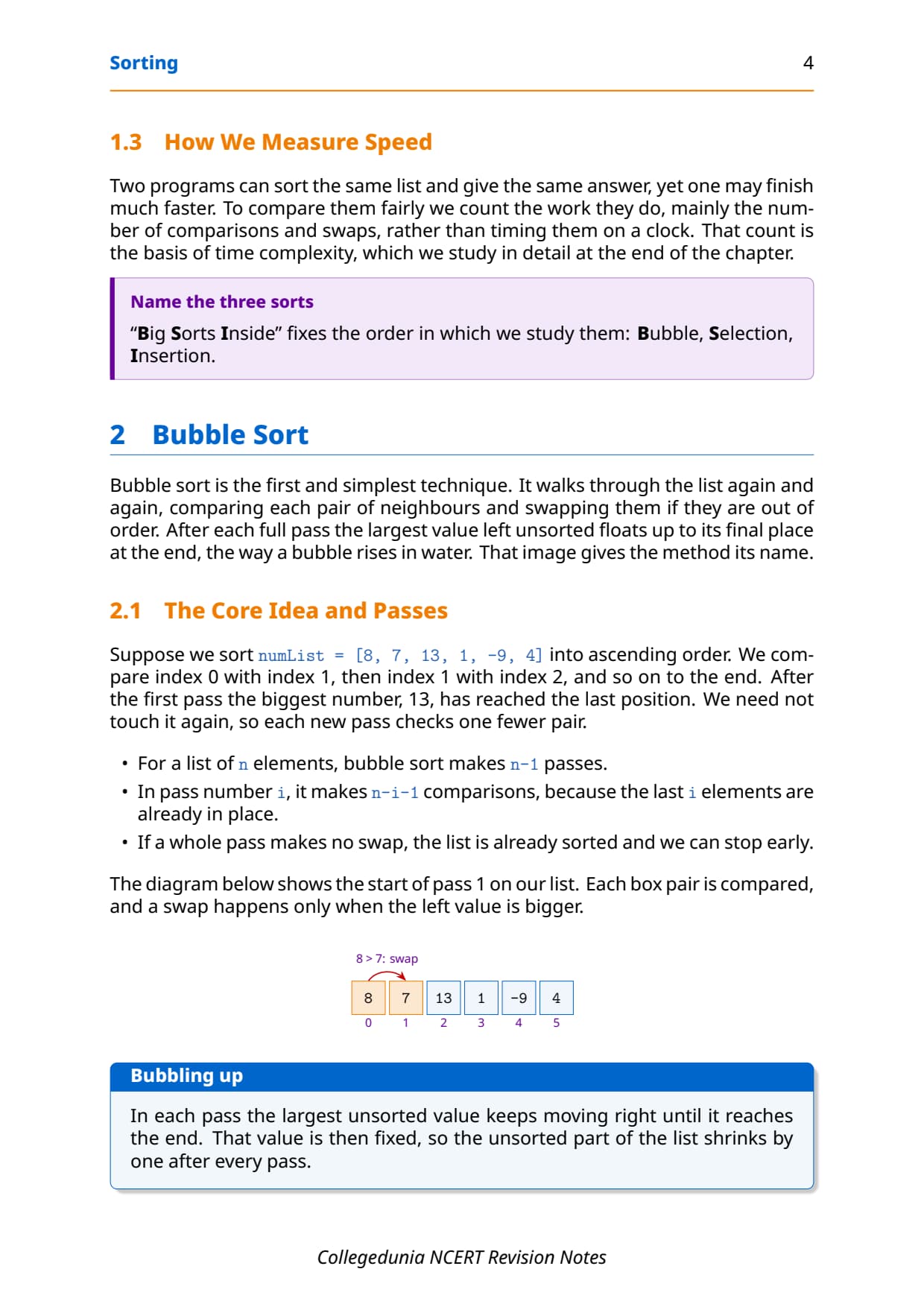
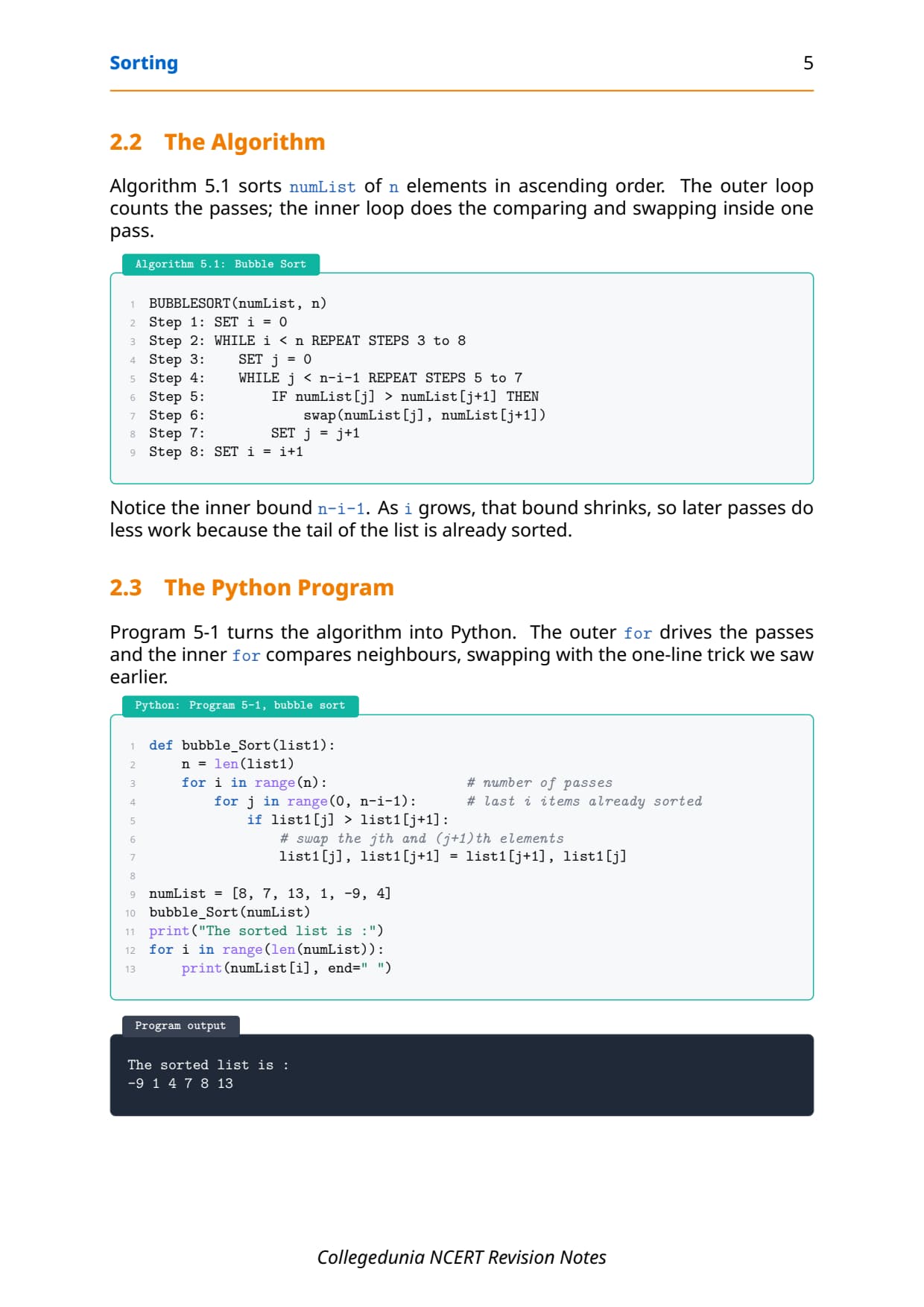
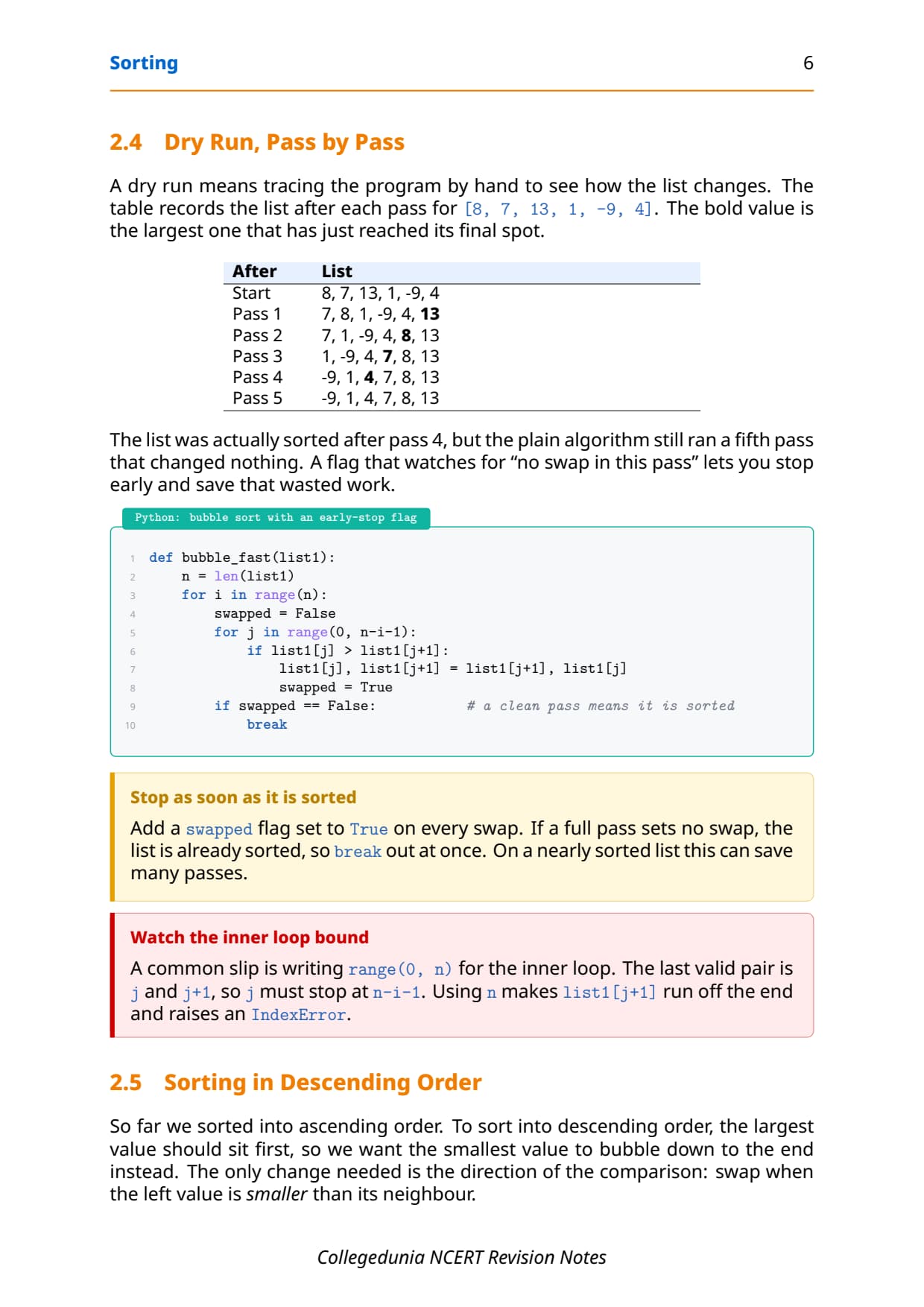
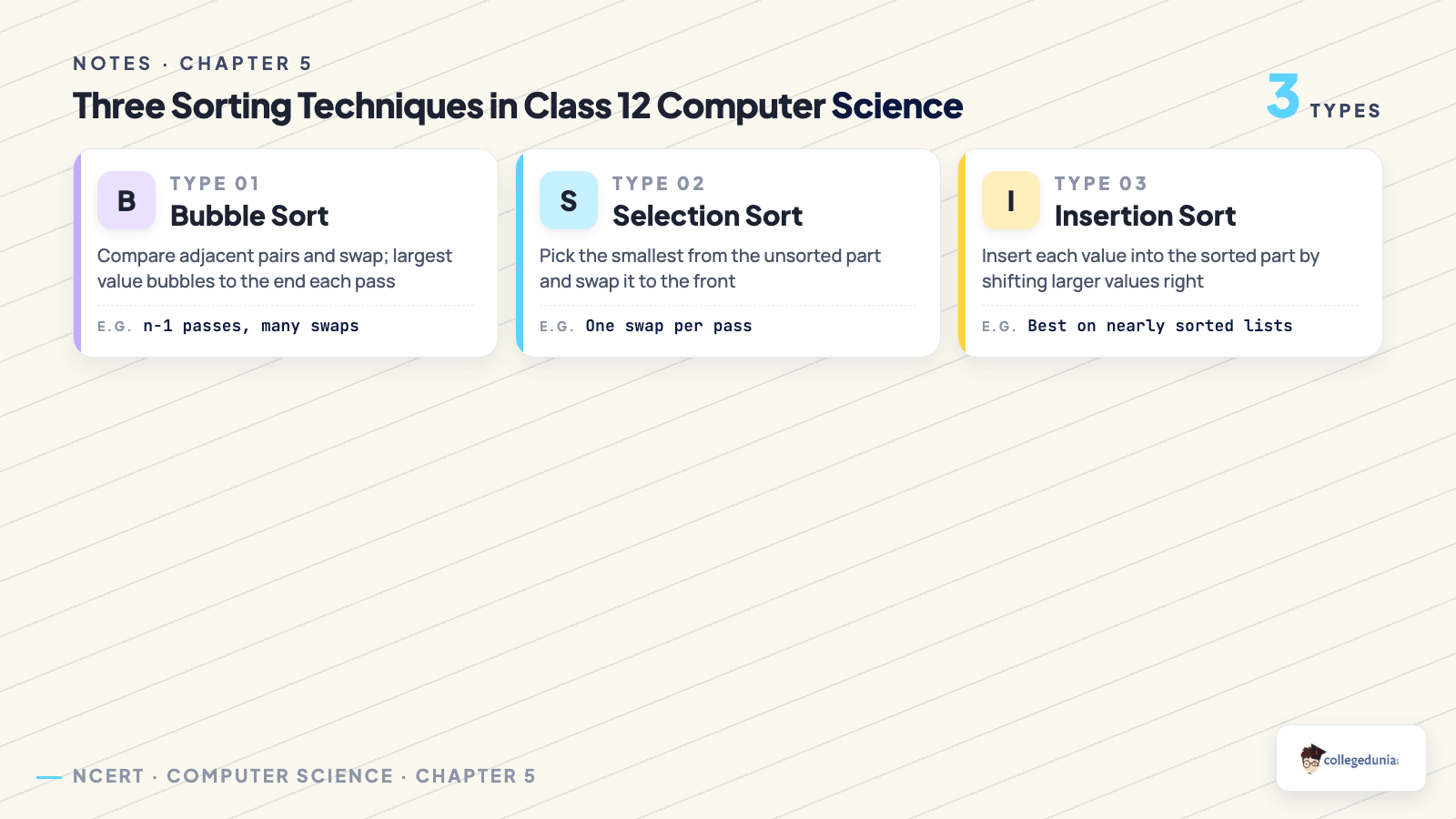
Bubble sort is the first and simplest technique. It walks through the list again and again, comparing each pair of neighbours and swapping them if they are out of order. After each full pass the largest value left unsorted floats up to its final place at the end, the way a bubble rises in water. That image gives the method its name.
- For a list of
nelements, bubble sort makesn-1passes. - In pass number
i, it makesn-i-1comparisons, because the lastielements are already in place. - If a whole pass makes no swap, the list is already sorted and you can stop early.
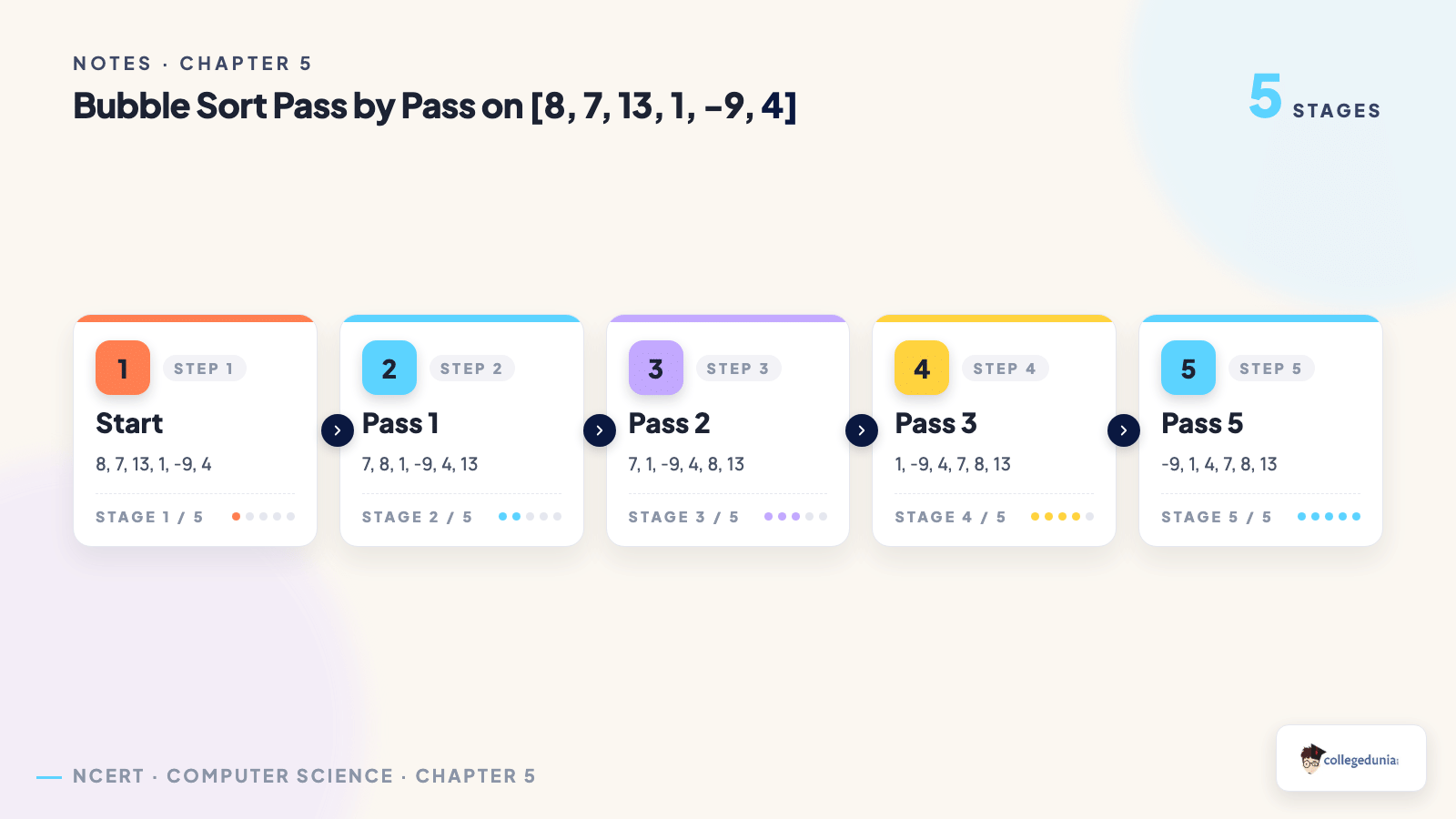
The bubble sort Python program
Program 5-1 turns the idea into Python. The outer for loop drives the passes and the inner for loop compares neighbours, swapping with the one-line trick. The inner bound n-i-1 is the key: as i grows, that bound shrinks, so later passes do less work because the tail of the list is already sorted.
def bubble_Sort(list1):
    n = len(list1)
    for i in range(n):                 # number of passes
        for j in range(0, n-i-1):      # last i items already sorted
            if list1[j] > list1[j+1]:
                # swap the jth and (j+1)th elements
                list1[j], list1[j+1] = list1[j+1], list1[j]

numList = [8, 7, 13, 1, -9, 4]
bubble_Sort(numList)
print(numList)
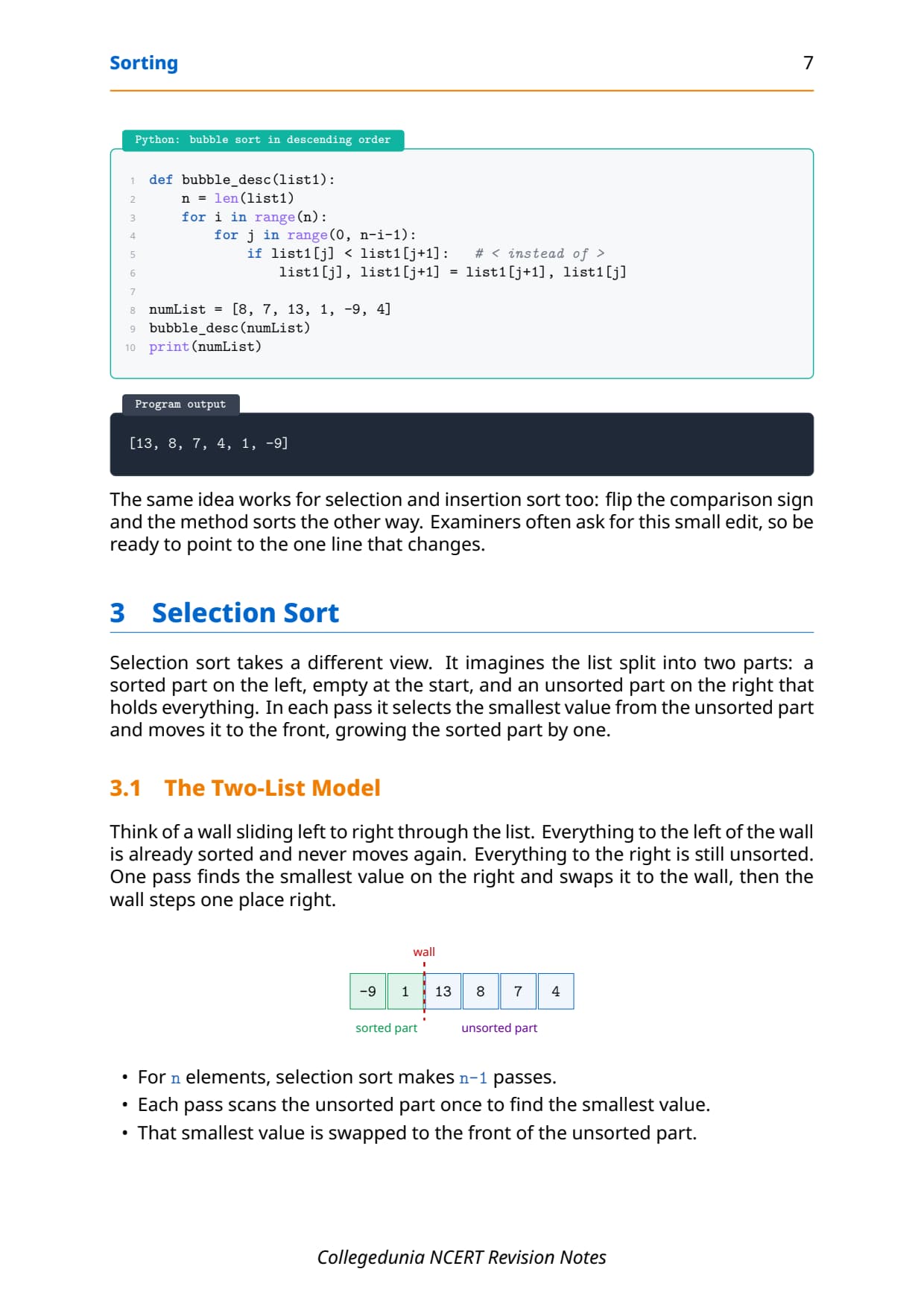
[-9, 1, 4, 7, 8, 13]To sort in descending order, you change only one thing: the direction of the comparison. Swap when the left value is smaller than its neighbour, so the smallest value bubbles down to the end. Examiners often ask for this small edit, so be ready to point to the single line that changes (< instead of >).
range(0, n) for the inner loop. The last valid pair is j and j+1, so j must stop at n-i-1. Using n makes list1[j+1] run off the end and raises an IndexError.
Selection Sort: Pick the Smallest Each Pass
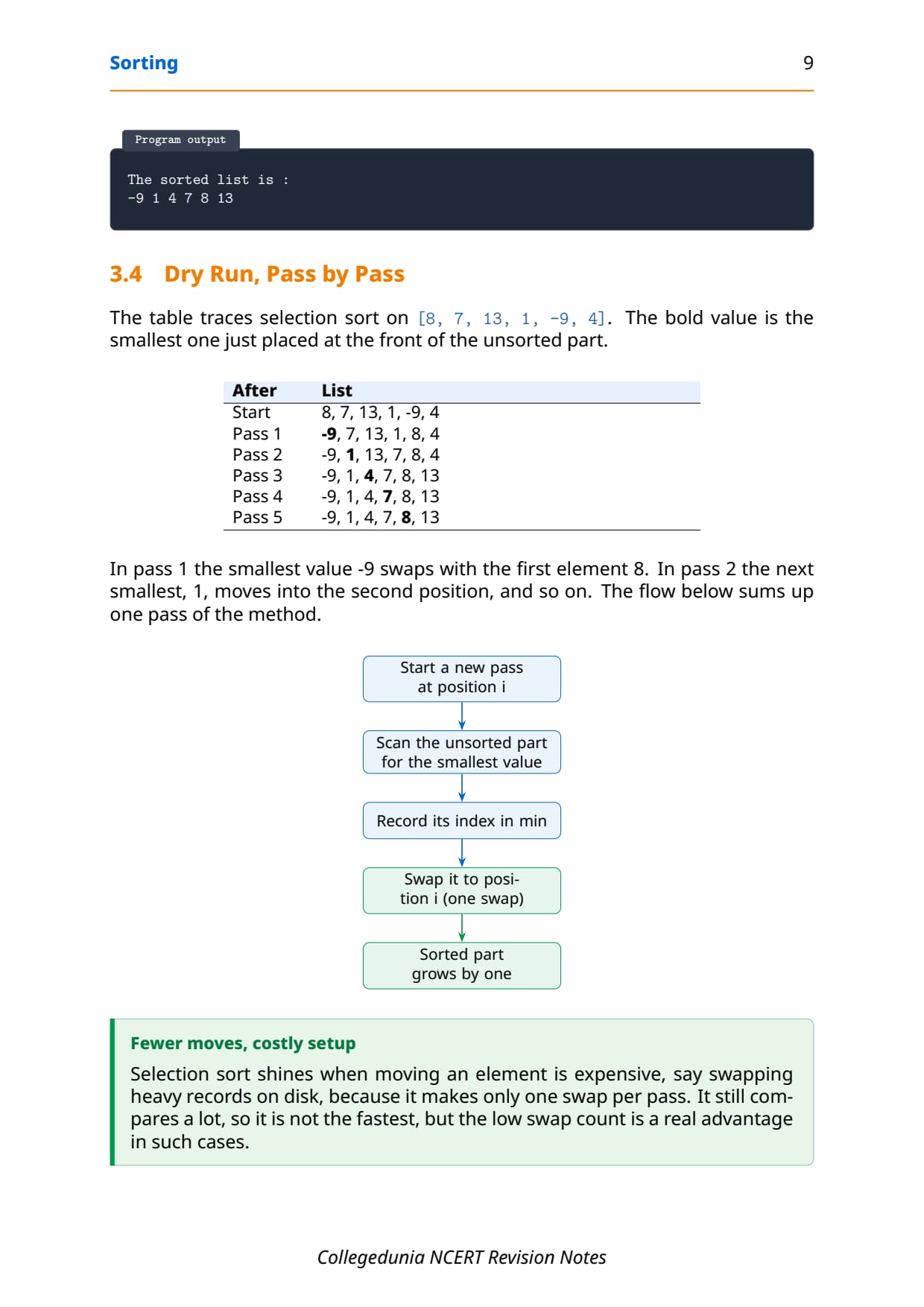
Selection sort takes a different view. It imagines the list split into two parts: a sorted part on the left, empty at the start, and an unsorted part on the right that holds everything. In each pass it selects the smallest value from the unsorted part and swaps it to the front, growing the sorted part by one. Think of a wall sliding left to right: everything to the left of the wall is fixed and never moves again.
- For
nelements, selection sort makesn-1passes. - Each pass scans the unsorted part once to find the smallest value.
- It makes at most one swap per pass, which is far fewer swaps than bubble sort.
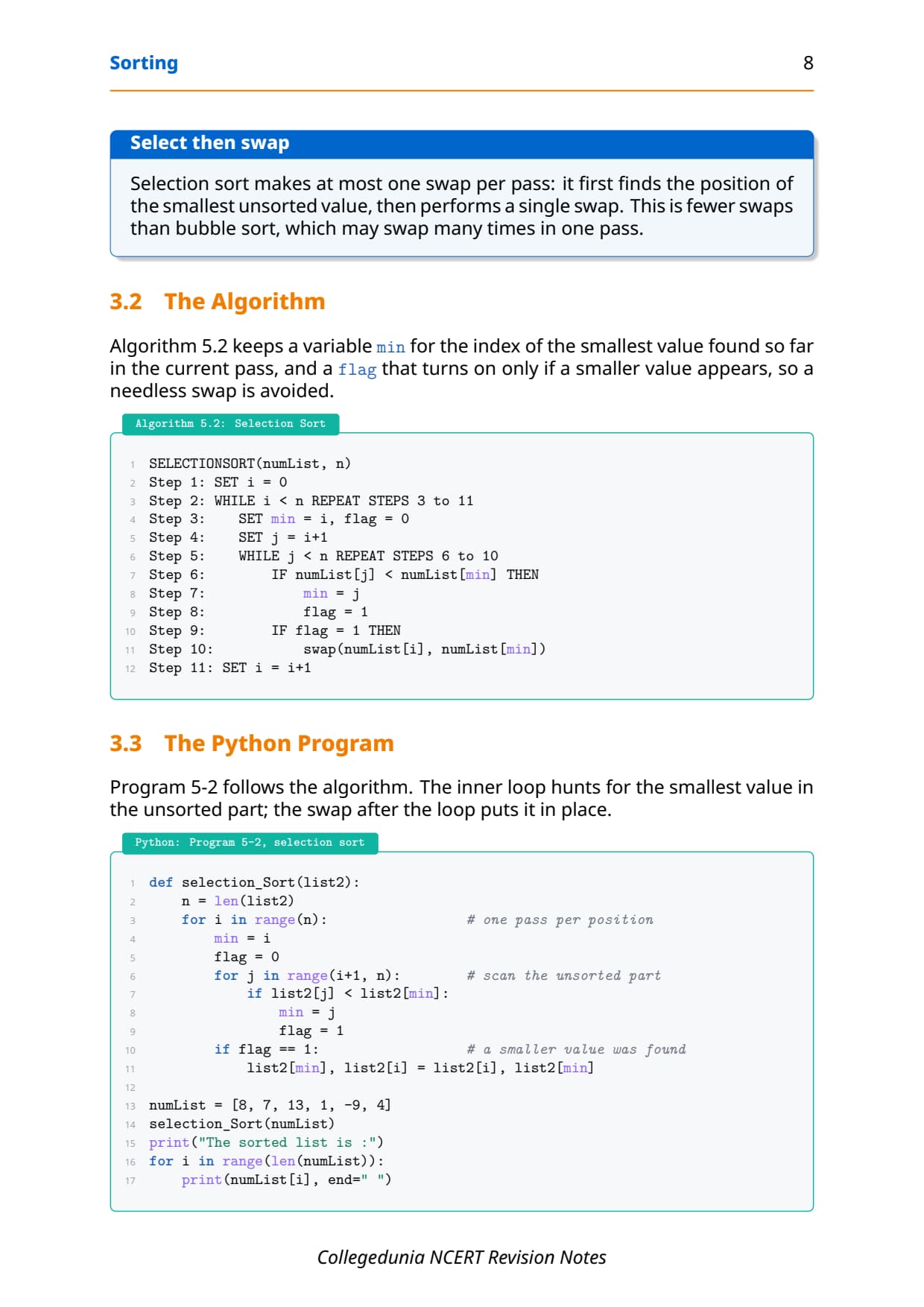
Program 5-2 follows this plan. The inner loop hunts for the smallest value in the unsorted part and records its index in min; a flag turns on only if a smaller value appears, so a needless swap is avoided.
def selection_Sort(list2):
    n = len(list2)
    for i in range(n):                 # one pass per position
        min = i
        flag = 0
        for j in range(i+1, n):        # scan the unsorted part
            if list2[j] < list2[min]:
                min = j
                flag = 1
        if flag == 1:                  # a smaller value was found
            list2[min], list2[i] = list2[i], list2[min]

numList = [8, 7, 13, 1, -9, 4]
selection_Sort(numList)
print(numList)
[-9, 1, 4, 7, 8, 13]min, not the value itself. You need the index to swap correctly. Selection sort shines when moving an element is expensive, such as swapping heavy records, because it makes only one swap per pass.
Insertion Sort: Insert Into the Sorted Part
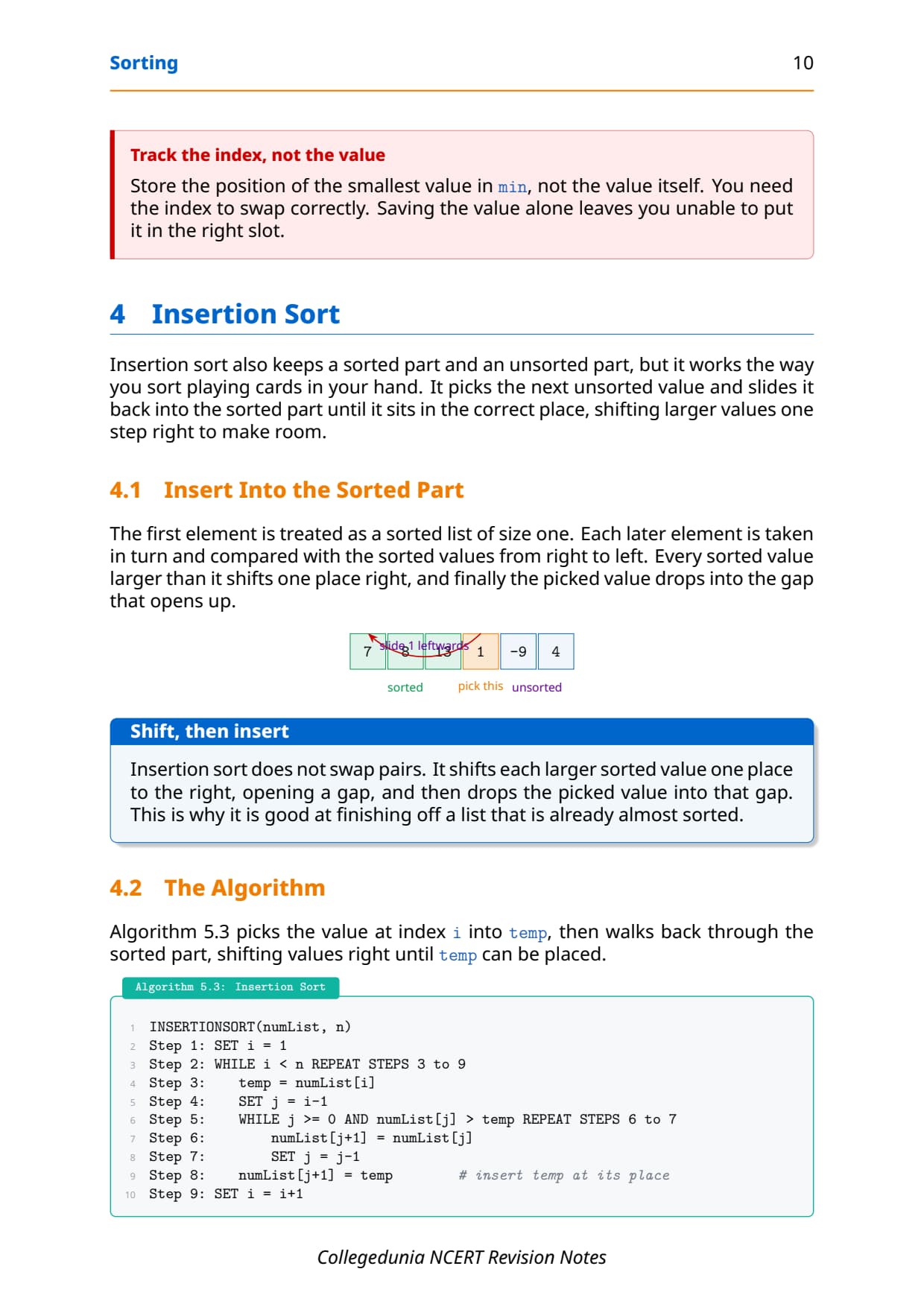
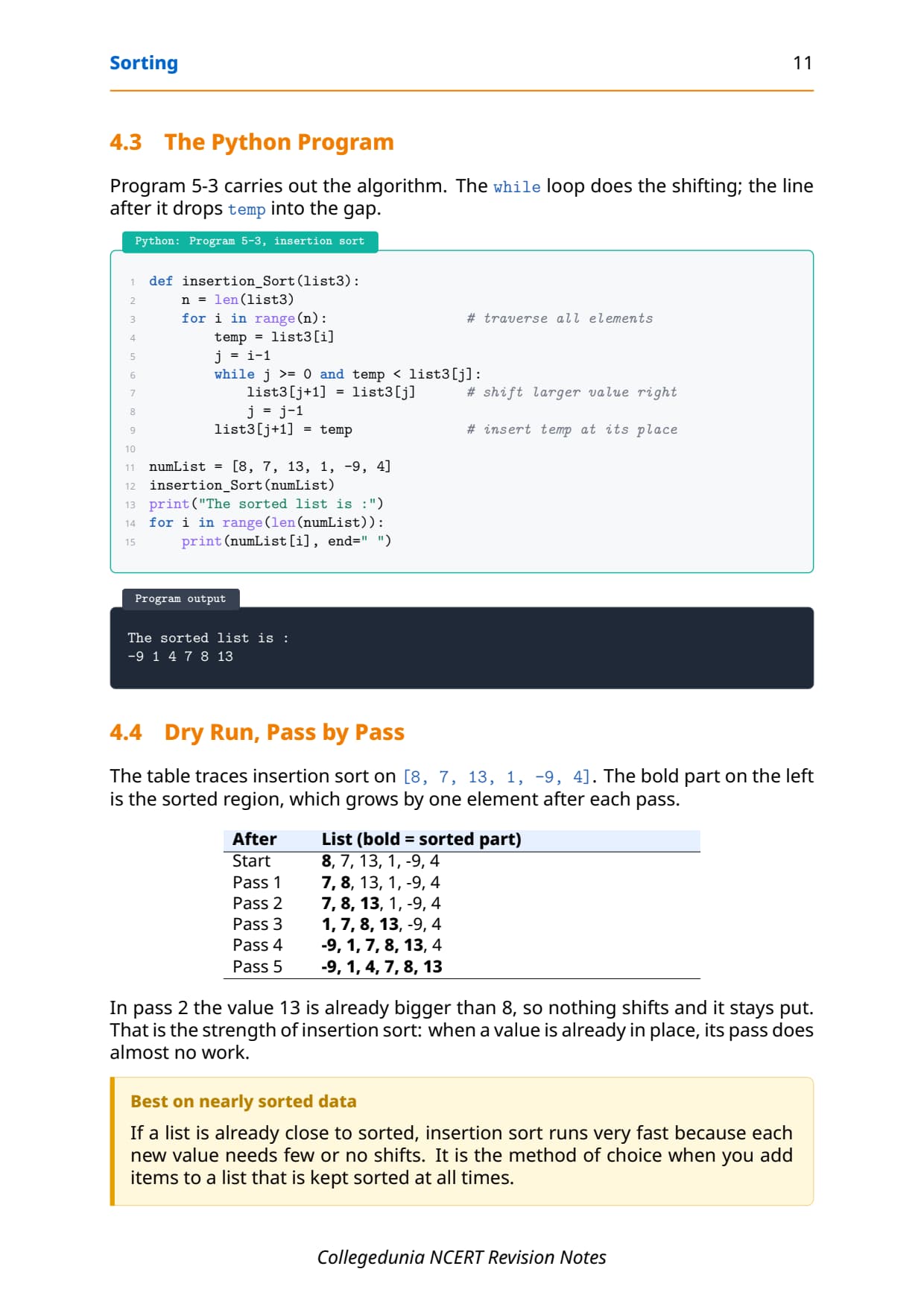
Insertion sort also keeps a sorted part and an unsorted part, but it works the way you sort playing cards in your hand. It picks the next unsorted value and slides it back into the sorted part until it sits in the correct place, shifting larger values one step right to make room. The first element is treated as a sorted list of size one.
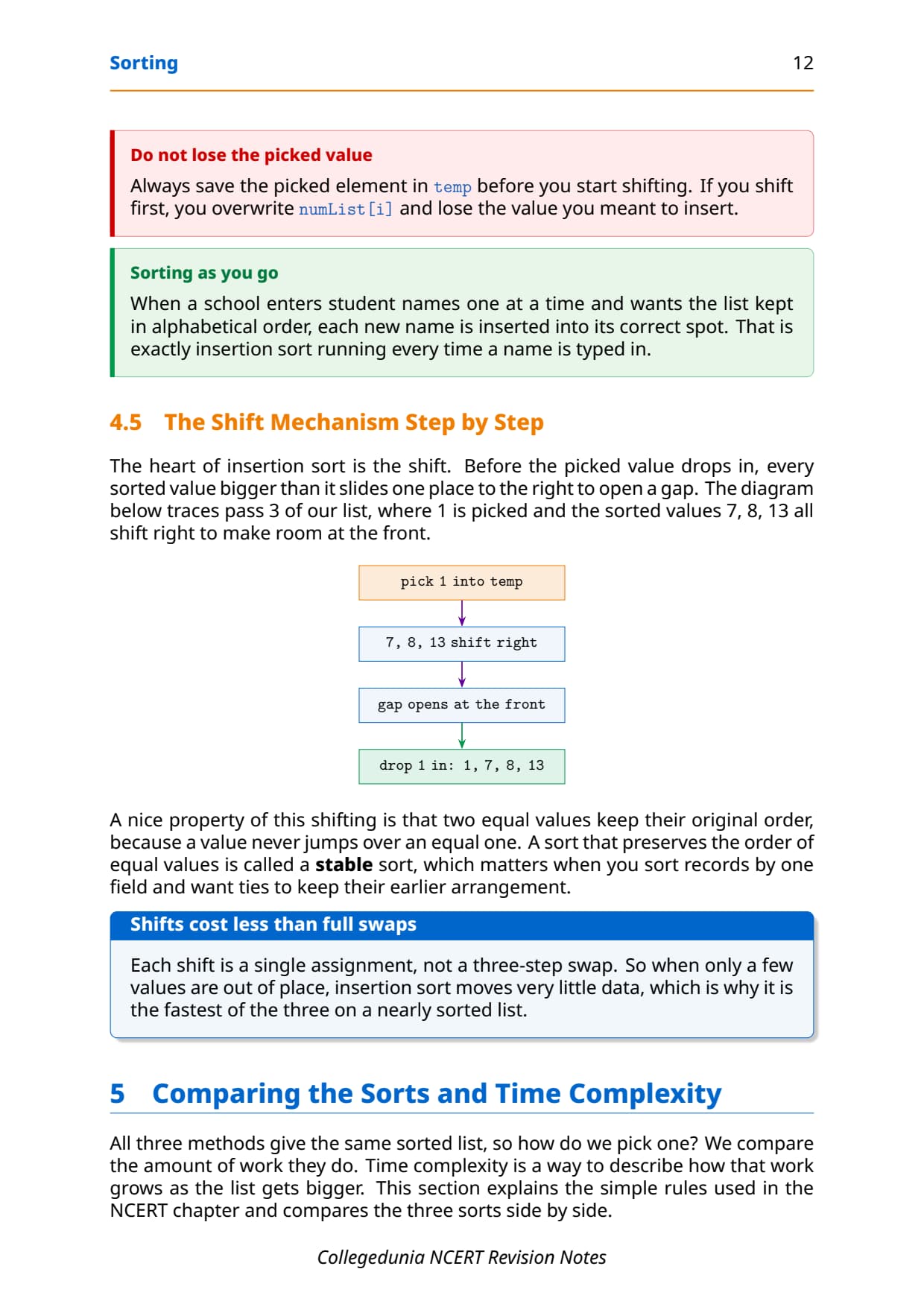
Unlike bubble sort, insertion sort does not swap pairs. It shifts each larger sorted value one place to the right, opening a gap, and then drops the picked value into that gap. This is why it is the fastest of the three on a list that is already almost sorted: when a value is already in place, its pass does almost no work.
def insertion_Sort(list3):
    n = len(list3)
    for i in range(n):                 # traverse all elements
        temp = list3[i]
        j = i-1
        while j >= 0 and temp < list3[j]:
            list3[j+1] = list3[j]      # shift larger value right
            j = j-1
        list3[j+1] = temp              # insert temp at its place

numList = [8, 7, 13, 1, -9, 4]
insertion_Sort(numList)
print(numList)
[-9, 1, 4, 7, 8, 13]A nice property of this shifting is that two equal values keep their original order, because a value never jumps over an equal one. A sort that preserves the order of equal values is called a stable sort, which matters when you sort records by one field and want ties to keep their earlier arrangement.
temp before you start shifting. If you shift first, you overwrite numList[i] and lose the value you meant to insert.
Comparing the Sorts and Time Complexity in Class 12
All three methods give the same sorted list, so how do you pick one? You compare the amount of work they do. Time complexity is a way to describe how that work grows as the list gets bigger. We care about how fast the work grows when n gets large, not the exact seconds on one computer, because that depends on the machine.
The NCERT chapter gives four plain rules to estimate time complexity from the loops in a program. The table below lists them, and then applies them to the three sorts.
| Structure of the code | Type | Complexity |
|---|---|---|
| No loop at all | Constant time | 1 |
| A single loop, 1 to n | Linear time | n |
| A loop inside a loop | Quadratic time | n2 |
| A nested loop plus a single loop | Counted by the nested loop | n2 |
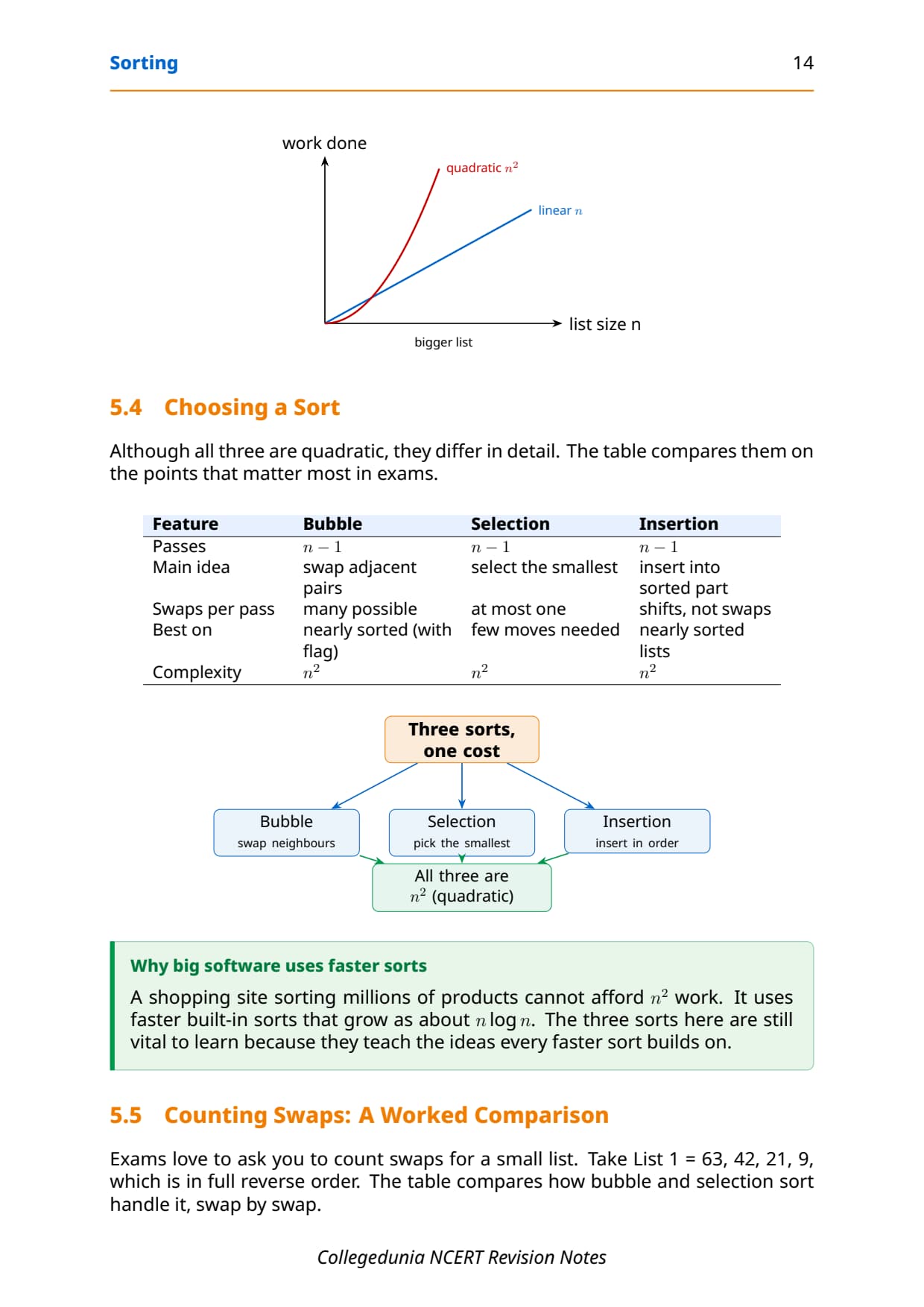
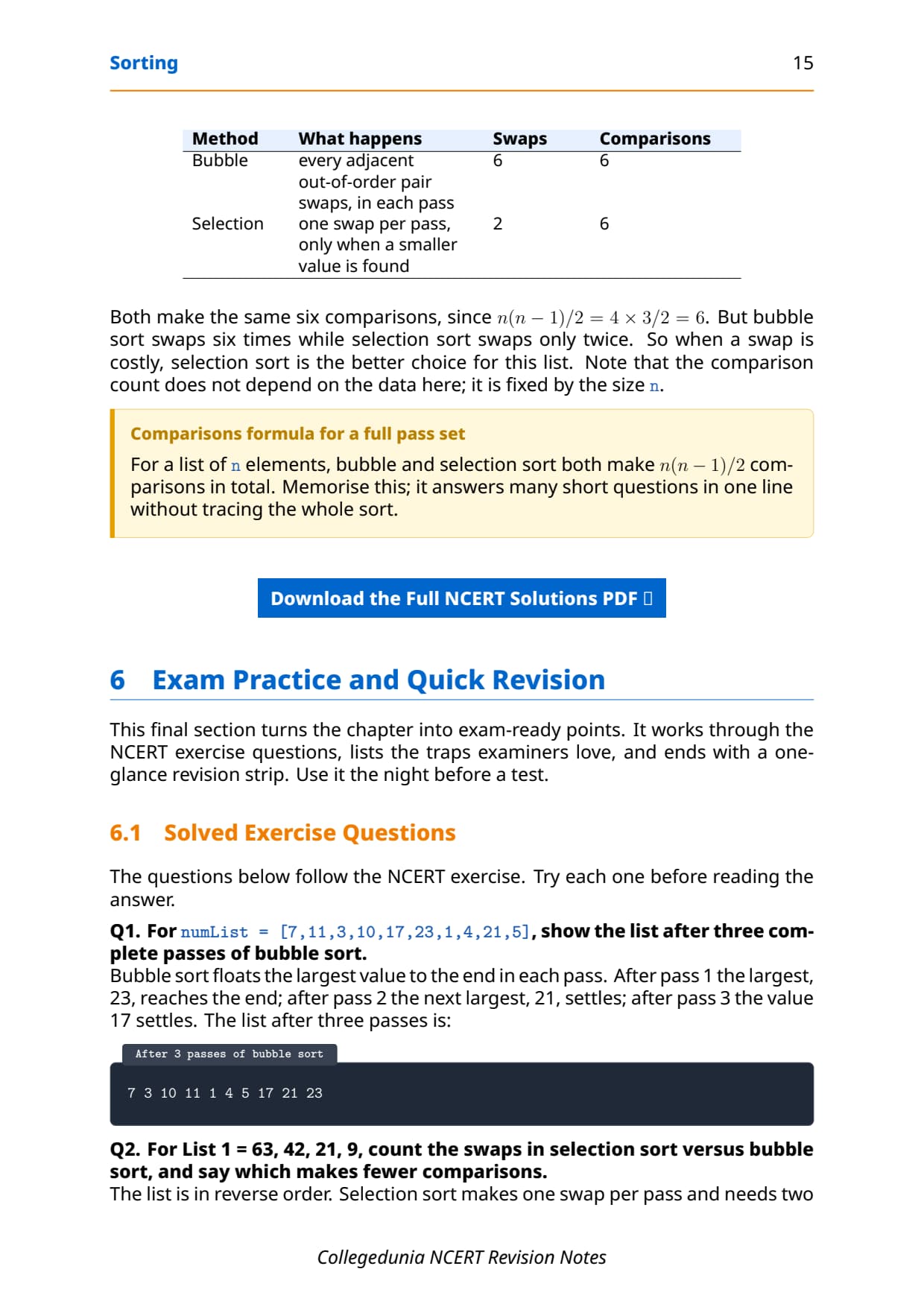
Look at the three sorting programs. Each one has a loop inside another loop, so by the third rule each one has a time complexity of n2. That is why all three are called quadratic-time sorts. Doubling the list size makes the work about four times as much, so on very large lists big software uses faster sorts that grow as about n log n.
| Feature | Bubble | Selection | Insertion |
|---|---|---|---|
| Passes | n-1 | n-1 | n-1 |
| Main idea | swap adjacent pairs | select the smallest | insert into sorted part |
| Swaps per pass | many possible | at most one | shifts, not swaps |
| Best on | nearly sorted (with flag) | few moves needed | nearly sorted lists |
| Complexity | n2 | n2 | n2 |
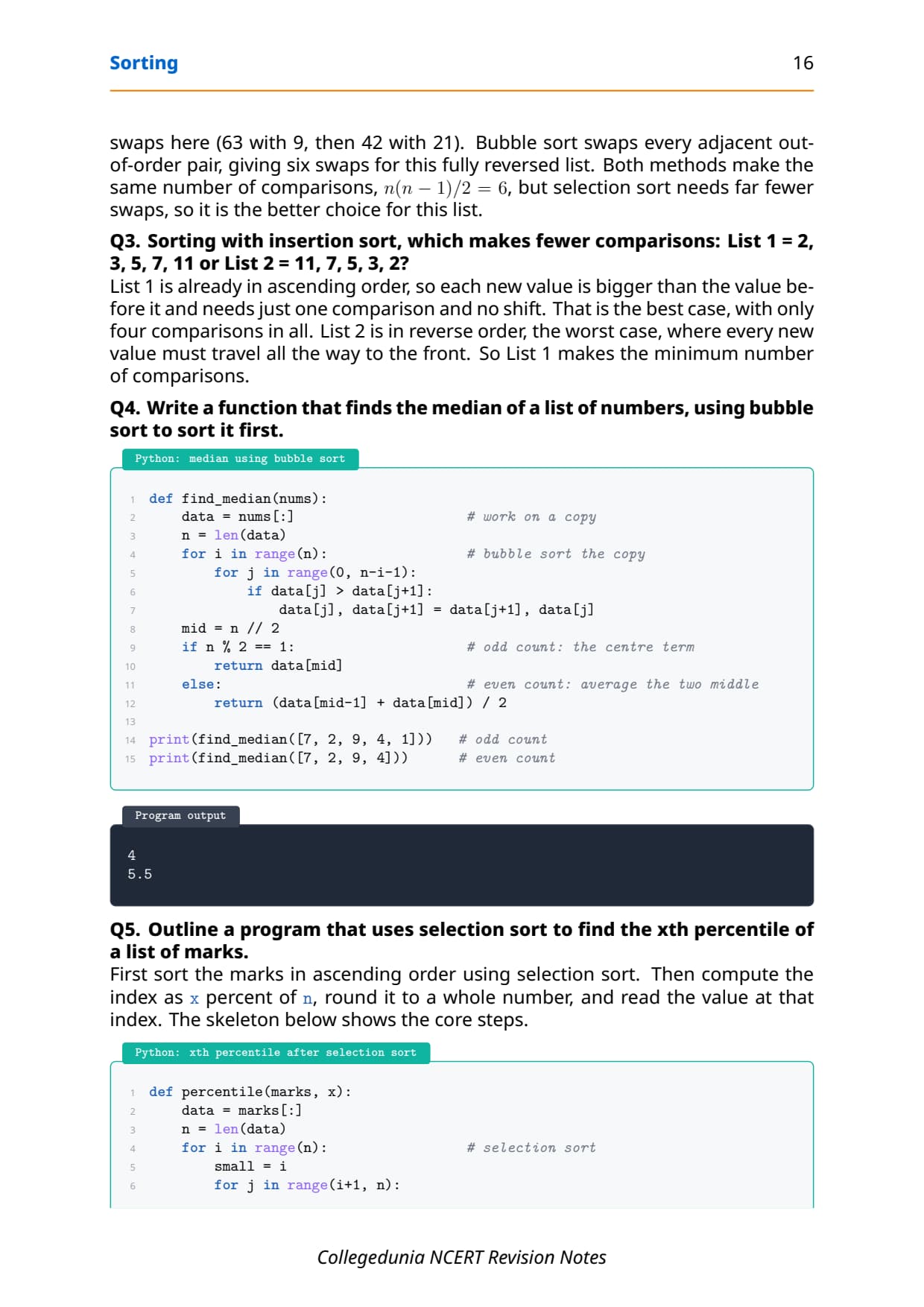
Exams love to ask you to count swaps for a small list. For List 1 = 63, 42, 21, 9, which is in full reverse order, bubble sort swaps six times while selection sort swaps only twice. Both make the same six comparisons, since n(n-1)/2 = 4 × 3 / 2 = 6, so when a swap is costly, selection sort is the better choice for this list.
n elements, bubble and selection sort both make n(n-1)/2 comparisons in total. Memorise this; it answers many short questions in one line without tracing the whole sort.
One-Glance Revision Strip and Common Exam Traps
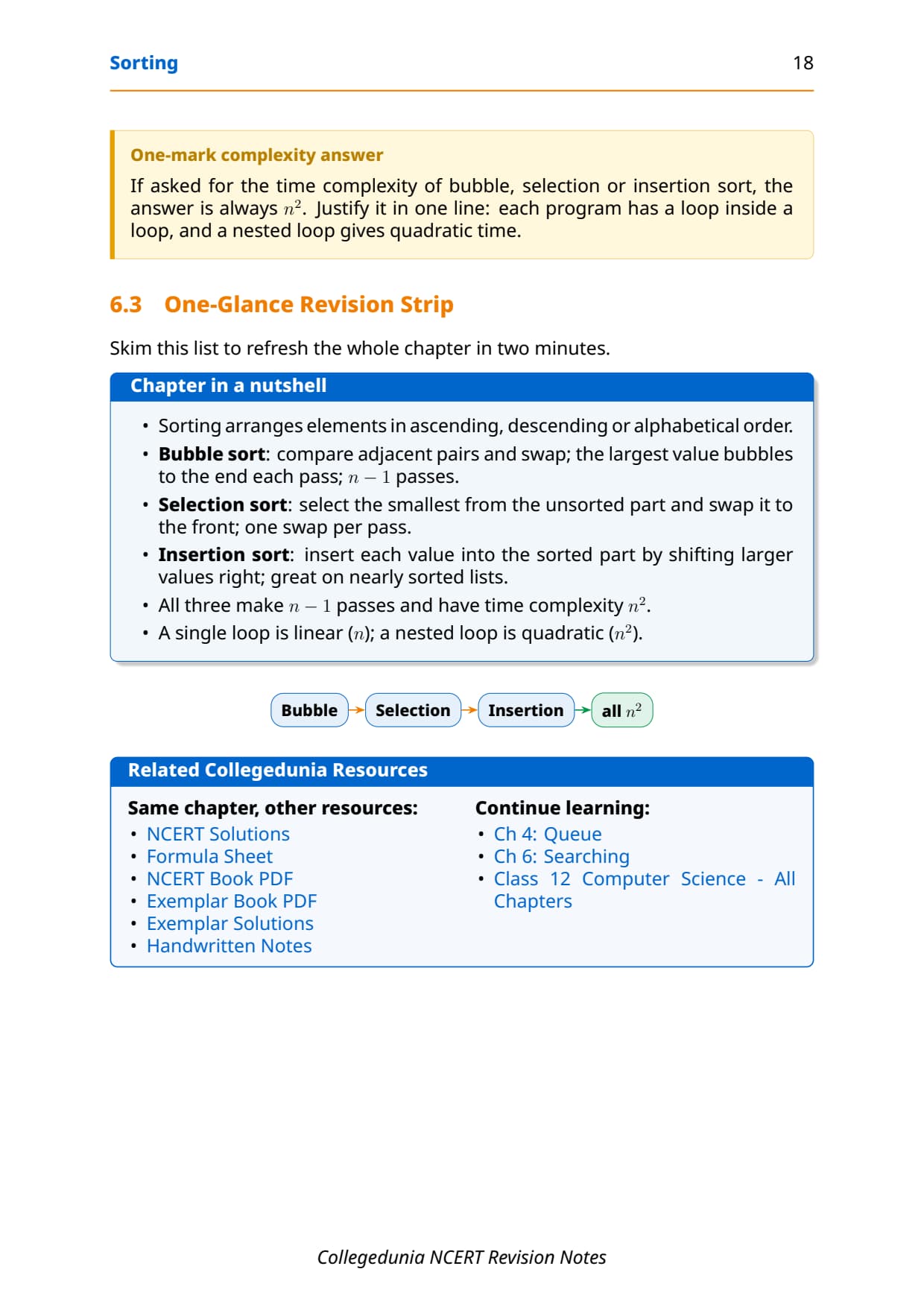
This is the strip to read in the last five minutes before the exam. It lines up each sort with its one-line idea and cost, then lists the traps that cost students marks every year.
| Sort | One-line idea | Cost |
|---|---|---|
| Bubble | Compare adjacent pairs; largest bubbles to the end each pass | n-1 passes, n2 |
| Selection | Pick the smallest from the unsorted part; one swap per pass | n-1 passes, n2 |
| Insertion | Insert each value into the sorted part by shifting larger values right | n-1 passes, n2 |
The repeat-offender mistakes in Sorting chapter board answers:
- Saying bubble sort needs n passes: it needs
n-1passes, and the inner loop runs ton-i-1, notn. - Claiming selection sort makes many swaps: it makes at most one swap per pass; it is the comparison count that is high.
- Losing the picked value in insertion sort: save it in
tempbefore shifting, or you destroy the value. - Giving the three sorts different complexities: all three are quadratic, n2, because each has a nested loop.
- Forgetting the descending edit: only the comparison sign flips (
<to>), not the whole program.
How to Use the Sorting Notes PDF for Board Revision
The Sorting chapter is short but trap-heavy and program-heavy. The best approach is two passes: one for the idea and the loop counts, one for tracing the small programs by hand.
First pass: idea and loop counts
Read these notes and note the core idea of each sort, the number of passes (n-1 for all three), and the rule that a nested loop gives n2 time. Say one line of meaning aloud for bubble, selection and insertion sort so the methods stick before you start tracing code.
Second pass: trace the programs
Take the list [8, 7, 13, 1, -9, 4] and trace each sort on paper, writing the list after every pass. Then count the swaps for the reverse-order list 63, 42, 21, 9 under both bubble and selection sort. That single exercise covers the most common 3-mark board question on this chapter.
JEE and CUET angle
For students preparing competitive exams, sorting appears in Python-based programming rounds and in CUET Computer Science. Loop-counting for time complexity and the swap-versus-shift difference are exactly the kind of concept questions those papers reuse, so this revision doubles as competitive prep.
Previous Year Question Trends from the Sorting Chapter
The Sorting chapter is tested in CBSE board papers mainly through dry-run and swap-counting questions, with a program question on one of the three sorts. The table below maps the asked question types across recent board papers, so your revision can target the high-frequency areas.
| Year | Question type asked | Marks |
|---|---|---|
| 2025 | Show the list after three passes of bubble sort; state the time complexity | 2 + 1 |
| 2024 | Write a Python program to sort a list using selection sort | 3 |
| 2023 | Count swaps in bubble vs selection sort; which is better | 3 |
| 2022 | Define a pass and a swap; trace insertion sort on a small list | 1 + 2 |
| 2021 | Difference between bubble and insertion sort; complexity of each | 2 + 2 |
Also Check: The full set of CBSE board paper questions for this chapter, with step-by-step answers, is included in the downloadable PDF above, updated for the 2026-27 cycle.
Other Resources for Class 12 Computer Science Chapter 5 Sorting
Pair these revision notes with the matching NCERT Solutions, handwritten notes and the official NCERT book chapter. All resources for Class 12 Computer Science Chapter 5 Sorting are linked below.
| Resource | What it covers | Open |
|---|---|---|
| Notes | Concept-first revision notes on bubble, selection and insertion sort, with dry runs and time complexity. | You are here |
| NCERT Solutions | Step-by-step answers to all 6 exercise questions, with an Expert Solution for each. | Class 12 Computer Science Chapter 5 NCERT Solutions |
| Handwritten Notes | Scanned-style handwritten pages for last-minute board revision. | Class 12 Computer Science Chapter 5 Handwritten Notes |
| NCERT Book PDF | Official NCERT Computer Science Chapter 5 Sorting textbook in PDF form. | Class 12 Computer Science Chapter 5 NCERT Book PDF |
Notes for Class 12 Computer Science: All Chapters
Related Links: Use the table below to open the revision notes for the other chapters of Class 12 Computer Science. Every chapter ships with the same concept-first notes style, full PDF download, and revision FAQ.
| Chapter | Notes link |
|---|---|
| Chapter 1 | Exception Handling in Python Notes |
| Chapter 2 | File Handling in Python Notes |
| Chapter 3 | Stack Notes |
| Chapter 4 | Queue Notes |
| Chapter 5 | Sorting Notes (You are here) |
| Chapter 6 | Searching Notes |
| Chapter 7 | Understanding Data Notes |
| Chapter 8 | Database Concepts Notes |
| Chapter 9 | Structured Query Language (SQL) Notes |
| Chapter 10 | Computer Networks Notes |
| Chapter 11 | Data Communication Notes |
| Chapter 12 | Security Aspects Notes |
Notes Class 12 Computer Science Chapter 5 Sorting FAQs
Ques. What does Chapter 5 Sorting cover in Class 12 Computer Science?
Ans. Chapter 5 covers how to arrange a list of elements in order and which method does it with the least work. The notes explain sorting in ascending, descending and alphabetical order, the three basic moves of a pass, a comparison and a swap, and the three classic methods: bubble sort, selection sort and insertion sort. Each sort comes with its core idea, a pass-by-pass dry run, a Python program and its output. The chapter ends with time complexity, showing that all three sorts are quadratic, all aligned with the 2026-27 CBSE syllabus.
Ques. What is the difference between bubble sort, selection sort and insertion sort?
Ans. Bubble sort compares adjacent pairs and swaps them, so the largest value bubbles to the end in each pass; it can make many swaps per pass. Selection sort picks the smallest value from the unsorted part and swaps it to the front, making at most one swap per pass but many comparisons. Insertion sort inserts each value into the sorted part by shifting larger values one place to the right, which makes it the fastest of the three on a list that is already nearly sorted. All three make n-1 passes and all three have a time complexity of n squared because each uses a loop inside a loop.
Ques. Why is the time complexity of all three sorts n squared in Class 12 Computer Science?
Ans. Time complexity describes how the work an algorithm does grows as the list size n increases. The NCERT rule says that a single loop from 1 to n is linear time, written n, while a loop inside another loop is quadratic time, written n squared. Each of the three sorting programs in this chapter has an outer loop that drives the passes and an inner loop that compares or shifts, so each one is a nested loop. By the rule, a nested loop gives n squared, which is why bubble, selection and insertion sort are all called quadratic-time sorts. Doubling the list size makes the work about four times as much.
Ques. How many swaps does selection sort make compared to bubble sort?
Ans. Selection sort makes at most one swap per pass, because it first finds the index of the smallest unsorted value and then performs a single swap to bring it to the front. Bubble sort may swap many times in one pass, since it swaps every adjacent out-of-order pair it meets. For a fully reversed list such as 63, 42, 21, 9, selection sort needs only two swaps while bubble sort needs six, even though both make the same n(n-1)/2 comparisons. This is why selection sort is the better choice when moving an element is expensive, such as swapping heavy records.
Ques. How do you change a sort from ascending to descending order?
Ans. You change only the direction of the comparison. In bubble sort, the ascending version swaps when the left value is greater than its neighbour, using the greater-than sign. To sort in descending order, you swap when the left value is smaller than its neighbour, so you flip the sign to less-than and the smallest value bubbles down to the end. The same single-line edit works for selection sort and insertion sort too: flip the comparison and the method sorts the other way. Examiners often test this, so be ready to point to the one line that changes rather than rewriting the whole program.
Ques. How many pages is the Class 12th Computer Science Sorting Notes PDF?
Ans. The Sorting Notes PDF runs about 18 pages and covers the full chapter in concept-first revision blocks, with Python programs, sample output, labelled diagrams, pass-by-pass dry-run tables, common traps and a one-glance revision strip. The PDF is free to download for the 2026-27 session, and a green Handwritten Notes button on this page opens the scanned-style version for last-minute revision.
Ques. Are these Notes for Class 12 Computer Science Chapter 5 aligned with the 2026-27 syllabus?
Ans. Yes. This page reflects the current 2026-27 CBSE syllabus for Class 12 Computer Science. The Sorting chapter is unchanged for the current cycle, and these notes follow the NCERT textbook, covering the meaning of sorting, the three moves of pass, comparison and swap, the bubble, selection and insertion sort programs, and the time complexity rules. The notes are useful for the CBSE board exam, and the same ideas help with JEE-level programming and CUET Computer Science.
Ques. Which sort is best for a list that is already nearly sorted?
Ans. Insertion sort is the best choice for a list that is already nearly sorted. It works by inserting each value into the sorted part, and when a value is already close to its correct place it needs very few or no shifts, so a single pass does almost no work. This is different from bubble sort, which still scans the whole list, and selection sort, which still searches the unsorted part for the smallest value every pass. Insertion sort is also a stable sort, so two equal values keep their original order, which is why it is the natural choice when you keep a list sorted as new items are added one at a time.



Comments