




CBSE OMR sheet class 10 is the sheet which is used by the Central Board of Secondary Education to evaluate the Class 10 exams.
- Students have to write the correct information in the OMR and fill the necessary circles only.
- Candidates should only use a blue pen while filling out the OMR sheet information as mentioned in the admit card.
- They should not use a pencil, gel pen or black pen as it is strictly prohibited.
- If a student uses a pencil, it will be considered an unfair means, and action will be taken against the candidate. Read the article to learn more about the CBSE OMR sheet 2026.
The CBSE board exams for class 10th have started on February 17, 2026, with Mathematics (Standard and Basics) and will conclude on March 11, 2026.
Related Links:
Key Summary
- OMR sheets are already included in CBSE Class 10 board examinations for MCQs.
- The student will fill the bubbles in blue/black pen in CBSE OMR sheet class 10.
- No corrections are allowed once marked
- The reason of change is to make it more precise and quicker.
How the CBSE OMR sheet Class 10 Works?
Under the new format, students will be given a separate OMR sheet together with the question paper. Marking must be done by darkening the correct bubble with the use of a blue/black ballpen.
Key instructions students must follow:
- Fill the correct roll number and details carefully
- Darken the bubble completely (do not tick or cross)
- Use only one option per question
- Avoid overwriting or using correction fluid
- The OMR sheet should not be used for rough work
Once the sheets are given, there are no possibilities to change the OMR sheets, hence precision during the filling process remains essential.
Check:
- Class 10 Science Notes: Syllabus, Chapter-Wise Important Topics & NCERT Solutions
- Class 10 Maths Notes: Important Topics & NCERT Solutions
- CBSE Class 10 Notes: Chapter-Wise Notes, Revised Syllabus & NCERT Solutions
CBSE Class 10 OMR SHEET PDF Download 2026
You can download the CBSE Class 10 OMR Sheet sample PDF to check how the front page will look.
Check this video of GREEN Board channel on how to fill up the CBSE Class 10 OMR Sheet Class 10.
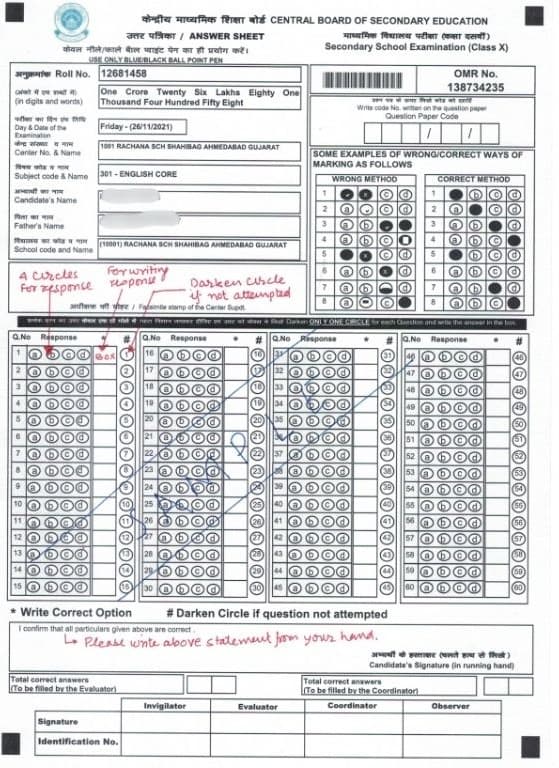
The image below shows how your answer sheet will look :
How to Fill the CBSE OMR sheet class 10
- The students, who will give the CBSE Class 10 board examinations should pay proper attention to instructions, which are given in the OMR sheet.
- Minor mistakes may result in failure to evaluate answers, and thus, proper knowledge is quite crucial.
The procedure to be followed to fill CBSE OMR sheet:
- Fill exam details first
- After receiving the OMR sheet, enter:
- Subject name and subject code
- Day and date of the exam
- Question paper code
- Question paper set number
- The question paper code and set number are printed on the question paper.
- After receiving the OMR sheet, enter:
- Enter personal and exam information
Write the following details in capital letters:
- Candidate’s name
- Roll number
- Subject code
- Centre number
- School code
- Father’s name
- Sign and declaration
- Sign in the space provided.
- Write the declaration: “I confirm that all particulars given above are correct.”
- Use the correct pen
- Fill the OMR sheet only with a blue ballpoint pen.
- Using a pencil or black pen may be treated as unfair means.
- Mark answers carefully
- Darken the correct bubble completely.
- Do not tick, cross, or partially fill the circle.
- Avoid overwriting or scratching.
These steps ensure your OMR sheet is readable during scanning and your answers are evaluated correctly.
Ques. Can I use a pencil to fill the CBSE OMR sheet?
Ans. No. CBSE permits the usage of blue ball point pen only. Use of pencils can cause disqualification of answers. This rule makes sure that the answers can be read properly without being smudged by the OMR scanner.
Ques. Where do I find the question paper code and set number?
Ans. They are written on the question paper given in the examination hall. These details should also be copied carefully so that the students do not create an error during assessment.
Features of the CBSE OMR sheet class 10
CBSE OMR sheet has a standard format that would help provide quick yet accurate assessment. By the time of exam, students must know its main features.
Important features to know:
- The sheet contains space to answer up to 60 questions, regardless of subject.
- Students must answer questions in sequence and use circles only up to the total number of questions in the paper.
- Any answers marked beyond the maximum questions will not be checked.
- Every question will have four choices (A, B, C, D) that has to be filled with circles.
- Students must:
- Darken the correct circle with a blue pen
- Write the chosen option in the box beside the circles
Important rule to remember
- If you mark a circle but do not write the option in the box, the answer will be treated as not attempted.
- The option written in the box is treated as the final answer.
- If a question is not attempted, students must darken the ‘not attempted’ circle provided.
- Students should not only darken the bubble, but also write the option in the box when they are sure of the answer.
Ques. What if I mark the bubble but forget to write the option in the box?
Ans. The question is going to be considered not attempted and will not be assessed. This is a major error that students should avoid.
Ques. Can I answer questions in any order in CBSE OMR sheet class 10?
Ans. Students must respond in sequence and use circles only up to the total number of questions. Answering randomly can lead to marking the wrong question number.
Why CBSE Introduced CBSE OMR sheet class 10
CBSE has progressively raised the proportion of competency based and objective questions in the board examination. With a larger MCQ section, manual checking becomes time-consuming and prone to mistakes.
The OMR system helps the board to:
- Speed up result processing
- Ensure error-free evaluation
- Maintain uniform marking across India
- Reduce examiner workload
- Enhance the efficiency and transparency of exams.
This development is in line with the broader objective of CBSE to transition exams to be based on skills and application based learning.
Major Changes CBSE OMR sheet class 10
1. No Partial Correction Allowed
Once a bubble is filled in the wrong way, you cannot remove or correct it. This implies that students should check twice before marking.
2. MCQ Weightage Has Increased
More objective questions are now included in most subjects, making OMR practice essential.
3. Faster Result Processing
OMR scanning assists CBSE to release results sooner than conventional evaluation.
Ques. What happens if I make a mistake while filling details?
Ans. You need to report to the invigilator as fast as you can. There are no corrections that can be made after submissions. Once the sheet is submitted, CBSE cannot make manual changes.
Ques. Is signing the OMR sheet compulsory?
Ans. Yes, signature and declaration are mandatory for the sheet to be considered valid. Unsigned CBSE OMR sheet class 10 may be treated as incomplete or invalid.



Comments