

![Mumbai University - [MU]](https://img.collegedunia.com/public/college_data/images/logos/1775120985download1logoooo2.jpg?h=71.7&w=71.7&mode=stretch)
.png?h=18&w=18&mode=stretch)
Mumbai University Result 2026 has been released for various UG, PG, engineering, education and other programmes. The university has announced course-wise and semester-wise results for regular, supplementary and NEP 2020 examinations. Students can check the latest Mumbai University Result 2026 through the official result PDFs and find the examination details and result dates provided below.
To check the result, students need to select the relevant examination from the list and open the corresponding result PDF. They can then search the PDF using the details required for their examination to view their result.
Mumbai University Result 2026: Direct Link
| Result | Link |
|---|---|
| Mumbai University Result | Check Here |
| Mumbai University Revaluation result | Check Here |

Mumbai University Result 2026: Latest Results
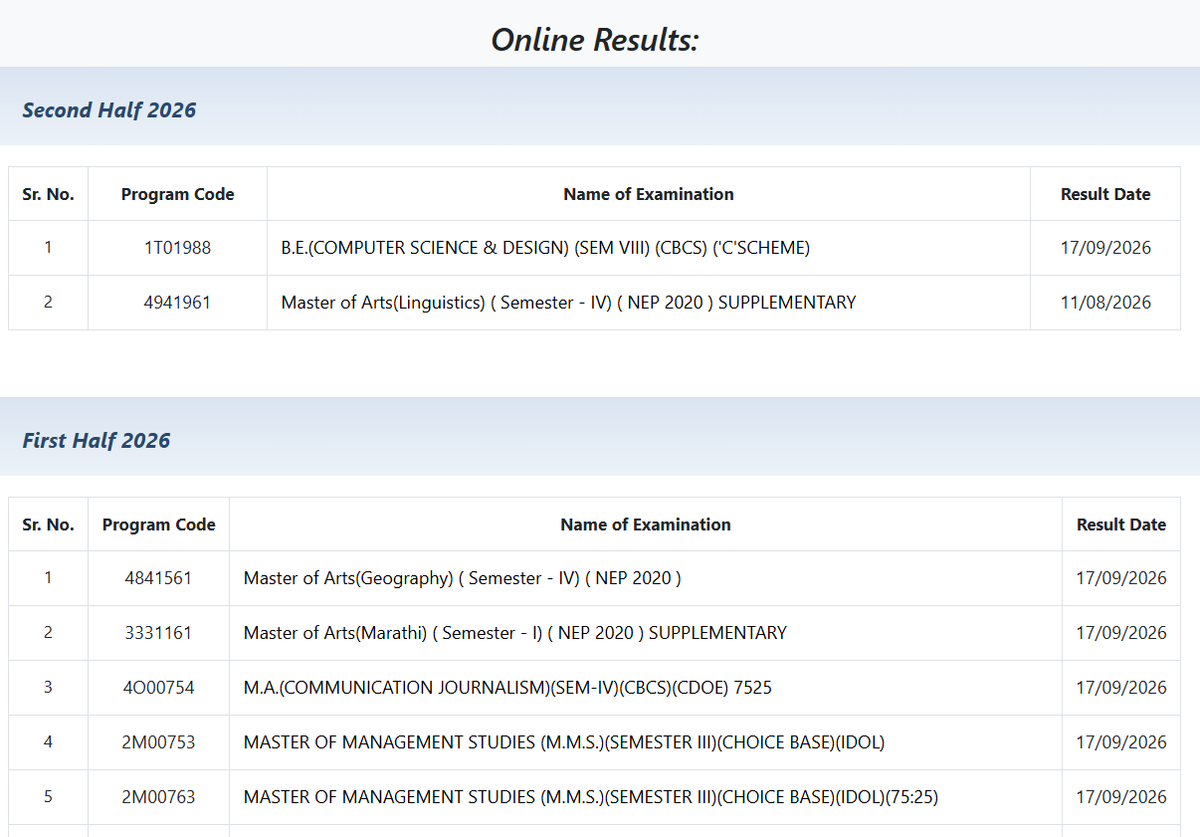
Mumbai University is releasing 2026 results in batches on mumresults.in. Open your session list, click the course PDF, and search your seat number.
Mumbai University Second Half 2026 Results
| Course | Semester | Result Type | Result Date | Result PDF |
|---|---|---|---|---|
| B.E.(COMPUTER SCIENCE & DESIGN) | Semester VIII | CBCS ('C' Scheme) | September 17, 2026 | Download PDF |
| Master of Arts(Linguistics) | Semester IV | Supplementary – NEP 2020 | August 11, 2026 | Download PDF |
Mumbai University First Half 2026 Results
| Course | Semester | Result Type | Result Date | Result PDF |
|---|---|---|---|---|
| M.A. Marathi | Semester II | Regular – NEP 2020 | September 17, 2026 | Download PDF |
| M.A. Political Science | Semester III | Supplementary – NEP 2020 | September 17, 2026 | Download PDF |
| M.A. History | Semester III | Supplementary – NEP 2020 | September 17, 2026 | Download PDF |
| M.A. History | Semester II | Regular – NEP 2020 | September 17, 2026 | Download PDF |
| B.Ed. | Semester II | CBCS – Two-Year Course | September 15, 2026 | Download PDF |
| M.A. Public Relations | Semester IV | CBCS – CDOE | September 11, 2026 | Download PDF |
| M.A. History | Semester IV | Regular – NEP 2020 | September 9, 2026 | Download PDF |
| M.A. Communication and Journalism | Semester I | Supplementary – NEP 2020 | September 8, 2026 | Download PDF |
| M.A. Public Relations | Semester I | Supplementary – NEP 2020 | September 8, 2026 | Download PDF |
| LL.M. | Semester III | Regular | September 8, 2026 | Download PDF |
| M.Sc. Information Technology | Semester I | Supplementary – NEP 2020 | September 8, 2026 | Download PDF |
| M.Sc. Analytical Chemistry | Semester I | Supplementary – NEP 2020 | September 8, 2026 | Download PDF |
| M.Sc. Organic Chemistry | Semester III | Supplementary – NEP 2020 | September 8, 2026 | Download PDF |
| M.A. English | Semester II | Regular – NEP 2020 | September 8, 2026 | Download PDF |
| M.A. Public Relations | Semester II | Regular – NEP 2020 | September 8, 2026 | Download PDF |
| BMS-MMS Integrated Programme | Semester V | Supplementary – NEP 2020 | September 8, 2026 | Download PDF |
| M.A. Communication and Journalism | Semester II | Regular – NEP 2020 | September 8, 2026 | Download PDF |
| M.A. Psychology | Semester II | Regular – NEP 2020 | September 8, 2026 | Download PDF |
| M.A. Education | Semester II | Regular – NEP 2020 | September 8, 2026 | Download PDF |
| M.A. Psychology | Semester II | Regular – NEP 2020 | September 8, 2026 | Download PDF |
| B.E. Mechanical Engineering (Automobile) | Semester IV | Regular – NEP 2020 | September 8, 2026 | Download PDF |
| B.E. Instrumentation Engineering | Semester IV | Regular – NEP 2020 | September 8, 2026 | Download PDF |
| B.E. Cyber Security | Semester IV | Regular – NEP 2020 | September 8, 2026 | Download PDF |
| M.A. Geography | Semester III | Supplementary – NEP 2020 | September 8, 2026 | Download PDF |
| M.A. History | Semester III | Supplementary – NEP 2020 | September 8, 2026 | Download PDF |
| M.A. Psychology | Semester III | Supplementary – NEP 2020 | September 8, 2026 | Download PDF |
| M.A. Marathi | Semester II | Regular – NEP 2020 | September 8, 2026 | Download PDF |
| M.Com. General | Semester I | Supplementary – NEP 2020 | September 7, 2026 | Download PDF |
| M.A. Economics | Semester I | Supplementary – NEP 2020 | September 7, 2026 | Download PDF |
| M.Pharm. | Semester I | CBCS – Revised | September 7, 2026 | Download PDF |
| M.Sc. Computer Science | Semester I | Supplementary – NEP 2020 | September 7, 2026 | Download PDF |
| B.E. Computer EngineeringDownload PDF | Semester IV | Regular – NEP 2020 | September 7, 2026 | Download PDF |
| M.Sc. Information Technology | Semester II | Regular – NEP 2020 | September 7, 2026 | Download PDF |
| B.E. Information Technology | Semester IV | Regular – NEP 2020 | September 4, 2026 | Download PDF |
| B.E. Mechanical Engineering | Semester IV | Regular – NEP 2020 | September 4, 2026 | Download PDF |
| B.E. Electronics and Biomedical Engineering | Semester IV | Regular – NEP 2020 | September 4, 2026 | Download PDF |
| B.E. Computer Science and Engineering (Data Science) | Semester IV | Regular – NEP 2020 | September 4, 2026 | Download PDF |
| B.E. Computer Science and Engineering (Artificial Intelligence and Machine Learning) | Semester IV | Regular – NEP 2020 | September 4, 2026 | Download PDF |
| M.Com. Business Management | Semester III | Supplementary – NEP 2020 – CDOE | September 4, 2026 | Download PDF |
How to Check Mumbai University Result?
- Visit mumresults.in/.
- Select the relevant session:
- First Half 2026 – Summer 2026 exams
- Second Half 2025 – Winter session exams
- UG NEP 2020 – For courses under NEP 2020
- Find your course or programme and click the result link.
- Open the PDF/result list.
- Press Ctrl + F and enter your Seat Number.
- Check your marks, grade and result status.
- Download the result PDF for future reference.
Read More: Mumbai University Admissions 2026: Merit List (Out), Cutoff, Eligibility, Selection Criteria
Mumbai University Result 2026: Details Mentioned
- Name
- Year, Semester and Session
- Seat No
- Roll number
- Subjects, the maximum marks allotted, the Minimum marks required to pass and the marks scored
- Pass/ Fail status
- Result Declaration date
Mumbai University Revaluation Results 2026
Mumbai University has started releasing Revaluation Results 2026 for various UG and PG examinations under the NEP 2020 scheme. The revaluation results are published examination-wise, along with the date of the result declaration. Students can check the result for their course by selecting the relevant examination and opening the corresponding result PDF.
For the First Half 2026 examination session, revaluation results have been released for several programmes, including Master of Computer Application (MCA), Master of Management Studies (MMS), Bachelor of Management Studies (BMS), Human Capital Management and Employee Relations, and Master of Arts in Public Policy.

How to Check Mumbai University Revaluation Result 2026?
Students can check their revaluation results online by following these steps:
- Visit the Mumbai University Revaluation Results page.
- Select First Half 2026 from the available examination sessions.
- Find your course or examination name from the list.
- Check the revaluation result date mentioned against your examination.
- Click on the corresponding result PDF.
- Open the PDF and search for your Seat Number using Ctrl + F.
- Check your revaluation marks and result status.
- Download or save the PDF for future reference.
Mumbai University Revaluation 2026
Students who are not satisfied with their marks can apply for revaluation, subject to the University's eligibility criteria and application schedule. The application is submitted through the Mumbai University Revaluation/Photocopy portal.
How to Apply for Mumbai University Revaluation 2026?
Students who are not satisfied with their marks can apply for revaluation through the University of Mumbai Revaluation/Photocopy portal. Follow the steps below:
- Visit the Mumbai University Revaluation/Photocopy portal.
- Select the revaluation link for the relevant examination session.
- Enter your Seat Number and the other details required on the portal.
- Select Revaluation and choose the subject(s) for which you want to apply.
- Enter your mobile number and email ID carefully.
- Check all the details entered in the application form.
- Pay the applicable revaluation fee online.
- Submit the application and wait for the acknowledgement to be generated.
- Download/save the acknowledgement for future reference.
- Check the Mumbai University revaluation result after the University declares it.
Important: Students should carefully select the subjects before submitting the application, as the University states that the application can be submitted only once. The revaluation fee once paid is also non-refundable. The University recommends using a computer rather than a mobile phone to complete the application.
Mumbai University Revaluation Weblist 2026
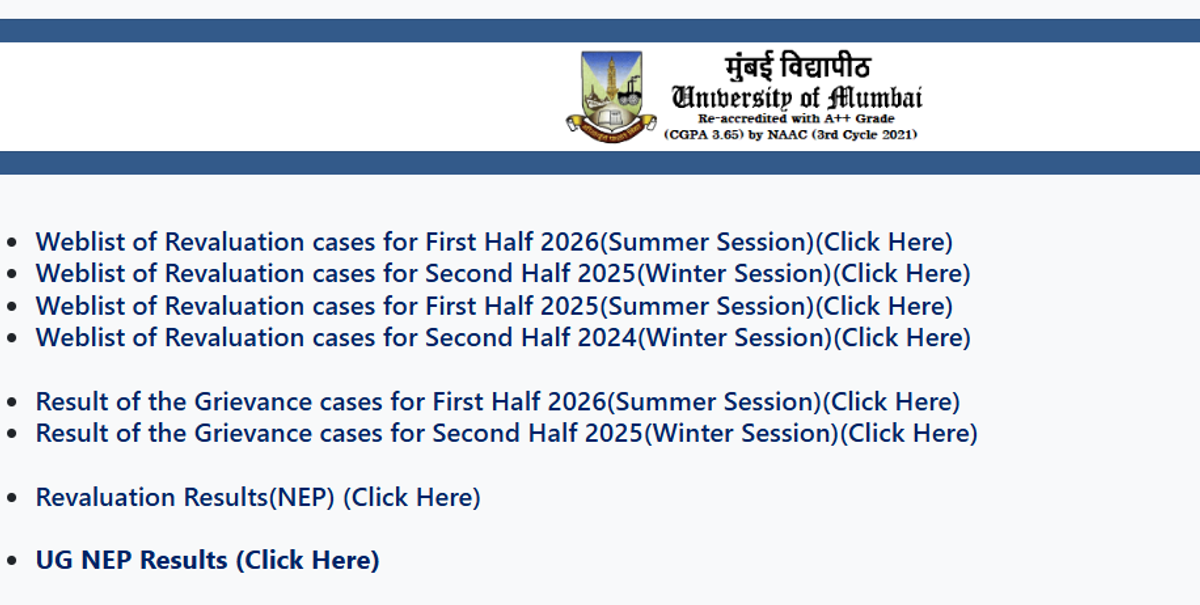
Mumbai University publishes revaluation weblists on mumresults.in after students submit their revaluation applications. The weblist contains the seat numbers of accepted revaluation cases and does not represent the final revised marks.
Mumbai University Revaluation Weblist 2026
Students can check the relevant session-wise weblist and search for their seat number in the PDF.
- First Half 2026 (Summer): Check Revaluation Weblist
- Second Half 2025 (Winter): Available on the official Mumbai University results website.
- First Half 2025 (Summer): Available on the official results page.
- Second Half 2024 (Winter): Available on the official results page.
How to check: Visit mumresults.in, select the relevant revaluation weblist, open the PDF and use Ctrl + F to search your seat number.
Revaluation Results vs Weblist
The revaluation weblist only confirms that your revaluation case has been accepted/processed. Students need to check the separate Revaluation Results (NEP) or relevant result link on the official website for revised marks.
For grievance cases, use the separate Result of the Grievance Cases link for your examination session. Grievance results and revaluation weblists are different.
Frequently Asked Questions
Ques. How can I apply for Mumbai University Revaluation 2026?
Ans. To apply for revaluation, students need to visit the Mumbai University Revaluation/Photocopy portal and select the applicable examination session. They then need to enter the required examination details, select the subject(s) for revaluation, provide the required contact information, pay the applicable fee online and submit the application. Students should save the acknowledgement generated after successful submission.
Ques. Can I apply for revaluation for multiple subjects?
Ans. Students can select the eligible subject(s) for revaluation according to the University's rules for their particular examination. They should carefully check the subjects selected before submitting the application because the University advises students to verify their selections before final submission.
Ques. Can I apply for a photocopy of my Mumbai University answer book?
Ans. Yes. Mumbai University provides a photocopy of the answer book facility for eligible examinations. Students who want to see their evaluated answer book can apply through the University's designated Revaluation/Photocopy portal within the specified deadline.
Ques. What is the difference between revaluation and photocopy of the answer book?
Ans. A photocopy of the answer book allows a student to obtain a copy of the evaluated answer book. Revaluation is the process through which the answer book is re-examined according to the University's prescribed procedure. Students should check the applicable University instructions before applying for either facility.
Ques. Where can I check Mumbai University Revaluation Result 2026?
Ans. Students can check the Mumbai University Revaluation Result 2026 through the University's designated revaluation results page. Revaluation results are generally published separately from the regular examination results and may be released course-wise or examination-wise.
Ques. Is the Mumbai University revaluation fee refundable?
Ans. No. According to the University's revaluation instructions, the fee paid for the revaluation application is non-refundable. Students should therefore verify the examination and subjects selected before making the payment.
Ques. Can I submit the Mumbai University revaluation application more than once?
Ans. Students should submit the revaluation application carefully after checking all the entered information and selected subjects. The University's instructions state that the application can be submitted only once, so students should verify the details before final submission.
Ques. What should I do after submitting the Mumbai University revaluation application?
Ans. After successfully submitting the application, students should save or download the acknowledgement generated by the portal. They should retain it until the revaluation process and result declaration are completed. Students can subsequently check the University's revaluation result page for updates.
Ques. What should I do if my Mumbai University result has an error?
Ans. If a student notices an error or discrepancy in the result, they should first verify the information against their examination documents and then contact their college or the concerned University department for guidance. The appropriate correction procedure may depend on the nature of the discrepancy.
Ques. Can I use the online Mumbai University result as my final marksheet?
Ans. The online result is useful for checking examination performance, but students should follow the University's instructions regarding the official marksheet and academic documents. The college or University may provide the official marksheet separately.
Ques. What should I do if my Mumbai University result is not showing?
Ans. If your result is not displayed, first make sure that the result for your particular course, semester and examination has been released. Check that you have selected the correct result link and entered your Seat Number correctly. If the result has been officially declared but is still unavailable, contact your college or the concerned University authority.
Ques. Can I check my Mumbai University result using my name?
Ans. The method of accessing the result depends on the particular examination result page. Students should use the credentials specifically requested by the University. Where the result page requires a Seat Number, students should enter the Seat Number given on their examination documents.
Ques. Is Mumbai University Result 2026 available online for both UG and PG students?
Ans. Yes. Mumbai University publishes results for various UG and PG programmes online. However, results are released separately according to the course, semester and examination, so students should select the appropriate result link for their programme.








Comments