



Content Writer | KdTvCV - Oct 31, 2026
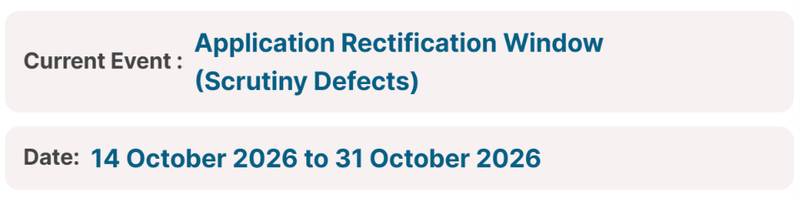
IIT Madras opened the GATE 2027 application rectification window on October 14, 2026 on the official website, gate2027.iitm.ac.in. As per the official schedule, the rectification facility will remain open till October 31, 2026, so candidates who have already submitted their application have an 18-day window to make notified changes.
- GATE 2027 application rectification window is open from October 14 to October 31, 2026.
- During the GATE application rectification window for scrutiny defects, you are required to make changes as per the defects notified via email.
- Among other editable fields, you can change the exam paper, exam city, and category during the GATE form correction window.
- After the GATE form correction window, IIT Madras will release the city allotment notification on January 4, 2027.
- GATE 2027 exam will be conducted on February 6, 7, 13, 14, 20, and 21, 2027, and results will be released on March 19, 2027.
- Last year, the GATE 2026 correction window opened on October 28, 2025, was extended to November 10, and was reopened for one more day on November 18, 2025.
Related Articles:

GATE 2027 Form Correction Window Dates
You can begin editing your GATE 2027 forms from 14 October 2026. The last date for making corrections in your GATE 2027 application form is 21 October 2026.
| Dates | Events |
|---|---|
| 14 October 2026 | GATE 2027 Application Rectification Window Opens |
| 21 October 2026 | GATE 2027 Application Rectification Window Closes |
| TBA | GATE 2027 Form Correction Window Opens |
| TBA | GATE 2027 Form Correction Window Closes |
| 6, 7, 13, 14, 20, and 21 February 2027 | GATE 2027 Exam Dates |

Source: Official GATE 2027 Dates Page
How to Edit GATE 2027 Application Form
To make changes in your GATE 2027 application form, you can follow the steps listed below.
- Visit the official website of GATE 2027 at gate2027.iitm.ac.in.
- Log in to your GATE 2027 account.
- On the dashboard, click on the link for form correction.
- Select the fields you want to edit.
- Make the required changes and pay the form correction fee.
- Download and take a printout of the confirmation page for future reference.
Not guaranteed. According to the FAQ, most candidates get their first choice, and the remaining choices matter mainly when the first city is oversubscribed. The GATE Committee can also allot a city that is not on your list.
City allotment is scheduled for January 4, 2027, and the admit card date is TBA.
No. The official FAQ says marksheets for 10th, 12th, UG, or PG do not have to be uploaded. Your identity is verified through the photo ID submitted, and academic documents are not used for that.
Keep your academic documents ready, since admission is decided by the institute that you apply to later, not by GATE.
No printout needs to be sent to GATE. If you did not print or save the application, log in with your enrolment ID and password and print it for your own records.
Note that once the application PDF is generated, you cannot edit the data. You can only download it, so check every field before submitting.
Do not panic. As per the FAQ, if the connection fails during submission, log in again and continue from where you stopped.
- Use the same enrolment ID and password.
- Check your application status before repeating any step.
- If the problem is with payment, check the payment status first. Do not pay again until the portal shows the amount was not received.
The rectification window for scrutiny defects closes on October 31, 2026. No extension has been announced; the latest official notification is still dated October 16.
According to the official FAQ, if your photo or signature doesn't meet the specifications, the application is marked defective. If you do not upload a corrected file before the deadline, the application may become provisional or be rejected.
- Fix the defect shown in your login today rather than on the last day, when the portal may be slow.
- Keep a screenshot of the updated status.
If your GATE 2027 application form is defective, you should modify the application form as per the guidelines received via email. All the changes must be updated on the GOAPS portal.
If your GATE 2027 form is still under scrutiny, you should wait until your GATE form status is updated. All the GATE 2027 application forms will be reviewed by 31 October 2027.
You have only 2 days left for GATE 2027 form correction. Last date to make changes in your GATE 2027 application form is 31 October 2027.
GATE verifies your identity from the photo ID submitted in the application. Academic documents are not collected or used for identity verification during the examination process, and marksheets need not be uploaded. So a spelling difference between your degree documents and your ID does not by itself affect the GATE application.
- The name in the application must match the photo ID exactly.
- The scorecard carries the name entered in the application.
- Admission based on a GATE score is outside GATE's purview; the admitting institute may ask for its own proof, so keep your supporting documents ready.
If you are thinking of changing your paper once the data correction window opens, check how marks are split. Every paper has 100 marks, of which General Aptitude carries 15.
| Paper group | General Aptitude | Engineering Mathematics | Subject questions |
|---|---|---|---|
| Most papers | 15 | 13 | 72 |
| AR, CY, DA, EY, GE, GG, MA, PH, RA, ST, XH, XL | 15 | No separate section | 85 |
| XE | 15 | XE0 carries 15 marks | Two optional sections of 35 marks each |
Each paper has 65 questions of 1 or 2 marks. Negative marking applies only to MCQs.
Appendix C of the brochure lists conduct rules. Breaking them can lead to cancellation of candidature and non-declaration of results.
| Rule | Detail |
|---|---|
| Documents | Bring the admit card and the original photo ID used at registration |
| Scribble pad | One at a time; write your name and registration number on it; do not tear the sheets |
| Phones, watches, calculators | Prohibited, even if a phone is switched off |
| Other items | Wallets, papers, pen or pencil pouches, and other electronic devices are prohibited |
| Communication | Talking to other candidates is prohibited |
| Computers | Do not tamper with the computer or hardware |
The brochure states that the decisions of the GATE 2027 Committee are final and binding, and that any disputes fall under the exclusive jurisdiction of the Madras High Court, Chennai. It does not describe a separate appeal process for rejected applications.
- First read the reason shown with your status on the portal.
- Contact your zone's coordinating office or the helpdesk with your enrolment ID, and explain the issue in writing.
- Act quickly while the scrutiny defect rectification (till October 31) is open.
IIT Madras warns candidates about fraud. According to the brochure, GATE offices never sell test papers or syllabi, and candidates should beware of fraud and fake messages. Defect notices are sent to your registered email and mobile number, and your status is visible when you log in.
| Claim you may hear | What the brochure says |
|---|---|
| "Buy the paper or syllabus from us" | GATE offices never sell test papers or syllabi |
| "Ask your GATE zone about admission" | Zonal offices do not handle admission queries; each institution advertises admissions separately |
| "Pay us to fix your application" | No such facility is mentioned; fees are paid only on the official portal |
Follow the latest brochure on the official website, dated October 17, 2026. IIT Madras has released several versions during this cycle, and rules for exam cities and two-paper combinations changed along the way.
| Version | Date | Notable change |
|---|---|---|
| v1.0 | July 20, 2026 | First release with tentative cities and combinations |
| v1.1 | July 23, 2026 | BT syllabus and two-paper combination updates |
| v1.2 | August 10, 2026 | Updated exam cities and two-paper combinations |
| Revised | August 27, 2026 | Not described in the notifications |
| Revised (latest) | October 17, 2026 | No list of changes published |
The brochure's own dates table still shows both October 21 and October 31 as the rectification closing date, without saying which applies. The Important Dates page shows October 31 as the current date, so rely on that page.
Students often ask this before fixing defects. The brochure's disclaimer says that candidate data and results may be shared for admission or recruitment purposes, for example with admitting institutes and PSUs. It also says the admitting institute may verify PwD and dyslexia certificates at its own stage.
- Accurate details matter, because the same data travels with your scorecard.
- Issued scorecard data cannot be changed directly; discrepancies are taken up with the admitting institute, COAP or PSU.
- Keep the originals of your certificates ready for later verification.
Two different certificates are involved, and the wrong one can cause a defect.
| Certificate | Issued by |
|---|---|
| Dyslexia certificate | Any Dyslexia Association (the brochure names examples in Kolkata, Hyderabad, Chennai, Mumbai and Noida) |
| Scribe or compensatory time recommendation | A multi-member medical authority chaired by a Chief Medical Officer, Civil Surgeon or Chief District Medical Officer, with an Orthopaedic or PMR specialist and any other expert the chairperson nominates |
The dyslexia certificate must be uploaded to use scribe services. The recommendation is given in the Appendix B1 format, which is available on the official website.
Appendix A of the brochure does not name specific issuing authorities for PwD certificates. It refers to a "competent authority" and to the UDID scheme. Benchmark disability means 40% impairment or more, which is the condition for the fee concession.
| Document | Use |
|---|---|
| PwD certificate (PWD_CERT.pdf) | Fee concession |
| UDID card (UDID_CERT.pdf) | Preferred over the PwD certificate |
| Appendix B1 / B2 certificate | Scribe or compensatory time |
If your certificate is marked defective, ask your zone's GATE office which document it needs, instead of guessing.
A category certificate can be flagged as a defect if it is not from an authorised official. According to Appendix A of the Information Brochure, valid SC/ST certificates are issued only by authorised officials, such as:
- District Magistrate, Collector or Deputy Commissioner, and related magistrate or deputy-level posts
- Chief Presidency Magistrate or Presidency Magistrate
- A revenue officer not below the rank of Tahsildar
- The Sub-Divisional Officer of the area where the candidate or the family resides
- For Lakshadweep: the Administrator, Secretary to the Administrator or Development Officer
Compare the signing authority on your certificate with this list. OBC-NCL and EWS candidates do not upload a certificate.
Candidates must report on the date and time printed on the admit card. The brochure gives the following timings, so any error in your application that could delay admit card checks should be sorted out well before the exam.
| Time | What happens |
|---|---|
| 40 minutes before the start | You can occupy your seat |
| 20 minutes before the start | You can log in |
| Up to 15 minutes after the start | Last time for login; no login is allowed after this |
Carry a printed admit card (colour preferred, on A4 paper) and the same original photo ID you used during registration. Without it, you may not be allowed to appear for the exam.
The application fee is not transferable and not refundable, except when a certain two-paper combination is removed. So a payment made against one enrolment ID cannot be moved to another.
| Point | Rule |
|---|---|
| Accepted payment modes | Internet banking, debit card, credit card, wallet and UPI |
| Card setting | Make sure e-commerce transactions are enabled on your card |
| Extra charges | Bank and service charges are paid by the candidate |
| Two papers | Twice the single-paper fee |
| Transfer to another application | Not allowed |
The PwD fee concession applies only to candidates with a benchmark disability, which means 40% or more. Those candidates pay ₹1,000 per paper in the regular period and ₹1,500 in the extended period or special window, instead of ₹2,000 and ₹2,500.
- A recent, valid PwD certificate is needed, and the UDID card is encouraged.
- The brochure says the GATE committee is not responsible for incorrect declarations of PwD or dyslexic status.
- Scribe and compensatory time require Appendix B1/B2 or dyslexia certificates at the time of application.
- If your PwD certificate is flagged as a defect during scrutiny, upload the correct file in the GATE2027 DigiLocker folder before the deadline in your notice.
Before submitting, every candidate accepts a declaration that falsification of data will attract appropriate consequences. The Information Brochure does not list what those consequences are, but it mentions the following.
| Situation | What the brochure says |
|---|---|
| Category certificate wrongdoing or misinformation | Necessary legal action will be initiated |
| Unfair means or breach of the code of conduct | Candidature is cancelled, even if the exam is completed; legal action may follow |
| Malpractice | The committee may bar the candidate from GATE for the next three years |
| Wrong PwD or dyslexic declaration | The committee is not responsible for incorrect declarations |
An honest typing mistake is handled through scrutiny defects or the correction facility, so inform the helpdesk early rather than ignoring a notice.
Application queries go to the coordinating GATE office of your zone. Contact details listed in Table 1 of the brochure are below. Your zone is the one your six exam cities belong to. The brochure text is partly garbled, so confirm details on the official website before you call.
| Zonal office | Phone | |
|---|---|---|
| IISc Bengaluru | helpdesk.gate@iisc.ac.in | 080-22932644, 080-22932392 |
| IIT Bombay | gateoffice@iitb.ac.in | 022-25767068, 022-25767022 |
| IIT Delhi | gateoffice@admin.iitd.ac.in | 011-26591749 |
| IIT Guwahati | gate@iitg.ac.in, helpdesk.gate@iitg.ac.in | 0361-2586500 |
| IIT Kanpur | gate@iitk.ac.in | 0512-2596962, 0512-2596963 |
| IIT Kharagpur | gateonline@adm.iitkgp.ac.in | 03222-282091, 03222-282095 |
| IIT Madras (organising institute) | helpdesk@gate.iitm.ac.in | 044-22578200 |
| IIT Roorkee | gate@iitr.ac.in | 01332-284531 |
If the details in your application differ from DigiLocker, the official guide says the cause is that your e-KYC details are not updated in DigiLocker. The steps are:
| Step | Action |
|---|---|
| 1 | Open DigiLocker and go to Search Documents |
| 2 | Search for "Aadhaar" |
| 3 | Open the UIDAI document |
| 4 | Select the radio button and click Update |
Refreshing the record does not change an application already submitted. Ask the helpdesk whether your submitted details need any further action.
| Issue | Cause | Fix |
|---|---|---|
| Drive access not granted | Access was not allowed on the consent page | Revoke the GATE-2027 consent in DigiLocker settings, log in to the portal and grant Drive access when asked |
| Consent validity modified | The validity period was changed in DigiLocker | Revoke the consent, log in again, leave the validity date unchanged and click Allow |
| "OOPS" error in the app | App problem | Uninstall the DigiLocker app, revoke the consent on the DigiLocker website, then log in to the portal again |
Remember that IIT Madras has asked candidates not to delete their DigiLocker account after applying, since future communication is sent only through it.
Two registration-stage problems were linked to using an unverified DigiLocker account when a verified one existed.
| Error | Cause | Fix given by IIT Madras |
|---|---|---|
| Email ID is already registered | The same email was on an unverified and a verified account, and the application was started with the unverified one | Revoke GATE-2027 consent in the verified account, change the email under "My Profile", open a private window and restart; a new enrolment ID is generated |
| Complete address not available | Unverified account whose mobile number is not linked to Aadhaar (a parent's number may be linked instead) | Update the mobile number and email in the verified account, open a private window, and restart |
Note: The registration portal closed on October 16, and the guide is not recommended for candidates who have already paid the fee. If you are in this situation, contact the helpdesk instead of restarting.
This error, along with a missing "Address Line 1" or a "fields highlighted in red" message, affects SC/ST and PwD candidates only, because their certificates are read from DigiLocker Drive. The official document lists these causes.
| Cause | What to check |
|---|---|
| No GATE2027 folder | Create a folder named GATE2027 (no space) |
| Wrong category file name | Name it CATEGORY.pdf |
| Wrong PwD file name | Name it PWD_CERT.pdf or UDID_CERT.pdf |
| File too large | Keep each file under 600 KB |
| Different DigiLocker account | The folder must be in the same account used to start the application |
If your certificate is flagged as a defect, check all five points before uploading again.
Students trying to log in to check their application status or defect notice may see this message. IIT Madras suggests a simple fix: open an incognito or private browser window and log in to the portal again. The official document does not state the cause.
| Step | Action |
|---|---|
| 1 | Close the current browser tab |
| 2 | Open a new incognito or private window |
| 3 | Go to the official GATE 2027 website and open the application portal |
| 4 | Log in again |
If the error continues, call the helpdesk at 044-22578200.
The college field accepts only a clean text name. IIT Madras provides two fixes for this problem.
| Problem | Cause | Fix |
|---|---|---|
| "Enter a valid college name" error | The name contains special characters | Remove characters such as ( ) and &, then save again |
| Your college is not in the list | The college field is a text field | Type the name manually and save |
This guidance applies to the registration stage. If a wrong college name was already submitted, the official pages describe no correction process yet; contact your zone's GATE office.
As per the official website, GATE 2027 form correction window will be open till 31 October 2027. As on 22 October 2027, you have 9 days to make changes in your GATE 2027 form correction.
Since the date of the data correction window is still to be announced, keep an eye on the official sources. IIT Madras lists the following channels on its website.
| Channel | Where |
|---|---|
| Website and Notifications page | gate2027.iitm.ac.in/notifications |
| WhatsApp channel | Linked on the official website |
| X (Twitter) | @GATE27iitm |
| YouTube | @GATE27iitm |
| gate27iitm | |
| Email and SMS | Your registered email and mobile number |
Be careful with unofficial groups and pages that claim to offer "correction services" for a fee.
Choose the scribe option when filling out the application, along with the required certificates. GATE 2027 arranges the scribe. According to the Information Brochure, a candidate can bring their own scribe only if GATE cannot arrange one. Requests made on the exam day are not entertained.
| Question | Answer |
|---|---|
| When to request | During the application |
| Who provides the scribe | GATE 2027 |
| Own scribe | Only if GATE cannot arrange one |
| Request on the exam day | Not entertained |
If you forgot to request a scribe, contact your zone's coordinating GATE office as early as possible.
After registration, every candidate gets a unique enrolment ID by email. It is needed to log in, download the application and take part in all future communication, together with your password. Since only one email can be used for one application, the ID is in the inbox you used to register.
- Search your inbox and spam folder for messages from the GATE 2027 organising institute.
- Do not create a new application; extra applications are rejected without a refund, and the portal is closed anyway.
- If you cannot find it, write to helpdesk@gate.iitm.ac.in or call 044-22578200 (Monday to Friday, 5:00 PM to 7:00 PM) with your registered email and mobile number.
No. The concessional fee is limited to Female, SC, ST and PwD candidates. OBC-NCL and EWS candidates pay the same fee as all other candidates, and neither group needs to upload a category certificate.
| Category | Regular, one paper | Special window, one paper |
|---|---|---|
| Female / SC / ST / PwD | ₹1,000 | ₹1,500 |
| OBC-NCL, EWS and all others | ₹2,000 | ₹2,500 |
For two papers, the fee is double. SC/ST and PwD candidates must have their certificate uploaded to claim the concession.
DigiLocker registration is for Indian nationals. Other nationals register by giving their full name, a valid email, a mobile number, and a password. The name must match the valid photo ID, which has to be carried in original to the exam.
| Point | Rule |
|---|---|
| Accepted ID | Passport, any other valid government-issued photo ID, or driving licence |
| Exam location | Only in India; travel and stay are the candidate's responsibility |
| One email for one application; cannot be changed later | |
| Enrolment ID | Sent to the registered email after registration |
The name must be exactly the same as in your valid photo ID. The brochure says that prefixes or titles must not be used before the name. The list includes:
- Mr., Mrs., Smt., Shri
- Dr., Prof.
- Capt., Maj., Lt., Col.
The brochure does not give a separate rule for initials or single names, so the safe approach is to match the name on your ID letter for letter. The scorecard is issued as per the name entered in the application form.
The Information Brochure lists these statuses: Received, Under scrutiny, Accepted, Defect status, Status after rectification and Rejected with valid reasons. A rejected application is one that could not be accepted after scrutiny.
| Situation named in official pages | Likely outcome |
|---|---|
| Photograph not meeting the criteria | Application may be rejected; fee not refunded |
| More than one application submitted | Only one accepted; the others are rejected without a refund |
| Defect not rectified by the deadline | Application may be provisional or rejected |
If your status shows rejection, log in, read the reason on the portal, and contact your zone's coordinating GATE office with your enrolment ID.
The Information Brochure asks for a recent photograph, taken not more than three months earlier, along with the live photo captured at registration. A photo that does not follow the criteria can lead to rejection of the application without a fee refund, and an unclear photo can also make the admit card invalid.
- Use a plain white background, with the face clearly visible and no shadow.
- Do not use an old photograph, even if it looks acceptable.
- If scrutiny marks your photo as defective, replace it only when you receive the defect notice and within the deadline given in it.
The admit card is useful only if the details on it are clear. According to the Information Brochure, candidates must bring a printed A4 copy of the admit card along with the original photo ID, and the admit card is valid only if the photo and signature on it are clear. It will not be sent by post or email.
| Item | Rule |
|---|---|
| City allotment notification | January 4, 2027 |
| Admit card download | Date to be announced |
| Print format | A4 printout |
| Validity condition | Photo and signature must be clear |
| Where to download | The GATE 2027 website only |
This is one of the most common student queries. The official FAQs and the Information Brochure do not describe a process to change the institute name, parent or guardian details or address after submission. Only the listed changes (paper, city, category and name spelling) are mentioned, and those are tied to the data correction window, whose date is yet to be announced.
- Contact the coordinating GATE office of your zone with your enrolment ID and a clear description of the error.
- Watch the official website for the data correction window notice.
- Do not assume that older correction lists from other years apply to GATE 2027.
Open the application PDF you downloaded and compare each detail below. Spotting a mistake early lets you contact the right office before the scrutiny deadline.
| Detail | Source and rule |
|---|---|
| Name and date of birth | Fetched from DigiLocker; must match the photo ID exactly |
| Mobile number and email ID | Verified through DigiLocker; cannot be changed later |
| Address with PIN code | Fetched from DigiLocker |
| Parent or guardian name and mobile | Entered by you |
| Degree and institute name with PIN code | Entered by you |
| Test paper(s) and exam cities | Entered by you; cities must be from one zone |
| Photo ID and its number | Must match the ID you will carry to the exam |
| Photograph and signature | Must be clear and as per the specifications |
| Category or PwD certificate | Only for SC/ST and PwD candidates |
No. The Information Brochure states that requests for a change in the centre, location or date/time mentioned in the admit card will not be entertained. The FAQs add that each candidate is assigned to only one session of a paper, and the assigned session is shown on the admit card.
- The city allotment notification is scheduled for January 4, 2027.
- The GATE Committee can add or remove a city and may allot one that is not in your six choices.
- Any change to the exam city can only be requested through the data correction window, whose dates are yet to be announced.
The Information Brochure and FAQs do not describe a process for changing gender after submission. Gender matters because female candidates pay the concessional fee. If you made a mistake, contact the coordinating GATE office of your zone instead of relying on unofficial sources.
| Category | Regular, one paper | Extended and special window, one paper |
|---|---|---|
| Female / SC / ST / PwD | ₹1,000 | ₹1,500 |
| All other candidates | ₹2,000 | ₹2,500 |
Two papers cost twice the single-paper fee. The fee is not refundable, except when a two-paper combination is removed.
Not immediately. If your photograph and photo ID were exchanged while registering, the application is marked defective, and you are asked to upload the correct images by a deadline. The same happens if the ID image is correct but the ID number field has the wrong number (for example, a PAN number typed for an Aadhaar upload).
| Mistake | Outcome | Fix |
|---|---|---|
| Photo and ID images exchanged | Marked defective | Upload the correct images |
| ID number does not match the uploaded ID | Marked defective | Upload the right ID image or correct the number |
| Defect not fixed by the deadline | Application may be provisional or rejected | Fix it as soon as the notice arrives |
The GATE 2027 scorecard will be issued as per the name entered in the application form, and that name must be exactly the same as in the valid photo ID. Prefixes such as Mr. or Dr. are not allowed.
- A name spelling mistake can be corrected later, in a given duration, by furnishing supporting documents, according to the FAQs.
- After the scorecard is released, a name change needs the necessary correction documents, acknowledgement or proof, as per procedure.
- Issued scorecard data cannot be changed directly, because it is already shared with institutes, COAP and PSUs.
| Category | Rule in the brochure |
|---|---|
| SC / ST | Certificate required for the fee concession; only certificates issued by authorised officials are valid (listed in Appendix A) |
| OBC-NCL and EWS | No certificate upload needed |
| PwD | A recent, valid PwD certificate for the concession; the UDID card is encouraged |
| Scribe or extra time | Appendix B1 and, where applicable, B2 certificates |
| Dyslexia | Certificate from an authorised Dyslexia Association |
Files go into the DigiLocker "GATE2027" folder, each between 10 KB and 600 KB. An unclear, unreadable or invalid certificate can be marked as a defect during scrutiny.
No. The Information Brochure says that no change in email or mobile number will be entertained at a later stage. This matters because defect notices, status updates and other communication go to the email and mobile number given in the application.
- One email address can be used for only one application.
- If you no longer have access to the email, contact the coordinating GATE office of your zone and check the helpdesk for guidance.
- Keep your DigiLocker account active, since future communication is tied to it.
Applications are checked for the accuracy of the data, including verification against the uploaded supporting documents and the clarity of the photograph and signature. If everything is in order, the application is accepted.
| Item checked | What the brochure requires |
|---|---|
| Photograph | Must meet size, background and face-coverage rules; non-compliance can lead to rejection with no fee refund |
| Signature | Black or dark blue ink only; a mismatch with your exam-day signature could lead to disqualification |
| Photo ID | One valid ID with its number; most recently issued; must clearly show name, photo, ID number and date of birth |
| Name and date of birth | Must exactly match the photo ID |
| Category or PwD documents | Valid certificates, where applicable |
| Unverified DigiLocker | GATE may ask for additional documents; originals are checked at the exam venue |
If scrutiny finds a defect, it is intimated by email or SMS/WhatsApp to your registered email and mobile number. The FAQs also mention a phone call from your respective zone. The coordinating GATE office updates the status, and you can check it at any time by logging in to the application portal.
| Step | What to do |
|---|---|
| 1 | Log in with your enrolment ID and password and open the application status |
| 2 | Read the defect status message and the Information Brochure |
| 3 | Fix the defect (for example, upload the correct image) within the stipulated time |
| 4 | Check the status after rectification; the application goes for scrutiny again |
Check your spam folder too, and keep your DigiLocker account, since future communication is linked to it.
The Important Dates page lists a separate item, the "Application Data correction window (Candidate Request with fee)", with the date shown as TBA. This is the window students are asking about for changes to paper, exam city and category. IIT Madras has not published its dates or fee amounts.
| Change | What the official FAQs say |
|---|---|
| Exam paper | Accepted only after the last date of application, against additional payment (a fee per change); dates to be announced |
| Exam city | Same rule; requests after the announced dates will not be considered |
| Category | Same rule |
| Name spelling | Can be corrected later within a given duration, with supporting documents |
Some websites quote fees such as ₹500 per change. Those figures are not from IIT Madras, so treat them as unconfirmed. Watch the official website for the dates and fee.
The official Important Dates page now shows that the GATE 2027 application rectification (scrutiny defects) opened on October 14, 2026 and will close on October 31, 2026 (Saturday). The earlier closing date was October 21. The rectification is meant for fixing the defects found when your submitted application is scrutinised, such as a photo, signature, ID or document problem.
- The registration portal closed on October 16, 2026, so new applications cannot be submitted.
- The exact deadline for each defect is given in the defect notice sent to you.
- IIT Madras states that all dates are liable to change.
IIT Madras changed the sectional paper codes this year, and candidates must know their paper code because it is needed in the application and at the exam. Check the mapping below if you studied from GATE 2026 material.
| Paper | Common section | Optional sections | GATE 2026 codes |
|---|---|---|---|
| XE (Engineering Sciences) | XE0 Engineering Mathematics (15 marks) | Any two of XE1 to XE9 (35 marks each) | A to I became XE0 to XE8; TF became XE9 |
| XH (Humanities and Social Sciences) | XH0 Reasoning and Comprehension (25 marks) | One of XH1 to XH6 (60 marks) | B1 became XH0; C1 to C6 became XH1 to XH6 |
| XL (Life Sciences) | XL0 Chemistry (25 marks) | Any two of XL1 to XL5 (30 marks each) | P became XL0; Q to U became XL1 to XL5 |
Textile Engineering and Fibre Science is now section XE9 of the XE paper.
Many Public Sector Undertakings use GATE scores in hiring. IIT Madras names the following among them, and says the list is not exhaustive.
- Energy: NTPC, ONGC, GAIL, IOCL, POWERGRID, CIL
- Manufacturing and defence: BHEL, HAL, SAIL, ECIL
- Aviation, telecom and IT: AAI, BSNL, CRIS
GATE qualification does not assure a PSU job, and recruitment rules are set by each organisation.
A valid GATE score can be used for admission to Master's and direct Doctoral programmes at institutes supported by the Ministry of Education and other government agencies. IIT Madras lists the following financial assistance.
| Programme | Monthly assistance |
|---|---|
| M.Tech | ₹12,400 per month, generally for 22 months |
| Direct PhD (after B.E./B.Tech/M.Sc or equivalent) | ₹37,000 per month for the first two years |
| Direct PhD, 3rd to 5th year | ₹42,000 per month |
Qualifying in GATE does not guarantee admission, a scholarship or a job. Each institute applies its own eligibility and selection criteria.
Students in the 3rd year or higher of an undergraduate programme, and those who have already completed a government-approved degree in Engineering, Technology, Architecture, Science, Commerce, Arts or Humanities, can appear. A candidate studying or holding a degree higher than those listed is also allowed to appear.
| Degree or programme | Year requirement |
|---|---|
| B.E. / B.Tech. / B.Pharm. | 3rd year or higher, or completed |
| B.Arch. (5-year) | 3rd year or higher, or completed |
| B.Sc. / B.A. / B.Com. / BCA (3-year) | 3rd year, or completed |
| B.Sc. (Agriculture, Horticulture, Forestry) | 3rd or 4th year, or completed |
| M.Sc. / M.A. / MCA | 1st year or higher, or completed |
| MBBS / BDS / BAMS / BHMS and similar | 5th, 6th or 7th semester or higher, or completed |
| Pharm.D. (6-year) | 3rd to 6th year, or completed |
The FAQs also confirm there is no age limit and no limit on the number of attempts.
Indian candidates can use Aadhaar (preferable), Passport, PAN Card, Voter ID or Driving Licence. Foreign nationals can use a valid passport, any other valid government photo ID, or a driving licence. The ID you carry to the exam must be the same one you named in the application.
- Wrong ID number: if you uploaded Aadhaar but typed the PAN number (or the reverse), the application is marked defective. You will be asked to correct it by email, SMS or phone call from your zone.
- Upload both sides: if the details are on the back of the ID, upload both pages in a single PDF.
- Name changed after marriage: upload the ID with the old name along with an affidavit, and carry the affidavit to the exam hall.
Documents are uploaded to a DigiLocker folder named "GATE2027" (written without a space), not on the application form.
| Category | Document needed |
|---|---|
| General, OBC-NCL, EWS | None in the GATE2027 folder |
| SC / ST | Category certificate saved as CATEGORY.pdf |
| PwD | Disability certificate (PWD_CERT.pdf), UDID card (UDID_CERT.pdf) and Appendix B1/B2 where required |
EWS candidates pay the same fee as General candidates, and the qualifying mark is the same as the General category. You do not need to upload 10th, 12th, UG or PG marksheets.
Check your status on the application portal regularly. Here is what each message means.
| Status | What it means | What to do |
|---|---|---|
| Application submitted | Payment has not been made yet | Complete the fee payment |
| Submitted and payment received | Application will go for scrutiny | Wait |
| Under Scrutiny | Verification is in progress | Wait |
| Incomplete or defective | Defects found and not yet rectified | Read the message and the Information Brochure, then fix the defect |
| Defect Rectification Done | Your fix has gone back for scrutiny | Wait |
| Application accepted | Scrutiny is complete | No action needed |
| Feature | GATE 2027 details |
|---|---|
| Mode and language | Computer Based Test, in English |
| Duration | 3 hours |
| Questions | 65 (10 General Aptitude + 55 subject) |
| Total marks | 100 (General Aptitude carries 15) |
| Question types | MCQ, MSQ and NAT |
| Negative marking | MCQ only: 1/3 mark for a 1-mark question, 2/3 mark for a 2-mark question |
| MSQ and NAT | No negative marking; no partial marking in MSQ |
Before changing your paper, note what is new this year. IIT Madras has introduced a new test paper, Robotics and Automation (RA), taking the total to 30 test papers. The syllabi of the GATE 2027 papers have been revised, and changes have been made to the XE, XH and XL sectional paper codes.
- RA has Part B1 (Electrical) and Part B2 (Mechanical), and no separate score or rank is given for either part.
- RA can be paired with CS, DA, EC, EE, IN and ME.
- Check the revised syllabus for your chosen paper before you pay for a change.
You must pick a primary paper first, and the second paper must be one of the officially allowed pairings. Combinations outside the list were not allowed in the regular and extended registration windows. The second paper's centre may differ from the primary paper's, but it will be in the same city. If a combination is removed later, the second-paper fee is refunded.
| Primary paper | Allowed second papers |
|---|---|
| CS (Computer Science) | DA, EC, GE, MA, ME, PH, RA, ST |
| DA (Data Science and AI) | CS, EC, EE, MA, ME, PH, RA, ST, XE |
| EC (Electronics) | CS, DA, EE, IN, PH, RA |
| EE (Electrical) | DA, EC, IN, PH, RA |
| ME (Mechanical) | AE, CS, DA, IN, NM, PI, RA, XE |
| CE (Civil) | AE, AG, AR, ES, GE, NM, XE |
| MN (Mining) | No second paper allowed |
The full list for all 30 papers is on the official website.
A wrong signature is one of the easiest mistakes to avoid. A signature that does not match the one you make at the exam centre may lead to disqualification.
| Do | Do not |
|---|---|
| Sign yourself, horizontally, inside the box | Use a digital signature or someone else's signature |
| Use black or dark blue ink | Use any other ink colour |
| Use a light background | Use a dark background or add other text |
| Keep the file in JPEG, 3 KB to 300 KB | Sign in ALL CAPITALS or use only initials |
| Keep size between 250 × 80 and 580 × 180 pixels | Make the signature too small or unclear |
The signature should cover 70% to 80% of the cropped image.
If your photo was flagged, check it against the official specifications before you upload it again. Photos that do not meet the criteria may lead to rejection of the application, and the fee is not refunded.
| Parameter | Requirement |
|---|---|
| Format | JPEG / JPG |
| File size | 5 KB to 600 KB |
| Pixel size | Minimum 200 × 260, maximum 530 × 690 |
| Print size | Passport size, 3.5 cm × 4.5 cm |
| Face coverage | 60% to 70% of the cropped image |
| Background | Plain white, no other person or object |
| Pose | Frontal, looking at the camera; forehead, eyes, nose and chin visible |
Not allowed: caps, sunglasses, coloured glasses, masks, blur, shadows and glare on spectacles. Head coverings are allowed only for religious reasons, with the face edges clearly visible.
Candidates select six exam cities, and all six must be from the same GATE 2027 zone. The committee says most candidates are likely to get their first-choice city. The other five choices matter only when too many candidates pick the same first city.
- The city list is tentative and may change.
- The committee may add or remove a city, and can allot a city that is not among your six choices.
- GATE 2027 has no centres outside India.
- The city allotment notification is scheduled for January 4, 2027.
| Zone (coordinating institute) | Regions covered |
|---|---|
| IISc Bengaluru | Karnataka, Kerala, Telangana, Andhra Pradesh, Andaman and Nicobar |
| IIT Bombay | Maharashtra, Gujarat, Goa |
| IIT Delhi | New Delhi, Haryana, Rajasthan, Jammu and Kashmir, Ladakh and parts of MP and UP |
| IIT Guwahati | North-eastern states, Bihar, Jharkhand, West Bengal |
| IIT Kanpur | Uttar Pradesh, Madhya Pradesh |
| IIT Kharagpur | West Bengal, Odisha, Chhattisgarh, Jharkhand, Andhra Pradesh |
| IIT Madras | Tamil Nadu, Kerala, Puducherry, Telangana, Andhra Pradesh, Lakshadweep |
| IIT Roorkee | Uttarakhand, Punjab, Himachal Pradesh, Haryana, Uttar Pradesh |
If you face a problem with login, payment or the correction link, contact the GATE 2027 helpdesk with your enrolment ID and a screenshot of the issue.
| Contact | Details |
|---|---|
| helpdesk@gate.iitm.ac.in | |
| Phone | 044-22578200 |
| Timings (application queries) | Monday to Friday, 5:00 PM to 7:00 PM |
| Address | GATE-JAM Office, IIT Madras, Chennai – 600 036 |
Change requests for paper, city, and category made after the notified dates will not be considered. Your application will then be processed as it stands. Defects raised by the zonal office are a separate matter: if you do not rectify them by the deadline, the application may be treated as provisional or rejected. Do not wait for the last day, because portals usually see heavy traffic close to the deadline.
| Event | Date |
|---|---|
| Application rectification opens | October 14, 2026 |
| Application rectification closes | October 21, 2026 |
| City allotment notification | January 4, 2027 |
| Admit card download | To be announced |
| GATE 2027 exam | February 6, 7, 13, 14, 20 and 21, 2027 |
| Result announcement | March 19, 2027 |
Yes. A candidate who filled only one paper and paid the fee can add a second paper from the allowed combinations to the same enrolment ID. Do not create a new enrolment ID, because one email address can be used for only one application. Two papers must be chosen in a single form, from the official two-paper combinations.
| Particular | GATE 2026 (IIT Guwahati) | GATE 2027 (IIT Madras) |
|---|---|---|
| Correction window opened | October 28, 2025 | October 14, 2026 |
| Scheduled close | November 3, 2025 (later extended to November 10) | October 21, 2026 |
| Reopened | One more day on November 18, 2025 | Not announced |
| Late-fee registration closed | October 13, 2025 | October 12, 2026 |
| Registration mode | GOAPS | GOAPS with mandatory DigiLocker |
| Feature | Correction window (Oct 14–21) | Defect rectification |
|---|---|---|
| Who starts it | The candidate | The GATE zonal office, after scrutiny |
| Used for | Paper, city, and category changes | Wrong or unclear photo, signature, photo ID or ID number |
| Fee | Additional fee for changes | No fee mentioned in the FAQs |
| How you are informed | Dates on the official website | Email, SMS or phone call from your zone |
| If not done | Request is not considered after the dates | Application may be treated as provisional or rejected |
GATE 2027 registration through DigiLocker is mandatory for all Indian nationals. The candidate's address and date of birth are fetched from DigiLocker/Aadhaar, and the Aadhaar/DigiLocker photo is not considered; the live photo and the recent photo uploaded during application are used instead.
- If your Aadhaar has a name or date of birth mismatch, DigiLocker lets you choose another verified ID (such as PAN, Driving Licence or APAAR ID) with the correct details.
- A name spelling mistake can be corrected later, in a notified duration, by furnishing supporting documents.
- After the scorecard is released, name changes require the necessary correction documents as per procedure.
IIT Madras has confirmed that changes carry an additional fee, but the exact correction fee table had not been published on the official website at the time of writing. The figures below follow the GATE 2026 pattern reported by education portals and must be confirmed on the portal when the window opens.
| Type of change | Expected fee (INR) |
|---|---|
| Change of existing paper | 500 per change |
| Add a second paper (permitted combination) | 500 + application fee of the second paper |
| Change of category to SC/ST | 500 |
| Change of category from SC/ST to another category | 500 + fee difference |
| Exam city change | 0 to 500 |
You can edit the following details in your GATE 2027 application form during GATE 2027 form correction window.
- Name
- Date of Birth
- Gender
- PwD status
- Category
- Parent/Guardian/Correspondence address
- College information
- Exam centre change
- GATE paper



Comments