




UCEED Admit Card 2027 will be released by IIT Bombay on the official website on 1 January 2027. The date of the examination for UCEED 2027 is 17 January 2027. To download your UCEED admit card, you must go to the official website at ueed.iitb.ac.in.
- You can download your UCEED admit card 2027 using your registered email and password.
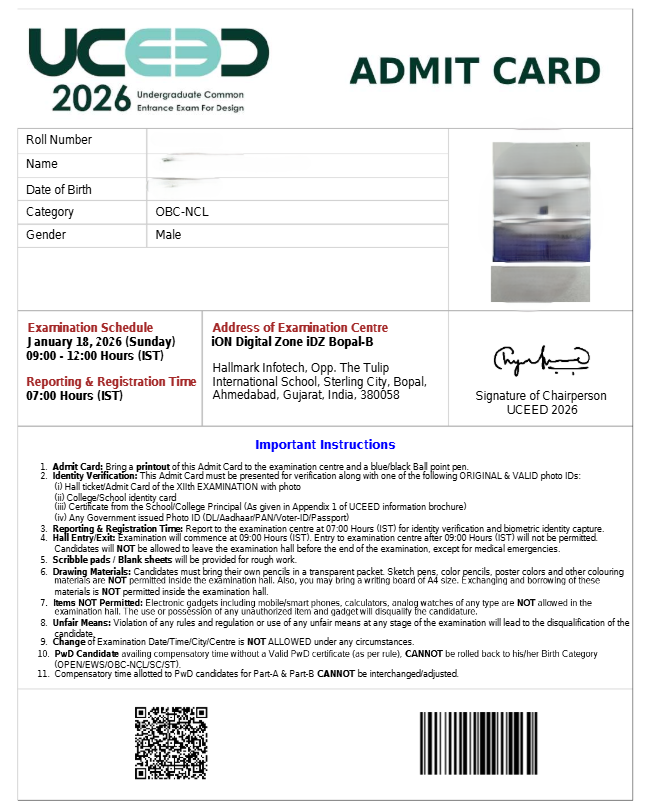
- Personal details mentioned on your UCEED admit card 2027 include roll number, name, DOB, and category.
- Reporting time and UCEED exam centre venue and address will also be included on your UCEED admit card 2027.
- You should carefully verify all details on your UCEED admit card and report discrepancies, if any, to the concerned authority.
- For any discrepancy in the admit card, contact the UCEED Office at uceed@iitb.ac.in or call +91-22-2576 4063 / 9093 / 9094 before the rectification deadline.
- The last date to get the discrepancies resolved in the UCEED admit card 2027 is 8 January 2027.
- You should carry a valid photo ID along with your UCEED admit card to the UCEED exam centre to prove your identity.
Direct Link to Download UCEED Admit Card 2027
You can only download your UCEED admit card on the official website. Once the link is activated, you will be provided with the UCEED admit card direct link to download your document.
You can click on the link below to download the UCEED admit card 2027 once released.
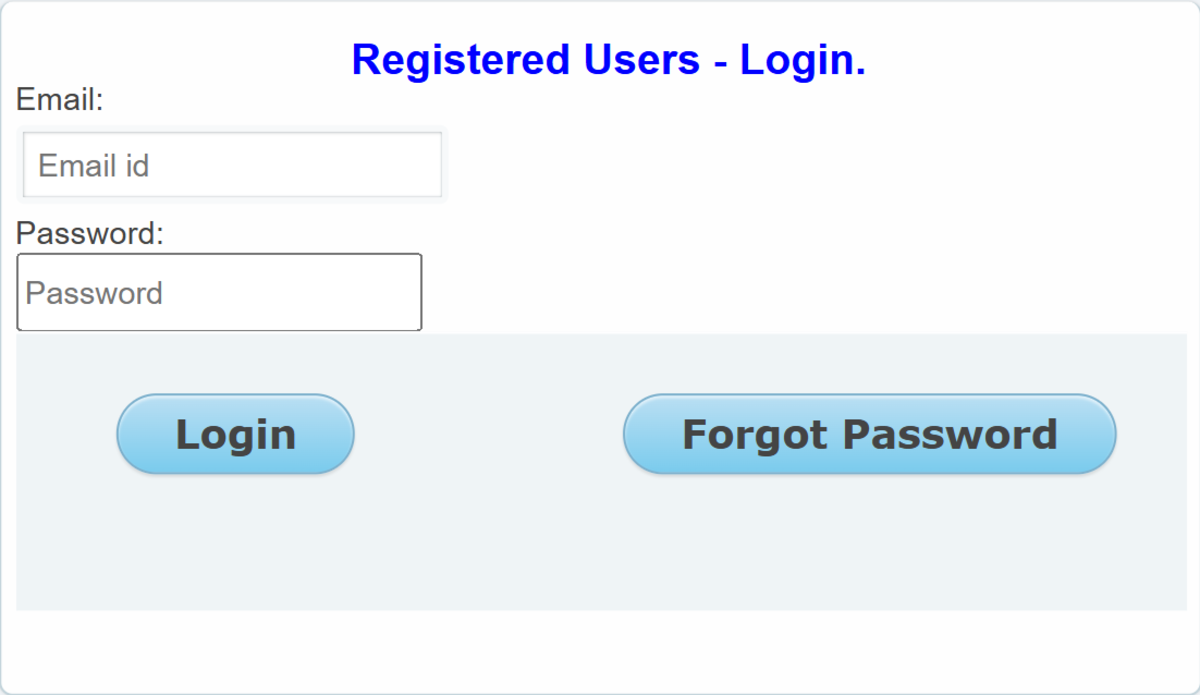
Source: Official UCEED 2027 Login Page
Related Articles:

Key Summary
- UCEED admit card 2027 will be released 15 days before the UCEED exam 2027.
- To resolve discrepancies in UCEED admit card 2027, you will be given a total of 8 days.
- You cannot appear for UCEED exam without a valid printed admit card
- No digital copy of UCEED admit card 2027 is accepted at the exam centre.
- You will not be allowed to enter the UCEED exam centre without a valid Photo ID.
UCEED Admit Card 2027 Release Date 2027
| UCEED Dates 2027 | UCEED Events 2027 |
|---|---|
| Start date for Admit Card downloading | 1 January 2027 |
| Last date for rectification of discrepancies in Admit Card | 8 January 2027 |
| UCEED 2027 Exam Date and Time | 17 January 2027 |

How to Download UCEED Admit Card 2027
Once the UCEED admit card is released, you can begin downloading your UCEED admit card 2027. To download the UCEED admit card 2027, you can follow the steps listed below.
- Step 1: Go to the official UCEED website at uceed.iitb.ac.in.
- Step 2: Click on the "UCEED 2027 Admit Card" or "Candidate Portal" link on the homepage.
- Step 3: Enter your registered email address and password in the login fields.
- Step 4: Type the captcha shown on the screen and click Login or Submit.
- Step 5: Your admit card will appear on screen; verify all details carefully, including your name, roll number, exam centre, and exam date.
- Step 6: Click the Download button to save the admit card as a PDF.
- Step 7: Take a colour printout on A4 paper and keep at least two to three copies — one for the exam, one for counselling, and one as a backup.
A user in a Reddit post asked why the UCEED Candidate Portal keeps redirecting them to the registration portal, which displays the expired registration deadline instead of allowing admit card access. The student is unable to download the admit card and wants to know whether others are facing the same technical issue.
- This may be a portal-session or login-routing issue rather than a registration problem; candidates should access the admit card through the official UCEED website's admit card link.
- Try logging in using the registered email ID, preferably in an incognito window or a different browser, and clear the browser cache.
- If the issue persists, email uceed@iitb.ac.in with the registered email ID, application number, and a screenshot of the error, requesting direct assistance with admit card access.

Source: Reddit
Details Mentioned on UCEED Admit Card 2027
After downloading your UCEED admit card, you will find the below listed details mentioned on your UCEED admit card 2027.
- Roll Number
- Name
- Date of Birth
- Photograph
- Signature
- Category
- Gender
- Exam Schedule
- Reporting and Registration Time
- Address of the Exam Centre
- Important Instructions for Candidates
UCEED Admit Card 2027: Discrepancies and Their Resolution
After downloading the UCEED Admit Card 2027, a few students may notice discrepancies in their admit card. These may include an incorrect name, DOB, Category, missing or blurred photograph, missing or unclear signature, etc.
Students must get discrepancies resolved as soon as possible to avoid issues on exam day. You can check discrepancies in the UCEED admit card along with their resolution in the table below.
| Admit Card Discrepancy | Resolution |
|---|---|
| Incorrect Name: Name spelling does not match official documents. | Contact the UCEED Office and submit valid ID proof for correction. |
| Incorrect Date of Birth: Date of birth differs from the Class 10 certificate. | Request correction with a valid date-of-birth proof. |
| Incorrect Category: Wrong category (General, EWS, OBC-NCL, SC or ST) is mentioned. | Contact the UCEED Office and provide the relevant category certificate. |
| Missing or Blurred Photograph: Photograph is unclear or missing. | Report the issue to the UCEED Office and request verification. |
| Missing or Unclear Signature: Signature is not visible properly. | Contact the UCEED Office for correction or clarification. |
| Incorrect Registration ID or Roll Number: Registration details are missing or incorrect. | Request verification by sharing your application details. |
| Incorrect Exam Date or Time: Printed schedule differs from the official schedule. | Contact the UCEED Office immediately for confirmation. |
| Incorrect Exam Centre: Centre address is missing or incorrect. | Contact the UCEED Office to verify the allotted centre. |
| Admit Card Not Downloading: Download link is not working or PDF is not opening. | Retry through the Candidate Portal or contact the UCEED Office. |
| Application Details Mismatch: Admit card information differs from the submitted application. | Report the mismatch with supporting documents for verification. |
UCEED 2027 Helpline Details
| Contact Mode | Details |
|---|---|
| uceed@iitb.ac.in | |
| Phone | +91-22-2576 4063 / 9093 / 9094 |
| Office Address | UCEED Office, IIT Bombay, Powai, Mumbai – 400 076 |
| Office Hours | Monday to Friday, 9:00 am to 5:00 pm |
UCEED Admit Card 2027: Exam Timings
UCEED exam will begin at 9:00 AM and will be conducted till 12:00 PM. Students must report for the examination at the allotted test centre at 7:00 AM.
| Event | Timing |
|---|---|
| Reporting and Registration | 7:00 AM |
| UCEED Exam Starts | 9:00 AM |
| UCEED Exam Ends | 12:00 PM |
UCEED Admit Card 2027: Exam Day Guidelines
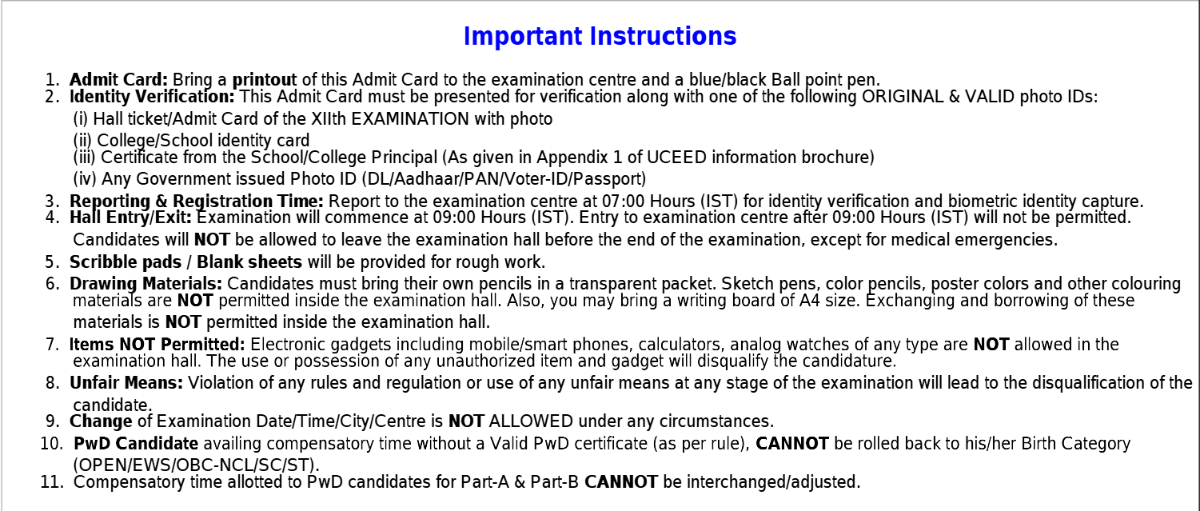
UCEED 2027 exam day guidelines are printed on the UCEED admit card. Students must carefully read and follow the instructions shared by IIT Bombay. You should check and follow the UCEED exam day guidelines as listed below.
- Admit Card: You must bring a printout of the UCEED Admit Card to the examination centre and a blue/black ballpoint pen.
- Identity Verification: UCEED Admit Card must be presented for verification along with one of the following ORIGINAL & VALID photo IDs:
- Hall ticket/Admit Card of the XIIth EXAMINATION with photo
- College/School identity card
- Certificate from the School/College Principal (As given in Appendix 1 of UCEED information brochure)
- Any Government-issued Photo ID (DL/Aadhaar/PAN/Voter-ID/Passport)
- Reporting & Registration Time: Report to the examination centre at 07:00 Hours (IST) for identity verification and biometric identity capture.
- Hall Entry/Exit: The examination will commence at 09:00 Hours (IST). Entry to the examination centre after 09:00 Hours (IST) will not be permitted. Candidates will NOT be allowed to leave the examination hall before the end of the examination, except for medical emergencies.
- Scribble pads / Blank sheets will be provided for rough work.
- Drawing Materials: Candidates must bring their own pencils in a transparent packet. Sketch pens, colored pencils, poster colors, and other colouring materials are NOT permitted inside the examination hall. Also, you may bring a writing board of A4 size. Exchanging and borrowing of these materials is NOT permitted inside the examination hall.
- Items NOT Permitted: Electronic gadgets, including mobile/smart phones, calculators, analog watches of any type are NOT allowed in the examination hall. The use or possession of any unauthorized item or gadget will disqualify the candidate.
- Unfair Means: Violation of any rules and regulations or use of any unfair means at any stage of the examination will lead to the disqualification of the candidate.
- Change of Examination Date/Time/City/Centre is NOT ALLOWED under any circumstances.
- PwD Candidate availing compensatory time without a Valid PwD certificate (as per rules), CANNOT be rolled back to his/her Birth Category (OPEN/EWS/OBC-NCL/SC/ST).
- Compensatory time allotted to PwD candidates for Part-A & Part-B CANNOT be interchanged/adjusted.
UCEED Admit Card 2027: Documents to Carry on Exam Day
You will be required to show a valid photo ID along with your UCEED 2027 admit card to enter the UCEED exam centre. You should also carry 2-3 passport-size photographs uploaded at the time of UCEED registration.
- As a valid photo ID, you can carry Aadhaar Card, PAN Card, Voter ID, Passport, Driving Licence, School / College Photo ID.
- You can also carry Pencils (HB, 2B, 4B or as required), Black / Coloured Pens, Eraser and Sharpener, Geometry Set (if applicable) inside the exam centre.
| Document / Item | Notes |
|---|---|
| Printed UCEED 2027 Admit Card | Colour printout on A4 paper; photograph must be clearly legible; carry at least 2–3 copies |
| Passport-Size Photographs | 2–3 copies; must match the photograph uploaded during UCEED registration |
| Aadhaar Card | Most widely accepted photo ID; e-Aadhaar or masked Aadhaar is also valid |
| PAN Card | Valid government-issued photo ID |
| Voter ID | Must carry a photograph |
| Passport | Must be valid and unexpired |
| Driving Licence | Must carry a photograph |
| School / College Photo ID | Accepted for students who do not hold a government-issued photo ID |
| Pencils (HB, 2B, 4B or as required) | Mandatory for Part B — the pen-and-paper drawing test; not provided at the centre |
| Black / Coloured Pens | For Part B drawing and design questions; check official instructions on the admit card for permitted types |
| Eraser and Sharpener | Required for Part B; must be brought from home |
| Geometry Set (if applicable) | Ruler, compass, set square — verify the list of permitted instruments printed on the UCEED 2027 admit card |
Also Read:
UCEED Admit Card 2027 FAQs
Ques. When will the UCEED 2027 admit card be released?
Ans. The UCEED 2027 admit card has not been released yet. IIT Bombay will announce the official schedule by 1 October 2026. Based on past years, the admit card is typically released in the first week of January 2027, about 10 to 15 days before the exam on 17 January 2027. Check uceed.iitb.ac.in regularly for updates.
Ques. How do I download the UCEED 2027 admit card?
Ans. Once released in January 2027, visit uceed.iitb.ac.in and log in to the candidate portal using your registered email address and password. Enter the captcha, click Login, and download the admit card PDF. Take a colour printout on A4 paper before your exam day.
Ques. What login credentials do I need to download the UCEED admit card?
Ans. You need your registered email address and the password you set during UCEED 2027 registration. If you have forgotten your password, use the "Forgot Password" option on the candidate portal to reset it using your registered email. Do this before the admit card release date to avoid last-minute delays.
Ques. Can I use a digital copy of the UCEED admit card on my phone at the exam centre?
Ans. No. Only a printed colour copy on A4 paper is accepted at the UCEED 2027 exam centre. Entry will be denied if you show a digital copy on your phone or tablet. Mobile phones are also prohibited inside the exam hall, so carry your printed admit card without fail.
Ques. What details will be printed on the UCEED 2027 admit card?
Ans. The UCEED 2027 admit card will carry your name, UCEED Registration ID, roll number, date of birth, category, photograph, signature, exam date (17 January 2027), exam timing (9:00 am to 12:00 noon), reporting time, exam centre name and address, and important instructions for both Part A and Part B of the examination.
Ques. What if there is a spelling mistake in my name on the UCEED admit card?
Ans. Email uceed@iitb.ac.in immediately with your UCEED Registration ID, a description of the error, and a scanned copy of your government-issued ID (such as Aadhaar or passport) showing the correct spelling. IIT Bombay provides a short rectification window — typically until about a week before the exam; so do not delay.
Ques. What if my photograph is unclear or missing on the UCEED 2027 admit card?
Ans. Contact the UCEED Office at uceed@iitb.ac.in or call +91-22-2576 4063 / 9093 / 9094 as soon as you notice the issue. On exam day, carry extra passport-size photographs matching the one you uploaded during registration; invigilators may ask for one as additional identity verification.
Ques. Can I appear for UCEED 2027 without the admit card?
Ans. No. Entry to the UCEED 2027 exam centre without a valid printed admit card is not permitted under any circumstances. Download your admit card as soon as it is released in January 2027 and carry at least two to three printed copies on exam day.
Ques. Will IIT Bombay send the UCEED admit card by post?
Ans. No. IIT Bombay does not dispatch the admit card by post. You must download it yourself from the official UCEED candidate portal at uceed.iitb.ac.in. No physical copy will be mailed to your registered address.
Ques. What photo ID should I carry along with the UCEED admit card?
Ans. Carry one original, valid photo ID: Aadhaar card, PAN card, Voter ID, passport, or driving licence. Photocopies and expired documents are not accepted. If you do not hold a government-issued photo ID, a school or college photo ID card is also accepted at the UCEED exam centre.
Ques. Can I change my exam centre after the UCEED 2027 admit card is issued?
Ans. No. Once the UCEED 2027 admit card is issued, the allotted exam centre is final and cannot be changed. Plan your travel and accommodation after checking the centre allotted to you on the downloaded admit card.
Ques. Do I need to bring drawing instruments for the UCEED 2027 exam?
Ans. Yes. UCEED Part B is a pen-and-paper drawing aptitude test, and IIT Bombay does not provide drawing materials at the exam centre. You must bring your own pencils (HB, 2B, etc.), black and coloured pens, an eraser, and a sharpener. Review the complete list of permitted instruments printed on your UCEED 2027 admit card before the exam day.



Comments