

![Indira Gandhi National Open University - [IGNOU]](https://img.collegedunia.com/public/college_data/images/logos/1491826680logo.png?h=71.7&w=71.7&mode=stretch)
.png?h=18&w=18&mode=stretch)
IGNOU Assignment Front Page Format 2026 is the cover page that must be attached to every assignment submitted to the university. It contains important details such as your name, enrolment number, programme code, course code, assignment number, study centre, regional centre, and date of submission. Filling in these details correctly helps IGNOU identify your assignment and process it without delays.
The IGNOU Assignment Front Page is compulsory for all students enrolled in Open and Distance Learning (ODL) and Online Programmes. Whether you submit your assignment offline at your Learner Support Centre (LSC) or through the submission mode prescribed by your Regional Centre, the front page must be completed accurately.
Students can download the assignments for the term-end examination through the university’s official website of IGNOU– ignou.ac.in.
Do Read: IGNOU Assignment 2026: Download Question Paper PDF, Submission Last Date, Status Check & Front Page
Check IGNOU Assignment cover page format PDF link below.

Note: IGNOU Assignment Front Page format is an important aspect of the assignment. Students failing to meet the standards may secure fewer marks or there may be chances of cancellation of IGNOU assignments.
Check: IGNOU Assignment Download Page 2026
IGNOU Assignment Front Page Cover Format: Details Required
The following details should be clearly mentioned on the IGNOU Assignment front page:
- IGNOU Logo
- Enrolment No. of the student
- Name of the student
- Address
- Program Name and Code
- Course Code and Title
- Assignment No.
- Study Centre Name and Code
- Phone No.
- Email ID
Download Here: IGNOU Assignment Front Cover Page Format
A correctly filled cover page helps ensure smooth evaluation and timely updating of your assignment marks. Missing or incorrect information can delay the evaluation process or even lead to the rejection of your assignment. Before submitting your assignment, check that all the details on the front page are complete and accurate.
The details on the IGNOU Assignment Front Cover Page can be presented as illustrated below:

Overall the assignment has to be presented well, hence students need to ensure they take time to prepare the IGNOU Assignment cover page, as it carries substantial marks. However, to enhance its presentation, avoid too much usage of bold and varied colours.
All the details mentioned in the image above have to be hand-written on the IGNOU Assignment Cover page. Also to remain on the safer side, add all the details in the front page in a neat and tidy manner following all the IGNOU Assignment guidelines.
Steps to Download the IGNOU Assignment Front Page PDF 2026
- Visit the official IGNOU website and navigate to the Student Zone section.
- Open the Assignments or Student Support page to access assignment-related resources.
- Look for the IGNOU Assignment Front Page PDF 2026 applicable to your programme and academic session.
- Click the Download link to save the front page PDF to your device.
- Fill in the required details, such as your name, enrolment number, programme code, course code, study centre, and session, before attaching it to your assignment.
- Print the completed front page and submit it along with your assignment at your designated IGNOU Study Centre within the prescribed deadline.
IGNOU Assignment Front Page Format Complete Guide
| Requirement | Details |
|---|---|
| Paper Size | Use A4-size paper (ruled or plain) for writing the assignment. |
| Writing Style | Assignments should be handwritten using blue or black ink. Typed assignments are generally not accepted for most IGNOU programmes. |
| Language | Write the assignment in English or Hindi, depending on your selected medium of instruction. |
| Handwriting | Ensure your handwriting is neat, legible, and easy to read. |
| Margins | Leave a 3 cm left margin and 2 cm margins on the top, right, and bottom of each page. |
| Question Numbering | Clearly mention the correct question number before writing each answer. |
| Page Numbering | Number every page at the bottom centre for easy identification. |
| Word Limit | Follow the word limit mentioned in the assignment. Long answers are generally 500–1,000 words, while short answers are 250–500 words, unless otherwise specified. |
| Assignment Cover Page | Attach the IGNOU assignment cover/front page with all required details filled in correctly. |
| Arrangement of Pages | Ensure all pages are arranged in the correct sequence before submission. |
| Binding | Secure the assignment using stapling or spiral binding. Avoid submitting loose sheets. |
| Separate Course Files | Prepare and submit separate assignments for each course. Do not combine multiple course assignments into one file. |
| Keep a Copy | Retain a photocopy or scanned copy of every assignment for future reference. |
| Submission Deadline | Submit the completed assignment on or before the official deadline announced by IGNOU. |
| Submission Proof | Keep the submission receipt or acknowledgement safely until your assignment marks are updated in the IGNOU Grade Card. |
How to Fill IGNOU Assignment Front Page 2026?
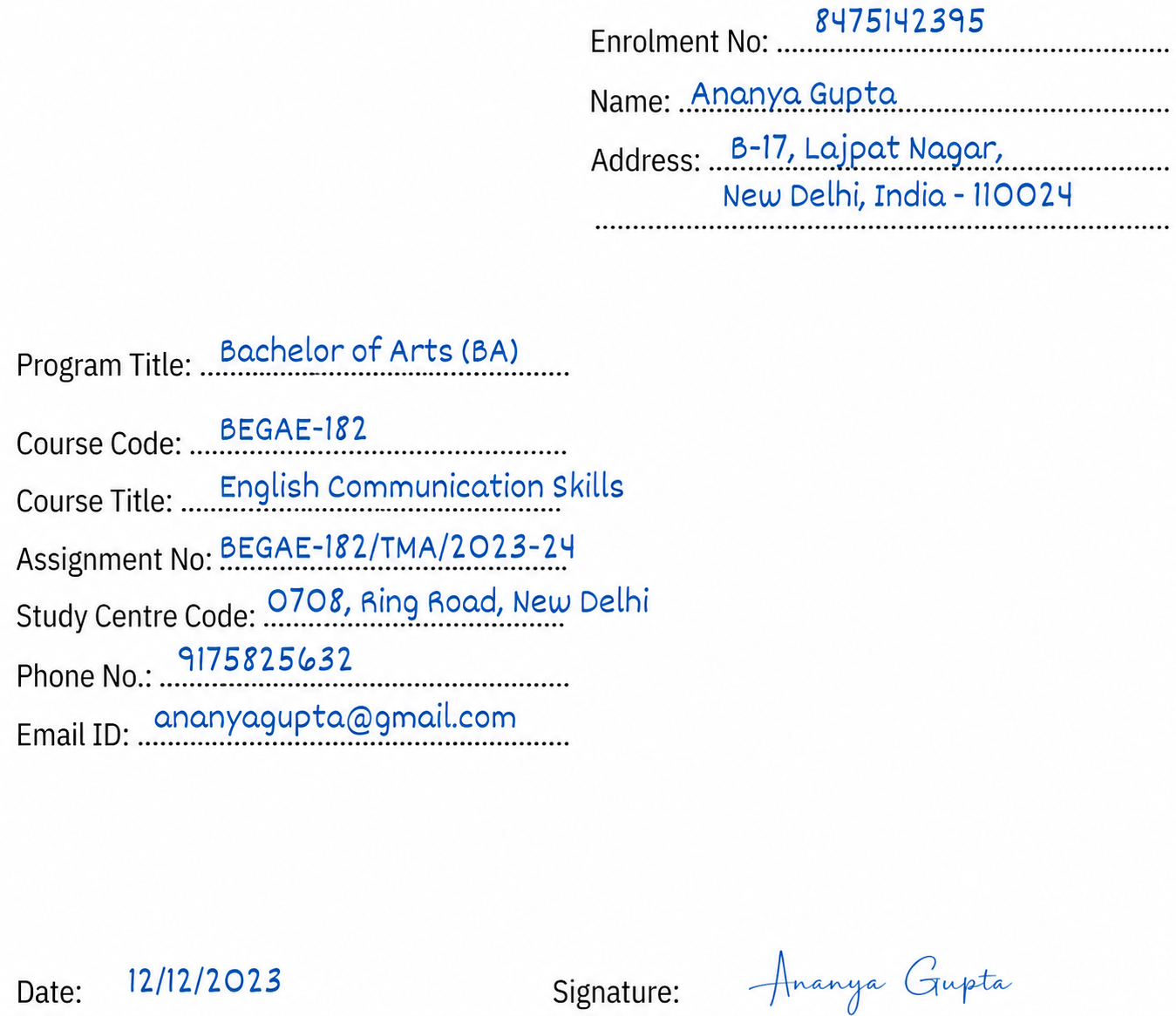
- Enrollment Number: Enter your unique 9-digit IGNOU Enrollment Number as printed on your IGNOU ID card, admission confirmation, or student registration details.
- Student Name: Write your full name exactly as it appears in your IGNOU admission records.
- Complete Postal Address: Enter your full correspondence address with PIN code.
- Programme Code: Enter your registered programme code (e.g., BAG, BCOMG, BCA, MBA, etc.).
- Course Code: Write the course code exactly as printed on the assignment question paper or programme guide (e.g., BEGAE-182, BCS-011, MS-01).
- Course Title: Write the full title of the course corresponding to the course code.
- Assignment Code: Copy the assignment code exactly as printed on the assignment booklet/question paper (e.g., BEGAE-182/TMA/2026-27 or MS-01/TMA/2026).
- Study Centre Code: Enter the code of your allotted IGNOU Study Centre as shown in your admission confirmation or Student Zone.
- Study Centre Name: Write the name and location of your allotted Study Centre (if required).
- Mobile Number: Enter your active contact number.
- Email ID: Write your valid email address.
- Date: Mention the date on which you are submitting or signing the assignment.
- Signature: Sign using the same signature used in your IGNOU records.
Important: Do not mix up the Course Code and Assignment Code. The Course Code identifies the subject, while the Assignment Code identifies the assignment for a particular academic session and includes the session/year. Entering the wrong code may result in assignment submission errors.
IGNOU Assignment Answer Length Guidelines (2026): Word Count & Page Limit
| Question Type | Marks | Expected Length | Approx. Pages |
|---|---|---|---|
| Long Answer | 10–20 marks | 800–1,200 words | 3–5 pages |
| Medium Answer | 5–10 marks | 400–600 words | 1.5–2 pages |
| Short Answer | 2–5 marks | 150–250 words | 0.5–1 page |
IGNOU Assignment: Preparations Required
The IGNOU Assignments have to be written on A4 size blank papers. Students need to write each question providing the right question number and sub-sections. Question and answers can be written on both the sides of the sheets.
Below the questions, provide answers along with diagrams (if required). As different questions have marks allotted like 5, 10 or 15 to them, students should write answers and limit their words based on the marks.
Students can even choose to write only the question number and start writing the answers. However, writing questions will make it easier for understanding.
Check: IGNOU Results
IGNOU Assignment Submission Guidelines
Students should keep the following points in mind when preparing and submitting their IGNOU assignments:
- Use A4-size paper for writing the assignment.
- Write the answers with blue or black ink.
- Ensure that the handwriting is neat, readable, and easy to understand.
- Clearly mention the question number before answering each question.
- Fill in and attach the required assignment cover/front page.
- Check that all pages are properly arranged and in the correct sequence.
- Keep assignments for different courses separate and avoid binding or stapling them together.
- Make a photocopy or digital scan of each assignment for future reference.
- Submit the completed assignment within the deadline specified by IGNOU.
- Keep the submission receipt or acknowledgement safely until the assignment marks are reflected in your grade card.
IGNOU Assignment Submission: Offline vs Online
IGNOU allows assignment submission through different modes depending on the instructions issued by the respective Regional Centre.
Offline Submission
Students can submit handwritten assignments at their allotted Learner Support Centre (LSC) or Study Centre.
Steps include:
- Complete the handwritten assignment.
- Attach the filled front page.
- Arrange the pages properly.
- Submit the assignment at the Study Centre before the last date.
- Collect the acknowledgement receipt for future reference.
Online Submission
Some Regional Centres accept assignments through online submission.
The process generally involves:
- Scanning the handwritten assignment.
- Saving the file in PDF format.
- Naming the file according to the Regional Centre guidelines.
- Uploading it through the official submission portal or email, if instructed.
- Keeping the submission confirmation for future reference.
Always follow the submission method prescribed by your Regional Centre.
IGNOU Assignment Queries on Quora
Anish Sharma Question Asked on Quera: "How do I prepare for the IGNOU assignment and its front page?”

Answer: Responding to the query, Anish Sharma, who shared his experience on Quora, suggested the following tips for preparing IGNOU assignments:
- Prepare your answers primarily from the official IGNOU study material.
- You may also refer to books, journals, and reliable online resources to improve the quality of your answers.
- Write the assignment on A4-size sheets in neat and legible handwriting.
- Both sides of the paper can be used while writing the assignment.
- Attach a properly filled IGNOU Assignment Front Page with each course assignment before submission.
Note: While community suggestions can be helpful, students should always follow the latest assignment guidelines and submission instructions issued by IGNOU and their respective Regional Centre.
Read the Complete Quora Discussion Here: Quora
IGNOU Assignment 2026: Important Links
| Purpose | Official Link | Direct Link |
|---|---|---|
| Download Assignment Question Papers | webservices.ignou.ac.in/assignments | Click Here |
| New Assignment Portal | ignou.ac.in/studentService/download/assignments | Click Here |
| Assignment Status Check | isms.ignou.ac.in | Click Here |
IGNOU Assignment Cover Page: FAQs
Ques. What are the details required to be mentioned on IGNOU Assignment FrontPage?
Ques. Should I keep the IGNOU Assignment Front Cover hand-written?
Ques. Can I use printed IGNOU Assignment Front Page Cover?
Ques. What type of paper should I use for IGNOU Assignment Front Page Cover?
Ques. Where to submit the IGNOU Assignments?

.jpeg?h=132&w=263&mode=stretch)


.png?h=132&w=263&mode=stretch)



Comments