




Candidates facing a VITEEE 2026 balance fee payment portal error can resolve most issues by clearing the browser cache, using Google Chrome or Mozilla Firefox or trying again during non peak hours.
- The VITEEE 2026 balance fee payment is an important step for candidates who have received a provisional seat at VIT Vellore, VIT Chennai, VIT AP (Amaravati) or VIT Bhopal.
- Browser compatibility issues, heavy server traffic and unstable internet connections are the common reasons for payment portal errors.
- Completing the balance fee payment before the prescribed deadline is necessary to avoid any impact on the allotted seat.
- The official VITEEE 2026 fee payment portal and the VITEEE 2026 counselling portal are the only authorised platforms for completing the balance fee payment.
- If the payment amount is deducted but the transaction is not confirmed, candidates should not make another payment and should contact the VIT helpdesk with the transaction ID or UTR number.
Related Links:
- VITEEE Counselling 2026: Balance Fee Due July 4, Phase Wise Dates and Rank vs Branch
- VITEEE 2026 Phase V vs Phase I-IV Cutoff: How Opening Ranks Shifted
- VITEEE 2026 Phase V Admission Confirmation: Fees and Reporting Dates

Key Summary
- Candidates are advised to use the latest version of Google Chrome or Mozilla Firefox and avoid outdated or unsupported browsers.
- Server traffic is generally higher between 10:00 AM and 6:00 PM while payments made between 6:00 AM and 9:00 AM may be processed more smoothly.
- The portal supports Net Banking, UPI, Debit Card and Credit Card payments.
What is the VITEEE 2026 Balance Fee Payment?
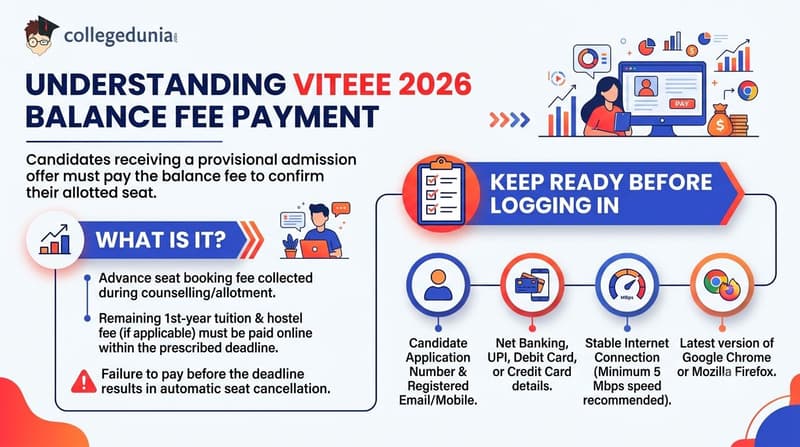
Candidates who receive a provisional admission offer through VITEEE 2026 must pay the balance fee to confirm their allotted seat.
- An advance seat booking fee is collected during the counselling or seat allotment process.
- The remaining first-year tuition fee and hostel fee, wherever applicable, must be paid online within the prescribed deadline.
- Failure to pay the balance fee before the deadline will result in the automatic cancellation of the provisional seat.
Keep the following ready before logging in to pay:
- Candidates should keep their VITEEE 2026 Application Number and registered email ID or mobile number ready before logging in.
- Candidates should also keep their Net Banking, UPI, Debit Card, or Credit Card details ready for the payment process.
- A stable internet connection with a speed of at least 5 Mbps is recommended while making the payment.
- Candidates should use the latest version of Google Chrome or Mozilla Firefox to complete the payment without browser-related issues.
Also Check:
- How to Check VITEEE 2026 Phase V Allotment Letter and Download
- VITEEE 2026 Safe Score for CSE at VIT Vellore
Ques. Is the VITEEE 2026 balance fee payment mandatory to confirm my admission?
Ans. Yes. Paying the VITEEE 2026 balance fee within the prescribed deadline is mandatory to confirm your provisionally allotted seat. Candidates who have already paid the advance seat booking fee must also pay the remaining first-year tuition fee and applicable hostel fee. If the balance fee is not paid on time, the provisional admission offer is liable to be cancelled and the seat may be allotted to another candidate.
Ques. What should I keep ready before starting the VITEEE 2026 balance fee payment process?
Ans. Before making the VITEEE 2026 balance fee payment, keep your Application Number, registered email ID or mobile number, and a valid payment method such as Net Banking, UPI, Debit Card, or Credit Card ready. It is also advisable to use a stable internet connection and the latest version of Google Chrome or Mozilla Firefox to reduce the chances of payment or browser-related issues during the transaction.
Common Portal Errors During VITEEE 2026 Balance Fee Payment
The table below lists the most frequently reported issues on the VITEEE balance fee payment portal and their typical causes.
| Error or Issue | Likely Cause |
|---|---|
| Portal not loading or blank white screen | High server traffic; browser cache conflict |
| Invalid login credentials error | Wrong application number format; Caps Lock on; expired session |
| OTP not received on mobile or email | Incorrect registered number; SMS network delay; OTP in spam folder |
| Payment gateway timeout or session expired | Slow or intermittent internet; bank server under load |
| Amount deducted from bank but no confirmation on portal | Connection dropped mid-transaction; bank delay in updating portal |
| 404 or page not found error | Outdated bookmarked URL; payment window not yet open for that stage |
| Browser compatibility error or broken layout | Outdated browser; unsupported browser such as Internet Explorer or older Safari |
| UPI payment failed or declined | UPI app not updated; daily transaction limit reached; bank UPI service disruption |
Also Check:
- VITEEE 2026: Expected Rank for 60 Marks and Campus Eligibility
- VITEEE 2026: Is 90 Marks Safe for VIT Vellore CSE?
Ques. What does the "Invalid Login Credentials" error mean on the VITEEE 2026 balance fee payment portal?
Ans. The "Invalid Login Credentials" error usually appears when candidates enter an incorrect VITEEE 2026 Application Number, use the wrong password, keep Caps Lock enabled, or try to log in after their session has expired. Verify your login details carefully, refresh the page, and sign in again. If you still cannot access the portal, use the password recovery option or contact the VIT admissions helpdesk.
Ques. Why am I getting a "404 Page Not Found" error while opening the VITEEE 2026 balance fee payment page?
Ans. A 404 Page Not Found error generally occurs when candidates use an outdated bookmarked link or try to access the payment portal before it is activated for their admission phase. Always open the payment page through the latest link available in the official VIT admission portal or your seat allotment dashboard instead of using old URLs saved in your browser.
How to Fix VITEEE 2026 Balance Fee Payment Portal Errors
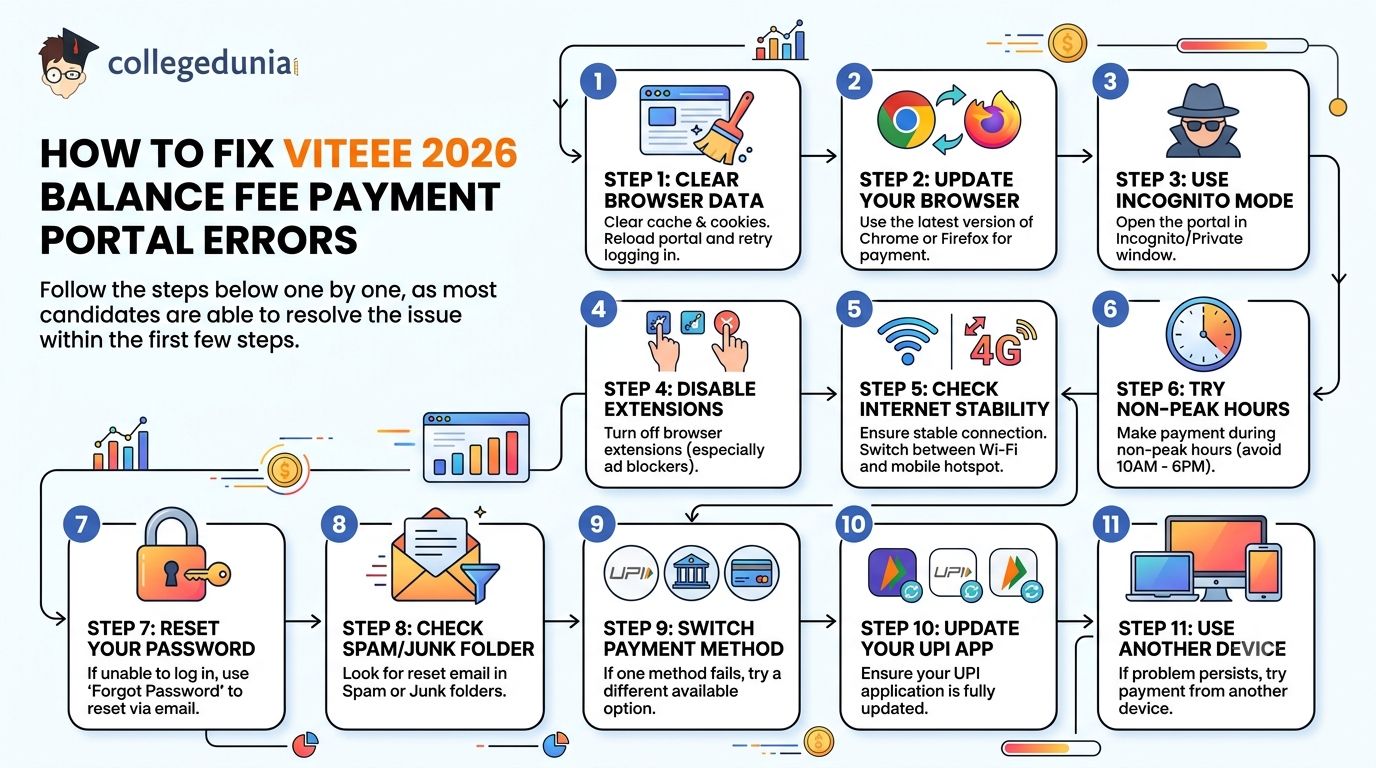
Follow the steps below one by one, as most candidates are able to resolve the issue within the first few steps.
- Step 1: Clear the browser cache and cookies, then reload the VITEEE 2026 portal and try logging in again.
- Step 2: Use the latest version of Google Chrome or Mozilla Firefox for the payment process.
- Step 3: Open the portal in Incognito or Private mode to avoid issues caused by cached data or browser extensions.
- Step 4: Disable browser extensions, especially ad blockers and privacy extensions, before opening the payment portal.
- Step 5: Check your internet connection and switch between Wi-Fi and a mobile hotspot if the connection is unstable.
- Step 6: Try making the payment during non-peak hours, as the portal usually experiences heavy traffic between 10:00 AM and 6:00 PM.
- Step 7: If you are unable to log in, use the Forgot Password option and reset your password through the registered email address.
- Step 8: Check the Spam or Junk folder if the password reset email does not appear in your inbox.
- Step 9: If one payment method fails, switch to another available option such as UPI, Net Banking, Debit Card, or Credit Card.
- Step 10: Make sure your UPI application is updated before attempting the payment again.
- Step 11: If the problem continues, try completing the payment from another laptop, desktop, or smartphone to rule out device-related issues.
Also Check:
- VITEEE 2026 Phase V Seat Allotment: How to Accept and Confirm Admission
- VITEEE 2026 Documents Required for Campus Reporting: Phase V Allottees Checklist
Ques. Which browser works best for the VITEEE 2026 balance fee payment portal?
Ans. The VITEEE 2026 balance fee payment portal works best on the latest versions of Google Chrome and Mozilla Firefox. If the portal is not working properly, clear your browser cache and cookies, open the website in Incognito/Private mode, and disable ad blockers or other browser extensions before trying again. Using an updated browser helps prevent compatibility and payment-related issues.
Ques. What should I do if the VITEEE 2026 balance fee payment portal is still not working after trying all troubleshooting steps?
Ans. If the VITEEE 2026 balance fee payment portal still does not work after clearing cache, changing browsers, using Incognito mode, updating your UPI app, and switching internet connections, try accessing the portal from a different laptop, desktop, or smartphone. If the issue continues, contact the VIT Admissions Helpdesk immediately with your application number, screenshots of the error, and details of the steps you have already tried so that the issue can be resolved before the payment deadline.
Payment Deducted but Not Confirmed: What to Do
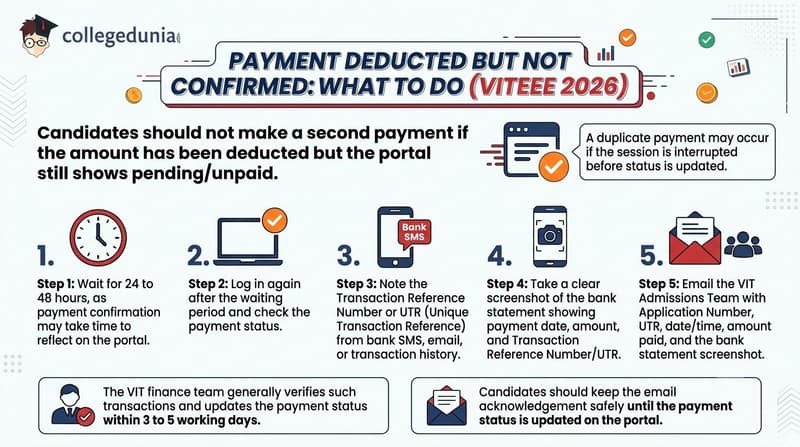
Candidates should not make a second payment if the amount has been deducted from the bank account but the VITEEE 2026 portal still shows the fee as pending or unpaid.
- A duplicate payment may occur if the payment session is interrupted before the transaction status is updated on the portal.
- Step 1: Wait for 24 to 48 hours, as the payment confirmation may take some time to reflect on the VITEEE 2026 portal.
- Step 2: Log in again after the waiting period and check the payment status.
- Step 3: Note the Transaction Reference Number or UTR (Unique Transaction Reference) from the bank SMS, email, or transaction history.
- Step 4: Take a clear screenshot of the bank statement showing the payment date, amount, and Transaction Reference Number/UTR.
- Step 5: Email the VIT Admissions Team with your Application Number, Transaction Reference Number/UTR, date and time of payment, amount paid, and the bank statement screenshot.
- The VIT finance team generally verifies such transactions and updates the payment status within 3 to 5 working days.
- Candidates should keep the email acknowledgement safely until the payment status is updated on the portal.
Also Check:
- VITEEE 2026 Documents for Reporting and VTOP Upload Full Checklist
- 80 Marks in VITEEE 2026: Expected Rank and Branch Eligibility at VIT
Ques. How long does it take for the VITEEE 2026 balance fee payment status to update after a successful bank transaction?
Ans. If your bank has successfully processed the payment but the VITEEE 2026 portal has not updated the status, it usually takes 24 to 48 hours for the transaction to reflect. In some cases where manual verification is required, the VIT finance team may take 3 to 5 working days to update the payment status. Candidates should regularly check the portal and avoid making another payment during this period.
Ques. What details should I include while reporting a VITEEE 2026 payment issue to the admissions team?
Ans. When reporting a VITEEE 2026 payment issue, include your Application Number, Transaction Reference Number (UTR), payment date and time, amount paid, and a clear screenshot of the bank statement or payment confirmation. Providing complete transaction details helps the admissions and finance team verify the payment faster and update your portal status without unnecessary delays.
VITEEE 2026 Helpdesk Contact Details
If the suggested troubleshooting steps do not resolve the issue, candidates should contact the official VIT support team for assistance.
- Candidates should never share their account password with anyone, as VIT officials do not ask for login passwords.
- Candidates can also submit a grievance through the VITEEE 2026 student or counselling portal after logging in with their application credentials.
- Candidates should keep the ticket number or grievance reference number ready while following up with the VIT support team.
| Contact Channel | Details |
|---|---|
| Official portal (Help or Contact Us section) | viteee.vit.ac.in |
| Admissions email (Vellore) | ugadmission@vit.ac.in |
| Phone — VIT Vellore campus |
0416-220 2020 / 044-46277555 |
| Phone — VIT Chennai campus |
044-3993 1555 |
| Helpdesk working hours |
Monday to Saturday, 9 AM to 5 PM IST |
Also Check:
- 110 Marks in VITEEE 2026: Expected Rank and Admission Chances
- 100 Marks in VITEEE 2026: Expected Rank and College Admission Prospects
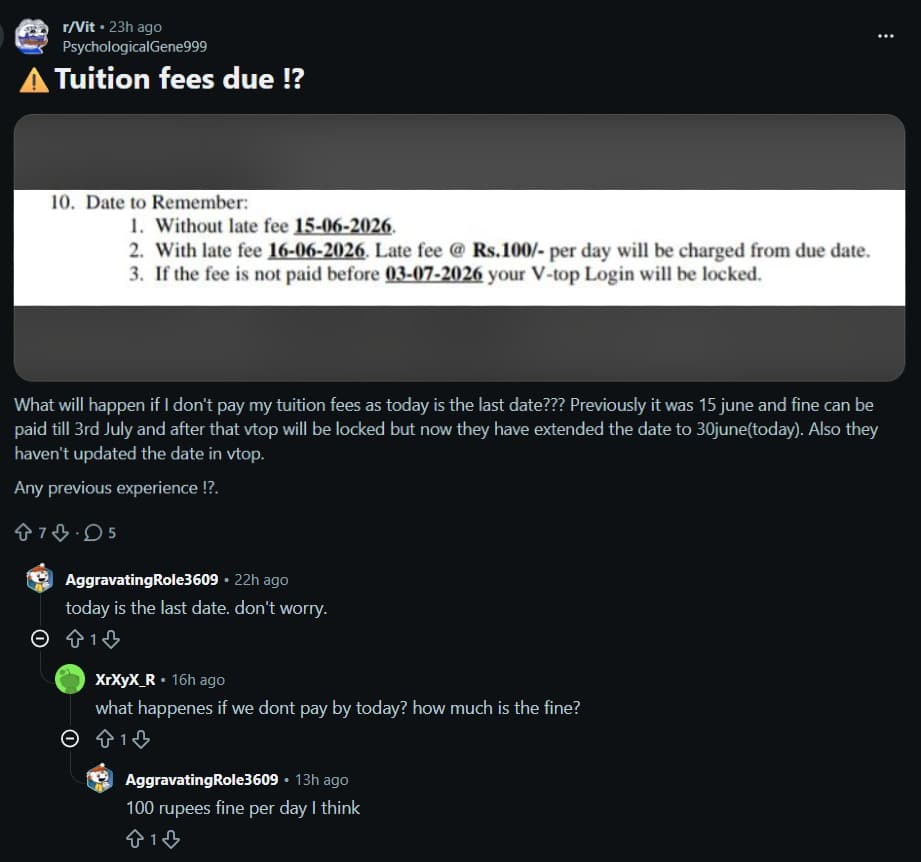
VITEEE 2026 Balance Fee Payment: Reddit Discussion
- The discussion focused on the VIT tuition fee payment deadline, with candidates seeking clarification on the extended last date, possible consequences of missing the deadline, and whether VTOP would be locked if the fee was not paid on time.
- During the discussion, one user confirmed that 30 June 2026 was the final payment deadline, while another query regarding the penalty received a response stating that the late fee is expected to be around ₹100 per day after the due date.
VITEEE 2026 Balance Fee Payment FAQs
Ques. Why is the VITEEE 2026 fee payment portal showing a blank or white screen?
Ans. A blank screen usually occurs due to browser cache conflicts or heavy server load. Clear your browser cache, try a fresh Incognito/Private window in Google Chrome, and retry. If the issue continues, attempt payment during early morning or late night hours when traffic is lower.
Ques. My VITEEE 2026 balance fee payment was deducted from my account but the portal shows it as pending. Should I pay again?
Ans. No. Do not make a second payment. Wait 24 to 48 hours for the bank to confirm the transaction with VIT’s system. If it still shows pending, email ugadmission@vit.ac.in with your application number, bank transaction reference/UTR, date of payment, and a screenshot of the deduction.
Ques. I am not receiving the OTP during VITEEE 2026 login. What should I do?
Ans. Ensure the mobile number displayed matches your registered number. OTPs may be delayed up to 5 minutes during peak hours. Check your SMS inbox and spam/junk folder. Use the “Resend OTP” option. If the problem persists, contact the VIT helpdesk to verify or update your registered mobile number.
Ques. Can I pay the VITEEE 2026 balance fee using UPI?
Ans. Yes. UPI is a supported payment mode on the VITEEE balance fee portal, along with net banking, debit cards, and credit cards. Update your UPI app to the latest version before payment. If UPI fails, switch to net banking or debit card.
Ques. What happens if I miss the VITEEE 2026 balance fee payment deadline due to a portal error?
Ans. VIT generally does not extend individual deadlines. However, if you face a verifiable technical issue on the official portal near the deadline, email ugadmission@vit.ac.in immediately with screenshots of the error, your application number, and payment attempt logs. Acting quickly improves the chances of resolution.
Ques. Is it safe to enter card details on the VITEEE 2026 fee payment portal?
Ans. Yes. The portal uses a secure, encrypted payment gateway. Always ensure the URL starts with https:// and the domain is viteee.vit.ac.in. Never make payments through links from unofficial social media groups or third-party websites.



Comments