




UP Board is conducting the Class 10 Computer Board Exam 2026 on February 19, 2026. Class 10 Computer Question Paper with Solution PDF is available here for download.
The official question paper of UP Board Class 10 Computer Board Exam 2026 is provided below. Students can download the official paper in PDF format for reference.
UP Board Class 10 2026 Computer Question Paper with Solution PDF
| UP Board Class 10 2026 Computer Question Paper with Solution PDF | Download PDF | Check Solutions |

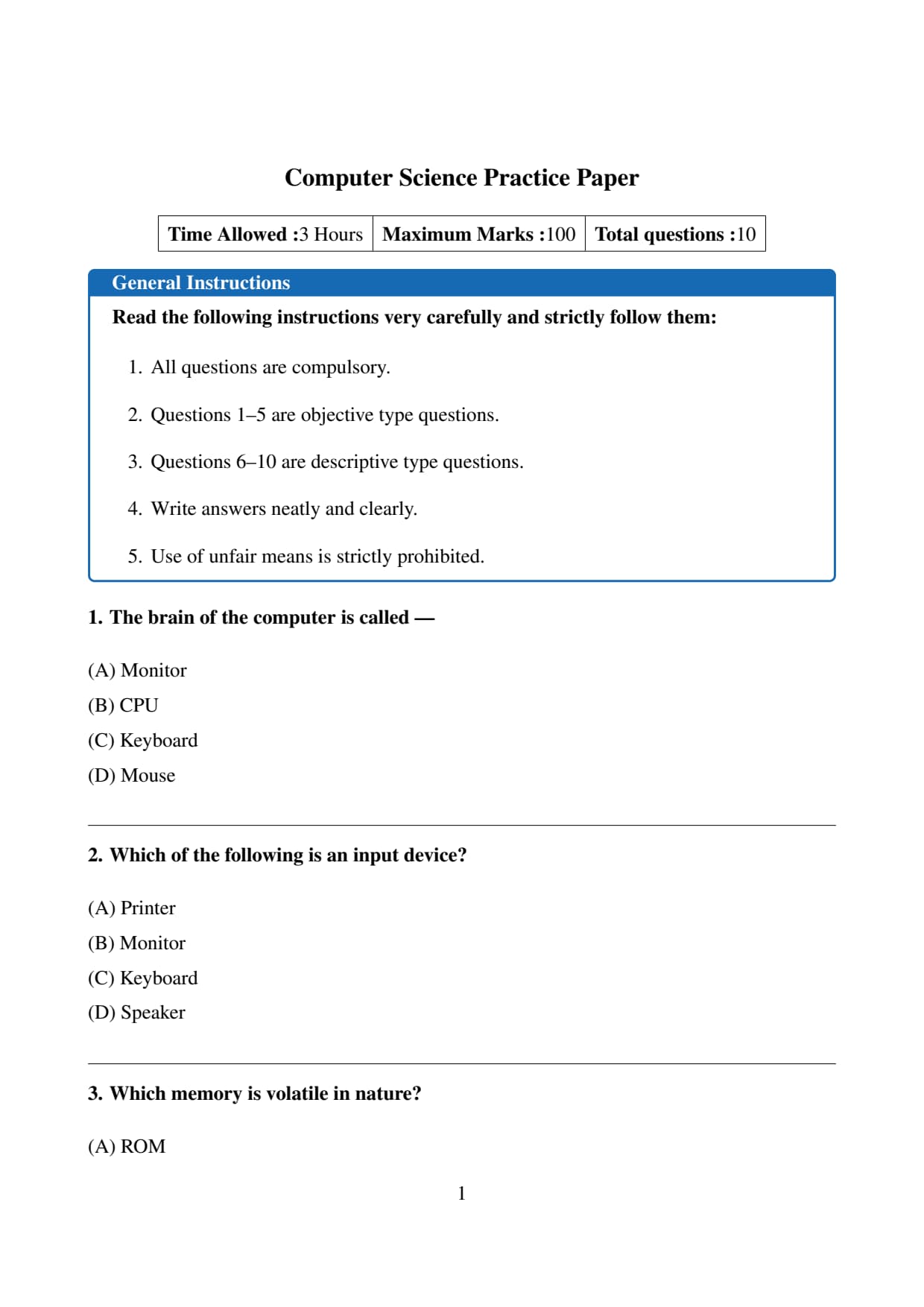
The brain of the computer is called —
View Solution
The CPU controls all operations of a computer and performs calculations and logical tasks.
Step 1: Analyze the options.
- Monitor — Output device.
- CPU — Processing unit (brain).
- Keyboard — Input device.
- Mouse — Input device.
Step 2: Conclusion.
Thus CPU is called the brain of the computer.
Final Answer: \[ \boxed{(B) \, CPU} \] Quick Tip: CPU stands for Central Processing Unit.
Which of the following is an input device?
View Solution
An input device is used to enter data into the computer.
Step 1: Analyze the options.
- Printer — Output device.
- Monitor — Output device.
- Keyboard — Input device.
- Speaker — Output device.
Step 2: Conclusion.
Therefore keyboard is an input device.
Final Answer: \[ \boxed{(C) \, Keyboard} \] Quick Tip: Mouse, keyboard, scanner are input devices.
Which memory is volatile in nature?
View Solution
Volatile memory loses data when power is off.
Step 1: Analyze the options.
- ROM — Non-volatile.
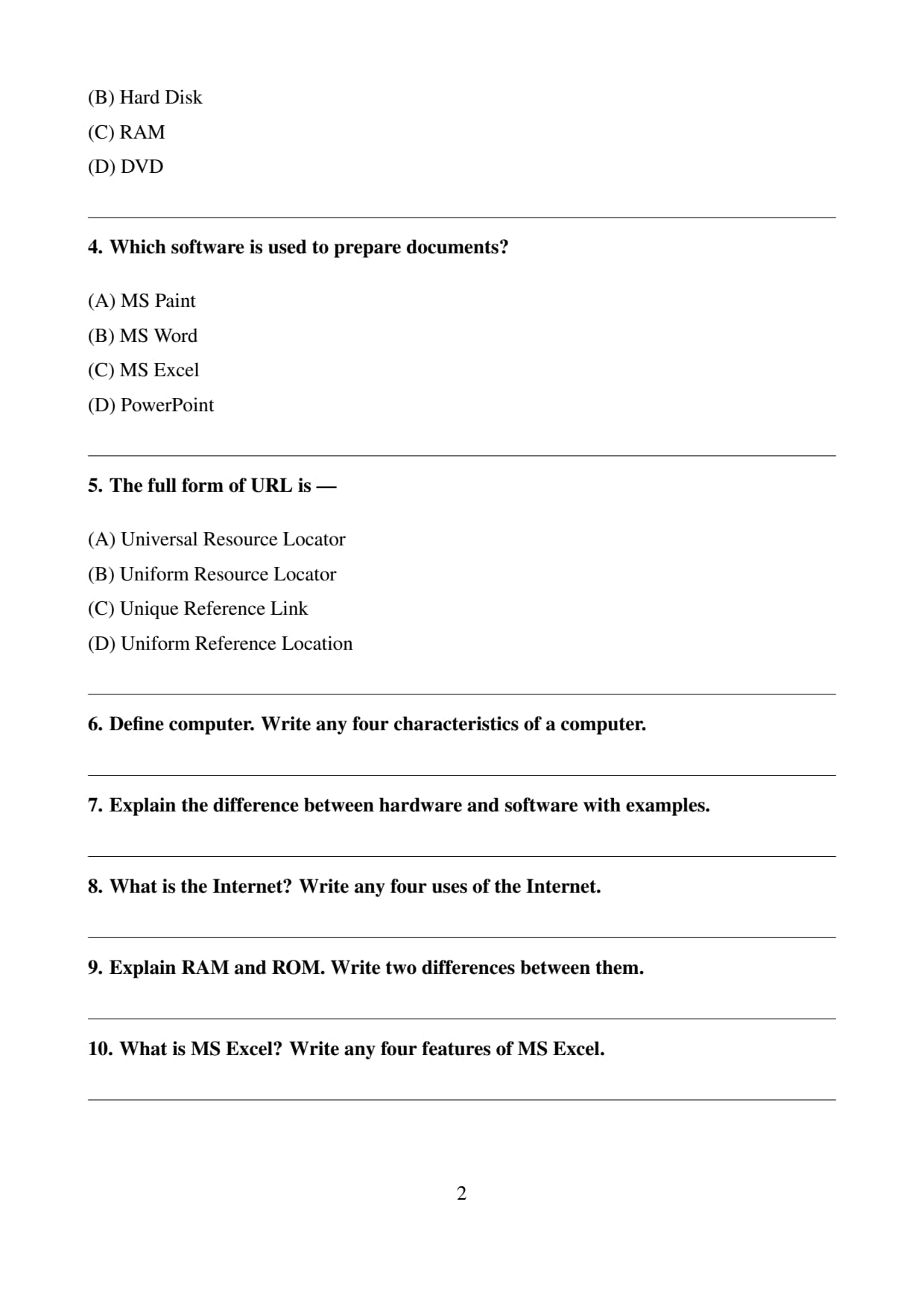
- Hard Disk — Permanent storage.
- RAM — Volatile memory.
- DVD — Optical storage.
Step 2: Conclusion.
Hence RAM is volatile.
Final Answer: \[ \boxed{(C) \, RAM} \] Quick Tip: RAM stores temporary working data.
Which software is used to prepare documents?
View Solution
MS Word is a word processing software.
Step 1: Analyze the options.
- Paint — Drawing tool.
- Word — Document creation.
- Excel — Spreadsheet.
- PowerPoint — Presentation.
Step 2: Conclusion.
Thus MS Word is correct.
Final Answer: \[ \boxed{(B) \, MS Word} \] Quick Tip: Word processors are used for letters, reports, assignments.
The full form of URL is —
View Solution
URL is the address of a webpage on the Internet.
Step 1: Analyze the options.
Only option (B) is correct.
Step 2: Conclusion.
Hence URL stands for Uniform Resource Locator.
Final Answer: \[ \boxed{(B) \, Uniform Resource Locator} \] Quick Tip: Every webpage has a unique URL.
Define computer. Write any four characteristics of a computer.
View Solution
A computer is an electronic device that accepts input, processes data according to instructions, stores the results, and produces output. It performs calculations and logical operations at very high speed and accuracy.
The major characteristics of a computer are as follows. First, speed — computers can perform millions of calculations in a fraction of a second. Second, accuracy — results are highly accurate if correct data and instructions are provided. Third, storage capacity — computers can store large amounts of data for future use. Fourth, diligence — unlike humans, computers do not get tired and can work continuously for long periods. Quick Tip: Computer works on IPO cycle — Input, Process, Output.
Explain the difference between hardware and software with examples.
View Solution
Hardware refers to the physical components of a computer that can be seen and touched, such as keyboard, monitor, mouse, CPU, and printer. These devices perform input, processing, storage, and output functions.
Software, on the other hand, consists of programs and instructions that tell the hardware what to do. Software cannot be touched. Examples include operating systems like Windows, application programs like MS Word, and antivirus software.
The main difference is that hardware is the physical part of the computer system, whereas software is the logical part that controls the hardware. Quick Tip: Hardware needs software to function, and software needs hardware to run.
What is the Internet? Write any four uses of the Internet.
View Solution
The Internet is a worldwide network of interconnected computers that allows users to share information, communicate, and access various online services.
The Internet has many uses. It enables communication through email, video calls, and social media. It provides access to information through websites and online databases. It is widely used for online education and research. It also supports e-commerce, allowing people to buy and sell goods and services online. Quick Tip: Internet connects millions of networks across the world.
Explain RAM and ROM. Write two differences between them.
View Solution
RAM (Random Access Memory) is the main memory of a computer used to store data and programs currently in use. It is volatile, meaning the data is lost when power is switched off.
ROM (Read Only Memory) is a permanent memory that stores essential instructions needed to start the computer. It is non-volatile and retains data even when the power is off.
The main differences are that RAM is temporary and volatile, while ROM is permanent and non-volatile. RAM allows both reading and writing of data, whereas ROM generally allows only reading. Quick Tip: RAM = Temporary memory, ROM = Permanent memory.
What is MS Excel? Write any four features of MS Excel.
View Solution
MS Excel is a spreadsheet software developed by Microsoft used for organizing, calculating, and analyzing data in tabular form. It allows users to perform mathematical operations, create charts, and manage large datasets efficiently.
Some important features of MS Excel include formulas and functions for automatic calculations, the ability to create charts and graphs for data visualization, sorting and filtering tools to organize data, and worksheets arranged in rows and columns for easy data entry. Quick Tip: Excel is widely used for accounting, data analysis, and reporting.
UP Board Class 10 Computer Question Paper 2026 Youtube solution



Comments