Kerala Plus Two 2025 Computer Science (SY-630) Model Question Paper with solutions PDFs are now available for download. The Kerala Plus Two Physics Model Examination 2025 was conducted by the Directorate of Higher Secondary Education (DHSE), Kerala, to help students prepare for the final board exams. The paper is designed as per the latest syllabus and exam pattern prescribed for the academic year 2025–26.
Kerala Plus Two 2025 Computer Science (SY-630) Model Question Paper with solutions
| Kerala Plus Two 2025 Computer Science (SY-630) Model Question Paper | Check Solutions |

Inserting a new element into a Stack data structure is called _______ operation.
View Solution
Step 1: Understanding Stack Operations.
In the context of stack data structures, a stack is a collection that follows the Last In, First Out (LIFO) principle. This means the last element inserted into the stack will be the first one to be removed. A stack supports two primary operations: Push and Pop.
Step 2: The Push Operation.
The operation of inserting a new element into the stack is known as the Push operation. When you push an element onto the stack, it is placed at the top of the stack, which is where it will remain until it is removed by the pop operation. This operation involves two main steps:
1. The element is added to the stack.
2. The top pointer of the stack is updated to reflect the new element's position.
Step 3: Example.
For example, if the stack is initially empty and the elements \{1, 2, 3\ are pushed onto the stack in that order, the stack will look like this: \[ Stack: [3, 2, 1] \]
After pushing the element 4, the stack will look like: \[ Stack: [4, 3, 2, 1] \]
The element 4 is now at the top of the stack.
Step 4: Conclusion.
Thus, the operation of inserting a new element into a stack is called the Push operation. It is fundamental in stack-based operations, especially in algorithms like Depth First Search (DFS).
Final Answer:
The operation is called the Push operation. Quick Tip: In stack operations, "Push" refers to adding an element, while "Pop" refers to removing an element. These operations are used to manage data in a LIFO order.
Name the tag which has the attribute ‘Noresize’.
View Solution
Step 1: Understanding the
The keyword used to define a variable in JavaScript is _______ .
View Solution
In JavaScript, there are three main keywords used to define a variable. These keywords are let, const, and var. Each of these has different scopes and use cases.
1. let:
The \texttt{let keyword is used to declare a block-scoped variable. This means that the variable is only available within the block of code (such as within a loop or a function) where it is defined. Variables declared with \texttt{let can be reassigned new values but cannot be re-declared within the same scope.
Example:
\begin{verbatim
let x = 10; // variable declared with let
x = 20; // reassignment is allowed
\end{verbatim
2. const:
The \texttt{const keyword is used to declare a block-scoped variable, but it differs from \texttt{let in that once a value is assigned to a \texttt{const variable, it cannot be reassigned. This is useful when you want to ensure that a value remains constant throughout the code execution.
Example:
\begin{verbatim
const y = 30; // variable declared with const
y = 40; // Error: Assignment to constant variable
\end{verbatim
3. var:
The \texttt{var keyword is the traditional way of declaring variables in JavaScript, but it is less commonly used today due to its function-scoping behavior. \texttt{var declares a variable that is scoped to the function in which it is declared, rather than the block where it is used. This can sometimes lead to bugs due to unexpected behavior with scoping.
Example:
\begin{verbatim
var z = 50; // variable declared with var
\end{verbatim
Step 2: Conclusion.
While all three keywords can be used to define variables, \texttt{let and \texttt{const are preferred in modern JavaScript due to their block-scoping behavior, which helps prevent errors and makes code more predictable. \texttt{var is generally avoided in modern JavaScript unless specifically needed for legacy code.
Quick Tip: In modern JavaScript, always use \texttt{let} or \texttt{const} for variable declaration to avoid unexpected behaviors associated with \texttt{var}.
Write the symbol of concatenating assignment operator in PHP.
View Solution
In PHP, the symbol for the concatenating assignment operator is \texttt{.=. This operator is used to append one string to another string stored in a variable. It is a combination of the concatenation operator \texttt{. (used for combining strings) and the assignment operator \texttt{= (used for assigning a value to a variable).
How the concatenating assignment works:
The \texttt{.= operator first concatenates the right-hand operand (a string) to the left-hand operand (the variable), and then assigns the result back to the variable. This is useful when you want to append data to an existing string without having to rewrite the whole string each time.
Example:
Here’s how the concatenating assignment operator works in PHP:
\begin{verbatim
\(greeting = "Hello"; // Initial value of greeting
\)greeting .= " World"; // Appends " World" to "Hello"
echo \(greeting; // Output: Hello World
\end{verbatim}
In this example, \texttt{.=} is used to concatenate the string \texttt{" World"} to the existing string \texttt{"Hello"}, resulting in the final value of \texttt{\)greeting being \texttt{"Hello World".
Step 2: Conclusion.
The symbol for concatenating assignment in PHP is \texttt{.=, and it is used to append strings to variables efficiently.
Quick Tip: Use \texttt{.=} to append strings to an existing variable in PHP.
Define the term Robotics.
View Solution
Robotics is an interdisciplinary branch of engineering and technology that deals with the design, construction, operation, and use of robots.
A robot is a programmable machine that can carry out a series of tasks autonomously or semi-autonomously. Robotics combines mechanical engineering, electrical engineering, computer science, and artificial intelligence (AI).
The primary goal of robotics is to develop robots that can perform tasks typically done by humans, especially those that are hazardous, tedious, or repetitive.
Key areas of robotics include:
1. Mechanical design: The construction of the robot’s physical components, such as the body, arms, and joints. This includes motors, actuators, and sensors that enable movement and interaction with the environment.
2. Control systems: The systems that allow robots to perform their tasks, including programming, algorithms, and feedback loops to ensure robots can function accurately and efficiently.
3. Artificial Intelligence: AI in robotics enables robots to perform tasks with decision-making abilities, adapt to changing environments, and even learn from experience. This is seen in robots like self-driving cars or autonomous drones.
Robotics has a wide range of applications in various fields:
- Industrial automation: Robots are used in manufacturing to automate processes such as assembly, packaging, and material handling.
- Medical field: Robots are used in surgeries, rehabilitation, and assisting disabled individuals with robotic exoskeletons.
- Space exploration: Robots are sent to explore other planets, such as the Mars rovers.
- Military applications: Robots are used in defense for tasks like bomb disposal and surveillance.
Robotics is continually advancing, with robots becoming more capable of performing complex tasks, learning from their environment, and working alongside humans.
Quick Tip: Robotics merges multiple engineering fields to create autonomous machines that can perform specific tasks, from manufacturing to healthcare.
A legal right given for the creator of an original work is _______.
View Solution
The legal right given for the creator of an original work is copyright.
Copyright is a form of intellectual property law that grants the creator or owner of an original work exclusive rights to its use and distribution. These rights are granted to protect the creator's work from unauthorized reproduction, distribution, or performance.
The copyright holder has the right to:
1. Reproduce the work in copies or recordings.
2. Distribute copies of the work to the public.
3. Perform or display the work publicly.
4. Create derivative works based on the original work.
The scope of copyright protection can apply to literary works, music, art, films, software, architecture, and other creative outputs. In most jurisdictions, the copyright holder has the exclusive right to use the work for a limited time, generally lasting the lifetime of the author plus an additional 50 to 70 years, depending on the laws of the country. After this period, the work enters the public domain.
For example, if an artist creates a painting, that artist holds the copyright to that painting, and only they or individuals they grant permission to can reproduce or sell it. Similarly, a software developer who writes a computer program has the copyright to that software and can control how it is distributed and used.
Copyright is essential for creators to benefit financially from their work and prevent others from exploiting it without permission.
Quick Tip: Copyright grants creators exclusive rights to their original works, protecting them from unauthorized use and enabling them to benefit from their creations.
(i) Orphaned memory blocks are undesirable related with pointers in C++. Justify.
View Solution
Step 1: Understanding Orphaned Memory Blocks.
Orphaned memory blocks occur when memory is dynamically allocated (using operators like `new` or `malloc`) but is not properly deallocated or freed after use. As a result, the memory is no longer accessible, leading to memory leaks. These orphaned blocks of memory cannot be reclaimed by the program, even though they are still reserved, causing a gradual increase in memory usage. This issue can eventually exhaust the system’s memory resources, leading to a crash or performance degradation.
Step 2: Why Orphaned Memory Blocks are Undesirable.
1. Memory Leaks: Orphaned memory blocks cause memory leaks, where memory is allocated but not released, leading to inefficient use of system memory. This can cause the application or even the entire system to run out of memory.
2. System Performance: Accumulation of orphaned memory can slow down system performance over time because it prevents the operating system from using that memory for other processes.
3. Application Crashes: In long-running applications, orphaned memory blocks can accumulate and eventually lead to the system running out of memory, causing the application to crash.
4. Resource Wastage: It is wasteful in terms of resource management, as the system continues to reserve memory that is no longer in use.
Step 3: Conclusion.
Orphaned memory blocks can severely affect system performance, lead to memory leaks, and cause application crashes. Therefore, it is important to avoid them in C++ programs.
Quick Tip: Always ensure that dynamically allocated memory is properly freed using `delete` (or `free`) to prevent orphaned memory blocks.
(i) Orphaned memory blocks are undesirable related with pointers in C++.
How can they be avoided?
View Solution
Step 1: Proper Memory Management.
To avoid orphaned memory blocks, proper memory management practices should be followed:
1. Deallocation of Memory: Every time memory is allocated using `new` or `malloc`, it should be deallocated using `delete` or `free` when it is no longer needed. This ensures that memory is returned to the system after use.
Example:
\[
int* ptr = new int[10]; \quad delete[] ptr;
\]
This ensures the memory block is freed after use.
2. Use of Smart Pointers (in C++): Modern C++ provides smart pointers like `std::unique_ptr` and `std::shared_ptr` in the `
Example:
\[
std::unique_ptr
Smart pointers automatically release memory when they go out of scope.
3. Memory Management Tools: Use tools like Valgrind or AddressSanitizer to detect memory leaks during program execution. These tools can help find areas where memory is not properly deallocated.
4. RAII (Resource Acquisition Is Initialization): This is a design pattern in C++ where resources (including memory) are acquired during object construction and released during destruction. This technique helps ensure that memory is properly released when objects go out of scope.
5. Avoiding Multiple Pointers to the Same Memory: When multiple pointers refer to the same memory block, there is a risk of one pointer being lost while the others are still using it. This can lead to orphaned memory. To avoid this, ensure that only one pointer is responsible for deallocating the memory.
Step 2: Conclusion.
By ensuring proper memory allocation and deallocation, using smart pointers, and leveraging modern C++ practices, orphaned memory blocks can be avoided, thus preventing memory leaks and resource wastage.
Quick Tip: Always deallocate dynamically allocated memory and consider using smart pointers to manage memory automatically.
Compare different types of tags available in HTML.
View Solution
for paragraphs,
Step 1: Understanding HTML Tags.
HTML (Hypertext Markup Language) uses tags to structure content on web pages. Tags are used to define elements in the page, such as headings, paragraphs, links, images, and forms. There are various types of HTML tags that serve different purposes. The common types of HTML tags are:
1) Structural Tags:
These tags define the structure and layout of the web page. Examples include:
- \texttt{
These tags enclose the entire HTML document, the head section, the body section, and the title of the document. They are crucial for organizing the content of the webpage.
2) Content Tags:
These tags are used to define the content of the webpage. Examples include:
- \texttt{ -
for headings,
- \texttt{
- \texttt{ for links,
- \texttt{ for images, etc.
These tags help to format the content and structure the page.
3) Form Tags:
Form tags are used to collect input from users. Examples include:
- \texttt{
How can we add comments in an HTML document?
View Solution
Step 1: Syntax for Adding Comments in HTML.
In HTML, comments are added to provide notes or explanations within the code. These comments are not displayed in the browser when the web page is viewed, and they are used for documentation purposes within the HTML code. Comments can be added anywhere in the HTML document.
The syntax for adding a comment in HTML is as follows:
\begin{verbatim
\end{verbatim
Anything written between the opening \texttt{ will be treated as a comment and will not be rendered in the browser. Comments can span multiple lines as well.
Step 2: Example of HTML Comment.
Here’s an example of using comments in HTML:
\begin{verbatim
Welcome to My Website
\end{verbatim
In this example, the comments help to identify the header section of the webpage, but they are not displayed on the webpage itself.
Step 3: Conclusion.
Comments in HTML are used for documentation, debugging, or leaving notes for developers, and they are not displayed on the web page. They help make the code more readable and understandable for others working on the same project.
Final Answer:
To add comments in an HTML document, use the syntax \texttt{. Anything inside the comment tags will not be displayed on the webpage.
Quick Tip: Comments in HTML are used to add notes within the code that are not visible on the webpage. This helps with code organization and understanding.
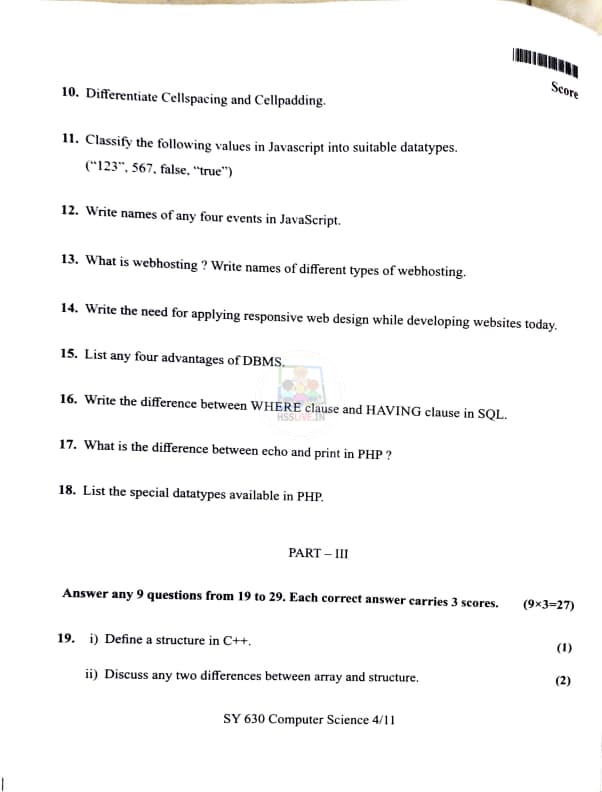
Differentiate Cellspacing and Cellpadding.
View Solution
Step 1: Definition of Cellspacing.
\texttt{Cellspacing is the space between the borders of adjacent cells in an HTML table. It determines the distance between each cell in a table and is applied outside the cells. When set, it adds space between the cells, making the table look more spacious.
Step 2: Definition of Cellpadding.
\texttt{Cellpadding refers to the space between the content of a cell and its borders. It determines the internal space within each table cell, giving the content room to breathe and preventing it from touching the cell borders.
Step 3: Differences.
- \texttt{Cellspacing controls the space between cells, applied to the outer borders of the cells.
- \texttt{Cellpadding controls the internal space inside a cell, applied between the cell content and its borders.
Step 4: Conclusion.
Thus, \texttt{Cellspacing manages the outer distance between cells, while \texttt{Cellpadding adjusts the internal space within each cell.
Quick Tip: Use \texttt{cellspacing} for external space between cells, and \texttt{cellpadding} for internal space within cells in HTML tables.
Classify the following values in JavaScript into suitable datatypes.
\texttt{"123", 567, false, "true"
View Solution
Step 1: Identify the Values.
Let's classify the given values into their suitable datatypes.
1. "123":
This is a string because it is enclosed in double quotes. In JavaScript, anything inside quotation marks is considered a string. So, this is a String.
2. 567:
This is a numeric value without quotes, so it is recognized as a number. Thus, it is classified as a Number.
3. false:
This is a Boolean value, as it is either \texttt{true or \texttt{false. In this case, it is \texttt{false. So, it is classified as a Boolean.
4. "true":
Although it is written as \texttt{true, it is enclosed in quotation marks, making it a string. Therefore, it is classified as a String.
Step 2: Conclusion.
The data types are as follows:
\[
\begin{array}{|c|c|}
\hline
Value & Data Type
\hline
"123" & String
567 & Number
false & Boolean
"true" & String
\hline
\end{array}
\] Quick Tip: In JavaScript, data types include String, Number, and Boolean, and can be easily identified based on their syntax (e.g., quotes for strings, no quotes for numbers).
Write names of any four events in JavaScript.
View Solution
In JavaScript, events are actions or occurrences that can be detected by the browser and can be used to trigger specific functions or actions. Here are four common events in JavaScript:
1. click: This event is triggered when an element is clicked by the user, like a button or a link.
2. keydown: This event is triggered when the user presses a key on the keyboard.
3. load: This event is triggered when a web page has fully loaded, including all its resources like images and scripts.
4. mouseover: This event occurs when the user moves the mouse pointer over an element, such as a button or an image.
These events are important for building interactive web applications, where user actions can trigger specific responses.
Quick Tip: JavaScript events like "click", "keydown", and "mouseover" allow developers to create dynamic and interactive web pages.
What is web hosting? Write names of different types of web hosting.
View Solution
Web hosting is a service that allows individuals and organizations to make their websites accessible over the internet. Web hosting provides the infrastructure and technologies required to store and serve website files, such as HTML, CSS, JavaScript, images, and databases, to users.
Web hosting services typically include domain registration, web server management, and support for email accounts, databases, and content management systems.
There are several types of web hosting, each offering different levels of service and resources:
1. Shared Hosting:
In shared hosting, multiple websites are hosted on the same server and share the server's resources, such as memory and processing power. This is the most cost-effective option but may have limitations in terms of performance and customization.
2. VPS Hosting (Virtual Private Server):
VPS hosting provides a dedicated portion of the server's resources, offering more control and performance than shared hosting. Each website has its own virtualized operating system and resources.
3. Dedicated Hosting:
In dedicated hosting, the entire server is dedicated to a single website. This type of hosting provides the highest level of performance, control, and security but is more expensive.
4. Cloud Hosting:
Cloud hosting uses a network of servers to host websites, allowing for scalability, flexibility, and reliability. Resources can be allocated dynamically based on the website's needs.
5. Managed Hosting:
Managed hosting involves a hosting provider managing the server for you, including maintenance, updates, and security. This is ideal for those who want to focus on their website without worrying about server management.
Each type of hosting offers unique benefits, and the choice depends on factors such as website size, traffic, and budget.
Quick Tip: Choose web hosting based on your website’s needs, considering factors like performance, control, and scalability.
Write the need for applying responsive web design while developing websites today.
View Solution
Step 1: What is Responsive Web Design?
Responsive web design (RWD) is an approach to web design that ensures web pages are displayed optimally across a variety of devices and screen sizes, from desktop monitors to mobile phones. This is achieved by using fluid grids, flexible images, and media queries that adapt the layout to the user’s device.
Step 2: Need for Responsive Web Design.
In today's world, where there is a wide variety of devices, including desktops, laptops, tablets, and smartphones, websites need to be able to adjust to the varying screen sizes and resolutions. The need for responsive web design arises due to the following reasons:
1. Increasing Use of Mobile Devices: With a significant number of users accessing websites via mobile devices, it is essential to have a design that adapts to smaller screens for a better user experience.
2. Improved User Experience: Responsive design ensures that users have a seamless experience on any device, whether it's a desktop, tablet, or smartphone, which leads to greater user satisfaction and longer engagement on the website.
3. SEO Benefits: Google gives preference to websites that are mobile-friendly in search rankings. A responsive design helps improve the website’s SEO performance by providing a better user experience across devices.
4. Cost-Effective: Rather than developing and maintaining separate websites for different devices (e.g., one for desktop and one for mobile), responsive web design allows for a single website that adapts to different screen sizes, reducing development and maintenance costs.
5. Future-Proofing: With the rapid evolution of technology and the introduction of new devices, responsive web design ensures that the website will work well on future devices with different screen sizes and resolutions.
Step 3: Conclusion.
In summary, responsive web design is crucial for ensuring that websites are accessible, user-friendly, and efficient on all devices, making it an essential practice in modern web development.
Quick Tip: Responsive web design is crucial for improving user experience, SEO, and reducing development costs.
List any four advantages of DBMS.
View Solution
A Database Management System (DBMS) is software that helps in managing, storing, and organizing data. It offers various advantages that contribute to efficient data management. Four major advantages of DBMS are:
1. Data Integrity and Accuracy:
DBMS ensures that the data stored in the system is accurate and consistent. Through integrity constraints, such as primary keys, foreign keys, and data types, the DBMS enforces data accuracy, preventing invalid data entries.
2. Data Security:
DBMS provides robust security features to protect sensitive data from unauthorized access. It allows the database administrator to define user roles and permissions, ensuring that only authorized users can view or modify certain data.
3. Reduced Data Redundancy:
A DBMS minimizes data redundancy (duplicate data storage) by centralizing data in a single location, reducing the chances of inconsistent data being stored across multiple places. This ensures efficient storage and retrieval.
4. Data Independence:
DBMS offers data independence by separating the application layer from the underlying database structure. This means that changes to the database schema (e.g., adding new fields or tables) do not affect the application programs, leading to easier maintenance.
Step 5: Conclusion.
DBMS offers numerous benefits such as data integrity, security, reduced redundancy, and data independence, making it an essential tool for managing large-scale databases efficiently.
Quick Tip: DBMS provides data integrity, security, and reduces redundancy, making it essential for managing large amounts of data efficiently.
Write the difference between WHERE clause and HAVING clause in SQL.
View Solution
Step 1: Understanding the WHERE Clause.
The WHERE clause in SQL is used to filter records before any groupings are made. It applies the condition to rows as they are being retrieved, before any aggregation or grouping occurs. This means that \texttt{WHERE is used to filter rows in a query that do not meet a certain condition.
Step 2: Understanding the HAVING Clause.
The HAVING clause in SQL is used to filter records after grouping. It is used when the conditions need to apply to the aggregated results of a query (i.e., after applying aggregate functions like \texttt{COUNT, \texttt{SUM, \texttt{AVG, etc.). Unlike the \texttt{WHERE clause, which filters individual rows, the \texttt{HAVING clause filters the grouped records.
Step 3: Key Difference.
- \texttt{WHERE filters records before grouping or aggregation.
- \texttt{HAVING filters records after grouping or aggregation.
Final Answer:
\texttt{WHERE applies to individual records, while \texttt{HAVING applies to the result of aggregation or grouping. Quick Tip: Use \texttt{WHERE} for conditions on individual rows and \texttt{HAVING} for conditions on grouped results or aggregates.
What is the difference between echo and print in PHP?
View Solution
Step 1: Understanding echo.
echo is a language construct in PHP that outputs one or more strings. It does not return any value. It can take multiple parameters, although it is rarely used with more than one. Echo is generally faster than \texttt{print because it does not return a value.
Step 2: Understanding print.
print is also a language construct in PHP, used to output a string, but it is different from \texttt{echo in that it always returns a value of \texttt{1. This means \texttt{print can be used in expressions, while \texttt{echo cannot. However, \texttt{print only accepts one parameter.
Step 3: Key Difference.
- \texttt{echo is faster, can take multiple parameters, and does not return any value.
- \texttt{print returns \texttt{1, accepts only one parameter, and is slightly slower than \texttt{echo.
Final Answer:
\texttt{echo outputs without returning a value, while \texttt{print returns \texttt{1, and it is used with one parameter. Quick Tip: Use \texttt{echo} for faster output when no return value is needed and \texttt{print} when you need to return a value from the output statement.
List the special datatypes available in PHP.
View Solution
PHP supports several special data types that allow you to work with more complex data structures or unique functionality. These include:
Step 1: Special Data Types.
1) Resource:
A resource is a special variable that holds a reference to an external resource, like a database connection or file handler. It is not a primitive data type but rather a reference to an external resource. Resources are typically returned by functions like \texttt{fopen() or \texttt{mysqli_connect().
2) NULL:
The \texttt{NULL data type represents a variable with no value or an empty value. It is used to denote that a variable has no value assigned to it or has been cleared.
Step 2: Conclusion.
These special data types allow PHP to handle advanced functionality, such as working with external resources or representing empty values. They differ from standard data types like strings, integers, and arrays.
Final Answer:
The special data types in PHP are \texttt{Resource and \texttt{NULL. Quick Tip: The \texttt{Resource} data type is used to handle connections to external resources, and \texttt{NULL} represents variables with no value.
Define a structure in C++.
View Solution
Step 1: Structure in C++.
In C++, a structure is a user-defined data type that allows grouping of variables of different data types under a single name. It is used to represent a record, and it allows storing different types of data, such as integers, floats, and characters, together.
Step 2: Syntax of Structure.
The syntax to define a structure is as follows:
\begin{verbatim
struct structureName {
dataType member1;
dataType member2;
// Other members
;
\end{verbatim
For example, to define a structure to store details about a student, we can write:
\begin{verbatim
struct Student {
string name;
int age;
float grade;
;
\end{verbatim
Step 3: Conclusion.
Thus, a structure in C++ is defined using the \texttt{struct keyword, followed by the structure name, and a block of variable declarations of different data types.
Quick Tip: Structures in C++ are useful for grouping different types of data into a single unit.
Discuss any two differences between array and structure.
View Solution
Step 1: Defining Arrays and Structures.
- An array is a collection of elements of the same data type. It allows storing multiple values of the same type under one name.
- A structure is a collection of variables of different data types, grouped together under a single name. It allows storing heterogeneous data under one name.
Step 2: Two Key Differences.
1. Homogeneity vs Heterogeneity:
- An array stores elements of the same data type (e.g., all integers, all floats).
- A structure stores elements of different data types (e.g., integers, floats, strings) under a single name.
2. Memory Allocation:
- In an array, the memory is allocated contiguously for each element. The elements in an array are stored in consecutive memory locations.
- In a structure, memory is allocated separately for each member variable, and the variables may not necessarily be contiguous. The size of the structure is the sum of the size of each individual member.
Step 3: Conclusion.
Thus, the key differences between an array and a structure are:
1. Arrays store homogeneous data, while structures store heterogeneous data.
2. Arrays use contiguous memory allocation, while structures may have non-contiguous memory allocation.
Quick Tip: Use arrays when you need to store similar types of data, and use structures when you need to store different types of data together.
Read the following code fragment.
\texttt{int a[] = \{5, 10, 15, 20, 25\;
\texttt{int *p = a;
Predict the output of the following statement:
\texttt{cout << *(p+2);
View Solution
In the given code, an array \( a[] \) is initialized with values \{5, 10, 15, 20, 25\. A pointer \( p \) is assigned the address of the first element of the array. In C++, arrays and pointers are closely related, and the name of the array \( a \) refers to the address of its first element.
The expression \( p+2 \) means that the pointer \( p \) is incremented by 2 positions. Since \( p \) points to the first element of the array \( a \), \( p+2 \) will point to the third element, which is \( 15 \).
The dereference operator \( * \) is used to access the value stored at the memory location pointed to by \( p+2 \). Therefore, the expression \( *(p+2) \) refers to the value at index 2 of the array \( a \), which is \( 15 \).
Thus, the output of the statement \texttt{cout << *(p+2); will be:
\[
\boxed{15}
\] Quick Tip: In arrays, pointers can be used to access elements using pointer arithmetic. \( *(p+2) \) accesses the element at index 2 of the array.
What is the difference between the two declaration statements given below?
\texttt{a) int *ptr = new int(10);
\texttt{b) int *ptr = new int[10];
View Solution
The two declaration statements differ in the type of memory they allocate and the way the pointer is initialized:
a) \texttt{int *ptr = new int(10);}
This statement dynamically allocates memory for a single integer on the heap and initializes it with the value 10. The pointer \( ptr \) is then assigned the address of this memory.
Thus, this is used when you need a single integer value, and the value is initialized to 10.
b) \texttt{int *ptr = new int[10];}
This statement dynamically allocates memory for an array of 10 integers on the heap. The pointer \( ptr \) will point to the first element of the array. By default, the elements in this array will be uninitialized (contain garbage values unless explicitly initialized).
This is used when you need an array of integers. The size of the array is specified inside the square brackets.
Key Differences:
1. \texttt{new int(10) allocates a single integer and initializes it to 10, while \texttt{new int[10] allocates memory for an array of 10 integers.
2. \texttt{new int(10) initializes the value, while \texttt{new int[10] does not initialize the array elements (they contain garbage values unless specified).
Quick Tip: Use \texttt{new int(10)} for single integer allocation with initialization and \texttt{new int[10]} for array allocation.
Define Inheritance. List the different forms of inheritance.
View Solution
Step 1: Definition of Inheritance.
Inheritance is a fundamental concept in Object-Oriented Programming (OOP) that allows a class (called a subclass or derived class) to inherit properties and behaviors (methods) from another class (called a superclass or base class). This enables the reuse of code and promotes a hierarchical relationship between classes. Inheritance helps to extend or modify the functionality of existing classes without modifying the base class.
Step 2: Types of Inheritance.
The different forms of inheritance in OOP are:
1. Single Inheritance: In single inheritance, a class inherits from only one superclass. The derived class can access the attributes and methods of a single parent class.
Example:
\[
class Derived: public Base \{ \ }
\]
2. Multiple Inheritance: In multiple inheritance, a class inherits from more than one superclass. This allows the derived class to access attributes and methods from multiple parent classes. However, it can lead to ambiguity issues if the parent classes have methods with the same name.
Example:
\[
class Derived: public Base1, public Base2 \{ \ }
\]
3. Multilevel Inheritance: In multilevel inheritance, a class is derived from another class, which is itself derived from another class, forming a chain of inheritance. The derived class inherits the properties and methods from its immediate parent class and the parent class's parent.
Example:
\[
class Base \{ \ }
class Derived1 : public Base \{ \ }
class Derived2 : public Derived1 \{ \ }
\]
4. Hierarchical Inheritance: In hierarchical inheritance, a single base class is inherited by multiple derived classes. All derived classes share the attributes and methods of the same base class.
Example:
\[
class Base \{ \ }
class Derived1 : public Base \{ \ }
class Derived2 : public Base \{ \ }
\]
5. Hybrid Inheritance: Hybrid inheritance is a combination of two or more types of inheritance, such as a combination of multiple and multilevel inheritance. Hybrid inheritance can cause issues, especially with languages like C++ that don't handle it well.
Example:
\[
class Derived : public Base1, public Base2, public Base3 \{ \ }
\] Quick Tip: Inheritance allows for code reuse and creating a relationship between classes in object-oriented programming.
Write an algorithm to insert an element into a queue.
View Solution
Step 1: Understanding the Queue Data Structure.
A queue is a linear data structure that follows the First In First Out (FIFO) principle. Elements are inserted at the rear (enqueue operation) and removed from the front (dequeue operation).
Step 2: Algorithm to Insert an Element into a Queue.
To insert an element into a queue, we need to follow the steps below:
1. Check if the queue is full (in case of a fixed-size queue).
2. If the queue is not full, add the element at the rear (enqueue).
3. If the queue is full, display an error message (Overflow).
Algorithm:
Input: An element \( item \) to be inserted into the queue.
Output: The element is inserted into the queue, or an overflow error is displayed.
\begin{verbatim
Algorithm InsertElement(queue, item)
1. If queue is full
2. Print "Overflow" and stop
3. Else
4. Rear = Rear + 1
5. queue[Rear] = item
6. Print "Element inserted"
End Algorithm
\end{verbatim
Step 3: Explanation.
- The algorithm first checks if the queue is full by comparing the rear index with the maximum size of the queue.
- If the queue is not full, the item is inserted at the rear and the rear index is incremented.
- The algorithm ends after inserting the item. If the queue is full, an overflow message is displayed.
Quick Tip: In a queue, elements are added to the rear (enqueue) and removed from the front (dequeue), following the FIFO principle.
Name the data structure where memory allocation is done only at the time of execution.
View Solution
Step 1: Understanding Dynamic Data Structures.
Dynamic data structures are the ones where memory is allocated during runtime or execution, as opposed to static data structures where memory allocation is done during compile-time. In dynamic data structures, memory allocation and deallocation happen as per the requirements during the execution of the program.
Step 2: Example of Dynamic Data Structures.
One of the main examples of dynamic data structures where memory allocation happens during execution is the \texttt{Linked List. A linked list is a linear data structure where each element, called a node, contains data and a reference to the next node in the sequence. The memory for the nodes is allocated dynamically during the program's execution when the node is created, and it is deallocated when the node is deleted.
Step 3: Conclusion.
Thus, a \texttt{Linked List is an example of a dynamic data structure, and memory is allocated only at the time of execution.
Final Answer:
The data structure where memory allocation is done only at the time of execution is a \texttt{Linked List. Quick Tip: Dynamic data structures like linked lists allocate memory during runtime, which provides more flexibility and efficient memory usage than static data structures.
Write a note on circular queue. What is its advantage?
View Solution
Step 1: Understanding Circular Queue.
A circular queue is a type of queue data structure that overcomes the limitations of a regular (linear) queue by connecting the front and rear ends of the queue. In a regular queue, when the rear end reaches the last position, no more elements can be added unless space is freed at the front end. However, in a circular queue, the last position is connected to the first position, allowing for efficient use of available space.
Step 2: Characteristics of Circular Queue.
- It has two pointers: \texttt{front and \texttt{rear, which help keep track of the elements in the queue.
- When the queue is full, both the \texttt{front and \texttt{rear pointers move in a circular manner, wrapping around when they reach the end of the array.
- If there is space available (even at the beginning of the array), the new elements are added to the front if needed.
Step 3: Advantages of Circular Queue.
1. Efficient Memory Usage: Since the circular queue connects the front and rear, it utilizes all the available space efficiently without leaving gaps, unlike a linear queue where unused space at the front cannot be used.
2. Faster Enqueue and Dequeue Operations: The circular structure helps avoid the problem of having to shift elements, making enqueue and dequeue operations faster.
Step 4: Conclusion.
Circular queues provide better memory utilization and prevent unnecessary space wastage, making them suitable for situations where resources like memory or buffer space are limited. It is often used in applications such as CPU scheduling, networking buffers, and resource management systems.
Final Answer:
A circular queue is a queue data structure where the last position is connected to the first, providing better memory utilization. Its advantages include more efficient memory usage and faster enqueue/dequeue operations. Quick Tip: In a circular queue, the circular structure allows efficient memory use and prevents wasted space, making it ideal for systems with fixed-sized buffers or circular data processing.
Define an attribute in HTML.
View Solution
Step 1: Definition of an Attribute in HTML.
In HTML, an attribute is a special quality or property that provides additional information about an HTML element. It is always specified in the opening tag of an element and consists of a name and a value. Attributes control the behavior, style, and characteristics of the element.
For example:
\[
\texttt{Click Here}
\]
Here, \texttt{href is an attribute of the \texttt{ tag, and \texttt{"https://www.example.com" is its value.
Step 2: Conclusion.
Thus, an attribute in HTML is used to define properties of HTML elements, specified as name-value pairs.
Quick Tip: Common HTML attributes include \texttt{href}, \texttt{src}, and \texttt{alt}.
Write names of any two attributes of
View Solution
Step 1: Common Attributes of the \texttt{
The \texttt{
1. \texttt{background: Specifies the background image for the webpage.
2. \texttt{bgcolor: Defines the background color of the webpage.
Step 2: Example.
\begin{verbatim
\end{verbatim
Step 3: Conclusion.
Thus, \texttt{background and \texttt{bgcolor are two commonly used attributes of the \texttt{
Quick Tip: You can also use the \texttt{style} attribute with \texttt{
Write the use of attribute ‘Alt’ with .
View Solution
Step 1: Use of the \texttt{alt} Attribute.
The \texttt{alt attribute is used in the \texttt{ tag to provide alternative text for an image. This text is displayed if the image cannot be loaded or viewed by the user. It also helps with accessibility by describing the image for visually impaired users who may be using screen readers.
Step 2: Example.
\begin{verbatim
\end{verbatim
Step 3: Conclusion.
Thus, the \texttt{alt attribute is crucial for web accessibility and for providing a fallback description for images when they cannot be loaded.
Quick Tip: Always use the \texttt{alt} attribute for images to improve accessibility and SEO.
Prepare a note on CSS.
View Solution
CSS (Cascading Style Sheets) is a stylesheet language used to describe the presentation of a document written in HTML or XML. It controls the layout, design, and formatting of web pages, allowing web developers to separate the content (HTML) from the design (CSS). This separation makes it easier to manage the structure and style of a website.
Key Features of CSS:
1. Separation of Content and Design:
CSS allows the design and layout to be separated from the content in HTML files. This makes web pages easier to manage, as you can update the design of multiple pages from a single CSS file.
2. Consistency:
By using CSS, you can apply consistent design rules across a website. Changes to a single CSS file will reflect on all linked HTML pages, ensuring a uniform look and feel.
3. Responsive Design:
CSS plays a key role in creating responsive websites. Media queries in CSS allow websites to adjust their layout depending on the screen size or device type, making the website mobile-friendly.
4. Flexibility and Customization:
CSS offers a wide range of customization options for the design of web pages. You can control the font styles, colors, margins, padding, positioning, and more.
CSS Syntax:
CSS rules are made up of selectors and declarations. A typical CSS rule looks like this:
\[
selector \{ property: value; \}
\]
For example:
\[
body \{ background-color: lightblue; \}
\]
Here, "body" is the selector, and the declaration inside the curly braces sets the background color of the webpage to light blue.
Types of CSS:
1. Inline CSS:
Styles are directly applied to individual HTML elements using the `style` attribute. For example:
\[
Hello, World!
\]2. Internal CSS:
CSS rules are included within the `
3. External CSS:
Styles are written in a separate `.css` file, which is linked to the HTML file using the `
\[
Conclusion:
CSS is an essential tool for web design, allowing developers to create visually appealing and responsive websites. It provides flexibility, consistency, and ease of maintenance, making it a vital part of modern web development.
Quick Tip: Using external CSS is the most efficient way to manage styles for large websites as it ensures uniformity across multiple pages.
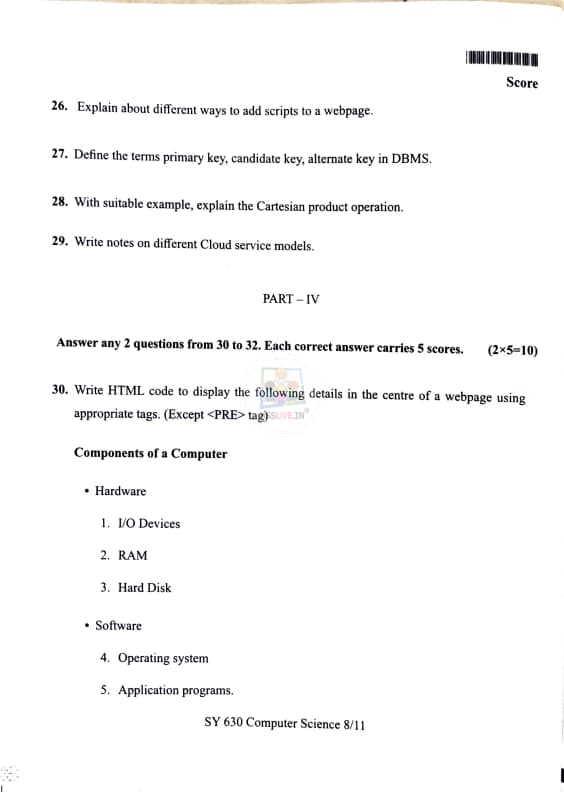
Explain about different ways to add scripts to a webpage.
View Solution
In web development, scripts are used to add interactivity and functionality to a webpage. JavaScript is the most commonly used scripting language for web development. There are different ways to add scripts to a webpage in HTML. These methods include:
Step 1: Inline Script.
Inline scripts are written directly within an HTML element using the \texttt{
\end{verbatim
The \texttt{
\end{verbatim
This method keeps the JavaScript code in a separate file (e.g., \texttt{script.js) and links it to the HTML document.
Step 3: Asynchronous Script Loading.
When you use \texttt{async with the \texttt{
\end{verbatim
The \texttt{async attribute ensures that the script runs as soon as it is loaded, without blocking the rest of the page from rendering.
Step 4: Deferred Script Loading.
Using the \texttt{defer attribute, the script is downloaded as the HTML page loads, but it is only executed after the entire document has been parsed. This is useful for scripts that rely on the entire DOM being available. Example:
\begin{verbatim
\end{verbatim
The \texttt{defer attribute allows for better performance by not blocking the page rendering while the script is being loaded.
Step 5: JavaScript in HTML Event Attributes.
You can also add JavaScript directly within HTML event attributes, such as \texttt{onclick, \texttt{onmouseover, or \texttt{onload. This method allows for adding simple interactions without the need for separate script tags. Example:
\begin{verbatim
\end{verbatim
This inline approach is not recommended for larger scripts, as it can make the code harder to maintain and debug.
Final Answer:
There are different ways to add scripts to a webpage: inline scripts, external scripts, asynchronous script loading, deferred script loading, and JavaScript within HTML event attributes. Quick Tip: Use external scripts for large projects and asynchronous or deferred loading for better page performance. Avoid using inline scripts for complex logic.
Define the terms primary key, candidate key, alternate key in DBMS.
View Solution
Step 1: Primary Key.
A primary key is a unique key that uniquely identifies each record in a database table. A table can have only one primary key, which may consist of one or more columns (also called a composite key). The values of the primary key cannot be null, ensuring that every record is identifiable and distinct from the others. It is used to enforce entity integrity in a database. Example:
\begin{verbatim
Table: Employee
EmployeeID (Primary Key) | Name | Position
--------------------------------------------
001 | John | Manager
002 | Alice | Engineer
\end{verbatim
Here, \texttt{EmployeeID is the primary key.
Step 2: Candidate Key.
A candidate key is a set of one or more columns that can uniquely identify each record in a table. A table can have more than one candidate key, and each candidate key can act as the primary key. However, one of the candidate keys is chosen to be the primary key, and the rest become alternate keys. Each candidate key is unique and non-null. Example:
\begin{verbatim
Table: Employee
EmployeeID (Candidate Key) | Email (Candidate Key) | Name
------------------------------------------------------
001 | john@example.com | John
002 | alice@example.com | Alice
\end{verbatim
In this case, both \texttt{EmployeeID and \texttt{Email can be candidate keys because they both uniquely identify each record.
Step 3: Alternate Key.
An alternate key is any candidate key that is not chosen as the primary key. After selecting the primary key, the remaining candidate keys are referred to as alternate keys. These keys still have the property of uniquely identifying records, but they are not used as the primary means of identification in the table. Example:
In the previous example, if \texttt{EmployeeID is chosen as the primary key, then \texttt{Email would become an alternate key.
Final Answer:
- A \texttt{primary key uniquely identifies records in a table, and it cannot have NULL values.
- A \texttt{candidate key is any set of attributes that could serve as the primary key.
- An \texttt{alternate key is a candidate key that is not selected as the primary key. Quick Tip: Remember, a table can have multiple candidate keys, but only one primary key. Alternate keys are just the other candidate keys not chosen as the primary key.
With suitable example, explain the Cartesian product operation.
View Solution
Step 1: Definition of Cartesian Product.
The Cartesian product is a mathematical operation that returns a set from multiple sets. For two sets \(A\) and \(B\), the Cartesian product \(A \times B\) is a set of all ordered pairs \((a, b)\), where \(a\) is an element of set \(A\) and \(b\) is an element of set \(B\).
\[
A = \{1, 2\}, B = \{a, b\}
\]
The Cartesian product \(A \times B\) is given by:
\[
A \times B = \{(1, a), (1, b), (2, a), (2, b)\}
\]
Step 2: Explanation.
In this example, we have two sets \(A\) and \(B\). The Cartesian product \(A \times B\) is created by pairing each element of \(A\) with every element of \(B\). This results in the set of ordered pairs: \((1, a), (1, b), (2, a), (2, b)\).
Step 3: Conclusion.
Thus, the Cartesian product operation takes two sets and produces a set of ordered pairs, where each element from the first set is paired with each element from the second set.
Quick Tip: In Cartesian product, the order of the elements in the pair matters, so \((a, b) \neq (b, a)\).
Write notes on different Cloud service models.
View Solution
Cloud computing offers various service models, which define the level of control, flexibility, and management provided to the users. The three primary cloud service models are:
1. Infrastructure as a Service (IaaS):
IaaS provides the basic infrastructure resources such as virtual machines, storage, and networks. Users can install, configure, and manage the operating systems and applications themselves. The cloud provider is responsible for maintaining the physical hardware.
Example: Amazon Web Services (AWS), Microsoft Azure.
2. Platform as a Service (PaaS):
PaaS provides a platform that allows users to develop, run, and manage applications without dealing with the complexities of underlying hardware and software layers. PaaS handles everything from operating systems to runtime environments, leaving the users to focus on the application code.
Example: Google App Engine, Heroku.
3. Software as a Service (SaaS):
SaaS delivers fully functional applications over the internet. These applications are hosted and maintained by the cloud provider, and users can access them through a web browser. SaaS requires no installation or maintenance from the end-user.
Example: Google Workspace (Docs, Sheets), Microsoft Office 365.
Step 2: Conclusion.
To summarize, IaaS provides infrastructure resources, PaaS offers platforms for application development, and SaaS delivers complete software applications. These models differ in the level of management required by the user and the responsibilities of the cloud provider.
Quick Tip: When choosing a cloud service model, consider the level of control you need and the amount of infrastructure management you are willing to handle.
Write HTML code to display the following details in the centre of a webpage using appropriate tags. (Except tag)
\section*{Components of a Computer
Hardware
I/O Devices
RAM
Hard Disk
Software
Operating system
Application programs
View Solution
The HTML code to display the given list of components of a computer in the center of a webpage can be written as follows:
\begin{verbatim
Components of a Computer
\end{verbatim
Explanation:
1. The \texttt{
tag is used to display the title "Components of a Computer" in large text.
2. The \texttt{ tag is used to create an unordered list for the major categories: Hardware and Software.
3. The \texttt{ tag is used to create an ordered list for the items under Hardware and Software.
4. Inline CSS (style tag) is used to center-align the content in the webpage using the \texttt{text-align: center; property.
Final Answer:
The HTML code to display the components of a computer in the center of a webpage is provided above. Quick Tip: Use \texttt{text-align: center;} to center content on a webpage. You can also use flexbox or grid layout for more complex alignments.
3. The \texttt{
- tag is used to create an ordered list for the items under Hardware and Software.
4. Inline CSS (style tag) is used to center-align the content in the webpage using the \texttt{text-align: center; property.
Final Answer:
The HTML code to display the components of a computer in the center of a webpage is provided above. Quick Tip: Use \texttt{text-align: center;} to center content on a webpage. You can also use flexbox or grid layout for more complex alignments.
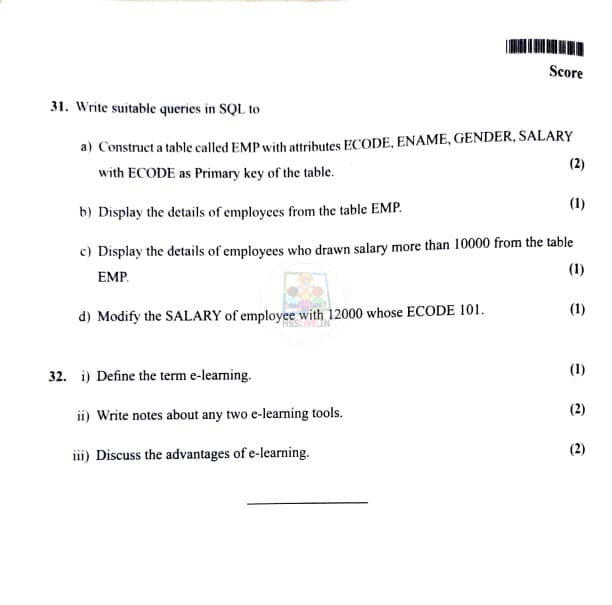
Construct a table called EMP with attributes ECODE, ENAME, GENDER, SALARY with ECODE as Primary key of the table.
View Solution
The SQL query to create a table called \texttt{EMP with the specified attributes and ECODE as the primary key is as follows:
\begin{verbatim
CREATE TABLE EMP (
ECODE INT PRIMARY KEY,
ENAME VARCHAR(100),
GENDER CHAR(1),
SALARY DECIMAL(10, 2)
);
\end{verbatim
Explanation:
- \texttt{ECODE is an integer and is the primary key of the table.
- \texttt{ENAME is a string with a maximum length of 100 characters.
- \texttt{GENDER is a character field with a size of 1 (either 'M' or 'F').
- \texttt{SALARY is a decimal number, which allows for two digits after the decimal point. Quick Tip: Ensure to define the primary key constraint on \texttt{ECODE} to ensure each record has a unique identifier.
Display the details of employees from the table EMP.
View Solution
To display all the details of employees from the table \texttt{EMP, the SQL query is:
\begin{verbatim
SELECT * FROM EMP;
\end{verbatim
Explanation:
The \texttt{SELECT * statement is used to retrieve all columns from the \texttt{EMP table. The asterisk (\texttt{*) symbol is a wildcard that means all columns. Quick Tip: Use \texttt{SELECT *} to retrieve all columns, but for large datasets, specify the columns you need to improve query performance.
Display the details of employees who drawn salary more than 10000 from the table EMP.
View Solution
To display the details of employees with a salary greater than 10000, the SQL query is:
\begin{verbatim
SELECT * FROM EMP WHERE SALARY > 10000;
\end{verbatim
Explanation:
This query selects all the columns from the \texttt{EMP table where the \texttt{SALARY is greater than 10000. The \texttt{WHERE clause filters the data based on the specified condition. Quick Tip: You can add multiple conditions in the \texttt{WHERE} clause using logical operators like \texttt{AND}, \texttt{OR}.
Modify the SALARY of employee with 12000 whose ECODE is 101.
View Solution
To modify the salary of the employee with ECODE 101 to 12000, the SQL query is:
\begin{verbatim
UPDATE EMP SET SALARY = 12000 WHERE ECODE = 101;
\end{verbatim
Explanation:
The \texttt{UPDATE statement is used to modify existing records in a table. The \texttt{SET clause sets the new value for the \texttt{SALARY column, and the \texttt{WHERE clause ensures that only the employee with ECODE 101 is updated. Quick Tip: Always include a \texttt{WHERE} clause in \texttt{UPDATE} queries to prevent updating all records in the table unintentionally.
Define the term e-learning.
View Solution
Step 1: Definition of E-Learning.
E-learning refers to the use of electronic technologies to access educational curriculum outside of a traditional classroom. It can involve digital tools such as computers, tablets, smartphones, and the internet, allowing students to learn remotely, at their own pace, and from anywhere in the world. E-learning includes online courses, webinars, virtual classrooms, and learning management systems (LMS).
Step 2: Conclusion.
Thus, e-learning is an educational process that takes place through electronic media, making learning more accessible and flexible for students.
Quick Tip: E-learning is convenient for students as it allows for learning at any time and place with an internet connection.
Write notes about any two e-learning tools.
View Solution
Step 1: E-learning Tools.
Here are two popular e-learning tools:
1. Google Classroom:
Google Classroom is a free platform for educators and students to interact and share resources. Teachers can create assignments, share materials, and grade students’ work. Students can submit assignments and communicate with instructors. Google Classroom is integrated with Google Drive, allowing easy access to learning resources and collaborative work.
2. Moodle:
Moodle is an open-source learning management system (LMS) that enables teachers to create online courses. It supports features such as course management, assignments, quizzes, grading, forums, and messaging. It’s used by educational institutions worldwide to deliver e-learning content and track student progress.
Step 2: Conclusion.
Both Google Classroom and Moodle are powerful tools that facilitate communication, content management, and assessment for online learning.
Quick Tip: Google Classroom is user-friendly and great for collaboration, while Moodle offers more advanced customization and course management features.
Discuss the advantages of e-learning.
View Solution
Step 1: Advantages of E-Learning.
E-learning has several advantages that make it an attractive option for education:
1. Flexibility and Convenience:
Students can access learning materials anytime and anywhere, as long as they have an internet connection. This flexibility allows learners to work at their own pace and manage their time better.
2. Cost-Effective:
E-learning reduces costs associated with traditional classroom learning, such as travel expenses, printed materials, and classroom space. Many e-learning platforms also offer free or affordable courses.
3. Wide Range of Resources:
E-learning platforms offer access to a vast array of resources such as videos, interactive quizzes, and reading materials. This diversity helps engage learners and provides various learning methods to cater to different learning styles.
4. Personalized Learning:
E-learning allows learners to personalize their learning experience. They can choose their own pace, access additional resources when needed, and revisit lessons to reinforce learning.
Step 2: Conclusion.
Thus, e-learning offers flexibility, affordability, and diverse resources, making it an effective tool for both students and educators.
Quick Tip: E-learning is ideal for learners who require flexible schedules or are unable to attend traditional classes.


Comments