




With around 1.4-1.5 lakh candidates registered for XAT 2026, all applicants will download their XAT 2026 Admit Card, which will be available on 20 December 2025, with the exam on 4 January 2026.
To download the Admit card, you are required to log in to the official portal by using your XAT User ID and Password. Without valid login credentials, candidates cannot download the XAT 2026 admit card or appear for the exam.
If you have forgotten your User ID or password, there is no need to worry, as you can easily recover them by using the step-by-step methods provided in this article.
Based on previous XAT cycles and candidate reports, 30-40% of login-related queries during admit card week are linked to forgotten XAT IDs, passwords, or incorrect Date of Birth formats.
Related Links: Download XAT 2026 Admit Card
Key Summary
- XAT User ID and password can be recovered using the “Forgot” options on the official portal
- Most login issues are caused by credential errors, DOB format mistakes, or server traffic
- Candidates should recover credentials well before exam day to avoid last-minute issues
- If self-recovery fails, candidates must contact the official XAT helpdesk with registration details
XAT 2026 Admit Card Advisory: Login Issues Candidates Must Resolve Before Exam Day
If you have forget your XAT Login credentials, then you will not be able to access the candidate dashboard (so you can’t download the admit card, make corrections, or view application details) until you recover or reset your credentials.
XAT is conducted by XLRI Jamshedpur, and all login recovery is handled only through the official portal. (Admit card & correction windows are available for a limited time only)
Quick Fix: XAT User ID
- When you register for the XAT exam, the system generates a unique XAT ID (login user name) and sends it to your registered email or phone number via SMS.
- If you forget it later, you can retrieve it through the “Forgot feature” on the login page by entering your registered email or phone number.
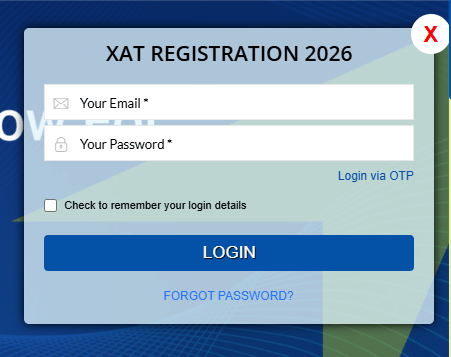
Quick Fix: XAT Password
- Passwords are also created at the time of registration and sent to your email.
- If you forget the password, you can reset it through the “Forgot Password” link by verifying your registered email ID or application information.
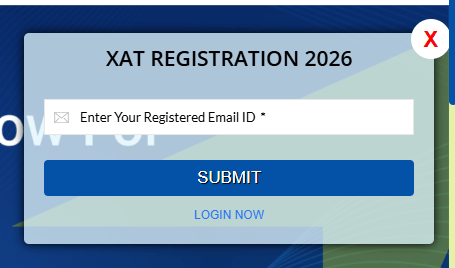
Source - applications.xatonline
Step‑by‑Step: How to Recover User ID
- Visit the XAT login page. applications.xatonline.in
- Choose the option “Forgot XAT ID” / “Forgot Username”.
- Provide your registered email ID or mobile number (and sometimes DOB/registration info).
- The system will send your User ID to your email or phone.
Step‑by‑Step: How to Recover a Password
Most password issues are resolved within minutes using the registered email or mobile number.
- Go to the official XAT login page at xatonline.in.
- Click “Forgot Password” below the login fields.
- Enter your registered email ID or application number when prompted.
- You will receive a password reset link via email or SMS
- Click the link, set a new password, and use it to log in.
Make sure the email is the same one you used during registration. Check your spam/junk folders if you don’t see it.
Things you may be asked at the time of recovering your User ID and Password:
- Email address used during registration
- Registered mobile number
- Security/security question/Date of Birth
Tips to Avoid Future XAT Login Issues
- Save login emails or sms immediately after registration.
- Use a password manager or note down the credentials and keep it safely.
- Always check spam/junk folders for important mails from admis@xlri.ac.in.
- If the registered email isn’t accessible anymore, contact the official helpdesk early.
XAT Helpline Support
You can contact the official XAT helpline when you have used every method to recover your credentials and still are not able to get them.
- Official Helpdesk Email: admis@xlri.ac.in
- Phone: Typically provided on the official site (check XAT notifications)
Contact them with:
- Full Name
- Registered Email & Mobile Number
- Application/XAT ID (if available)
- Screenshot of any error messages
Why Candidates Forget Credentials?
Most XAT login errors occur due to forgotten credentials, incorrect date-of-birth format, or heavy server traffic.
| Reason | Impact |
|---|---|
| Time gap between registration and the admit card release | People forget credentials for months |
| Multiple email IDs/phone numbers used | Confusion over which was registered |
| Browser auto‑fill usage | People rely on saved passwords |
| Change of phone number or email | Reset communications fail |
| Spelling/typo errors at registration | Emails don’t reach the inbox |
XAT Admit Card Login Problems: Most Common Issue
The data shows that most XAT admit card login issues are technical and time-related rather than actual credential errors. Many candidates report incorrect login messages despite entering valid details, mainly due to DOB format mistakes, browser cache issues, or heavy server traffic on release day.
| Issue | User Quote / Paraphrase | Suggested Fix |
| Incorrect credentials error | Entering XAT ID and DoB, but login shows incorrect credentials - Reddit | Check DoB format (DDMMYYYY), try incognito mode or a different browser; server issues are common on release day |
| Login not working despite correct details | ID and password are correct, but unable to log in - Reddit | Use “Forgot Password,” check confirmation email, clear cache, and retry |
| XAT ID not found or forgotten | Unable to find XAT ID/registration number - Reddit | Check application form or registration email (including spam); XAT ID starts with “XAT.” |
| Admit card not visible after login | Logged in successfully, but the admit card section is not showing - Reddit | Clear cache/cookies, try another device/browser, or wait for server sync |
| Admit card inaccessible due to heavy traffic | Many users are facing the same access issue - Reddit | Switch browsers/devices and retry after some time |
| Forgotten password or DoB format | Invalid credentials due to password confusion | Use “Forgot Password” on xatonline.in or reset via registered email/mobile |
| Lost XAT ID | Forgot registration ID with no recovery option | Retrieve from registration email or contact support@xatonline.in with basic details |
XAT Admit Card 2026 Forgot Password or User ID FAQs
Ques. What if I forget my XAT User ID or password?
Ans. Recover it using the “Forgot” option on the official XAT login page.
Ques. Can I download the XAT admit card without login credentials?
Ans. No, a valid User ID and password are mandatory.
Ques. When should I contact the XAT helpdesk?
Ans. If self-recovery fails or the registered email or mobile is inaccessible.



Comments