




The admit card for the Karnataka Management Aptitude Test (KMAT 2026) has been officially released by the Karnataka Private Post Graduate Colleges Association (KPPGCA). It was issued on September 16, 2026, allowing eligible candidates to access their test center and shift details. The release follows the conclusion of the application window on September 6, 2026, advancing the current admission cycle directly to the examination phase.
The management entrance test is to be conducted as an online examination on September 20, 2026. The paper for MCA aspirants is scheduled for the morning shift, while the MBA paper will be administered during the afternoon session.
KMAT 2026 Latest Updates
- The official admit card for the upcoming management exam was made available for download on the official portal on September 16, 2026.
- The registration window for prospective candidates officially closed on September 6, 2026.
- The state-level examination is scheduled to be held on September 20, 2026.
- The official results and subsequent counselling schedule are expected to be published in October 2026.
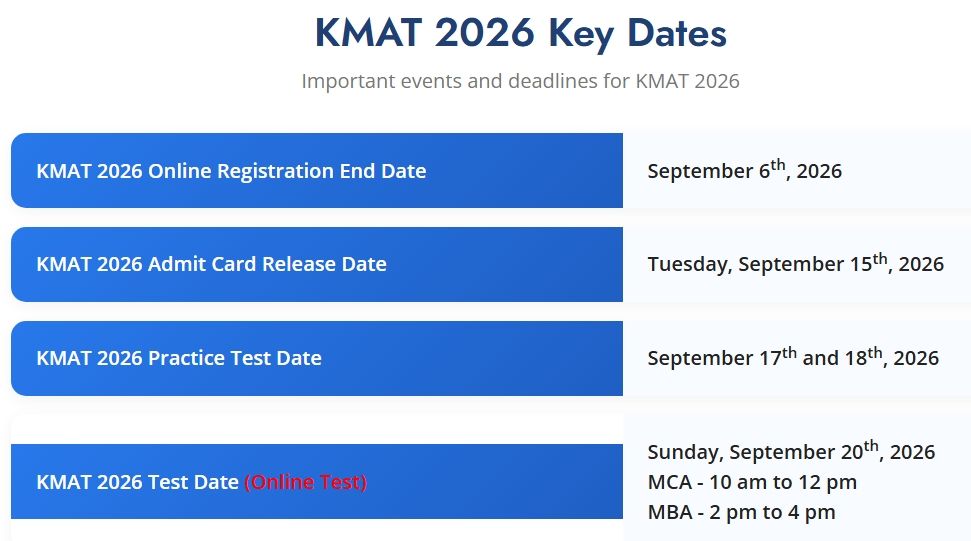
Source: kmatindia.com
KMAT 2026 Important Dates
| Event | Date |
|---|---|
| Registration Closure | September 6, 2026 (Over) |
| Admit Card Release | September 16, 2026 (Out) |
| KMAT 2026 Exam Date | September 20, 2026 |
| Result Declaration | October 2026 (Expected) |
How to Download KMAT Admit Card 2026
- Visit the official website at kmatindia.com.
- Click on the "KMAT Admit Card 2026" link on the homepage.
- Enter your Application Number and Date of Birth in the login fields.
- Click Submit or Login to proceed.
- Your admit card will appear on the screen — verify every detail carefully before downloading.
- Download the admit card as a PDF and take a printout for reference during the proctoring session.
- Save at least two to three copies — one to show the proctor, and one or two as backups.
The KMAT Admit Card 2027 will be released by the Karnataka Private Post Graduate Colleges Association (KPPGCA) on the official website kmatindia.com. Based on the 2026 exam cycle, the hall ticket is expected approximately 10–12 days before the exam date, which is likely to fall in September 2027. You can download your admit card using your application number and date of birth. As of now, the KMAT 2027 admit card has not been released — check the official website regularly for updates.
Note: The KMAT admit card will not be sent by post. You must download it from the official website at kmatindia.com once it is released.
- The KMAT 2027 admit card will be available at kmatindia.com — monitor the official KPPGCA portal for the release date.
- Download your hall ticket using your application number and date of birth.
- KMAT 2027 is a home-based online remote proctored test — no physical exam centre is allotted to you.
- Your admit card will carry your name, application number, exam date, session (MBA/MCA), timing, and proctoring instructions.
- Keep a valid government-issued photo ID ready for identity verification by the remote proctor before the exam begins.
- In case of any discrepancy, contact KPPGCA at info@kmatindia.com or call +91 80 2344 4555 without delay.
- The admit card is mandatory — entry to the exam platform will be denied without it.
What is KMAT Admit Card 2027?
The KMAT Admit Card 2027 is an official document issued by the Karnataka Private Post Graduate Colleges Association (KPPGCA). It authorises you to appear in the Karnataka Management Aptitude Test 2027 and serves as your primary identity proof during the remote proctoring session. KMAT 2027 is conducted as a home-based online remote proctored examination — there is no physical exam centre. Your proctor will verify your identity against the admit card before unlocking the test.
KMAT is the gateway for admissions to MBA, PGDM, and MCA programmes at Karnataka’s affiliated private post-graduate colleges. The exam runs for 120 minutes, with 120 multiple-choice questions across three sections — Verbal Ability and Reading Comprehension, Quantitative Ability, and Logical Reasoning. There is no negative marking. Your admit card carries your session (MBA or MCA), exam date, timing, and all proctoring instructions you need to follow on exam day.
You cannot appear in the KMAT exam without a valid admit card — the proctor verifies your identity using it before the test begins.
Note: The admit card is an authorisation document, not a confirmation of admission. Qualifying KMAT 2027 and meeting eligibility criteria are separate requirements for college admission.
KMAT Admit Card 2027 Release Date
KPPGCA has not yet announced the KMAT 2027 schedule or admit card release date. Based on the 2026 cycle — where the admit card was expected on 2 September 2026 ahead of the 13 September 2026 exam — you can expect the 2027 hall ticket approximately 10–12 days before the exam date. The 2027 exam is expected in September 2027; visit kmatindia.com regularly to catch the release announcement.
KMAT 2027 Important Dates
| Date | Event |
| May 2027 (Expected) | KMAT 2027 Registration Opens |
| August 2027 (Expected) | KMAT 2027 Registration Closes |
| September 2027 (Expected) | KMAT 2027 Admit Card Release |
| September 2027 (Expected) | KMAT 2027 Exam Date (MBA session and MCA session) |
| September / October 2027 (Expected) | KMAT 2027 Result Declaration |
KMAT Admit Card Release Trends
The table below shows admit card and exam date trends from previous KMAT cycles. These help you estimate when the 2027 hall ticket is likely to be released.
| Year | Admit Card Release Date | Exam Date |
| KMAT 2027 | To be announced (Expected September 2027) | Expected September 2027 |
| KMAT 2026 | 2 September 2026 (Expected) | 13 September 2026 |
| KMAT 2025 | ~10 days before exam | September 2025 |
How to Download KMAT Admit Card 2027
Once KPPGCA releases the KMAT 2027 admit card on kmatindia.com, follow these steps to download your hall ticket. Keep your application number and date of birth ready before you begin.
- Once released, visit the official website at kmatindia.com.
- Click on the "KMAT Admit Card 2027" link on the homepage.
- Enter your Application Number and Date of Birth in the login fields.
- Click Submit or Login to proceed.
- Your admit card will appear on the screen — verify every detail carefully before downloading.
- Download the admit card as a PDF and take a printout for reference during the proctoring session.
- Save at least two to three copies — one to show the proctor, and one or two as backups.
Note: The specific KMAT 2027 admit card download link will be activated on the official portal only after the release date is announced by KPPGCA. Bookmark kmatindia.com and check it regularly.
Check all details on your admit card immediately after downloading — corrections may not be possible close to the exam date.
Details Mentioned on KMAT Admit Card 2027
Your KMAT 2027 admit card will carry all the information needed for exam day verification and access to the online test platform. Verify every field immediately after downloading and report any error to KPPGCA at once.
| Detail | Description |
|---|---|
| Candidate’s Name | As registered in the application form |
| Application Number / Roll Number | Your unique identifier for the KMAT 2027 cycle |
| Exam Date | Scheduled date of the KMAT 2027 examination |
| Exam Session and Timing | MBA session or MCA session with specific start and end time |
| Reporting / Login Time | Time by which you must log in and complete proctoring setup before the test unlocks |
| Programme Applied For | MBA / PGDM / MCA — as selected during registration |
| Category | General / OBC / SC / ST / PwD |
| Candidate’s Photograph | Passport-size photo as uploaded during registration |
| Candidate’s Signature | As uploaded in the application form |
| Exam Login Link / Test Platform Details | URL or access code for the online proctored exam environment |
| System Requirements | Minimum internet speed, browser version, webcam and microphone requirements |
| Important Instructions | Remote proctoring rules, prohibited items, ID verification procedure, and exam conduct guidelines |
Documents to Keep Ready for KMAT Admit Card 2027
Since KMAT 2027 is a home-based online proctored exam, you will not travel to a physical exam centre. You must, however, keep the following documents and resources ready for identity verification by the remote proctor before the test begins.
| Document / Resource | Notes |
|---|---|
| Printed Admit Card | Keep a printout ready; the proctor will ask you to show it to the webcam during identity verification |
| Aadhaar Card | Most widely accepted government-issued photo ID; masked Aadhaar and e-Aadhaar are also valid |
| PAN Card | Valid government-issued photo ID accepted for proctoring verification |
| Voter ID | Must carry a photograph |
| Passport | Must be valid and unexpired |
| Driving Licence | Must carry a photograph |
| Functional Webcam and Microphone | Mandatory for remote proctoring; an external USB webcam is acceptable if the laptop camera is not working |
| Stable Internet Connection | Ensure a reliable broadband or 4G connection throughout the 120-minute exam |
| Charged Laptop or Desktop (PC) | Keep the device plugged into a power source during the exam to prevent sudden shutdown |
Note: Keep your device plugged into the power source throughout the exam. A sudden device shutdown may result in session termination and loss of exam attempt.
KMAT Admit Card 2027: Important Instructions
KPPGCA’s remote proctoring software monitors you throughout the exam via webcam, microphone, and screen sharing. Follow all instructions below carefully on exam day — any violation may result in disqualification.
| Guideline | Instruction |
|---|---|
| Login Time | Log in to the exam portal at least 15–20 minutes before the exam start time to complete the proctoring setup without rushing |
| Identity Verification | Show your printed admit card and a valid government-issued photo ID to the webcam as instructed by the proctor |
| Room Setup | Sit in a well-lit, quiet room; ensure no other person is present in the room during the exam |
| Screen and Camera Access | Allow full screen sharing and camera/microphone access to the proctoring software when prompted; denying access will block exam entry |
| Tab and Application Switching | Do not switch browser tabs or open any other application during the exam; this is flagged as a violation |
| Prohibited Items in the Room | Books, notes, calculators, mobile phones, and additional electronic devices are not permitted in the exam room |
| Exam Duration | The test runs for 120 minutes (2 hours); do not leave the screen before submitting your responses |
| Exam Pattern | 120 MCQs across three sections — Verbal Ability and Reading Comprehension, Quantitative Ability, and Logical Reasoning; no negative marking |
| Internet Connectivity | A stable connection is essential; a prolonged disconnection may result in automatic session termination |
Report to the exam login portal at least 15–20 minutes before your session starts — the proctoring setup process takes time and late login may result in denial of exam access.
What to Do If There Is a Discrepancy in KMAT Admit Card 2027
Check every detail on your KMAT 2027 admit card as soon as you download it. If you spot an error in your name, date of birth, photograph, session, or category, act immediately. Do not wait until exam day — corrections become difficult as the exam date approaches.
- Download your admit card and read every field carefully against your registration confirmation.
- Identify the exact error — name spelling, date of birth, photograph, session (MBA/MCA), or category.
- Gather supporting documents: your registration confirmation email, application form printout, and a valid photo ID.
- Email KPPGCA at info@kmatindia.com with the subject line "Admit Card Discrepancy – [Your Application Number]".
- Attach a copy of the erroneous admit card and all supporting documents in your email.
- Follow up by calling the helpline at +91 80 2344 4555 if you do not receive a response within two to three working days.
Note: Corrections to admit card details may not be possible close to the exam date. Report any discrepancy immediately after downloading your hall ticket — do not wait.
KMAT 2027 Helpline — Contact KPPGCA
Use the official contact details below to reach the Karnataka Private Post Graduate Colleges Association for any admit card or exam-related query.
| Contact Type | Details |
|---|---|
| Helpline Number 1 | +91 80 2344 4555 |
| Helpline Number 2 | +91 9513270139 |
| Helpline Number 3 | +91 9513271046 |
| Official Email | info@kmatindia.com |
| Office Address | Karnataka Private Post Graduate Colleges’ Association, No. 64, ’Vastra Bhavan’, 4th Main, Near 18th Cross, Malleswaram, Bengaluru – 560055 |
KMAT 2027 Admit Card FAQs
Ques: When will the KMAT 2027 admit card be released?
Ans: The KMAT 2027 admit card has not been released yet. KPPGCA has not announced the 2027 schedule as of now. Based on the 2026 pattern — where the admit card was expected on 2 September 2026 ahead of the 13 September 2026 exam — the 2027 hall ticket is likely to be available approximately 10–12 days before the exam date. The exam is expected in September 2027. Visit kmatindia.com regularly for the official announcement.
Ques: How do I download the KMAT 2027 admit card?
Ans: Once released, visit kmatindia.com and click the KMAT 2027 Admit Card link on the homepage. Enter your application number and date of birth, then click Submit. Your admit card will appear on screen. Download it as a PDF and keep a printout ready for the proctoring session.
Ques: What credentials do I need to download the KMAT admit card?
Ans: You need your KMAT Application Number and Date of Birth to log in to the admit card portal. Both are available in the KMAT registration confirmation email sent to your registered email address at the time of application.
Ques: What if I forgot my KMAT application number?
Ans: Check your KMAT registration confirmation email for the application number. If you cannot locate it, contact KPPGCA at info@kmatindia.com or call +91 9513270139 with your registered name and date of birth. The helpdesk team will help you retrieve your application number.
Ques: Can I use a digital copy of the admit card during the KMAT exam?
Ans: KMAT 2027 is a home-based online remote proctored exam. The proctor may ask you to show your admit card to the webcam during identity verification. While a digital copy displayed on screen may be acceptable, keeping a printed copy ready is strongly recommended to avoid any technical difficulty during the verification process.
Ques: What details are printed on the KMAT 2027 admit card?
Ans: The KMAT 2027 admit card will carry your name, application number, exam date, session (MBA or MCA), session timing, reporting/login time, programme applied for, category, photograph, signature, exam login link or test platform details, system requirements, and remote proctoring instructions.
Ques: What if there is a spelling mistake in my name on the KMAT admit card?
Ans: Email KPPGCA at info@kmatindia.com immediately with the subject line "Admit Card Discrepancy – [Your Application Number]". Attach your admit card, a valid photo ID showing the correct name, and your registration confirmation. Do not wait — corrections become very difficult close to the exam date.
Ques: What if my photograph on the KMAT admit card is unclear?
Ans: An unclear or incorrect photograph can cause issues during remote proctoring identity verification. Contact KPPGCA at info@kmatindia.com as soon as possible with your erroneous admit card attached. The authority will advise you on corrective steps before the exam date.
Ques: Can I appear in KMAT 2027 without an admit card?
Ans: No. You cannot appear in KMAT 2027 without a valid admit card. The remote proctor verifies your identity using the admit card before unlocking the test. Access to the exam platform will be denied without it.
Ques: Will the KMAT admit card be sent by post?
Ans: No. The KMAT admit card will not be sent by post. You must download it from the official website kmatindia.com using your application number and date of birth after the release date is announced by KPPGCA.
Ques: What ID proof should I keep ready for KMAT 2027?
Ans: Keep a valid government-issued photo ID ready for remote proctoring identity verification. Accepted documents include Aadhaar card (masked Aadhaar and e-Aadhaar are also valid), PAN card, passport, voter ID, or driving licence. The proctor will ask you to show the ID to your webcam before the exam begins.
Ques: How many copies of the KMAT admit card should I keep?
Ans: Keep at least two to three printed copies of your KMAT 2027 admit card. One copy is for showing the proctor during identity verification, and the others serve as backups in case a printout is damaged or lost. Also save a digital PDF copy on your device or cloud storage for easy access.



Comments