




The notification of AIAPGET 2026 registration is released today on July 10, 2026 at the official portal and the exam will be held on August 22, 2026. AIAPGET 2026 application process is held online at aiapget.nta.nic.in. You need a valid email ID, active mobile number, and scanned documents ready before you begin.
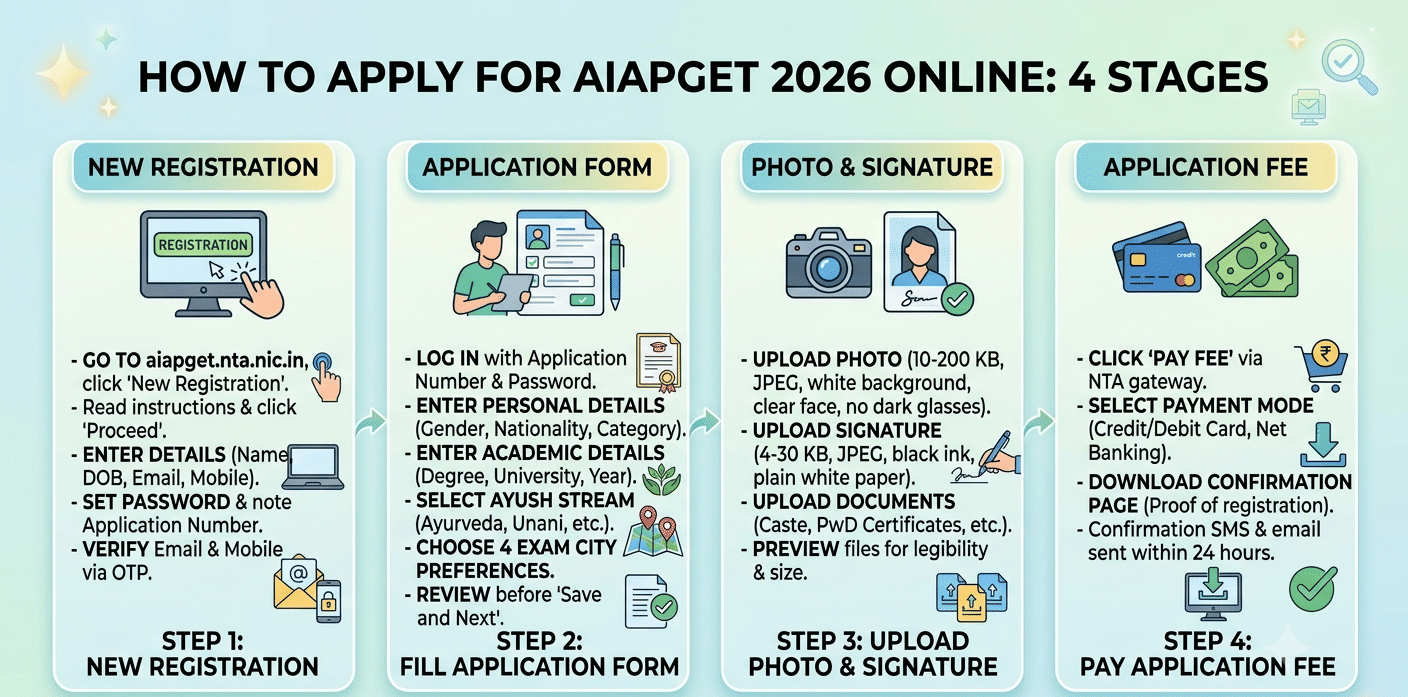
The AIAPGET 2026 application process has four stages: registration, form filling, document upload, and fee payment.
- The AIAPGET registration process 2026 started today and will conclude on July 30, 2026.
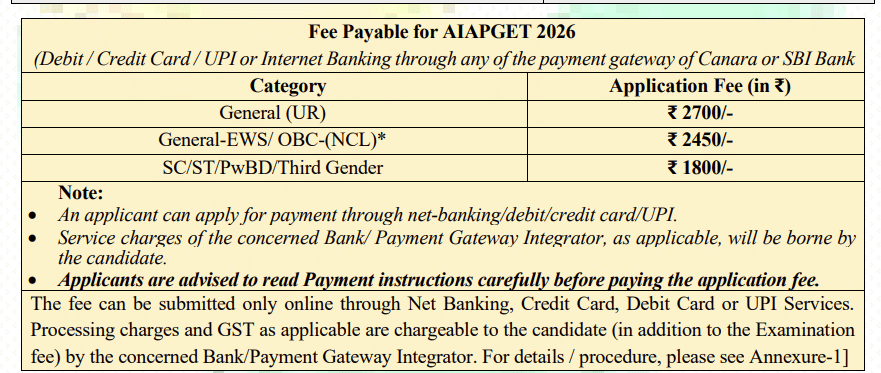
- A general category candidate need to pay INR 2700 as AIAPGET 2026 registration fee.
- The documents required for AIAPGET registration 2026 are Class 10 certificate or mark sheet, valid government-issued photo ID, scanned signature and passport-size photograph.
Check out the details regarding how to apply AIAPGET 2026 online and complete checklist of required documents for AIAPGET 2026 application form below.
Related Article: AIAPGET Application Form 2026: Registration Expected Late May, How to Apply and Form Correction
Key Summary
- The All India Ayush Post Graduate Entrance Test (AIAPGET) 2026 is conducted by NTA for admission to PG seats in Ayurveda, Yoga and Naturopathy, Unani, Siddha, and Homeopathy programs across India.
- Many students face rejection or last-minute issues due to incorrect photo sizes, name mismatches, or failed fee transactions so this guide covers every step and the most common errors so you can avoid them.
- The release of AIAPGET 2026 admit card will be declared on the website later on.
AIAPGET 2026 Important Dates
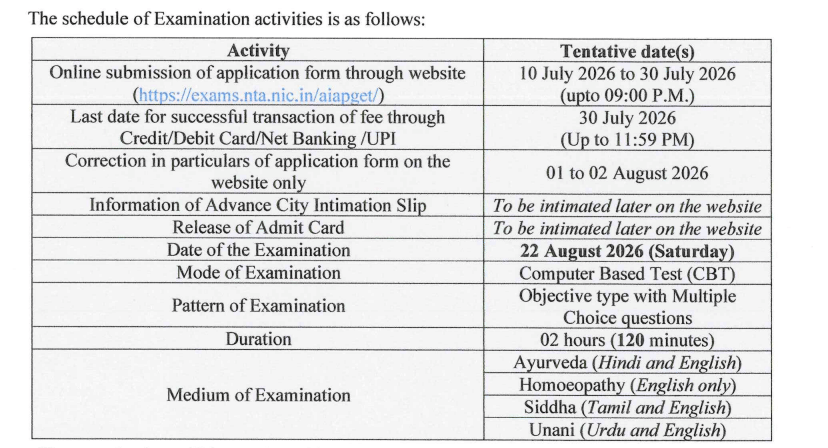
NTA publishes confirmed dates on aiapget.nta.nic.in with the official notification. The schedule below is based on the 2025 cycle and is indicative — treat all dates as expected until the notification is live.
| Event | Date |
|---|---|
| Official notification release | July 10, 2026 |
| Start of online registration | Juy 10, 2026 |
| Last date to submit application form | Juy 30, 2026 |
| Last date for fee payment | Juy 30, 2026 |
| Application correction window | August 1-2, 2026 |
| Admit card release | To be notified later |
| AIAPGET 2026 exam date | August 22, 2026 |
Source: exams.nta.nic.in/aiapget
Related Article: AIAPGET 2026 Login Issues: How to Recover Application Number and Reset Password
How to Apply for AIAPGET 2026 Online
Complete the four stages below in order. You cannot pay the fee before uploading your photo and signature.
Step 1: New Registration
- Go to aiapget.nta.nic.in and click "Apply Online / New Registration."
- Read the instructions page fully, then click "Proceed to Apply Online."
- Enter your name exactly as it appears on your Class 10 certificate, along with your date of birth, email ID, and mobile number.
- Set a strong password and note your system-generated application number — you need it for every future login and for downloading your admit card.
- Verify your email and mobile number using the OTP sent to both.
Step 2: Fill the Application Form
- Log in with your application number and password.
- Enter personal details: gender, nationality, state of domicile, and category (General/OBC-NCL/SC/ST/PwD).
- Enter academic details: qualifying degree (BAMS/BHMS/BUMS/BSMS), university name, year of passing, and roll number.
- Select your Ayush stream (Ayurveda, Unani, Siddha, Homeopathy, or Yoga and Naturopathy) as this determines which paper you sit for. Verify this matches your UG degree.
- Choose up to four exam city preferences in order of priority.
- Review every field before clicking "Save and Next."
Step 3: Upload Photo and Signature
- Upload a recent passport-size photograph: JPEG format, 10–200 KB, white background, face clearly visible, no cap or dark glasses.
- Upload your signature: JPEG format, 4–30 KB, signed in black ink on plain white paper, scanned or clearly photographed.
- Upload supporting documents: caste certificate, PwD certificate if you are claiming reservation.
- Preview each uploaded file to confirm it is legible and not cropped.
Step 4: Pay the Application Fee
- Click "Pay Fee" on the NTA payment gateway.
- Choose your payment mode: credit card, debit card, or net banking.
- After a successful transaction, download the confirmation page immediately — this is proof of completed registration.
- A confirmation SMS and email reach your registered contacts within 24 hours. If they do not, check your application status on the portal before assuming failure
Source: Official AIAPGET 2026 Information Bulletin
Related Article: AIAPGET 2026 Form Correction: Editable Fields and How to Edit
Ques. What is the last date to apply for AIAPGET 2026?
Ans. The last date to apply the AIAPGET 2026 application form is on July 30, 2026.
Documents Required for AIAPGET 2026 Registration
| Document | Purpose |
|---|---|
| Class 10 certificate or mark sheet | Date of birth proof |
| BAMS / BHMS / BUMS / BSMS degree or provisional certificate | Qualifying degree verification |
| Internship completion certificate | Mandatory eligibility requirement |
| Central or State AYUSH Council registration certificate | Mandatory eligibility requirement |
| Valid government-issued photo ID (Aadhaar, passport, or voter ID) | Identity verification at the exam centre |
| Caste / category certificate (OBC-NCL / SC / ST / EWS) | Required only if claiming reservation |
| PwD certificate | Required only if claiming PwD benefit |
| Passport-size photograph (JPEG, 10–200 KB) | Form upload |
| Signature scan (JPEG, 4–30 KB) | Form upload |
Source: Official AIAPGET 2026 Information Bulletin
Related Article: AIAPGET Exam Pattern 2026: 120 Questions, Total Marks, Marking Scheme, Duration & Subject-wise Weightage
Ques. Can I correct my AIAPGET 2026 application form after submission?
Ans. Yes. NTA opens a short correction window after the registration deadline closes. During this period you can edit fields such as name spelling, date of birth, photo, signature, and exam city preference. Stream selection and category are typically locked after initial submission.
AIAPGET 2026 Application Fee
| Category | Application Fee |
|---|---|
| General | INR 2700 |
| General- EWS/ OBC NCL | INR 2450 |
| SC / ST / PwD | INR1800 |
The application fee is non-refundable under all circumstances. Pay only through the official NTA payment gateway on aiapget.nta.nic.in. Do not use any third-party UPI link or payment portal shared via social media or messaging apps.
Source: Official AIAPGET 2026 Information Bulletin
Related Article: AIAPGET 2025 Question Paper (Available) - Download AIAPGET Question Paper with Solution PDF
Ques. Is the AIAPGET 2026 application fee refundable?
Ans. No. The application fee is non-refundable under all circumstances, including withdrawal of application or failure to appear for the exam.
Common Form Filling Errors in AIAPGET 2026 and How to Avoid Them
These are the errors students encounter most often during AIAPGET registration. Check out what to do about each one.
| Error | Consequence | Prevention |
|---|---|---|
| Name does not match Class 10 certificate | Form rejected or entry denied at exam centre | Copy your name from your Class 10 marksheet, including initials and spaces |
| Incorrect date of birth | Eligibility check fails and application may be cancelled | Cross-check DOB against your Class 10 certificate |
| Photo exceeds 200 KB or has a coloured background | Upload rejected by the portal; form stays incomplete | Use a white-background photo and compress the JPEG to under 200 KB |
| Signature file too large or unclear | Upload fails and signature rejected | Keep the file under 30 KB |
| Wrong Ayush stream selected | You appear for the wrong exam paper | Select the stream that matches your UG degree (e.g., Ayurveda for BAMS, Homeopathy for BHMS) and verify before submitting |
| Fee payment timeout or double debit | Fee debited but registration not confirmed | Wait 48 hours NTA reconciles failed transactions automatically. |
| Incomplete or expired category certificate | Reservation benefit denied at counselling stage | Upload the full, valid certificate issued by a competent authority |
| Registration email ID entered incorrectly | OTPs and admit card alerts go to the wrong inbox | Use an email ID you actively check and note it alongside your application number screenshot |
| Internship certificate not available at time of form filling | Eligibility condition unmet and application rejected | Confirm your internship completion certificate is issued before starting the application |
Note: Use the NTA correction window (August 1-2, 2026) to fix errors in your name, date of birth, photo, and exam city. Stream and category selections are generally locked after submission and cannot be changed.
How to Download AIAPGET 2026 Admit Card
The admit card is released on aiapget.nta.nic.in a few days before the exam. NTA does not send it by post or email so you must download it yourself from the portal. Check the details how to download AIAPGET 2026 Admit Card:
- Step 1: Visit aiapget.nta.nic.in and click "Download Admit Card."
- Step 2: Log in with your application number and date of birth (or password).
- Step 3: Your admit card loads on screen. Verify your name, roll number, exam date, and centre address before downloading.
- Step 4: Download the PDF and take two colour printouts and carry one to the exam centre and keep one at home as backup.
The admit card contains your roll number, reporting time, exam centre address, and exam-day instructions. Read the instructions section carefully before exam day, check items like permitted stationery and ID requirements are listed there.
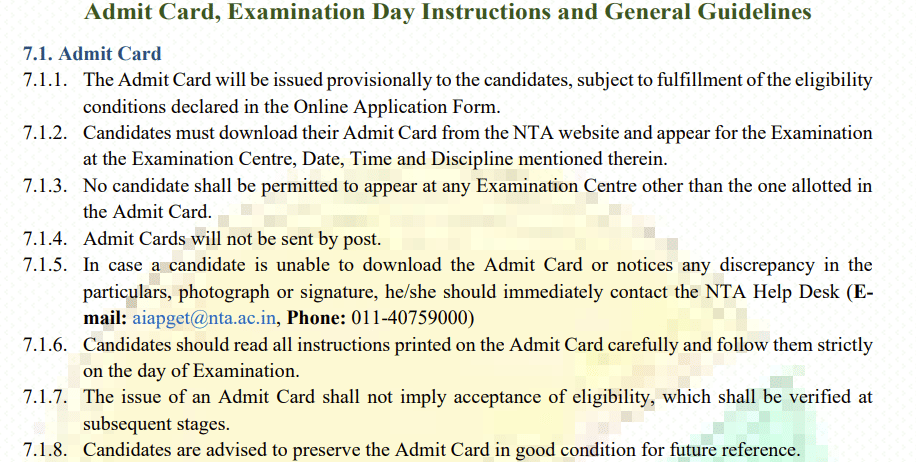
Source: Official AIAPGET 2026 Information Bulletin
Related Article: List of Top Colleges in India Accepting AIAPGET Based on 2026 Ranking
Admit Card Issues and Solutions
| Issue | Likely Cause | Solution |
|---|---|---|
| Admit card not generated or login fails | Fee payment not confirmed or registration incomplete | Check your fee confirmation email; contact NTA at 011-40759000 or email aiapget@nta.ac.in with your application number |
| Wrong name or DOB printed on admit card | Data entry error in the application form | Contact NTA immediately with your Class 10 certificate as proof; do not appear at the centre with incorrect details |
| Photo not visible or blurry on admit card | Low-resolution or incorrectly formatted photo uploaded | Contact the NTA helpdesk; carry an original government photo ID to the centre as a backup identification document |
| Exam centre does not match any city preference | Seat capacity exhausted at all preferred cities | NTA assigns the nearest available centre; the allotted centre is final and cannot be changed |
| Admit card PDF fails to download | Browser incompatibility or slow connection | Switch to Chrome or Firefox, clear browser cache, or try a different device or network |
Source: Official AIAPGET 2026 Information Bulletin
AIAPGET 2026 Application Form and Admit Card FAQs
Ques. My AIAPGET 2026 fee was deducted but I did not receive a confirmation. What should I do?
Ans. Wait 48 hours — NTA reconciles most payment failures automatically and the confirmation status updates on the portal. If the issue persists after 48 hours, email aiapget@nta.ac.in with your application number and a bank statement showing the debit.
Ques. What documents must I carry to the AIAPGET 2026 exam centre?
Ans. Carry your printed admit card (colour printout) and one original government-issued photo ID — Aadhaar card, passport, or voter ID. Photocopies of ID documents are not accepted at the exam centre.
Ques. Who can contact NTA for AIAPGET 2026 application issues?
Ans. Any student who has registered or is attempting to register for AIAPGET 2026 can contact NTA at 0120-2555263 or 0120-2555264 on working days, or email aiapget@nta.ac.in with their application number and a description of the issue.



Comments