




OJEE 2026 Counselling Login on ojee.nic.in requires the Registration Number or Application Number and Date of Birth or the password created during registration.
Direct Link to OJEE 2026 Counselling Portal (ACTIVE)
- Many candidates cannot login to the ojee.nic.in portal due to wrong login details or due to forgetting the registration number.
- Those candidates who may have lost their Registration Number can retrieve it by providing their email ID or mobile phone number.
- Candidates who experience slow portal or cannot access the portal due to some reason can use Incognito or Private mode in Google Chrome or Mozilla Firefox and try to login during off peak hours.
- For candidates facing other technical problems can approach the help desk for OJEE by using the contact information given at ojee.nic.in.
Related Links:
- OJEE Counselling 2026: Registration, Choice Filling and Round-Wise Seat Allotment
- OJEE Seat Allotment 2026: Round 1 Result Out, How to Check, Accept and Reporting
- OJEE Round 1 Seat Allotment 2026 Out Online Reporting by July 7

Key Summary
- The OJEE 2026 Counselling Portal is available on ojee.nic.in for all counselling related activities.
- This guide covers the complete OJEE 2026 Counselling Login process including how to sign in, recover login credentials and fix common login problems.
- The OJEE 2026 counselling process for lateral entry admissions to BTech, BPharm, MBA, MCA and other programmes across Odisha is currently underway (July 2026).
- Candidates who have forgotten their Registration Number can retrieve it through the "Forgot Registration Number" or "Forgot Password" option using their registered email ID or mobile number.
How to Log In to OJEE 2026 Counselling Portal
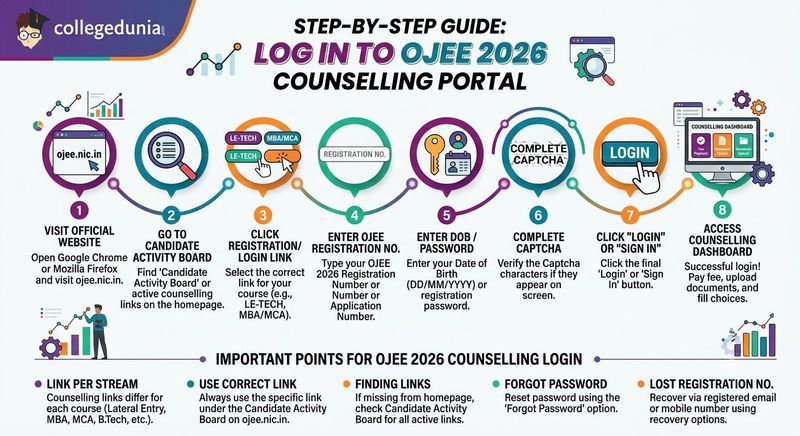
Candidates need to follow these steps to access their OJEE 2026 counselling account at ojee.nic.in:
- Step 1: Open Google Chrome or Mozilla Firefox and visit the official website ojee.nic.in.
- Step 2: On the homepage, go to the Candidate Activity Board section or check the active counselling links displayed on the page.
- Step 3: Click on the counselling registration/login link for your respective course, such as Registration for LE-TECH (DIPLOMA)/LE-B.SC./Int. MBA and Working Professionals Counselling or Registration for MBA/MCA/M.Tech and other programmes.
- Step 4: Enter your OJEE 2026 Registration Number/Application Number on the login page.
- Step 5: Enter your Date of Birth (DD/MM/YYYY) or the password created during registration.
- Step 6: Complete the CAPTCHA verification if it appears on the screen.
- Step 7: Click on the "Login" or "Sign In" button.
- Step 8: After successful login, you will be redirected to the counselling dashboard, where you can complete registration, pay the counselling fee, upload documents, and fill in your choice preferences.
Important Points for OJEE 2026 Counselling Login
- The counselling login link is different for each admission stream, including Lateral Entry, MBA, MCA, B.Tech, and other programmes.
- Candidates should always use the correct counselling login link available under the Candidate Activity Board on ojee.nic.in.
- If the counselling login link is not available on the homepage, candidates can open the Candidate Activity Board, where all active counselling links and their current status are listed.
- Candidates who have forgotten their password can reset it through the "Forgot Password" option.
- Candidates who have lost their Registration Number can recover it using their registered email ID or mobile number through the available recovery option.
Also Check: OJEE 2026 Round 1 Seat Matrix: Category-Wise Seats in Government and Private Colleges
Ques. Why am I seeing multiple counselling login links on the OJEE 2026 portal? Which one should I use?
Ans. OJEE 2026 provides separate counselling login links for different courses, such as B.Tech, MBA, MCA, M.Tech, and Lateral Entry programmes. Candidates should select the login link that matches their admission stream from the Candidate Activity Board. Using the wrong login link may prevent access to the correct counselling dashboard.
Ques. What can I do after logging in to the OJEE 2026 counselling portal?
Ans. After a successful login, candidates can complete all major counselling activities from their dashboard, including registration, counselling fee payment, document upload, choice filling, seat allotment checking, and other admission-related tasks as per the counselling schedule.
How to Recover Your OJEE 2026 Registration ID
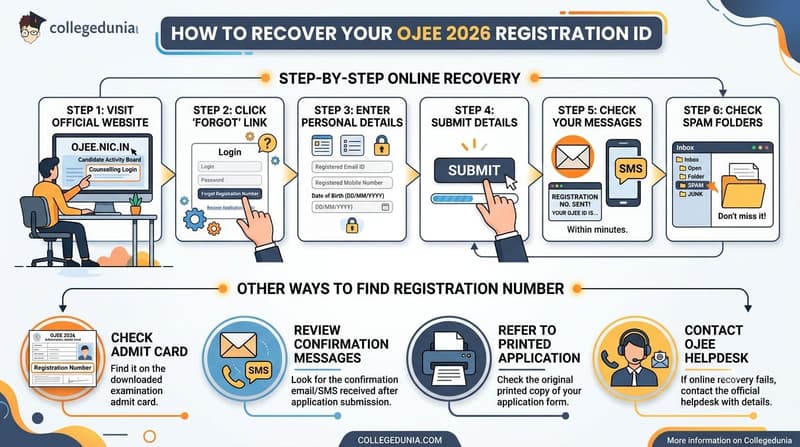
Candidates who have forgotten their OJEE 2026 Registration Number can recover it through the online recovery facility available on the counselling portal.
- Step 1: Visit ojee.nic.in and open the relevant OJEE 2026 Counselling Login page from the Candidate Activity Board.
- Step 2: Click on the "Forgot Registration Number", "Recover Application Number", or the similar option available below the login form.
- Step 3: Enter your registered email ID or mobile number along with your Date of Birth (DD/MM/YYYY).
- Step 4: Submit the details to continue with the recovery process.
- Step 5: Your Registration Number will be sent to your registered email ID and/or mobile number within a few minutes.
- Step 6: If the email is not available in your inbox, check the Spam or Junk folder.
Other Ways to Find OJEE 2026 Registration Number
- Candidates can also find their OJEE 2026 Registration Number on the OJEE 2026 admit card downloaded during the examination process.
- The confirmation SMS or confirmation email received after submitting the OJEE application form also contains the registration details.
- Candidates can also refer to the printed copy of their original OJEE 2026 application form to check the Registration Number.
- If the online recovery option is unavailable or does not work, candidates should contact the OJEE Helpdesk with their personal details for further assistance.
Also Check: OJEE 2026 Seat Allotment Fee: Amount, Online and Bank Challan
Ques. Can I find my OJEE 2026 Registration Number without using the online recovery option?
Ans. Yes. If you do not want to use the online recovery facility, you can find your OJEE 2026 Registration Number on your admit card, application form printout, or the confirmation email/SMS received after completing the application process.
Ques. What should I do if I do not receive my OJEE 2026 Registration Number after submitting the recovery request?
Ans. First, check your Spam or Junk folder and confirm that you entered the correct registered email ID or mobile number. If you still do not receive the Registration Number after a few minutes, contact the OJEE Helpdesk with your personal details for manual assistance before the counselling deadline.
How to Reset Your OJEE 2026 Password
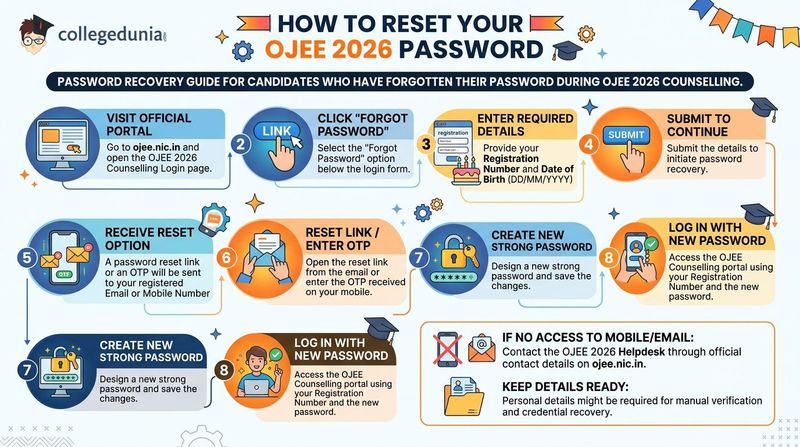
Candidates who have forgotten the password created during OJEE 2026 Counselling can reset it through the password recovery option available on the login portal.
- Step 1: Visit ojee.nic.in and open the OJEE 2026 Counselling Login page.
- Step 2: Click on the "Forgot Password" option available below the login form.
- Step 3: Enter your Registration Number and Date of Birth (DD/MM/YYYY).
- Step 4: Submit the required details to continue with the password recovery process.
- Step 5: A password reset link or OTP will be sent to your registered email ID or mobile number.
- Step 6: Open the password reset link received through email or enter the OTP received on your mobile number.
- Step 7: Create a new strong password and save the changes.
- Step 8: Log in to the counselling portal using your Registration Number and the new password.
- Candidates who no longer have access to their registered mobile number or email ID should contact the OJEE 2026 Helpdesk through the official contact details available on ojee.nic.in.
- Candidates should keep their personal details ready, as they may be required for manual verification and recovery of login credentials.
Also Check: OJEE 2026 VSSUT Burla Cutoff: Expected Branch-Wise Closing Ranks
Ques. How can I create a strong password for the OJEE 2026 counselling portal?
Ans. Create a password that combines uppercase and lowercase letters, numbers, and special characters. Avoid using easily guessed details such as your name, date of birth, or mobile number. A strong password helps protect your OJEE 2026 counselling account from unauthorized access.
Ques. Can I reset my OJEE 2026 password if I no longer have access to my registered mobile number or email ID?
Ans. Yes, but you cannot use the online password reset option in this case. You should contact the OJEE 2026 Helpdesk with your registration details and identity information. After verification, the helpdesk will guide you through the manual process to recover your counselling login credentials.
Common OJEE 2026 Login Issues and Fixes
Candidates should always use the latest version of Google Chrome or Mozilla Firefox while accessing the OJEE 2026 counselling portal.
- Older browser versions and Internet Explorer are not supported and may lead to login problems or page loading errors on ojee.nic.in.
- Using a supported browser can help candidates complete the login process without unnecessary technical issues.
- The table below lists some of the most common problems reported on ojee.nic.in along with the recommended solution for each issue.
| Login Issue | Likely Cause | Fix |
|---|---|---|
| Invalid credentials error | Wrong registration number or incorrect DOB format | Re-enter date of birth in DD/MM/YYYY format; check for typos in the registration number |
| Portal not loading or very slow | High traffic during peak counselling hours | Access the portal in early morning or late evening; refresh the page after a few minutes |
| CAPTCHA not displaying | Outdated browser or JavaScript disabled | Switch to the latest version of Chrome or Firefox; clear browser cache and disable extensions |
| Session timeout or auto logout | Inactivity or unstable internet connection | Log in again on a stable connection; do not leave the choice-filling page idle |
| OTP not received for password reset | Network delay or wrong mobile number registered | Wait 5 minutes and retry; verify the mobile number on your application form; try the email OTP option |
| "Account not found" error | Registration number entered incorrectly | Use "Forgot Registration Number" on the login page, or locate it on your admit card or registration email |
| Page freezes during choice filling | Browser memory or slow connection | Close other browser tabs; use a laptop or desktop instead of a mobile phone; save choices frequently |
Also Check: OJEE 2026 Round 1 Seat Allotment: How to Accept Seat and Report
Ques. Why does the OJEE 2026 counselling portal automatically log me out while filling choices?
Ans. Auto logout or session timeout usually happens due to inactivity or an unstable internet connection. To avoid losing your work, use a stable network, save your choices frequently, and avoid leaving the choice-filling page idle for a long time.
Ques. What should I do if the OJEE 2026 choice filling page freezes or stops responding?
Ans. If the choice filling page freezes, close unnecessary browser tabs, refresh the page if possible, and use the latest version of Google Chrome or Mozilla Firefox on a laptop or desktop. A stable internet connection and frequent saving of choices can also help prevent this issue.
Details Required to Log In to OJEE 2026 Counselling Portal
Candidates should keep the following information ready before they attempt to log in or use any recovery option:
| Detail | Where to Find It | Used For |
|---|---|---|
| OJEE 2026 Registration Number | Admit card, registration confirmation email, or SMS | Primary login credential |
| Date of Birth (DD/MM/YYYY) | Your personal records | Default password and identity verification for recovery |
| Registered Email ID | Email used during OJEE application | Registration ID recovery, password reset OTP |
| Registered Mobile Number | Mobile number used during OJEE application | OTP-based recovery and password reset |
Also Check: OJEE 2026 Upgrade or Freeze Seat After Round 1: Which Option to Choose
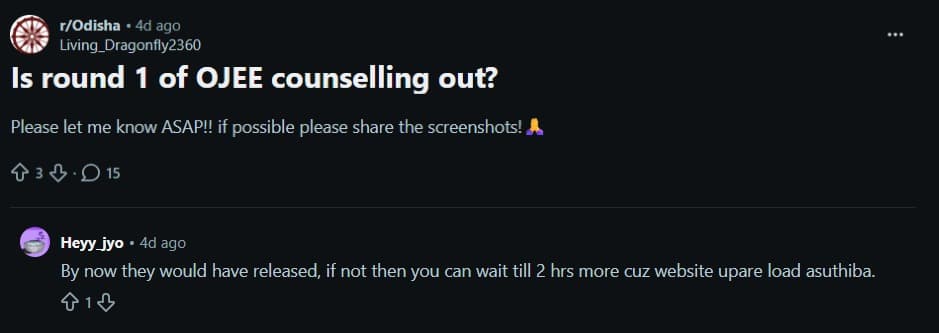
OJEE 2026 Counselling Login: Reddit Discussion
- The discussion focused on the release of the OJEE 2026 Round 1 seat allotment results, with candidates eagerly checking whether the counselling results had been published.
- Another Reddit user suggested that the Round 1 allotment results were likely to be released by then, adding that if they were not yet visible, candidates should wait a couple of hours as the official website might be experiencing heavy traffic due to high user activity.
OJEE 2026 Counselling Login FAQs
Ques. What credentials do I need to log in to the OJEE 2026 counselling portal?
Ans. You need your OJEE 2026 registration number and date of birth in DD/MM/YYYY format (used as the default password) or the custom password you set during registration. Enter these at the Counselling Login page on ojee.nic.in.
Ques. How do I recover my OJEE 2026 registration number if I have lost it?
Ans. Click "Forgot Registration Number" on the ojee.nic.in login page and enter your registered email ID or mobile number along with your date of birth. Your registration number will be sent to your registered contact. You can also find it on your admit card or the original registration confirmation email/SMS.
Ques. The OJEE 2026 portal is not opening. What should I do?
Ans. The portal may be slow due to high traffic during peak counselling hours. Try accessing it in the early morning or late evening. Use an updated version of Google Chrome or Firefox, open it in incognito mode, and clear your browser cache before retrying.
Ques. I am not receiving the OTP for password reset on the OJEE portal. What should I do?
Ans. Wait 5 minutes and request the OTP again. Make sure the mobile number you entered matches the one registered in your OJEE application. You can also try the email OTP option. If the problem continues, contact the OJEE 2026 helpdesk through the official contact details listed on ojee.nic.in.
Ques. Can I log in to OJEE 2026 counselling from my mobile phone?
Ans. Yes, but a laptop or desktop is strongly recommended, especially for choice filling. If you must use a mobile phone, open Google Chrome, switch to desktop mode, and ensure a stable internet connection to avoid session timeouts.
Ques. What if none of the login recovery options work on ojee.nic.in?
Ans. Contact the official OJEE 2026 helpdesk with your name, date of birth, and application details. The helpdesk phone number and email address are published on the official portal at ojee.nic.in. Approach the helpdesk well before the counselling deadline to allow time for manual verification.



Comments