Computing Mentor, IIIT Hyderabad | Updated 3+ months ago
The NCERT Solutions for Class 12 Computer Science Chapter 6 Searching cover all 9 exercise questions, according to the latest 2026-27 CBSE syllabus. Every answer follows the textbook's own flow: linear search on any list, binary search on a sorted list, and hashing with a hash function, plus the key comparisons and iterations each method needs.
All 9 NCERT questions solved with Python code, dry-run traces, and an Expert Solution per question that adds exam strategy and common-trap warnings.
Full coverage of linear search, binary search, hashing and collisions, with the position and comparison counts the CBSE board paper asks for directly.
Answers aligned with the 2026-27 CBSE Class 12 Computer Science syllabus and useful for JEE and CUET algorithm questions; no NEET references because Computer Science is not a medical subject.
Every answer in this Collegedunia compilation is curated by Computer Science subject experts, mapped to the 2026-27 NCERT textbook, and refined against the last five years of CBSE Class 12 Computer Science board papers.
Student Feedback: What 12,100 students told us about this chapter
71% of Class 12 students said counting key comparisons and binary search iterations was the part they got wrong most often. 3 out of 5 students told us they lost marks by mixing up index with position in the final answer line.
Toppers found that drawing the pass table with one row per comparison added 1 to 2 marks on the trace questions, and the average student spent 2 to 3 hours on this chapter across the first read and exercise practice.
Source: 2026-27 Class 12 Computer Science student poll. Sample of 12,100 students from CBSE schools across 13 states, conducted before the 2026 boards.
What the NCERT Solutions for Class 12 Computer Science Chapter 6 Searching Cover
This chapter answers one question: how does a computer find a value inside a collection of items? The NCERT book builds the answer through three methods, and these solutions stay faithful to that order while filling the gaps students hit in the exam.
Linear search: check every element one by one from the start. It works on any list but can need up to n comparisons.
Binary search: keep halving a sorted list, comparing the middle each step. It needs at most about log₂ n comparisons.
Hashing: jump straight to a slot using a hash function like h(element) = element % size, answering in one comparison when there is no collision.
Key comparisons, iterations and collisions: how to count the work each method does, and why two values landing in the same slot is a problem.
Exercise-wise Breakdown of the Searching Chapter NCERT Solutions
Chapter 6 of NCERT Class 12 Computer Science carries 9 end-of-chapter exercise questions. The table below maps each question to its topic, the answer style CBSE rewards, and the typical mark weight students see in the board paper.
Question
Topic covered
Answer style
Typical marks
Q 1
Linear search positions of 8, 1, 99, 44 with a pass table
One row per comparison, position = index + 1
3 to 4 marks
Q 2
Linear search on a list with a duplicate value
First-match trace plus a one-line meaning
2 marks
Q 3
Linear search program on mixed sign numbers
Full program with three labelled sample runs
3 to 4 marks
Q 4
Binary search program with three keys
While-loop code plus first, mid, last trace
4 to 5 marks
Q 5
Linear and binary search on 24 numbers, comparison counts
Three side-by-side tables of counts
4 to 5 marks
Q 6
Same as Q 5 but on a list of English words
Tables plus a note on string ordering
4 to 5 marks
Q 7
Estimate comparisons on 2⁷⁰ records, then interpret
Arithmetic plus a written interpretation
3 marks
Q 8
Hashing with h(e) = e % 11 and a full collision
Hash-index table, slot fill, search trace
3 to 4 marks
Q 9
Hashing countries by name length into two lists
Index table, parallel lists, search trace
4 to 5 marks
The two long program questions (Q 5 and Q 6) and the binary search question (Q 4) carry the heaviest marks. Students who show the comparison counts and the first, mid, last trace clearly score full marks.
Linear Search in Class 12 Computer Science: Position and Key Comparisons
Linear search, also called sequential search, compares the key with each element starting from index 0 and moving to the last index. The moment an element equals the key, you stop and report the position. If the whole list is scanned with no match, the key is absent. The NCERT program reports the position as index + 1, so the first element is position 1.
Index versus position: index is the 0-based slot Python uses; position is the human count that starts at 1, linked by position = index + 1.
Key comparison: one check of a list element against the key. The number of comparisons is how the board measures the work.
Worst case: a search for the last element, or for an absent key, costs the full n comparisons.
def linearSearch(numList, key):
    for index in range(0, len(numList)):
        if numList[index] == key:
            return index + 1     # report 1-based position
    return None                  # key not in the list
In Q 1, searching [1, -2, 32, 8, 17, 19, 42, 13, 0, 44] gives 8 at position 4, 1 at position 1, 99 absent, and 44 at position 10. Key 1 needs only 1 comparison, while the absent key 99 needs all 10 comparisons, which is the costliest case.
Quick Tip: In a pass table, the number of rows equals the number of key comparisons. The examiner counts rows to award the comparison marks, so never stop the table early for an absent key.
Binary Search on a Sorted List: first, mid, last and Iterations
Binary search works only on a sorted list. It keeps three markers: first (start of the search area), last (end), and mid, the middle index found by mid = (first + last) // 2. It compares the middle element with the key and halves the search area each step.
If numList[mid] == key, the key is found at mid.
If numList[mid] < key, the key must be to the right, so set first = mid + 1.
If numList[mid] > key, the key must be to the left, so set last = mid - 1.
def binarySearch(numList, key):
    first = 0
    last = len(numList) - 1
    while first <= last:
        mid = (first + last) // 2
        if numList[mid] == key:
            return mid + 1            # 1-based position
        elif numList[mid] < key:
            first = mid + 1           # search the right half
        else:
            last = mid - 1            # search the left half
    return None                       # key not found
In Q 4, key 56 in [3, 8, 15, 21, 34, 40, 56, 67, 78, 90] is found at position 7 in 4 iterations. The loop must use first <= last, not first < last, or a present value at the final single element can be wrongly reported as absent.
Watch Out: After comparing the middle, you must move first to mid + 1 or last to mid - 1, never leave them on mid. Forgetting the plus one or minus one makes the search area never shrink past the middle, so the loop runs forever on a missing key.
Comparing Linear and Binary Search on Numbers and Words
Q 5 and Q 6 put both methods on the same data, once with numbers and once with English words, so the contrast in work is impossible to miss. Both questions ask for the position and the number of key comparisons or iterations.
The same data, three searches (Q 5)
On the unsorted 24-number list, linear search for the absent key 1 costs all 24 comparisons. After sorting, linear search for 99 still costs 24 comparisons because 99 ends up last, but binary search finds 99 in only 5 iterations. That single row, 24 against 5, is the whole point of the chapter.
Key
Linear on unsorted
Linear on sorted
Binary on sorted
1
absent, 24 comparisons
absent, 24 comparisons
absent, 4 iterations
5
pos 13, 13 comparisons
pos 1, 1 comparison
pos 1, 4 iterations
55
pos 23, 23 comparisons
pos 12, 12 comparisons
pos 12, 1 iteration
99
pos 21, 21 comparisons
pos 24, 24 comparisons
pos 24, 5 iterations
Searching words (Q 6)
Searching and sorting work on strings exactly as on numbers, because Python compares words in dictionary (lexicographic) order using <, > and ==. So "Amazing" < "Awesome" is true, and sort() arranges words alphabetically, which is what binary search needs.
Remember: Python orders all capital letters before lowercase letters by character code. For mixed-case words, sort with words.sort(key=str.lower) before binary searching, or a present word can be missed.
Search by Hashing: Hash Function and Collisions
Hashing stores a value at a slot decided by a hash function. The remainder method uses h(element) = element % size, so to store a value you compute its hash index and place it there. To search, you compute the key's hash index and check only that one slot, which is why hashing can answer in a single comparison.
A collision happens when two different values produce the same hash index, because a slot can hold only one value. Q 8 is built to show this: the numbers [44, 121, 55, 33, 110, 77, 22, 66] are all multiples of 11, so with h(e) = e % 11 every one hashes to index 0.
With basic overwriting, slot 0 keeps only the last value 66, and slots 1 to 10 stay None.
Searches for 11, 44, 88 and 121 all check slot 0, find 66, and report not present, even though 44 and 121 were in the original list.
The fix is collision handling, such as chaining a list at each slot or probing to the next free slot.
Q 9 uses a text hash function, len(country) - 1, with two parallel lists for keys and values. India (length 5) lands at index 4 with capital New Delhi, France at index 5 with Paris, and a search for USA at index 2 finds an empty slot, so it is correctly reported as not found.
Tip: For any hashing question, state the hash index of each key in a small table first, then fill the slots, then search. Showing the index computation earns the method marks even if a slot later turns out empty.
Common Mistakes Students Make in the Searching Chapter
The repeat-offender mistakes in Searching chapter board answers:
Mixing index with position: NCERT reports index + 1, so a value at index 3 is position 4, not 3.
Stopping the pass table early: for an absent key the table must show all n rows, because the examiner counts rows for the comparison marks.
Using binary search on an unsorted list: it can miss a value that is actually present, so always sort first.
Writing first < last in binary search: the condition must be first <= last, or the loop quits one step too early.
Saying a collided value was never stored: in Q 8, 44 and 121 were lost to the collision, not absent from the input.
How to Use the Searching NCERT Solutions PDF for Board Prep
The Searching chapter is short but counting-heavy. The best approach is two passes: one for the three methods and their Python code, one for tracing the comparison and iteration counts by hand.
First pass: the three methods (1 hour)
Read the chapter and note the linearSearch and binarySearch functions, the mid = (first + last) // 2 formula, and the remainder hash function. Write one line of meaning next to each so the ideas stick before you start tracing.
Second pass: trace the counts (1.5 to 2 hours)
Work Q 1, Q 4, Q 5 and Q 8 on paper first, writing one row per comparison and showing the first, mid, last values for binary search. Then open these solutions and check your counts, paying attention to position = index + 1 and to the full collision in Q 8.
JEE and CUET angle
For students preparing competitive exams, search algorithms appear in data-structure questions in JEE-level programming rounds and in CUET Computer Science. The time growth idea, linear cost rising with n while binary cost rises with log₂ n, is exactly the reasoning those papers reuse, so the work here doubles as competitive prep.
Previous Year Question Trends from the Searching Chapter
The Searching chapter is tested in CBSE board papers mainly through trace questions on comparison counts, a program on binary search, and a hashing question on collisions. The table below maps the asked question types across recent board papers.
Year
Question type asked
Marks
2025
Trace linear search and count key comparisons; define collision
2 + 1
2024
Write a binary search program; count iterations for a given key
3 + 2
2023
Compute hash indices with h(e) = e % size and show the table
3
2022
Difference between linear and binary search; position = index + 1
2 + 1
2021
Estimate comparisons for a large database; interpret the result
3
Also Check: The full set of CBSE board paper questions for this chapter is included in the downloadable PDF above, updated for the 2026-27 cycle.
Other Resources for Class 12 Computer Science Chapter 6 Searching
Pair this NCERT Solutions PDF with the matching revision notes, handwritten notes and the official NCERT book chapter. All resources for Class 12 Computer Science Chapter 6 Searching are linked below.
Resource
What it covers
Open
NCERT Solutions
Step-by-step answers to all 9 exercise questions, with an Expert Solution for each.
You are here
Notes
Concept-first revision notes on linear search, binary search, and hashing.
NCERT Solutions for Class 12 Computer Science: All Chapters
Related Links: Use the table below to open the NCERT Solutions for the other chapters of Class 12 Computer Science. Every chapter ships with the same step-by-step answer style, full PDF download, and revision FAQ.
All NCERT Solutions for Class 12 Computer Science Chapter 6 Searching with Step-by-Step Solutions
Q 1
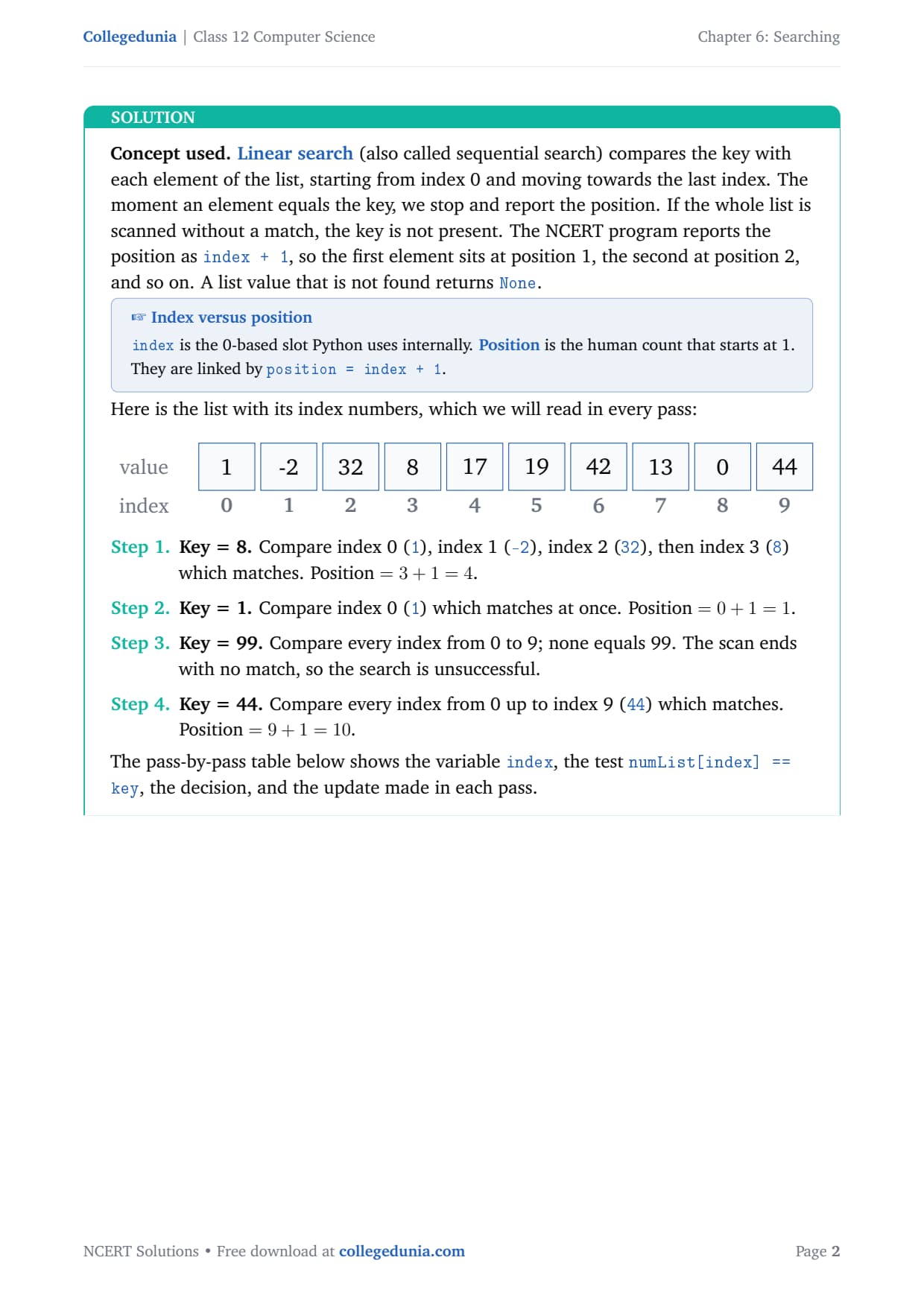
Using linear search determine the position of 8, 1, 99 and 44 in the list [1, -2, 32, 8, 17, 19, 42, 13, 0, 44]. Draw a detailed table showing the values of the variables and the decisions taken in each pass of linear search.
Linear search compares the key with each element from index 0 towards the last index, and stops at the first match. The NCERT program reports the position as index + 1, so the first element is position 1. An absent key returns None after the full scan.
Key = 8. Compare index 0 (1), 1 (-2), 2 (32), then index 3 (8) matches. Position = 3 + 1 = 4.
Key = 1. Compare index 0 (1), which matches at once. Position = 0 + 1 = 1.
Key = 99. Compare every index 0 to 9; none equals 99. The search is unsuccessful.
Key = 44. Compare every index up to index 9 (44), which matches. Position = 9 + 1 = 10.
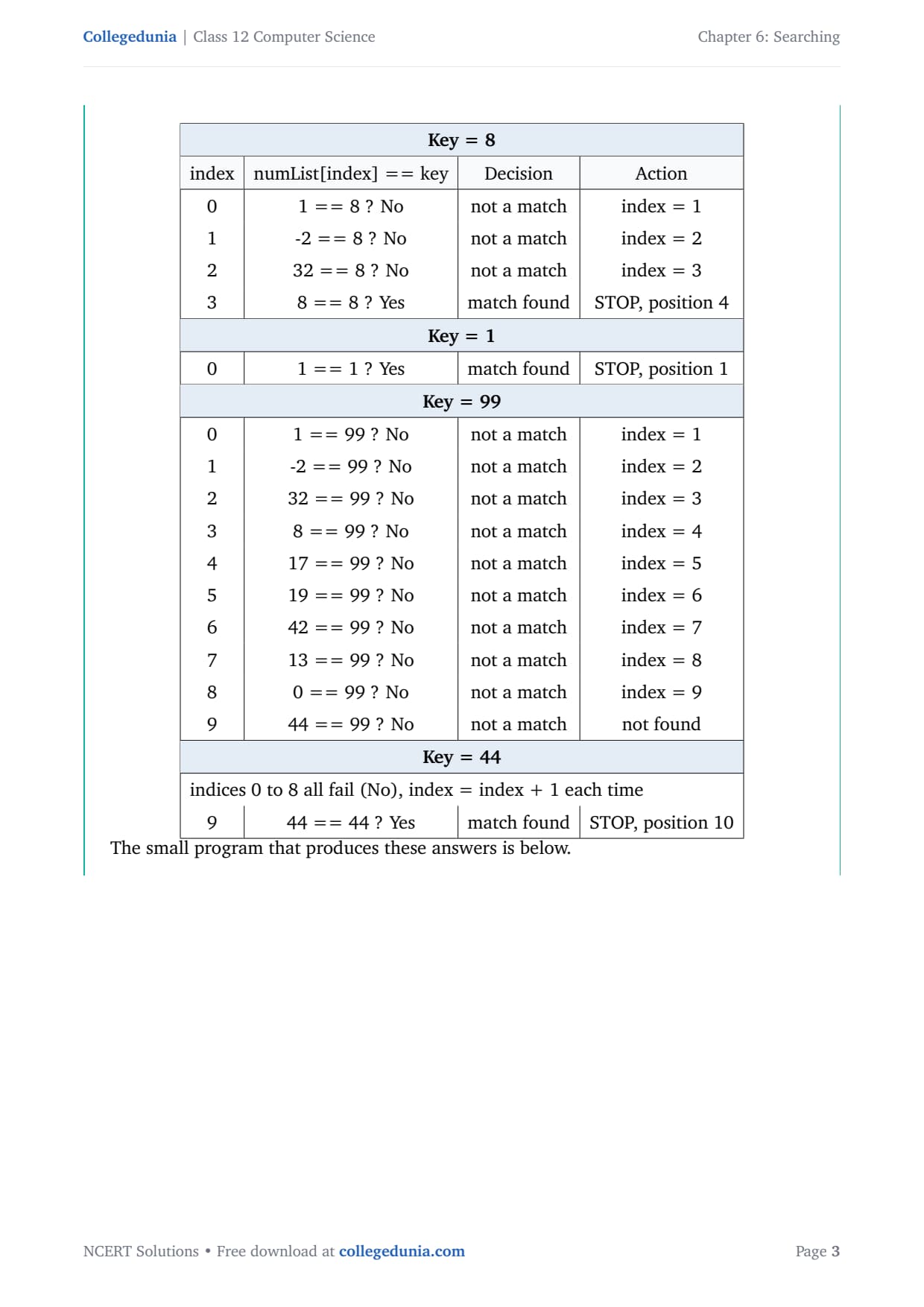
The pass-by-pass table for key 8 shows the variable index, the test, the decision, and the update made in each pass.
index
numList[index] == key
Decision
Action
0
1 == 8 ? No
not a match
index = 1
1
-2 == 8 ? No
not a match
index = 2
2
32 == 8 ? No
not a match
index = 3
3
8 == 8 ? Yes
match found
STOP, position 4
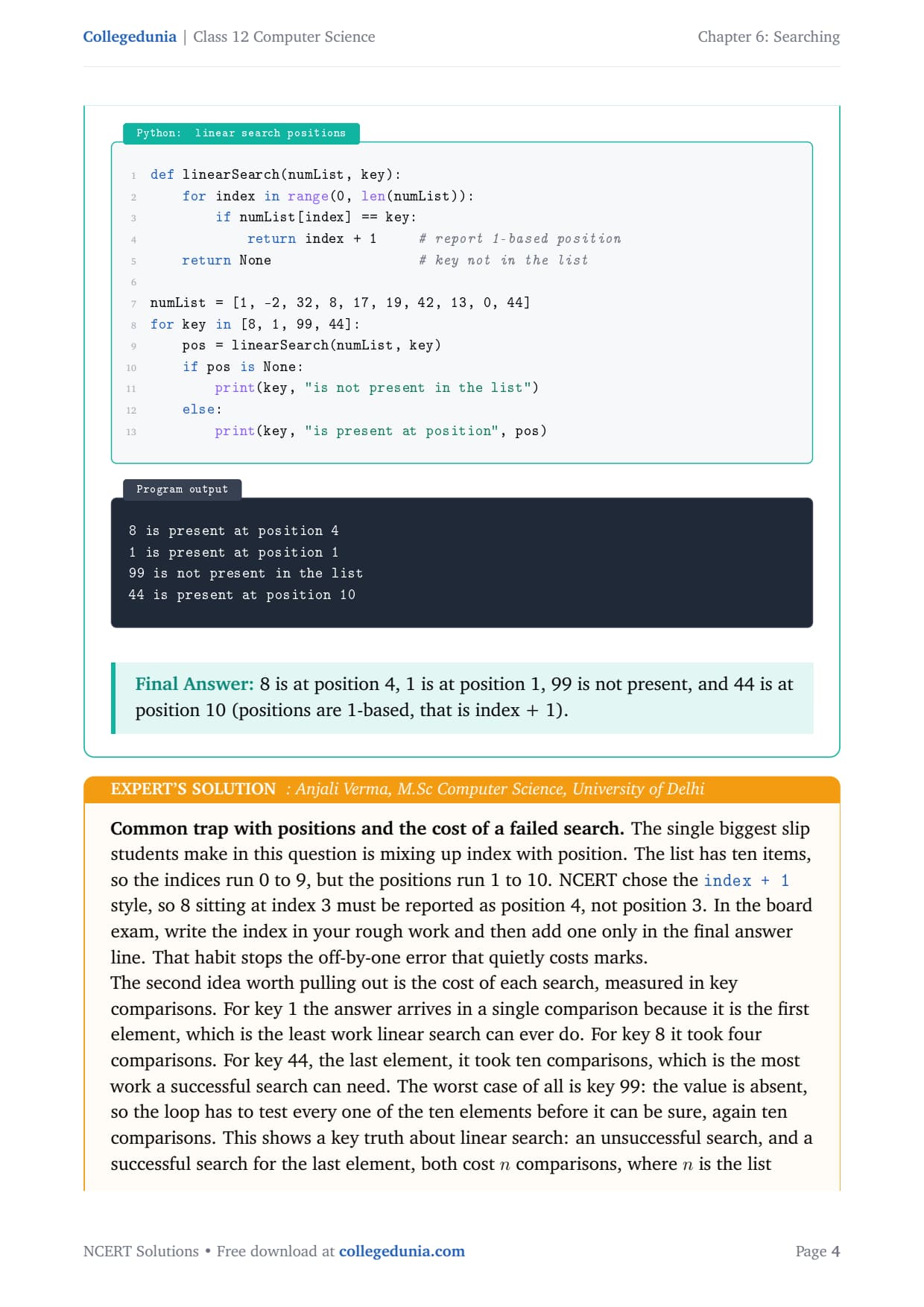
def linearSearch(numList, key):
    for index in range(0, len(numList)):
        if numList[index] == key:
            return index + 1     # report 1-based position
    return None                  # key not in the list

numList = [1, -2, 32, 8, 17, 19, 42, 13, 0, 44]
for key in [8, 1, 99, 44]:
    pos = linearSearch(numList, key)
    if pos is None:
        print(key, "is not present in the list")
    else:
        print(key, "is present at position", pos)
8 is present at position 4
1 is present at position 1
99 is not present in the list
44 is present at position 10
Answer: 8 at position 4, 1 at position 1, 99 not present, 44 at position 10 (positions are 1-based, that is index + 1).
AV
Anjali Verma
M.Sc Computer Science, University of Delhi
Verified Expert
The single biggest slip in this question is mixing up index with position. The list has ten items, so the indices run 0 to 9, but the positions run 1 to 10. NCERT chose the index + 1 style, so 8 at index 3 must be reported as position 4.
Write the index in your rough work, then add one only in the final answer line. That habit stops the off-by-one error that quietly costs marks.
The cost of each search matters too. Key 1 needs just 1 comparison because it is first; key 44 needs 10 because it is last; absent key 99 also needs all 10, because a failed search forces a complete scan.
A successful search for the last element and an unsuccessful search both cost n comparisons, where n is the list length.
When you draw the pass table, draw one row per comparison, because the examiner counts rows to award the comparison marks. A complete table for key 99 with all ten rows earns full credit, while a shortened table loses the very marks the question is testing.
Answer: 8 at position 4, 1 at position 1, 99 absent, 44 at position 10; remember position = index + 1, and a failed search costs all n comparisons.
Q 2
Use the linear search program to search the key with value 8 in the list having duplicate values such as [42, -2, 32, 8, 17, 19, 42, 13, 8, 44]. What is the position returned? What does this mean?
Linear search returns as soon as the first matching element is found and then stops. It does not keep scanning for more matches. So when a list holds duplicate values, it reports the position of the first occurrence only, reading from index 0.
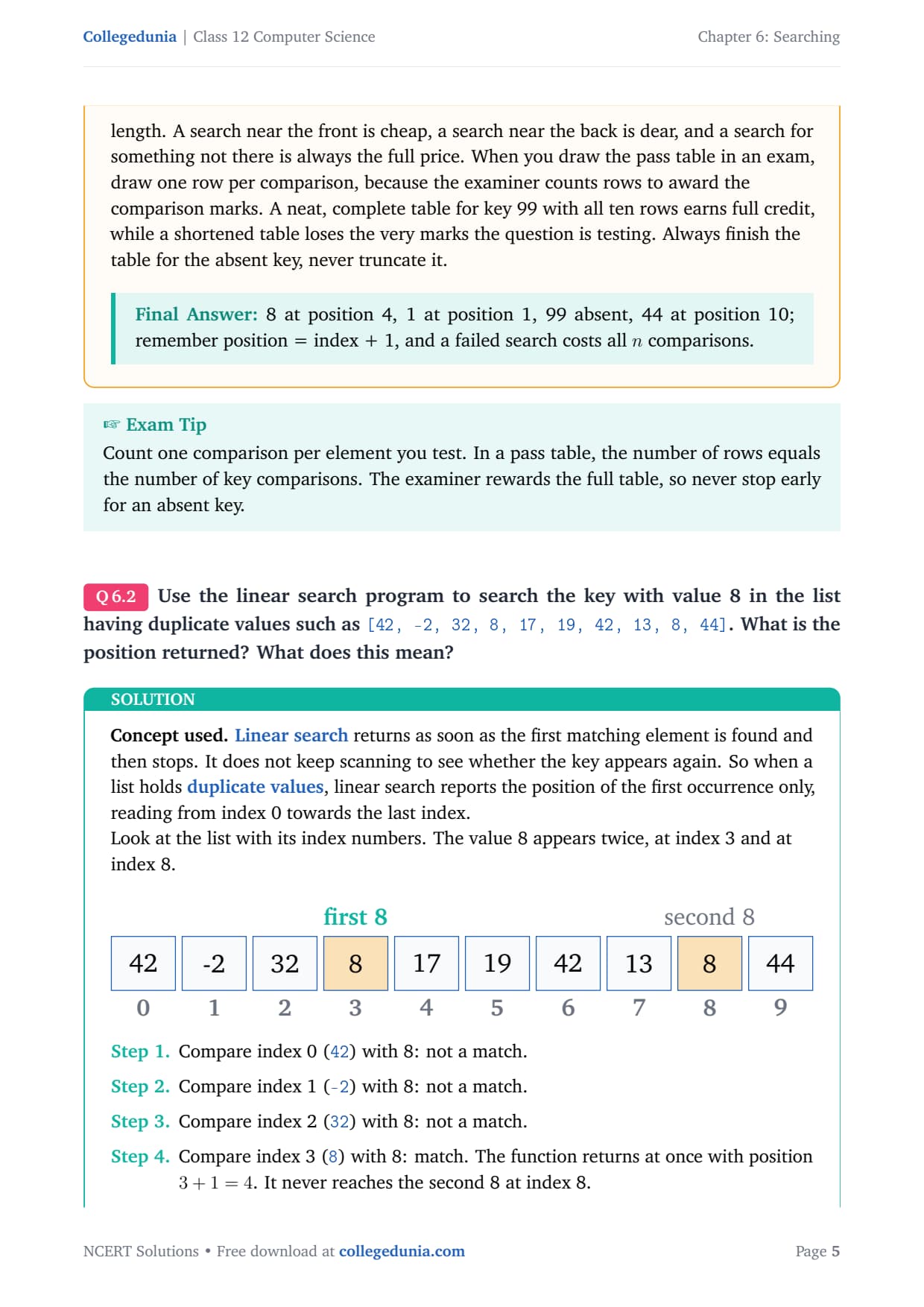
The value 8 appears twice, at index 3 and index 8.
Compare index 0 (42), 1 (-2), 2 (32) with 8: no match.
Compare index 3 (8) with 8: match. The function returns at once with position 3 + 1 = 4. It never reaches the second 8 at index 8.
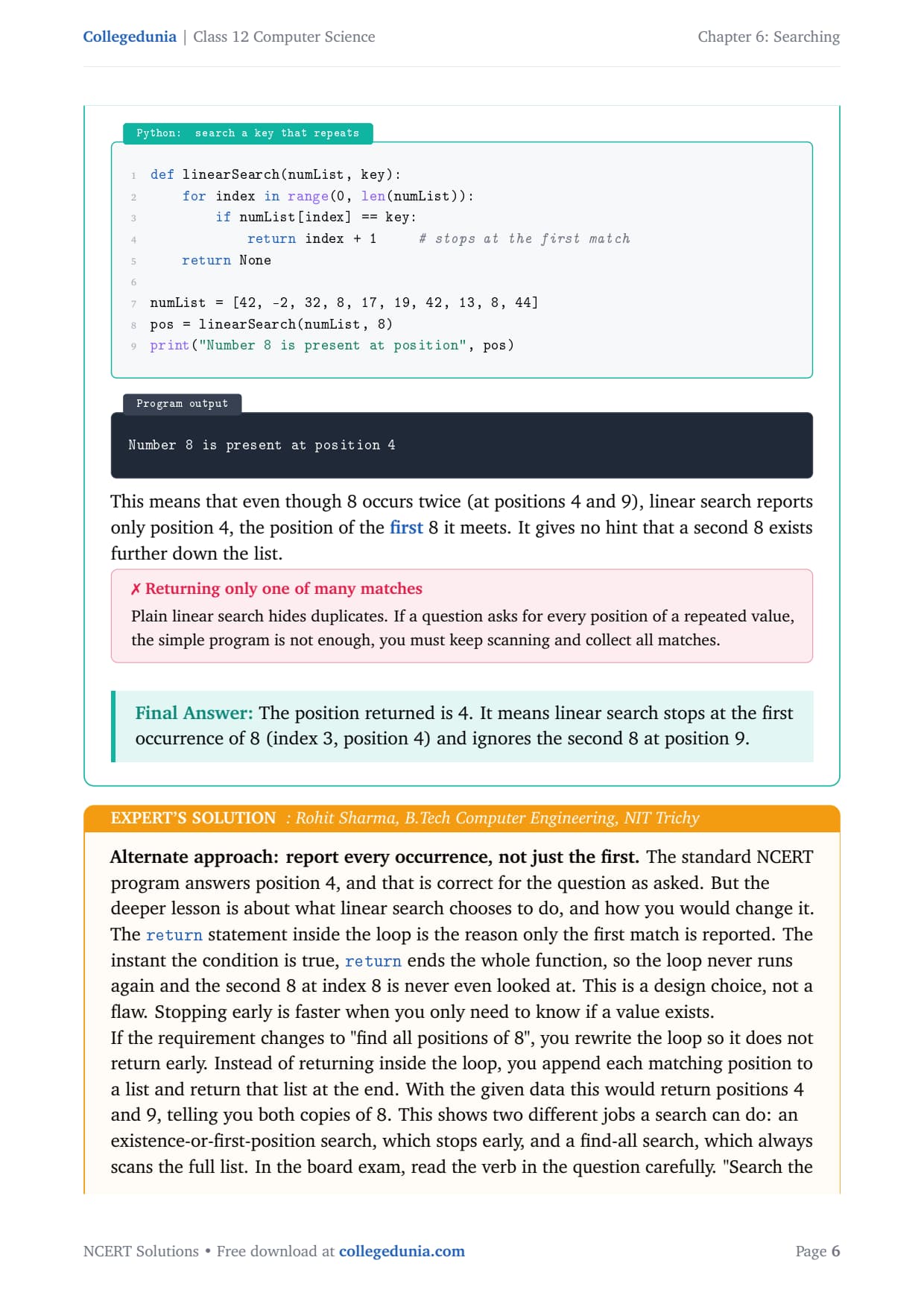
def linearSearch(numList, key):
    for index in range(0, len(numList)):
        if numList[index] == key:
            return index + 1     # stops at the first match
    return None

numList = [42, -2, 32, 8, 17, 19, 42, 13, 8, 44]
pos = linearSearch(numList, 8)
print("Number 8 is present at position", pos)
Number 8 is present at position 4
This means that even though 8 occurs twice (at positions 4 and 9), linear search reports only position 4, the first 8 it meets. It gives no hint that a second 8 exists further down the list.
Answer: The position returned is 4. It means linear search stops at the first occurrence of 8 (index 3, position 4) and ignores the second 8 at position 9.
RS
Rohit Sharma
B.Tech Computer Engineering, NIT Trichy
Verified Expert
The return statement inside the loop is the reason only the first match is reported. The instant the condition is true, return ends the whole function, so the loop never runs again and the second 8 at index 8 is never even looked at. This is a design choice, not a flaw, because stopping early is faster when you only need to know if a value exists.
If the requirement changes to "find all positions of 8", you rewrite the loop so it does not return early: append each matching position to a list and return that list at the end.
With this data, a find-all variant would return positions 4 and 9, telling you both copies of 8.
Read the verb in the question: "search the key" means stop at the first match; "find all positions" means scan to the end and gather every hit.
Picking the wrong behaviour is a common reason answers lose marks even when the code is correct. Here the wording asks to search the key, so the single answer of position 4 is expected.
Answer: Position 4 is returned because the function returns at the first match; a find-all variant that does not return early would instead report positions 4 and 9.
Q 3
Write a program that takes as input a list having a mix of 10 negative and positive numbers and a key value. Apply linear search to find whether the key is present. If present, display the position, otherwise print an appropriate message. Run the program for at least 3 different keys and note the result.
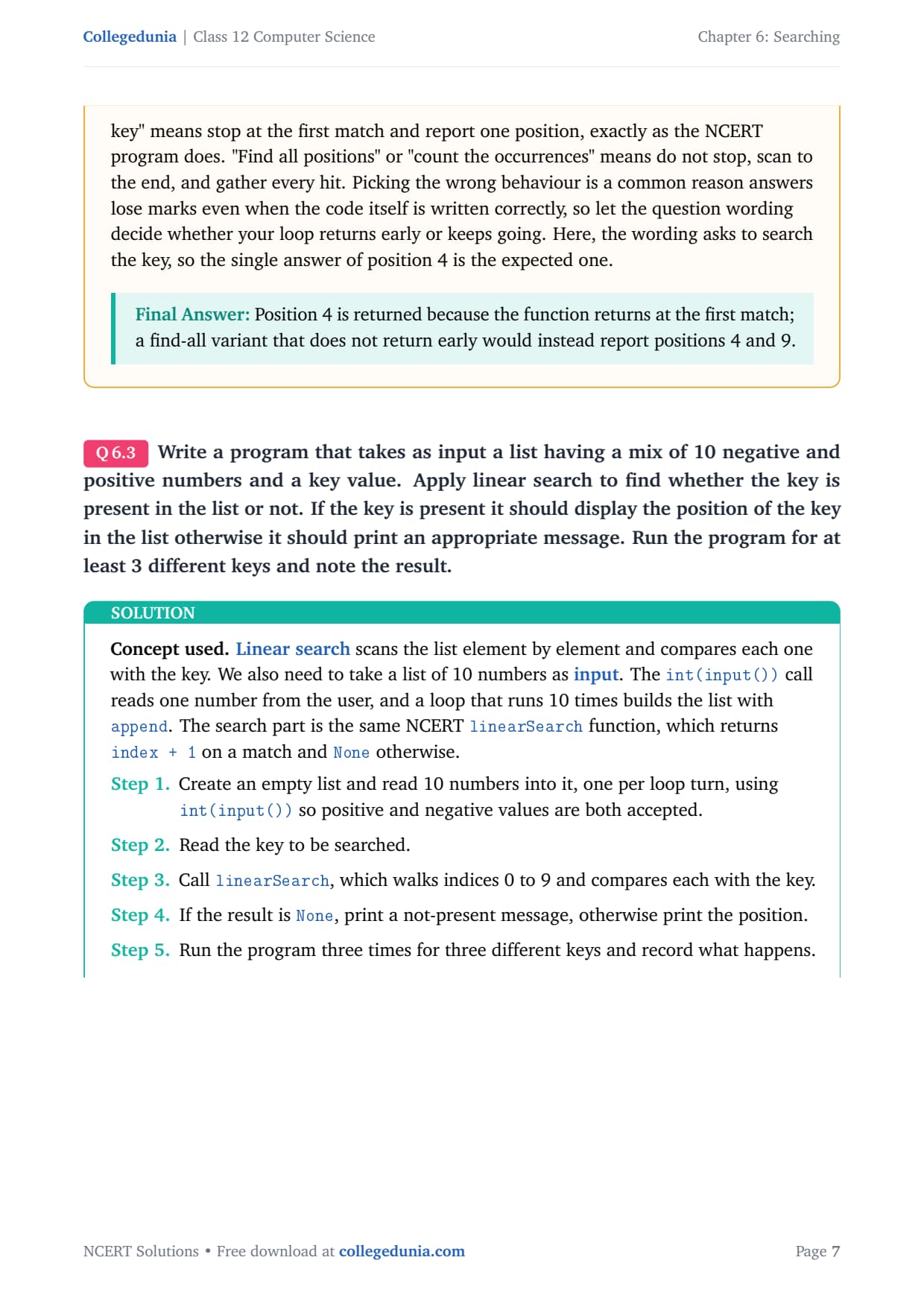
Linear search scans the list element by element and compares each with the key. We first read 10 numbers with int(input()), which accepts both positive and negative values, then run the NCERT linearSearch function, which returns index + 1 on a match and None otherwise.
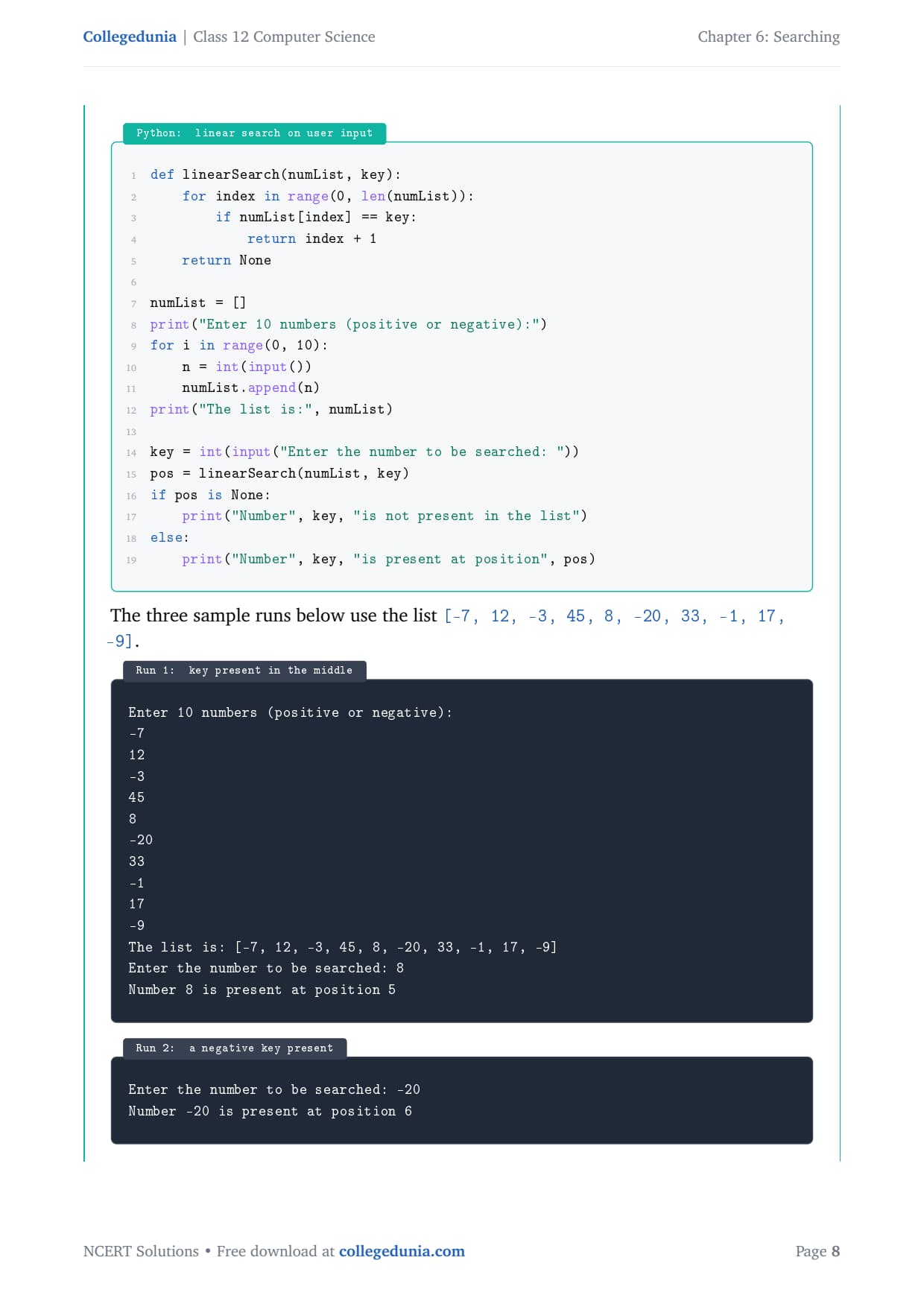
def linearSearch(numList, key):
    for index in range(0, len(numList)):
        if numList[index] == key:
            return index + 1
    return None

numList = []
print("Enter 10 numbers (positive or negative):")
for i in range(0, 10):
    n = int(input())
    numList.append(n)
print("The list is:", numList)

key = int(input("Enter the number to be searched: "))
pos = linearSearch(numList, key)
if pos is None:
    print("Number", key, "is not present in the list")
else:
    print("Number", key, "is present at position", pos)
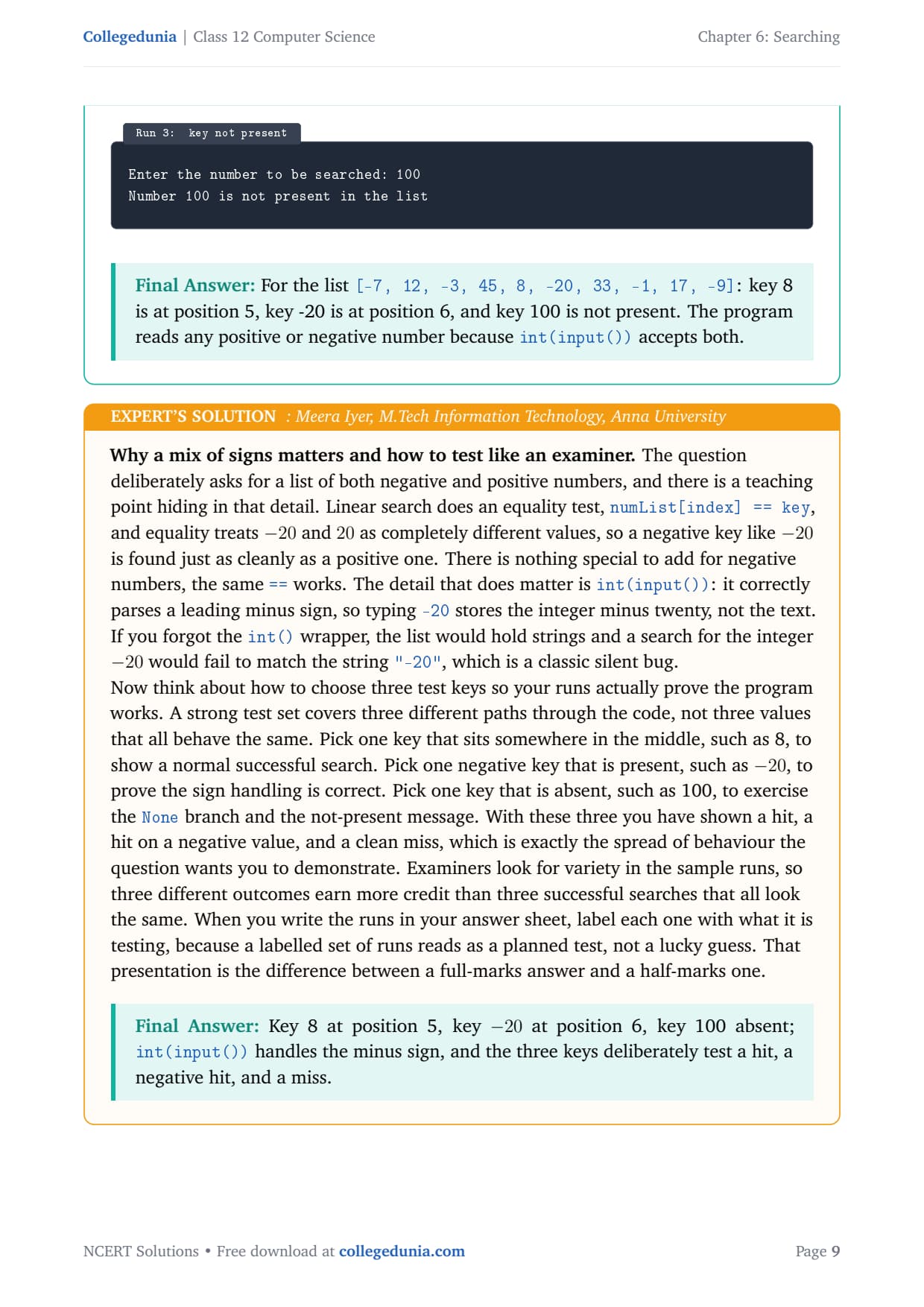
The three sample runs below use the list [-7, 12, -3, 45, 8, -20, 33, -1, 17, -9].
Run 1 (key in the middle):
Enter the number to be searched: 8
Number 8 is present at position 5

Run 2 (a negative key present):
Enter the number to be searched: -20
Number -20 is present at position 6

Run 3 (key not present):
Enter the number to be searched: 100
Number 100 is not present in the list
Answer: For the list [-7, 12, -3, 45, 8, -20, 33, -1, 17, -9]: key 8 is at position 5, key -20 is at position 6, and key 100 is not present. The program reads any positive or negative number because int(input()) accepts both.
MI
Meera Iyer
M.Tech Information Technology, Anna University
Verified Expert
The question deliberately asks for a mix of negative and positive numbers. Linear search uses an equality test, numList[index] == key, and equality treats -20 and 20 as completely different values, so a negative key is found just as cleanly as a positive one. There is nothing special to add for negatives.
The detail that matters is int(input()): it correctly parses a leading minus sign, so typing -20 stores the integer, not the text "-20". Drop the int() and the list holds strings, so a search for the integer -20 fails silently.
Choose three test keys that cover different code paths: one in the middle (8) for a normal hit, one negative present (-20) to prove sign handling, and one absent (100) to exercise the None branch.
Label each run with what it tests, because a labelled set reads as a planned test, not a lucky guess.
Examiners look for variety in the sample runs, so three different outcomes earn more credit than three successful searches that all look the same.
Answer: Key 8 at position 5, key -20 at position 6, key 100 absent; int(input()) handles the minus sign, and the three keys deliberately test a hit, a negative hit, and a miss.
Q 4
Write a program that takes as input a list of 10 integers and a key value and applies binary search to find whether the key is present. If present, display the position, otherwise print an appropriate message. Run the program for at least 3 different key values and note the results.
Binary search works only on a sorted list. It keeps first, last and mid = (first + last) // 2, and compares the middle element with the key. If the middle is smaller, search the right half; if larger, the left half. The search area halves each step and ends when the key is found or when first > last.
def binarySearch(numList, key):
    first = 0
    last = len(numList) - 1
    while first <= last:
        mid = (first + last) // 2
        if numList[mid] == key:
            return mid + 1            # 1-based position
        elif numList[mid] < key:
            first = mid + 1           # search the right half
        else:
            last = mid - 1            # search the left half
    return None                       # key not found

numList = [3, 8, 15, 21, 34, 40, 56, 67, 78, 90]   # must be sorted
print("The sorted list is:", numList)
key = int(input("Enter the key to be searched: "))
pos = binarySearch(numList, key)
if pos is None:
    print(key, "is not present in the list")
else:
    print(key, "is present at position", pos)
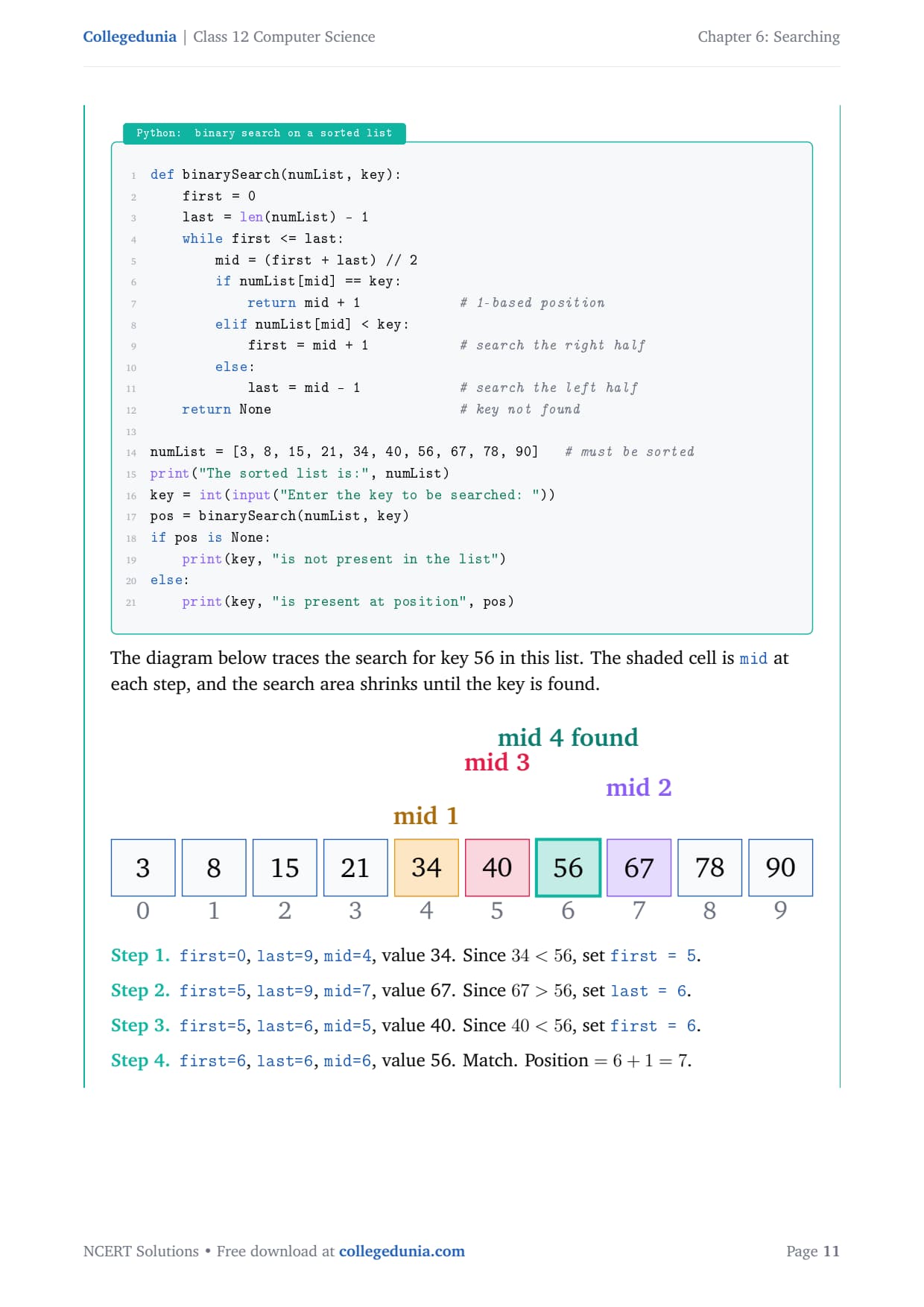
The trace below searches for key 56 in this list, showing first, mid and last each step.
Iteration
first
last
mid
numList[mid]
Decision
1
0
9
4
34
34 < 56, set first = 5
2
5
9
7
67
67 > 56, set last = 6
3
5
6
5
40
40 < 56, set first = 6
4
6
6
6
56
match, position 7
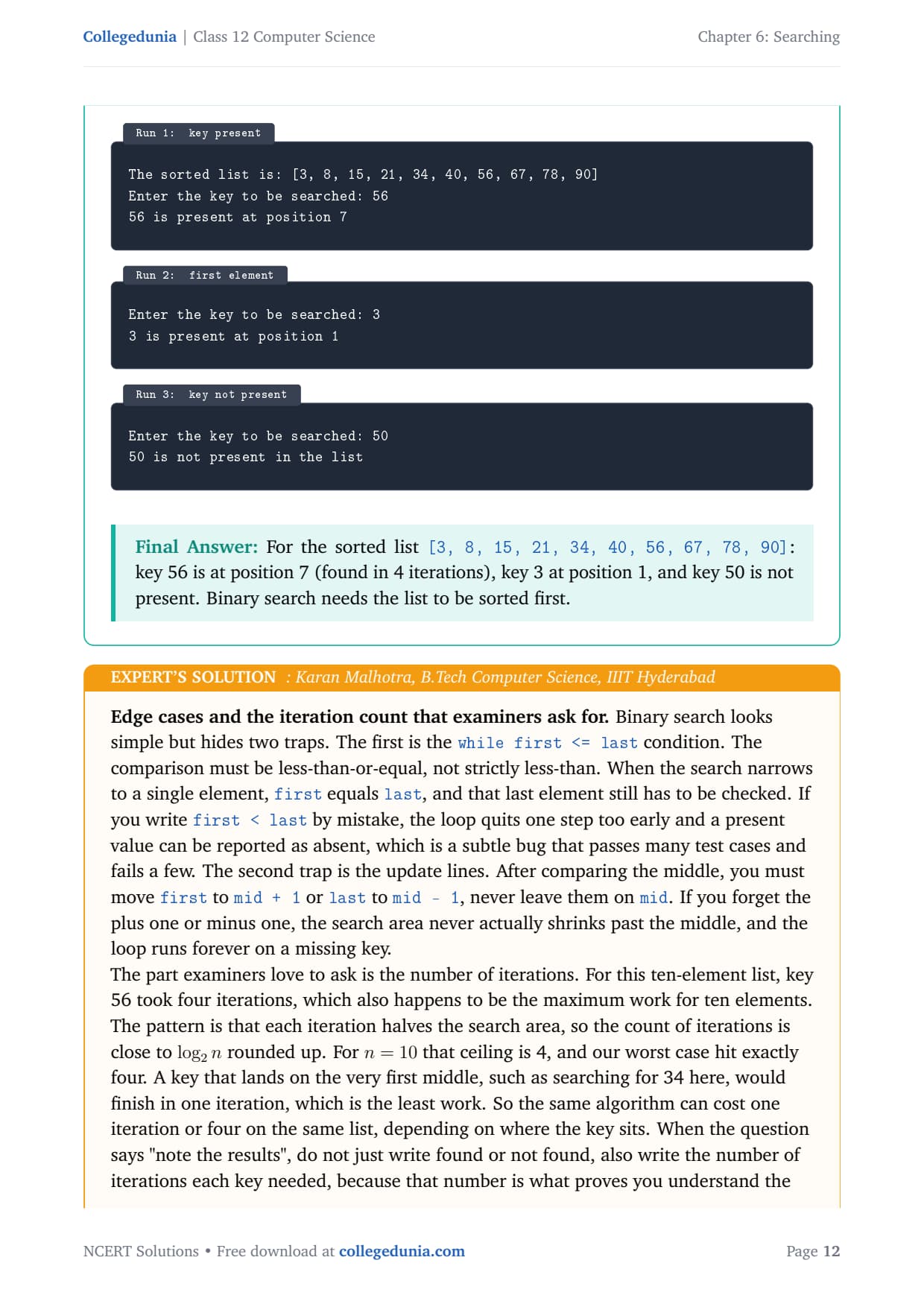
Run 1 (key present):
Enter the key to be searched: 56
56 is present at position 7

Run 2 (first element):
Enter the key to be searched: 3
3 is present at position 1

Run 3 (key not present):
Enter the key to be searched: 50
50 is not present in the list
Answer: For the sorted list [3, 8, 15, 21, 34, 40, 56, 67, 78, 90]: key 56 is at position 7 (found in 4 iterations), key 3 at position 1, and key 50 is not present. Binary search needs the list sorted first.
KM
Karan Malhotra
B.Tech Computer Science, IIIT Hyderabad
Verified Expert
Binary search hides two traps. The first is the while first <= last condition. It must be less-than-or-equal, not strictly less-than. When the search narrows to a single element, first equals last, and that last element still has to be checked. Write first < last and the loop quits one step too early, so a present value can be reported as absent.
The second trap is the update lines. After comparing the middle, move first to mid + 1 or last to mid - 1, never leave them on mid, or the loop runs forever on a missing key.
For ten elements, key 56 took four iterations, which is the maximum work, because the iteration count is close to the ceiling of log₂ n, and for n = 10 that is 4.
A key that lands on the first middle (such as 34) finishes in one iteration, the least work, so the same algorithm can cost one or four on the same list.
When the question says "note the results", also write the number of iterations each key needed, because that number proves you understand the halving. Show first, mid, last as a small table for every iteration.
Answer: Key 56 at position 7 in 4 iterations, key 3 at position 1, key 50 absent; use first <= last and always shift to mid + 1 or mid - 1; iterations are about the ceiling of log₂ n.
Q 5
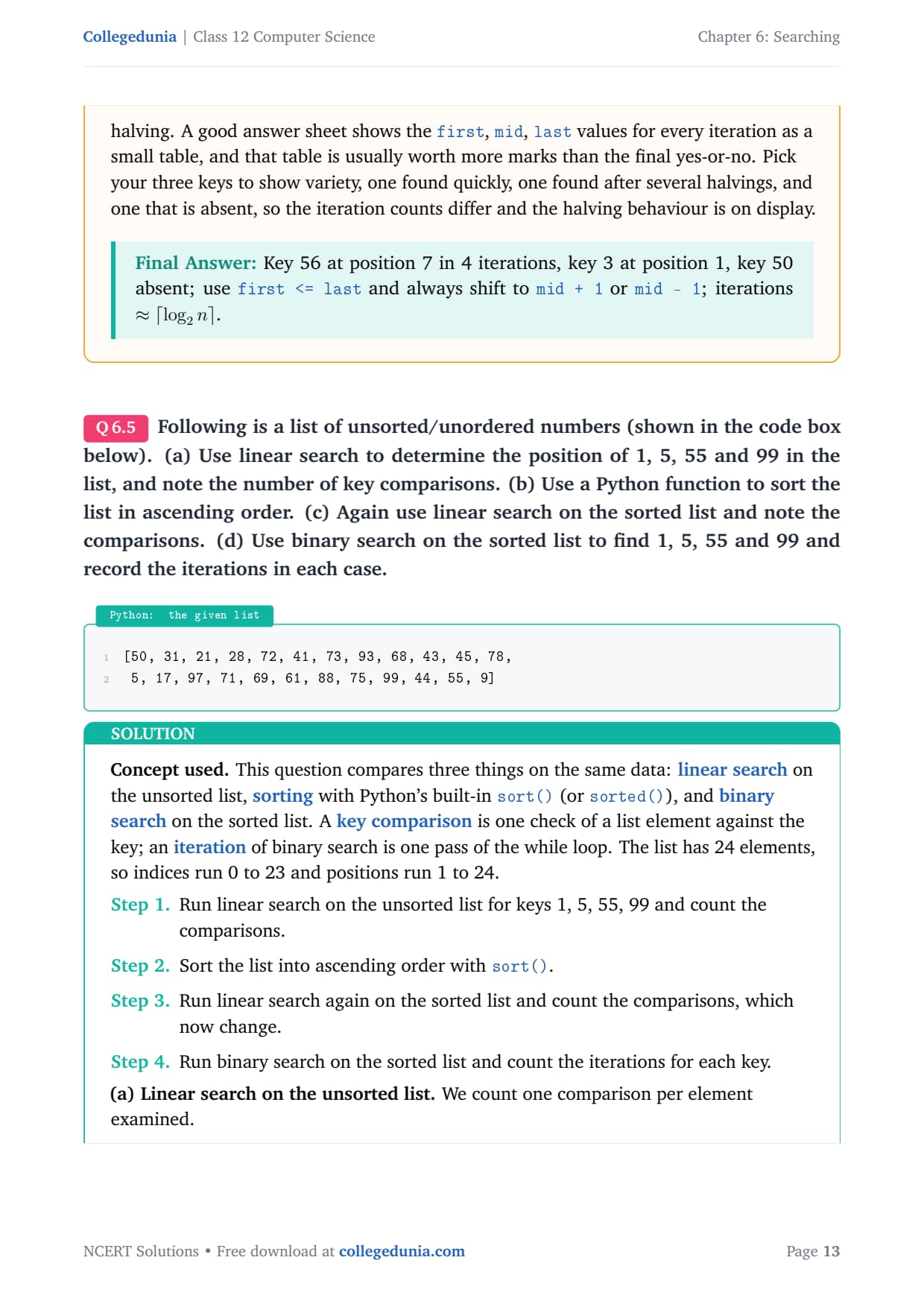
For the unsorted list [50, 31, 21, 28, 72, 41, 73, 93, 68, 43, 45, 78, 5, 17, 97, 71, 69, 61, 88, 75, 99, 44, 55, 9]: (a) use linear search for 1, 5, 55, 99 and note the key comparisons; (b) sort the list ascending; (c) run linear search again on the sorted list and note the comparisons; (d) use binary search on the sorted list and record the iterations.
This question compares three things on the same data: linear search on the unsorted list, sorting with sort(), and binary search on the sorted list. A key comparison is one check of a list element against the key; an iteration of binary search is one pass of the while loop. The list has 24 elements, so indices run 0 to 23 and positions 1 to 24.
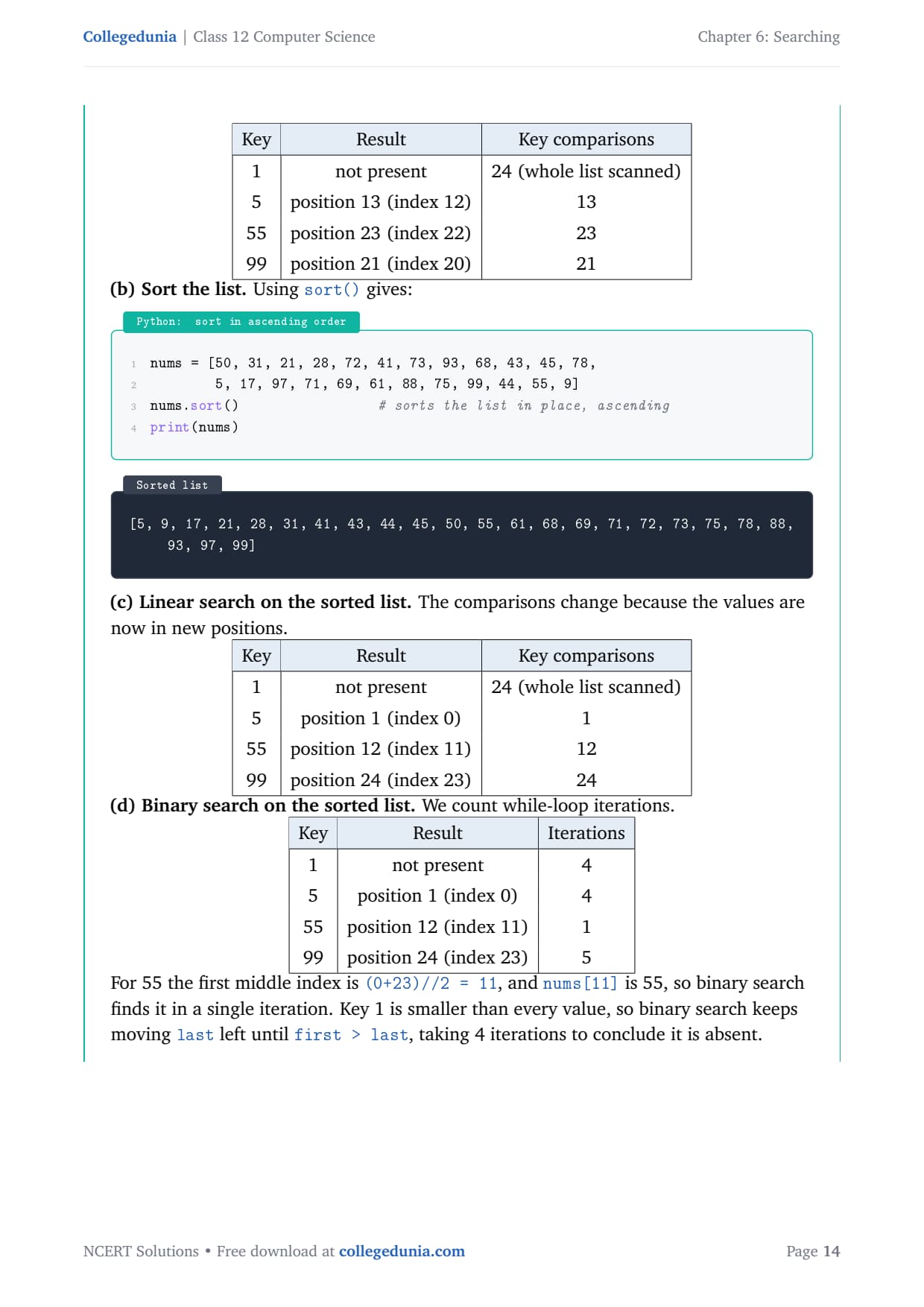
(a) Linear search on the unsorted list (one comparison per element examined):
(c) Linear search on the sorted list (the comparisons change because values moved):
Key
Result
Key comparisons
1
not present
24 (whole list scanned)
5
position 1 (index 0)
1
55
position 12 (index 11)
12
99
position 24 (index 23)
24
(d) Binary search on the sorted list (count while-loop iterations):
Key
Result
Iterations
1
not present
4
5
position 1 (index 0)
4
55
position 12 (index 11)
1
99
position 24 (index 23)
5
For 55 the first middle index is (0+23)//2 = 11, and the value there is 55, so binary search finds it in a single iteration. Key 1 is smaller than every value, so the loop keeps moving last left for 4 iterations before first > last.
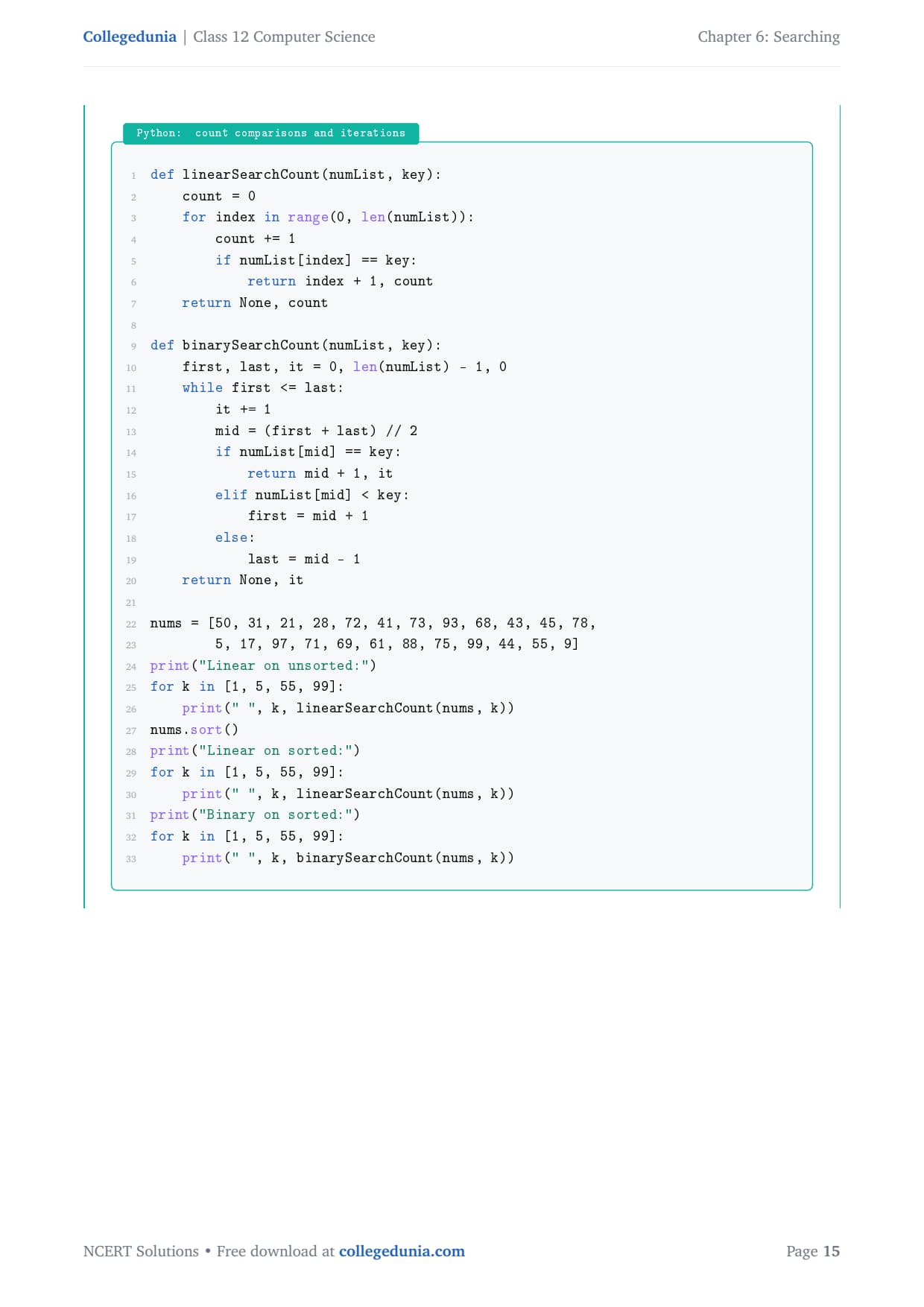
def linearSearchCount(numList, key):
    count = 0
    for index in range(0, len(numList)):
        count += 1
        if numList[index] == key:
            return index + 1, count
    return None, count

def binarySearchCount(numList, key):
    first, last, it = 0, len(numList) - 1, 0
    while first <= last:
        it += 1
        mid = (first + last) // 2
        if numList[mid] == key:
            return mid + 1, it
        elif numList[mid] < key:
            first = mid + 1
        else:
            last = mid - 1
    return None, it
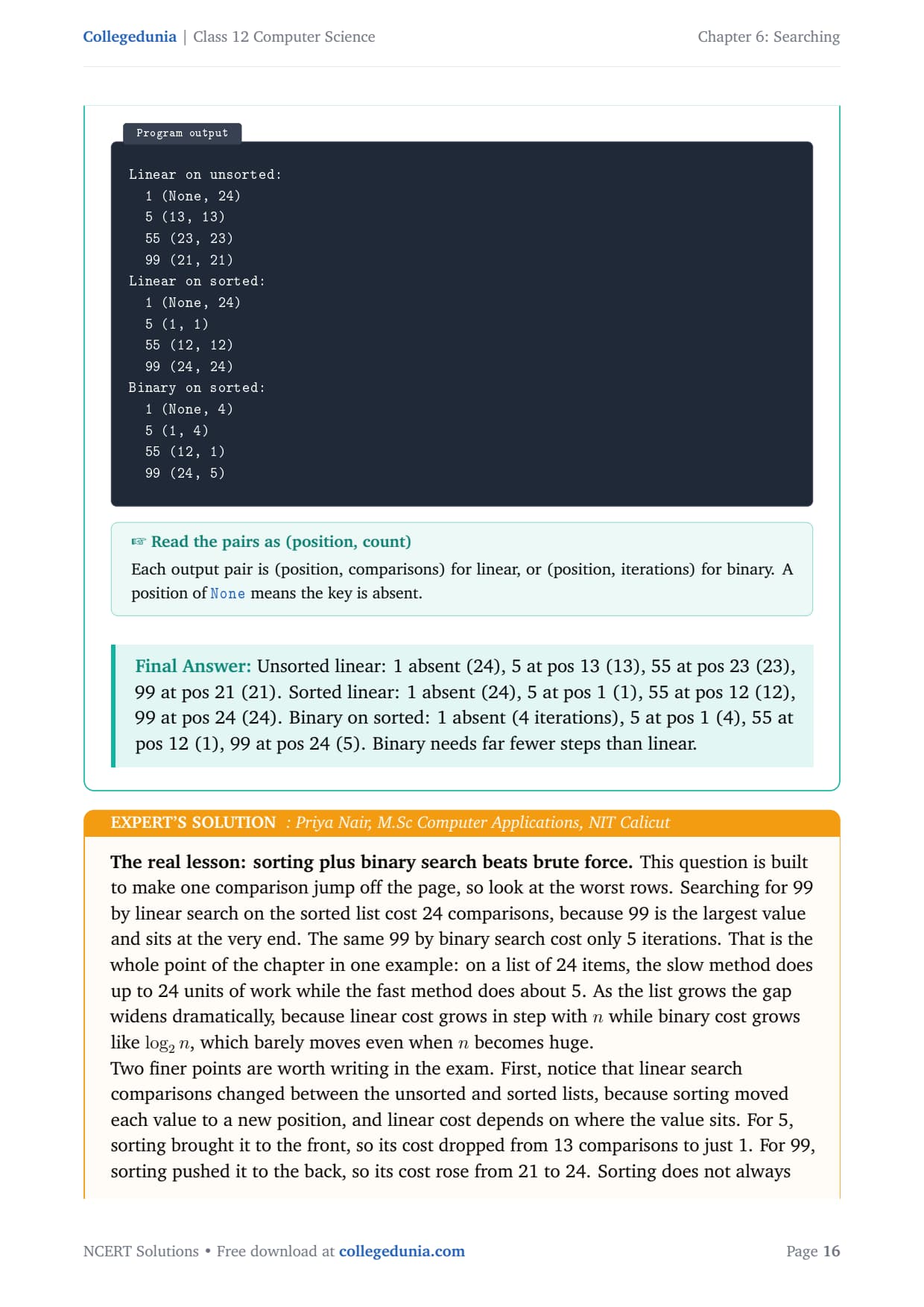
Answer: Unsorted linear: 1 absent (24), 5 at pos 13 (13), 55 at pos 23 (23), 99 at pos 21 (21). Sorted linear: 1 absent (24), 5 at pos 1 (1), 55 at pos 12 (12), 99 at pos 24 (24). Binary on sorted: 1 absent (4), 5 at pos 1 (4), 55 at pos 12 (1), 99 at pos 24 (5). Binary needs far fewer steps than linear.
PN
Priya Nair
M.Sc Computer Applications, NIT Calicut
Verified Expert
Look at the worst rows. Searching for 99 by linear search on the sorted list cost 24 comparisons, because 99 is the largest value and sits at the very end. The same 99 by binary search cost only 5 iterations. That is the whole chapter in one example: on 24 items, the slow method does up to 24 units of work while the fast method does about 5.
Linear search comparisons changed between the unsorted and sorted lists, because sorting moved each value. For 5, sorting brought it to the front, so its cost dropped from 13 to 1. For 99, sorting pushed it to the back, so its cost rose from 21 to 24.
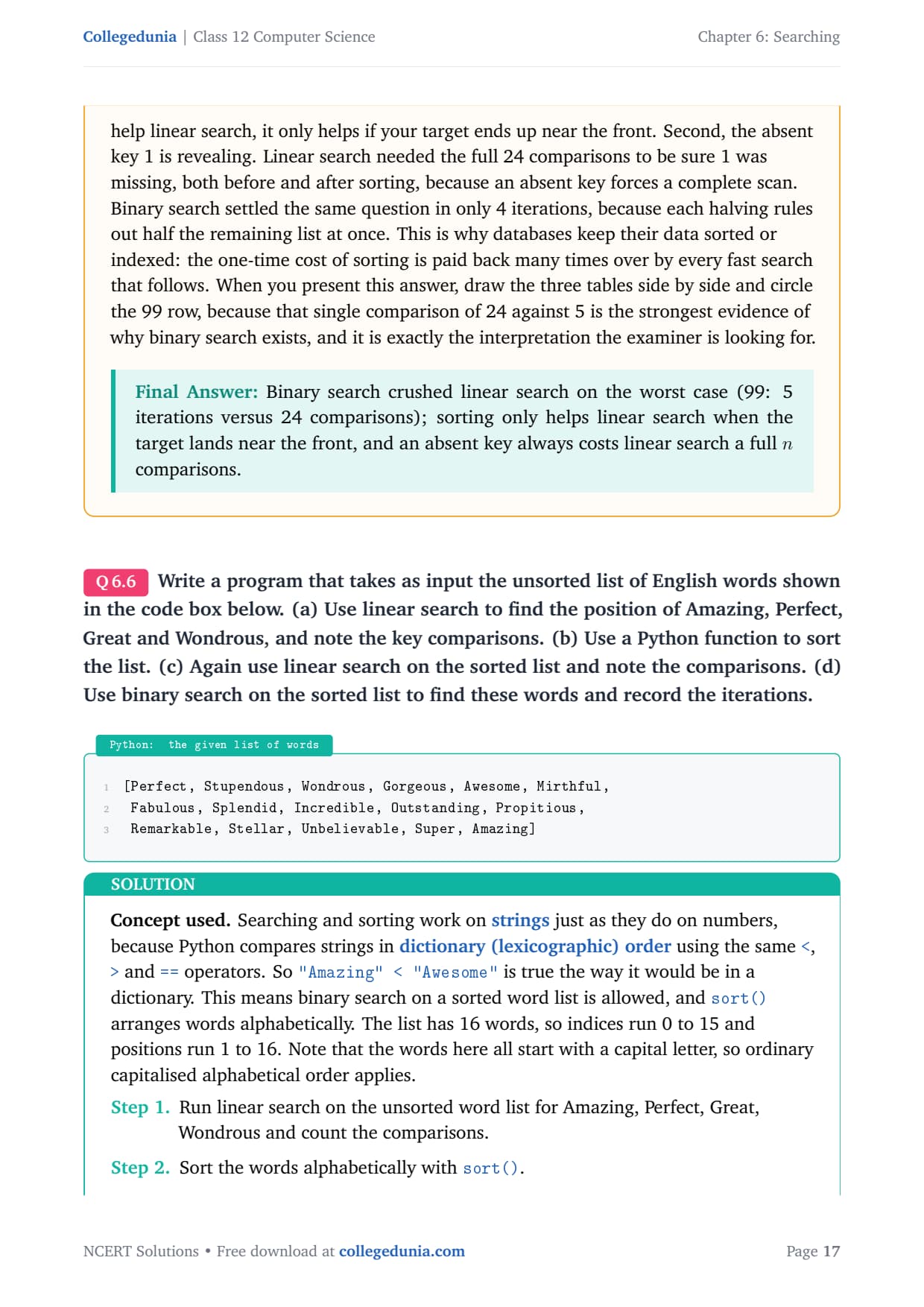
Sorting does not always help linear search; it only helps if your target ends up near the front.
The absent key 1 needed the full 24 comparisons by linear search both times, because an absent key forces a complete scan, while binary search settled it in just 4 iterations.
This is why databases keep data sorted or indexed: the one-time cost of sorting is paid back by every fast search that follows. Draw the three tables side by side and circle the 99 row, because 24 against 5 is the strongest evidence for why binary search exists.
Answer: Binary search crushed linear search on the worst case (99: 5 iterations versus 24 comparisons); sorting only helps linear search when the target lands near the front, and an absent key always costs linear search a full n comparisons.
Q 6
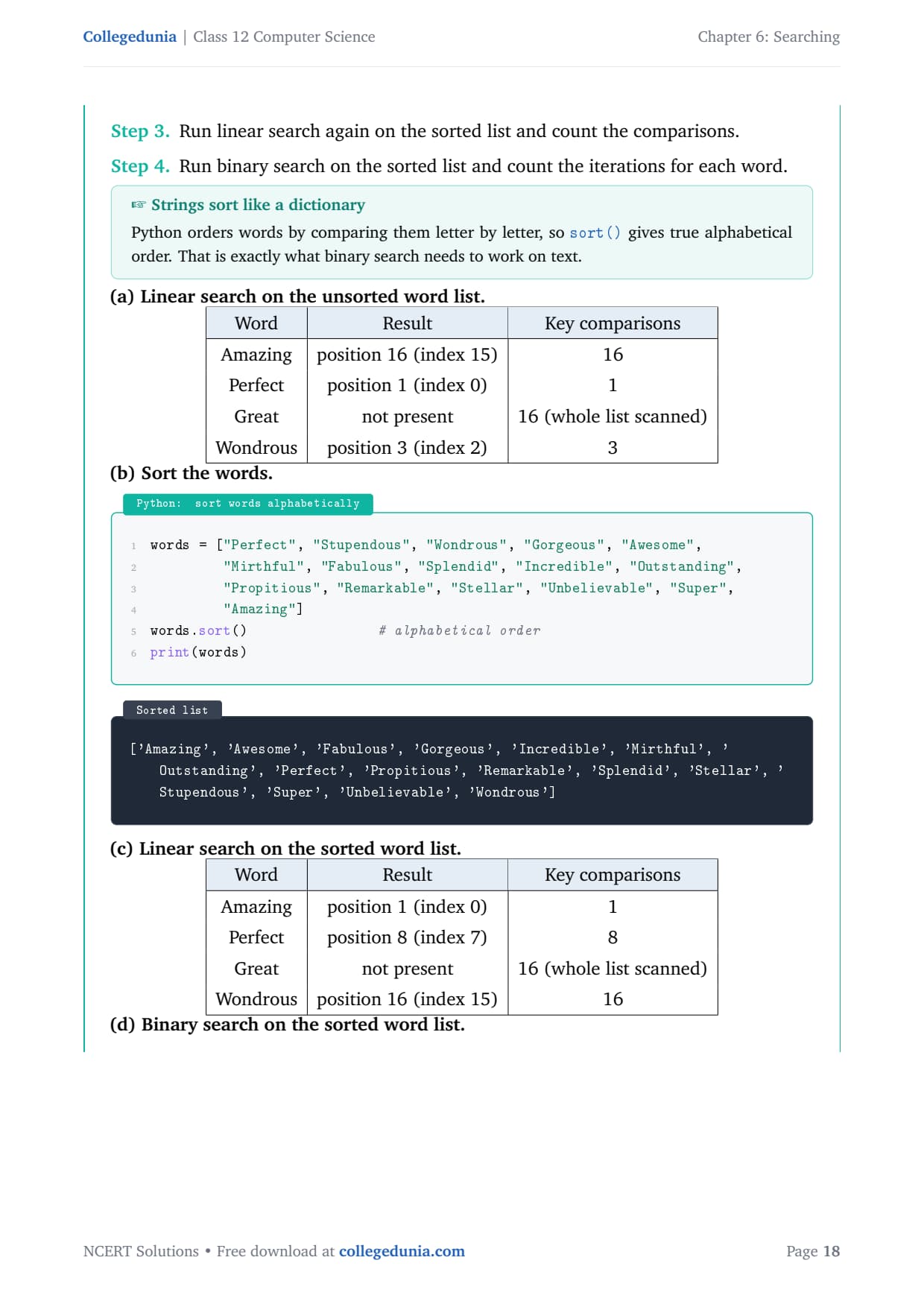
For the unsorted list of words [Perfect, Stupendous, Wondrous, Gorgeous, Awesome, Mirthful, Fabulous, Splendid, Incredible, Outstanding, Propitious, Remarkable, Stellar, Unbelievable, Super, Amazing]: (a) use linear search for Amazing, Perfect, Great, Wondrous and note the comparisons; (b) sort the list; (c) run linear search again on the sorted list; (d) use binary search on the sorted list and record the iterations.
Searching and sorting work on strings just as on numbers, because Python compares words in dictionary (lexicographic) order using <, > and ==. So sort() arranges words alphabetically, which binary search needs. The list has 16 words, so indices run 0 to 15 and positions 1 to 16.
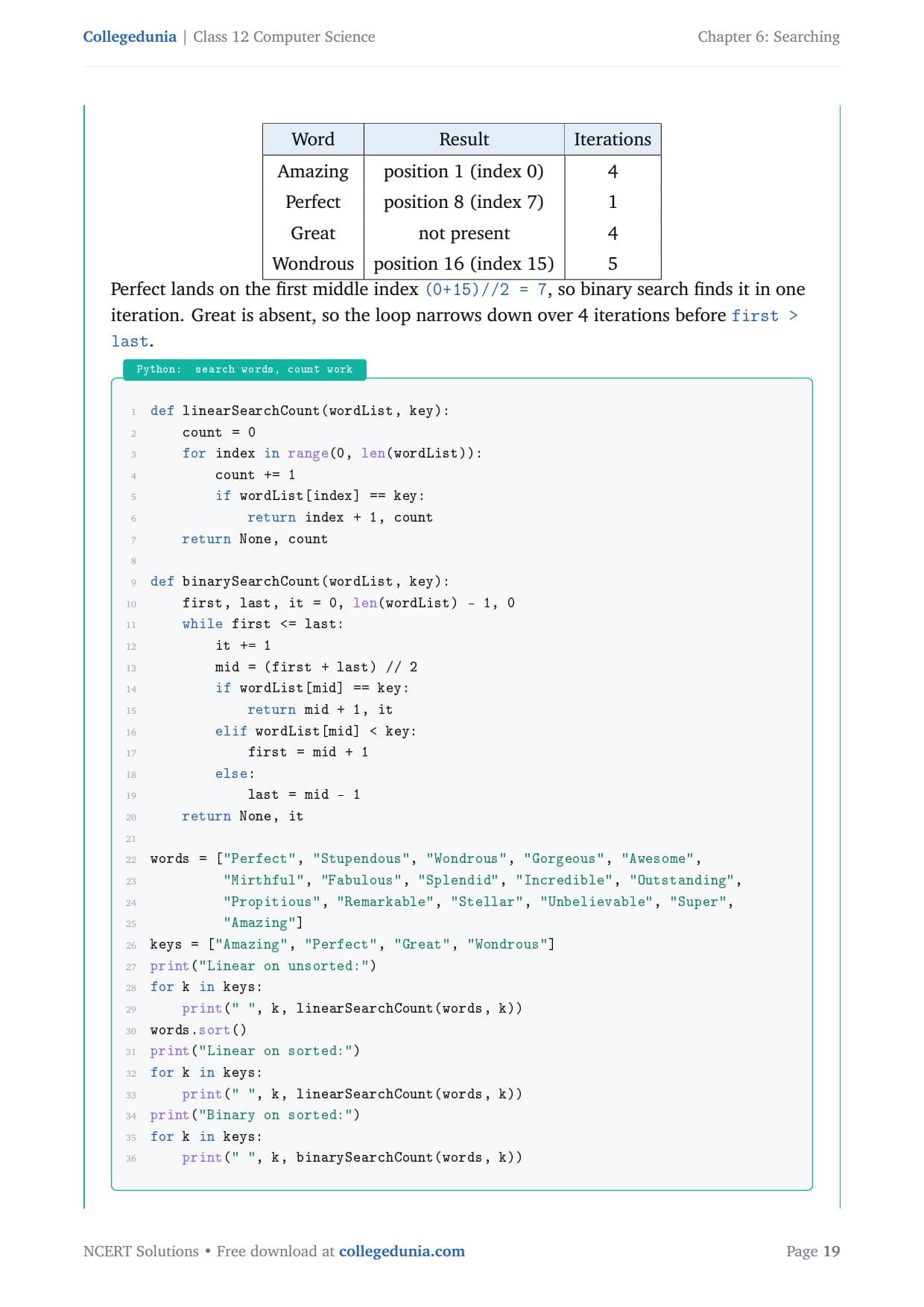
Perfect lands on the first middle index (0+15)//2 = 7, so binary search finds it in one iteration. Great is absent, so the loop narrows over 4 iterations before first > last.
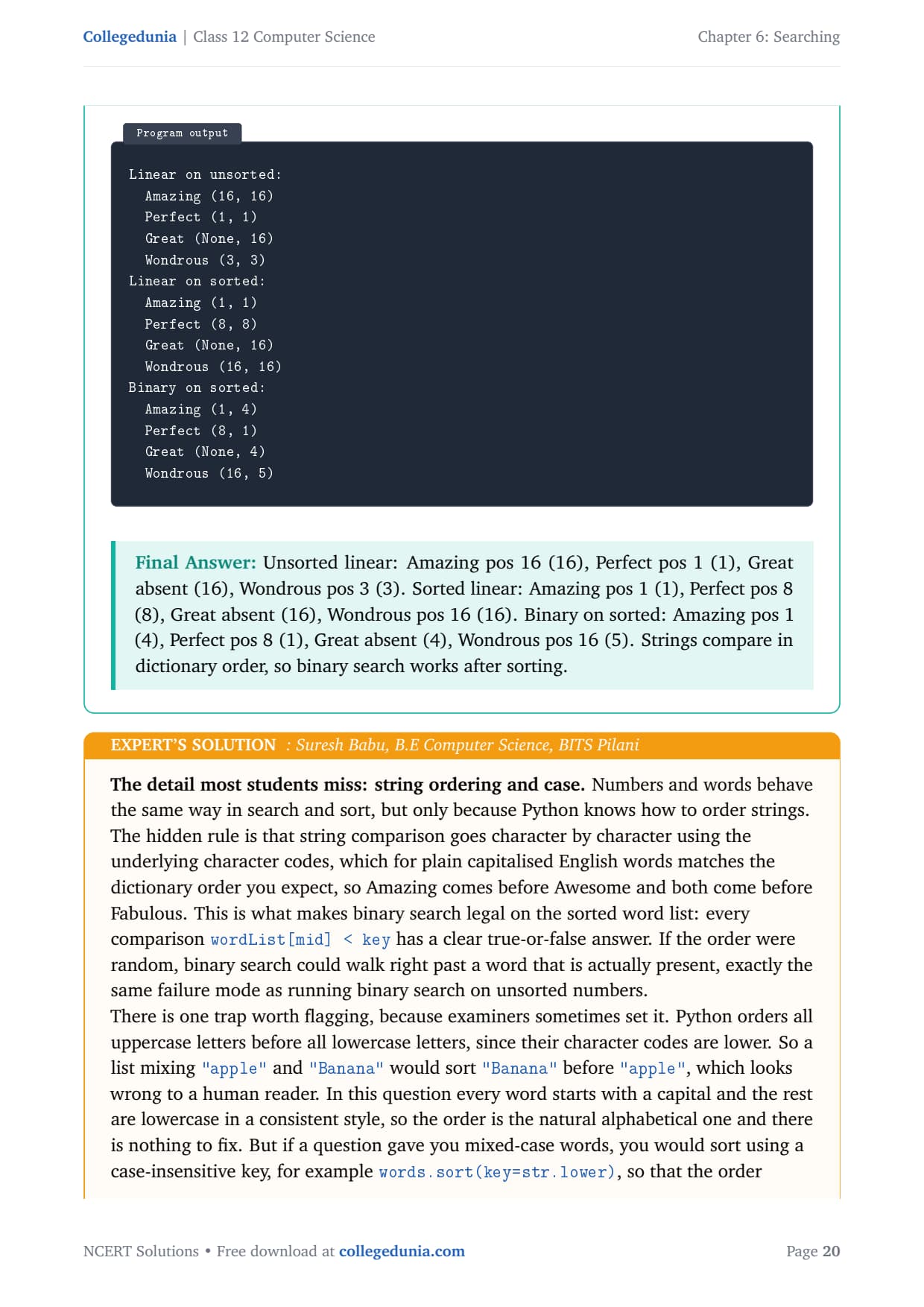
Answer: Unsorted linear: Amazing pos 16 (16), Perfect pos 1 (1), Great absent (16), Wondrous pos 3 (3). Sorted linear: Amazing pos 1 (1), Perfect pos 8 (8), Great absent (16), Wondrous pos 16 (16). Binary on sorted: Amazing pos 1 (4), Perfect pos 8 (1), Great absent (4), Wondrous pos 16 (5). Strings compare in dictionary order, so binary search works after sorting.
SB
Suresh Babu
B.E Computer Science, BITS Pilani
Verified Expert
Numbers and words behave the same way in search and sort, but only because Python knows how to order strings. String comparison goes character by character using the underlying character codes, which for plain capitalised English words matches dictionary order, so Amazing comes before Awesome. This is what makes binary search legal on the sorted word list.
One trap: Python orders all uppercase letters before all lowercase letters, since their codes are lower. So "Banana" would sort before "apple", which looks wrong to a human reader.
Every word here starts with a capital and the rest are lowercase in a consistent style, so the order is natural and there is nothing to fix.
For mixed-case words, sort with words.sort(key=str.lower) so the order matches a real dictionary before binary searching.
The numbers tell the same story as the previous question: Wondrous by linear search cost 16 comparisons because it ends up last, while binary search found it in 5 iterations. Sorting once and then using binary search pays off for words just as clearly as for numbers.
Answer: Same pattern as numbers (binary search beats linear on the sorted list), with one extra rule: strings compare in character-code order, so capitals sort before lowercase; use key=str.lower if a list mixes cases.
Q 7
Estimate the number of key comparisons required in binary search and linear search if we need to find the details of a person in a sorted database having 2⁷⁰ (1,073,741,824) records, when the person being searched lies at the middle position. What do you interpret from your findings?
The number of key comparisons measures the work a search does. Linear search work depends on where the key sits, because it scans from the start. Binary search on a sorted list always checks the middle first. The total is N = 2⁷⁰ = 1,073,741,824, and the person is at the middle position.
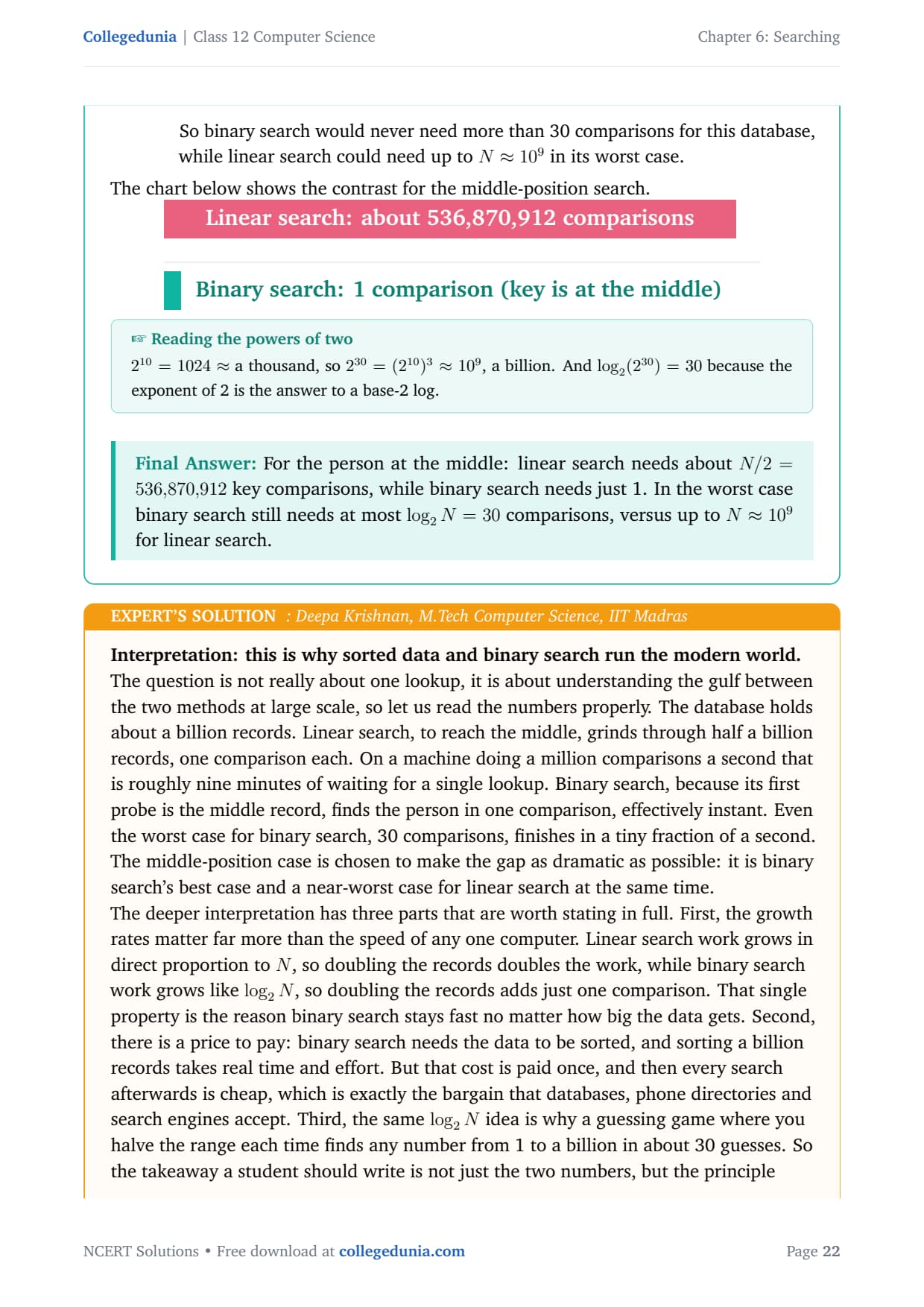
Linear search. To reach the middle record it must pass through every record before it. The middle is at about N / 2, so it needs roughly 1,073,741,824 ÷ 2 = 536,870,912 key comparisons, over half a billion.
Binary search. Its first comparison is with the middle record. Since the person is at the middle, it finds the match on the first try: 1 comparison.
Worst case for binary search. Even if the person were elsewhere, binary search would need at most log₂ N = log₂(2⁷⁰) = 30 comparisons, because each comparison halves the search area.
So binary search would never need more than 30 comparisons for this database, while linear search could need up to N (about 10⁹) in its worst case.
Answer: For the person at the middle: linear search needs about N/2 = 536,870,912 key comparisons, while binary search needs just 1. In the worst case binary search still needs at most log₂ N = 30 comparisons, versus up to N (about a billion) for linear search.
DK
Deepa Krishnan
M.Tech Computer Science, IIT Madras
Verified Expert
This question is about the gulf between the two methods at scale. The database holds about a billion records. Linear search, to reach the middle, grinds through half a billion records. On a machine doing a million comparisons a second that is roughly nine minutes for a single lookup. Binary search finds the person in one comparison, effectively instant.
Growth rates matter more than the speed of any one computer. Linear work grows in direct proportion to N, so doubling the records doubles the work, while binary work grows like log₂ N, so doubling the records adds just one comparison.
There is a price: binary search needs sorted data, and sorting a billion records takes real effort. But that cost is paid once, and every search afterwards is cheap.
The same idea is why a halving guessing game finds any number from 1 to a billion in about 30 guesses.
The middle-position case is chosen to make the gap as dramatic as possible: it is binary search's best case and a near-worst case for linear search at the same time. Write not just the two numbers, but the principle: keeping data ordered turns a search that scales with the size of the data into one that scales with how many times you can halve it.
Answer: Linear search about 5.37 × 10⁸ comparisons, binary search 1 (best case) and at most 30 (worst case). Interpretation: linear cost grows with N, binary cost grows with log₂ N, so keeping data sorted makes searching huge databases practical.
Q 8
Use the hash function h(element) = element % 11 to store the numbers [44, 121, 55, 33, 110, 77, 22, 66] in a hash table. Display the hash table created. Search if the values 11, 44, 88 and 121 are present in the hash table, and display the search results.
Hashing stores a value at a slot decided by a hash function. With h(element) = element % 11, the table has 11 slots, indices 0 to 10. To search, compute the key's hash index and check only that one slot. A collision happens when two different values produce the same index.
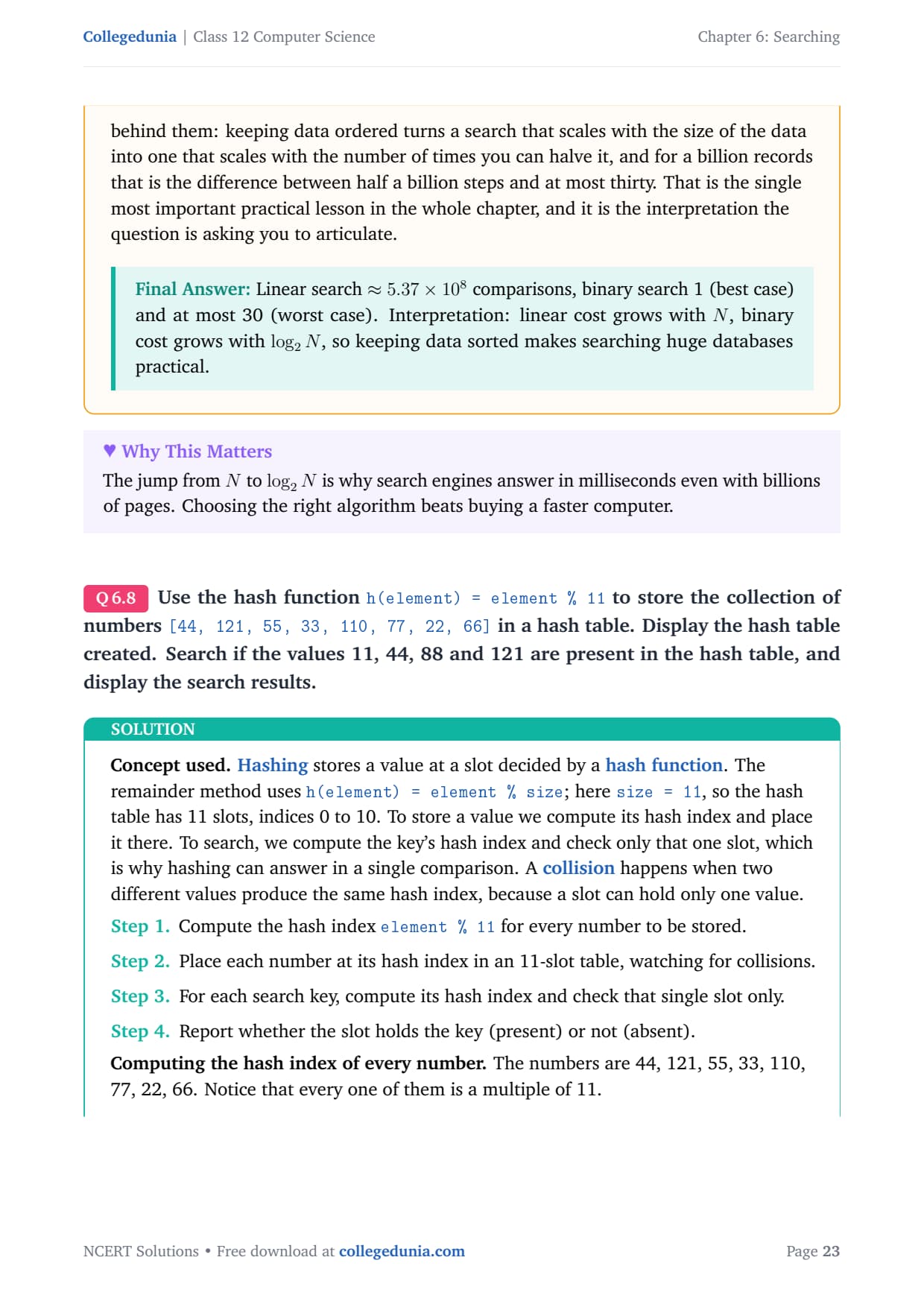
Computing the hash index of every number:
Element
Computation
Hash index
44
44 % 11
0
121
121 % 11
0
55
55 % 11
0
33
33 % 11
0
110
110 % 11
0
77
77 % 11
0
22
22 % 11
0
66
66 % 11
0
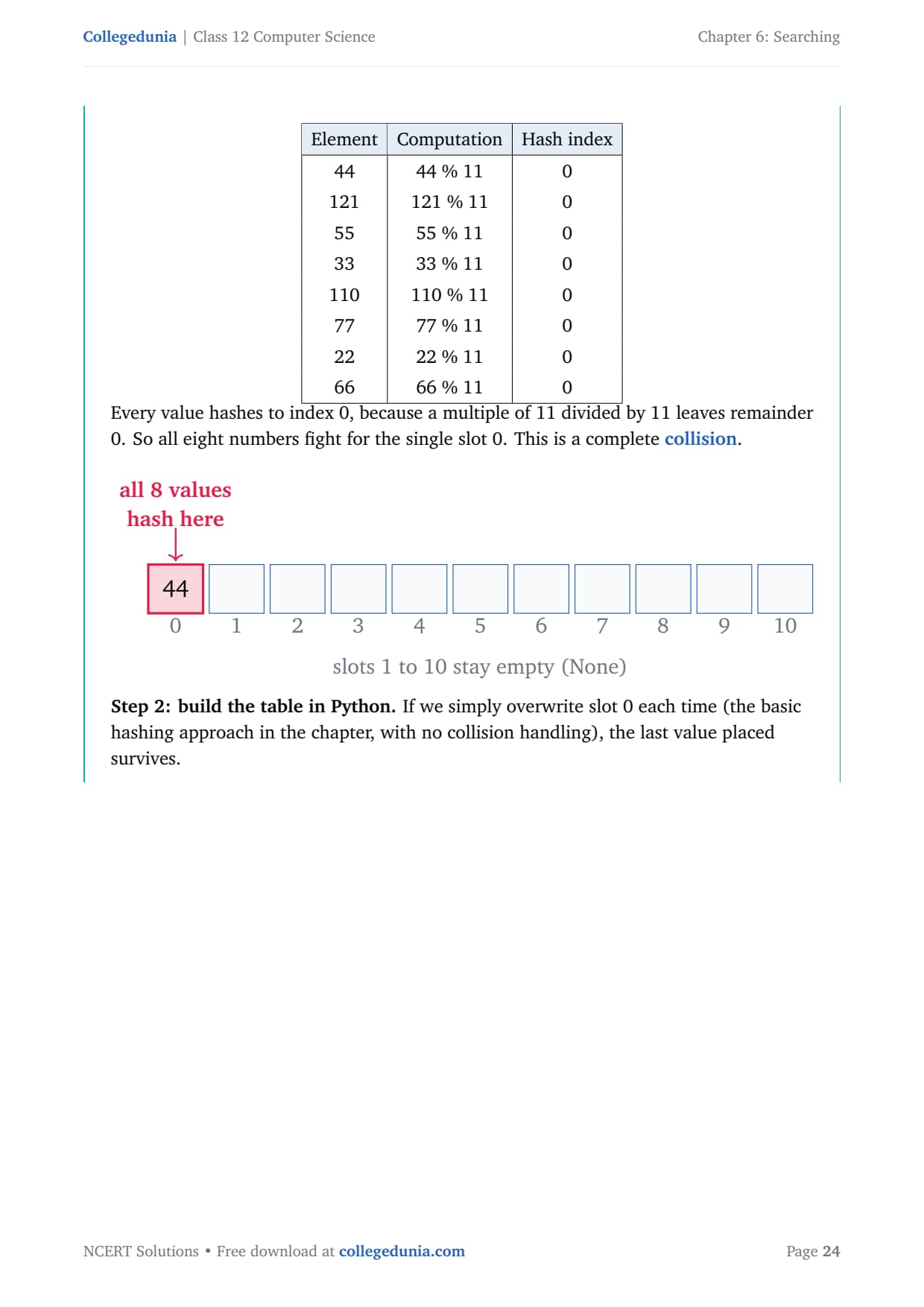
Every value is a multiple of 11, so each leaves remainder 0 and all eight fight for slot 0. This is a complete collision. With basic overwriting, the last value placed (66) survives.
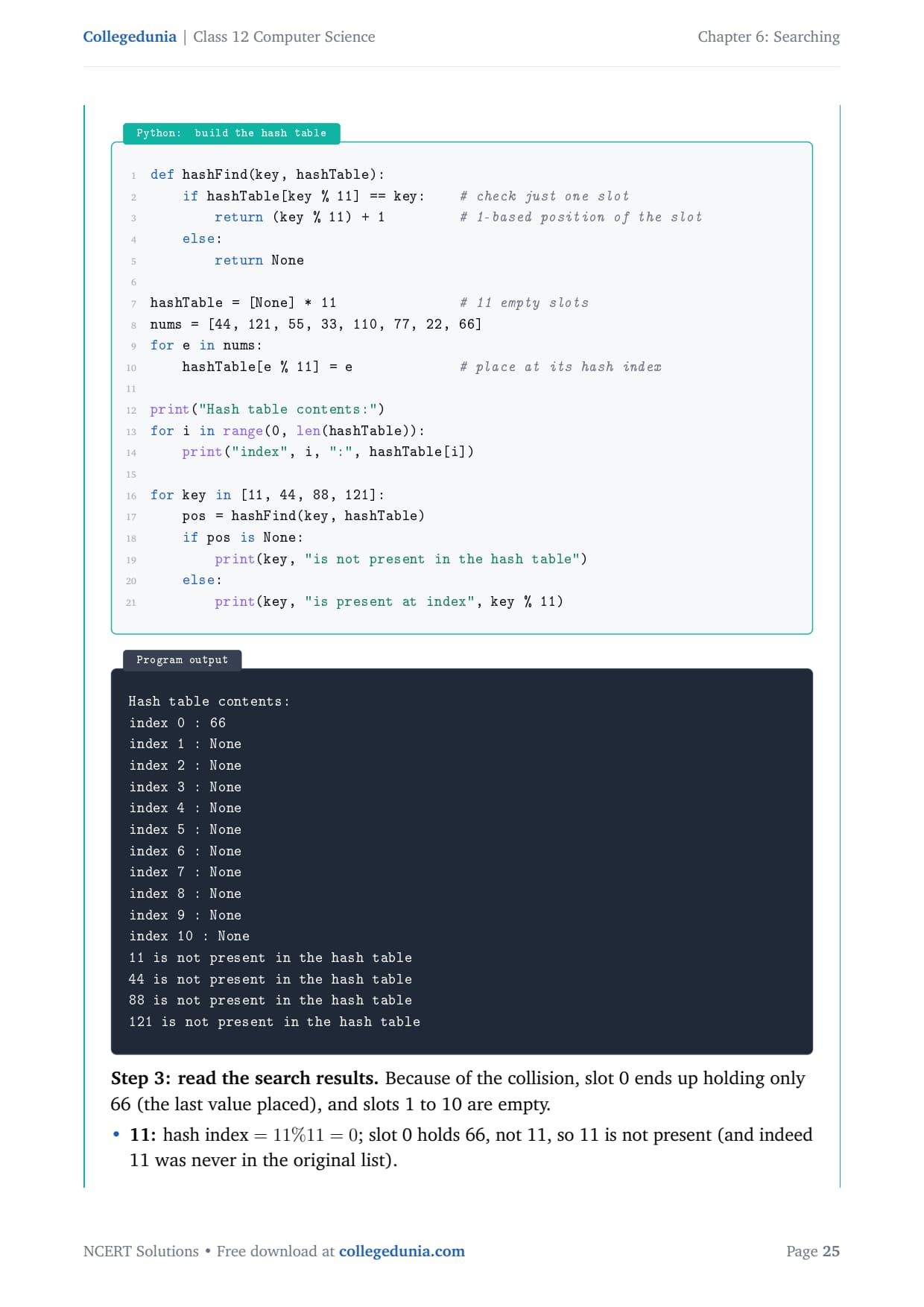
def hashFind(key, hashTable):
    if hashTable[key % 11] == key:    # check just one slot
        return (key % 11) + 1
    else:
        return None

hashTable = [None] * 11               # 11 empty slots
nums = [44, 121, 55, 33, 110, 77, 22, 66]
for e in nums:
    hashTable[e % 11] = e             # place at its hash index

print("Hash table contents:")
for i in range(0, len(hashTable)):
    print("index", i, ":", hashTable[i])

for key in [11, 44, 88, 121]:
    pos = hashFind(key, hashTable)
    if pos is None:
        print(key, "is not present in the hash table")
    else:
        print(key, "is present at index", key % 11)
Hash table contents:
index 0 : 66
index 1 : None
index 2 : None
index 3 : None
index 4 : None
index 5 : None
index 6 : None
index 7 : None
index 8 : None
index 9 : None
index 10 : None
11 is not present in the hash table
44 is not present in the hash table
88 is not present in the hash table
121 is not present in the hash table
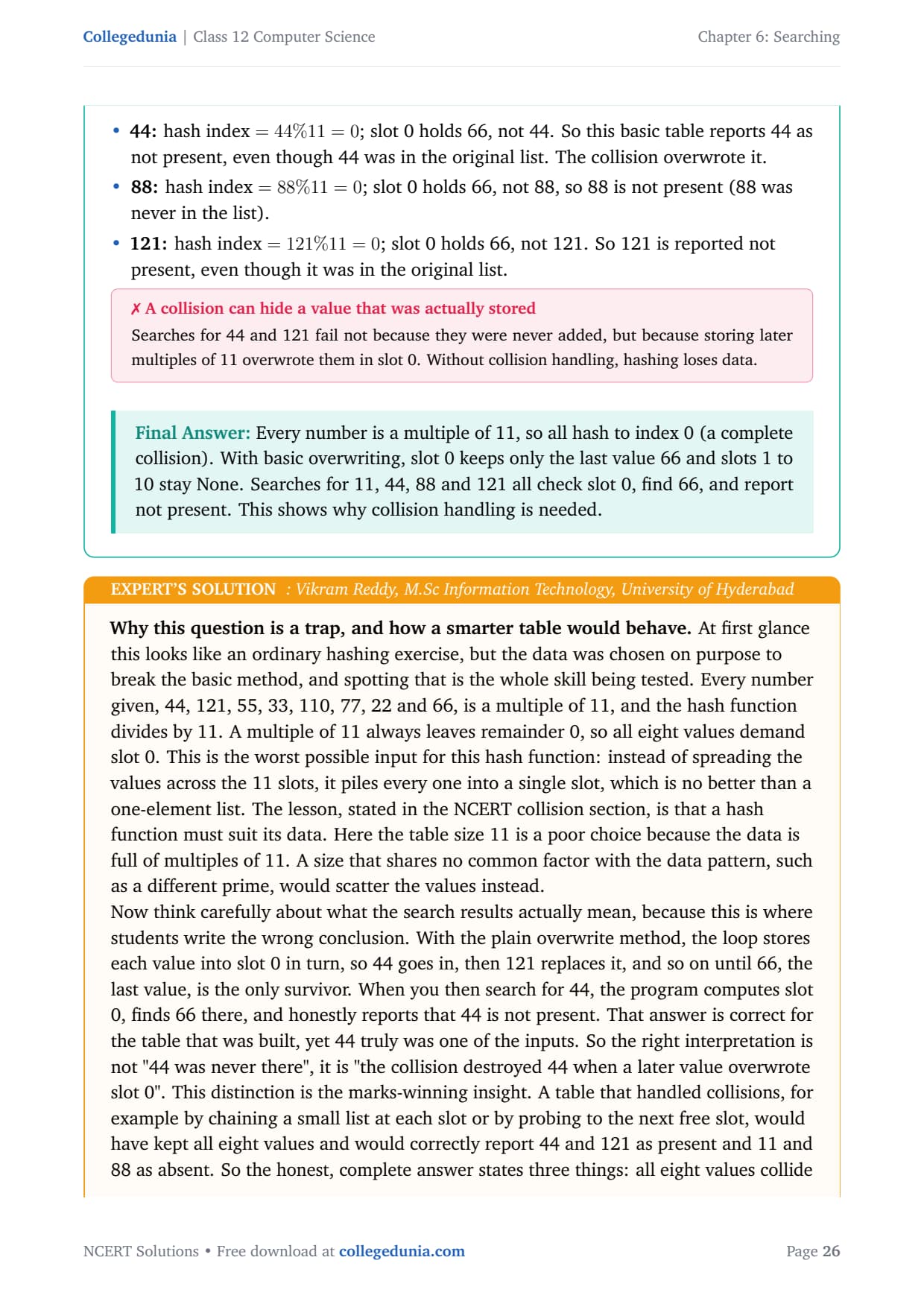
Because of the collision, slot 0 holds only 66 and slots 1 to 10 are empty. Searches for 11 and 88 (never in the list) correctly report not present, but 44 and 121 are also reported not present even though they were in the original list. The collision overwrote them.
Answer: Every number is a multiple of 11, so all hash to index 0 (a complete collision). With basic overwriting, slot 0 keeps only the last value 66 and slots 1 to 10 stay None. All four searches check slot 0, find 66, and report not present. This shows why collision handling is needed.
VR
Vikram Reddy
M.Sc Information Technology, University of Hyderabad
Verified Expert
The data was chosen on purpose to break the basic method. Every number given is a multiple of 11, and the hash function divides by 11, so all eight demand slot 0. This is the worst possible input: instead of spreading values across 11 slots, it piles every one into a single slot, which is no better than a one-element list. A hash function must suit its data, and table size 11 is a poor choice for data full of multiples of 11.
With the plain overwrite method, 44 goes in, then 121 replaces it, and so on until 66 is the only survivor. So searching for 44 honestly reports not present for the table that was built.
The right interpretation is not "44 was never there", it is "the collision destroyed 44 when a later value overwrote slot 0". This distinction is the marks-winning insight.
A table that handled collisions (chaining a small list at each slot, or probing to the next free slot) would keep all eight values and correctly report 44 and 121 as present, 11 and 88 as absent.
So the complete answer states three things: all eight values collide at index 0, the basic table keeps only 66 so every search returns not present, and the fix is collision resolution. Writing only the bare output without explaining the collision misses the whole point.
Answer: All eight inputs are multiples of 11, so all collide at slot 0; the overwrite table keeps only 66 and reports 11, 44, 88, 121 as not present. The deeper reading: 44 and 121 were lost to collision, and collision resolution would store and search all values correctly.
Q 9
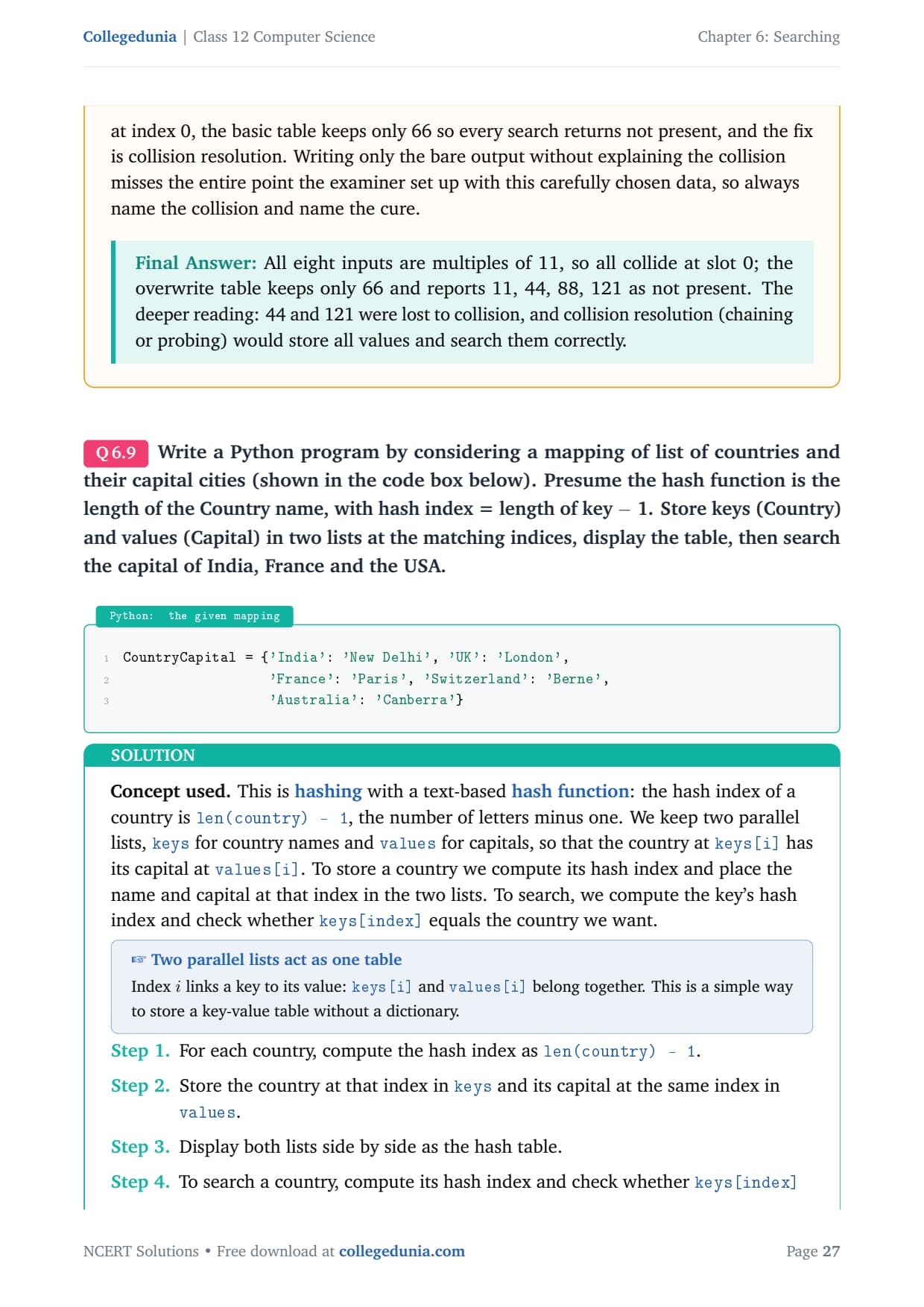
Write a Python program for a mapping of countries and capitals {'India':'New Delhi', 'UK':'London', 'France':'Paris', 'Switzerland':'Berne', 'Australia':'Canberra'}. Presume the hash function is the length of the Country name, with hash index = length of key minus 1. Store keys and values in two parallel lists, display the table, then search the capital of India, France and the USA.
This is hashing with a text-based hash function: the hash index of a country is len(country) - 1. We keep two parallel lists, keys for country names and values for capitals, so the country at keys[i] has its capital at values[i]. To search, compute the key's hash index and check whether keys[index] equals the country wanted.
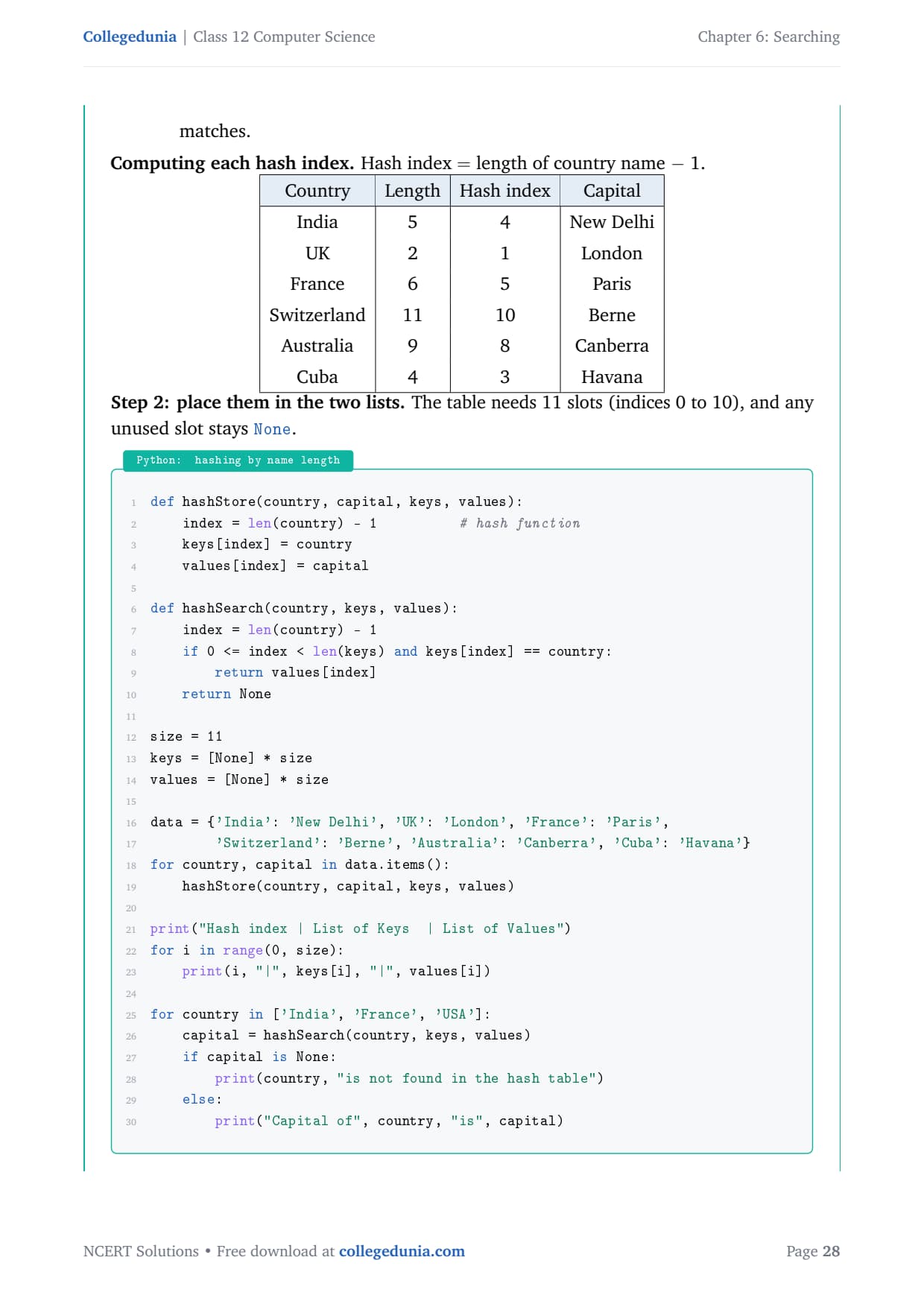
Computing each hash index (hash index = length of name minus 1):
Country
Length
Hash index
Capital
India
5
4
New Delhi
UK
2
1
London
France
6
5
Paris
Switzerland
11
10
Berne
Australia
9
8
Canberra
Cuba
4
3
Havana
def hashStore(country, capital, keys, values):
    index = len(country) - 1          # hash function
    keys[index] = country
    values[index] = capital

def hashSearch(country, keys, values):
    index = len(country) - 1
    if 0 <= index < len(keys) and keys[index] == country:
        return values[index]
    return None

size = 11
keys = [None] * size
values = [None] * size

data = {'India': 'New Delhi', 'UK': 'London', 'France': 'Paris',
        'Switzerland': 'Berne', 'Australia': 'Canberra', 'Cuba': 'Havana'}
for country, capital in data.items():
    hashStore(country, capital, keys, values)

print("Hash index | List of Keys  | List of Values")
for i in range(0, size):
    print(i, "|", keys[i], "|", values[i])

for country in ['India', 'France', 'USA']:
    capital = hashSearch(country, keys, values)
    if capital is None:
        print(country, "is not found in the hash table")
    else:
        print("Capital of", country, "is", capital)
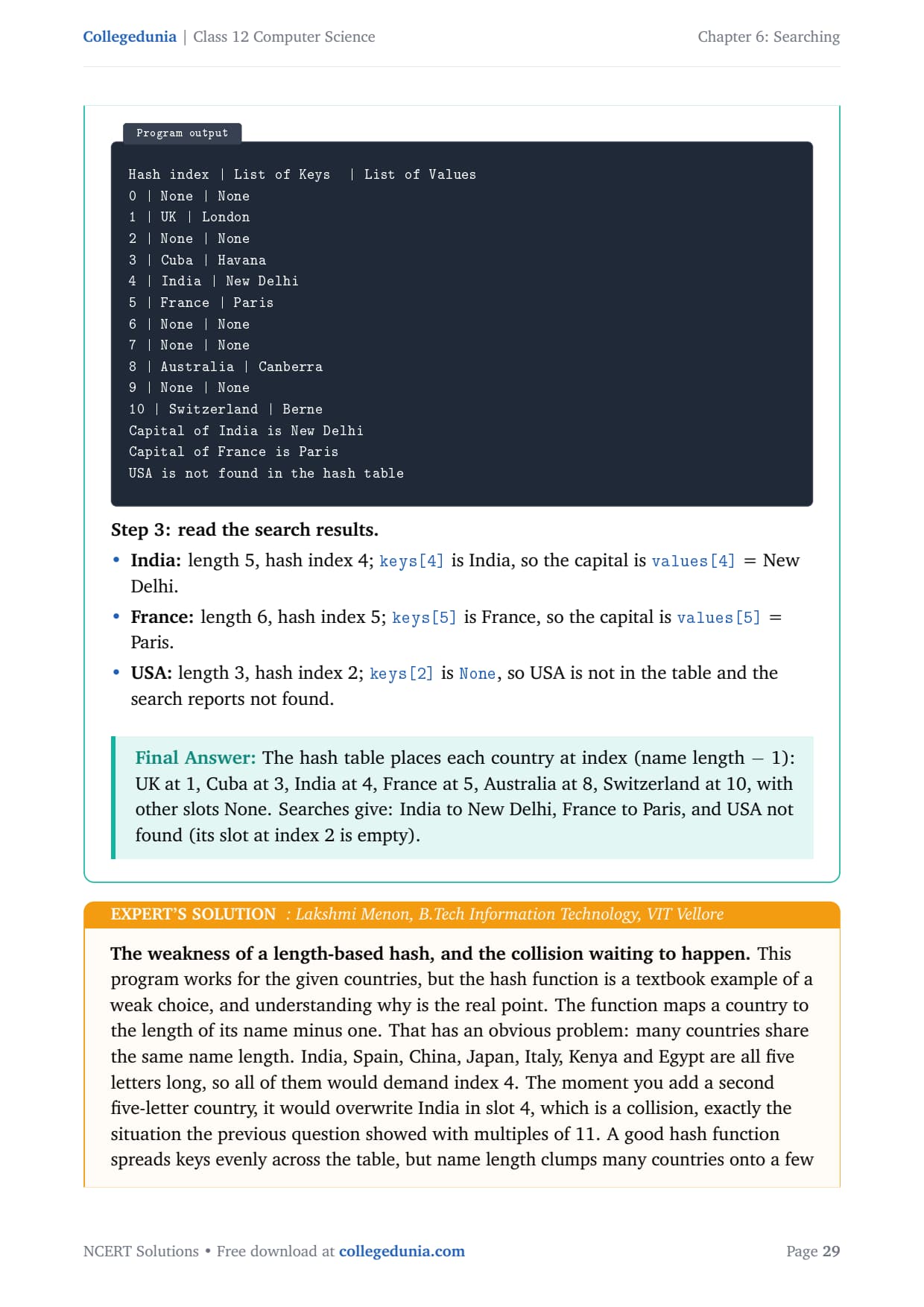
Hash index | List of Keys  | List of Values
0 | None | None
1 | UK | London
2 | None | None
3 | Cuba | Havana
4 | India | New Delhi
5 | France | Paris
6 | None | None
7 | None | None
8 | Australia | Canberra
9 | None | None
10 | Switzerland | Berne
Capital of India is New Delhi
Capital of France is Paris
USA is not found in the hash table
India: length 5, hash index 4; keys[4] is India, so the capital is New Delhi.
France: length 6, hash index 5; keys[5] is France, so the capital is Paris.
USA: length 3, hash index 2; keys[2] is None, so USA is not in the table.
Answer: The table places each country at index (name length minus 1): UK at 1, Cuba at 3, India at 4, France at 5, Australia at 8, Switzerland at 10, with other slots None. Searches give: India to New Delhi, France to Paris, and USA not found.
LM
Lakshmi Menon
B.Tech Information Technology, VIT Vellore
Verified Expert
This program works for the given countries, but the hash function is a textbook example of a weak choice. It maps a country to the length of its name minus one, and many countries share the same length. India, Spain, China, Japan, Italy, Kenya and Egypt are all five letters, so all of them would demand index 4. Add a second five-letter country and it overwrites India, a collision.
A good hash function spreads keys evenly, but name length clumps many countries onto a few indices, because real names cluster around five to nine letters.
Sizing point: the longest name here, Switzerland, has hash index 10, so the lists need at least 11 slots, or keys[10] would crash with an index error.
The search is genuinely fast: to find India we jump straight to index 4 in one step, the whole advantage of hashing. USA hashes to index 2, which is empty, so it is reported not found in a single check.
So the complete answer states the three correct results, India to New Delhi, France to Paris, USA not found, then adds the two engineering observations: the table must be large enough for the longest key, and name length is a weak hash because same-length names collide.
Answer: India to New Delhi, France to Paris, USA not found. Two insights: the lists must hold at least (longest name length) slots, and name length is a weak hash function because many countries share the same length and would collide.
NCERT Solutions Class 12 Computer Science Chapter 6 Searching FAQs
Ques. How many questions are there in NCERT Class 12 Computer Science Chapter 6 Searching?
Ans. There are 9 end-of-chapter exercise questions in NCERT Class 12 Computer Science Chapter 6 Searching. All 9 are solved with full answers and an Expert Solution in the PDF. The mix covers linear search with a pass table, a duplicate-value search, a linear search program on mixed sign numbers, a binary search program, two long compare-the-methods questions on numbers and on words, a large-database estimate, and two hashing questions on collisions.
Ques. What is the difference between linear search and binary search in Class 12 Computer Science?
Ans. Linear search checks every element one by one from the start, so it works on any list but can need up to n comparisons. Binary search works only on a sorted list: it compares the middle element, then keeps the half that may hold the key and discards the other, so it needs at most about log₂ n comparisons. For a list of 24 numbers, searching for the largest value cost 24 comparisons by linear search but only 5 iterations by binary search, which is why binary search is much faster on large sorted data.
Ques. Why must a list be sorted before using binary search?
Ans. Binary search throws away half the list at each step by trusting the order. It compares the key with the middle element and decides whether to look left or right based on that order. On an unsorted list that trust is broken, so a value that is actually present can be missed when the algorithm looks in the wrong half. This is why the NCERT chapter always sorts the list with sort() before running binary search. Linear search has no such requirement and works on any list.
Ques. What is a hash function and a collision in Class 12 Computer Science?
Ans. A hash function maps a value to a slot index in a hash table, for example h(element) = element % 11, so a value can be stored and found in a single step. A collision happens when two different values produce the same hash index, because a slot can hold only one value. In Question 8 every number is a multiple of 11, so all hash to index 0, a complete collision. With basic overwriting only the last value survives, which is why collision handling such as chaining or probing is needed in real hash tables.
Ques. How do you count key comparisons in linear search?
Ans. Count one key comparison for each element you test against the key. If the key is found at position p, linear search made p comparisons. If the key is absent, linear search made n comparisons, where n is the list length, because it had to scan the whole list to be sure. In a pass table the number of rows equals the number of comparisons, so the examiner counts rows to award marks. Always draw the full table, even for an absent key, or you lose the comparison marks the question is testing.
Ques. How many pages is the Class 12th Computer Science Searching NCERT Solutions PDF?
Ans. The Searching NCERT Solutions PDF runs about 20 pages and covers all 9 exercise questions with step-by-step Python code, dry-run traces, comparison and iteration counts, hash-index tables, and an Expert Solution for each question. Both Normal and HD versions are available from this page, and both are free to download for the 2026-27 session.
Ques. Is the NCERT Solutions for Class 12 Computer Science Chapter 6 aligned with the 2026-27 syllabus?
Ans. Yes. This page reflects the current 2026-27 CBSE syllabus for Class 12 Computer Science. The Searching chapter is unchanged for the current cycle, and every answer follows the NCERT textbook, including the linearSearch and binarySearch functions and the remainder hash function. The solutions are useful for the CBSE board exam, and the same algorithm ideas help with JEE-level programming and CUET Computer Science.
Ques. Why is binary search so much faster than linear search on large data?
Ans. Linear search cost grows in direct proportion to n, so doubling the data doubles the work. Binary search cost grows like log₂ n, so doubling the data adds just one comparison. For a sorted database of 2⁷⁰ (about a billion) records, linear search to reach the middle needs about 536,870,912 comparisons, while binary search needs at most 30. That gap is why databases, phone directories and search engines keep their data sorted or indexed: the one-time cost of sorting is paid back by every fast search that follows.








Comments