The NCERT Solutions for Class 12 Computer Science Chapter 10 Computer Networks cover all 16 exercise questions, according to the latest 2026-27 CBSE syllabus. Every answer follows the textbook's own flow: what a network is, the types LAN, MAN and WAN, the network topologies, the hardware devices, and how MAC addresses, IP addresses and DNS route data across the Internet.
All 16 NCERT questions solved with clear definitions, comparison tables, labelled diagrams, and an Expert Solution per question that adds exam strategy and common-trap warnings.
Full coverage of LAN versus WAN, bus and star topologies, modem, switch, router, gateway, NIC, MAC versus IP address, DNS, and the Internet versus the World Wide Web that the CBSE board paper tests directly.
Answers aligned with the 2026-27 CBSE Class 12 Computer Science syllabus and useful for JEE and CUET computer-awareness questions; no NEET references because Computer Science is not a medical subject.
Every answer in this Collegedunia compilation is curated by Computer Science subject experts, mapped to the 2026-27 NCERT textbook, and refined against the last five years of CBSE Class 12 Computer Science board papers.
Student Feedback: What 12,600 students told us about this chapter
71% of Class 12 students said the router versus gateway difference was the hardest part of the Computer Networks chapter. 3 out of 5 students told us they lost marks by mixing up MAC and IP addresses in the comparison question.
Toppers found that drawing a small labelled diagram for the topology and modem questions added 1 to 2 marks each, and the average student spent 2 to 3 hours on this chapter across the first read and exercise practice.
Source: 2026-27 Class 12 Computer Science student poll. Sample of 12,600 students from CBSE schools across 13 states, conducted before the 2026 boards.
What the NCERT Solutions for Class 12 Computer Science Chapter 10 Computer Networks Cover
This chapter answers one question: how do computers join together to share data and resources? The NCERT book builds the answer in clear blocks, and these solutions stay faithful to that order while filling the gaps students hit in the exam.
What a network is: two or more devices, called nodes, joined by a wired or wireless channel and following shared protocols, built to share data and resources.
Types of networks: PAN, LAN, MAN and WAN, classed by the area they cover. The Internet is the largest WAN.
Network topologies and devices: bus, star, ring, tree and mesh layouts, plus the hub, switch, repeater, router, gateway, modem and NIC.
Addressing and naming: the MAC address, the IP address, DNS, and the difference between the Internet and the World Wide Web.
Exercise-wise Breakdown of the Computer Networks Chapter NCERT Solutions
Chapter 10 of NCERT Class 12 Computer Science carries 16 end-of-chapter exercise questions. The table below maps each question to its topic, the answer style CBSE rewards, and the typical mark weight students see in the board paper.
Question
Topic covered
Answer style
Typical marks
Q 1
Expand ARPANET, MAC, ISP, URI
Full form plus one fact each
1 mark each (4 parts)
Q 2 to Q 3
Define a network; two advantages of networking
Definition with purpose and examples
2 to 3 marks
Q 4, Q 8
LAN versus WAN; tree versus bus topology
Point-by-point comparison table
3 marks each
Q 5, Q 11
Networking devices; explain switch, repeater, router, gateway, NIC
One clear line per device by its job
2 to 5 marks
Q 6, Q 9
Choose the network type; identify topology from wiring
Answer plus a one-line reason
1 to 2 marks
Q 7, Q 12
Topology definition and types; draw star and bus for five computers
Definition or labelled diagram
3 to 4 marks
Q 10, Q 13 to Q 16
Modem; MAC significance; MAC versus IP; DNS; Internet versus WWW
Definition, table and diagram
2 to 3 marks each
The comparison questions (Q 4, Q 8, Q 14) and the multi-part device question (Q 11) carry the heaviest marks. Students who use a clear Basis column in their tables and add a small labelled diagram score full marks.
What a Network Is and the Types LAN, MAN and WAN
A computer network is a collection of two or more computing devices joined by a communication channel so that they can exchange data and share resources. The devices on a network are called nodes. A network always needs three things: the devices, a medium that joins them, and a set of agreed rules called protocols such as TCP/IP.
PAN: a Personal Area Network around one person, for example a phone linked to a smartwatch.
LAN: a Local Area Network in a small area such as a room, a building or a campus.
MAN: a Metropolitan Area Network that spans a single city.
WAN: a Wide Area Network across states, a country or the world. The Internet is the largest WAN.
Watch Out: The "choose the network type" questions are decided by one distance phrase. "Same building or campus" means LAN, "within one city" means MAN, and "different cities, states or countries" means WAN. Underline the distance phrase first.
Because distance drives almost every property, a LAN is fast, cheap and low error, while a WAN is slower, costlier and more error prone over long links. This is why Q 6, where two universities sit in different States, points straight to a WAN.
LAN versus WAN: The Distance-Driven Comparison
Networks are classified by the geographical area they cover, and the difference between a LAN and a WAN flows from one root cause: the distance the data must travel. State the area first, then let speed, cost and ownership follow from it.
Basis
LAN (Local Area Network)
WAN (Wide Area Network)
Area covered
Small: one room, building or campus
Very large: city, country or worldwide
Ownership
Usually one organisation
Often many owners; no single body
Data speed
High speed
Lower over long distances
Cost of setup
Low
High
Medium
Own cables or Wi-Fi
Public links: telephone, fibre, satellite
Example
Computers in a school lab
The Internet; bank branches across India
A MAN sits between the two at city size, so the full size ladder is PAN, LAN, MAN, WAN. Mentioning the MAN rung shows you know the complete classification, which lifts a "differentiate" answer above the bare two-column table.
Network Topologies: Bus, Star, Ring, Tree and Mesh
A topology is the arrangement, or layout, in which the nodes of a network are connected. In short, it is the shape of the network. The topology you choose is a real trade-off between cost and reliability, so the popular layouts each have one defining feature.
Bus: every node taps onto one single backbone cable; cheapest, but one backbone break halts everyone.
Star: every node has its own cable to a central hub or switch; one cable break affects only one node.
Ring: nodes form a closed loop and data travels around it.
Tree: a hierarchy of star groups joined to a common backbone, shaped like an inverted tree.
Mesh: every node links directly to every other node, giving the most reliability at the highest cost.
Quick Tip: For the "identify the topology" question, two phrases settle it. "One single shared cable" means bus, and "a central device with each node on its own cable" means star. The word "central" almost always points to star.
A tree topology is not just a longer bus. The real difference is the hierarchy: a tree has levels and branches and combines star groups, while a bus is one flat straight line with no branching. Always name the hierarchy and the star-plus-bus combination when comparing them.
Network Devices: Modem, Hub, Switch, Repeater, Router, Gateway and NIC
A networking device is any hardware that helps connect computers and move data. The cleanest way to learn them is to group them by the job each one does, because that grouping also keeps the often-confused devices apart.
Connect and extend (hub, switch, repeater)
A hub copies incoming data to every port, so it wastes bandwidth and is less secure. A switch reads the destination MAC address and forwards data only to the correct port, so it is faster and safer, which is why switches have largely replaced hubs. A repeater regenerates and amplifies a weak signal so the network can stretch further.
Interconnect and access (router, gateway, modem, NIC)
A router forwards data between different networks along the best path using IP addresses. A gateway goes one step further and joins networks that use different protocols, translating between them. A modem (Modulator-Demodulator) converts digital signals to analog and back so a computer can use a telephone or cable line. A NIC (Network Interface Card) physically attaches a device to the network and carries its MAC address.
Remember: Router versus gateway is the favourite trap. A router links networks using the same protocol along the best path; a gateway links networks using different protocols and translates between them. Naming protocol translation is what marks out a gateway.
MAC Address, IP Address and DNS
Once devices are wired together, they need addresses and names so data reach the right place. The chapter covers three: the MAC address, the IP address, and the Domain Name System.
MAC versus IP address (Q 13, Q 14)
A MAC address is a 48-bit physical address fixed in a device's NIC by its maker, used for local delivery on a LAN, and it normally cannot change. An IP address is a logical address given by the network or ISP, used for global routing across networks, and it can change. The two cooperate: IP gets data to the right network, then MAC gets it to the right device.
A router works with IP addresses, while a switch works with MAC addresses.
Do not call an IP address permanent or a MAC address routable across the Internet; keep MAC as fixed and local, IP as changeable and global.
DNS and the Internet versus the World Wide Web (Q 15, Q 16)
DNS (Domain Name System) is the phone book of the Internet: it translates a domain name you type, such as www.example.com, into the numeric IP address the computer needs. A DNS server is the machine that stores these name-to-IP records and answers the lookup, a step called name resolution.
Tip: The Internet is the global infrastructure (cables, routers, protocols), while the World Wide Web is just one service on it (linked web pages in a browser). Opening a website uses the Web; sending an email uses the Internet but not the Web.
Common Mistakes Students Make in the Computer Networks Chapter
The repeat-offender mistakes in Computer Networks board answers:
Confusing router and gateway: a router links same-protocol networks by IP; a gateway joins different-protocol networks and translates. Protocol translation is the keyword.
Treating MAC and IP as the same kind of address: MAC is fixed, physical and local; IP is changeable, logical and global. Both are needed.
Answering "Internet" as a network type: the Internet is an example of a WAN, so the type is WAN and the Internet is how that WAN is realised.
Calling a tree topology "bus with more cable": the real difference is the hierarchy of star groups, not just extra length.
Saying "being online" equals "being on the Web": you are on the Internet whenever connected, but on the Web only when browsing web pages.
How to Use the Computer Networks NCERT Solutions PDF for Board Prep
The Computer Networks chapter is definition-heavy and full of close-but-different pairs. The best approach is two passes: one for the definitions and the size ladder, one for the comparison tables and diagrams.
First pass: definitions and the size ladder (1 hour)
Read the chapter and note the network definition, the PAN to WAN ladder, and the job of each device in one line. Write the full form next to ARPANET, MAC, ISP, URI and modem so the abbreviations stick before you start comparing.
Second pass: tables and diagrams (1.5 to 2 hours)
Practise the comparison questions, LAN versus WAN, tree versus bus, and MAC versus IP, by drawing a Basis column and filling both sides. Then sketch a labelled star and bus for five computers and a modem flow, because diagram marks are easy to earn and easy to miss.
JEE and CUET angle
For students preparing competitive exams, computer-network basics appear in CUET Computer Science and in the computer-awareness sections of several entrance tests. Topology types, network devices and the MAC versus IP distinction are exactly the kind of one-mark facts those papers reuse, so the work here doubles as competitive prep.
Previous Year Question Trends from the Computer Networks Chapter
The Computer Networks chapter is tested in CBSE board papers mainly through definition, expansion and comparison questions, with a diagram on topology. The table below maps the asked question types across recent board papers.
Year
Question type asked
Marks
2025
Differentiate between LAN and WAN; expand a networking term
2 + 1
2024
Explain any two network devices; identify a topology from wiring
2 + 1
2023
Difference between MAC address and IP address
3
2022
Define DNS; draw a star topology for given computers
1 + 2
2021
What is a modem and why is it used; Internet versus WWW
2 + 2
Also Check: The full set of CBSE board paper questions for this chapter is included in the downloadable PDF above, updated for the 2026-27 cycle.
Other Resources for Class 12 Computer Science Chapter 10 Computer Networks
Pair this NCERT Solutions PDF with the matching revision notes, handwritten notes and the official NCERT book chapter. All resources for Class 12 Computer Science Chapter 10 Computer Networks are linked below.
Resource
What it covers
Open
NCERT Solutions
Step-by-step answers to all 16 exercise questions, with an Expert Solution for each.
You are here
Notes
Concept-first revision notes on network types, topologies, devices and addressing.
NCERT Solutions for Class 12 Computer Science: All Chapters
Related Links: Use the table below to open the NCERT Solutions for the other chapters of Class 12 Computer Science. Every chapter ships with the same step-by-step answer style, full PDF download, and revision FAQ.
All NCERT Solutions for Class 12 Computer Science Chapter 10 Computer Networks with Step-by-Step Solutions
Q 1
Expand the following: a) ARPANET b) MAC c) ISP d) URI
Computer networking uses many short forms, and each one stands for a full phrase that tells you what the thing does. The four expansions are listed below.
a) ARPANET stands for Advanced Research Projects Agency Network. It was built in the late 1960s by the US Defence department and was the first network to use packet switching, so it is the direct ancestor of the Internet.
b) MAC stands for Media Access Control. A MAC address is the 48-bit physical address fixed on a device's network interface card.
c) ISP stands for Internet Service Provider. It is the organisation, such as a telecom company, that gives homes and offices access to the Internet.
d) URI stands for Uniform Resource Identifier. It names or locates any resource on the web; a URL is the most common kind of URI.
Answer: a) Advanced Research Projects Agency Network; b) Media Access Control; c) Internet Service Provider; d) Uniform Resource Identifier.
AI
Ananya Iyer
M.Tech Computer Science, IIT Bombay
Verified Expert
Tie each abbreviation to where it sits in the network story, because then the full forms stop being random letters and become a small map.
ARPANET is the historical root of the Internet, the first packet-switched network, so any question on the origin of the Internet points back to this name. Spelling "Agency" rather than "Agencies" protects the mark.
MAC sits on the hardware: every network card leaves the factory with a unique 48-bit MAC address, so it is the physical device address on the local network.
ISP sits at the boundary between your home network and the wider Internet, and it is the body that hands your connection a public IP address.
URI sits where humans type: it is the general name for any web resource, and saying "a URL is a kind of URI" shows you understand the relationship.
Write the expansion, then a four or five word note on what stage it belongs to, because that extra phrase both proves understanding and helps you recall the spelling under pressure.
Answer: ARPANET = Advanced Research Projects Agency Network; MAC = Media Access Control; ISP = Internet Service Provider; URI = Uniform Resource Identifier.
Q 2
What do you understand by the term network?
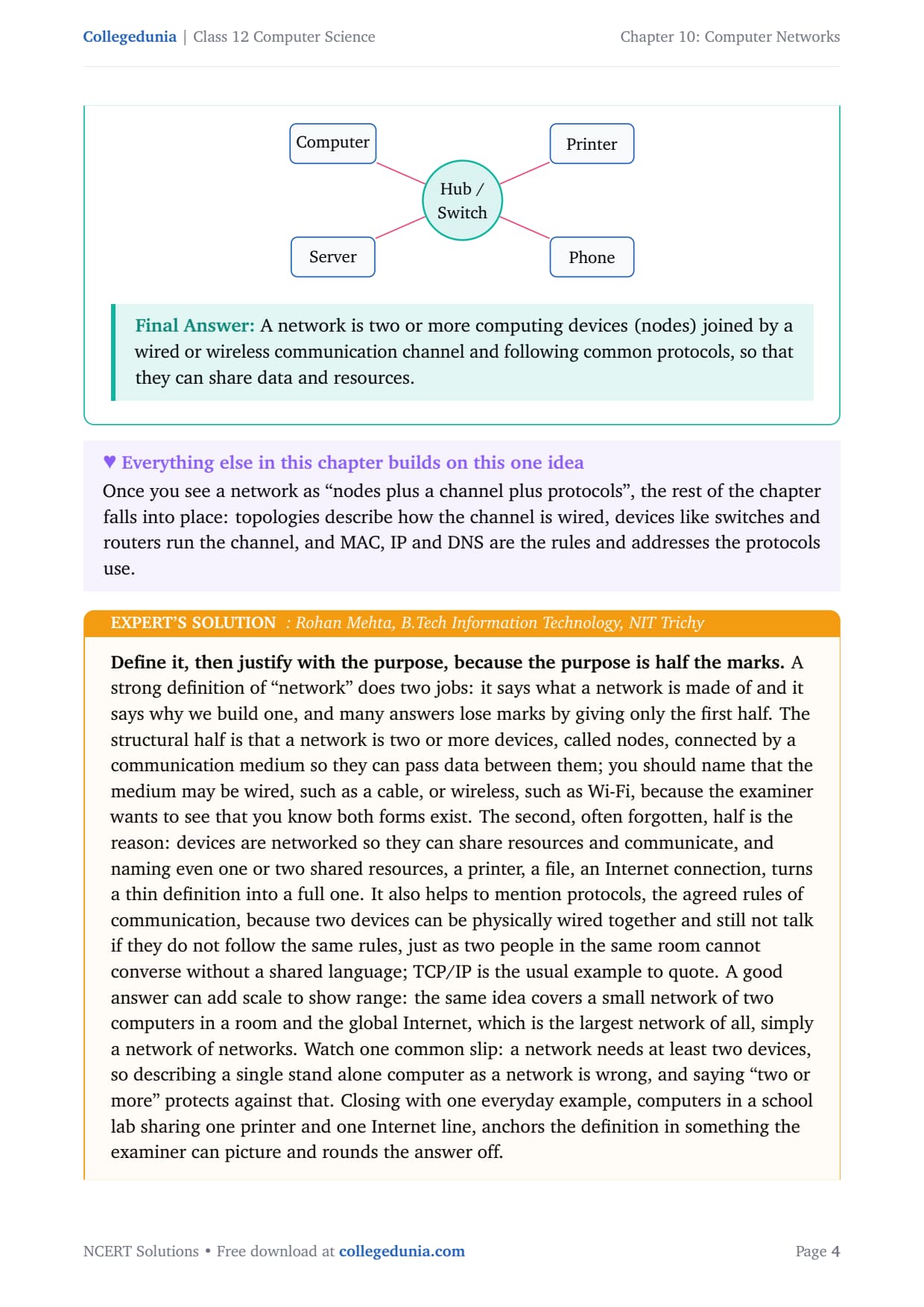
A computer network is a collection of two or more computing devices (computers, printers, phones and so on) connected by a communication channel so that they can exchange data and share resources. The devices on a network are called nodes. A network needs three things:
Devices (nodes). Any device that can send or receive data, for example a computer, a server, a printer or a smartphone.
Communication channel. The path that carries data; it can be wired (twisted pair, coaxial or optical fibre) or wireless (radio waves, Wi-Fi, satellite).
Protocols. The shared rules, such as TCP/IP, that let different devices understand each other, like a common language between two people.
Answer: A network is two or more computing devices (nodes) joined by a wired or wireless communication channel and following common protocols, so that they can share data and resources.
RM
Rohan Mehta
B.Tech Information Technology, NIT Trichy
Verified Expert
Define it, then justify with the purpose, because the purpose is half the marks. A strong definition says what a network is made of and why we build one.
The structural half: two or more devices, called nodes, connected by a medium that may be wired (a cable) or wireless (Wi-Fi), so they can pass data.
The often-forgotten half: the reason. Devices are networked to share resources and communicate, so name one or two shared resources, a printer, a file, an Internet connection.
Mention protocols, because two devices can be physically wired and still not talk if they do not follow the same rules; TCP/IP is the usual example.
Watch one slip: a network needs at least two devices, so saying "two or more" stops you from calling a single stand-alone computer a network. Close with one everyday example, a school lab sharing one printer and one Internet line.
Answer: A network is two or more devices (nodes) linked by a wired or wireless medium and following shared protocols, built so the devices can communicate and share resources such as files, printers and an Internet connection.
Q 3
Mention any two main advantages of using a network of computing devices.
Organisations connect computers because a network lets many users share what would otherwise be separate, costly and isolated. The question asks for any two main advantages, so we explain two clearly.
Resource sharing. A single printer, scanner, hard disk or software package, and even one Internet connection, can be used by every computer on the network. Without a network each computer would need its own copy of every resource, which wastes money and space.
Fast communication and data sharing. Files, documents and messages move between devices almost instantly, so people in different rooms or cities can work on the same data together instead of carrying it on a pen drive.
Other benefits worth a mention are lower cost (resources shared not duplicated), reliability (backup copies on more than one machine) and centralised management of data and security.
Answer: Two main advantages are resource sharing (one printer, disk, software or Internet line serves many computers) and fast communication and data sharing (files and messages move instantly between devices).
SK
Sneha Kulkarni
M.Sc Computer Science, University of Pune
Verified Expert
Answer with a benefit and its one-line "because", and you cover the marks safely. The scheme awards a point for each clearly stated benefit, usually with a short reason.
State resource sharing first, because it is the very purpose of a network: one printer, scanner, disk, software licence and Internet connection serve every machine, which saves money. Note the shared resource can be hardware, software or data.
Pick fast communication and data sharing second: files and messages travel in seconds, so teams in different locations collaborate without moving storage around.
If you have room, add reliability (copies on two machines) and centralised control as bonuses.
Do not confuse advantages of a network with features of the Internet specifically; keep examples device level, such as a shared office printer. Finish with a school lab where thirty computers share one printer and one broadband line.
Answer: The two strongest advantages are resource sharing (one printer, disk, software or Internet line used by all, which cuts cost) and fast communication and data sharing (files and messages move between devices in seconds), with reliability and central management as further gains.
Q 4
Differentiate between LAN and WAN.
Networks are classified by the geographical area they cover. A LAN (Local Area Network) connects devices within a small area such as a room, building or campus. A WAN (Wide Area Network) connects devices over a very large area such as a city, country or the world; the Internet is the largest WAN. The full comparison is below.
Basis
LAN (Local Area Network)
WAN (Wide Area Network)
Area covered
Small: one room, building or campus
Very large: city, country or worldwide
Ownership
Usually owned by one organisation
Often spans many owners; not owned by one body
Data speed
High speed
Lower than a LAN over long distances
Cost of setup
Low
High
Error rate
Low (short distances)
Higher (long distances)
Medium
Own cables or Wi-Fi
Public links: telephone, fibre, satellite
Example
Computers in a school lab
The Internet; bank branches across India
Answer: A LAN covers a small area, is owned by one organisation, and is fast and cheap; a WAN covers a very large area, spans many owners, and is slower and costlier over distance. The Internet is the biggest WAN.
VN
Vikram Nair
B.Tech Computer Engineering, COEP Pune
Verified Expert
Anchor every difference to the one root cause: distance. Almost every row in the table flows from how far the data must travel.
Because a LAN's distances are short, signals stay strong and arrive quickly, so it is fast and low error; a WAN's long distances mean weaker, delayed signals, so it is slower and more error prone, which is why WANs lean on repeaters.
Ownership follows too: a LAN sits in one site so one organisation owns it, whereas a WAN crosses public ground and many regions, so no single body owns it, which is why the Internet has no single owner.
Cost and medium: a LAN uses cheap own cabling or Wi-Fi, while a WAN must use costly public links such as leased lines, fibre or satellite.
Present this as a table with a Basis column, list area, speed, cost, ownership and an example, and add that a MAN (Metropolitan Area Network) at city size sits between the two.
Answer: Distance is the root difference: a LAN covers a small area so it is fast, cheap, low error and owned by one organisation; a WAN covers a very large area so it is slower, costlier, higher error and spans many owners, with a MAN sitting between them at city size.
Q 5
Write down the names of few commonly used networking devices.
A networking device is any hardware that helps connect computers and move data across a network. Grouped by the job they do, the commonly used devices are:
Connect machines: the hub joins computers and copies data to all ports, while the switch joins devices and sends data only to the intended recipient using its MAC address.
Extend a signal: the repeater regenerates and amplifies a weak signal, and the bridge connects two segments of the same network.
Interconnect networks: the router forwards data between networks along the best path using IP addresses, and the gateway connects networks that use different protocols and translates between them.
Access: the modem converts digital to analog and back, and the NIC (Network Interface Card) physically connects a device and carries its MAC address.
Answer: Commonly used networking devices include the modem, hub, switch, repeater, router, gateway, bridge and NIC (network interface card).
KS
Karthik Subramanian
M.Tech Computer Science, IIT Madras
Verified Expert
List the devices, but group them by the job they do so the list has shape and you do not forget one under pressure.
Connect: hub (copies to every port) and switch (reads MAC, forwards only to the correct port, so faster and more secure, and has mostly replaced the hub).
Extend: repeater (regenerates and boosts a weak signal so the network stretches further) and bridge (joins two segments of the same network).
Interconnect: router (forwards between different networks using IP, best path) and gateway (connects different-protocol networks and translates).
Access: modem (digital to analog and back over a phone or cable line) and NIC (physically attaches a device and holds its MAC address).
Presenting the answer in these four groups, connect, extend, interconnect and access, shows the examiner you understand what each device is for rather than having memorised a flat list.
Answer: Common networking devices are the modem, hub, switch, repeater, bridge, router, gateway and NIC; grouping them as connectors, extenders, interconnectors and access pieces makes the list easy to recall.
Q 6
Two universities in different States want to transfer information. Which type of network they need to use for this?
Networks are named by the area they cover: a PAN spans a person, a LAN a building or campus, a MAN a single city, and a WAN a very large area such as different states, a country or the world. Match the distance in the question to the network that covers it.
Read the distance. The two universities are in different States, so the data must travel a very long distance, well beyond one city.
Match it to the network type. A LAN covers only a campus and a MAN only one city, so both are too small. A network that spans different states is a WAN.
State the answer. In practice they would use the Internet, which is itself the largest WAN.
Answer: They should use a WAN (Wide Area Network), because the two universities are in different States, a distance only a WAN can cover; in practice they would use the Internet, which is the largest WAN.
PD
Priya Deshpande
M.Tech Software Systems, BITS Pilani
Verified Expert
Decide by distance, then name the type and justify in one breath, because the marker wants both the right name and the reason tied to the distance.
The deciding clue is "different States", which means hundreds of kilometres, far beyond one building or city, so it rules out PAN, LAN and MAN at once.
What remains is the WAN, the category built to connect devices over very large distances, so a WAN is the answer and the reason is the inter-state distance.
Avoid the trap of answering "Internet" as a separate type: the Internet is an example of a WAN, so the type is WAN and the Internet is how it is realised.
Keep a mental ladder of increasing size, PAN then LAN then MAN then WAN, and slot the distance onto the right rung; here "different States" lands firmly on WAN.
Answer: The correct type is a WAN, because the universities lie in different States, a range only a Wide Area Network covers; practically they would transfer the data over the Internet, which is the largest WAN, while PAN, LAN and MAN are all too small.
Q 7
Define the term topology. What are the popular network topologies?
Network topology is the arrangement, or layout, in which the devices (nodes) of a network are connected to one another and to the communication channel. In short, it is the shape of the network. Topology affects cost, speed and how the network behaves when a cable or device fails. The popular topologies are:
Bus topology. Every node connects to one single main cable called the backbone or bus.
Star topology. Every node connects by its own cable to a central device (a hub or switch).
Ring topology. Nodes are joined in a closed loop, each linked to the next, and data travels around the ring.
Tree topology. A hierarchy that combines several star networks joined to a common backbone, shaped like an upside-down tree.
Mesh topology. Every node is connected directly to every other node, giving many alternate paths.
Answer: Topology is the layout or shape in which a network's nodes are connected. The popular topologies are bus, star, ring, tree and mesh.
AR
Arjun Reddy
B.Tech Computer Science, IIIT Hyderabad
Verified Expert
Give a sharp definition, then list the topologies with their one defining feature each, and attach the trade-off so the list sticks.
Bus: all nodes hang off one shared backbone cable, so cheap on cable but a single backbone break halts the whole network.
Star: every node has its own cable to a central hub or switch, so more cable but a broken cable knocks out only one node; the hub is the single critical point.
Ring: nodes form a closed loop and data passes around the circle; a break can disrupt flow unless a dual ring is used.
Tree: a hierarchy of star groups joined to a common backbone, suited to large layered networks. Mesh: every node links to every other, highest reliability at highest cost.
Adding the clause that the choice of topology affects cost, speed and failure behaviour lifts a bare definition into an understanding-level answer, and a quick labelled sketch of bus, star and ring often earns a diagram mark.
Answer: Topology is the arrangement of a network's nodes and links, and it shapes cost, speed and failure behaviour; the popular topologies are bus (one backbone), star (central hub), ring (closed loop), tree (hierarchy of stars) and mesh (every node to every node).
Q 8
How is tree topology different from bus topology?
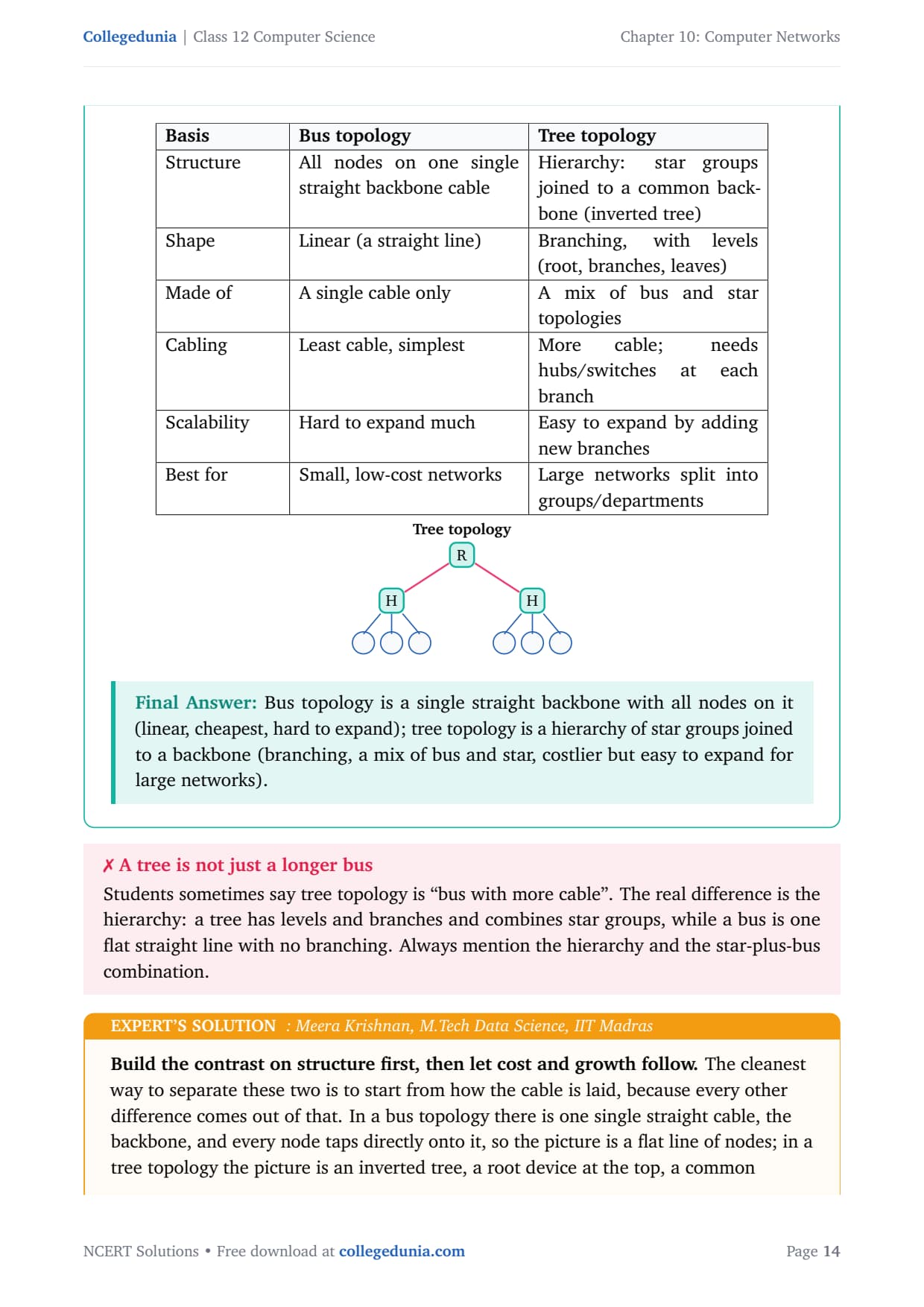
Bus topology connects every node to a single straight backbone cable. Tree topology is a hierarchical layout that joins several star-shaped groups to a common backbone, so it looks like an upside-down tree and is in fact a combination of bus and star ideas. The full comparison is below.
Basis
Bus topology
Tree topology
Structure
All nodes on one single straight backbone cable
Hierarchy: star groups joined to a common backbone
Shape
Linear (a straight line)
Branching, with levels (root, branches, leaves)
Made of
A single cable only
A mix of bus and star topologies
Cabling
Least cable, simplest
More cable; needs hubs/switches at each branch
Scalability
Hard to expand much
Easy to expand by adding new branches
Best for
Small, low-cost networks
Large networks split into groups
Answer: Bus topology is a single straight backbone with all nodes on it (linear, cheapest, hard to expand); tree topology is a hierarchy of star groups joined to a backbone (branching, a mix of bus and star, costlier but easy to expand for large networks).
MK
Meera Krishnan
M.Tech Data Science, IIT Madras
Verified Expert
Build the contrast on structure first, then let cost and growth follow, because every other difference comes out of how the cable is laid.
A bus is one single straight cable with every node tapped onto it, a flat line; a tree is an inverted tree, a root device, a common backbone, and several star groups hanging off it, so it has hierarchy and branching the bus does not.
Saying plainly that a tree is a combination of star and bus topologies is a high-value line, because that is how the textbook frames it.
Cost and growth follow: a bus uses the least cable and is cheapest but hard to extend, while a tree needs more cable plus a hub at each branch but is easy to extend, which suits large departmental networks.
Add a fault-behaviour sentence: a break in the single bus backbone can down the whole network, while a fault in one tree branch tends to affect only that branch. Present it as a table with a Basis column.
Answer: A bus is one flat straight backbone with all nodes on it, cheapest but hard to grow and vulnerable to a single break; a tree is a hierarchy of star groups on a common backbone (a star plus bus combination), costlier but easy to expand and more fault tolerant, suited to large layered networks.
Q 9
Identify the type of topology from the following: a) Each node is connected with the help of a single cable. b) Each node is connected with central switching through independent cables.
The clue to a topology is how the nodes are wired. In bus topology all nodes share one single cable (the backbone). In star topology each node has its own separate cable running to a central device, a hub or switch.
a) "Each node is connected with the help of a single cable" describes bus topology, because all nodes share one common cable, the backbone, rather than having a cable each.
b) "Each node is connected with central switching through independent cables" describes star topology, because every node has its own independent cable that runs to a central switch (or hub).
Answer: a) Bus topology (all nodes on one single shared cable); b) Star topology (each node has its own cable to a central switch or hub).
NJ
Nikhil Joshi
M.Tech Computer Science, IIT Delhi
Verified Expert
Read the wiring phrase, match the keyword, name the topology, then add the one-line reason that earns the justification mark.
In part (a) the deciding phrase is "a single cable" shared by each node, which is the exact definition of the backbone in a bus topology, so the answer is bus.
In part (b) the phrases "central switching" and "independent cables" mean a central device with each node on its own cable, which is the signature of a star topology, so the answer is star.
The word "central" is the strongest single hint for star.
A useful contrast to mention is failure behaviour: a break in the single bus backbone can halt the whole network, while a break in one star cable affects only that node, though a failure of the central switch would affect everyone.
Answer: a) Bus topology, because all nodes share one single backbone cable; b) Star topology, because each node has its own independent cable to a central switch or hub, which is the signature of a star.
Q 10
What do you mean by a modem? Why is it used?
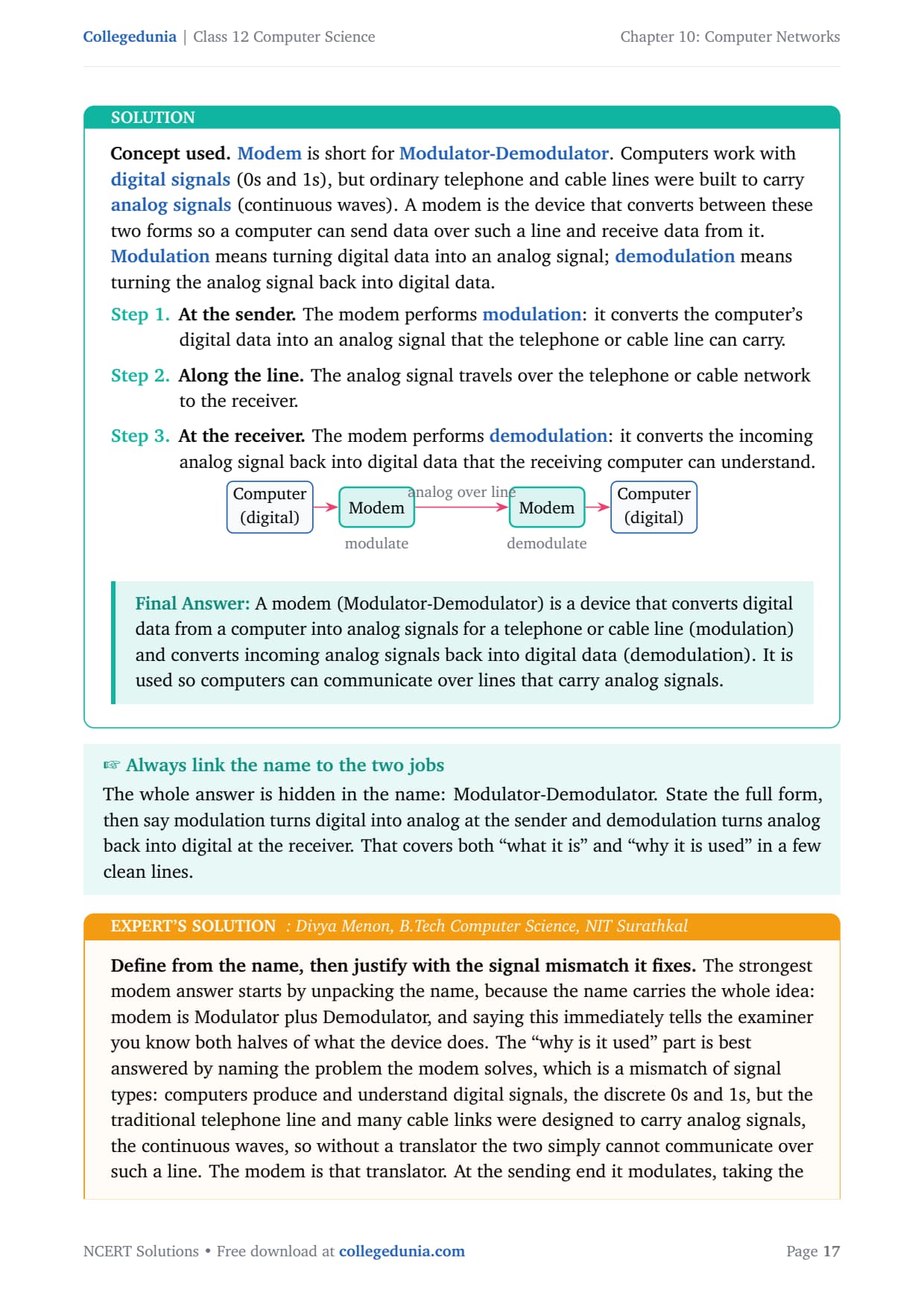
Modem is short for Modulator-Demodulator. Computers work with digital signals (0s and 1s), but ordinary telephone and cable lines were built to carry analog signals (continuous waves). A modem converts between these two forms.
At the sender. The modem performs modulation: it converts the computer's digital data into an analog signal the line can carry.
Along the line. The analog signal travels over the telephone or cable network to the receiver.
At the receiver. The modem performs demodulation: it converts the incoming analog signal back into digital data the computer can understand.
Answer: A modem (Modulator-Demodulator) converts digital data from a computer into analog signals for a telephone or cable line (modulation) and converts incoming analog signals back into digital data (demodulation). It is used so computers can communicate over lines that carry analog signals.
DM
Divya Menon
B.Tech Computer Science, NIT Surathkal
Verified Expert
Define from the name, then justify with the signal mismatch it fixes, because the name carries the whole idea.
Modem is Modulator plus Demodulator, so saying this tells the examiner you know both halves of what the device does.
The "why is it used" part is a mismatch of signal types: computers speak digital (0s and 1s), but telephone and many cable links carry analog (continuous waves), so without a translator the two cannot communicate over such a line.
The conversion happens at both ends in opposite directions, so mention the pair of modems, one at each end, which shows you understand the full round trip.
A common slip is to confuse a modem with a router: a modem converts between digital and analog to reach the ISP's line, while a router shares one connection among many devices, so the two do different jobs even when a home box combines both.
Answer: A modem is a Modulator-Demodulator: at the sender it modulates digital data into an analog signal for the line, and at the receiver it demodulates the analog signal back into digital data. It is used because the line carries analog while the computer works in digital, so a translator is needed at each end.
Q 11
Explain the following devices: a) Switch b) Repeater c) Router d) Gateway e) NIC
Each of these is a networking device with a distinct job.
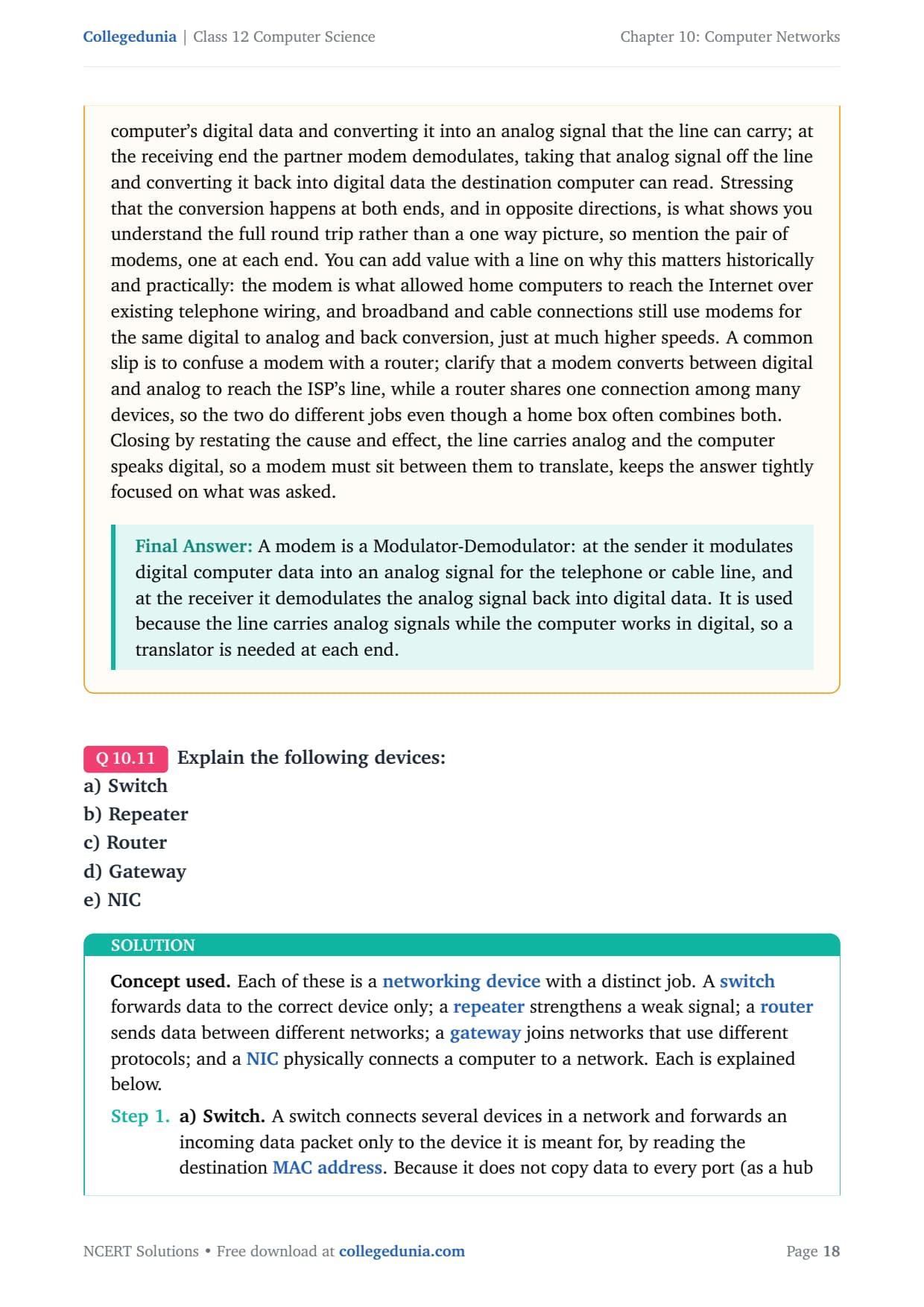
a) Switch. Connects several devices and forwards an incoming data packet only to the device it is meant for, by reading the destination MAC address. Because it does not copy data to every port (as a hub does), it is faster and more secure.
b) Repeater. Regenerates and amplifies a signal that has become weak over a long cable, then puts the fresh signal back on the line, so it extends the distance a network can cover.
c) Router. Forwards data between two or more different networks. Using a routing table and IP addresses, it picks the best path for each packet. A home router connects your home network to the Internet.
d) Gateway. Connects two networks that use different protocols and translates the data from one protocol to the other, acting as the entry and exit point of a network.
e) NIC. A Network Interface Card is the hardware inside a device that physically connects it to the network. Every NIC carries a unique MAC address.
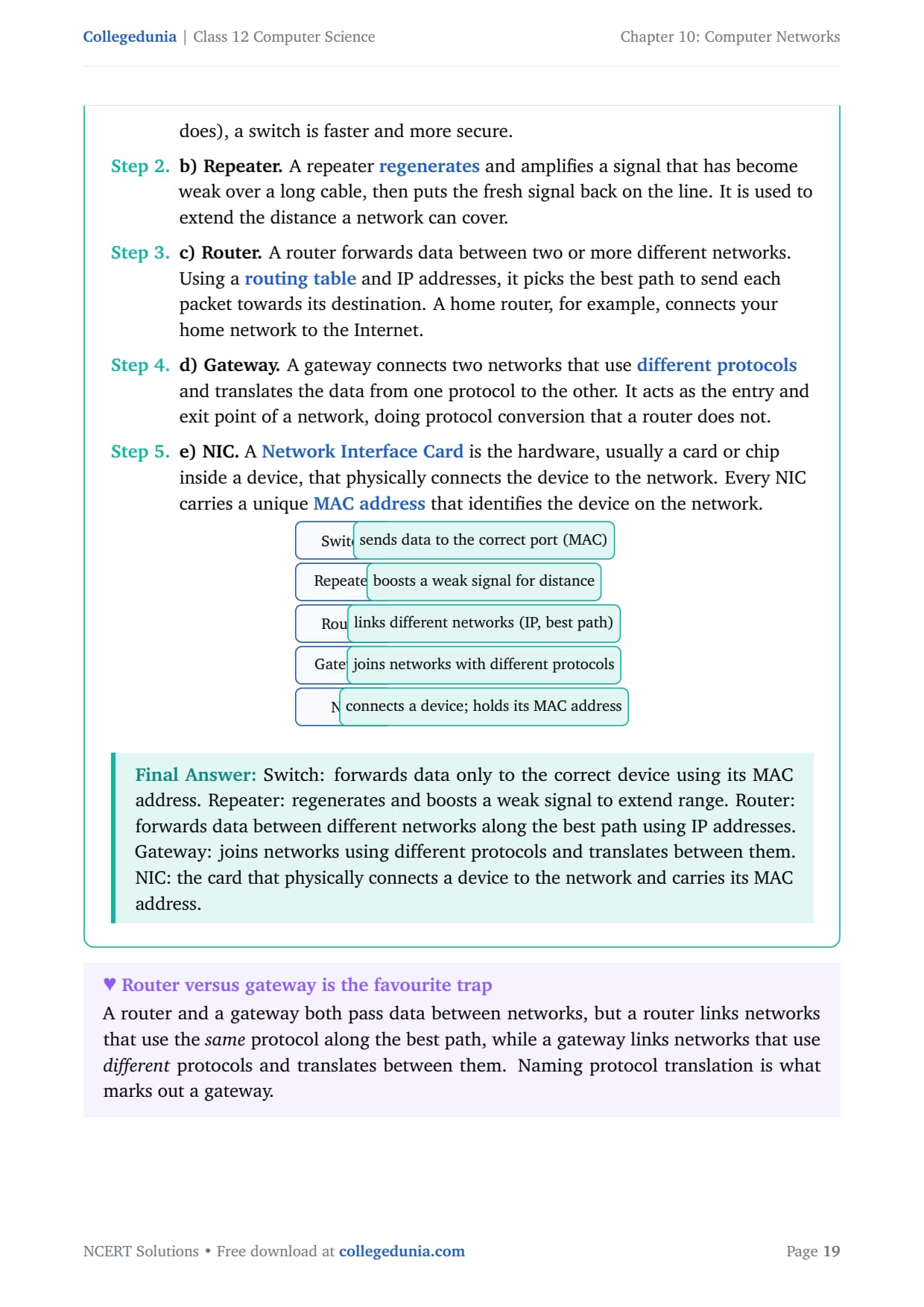
Answer: Switch forwards by MAC to the correct port; repeater boosts a weak signal to extend range; router forwards between different networks by IP on the best path; gateway joins different-protocol networks and translates; NIC physically connects a device and holds its MAC address.
AS
Aditya Sharma
B.Tech Computer Science, IIT Kanpur
Verified Expert
Explain each device by its job and the address or signal it works on, and the differences become clear.
Switch: forwards each packet only to the intended recipient by reading the destination MAC address, so it works with hardware addresses and beats the older hub.
Repeater: makes no forwarding decisions; it simply regenerates and amplifies a weakened signal to stretch the network over distance.
Router: works with IP addresses, consulting a routing table to choose the best path between different networks.
Gateway: the one to handle with care, it connects two networks that speak different protocols and translates between them, so protocol translation is the keyword. NIC: physically attaches one device and carries its unique MAC address.
Present all five as a short table of device against its one job and the address or signal it handles, which stops you blurring the router and the gateway, the single most common error in this question.
Answer: Switch forwards by MAC to the correct port; repeater regenerates a weak signal to extend range; router forwards between different networks by IP on the best path; gateway joins networks of different protocols and translates; NIC physically connects a device and holds its MAC address.
Q 12
Draw a network layout of star topology and bus topology connecting five computers.
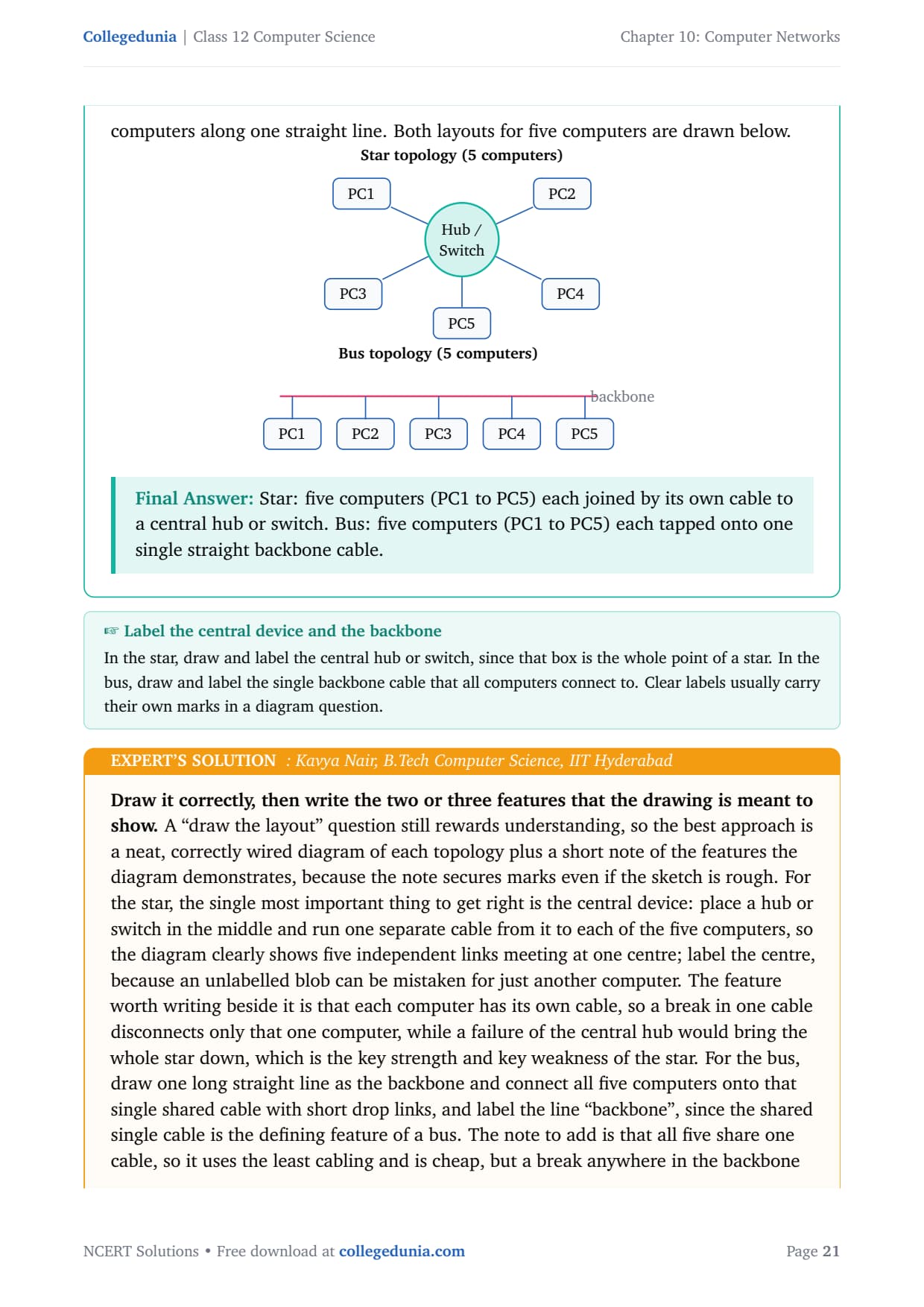
In star topology each computer has its own cable to a central device (a hub or switch), so the diagram shows five computers around one central box. In bus topology all computers tap onto one single backbone cable, so the diagram shows five computers along one straight line.
Star topology (5 computers)
        PC1        PC2
          \         /
           \       /
   PC5 --- [ Hub / Switch ] --- PC3
                  |
                 PC4

(each PC has its own cable to the central hub/switch)
Bus topology (5 computers)
 ====+======+======+======+======+====   backbone
     |      |      |      |      |
    PC1    PC2    PC3    PC4    PC5

(all five PCs tap onto one single backbone cable)
Answer: Star: five computers (PC1 to PC5) each joined by its own cable to a central hub or switch. Bus: five computers (PC1 to PC5) each tapped onto one single straight backbone cable.
KN
Kavya Nair
B.Tech Computer Science, IIT Hyderabad
Verified Expert
Draw it correctly, then write the two or three features the drawing is meant to show, because the note secures marks even if the sketch is rough.
Star: place a hub or switch in the middle and run one separate cable to each of the five computers; label the centre, because an unlabelled blob can be mistaken for a computer. Each computer has its own cable, so a break in one cable disconnects only that one, while a failure of the central hub brings the whole star down.
Bus: draw one long straight backbone line and connect all five computers onto it with short drop links; label the line "backbone". All five share one cable, so it is cheap, but a break anywhere stops the whole network and only one computer can transmit at a time.
Use exactly five computers numbered PC1 to PC5 in each, and keep the two diagrams clearly separate.
A real mark saver is to make the star truly radiate from the centre and the bus truly hang off one line; a star drawn as a loop or a bus drawn with a central box would lose the topology mark.
Answer: Star: a labelled central hub or switch with five separate cables, one to each of PC1 to PC5. Bus: one labelled straight backbone cable with PC1 to PC5 all tapped onto it (cheapest, but a backbone break stops all).
Q 13
What is the significance of MAC address?
A MAC address (Media Access Control address) is a 48-bit hardware address permanently assigned to a device's NIC by its manufacturer. It is written as six pairs of hexadecimal digits, for example 00:1A:2B:3C:4D:5E. Because it is fixed in hardware, it is also called the physical address.
Unique identity of a device. Every NIC is given a different MAC address, so no two devices on a network share the same one. This makes it a reliable way to tell one device from another.
Local delivery of data. On a local network, a switch uses the destination MAC address to forward each data frame to the correct device, so data reach exactly the intended machine.
It is permanent. Unlike an IP address, which can change, the MAC address is fixed in hardware, so it identifies the same device even if its IP address changes.
Answer: A MAC address is the 48-bit, permanent, hardware (physical) address on a device's NIC. Its significance is that it uniquely identifies each device on a local network, and a switch uses it to deliver data to the correct device; being fixed in hardware, it stays the same even when the IP address changes.
IV
Ishaan Verma
M.Tech Computer Science, IIT Roorkee
Verified Expert
State what a MAC address is, then why it matters: uniqueness plus local delivery, because the question really asks "why does this address matter".
Uniqueness: every NIC ever made gets its own MAC address, so on any network no two devices clash, which lets the network single out one exact machine, like a permanent serial number.
Local delivery: within a local network a switch reads the destination MAC on each frame and forwards it only to the matching device, so data are not sprayed to everyone, making the network faster and more private than a hub.
Permanence and teamwork: the MAC is fixed even when the IP changes; IP gets data to the right network and MAC gets it to the right device on that network.
Avoid the loose claim that a MAC address "locates a device on the Internet"; its real role is local identification and local delivery, so keep the significance tied to the local network.
Answer: A MAC address is the 48-bit, manufacturer-fixed, hardware address on a NIC. Its significance is twofold: it uniquely identifies every device so no two clash, and a switch uses it to deliver data to the exact device on the local network; being permanent, it complements the changeable IP address.
Q 14
How is IP address different from MAC address? Discuss briefly.
A MAC address is the 48-bit physical hardware address on a device's NIC, fixed by the manufacturer. An IP address is a logical address (for example 192.168.1.5) given to a device by the network or the ISP so it can be located across networks. Both identify a device, but they work at different levels.
Basis
MAC address
IP address
Full form
Media Access Control address
Internet Protocol address
Type
Physical (hardware) address
Logical (software) address
Assigned by
The NIC manufacturer
The network or the ISP
Changeable
Fixed; normally cannot change
Can change (a device can get a new IP)
Size
48 bits (six hexadecimal pairs)
32 bits in IPv4 (four decimal numbers)
Used for
Local identification on a LAN
Global identification across networks
Example
00:1A:2B:3C:4D:5E
192.168.1.5
Answer: A MAC address is a fixed 48-bit physical address from the NIC maker, used for local delivery on a LAN; an IP address is a changeable 32-bit (IPv4) logical address from the network or ISP, used for global routing. In short, IP gets data to the right network, MAC gets it to the right device.
TR
Tanvi Rao
B.Tech Information Technology, NIT Warangal
Verified Expert
Contrast on several bases, but pin the whole difference on physical versus logical and local versus global.
Physical versus logical: the MAC is built into the card and fixed for its life, while the IP is handed out by the network or ISP and changeable, so a laptop keeps its MAC everywhere but picks up a new IP on each network.
Local versus global: the MAC identifies and delivers to a device within the local network, while the IP identifies a device across networks for worldwide routing.
The remaining rows are easy marks: full forms, sizes (48-bit hex versus 32-bit IPv4 decimal), who assigns them, and an example of each.
The highest value sentence is how they cooperate: the IP carries your request across the Internet to the right network, then the MAC delivers it to the right device on that final network, which is why routers use IP and switches use MAC.
Answer: MAC is a fixed 48-bit physical address from the card maker for local delivery on a LAN; IP is a changeable 32-bit (IPv4) logical address from the network or ISP for global routing. They cooperate: IP routes data to the right network, then MAC delivers it to the right device.
Q 15
What is DNS? What is a DNS server?
DNS stands for Domain Name System. People find it easy to remember names such as www.google.com, but computers reach each other using numeric IP addresses. DNS is the system that translates a human-friendly domain name into the matching IP address, so it works like a phone book for the Internet.
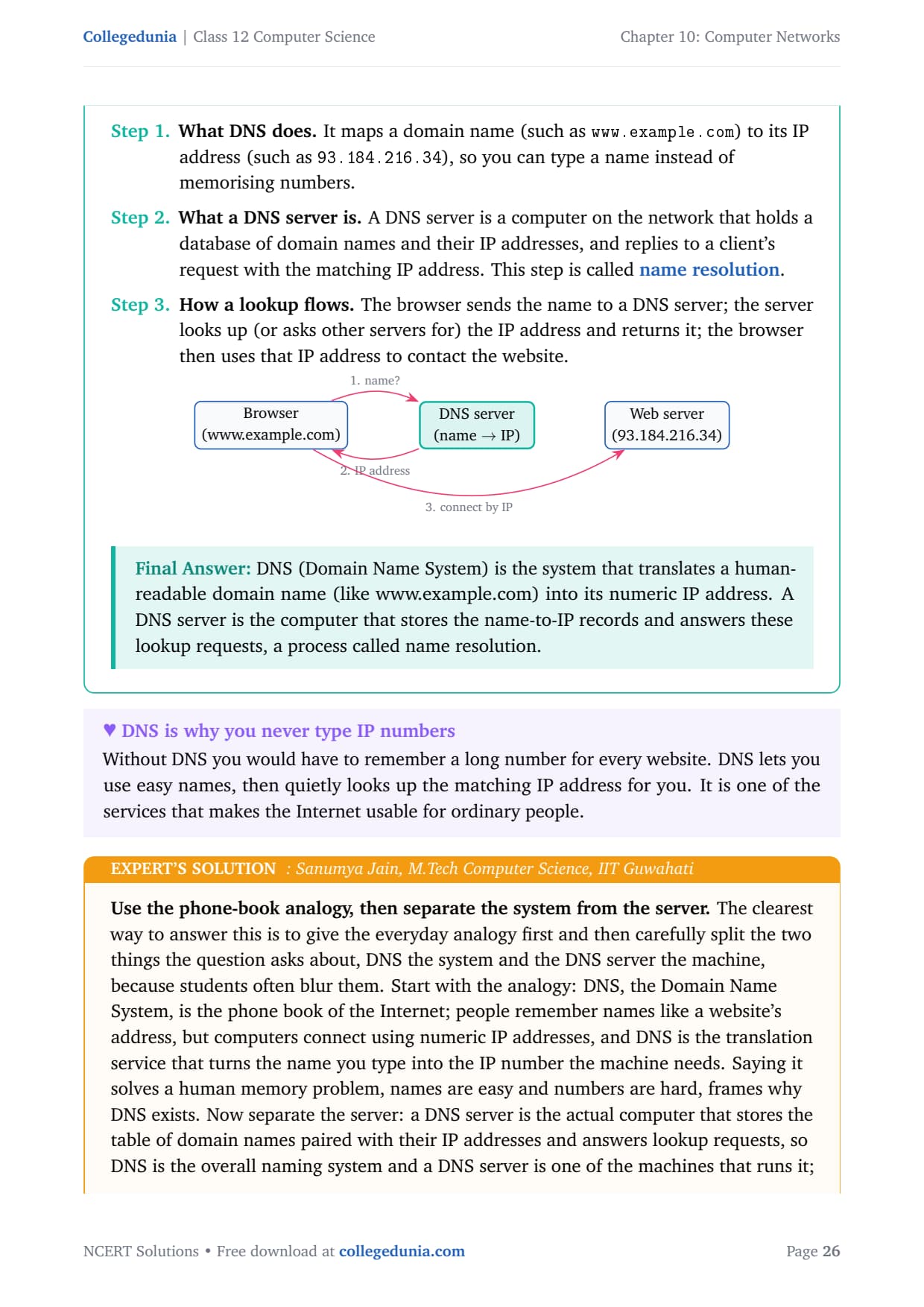
What DNS does. It maps a domain name (such as www.example.com) to its IP address (such as 93.184.216.34), so you type a name instead of memorising numbers.
What a DNS server is. A computer that holds a database of domain names and their IP addresses and replies to a client's request with the matching IP. This step is called name resolution.
How a lookup flows. The browser sends the name to a DNS server; the server returns the IP address; the browser then uses that IP to contact the website.
Answer: DNS (Domain Name System) translates a human-readable domain name (like www.example.com) into its numeric IP address. A DNS server is the computer that stores the name-to-IP records and answers these lookups, a process called name resolution.
SJ
Sanumya Jain
M.Tech Computer Science, IIT Guwahati
Verified Expert
Use the phone-book analogy, then separate the system from the server, because students often blur them.
DNS is the phone book of the Internet: people remember names but computers connect using numeric IP addresses, and DNS translates the name you type into the IP number the machine needs.
A DNS server is the actual computer that stores the table of names paired with IP addresses and answers lookup requests, so DNS is the overall system and a DNS server is one machine that runs it.
DNS is hierarchical and distributed: no single server knows every name, so queries pass up a chain, from root servers to top-level domain servers like .com and then to the site's authoritative server, which is why it scales to the whole Internet.
A correctness point: DNS maps names to IP addresses as its main job, and it is about naming, not routing the data itself, so keep DNS as the lookup step that happens before routing begins.
Answer: DNS (Domain Name System) is the Internet's phone book: it translates a domain name into the numeric IP address the computer needs (name resolution). A DNS server is the computer that stores the name-to-IP records and answers these lookups, and the system is hierarchical so it scales across the whole Internet.
Q 16
Sahil, a class X student, has just started understanding the basics of Internet and web technologies. He is a bit confused in between the terms "World Wide Web" and "Internet". Help him in understanding both the terms with the help of suitable examples of each.
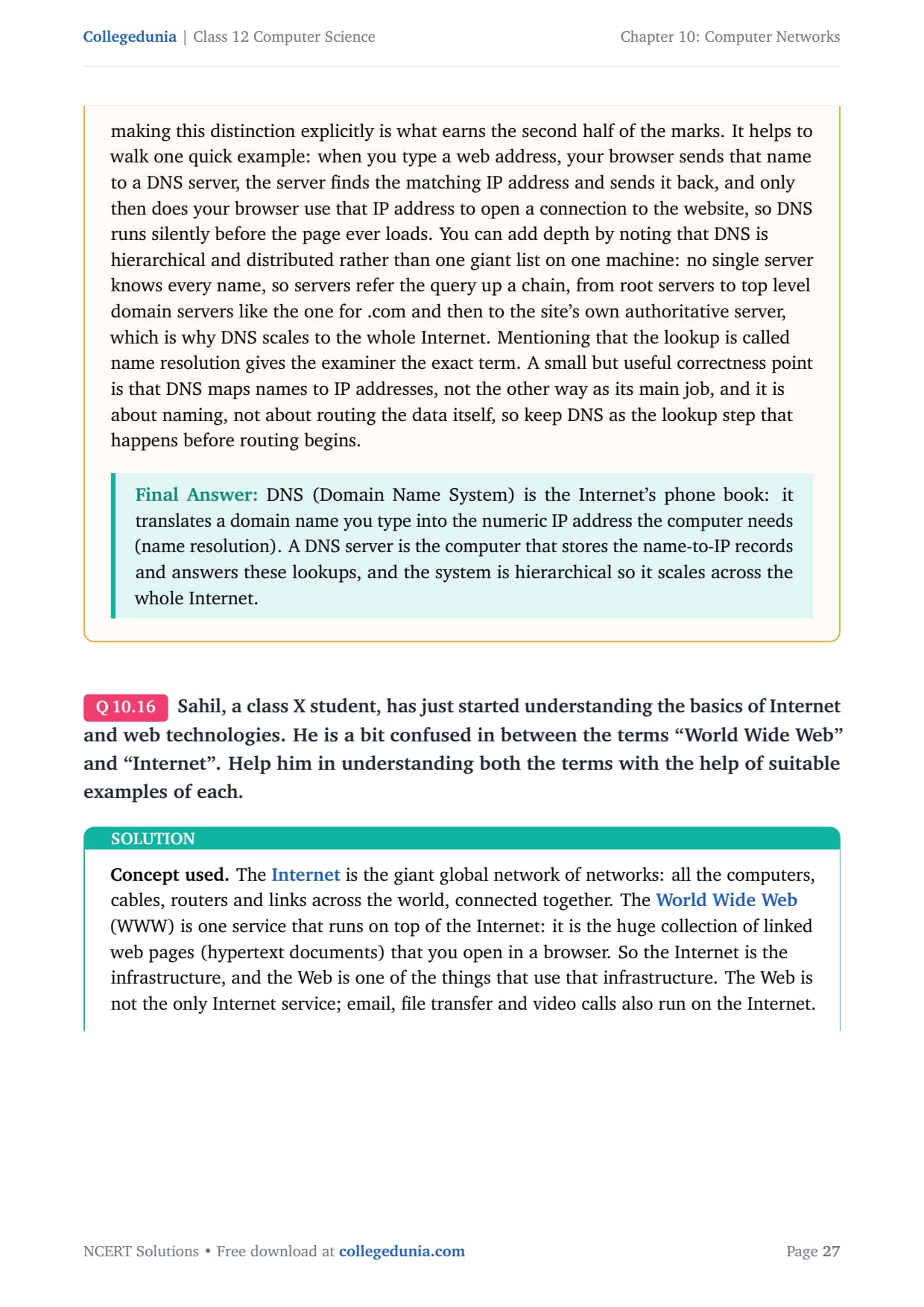
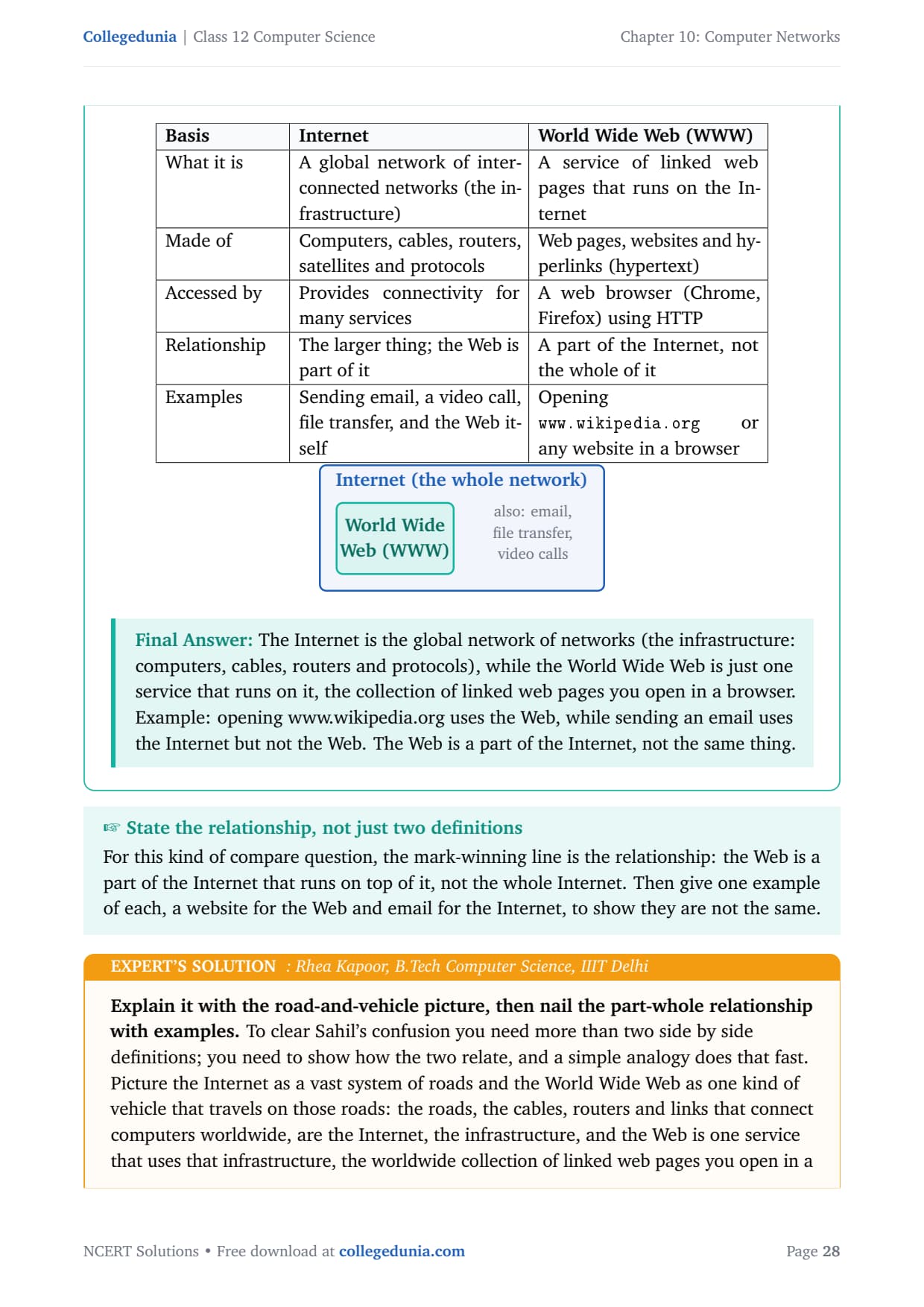
The Internet is the giant global network of networks: all the computers, cables, routers and links across the world, connected together. The World Wide Web (WWW) is one service that runs on top of the Internet: the huge collection of linked web pages you open in a browser. So the Internet is the infrastructure, and the Web is one of the things that use it.
Basis
Internet
World Wide Web (WWW)
What it is
A global network of interconnected networks (infrastructure)
A service of linked web pages running on the Internet
Made of
Computers, cables, routers, satellites and protocols
Web pages, websites and hyperlinks (hypertext)
Accessed by
Provides connectivity for many services
A web browser (Chrome, Firefox) using HTTP
Relationship
The larger thing; the Web is part of it
A part of the Internet, not the whole of it
Examples
Email, video call, file transfer, and the Web itself
Opening www.wikipedia.org in a browser
Answer: The Internet is the global network of networks (the infrastructure), while the World Wide Web is just one service that runs on it, the collection of linked web pages you open in a browser. Opening www.wikipedia.org uses the Web; sending an email uses the Internet but not the Web. The Web is a part of the Internet, not the same thing.
RK
Rhea Kapoor
B.Tech Computer Science, IIIT Delhi
Verified Expert
Explain it with the road-and-vehicle picture, then nail the part-whole relationship with examples.
Picture the Internet as a vast system of roads, the cables, routers and links that connect computers worldwide, and the World Wide Web as one kind of vehicle that travels on those roads, the worldwide collection of linked web pages.
The key idea for Sahil is the part-whole relationship: the Web is a part of the Internet, not the same as it, because the Internet also carries other services that are not the Web.
Examples on both sides: opening www.wikipedia.org and clicking links is using the Web, while sending an email, making a video call or transferring a file uses the Internet but not the Web.
Add the touch that the Internet grew from ARPANET and is decades old, while the Web was invented later, in 1989 by Tim Berners-Lee, on top of the existing Internet; this ordering fixes which one contains the other. Steer Sahil away from treating "being online" and "being on the Web" as identical.
Answer: The Internet is the global infrastructure, the network of networks made of cables, routers and protocols; the World Wide Web is one service on it, the linked web pages opened in a browser. Opening www.wikipedia.org uses the Web; sending email uses the Internet but not the Web. The Web (invented 1989 by Tim Berners-Lee) is a part of the older Internet, not the whole of it.
Ques. How many questions are there in NCERT Class 12 Computer Science Chapter 10 Computer Networks?
Ans. There are 16 end-of-chapter exercise questions in NCERT Class 12 Computer Science Chapter 10 Computer Networks. All 16 are solved with full answers and an Expert Solution in the PDF. The mix is one expansion question, several definition questions (network, topology, modem, DNS), three comparison questions (LAN versus WAN, tree versus bus, MAC versus IP), device-explanation questions, a choose-the-network-type question, an identify-the-topology question, a draw-the-layout question, and the Internet versus World Wide Web question.
Ques. What is the difference between LAN and WAN in Class 12 Computer Science?
Ans. A LAN (Local Area Network) covers a small area such as a room, building or campus, is usually owned by one organisation, and is fast and cheap with a low error rate. A WAN (Wide Area Network) covers a very large area such as a city, country or the world, often spans many owners, and is slower and costlier over long distances. The simplest way to remember it is that the whole difference flows from distance: short distances make a LAN fast and cheap, while long distances make a WAN slower and more expensive. The Internet is the largest WAN, and a MAN sits between the two at city size.
Ques. What is the difference between a MAC address and an IP address?
Ans. A MAC address is a 48-bit physical hardware address fixed in a device's NIC by the manufacturer, used for local identification and delivery on a LAN, and it normally cannot change. An IP address is a logical address (32 bits in IPv4) given by the network or the ISP, used for global identification across networks, and it can change. They cooperate rather than compete: the IP address routes data to the right network, and then the MAC address delivers it to the right device on that network, which is why routers work with IP addresses and switches work with MAC addresses.
Ques. What is a modem and why is it used in Class 12 Computer Science Chapter 10?
Ans. A modem is short for Modulator-Demodulator. Computers work with digital signals (0s and 1s), but ordinary telephone and cable lines were built to carry analog signals (continuous waves). At the sender the modem modulates, converting digital data into an analog signal the line can carry, and at the receiver the partner modem demodulates, converting the analog signal back into digital data. It is used because the line carries analog while the computer works in digital, so a translator is needed at each end of the connection.
Ques. How is tree topology different from bus topology?
Ans. A bus topology has all nodes on one single straight backbone cable, so it is linear, uses the least cable, is the cheapest, but is hard to expand and a single backbone break can stop the whole network. A tree topology is a hierarchy of star groups joined to a common backbone, shaped like an upside-down tree, so it is in fact a combination of bus and star topologies. A tree uses more cable and needs a hub or switch at each branch, but it is easy to expand by adding new branches and a fault in one branch tends to affect only that branch, which is why large layered networks favour the tree.
Ques. What is DNS and what is a DNS server?
Ans. DNS stands for Domain Name System, and it is the system that translates a human-friendly domain name such as www.example.com into the numeric IP address that computers actually use, a step called name resolution. It works like a phone book for the Internet: you give it a name and it returns the number. A DNS server is the computer that stores the database of domain names and their IP addresses and answers these lookup requests. DNS is hierarchical and distributed, so no single server holds every name, which is how it scales to the whole Internet.
Ques. How many pages is the Class 12th Computer Science Computer Networks NCERT Solutions PDF?
Ans. The Computer Networks NCERT Solutions PDF runs about 22 pages and covers all 16 exercise questions with clear definitions, comparison tables, labelled diagrams, and an Expert Solution for each question. Both Normal and HD versions are available from this page, and both are free to download for the 2026-27 session.
Ques. Is the NCERT Solutions for Class 12 Computer Science Chapter 10 aligned with the 2026-27 syllabus?
Ans. Yes. This page reflects the current 2026-27 CBSE syllabus for Class 12 Computer Science. The Computer Networks chapter is unchanged for the current cycle, and every answer follows the NCERT textbook, covering network types, topologies, devices, MAC and IP addressing, DNS, and the Internet versus the World Wide Web. The solutions are useful for the CBSE board exam, and the same networking basics help with CUET Computer Science and JEE-level computer awareness.
Ques. What is the difference between the Internet and the World Wide Web?
Ans. The Internet is the global infrastructure, the network of networks made of computers, cables, routers, satellites and protocols. The World Wide Web is just one service that runs on top of the Internet, the worldwide collection of linked web pages you open in a browser using HTTP. So the Web is a part of the Internet, not the whole of it. Opening a website such as www.wikipedia.org uses the Web, while sending an email or making a video call uses the Internet but not the Web. The Web was invented in 1989 by Tim Berners-Lee, long after the Internet itself.








Comments