




Strings is the chapter where Class 11 Computer Science students learn to pull a program apart one character at a time. The ncert book class 11 computer science chapter 8 strings file on this page is the official NCERT chapter for 2026-27. Download it for the indexing table, the full built-in function list and all five solved programs.
- Chapter: Chapter 8, Strings
- Book: Computer Science, the Class 11 NCERT textbook for 2026-27, 11 chapters
- File: 14 pages, printed pages 175 to 188, the complete official chapter
You can page through the indexing table, the twenty built-in functions and every shell example in the viewer above before downloading.
This is the official NCERT chapter file for the 2026-27 session, hosted by Collegedunia with no pages removed.
How the Strings Chapter Is Laid Out
The chapter opens with a line from Bill Gates about the computer notebook, then moves through six numbered sections. Each one adds a small skill, and the last section puts all of them together inside working programs.
| Section | What it covers |
|---|---|
| 8.1 Introduction | where strings sit among the sequence types introduced in Chapter 5 |
| 8.2 Strings | creating a string with single, double or triple quotes |
| 8.2.1 Accessing Characters | indexing, negative indices, IndexError, TypeError and Table 8.1 |
| 8.2.2 String is Immutable | why an item assignment on a string raises an error |
| 8.3.1 Concatenation | joining two strings with the plus operator |
| 8.3.2 Repetition | repeating a string with the star operator |
| 8.3.3 Membership | the in and not in operators on substrings |
| 8.3.4 Slicing | str1[n:m], the step size and the reverse trick |
| 8.4 Traversing a String | a for loop version and a while loop version |
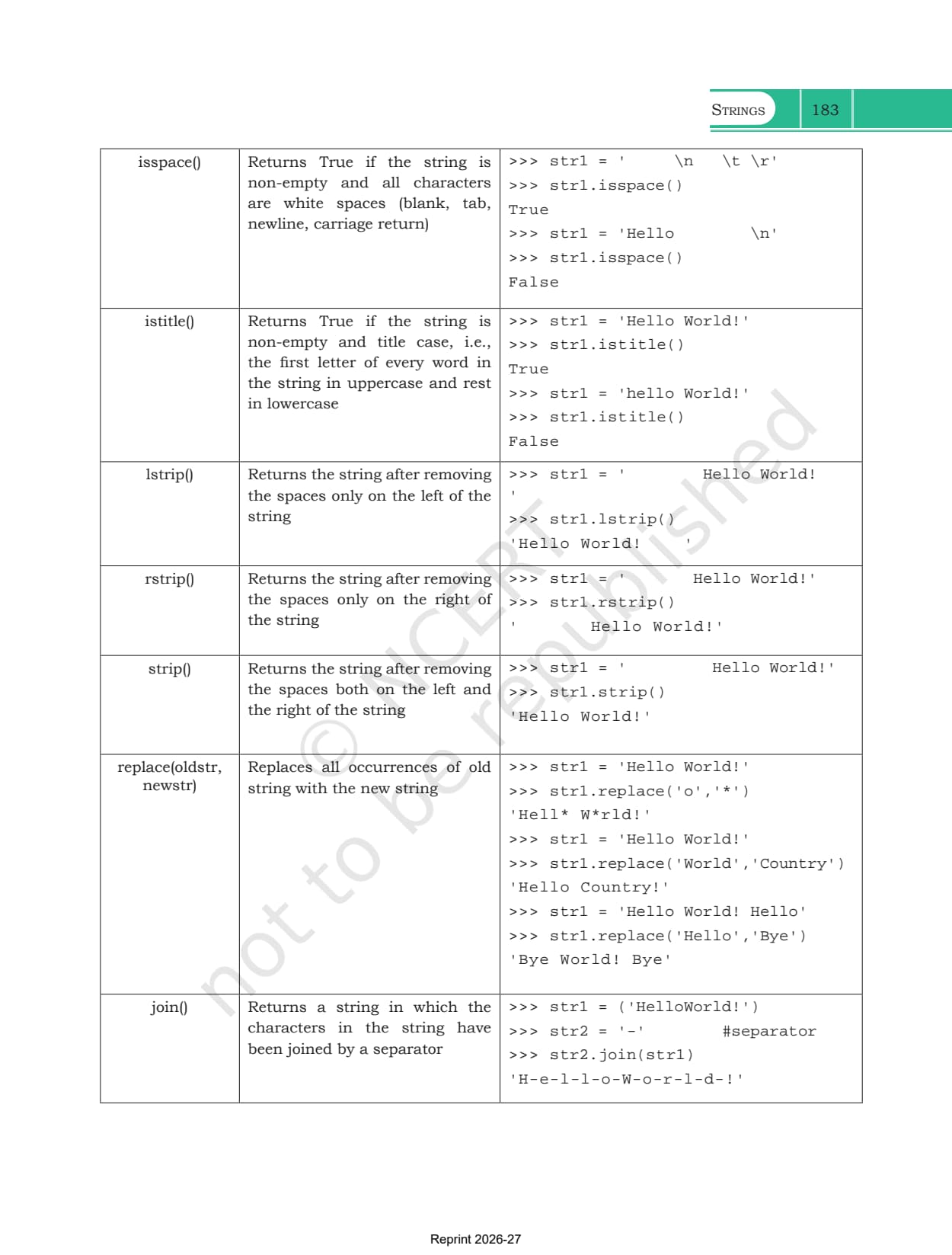
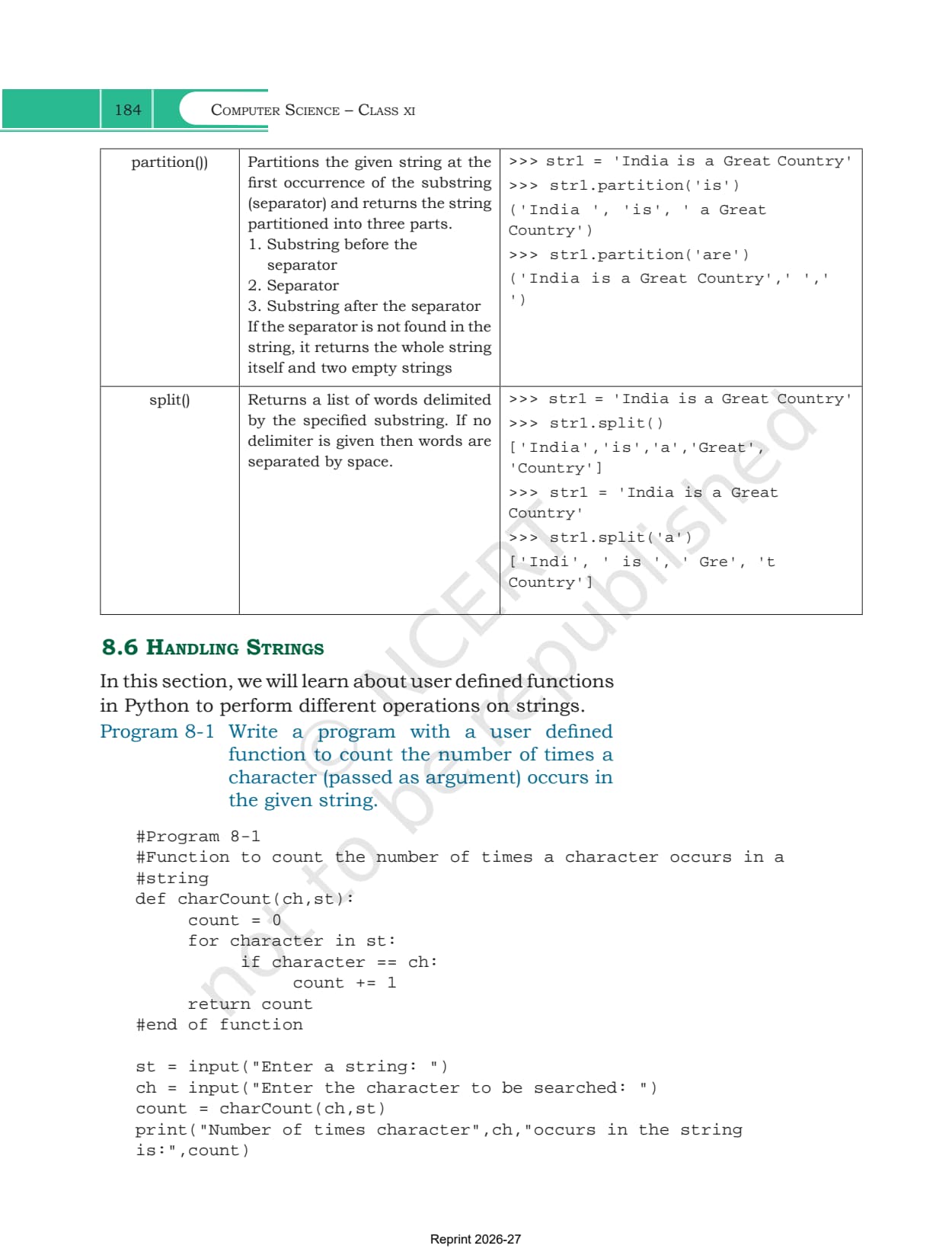
| 8.5 String Methods and Built-in Functions | Table 8.2, twenty methods with worked shell output |
| 8.6 Handling Strings | Programs 8-1 to 8-5, all with user defined functions |
| Summary and Exercise | an eight point recap, 20 output questions and 5 programming problems |
What the Strings Chapter PDF Contains
The PDF holds the whole chapter exactly as NCERT printed it, with nothing trimmed.
- All six sections, from the definition of a string to the five solved programs
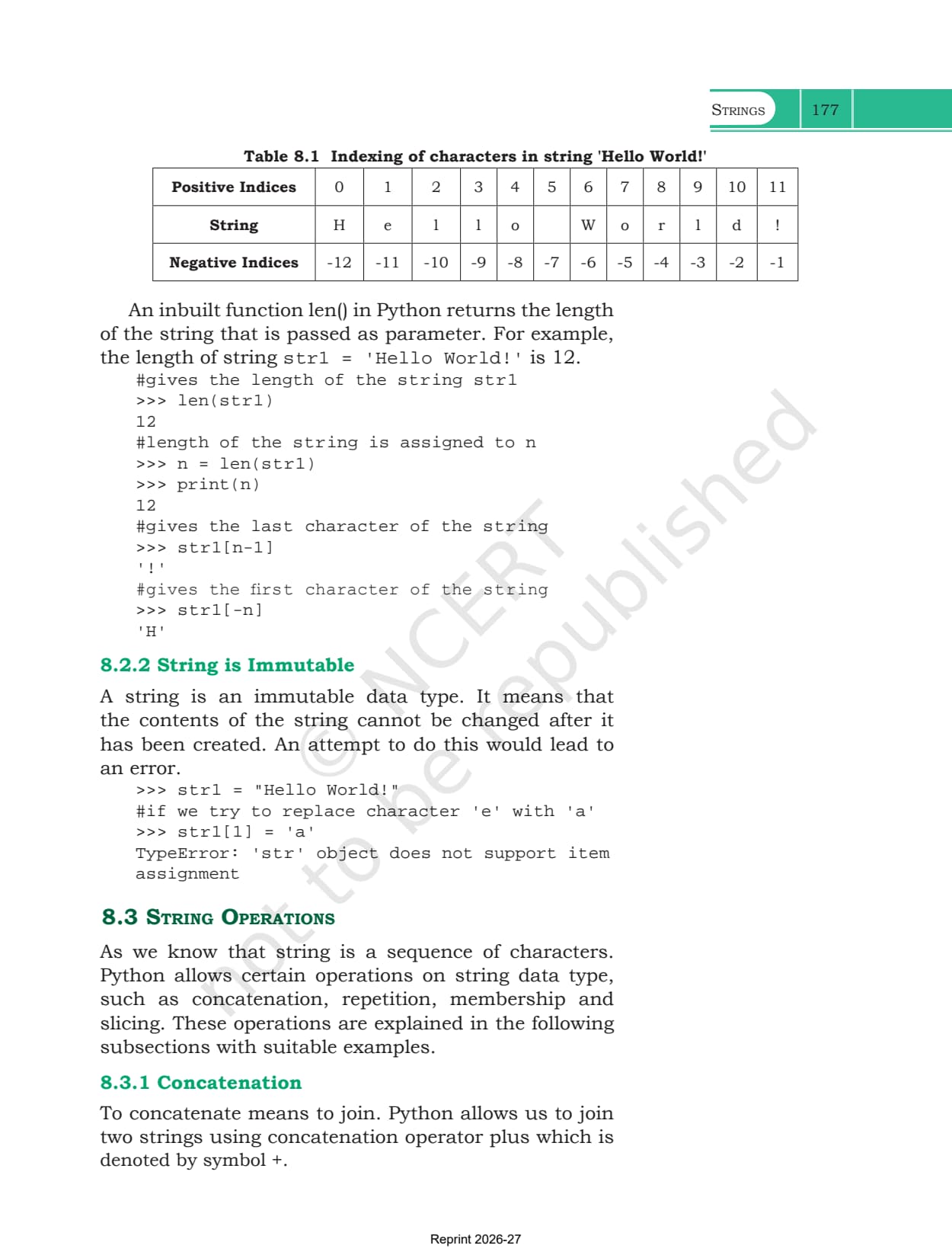
- Table 8.1, the indexing chart that lays positive indices 0 to 11 above the phrase Hello World! and negative indices -12 to -1 below it
- Table 8.2, the long built-in function table with 20 methods, each with a description and real shell output
- Every shell example from Example 8.1 onward, including the error messages Python actually prints
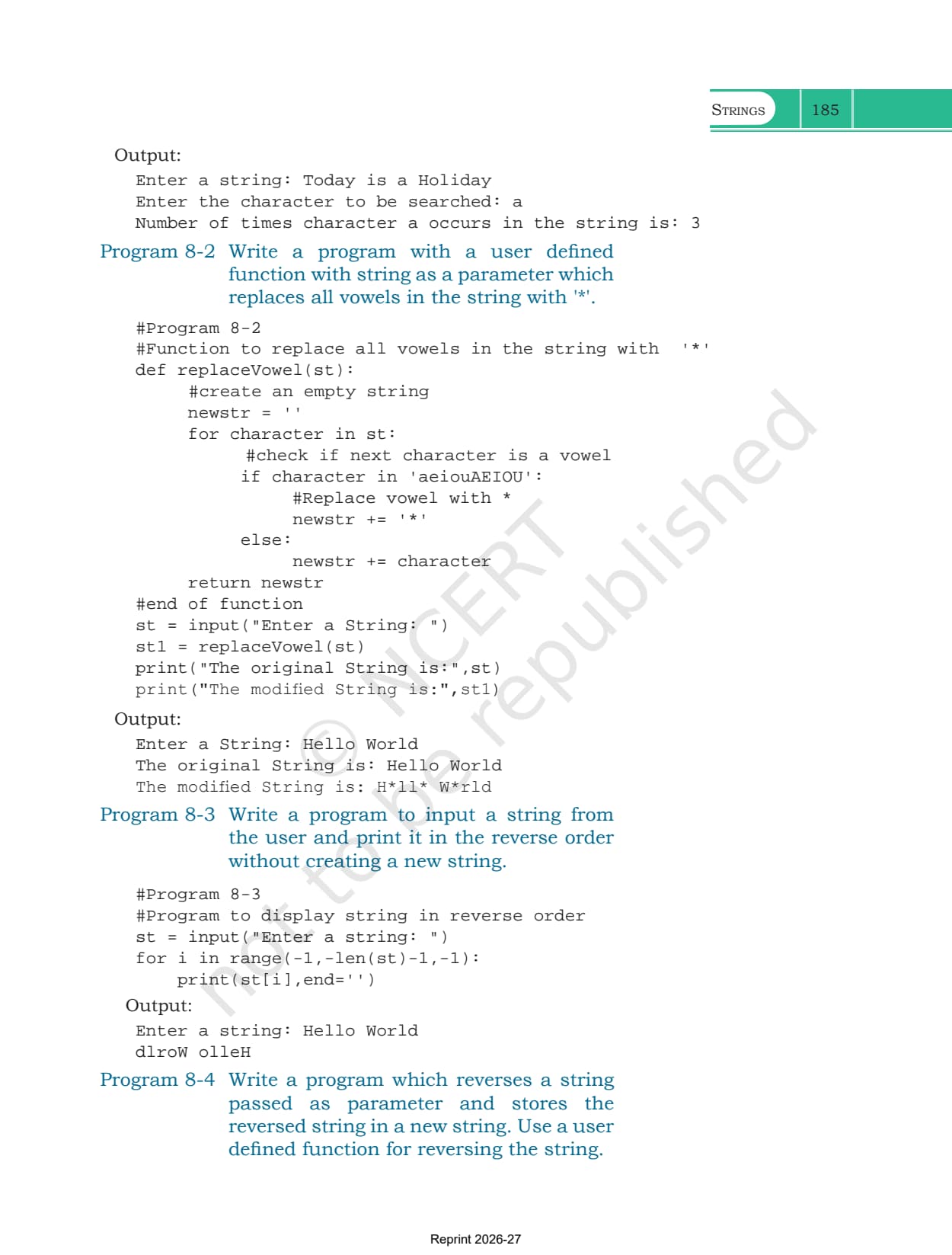
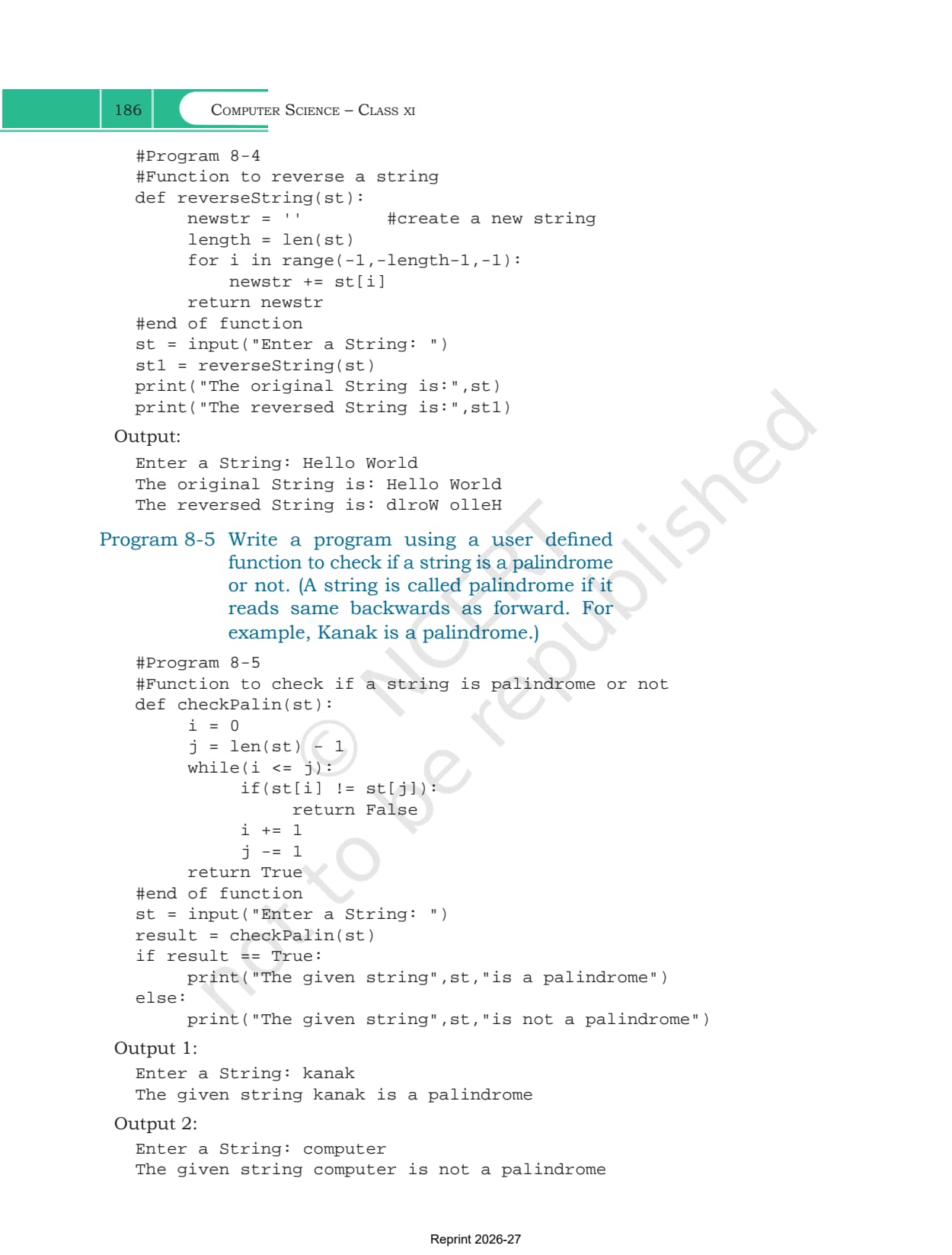
- Programs 8-1 to 8-5 with their input prompts and printed output
- The Summary page, both exercise questions with ten parts each, and the five programming problems
Strings Class 11 Chapter Overview
Source: Magnet Brains on YouTube
How a String Is Created and Why It Cannot Be Changed
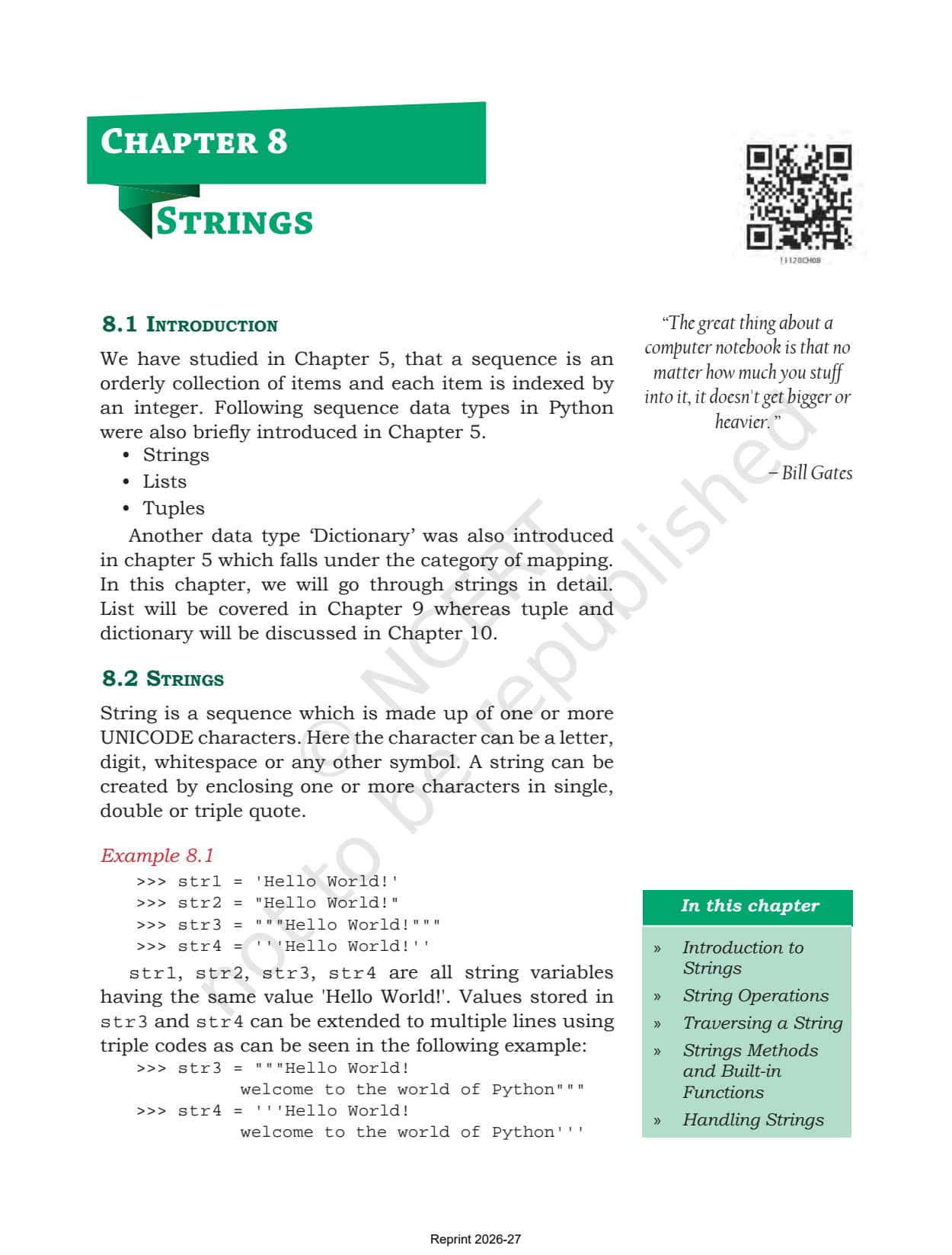
Section 8.2 defines a string as a sequence made of one or more Unicode characters. A character here can be a letter, a digit, a whitespace or any other symbol. You create one by wrapping those characters in quotes, and Python accepts three quoting styles.
- Single quotes: the everyday form, as in str1='Hello World!'
- Double quotes: the same result, useful when the text itself contains an apostrophe
- Triple quotes: either three single or three double quotes, and these are the only ones that let the text run across more than one line
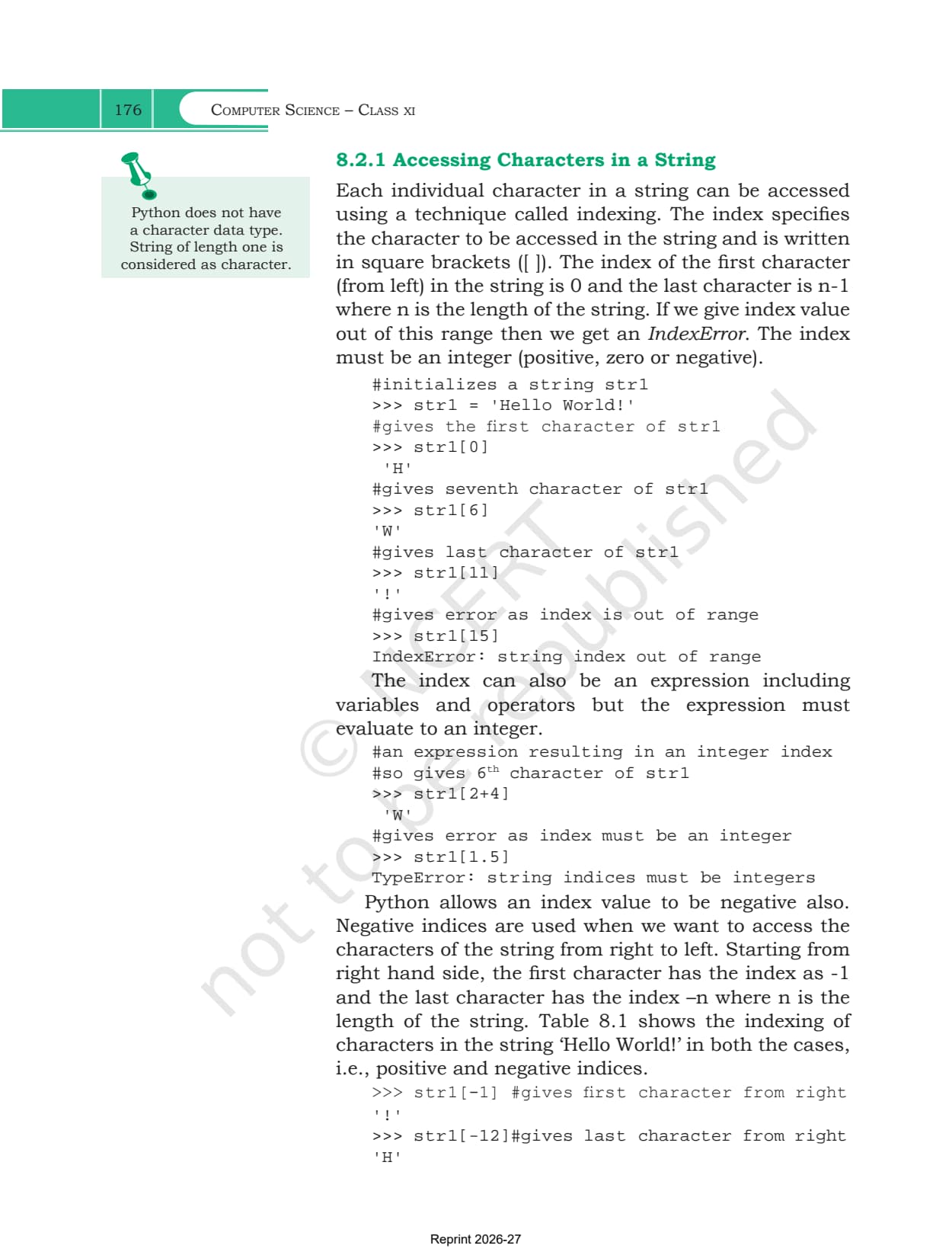
The chapter adds a margin note that students often miss. Python has no separate character data type, so a string of length one is the character. That single line answers a common one mark question.
Section 8.2.2 then states the rule that shapes everything else in the chapter. A string is immutable, so its contents cannot be changed after it has been created. Trying to swap one letter with str1[1] = 'a' does not quietly work, it raises a TypeError saying that a str object does not support item assignment. This is why Program 8-2 builds a brand new string when it replaces vowels instead of editing the old one in place.
Indexing, Negative Indices and the len Function
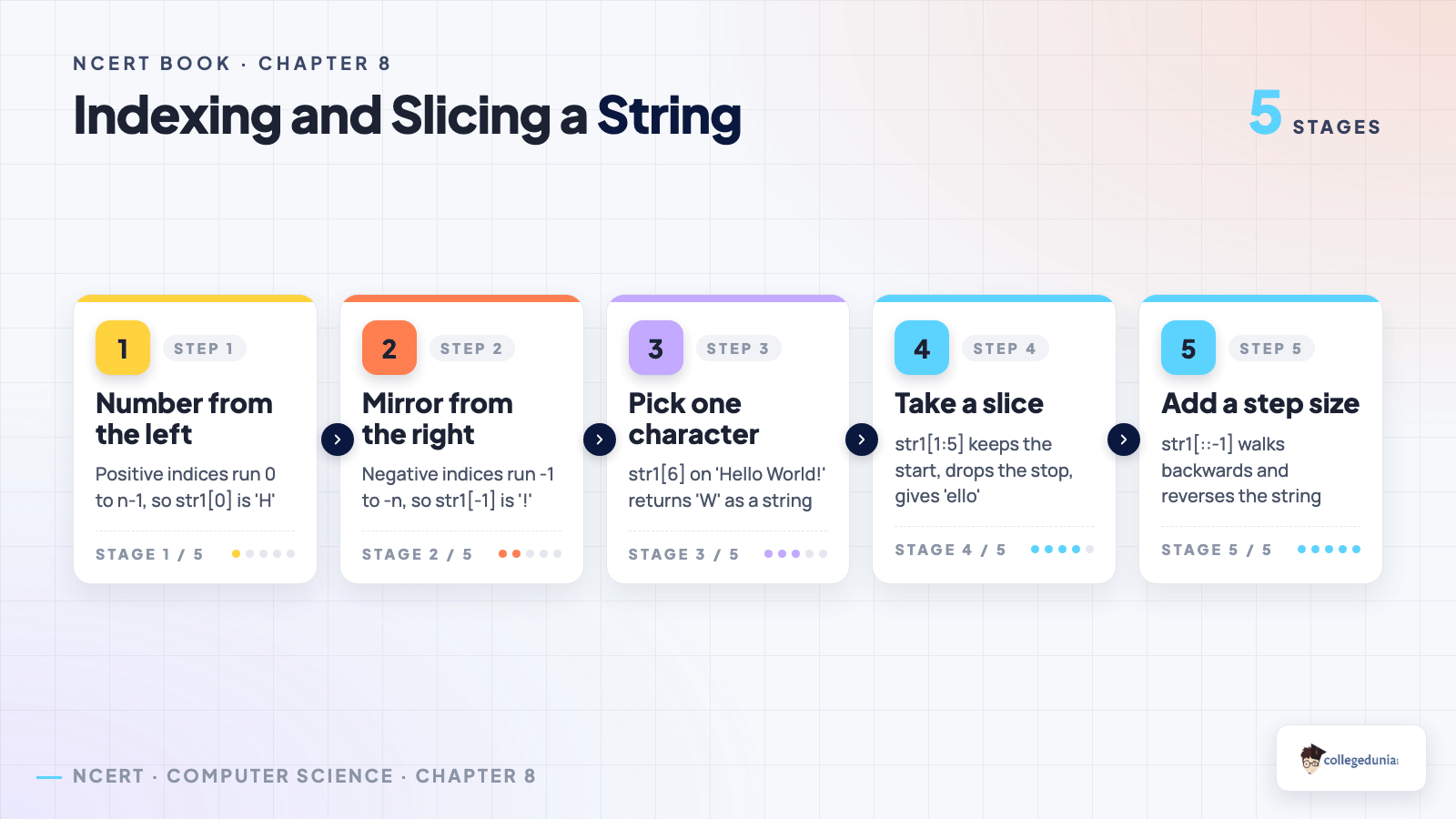
Section 8.2.1 explains how to reach one character at a time. The index goes inside square brackets, the first character from the left is at index 0, and the last one is at n-1 where n is the length of the string. An index beyond that range gives an IndexError.
The index may also be an expression, so str1[2+4] is valid because 2+4 evaluates to an integer. A float index such as str1[1.5] is not, and Python answers with a TypeError saying string indices must be integers. Negative indices then let you count from the right instead, with -1 at the last character and -n at the first.
| Expression on 'Hello World!' | Result | Why |
|---|---|---|
| str1[0] | 'H' | counting from the left always starts at zero |
| str1[6] | 'W' | the space at index 5 also takes up a position |
| str1[11] | '!' | the last character of a 12 character string |
| str1[15] | IndexError | the index sits outside the valid range |
| str1[1.5] | TypeError | an index must evaluate to an integer |
| str1[-1] | '!' | negative counting starts at the right hand end |
| str1[-12] | 'H' | -n reaches the very first character |
| len(str1) | 12 | the built-in function counts every character |
The built-in len() function is introduced here because the two index systems are tied to it. Once n = len(str1), the last character is str1[n-1] and the first is str1[-n]. Table 8.1 in the PDF prints both index rows above and below the phrase, which is the quickest way to fix the pattern in memory.
Concatenation, Repetition and Membership Operators
Section 8.3 lists the operations Python allows on strings. Three of them are single symbol operators you have already met on numbers, doing something different here.
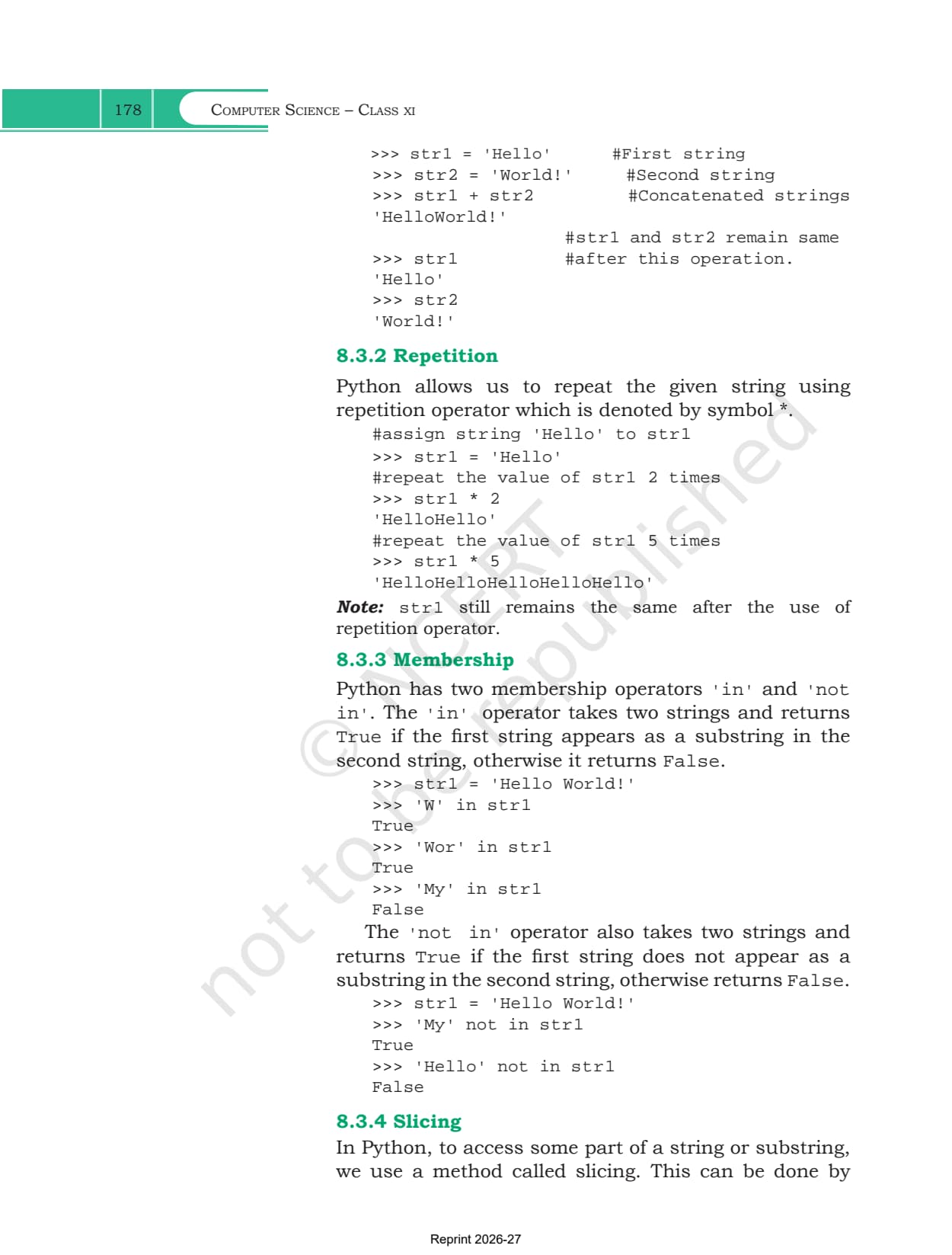
- Concatenation with +: 'Hello' + 'World!' returns 'HelloWorld!' as one new value. Note that no space is inserted, and both original strings stay exactly as they were
- Repetition with *: str1 * 2 on 'Hello' returns 'HelloHello', and str1 * 5 repeats it five times. Again the original is untouched, because the string is immutable
- Membership with in: takes two strings and returns True when the first appears as a substring inside the second, so 'Wor' in 'Hello World!' is True but 'My' in it is False
- Membership with not in: the exact reverse, so 'My' not in 'Hello World!' returns True while 'Hello' not in it returns False
Both membership operators return a Boolean, which is why they slot straight into an if statement. Program 8-2 uses this in one line, checking if character in 'aeiouAEIOU' to decide whether a letter is a vowel. Comparison operators such as == and != also work on strings and compare them character by character, and the palindrome program in section 8.6 depends on exactly that.
Slicing a String and Traversing It with Loops
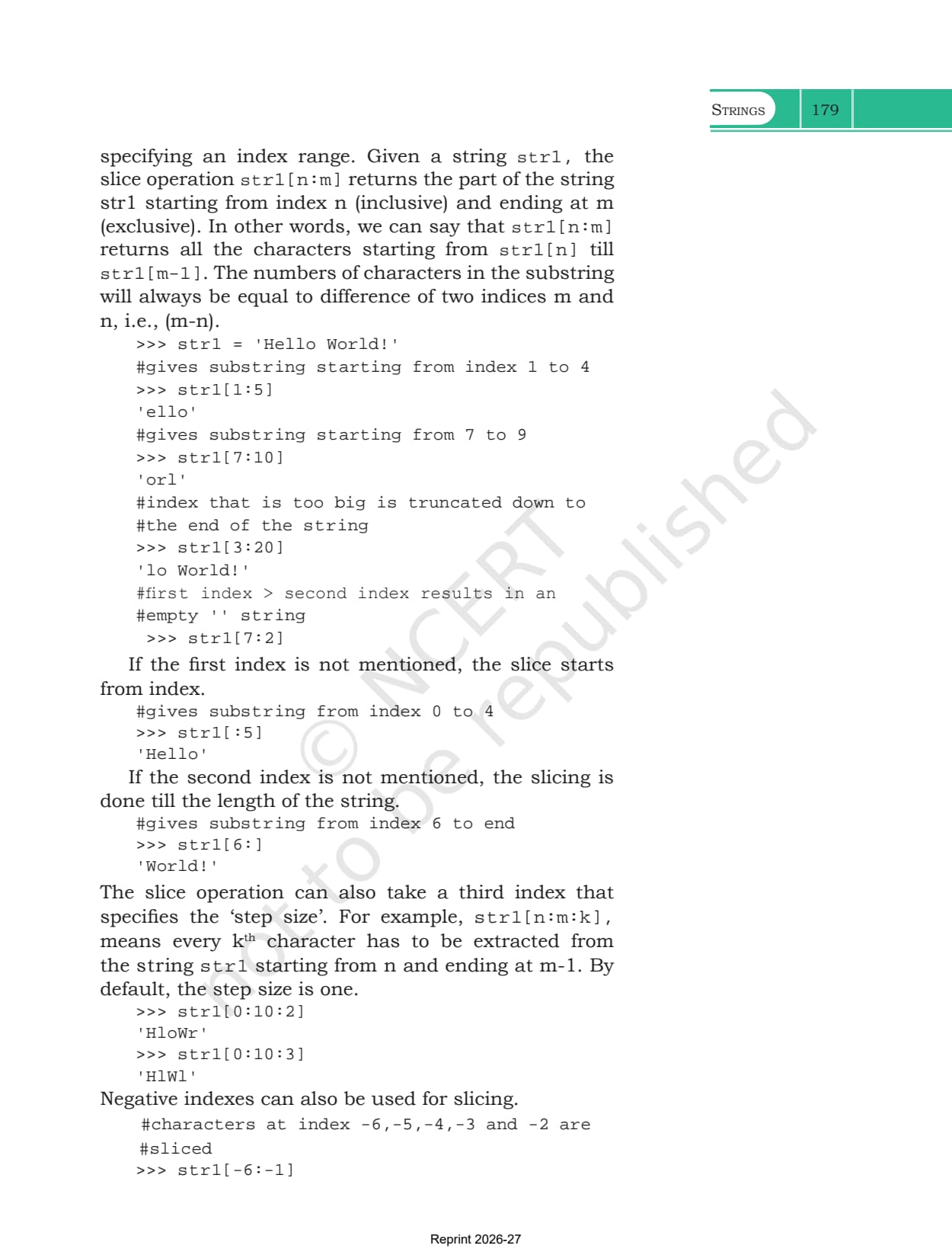
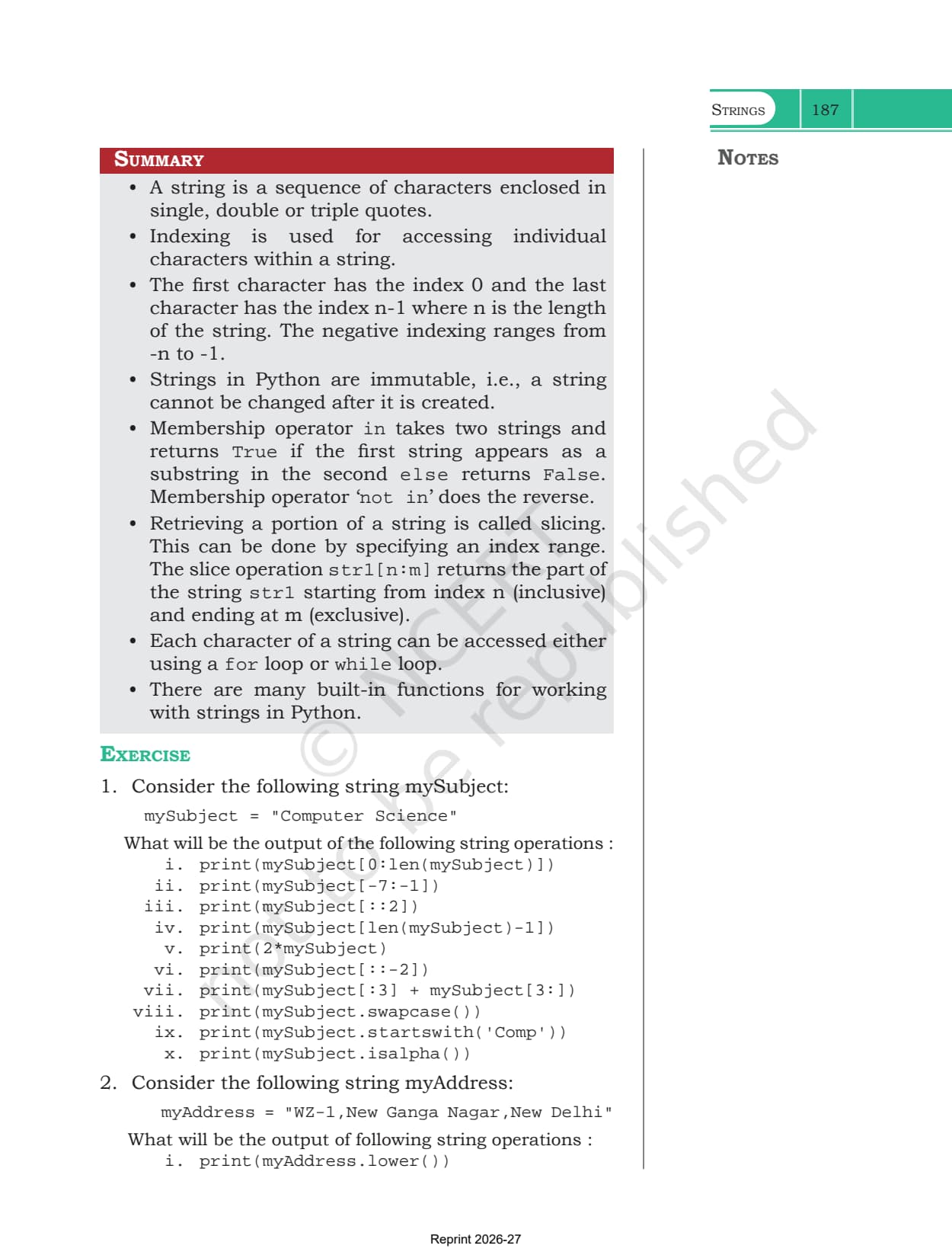
Slicing pulls out a whole substring in one step. Given a string str1, the slice str1[n:m] returns the characters from index n up to but not including index m, so the length of the result is always m minus n. This asymmetry is the single most common source of lost marks in the chapter.
| Slice on 'Hello World!' | Result | Rule it demonstrates |
|---|---|---|
| str1[1:5] | 'ello' | start included, stop excluded |
| str1[3:20] | 'lo World!' | an oversized stop is trimmed to the end |
| str1[7:2] | '' | start above stop returns an empty string |
| str1[:5] | 'Hello' | a missing start means index 0 |
| str1[6:] | 'World!' | a missing stop means the full length |
| str1[0:10:2] | 'HloWr' | the third value is the step size |
| str1[-6:-1] | 'World' | negative indices slice too |
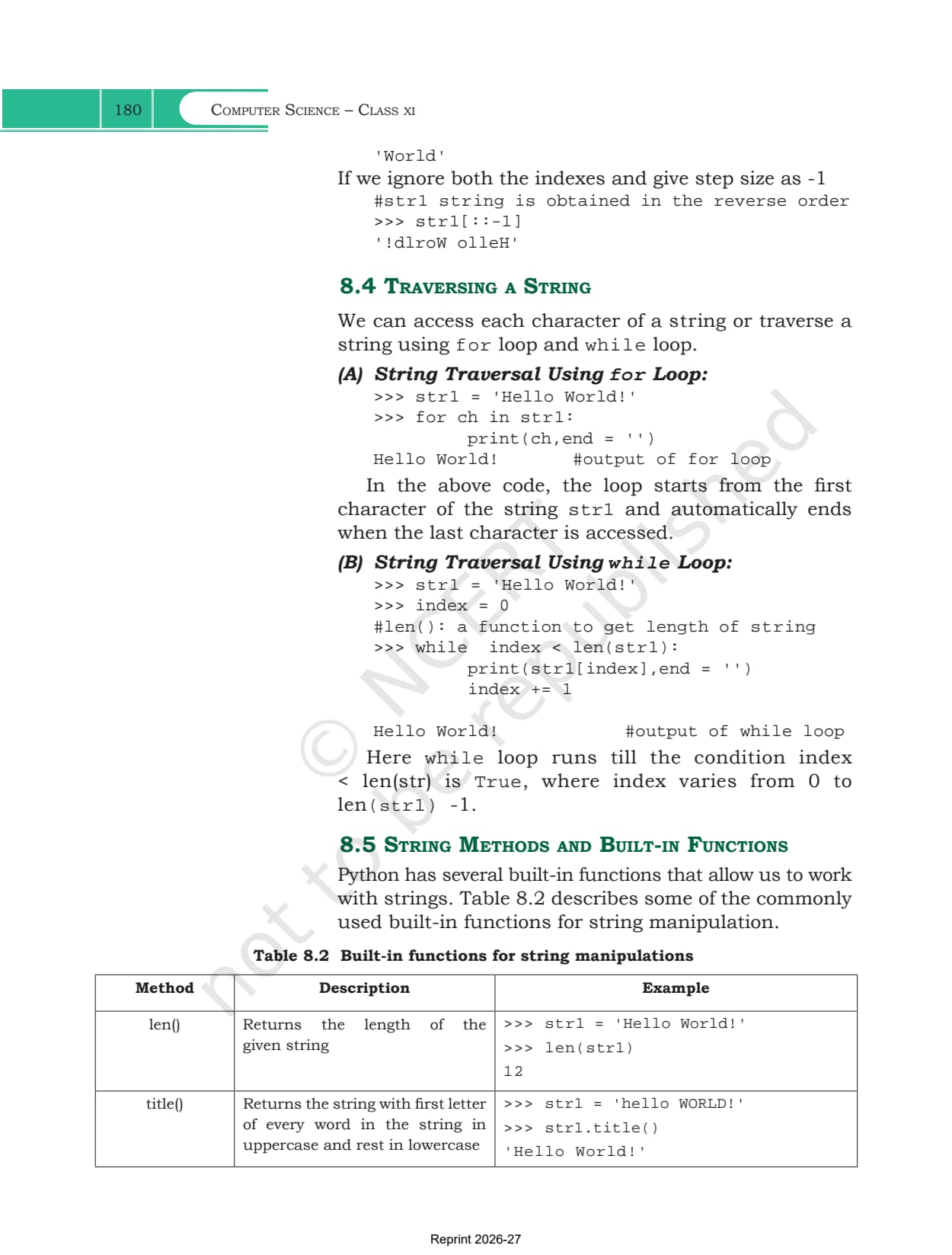
| str1[::-1] | '!dlroW olleH' | a step of -1 reverses the whole string |
Section 8.4 then covers traversal, which means visiting every character in turn. The chapter gives two versions of the same job, and the exercise expects you to be able to write both.
- The for loop: for ch in str1 hands you one character per pass and stops on its own at the end. Nothing has to be counted
- The while loop: set index = 0, run while index < len(str1), print str1[index] and add one each time. You control the counter yourself
- Printing on one line: both versions pass end='' to print so the characters appear side by side rather than one per line
String Methods and Built-in Functions in Table 8.2
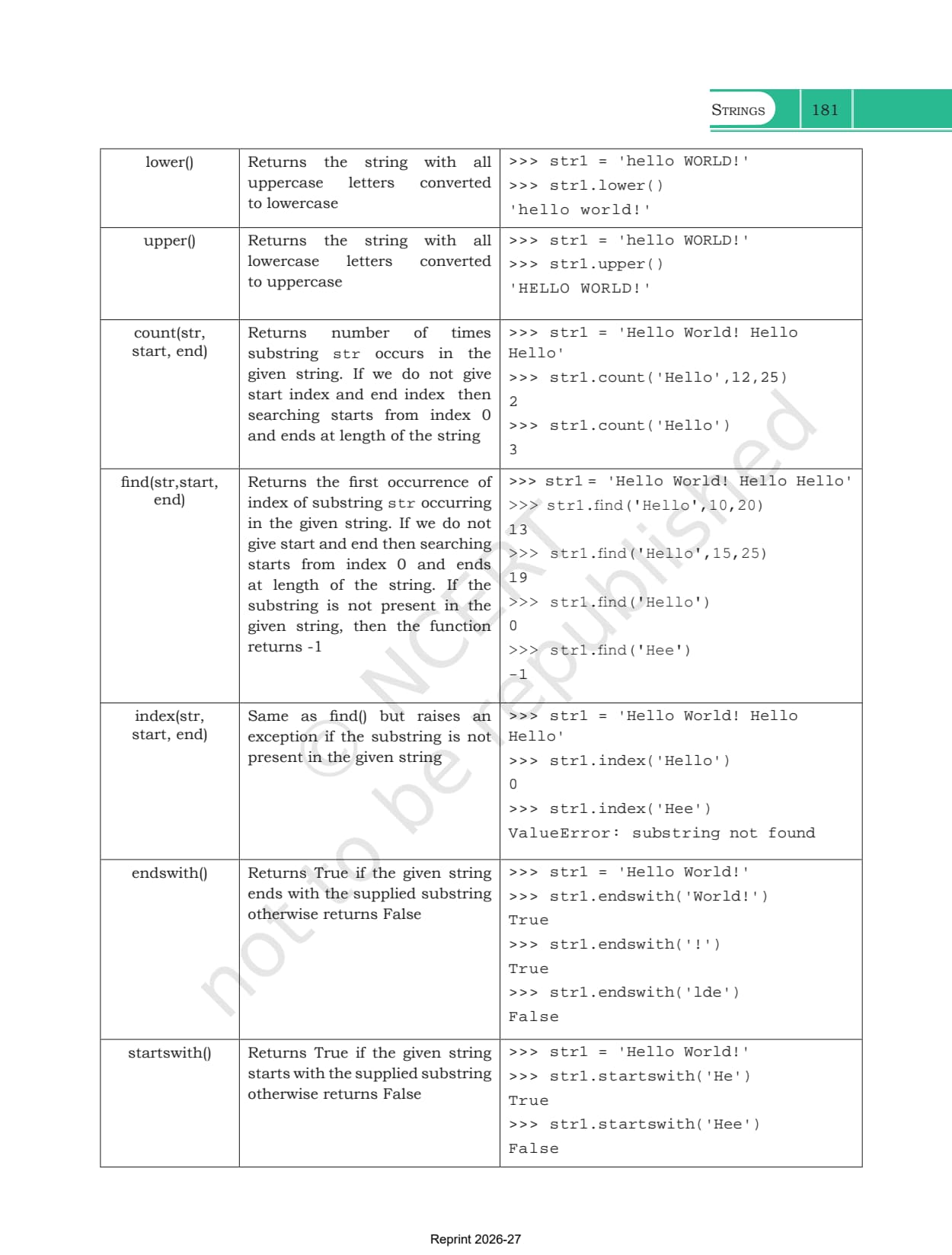
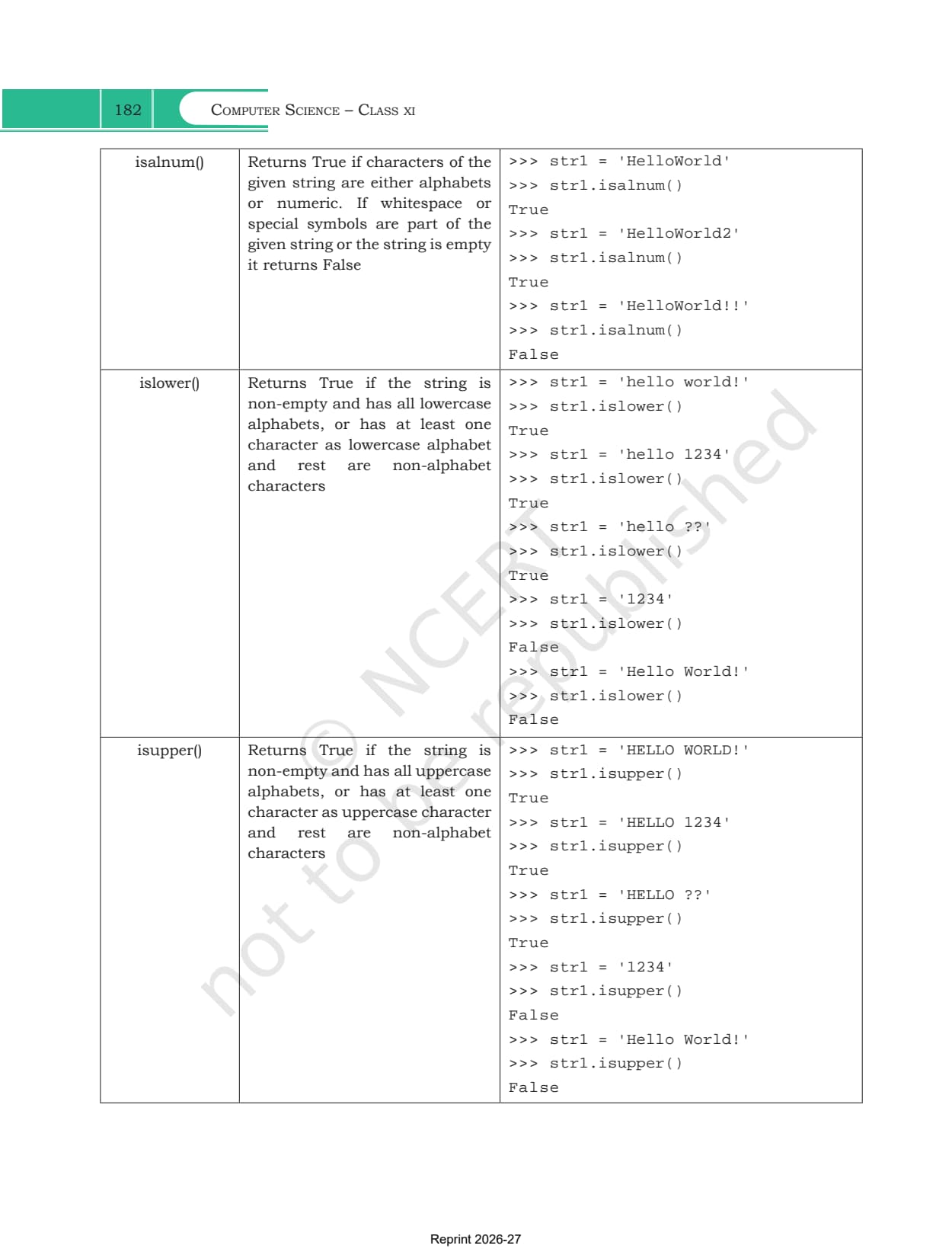
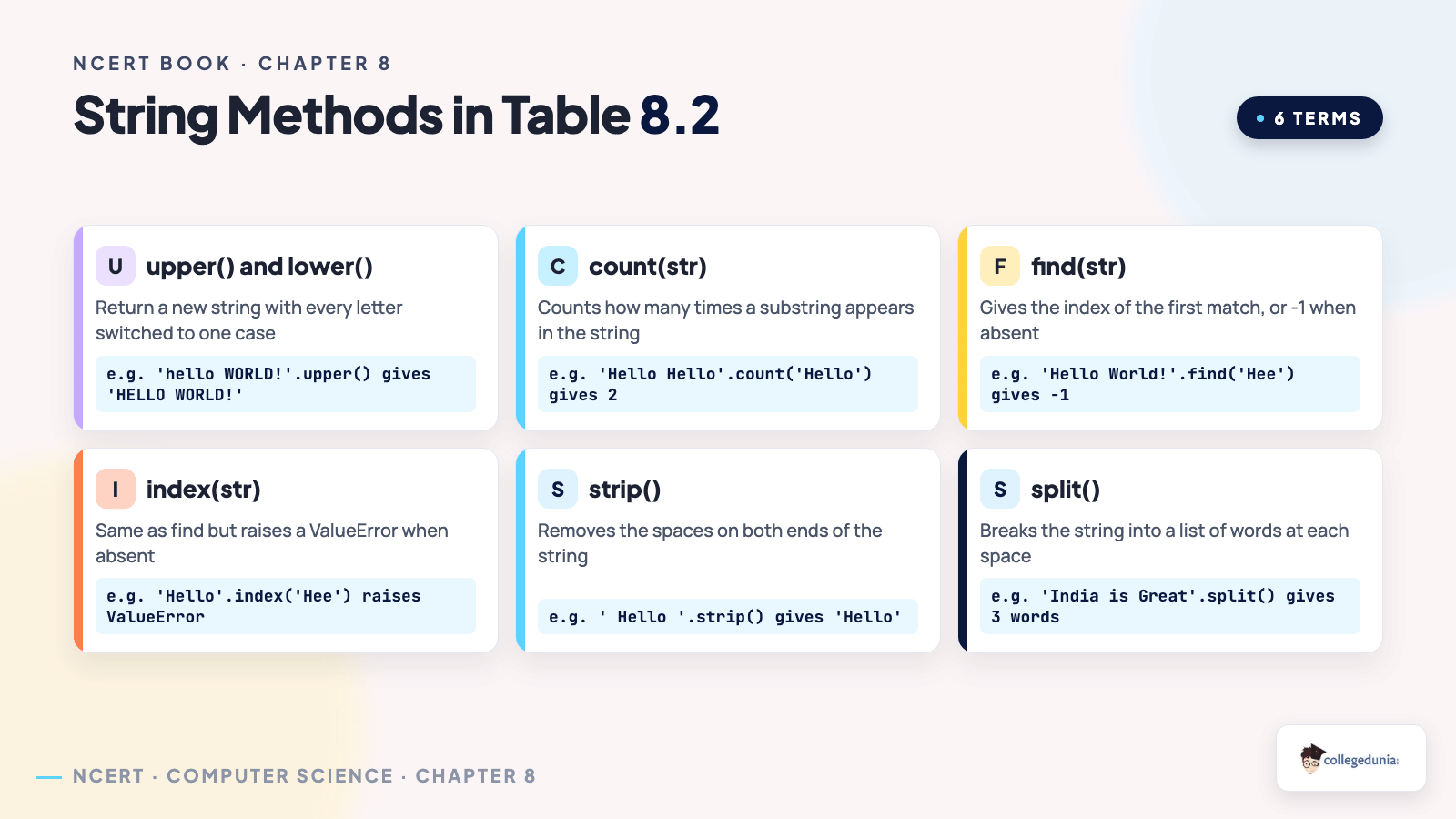
Section 8.5 is the longest part of the chapter and the part exercise question 2 tests directly. Table 8.2 lists twenty entries, and each row carries a description plus a small block of real shell output. They fall into four natural groups.
| Group | Methods | What they return |
|---|---|---|
| Changing case | title(), lower(), upper() | a fresh string in the new case, leaving the original alone |
| Searching | count(), find(), index(), startswith(), endswith() | a number or a Boolean describing where a substring sits |
| Testing the contents | isalnum(), islower(), isupper(), isspace(), istitle() | True or False about the characters in the string |
| Reshaping | lstrip(), rstrip(), strip(), replace(), join(), partition(), split() | a trimmed, edited or broken up version of the string |
A few rows carry the traps that examiners like. find() returns -1 when the substring is absent, while index() does the same job but raises a ValueError instead. That single difference is the most asked one mark question from this chapter. Both accept an optional start and end, so str1.count('Hello',12,25) searches only that slice of the string.
The content tests also have edges worth remembering. isalnum() is True for letters and digits together but False the moment a space or a symbol appears. islower() stays True for 'hello 1234' because the digits are not alphabets and the letters that are present are lowercase, yet it turns False for '1234' alone since no alphabet is present at all. The reshaping group is just as precise. partition() always returns three parts, namely the text before the separator, the separator itself and the text after it, while split() returns a list of words and uses spaces when you give it no delimiter. The exercise also touches isalpha() and swapcase() in question 1, so the two lists are worth reading together.
The Five Solved Programs and the Exercise Set
Section 8.6 turns everything above into complete code. Each program defines its own function, takes input from the user and prints an answer, so they double as practice for the functions chapter.
- Program 8-1: charCount() counts how many times one character appears in a string, using a for loop and a running counter
- Program 8-2: replaceVowel() builds a new string and swaps every vowel for a star, checking membership against 'aeiouAEIOU'
- Program 8-3: prints a string backwards without making a new one, by running range(-1,-len(st)-1,-1) over negative indices
- Program 8-4: reverseString() does the same job but stores the reversed text in a new string and returns it
- Program 8-5: checkPalin() walks two pointers inward from both ends and returns False the moment a pair fails to match
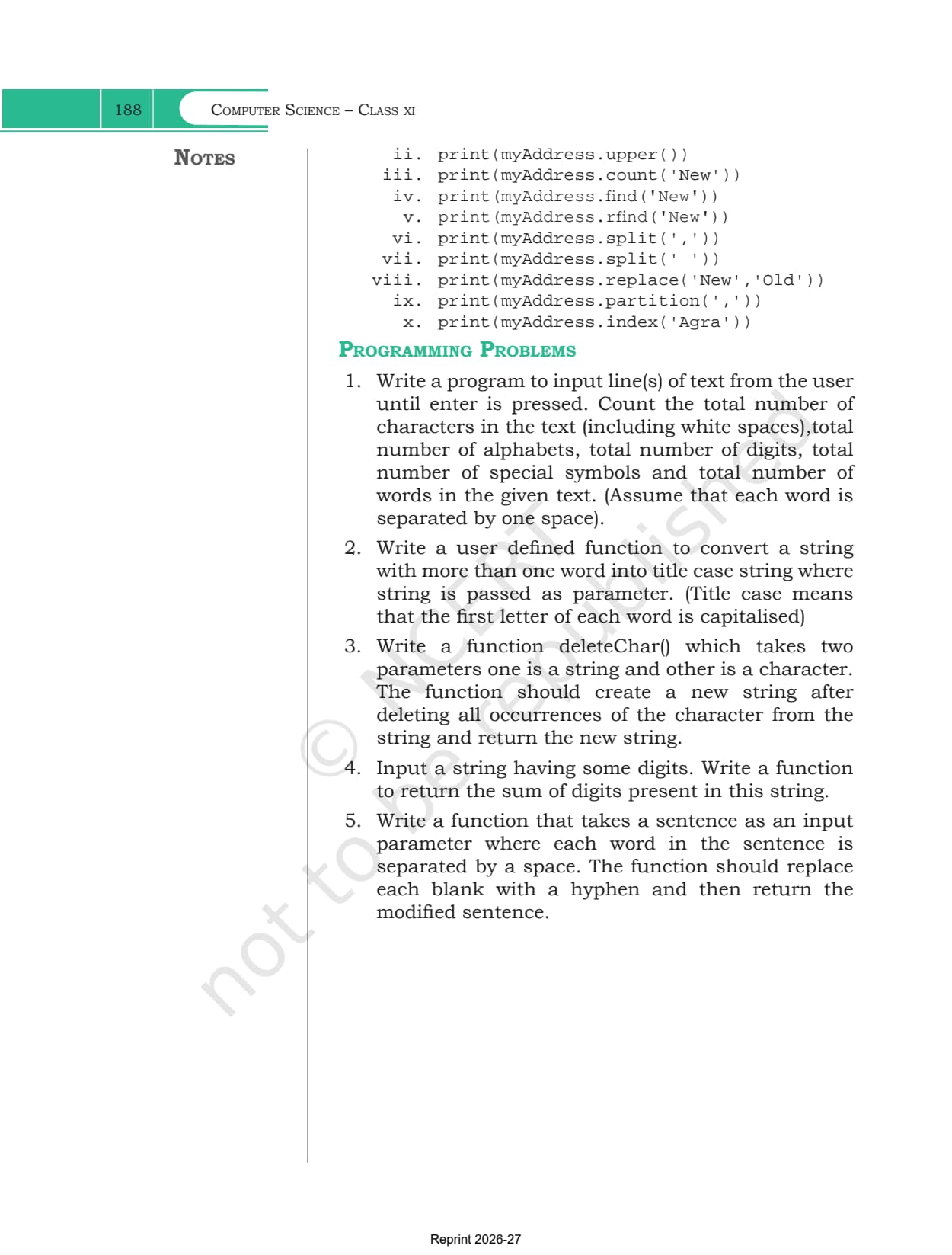
The exercise that follows has two questions with ten parts each, so 20 outputs to work out by hand. Question 1 uses mySubject="Computer Science" and tests slicing, the step size, repetition, swapcase(), startswith() and isalpha(). Question 2 uses a Delhi address string and tests lower(), upper(), count(), find(), rfind(), split(), replace(), partition() and index(). The last part is deliberately unfair, asking for index('Agra') on a string that does not contain it, which raises a ValueError. Five programming problems close the chapter, covering character counting, title case conversion, character deletion, digit sums and replacing spaces with hyphens.
What Collegedunia Adds to This Chapter PDF
Collegedunia gives students the file plus a way into it. The chapter PDF is the official NCERT file, untouched.
- Official file: the exact NCERT chapter PDF, no pages removed
- Read in the browser: page through all 14 pages first
- Chapter list: jump to any other chapter from one table
Also Check: the other Class 11 Computer Science resources for this chapter.
| Resource | Link |
|---|---|
| Handwritten notes | Strings Class 11 Handwritten Notes |
| Chapter notes | Strings Class 11 Notes (coming soon) |
| Chapter solutions | Strings Class 11 NCERT Solutions (coming soon) |
| Next chapter handwritten notes | Lists Class 11 Handwritten Notes |
| Earlier Python chapter book PDF | Getting Started with Python Class 11 NCERT Book PDF |
Class 11 Computer Science NCERT Book PDF: All Chapters
Every chapter of the book is on its own page. The 2026-27 Class 11 Computer Science textbook has 11 chapters, and chapters 5 to 10 form the Python programming block.
| Chapter | Download |
|---|---|
| Chapter 1 | Computer System NCERT Book PDF |
| Chapter 2 | Encoding Schemes and Number System NCERT Book PDF |
| Chapter 3 | Emerging Trends NCERT Book PDF |
| Chapter 4 | Introduction to Problem Solving NCERT Book PDF |
| Chapter 5 | Getting Started with Python NCERT Book PDF |
| Chapter 6 | Flow of Control NCERT Book PDF (coming soon) |
| Chapter 7 | Functions NCERT Book PDF (coming soon) |
| Chapter 8 | Strings NCERT Book PDF |
| Chapter 9 | Lists NCERT Book PDF (coming soon) |
| Chapter 10 | Tuples and Dictionaries NCERT Book PDF (coming soon) |
| Chapter 11 | Societal Impact NCERT Book PDF (coming soon) |
Strings Class 11 NCERT Book PDF FAQs
Common Student Questions on the Strings Chapter File
Ques. Where can I download the Class 11 Computer Science Chapter 8 NCERT Book PDF?
Ans. The official 14-page chapter file is on this page, free to download.
Ques. How many pages is the Strings chapter?
Ans. 14 pages, printed pages 175 to 188 in the 2026-27 book, and this PDF is the complete chapter.
Ques. Why can a string not be changed in Python?
Ans. Strings are immutable, so the value fixed at creation stays fixed. Writing str1[1] = 'a' raises a TypeError. To change text, build a new string instead.
Ques. How do negative indices work on a string?
Ans. They count from the right. The last character is at -1 and the first is at -n, where n is the length. On 'Hello World!' that means -1 gives '!' and -12 gives 'H'.
Ques. What is the difference between find() and index()?
Ans. Both return the position of the first match. When the substring is missing, find() returns -1 while index() raises a ValueError that stops the program.
Ques. Why does str1[1:5] give four characters and not five?
Ans. A slice includes the start index and excludes the stop index. The count is always the stop minus the start, so 5 minus 1 gives four characters.
Ques. How do I reverse a string in one line?
Ans. Use str1[::-1]. Leaving both indices empty covers the whole string and a step of -1 walks it backwards, so 'Hello World!' becomes '!dlroW olleH'.
Ques. What do partition() and split() return?
Ans. partition() returns three parts, the text before the separator, the separator and the text after it. split() returns a list of words, using spaces when no delimiter is given.
Ques. Is this the official NCERT file?
Ans. Yes. It is the NCERT chapter PDF for 2026-27 hosted as published, with no pages removed or added.



Comments