




Inside the Notes for Class 12 Computer Science Chapter 2 File Handling in Python, you will find every file access mode, the read and write methods, the seek() and tell() offset rules, and how the pickle module saves a whole Python object to a binary file. These revision notes follow the latest 2026-27 CBSE syllabus and compress the NCERT chapter into fast, exam-ready blocks.
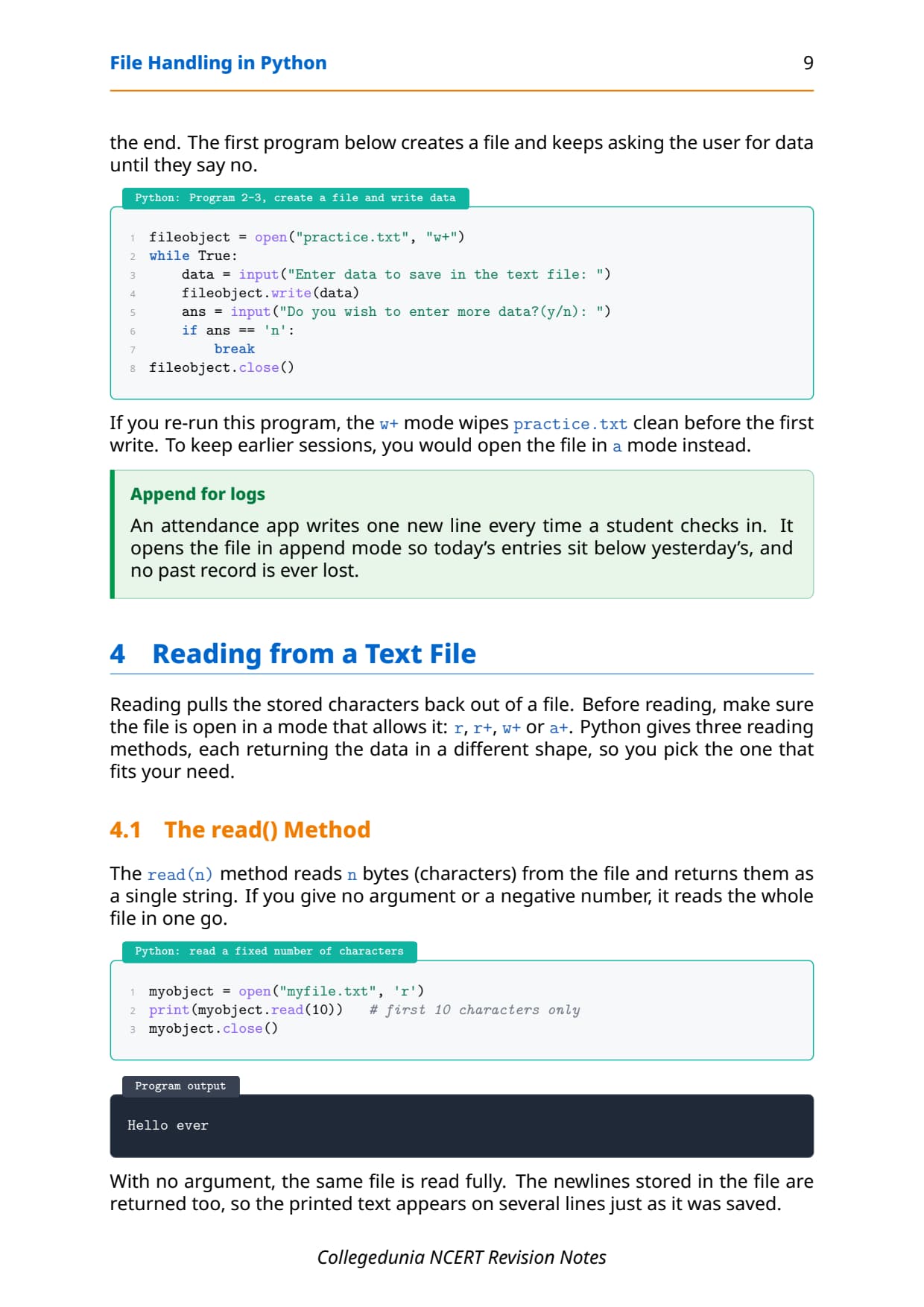
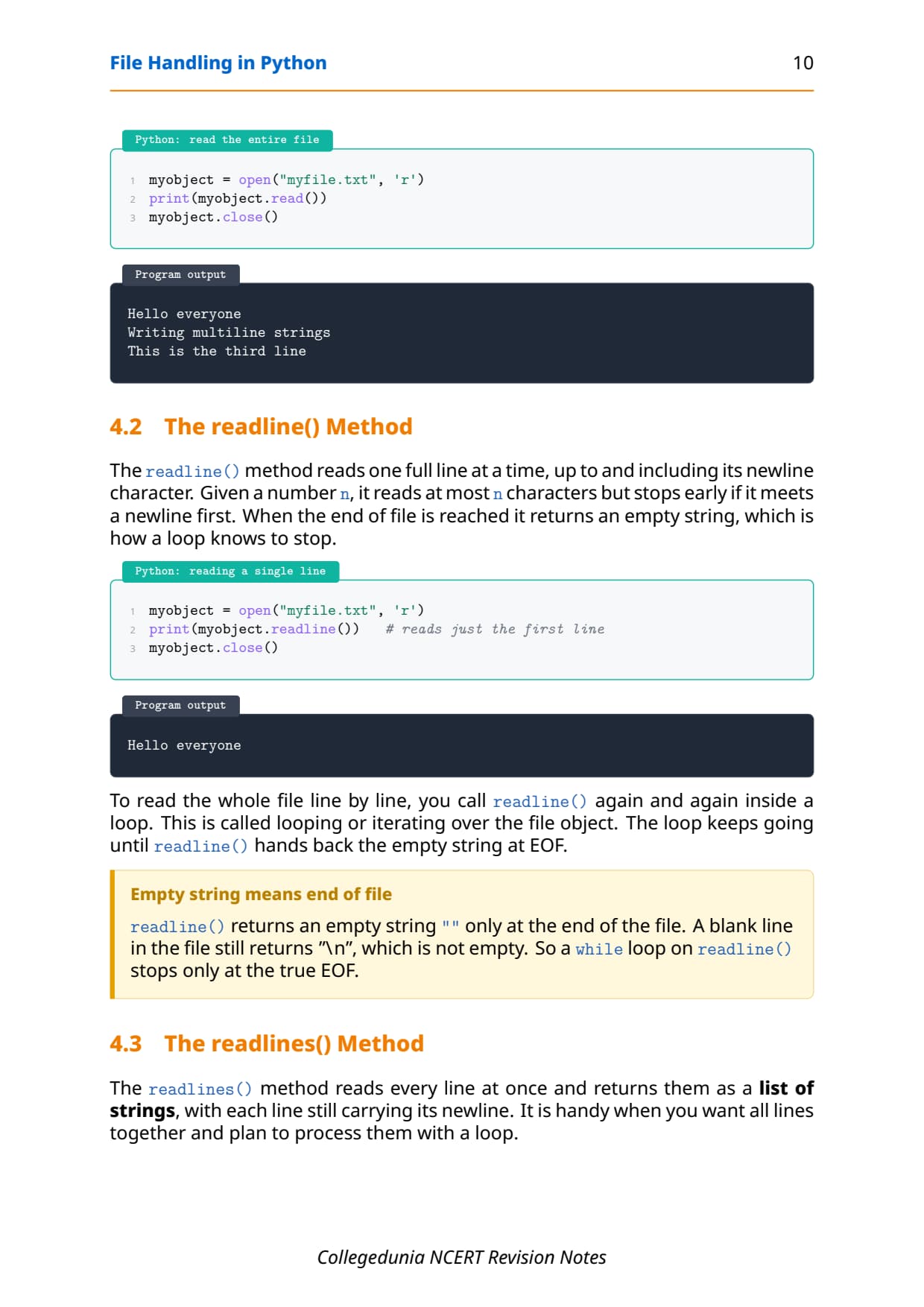
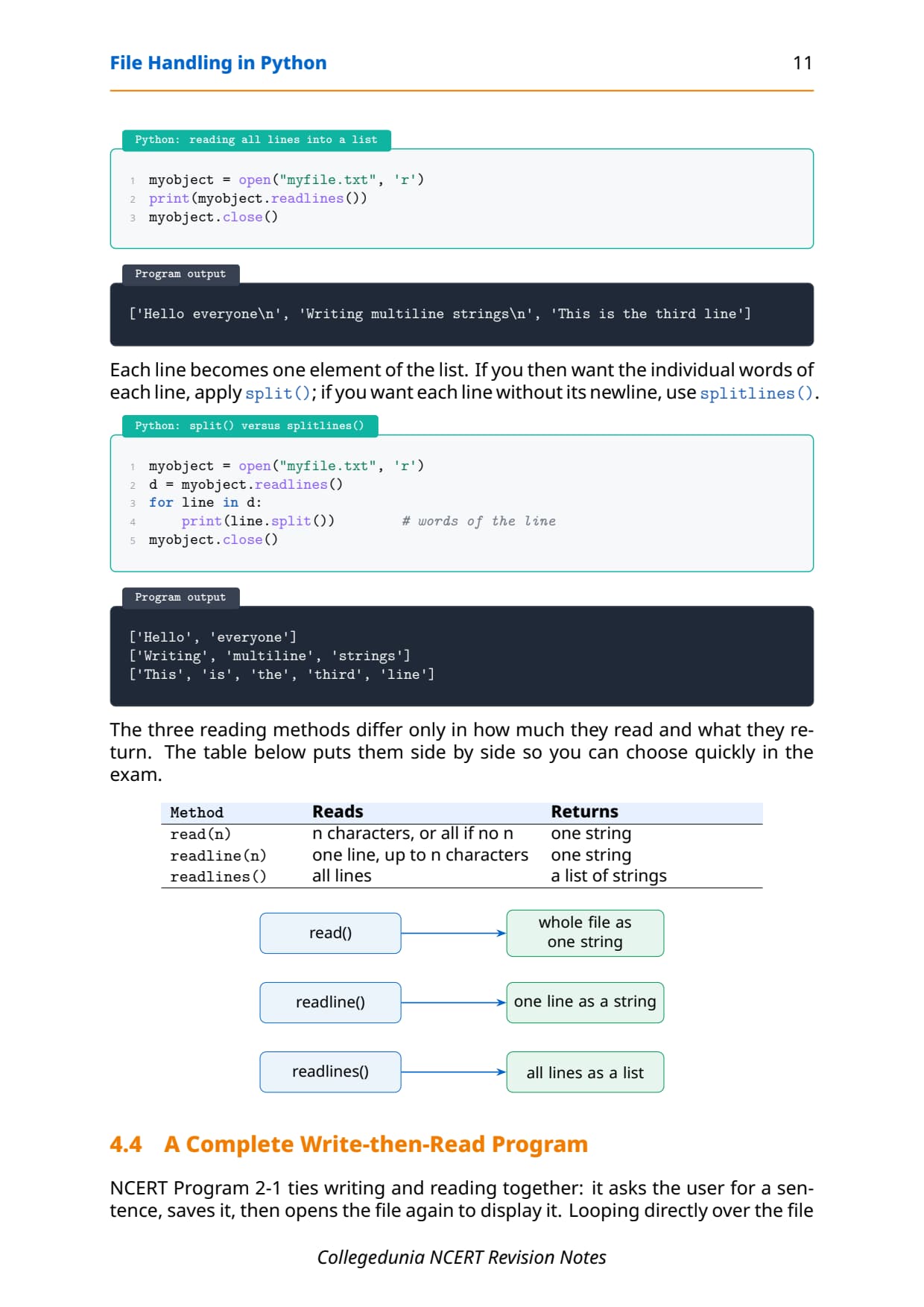
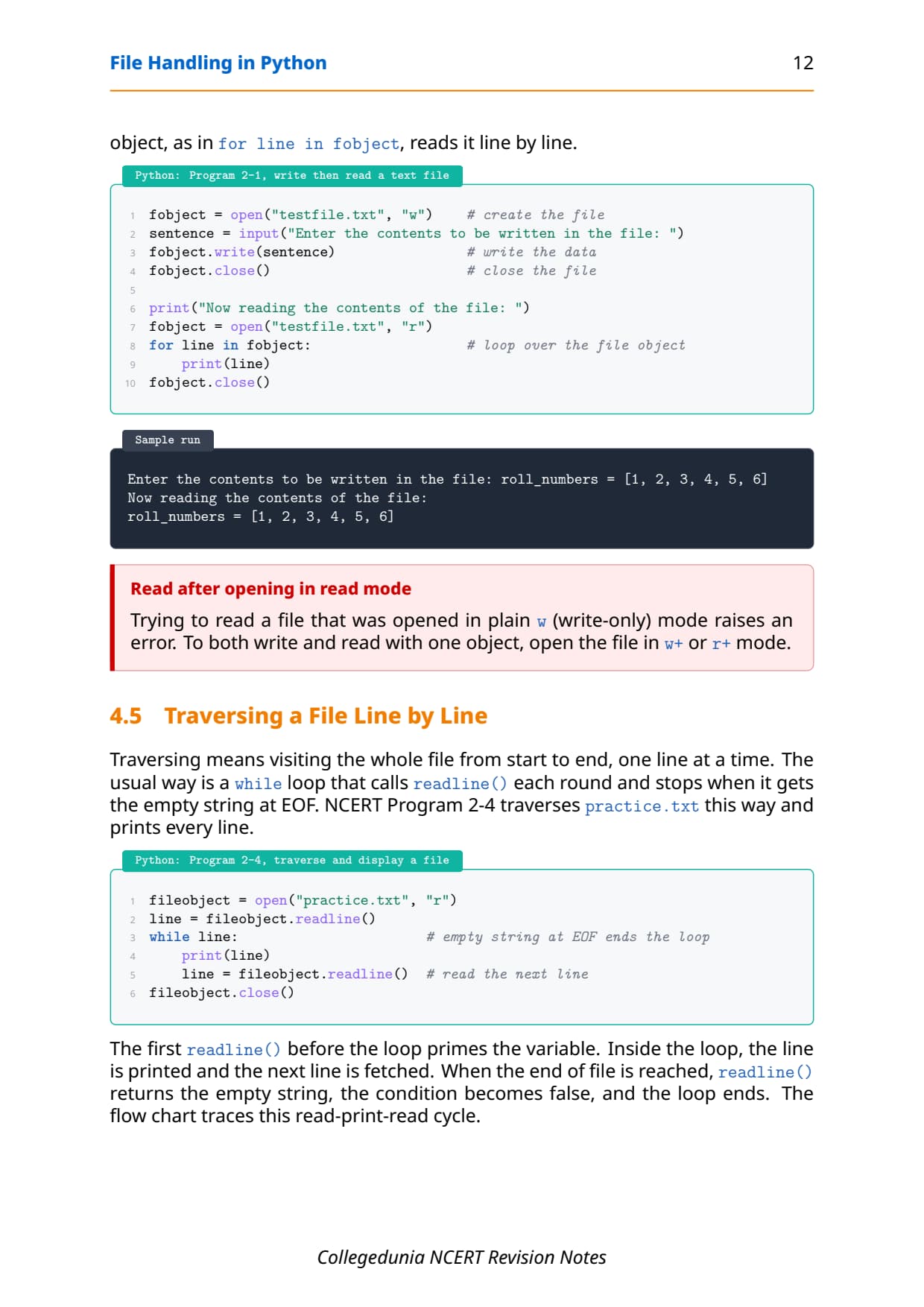
- Every method explained with its one-line use, syntax, and a short Python code block you can trace by hand.
- Full coverage of text vs binary files, the r/w/a modes, write()/read()/readlines(), seek()/tell() and pickle dump/load that the CBSE board paper tests.
- Notes aligned with the 2026-27 CBSE Class 12 Computer Science syllabus and useful for JEE and CUET programming questions; no NEET references because Computer Science is not a medical subject.
These Collegedunia revision notes are curated by Computer Science subject experts, according to the 2026-27 NCERT textbook, and refined against the last five years of CBSE Class 12 Computer Science board papers.
Student Feedback: What 13,400 students told us about this chapter
68% of Class 12 students said they mixed up write() mode with append mode and accidentally erased their file while revising. 3 out of 5 students told us a single table of file modes helped them lock the chapter the night before the exam.
Toppers found that tracing one seek() and tell() example by hand saved 10 to 15 minutes in the exam, and the average student spent 1 to 2 hours on these notes across the first read and the final revision.
Source: 2026-27 Class 12 Computer Science student poll. Sample of 13,400 students from CBSE schools across 15 states, conducted before the 2026 boards.
What the Notes for Class 12 Computer Science Chapter 2 File Handling in Python Cover
This chapter answers one question: how does a Python program keep its data after it stops running? These notes follow the NCERT order but compress it into revision-ready blocks, so you can read the whole chapter in one sitting and recall it fast in the exam.
- Text file vs binary file: human-readable characters versus raw bytes that stand for images, audio, or saved Python objects.
- Opening and closing:
open()returns a file object, andclose()flushes the buffer and saves the data to disk. - Access modes:
rfor read,wfor write,afor append,+for both, andbfor binary. - Read, write and offsets:
write(),writelines(),read(),readline(),readlines(), plusseek()andtell()for moving inside the file. - Pickle module:
dump()andload()serialise and deserialise a whole Python object to and from a binary file.
Source: Magnet Brains on YouTube
Files: Why Programs Need Permanent Storage in Class 12 Computer Science
Every program you have written so far reads input, works on it, and prints the answer. The trouble is that the data vanishes the moment the program ends, because variables live only in memory. To keep data for later, you save it on disk in a file. Getting this vocabulary right is what the first question on the chapter rewards.
| Where data sits | How long it lasts | Example |
|---|---|---|
| Memory (RAM) | Only while the program runs; cleared when it ends | A variable holding a student's marks |
| File on disk | Permanent; survives after the program and after power-off | A saved marks file read back the next day |
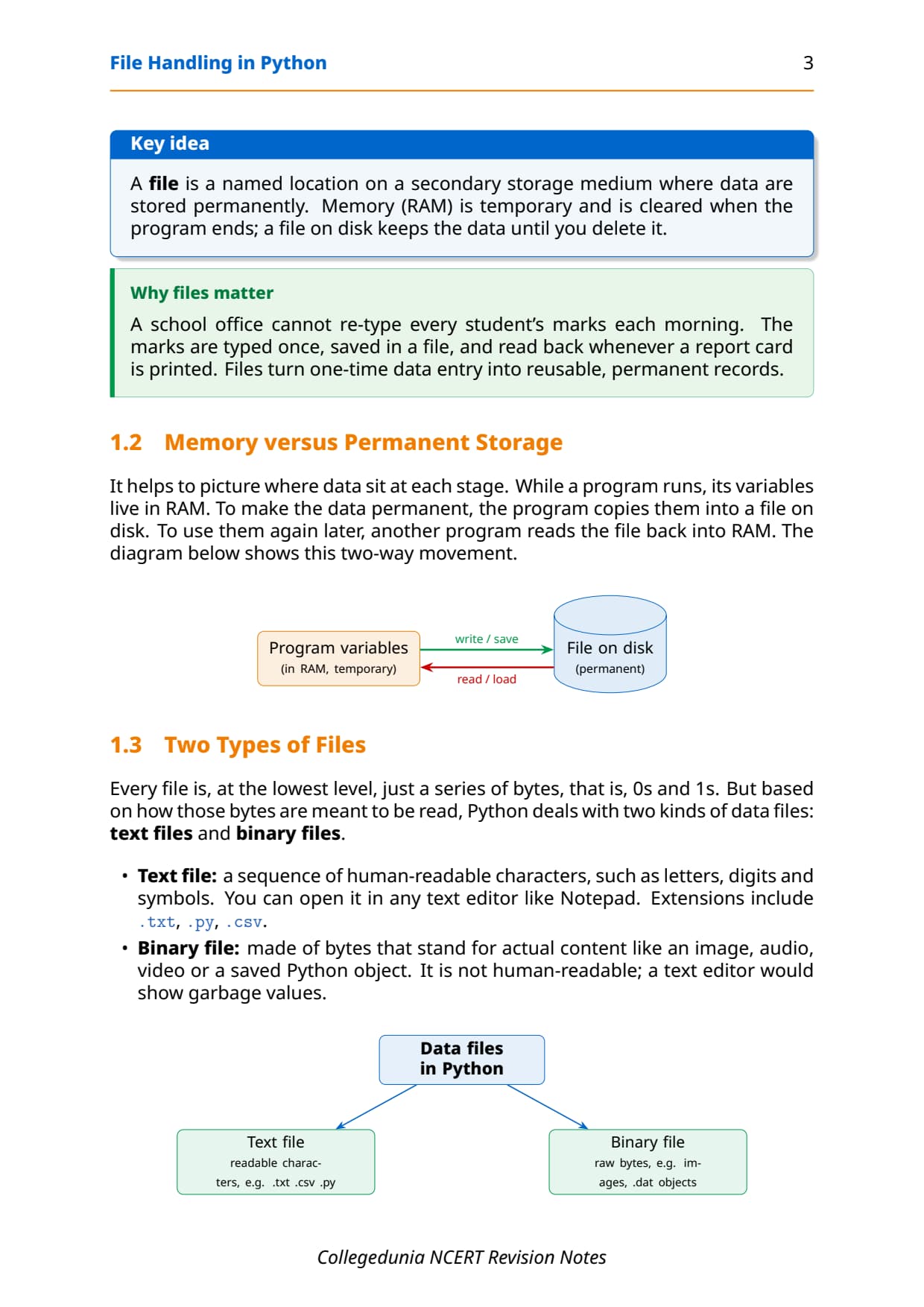
A file is a named location on a secondary storage device, such as a hard disk or a pen drive, where data are stored permanently. This is exactly why schools store student records, shops store stock lists, and games store your saved progress in files rather than in memory. To use the saved data again, another program reads the file back into RAM, so saving and loading is a two-way movement between memory and disk.
Text File vs Binary File in Python
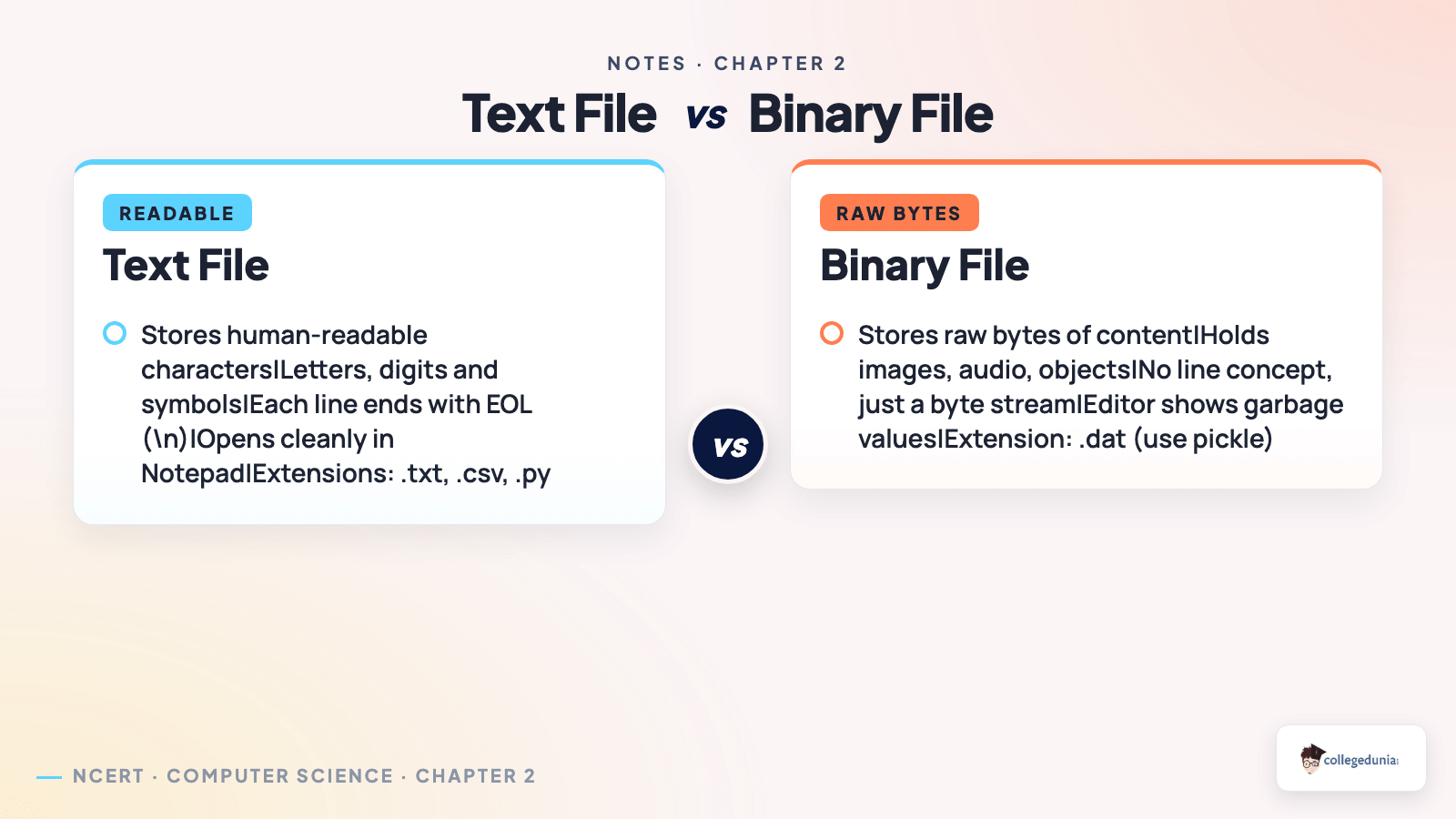
At the lowest level every file is just a series of bytes, that is, 0s and 1s. Based on how those bytes are meant to be read, Python deals with two kinds of data files. Naming the right type and giving a valid extension is a frequent 1-mark or 2-mark board question.
| Feature | Text file | Binary file |
|---|---|---|
| Content | Human-readable characters: letters, digits, symbols | Raw bytes that stand for actual content |
| Readable? | Yes, opens cleanly in Notepad | No, a text editor shows garbage values |
| Examples | .txt, .csv, .py | Images, audio, video, .dat objects |
| End of line | Each line ends with the EOL character \n | No line concept; just a byte stream |
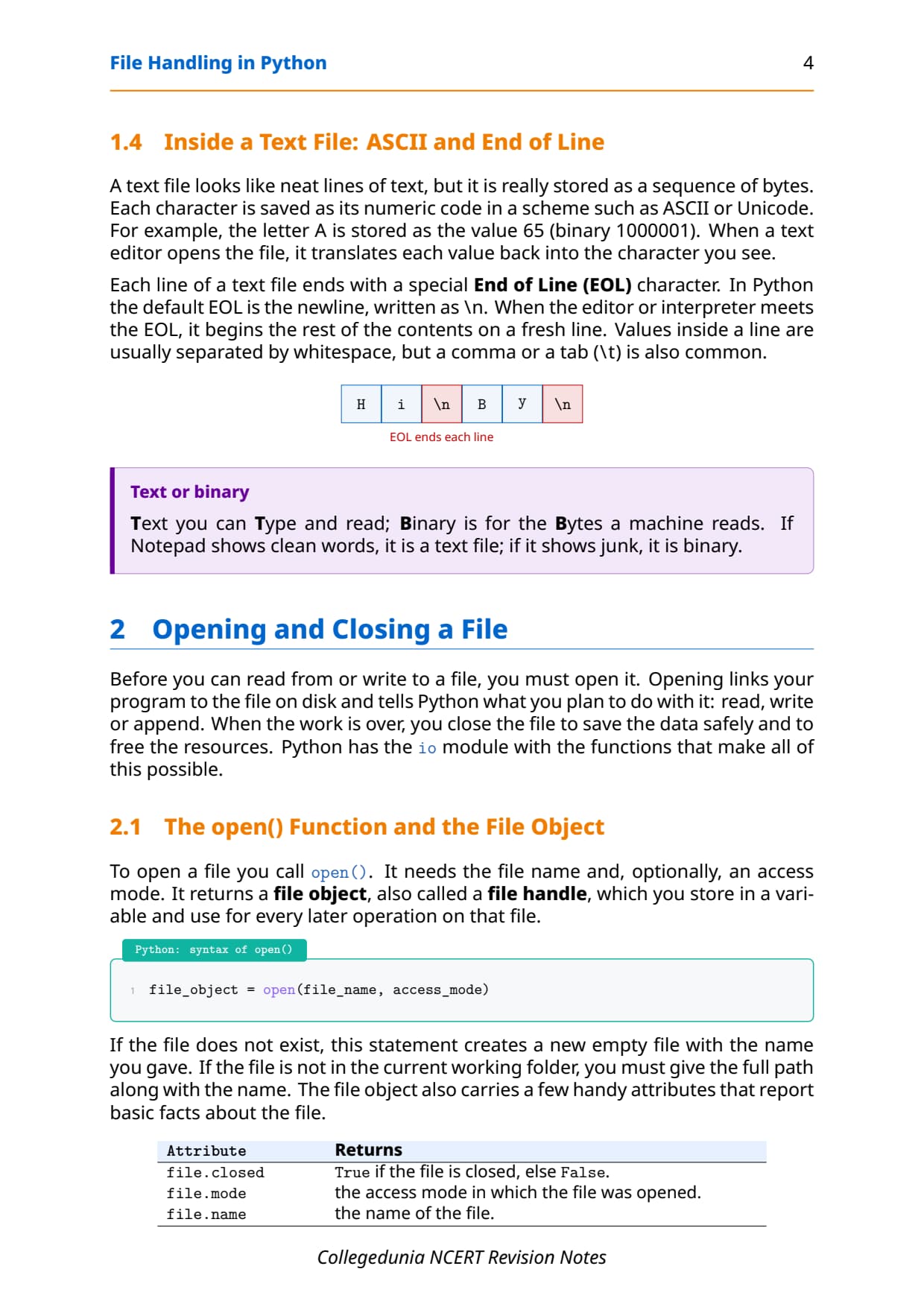
A text file looks like neat lines of text, but it is really stored as a sequence of bytes. Each character is saved as its numeric code in a scheme such as ASCII or Unicode. For example, the letter A is stored as the value 65. Each line ends with a special End of Line (EOL) character, which in Python is the newline written as \n. A binary file, by contrast, has no line concept and would look like junk if you opened it in a text editor.
Opening and Closing a File with open() and close() in Python
Before you can read from or write to a file, you must open it. Opening links your program to the file on disk and tells Python what you plan to do: read, write, or append. When the work is over, you close the file to save the data safely and free the resources.
The open() function and the file object
To open a file you call open(). It needs the file name and, optionally, an access mode. It returns a file object, also called a file handle, which you store in a variable and use for every later operation on that file.
file_object = open(file_name, access_mode)

f = open("marks.txt", "r")
print(f.name)     # marks.txt
print(f.mode)     # r
print(f.closed)   # False
If the file does not exist, opening in a write or append mode creates a new empty file with that name. If the file is not in the current folder, you must give the full path. The file object also carries handy attributes: f.name returns the name, f.mode returns the mode, and f.closed returns True only after the file is closed.
Closing a file with close() and the with clause
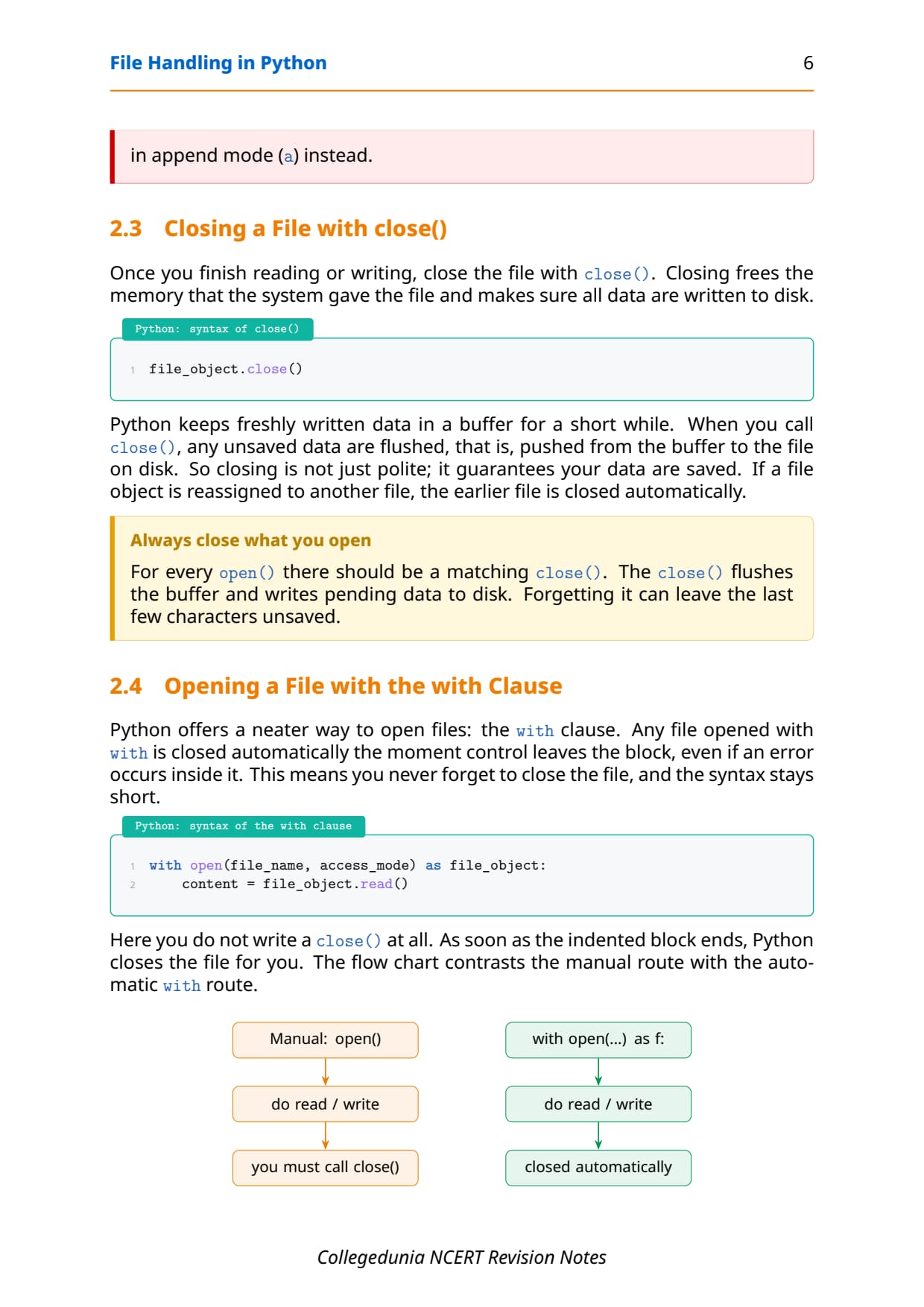
Once you finish, close the file with close(). Closing flushes the buffer, that is, it pushes any unsaved data from memory to the disk, and frees the memory the file used. Python offers a neater way too: the with clause, which closes the file for you automatically even if an error happens inside the block.
f = open("data.txt", "w")
f.write("Saved safely")
f.close()                       # buffer flushed, file saved

with open("data.txt", "r") as f:
text = f.read() # auto-closed at the end of the with blockopen() there should be a matching close(). Forgetting close() can leave the last few characters stuck in the buffer and unsaved. The with clause is the safest habit because it closes the file even if the program crashes.
File Access Modes Every Class 12 Student Must Know
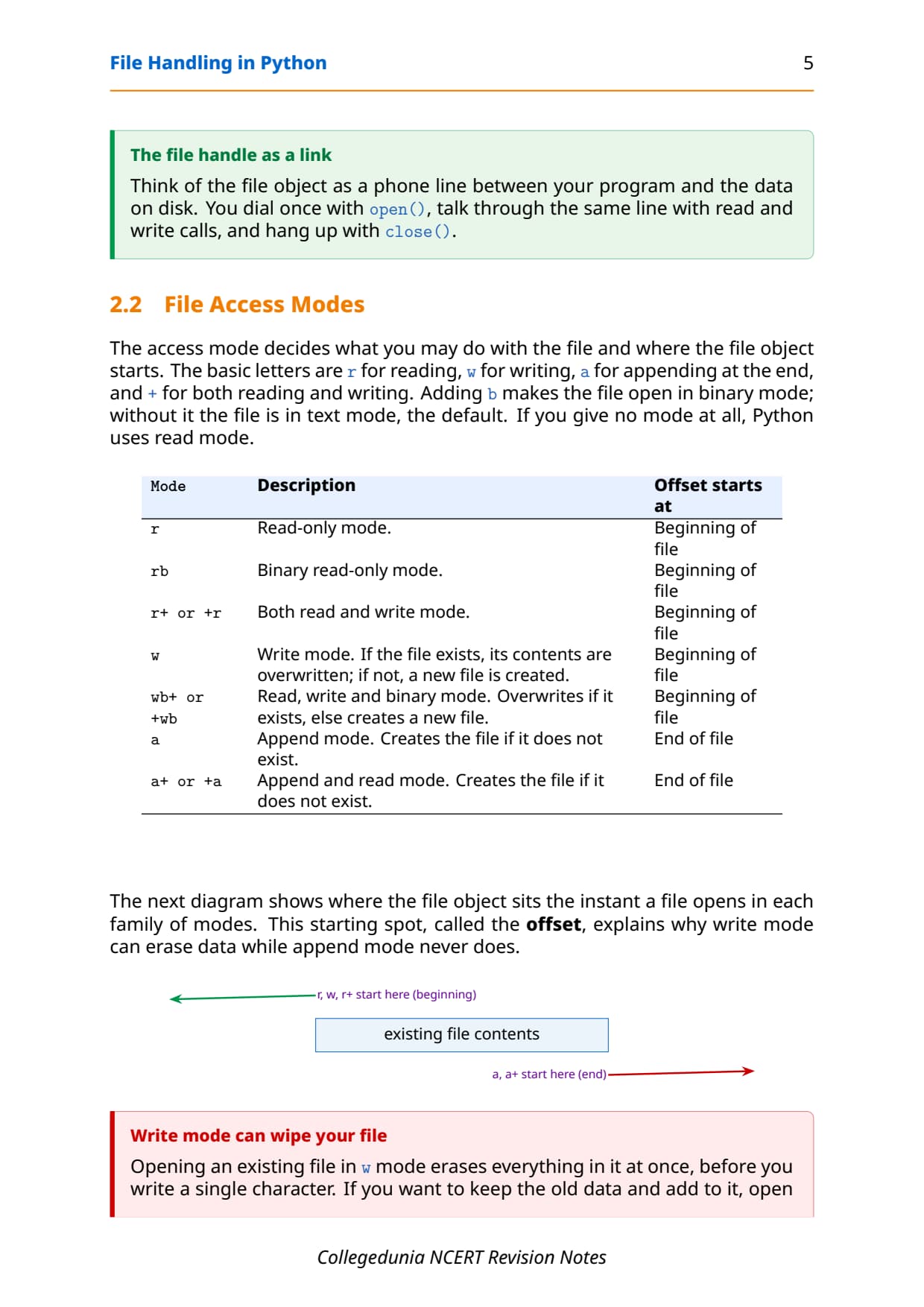
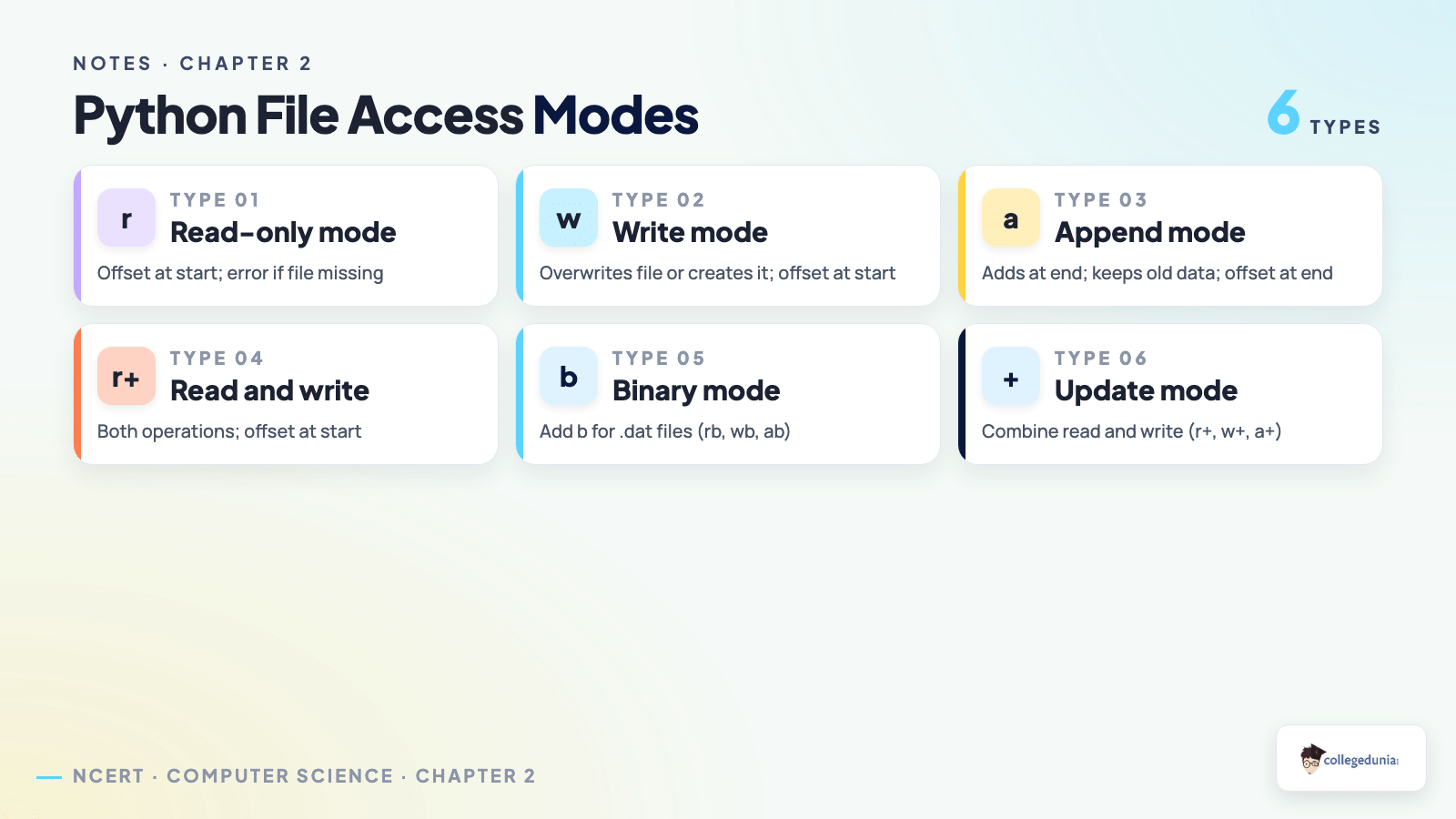
The access mode decides what you may do with the file and where the file object starts reading or writing. This starting spot is called the offset. The basic letters are r for read, w for write, a for append, and + for both reading and writing. Adding b opens the file in binary mode; without it the file is in text mode, the default. If you give no mode at all, Python uses read mode.
| Mode | What it does | Offset starts at |
|---|---|---|
r | Read-only. Error if the file does not exist. | Beginning of file |
rb | Binary read-only. | Beginning of file |
r+ | Both read and write. | Beginning of file |
w | Write. Overwrites if the file exists, else creates it. | Beginning of file |
wb+ | Read, write and binary. Overwrites or creates. | Beginning of file |
a | Append. Creates the file if it does not exist. | End of file |
a+ | Append and read. Creates the file if needed. | End of file |
The offset is why write mode can erase data while append mode never does. Modes r, w and r+ place the offset at the start of the file, while a and a+ place it at the end. This single fact explains the most common board question on the difference between write and append mode.
w mode erases everything in it at once, before you write a single character. If you want to keep the old data and add to it, open in append mode (a) instead.
Writing to a Text File: write() and writelines() in Python
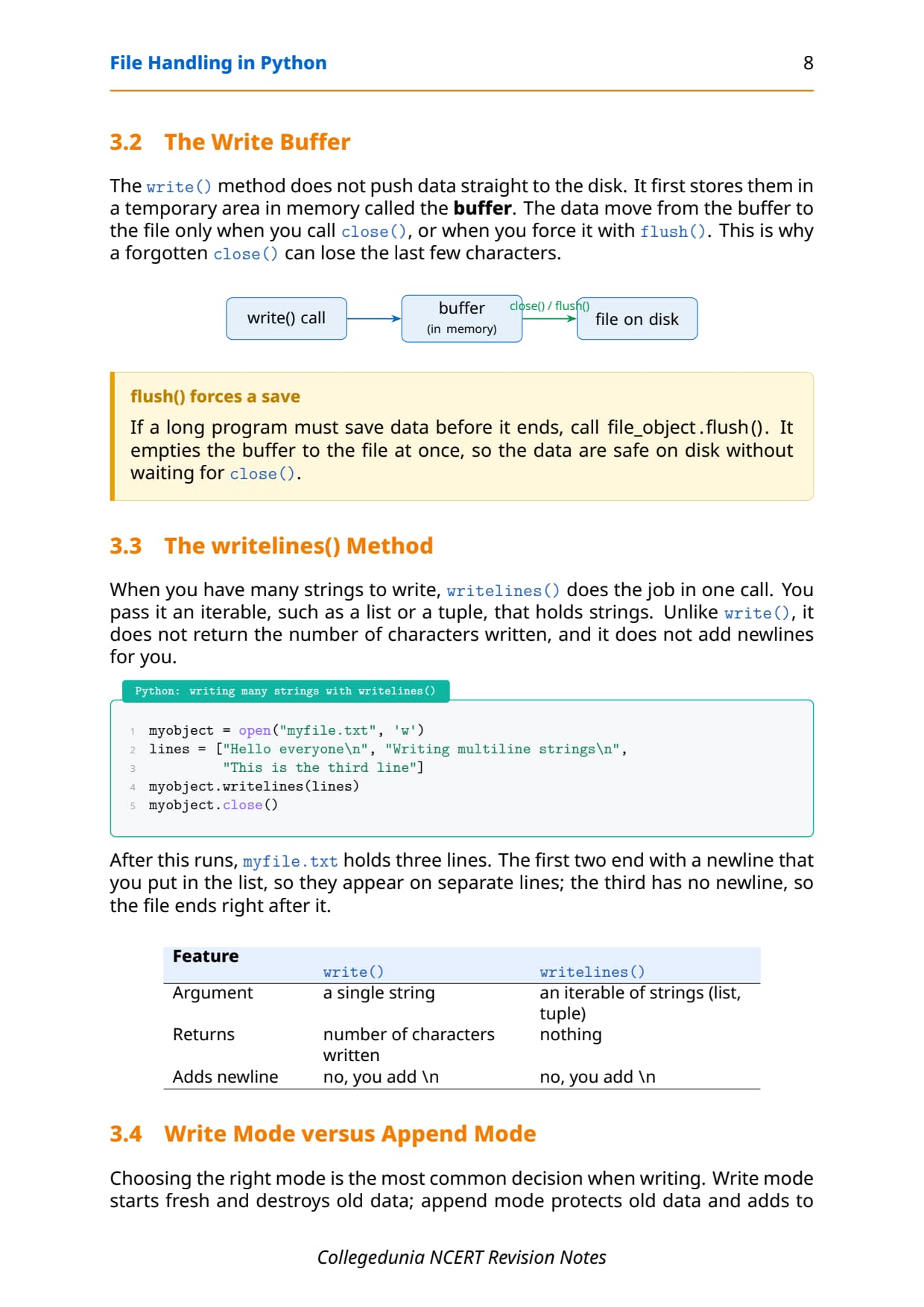
Two methods send data into a text file. The write() method takes one string and writes it as is. The writelines() method takes a list of strings and writes them one after another. Neither method adds a newline on its own, so you must add \n yourself when you want separate lines.
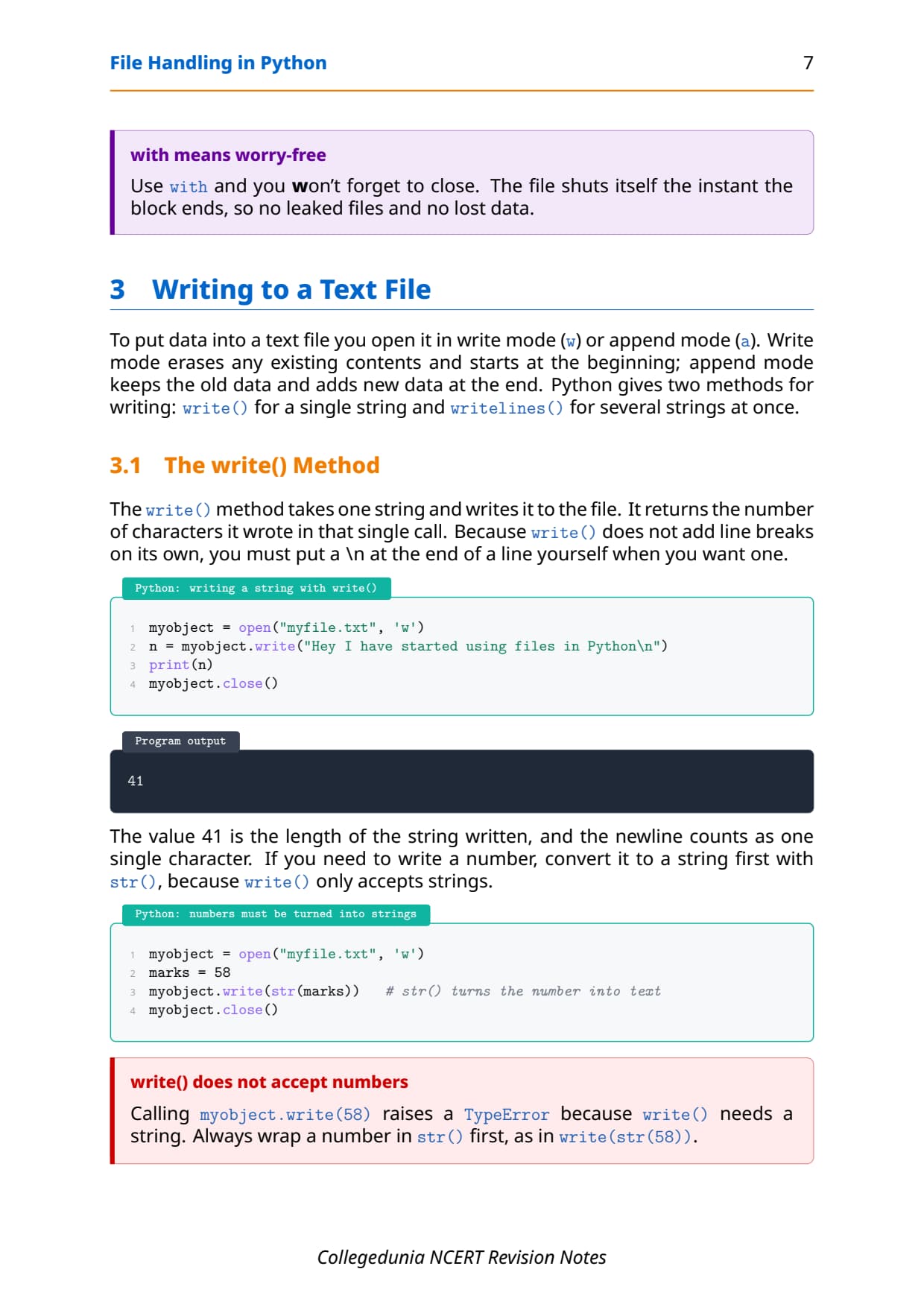
- write(string): writes a single string to the file and returns the number of characters written.
- writelines(list): writes every string in a list or tuple, with no newline added between them.
- Buffer: written data waits in a buffer and is pushed to disk only on
close()or when the buffer fills.
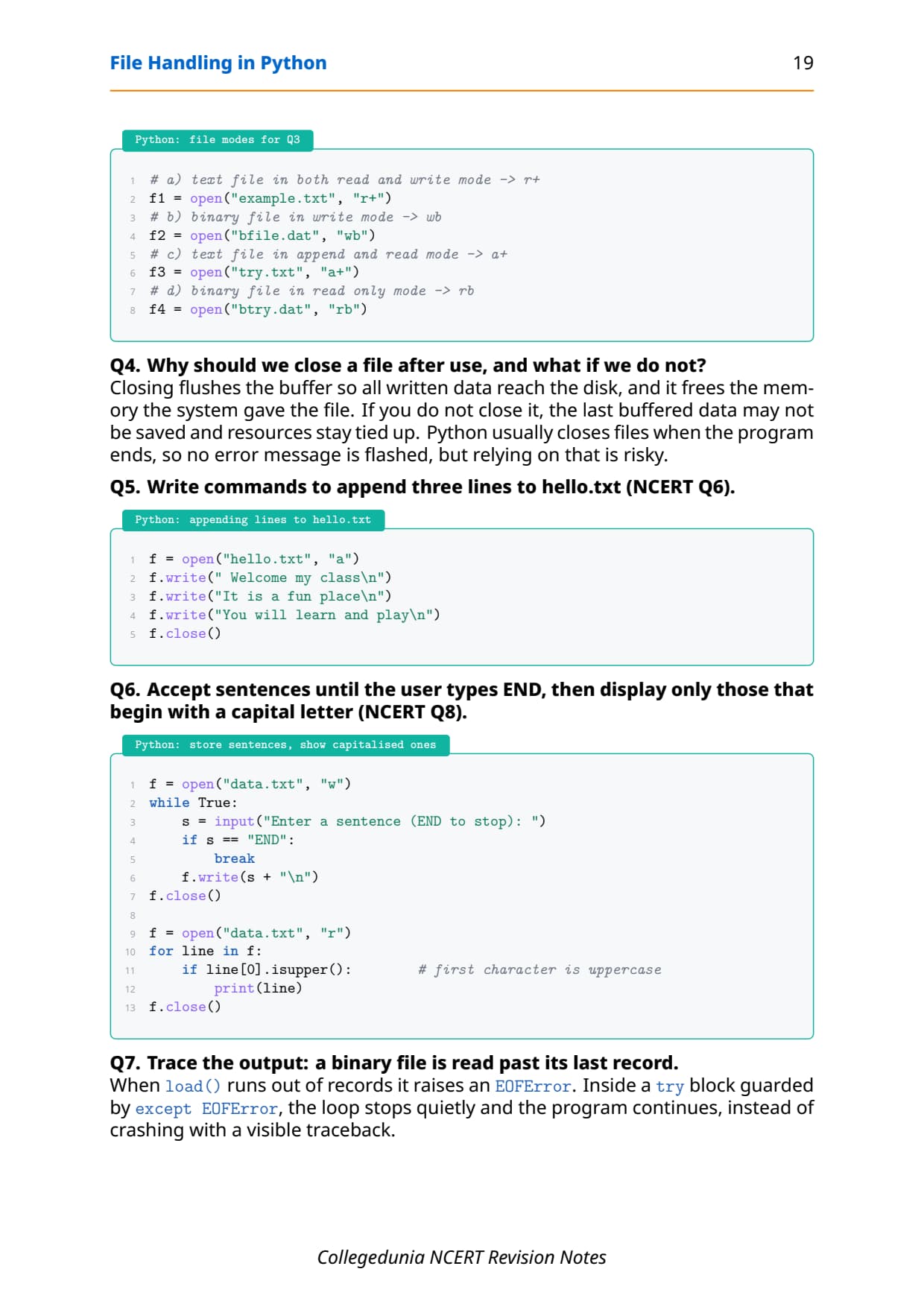
f = open("hello.txt", "a")          # append mode keeps old data
f.write("Welcome my class\n")
lines = ["It is a fun place\n", "You will learn and play\n"]
f.writelines(lines)
f.close()
Because the file above is opened in append mode, the three lines are added at the end and the earlier contents stay safe. Open the same file in w mode instead and the old contents would be wiped before the new lines are written. This contrast between a and w is the heart of most write-related board questions.
Reading from a Text File: read(), readline() and readlines()
Three methods read text back from a file, and the exam loves to ask the difference between them. Pick the method by how much you want at a time: the whole file, one line, or a list of all lines.
| Method | What it returns | Useful when |
|---|---|---|
read(n) | The next n characters as one string; the whole file if n is left out | You want the full text or a fixed number of characters |
readline() | One line as a string, including its \n | You process the file one line at a time |
readlines() | A list of all lines, each a string with its \n | You want every line in a list to loop over |
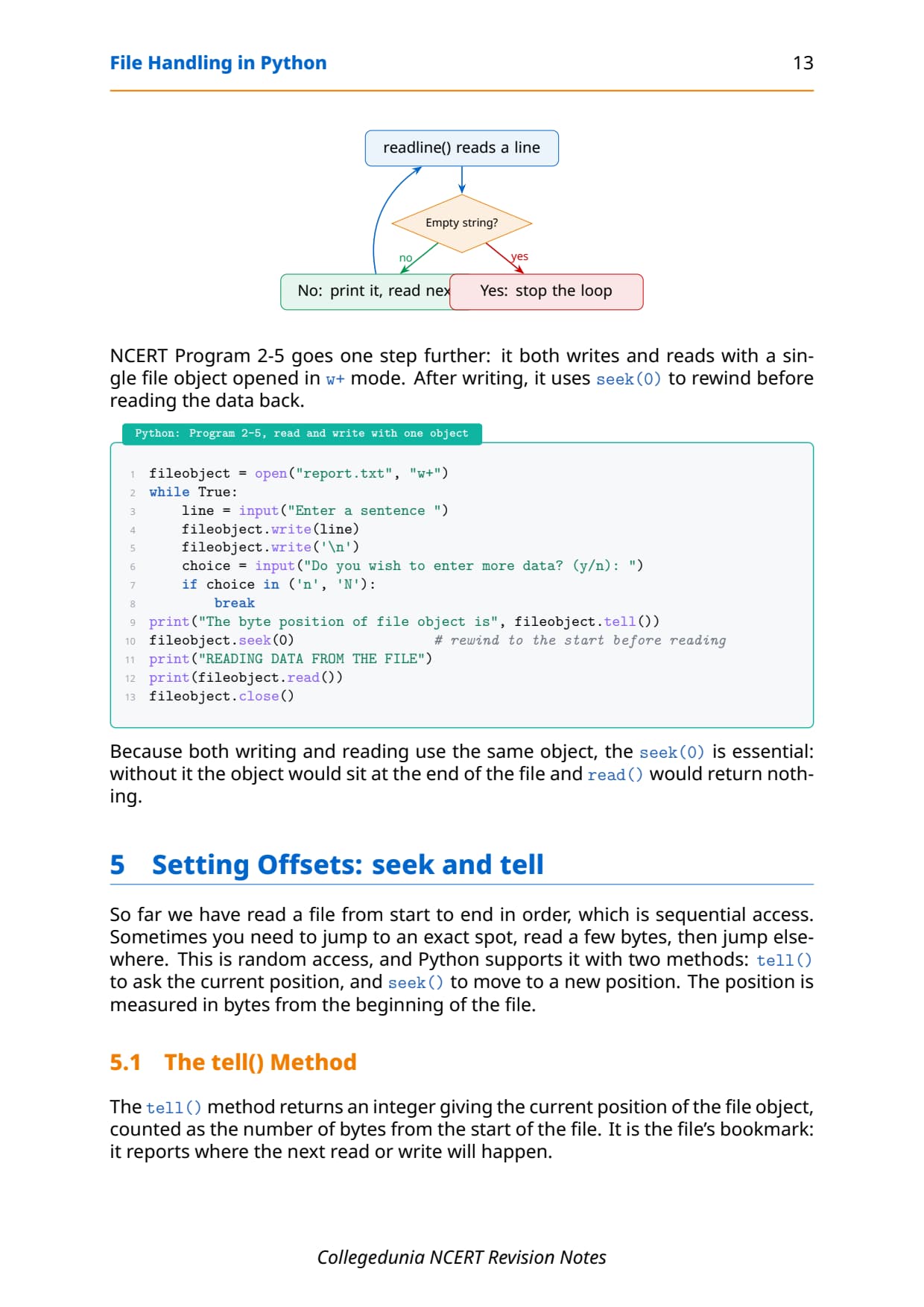
The single letter s in readlines() is the whole difference: readline() returns one line as a string, while readlines() returns a list of every line. A clean way to traverse a file is a for loop over the file object, which reads it line by line without loading it all at once.
with open("hello.txt", "r") as f:
    for line in f:                  # reads one line per pass
print(line, end="") # \n is already in the lineread(10) returns only the first 10 characters and leaves the offset after them, while a plain read() returns the entire file in one string. If a read returns an empty string, you have reached the end of the file.
Setting Offsets with seek() and tell() in Class 12 Computer Science
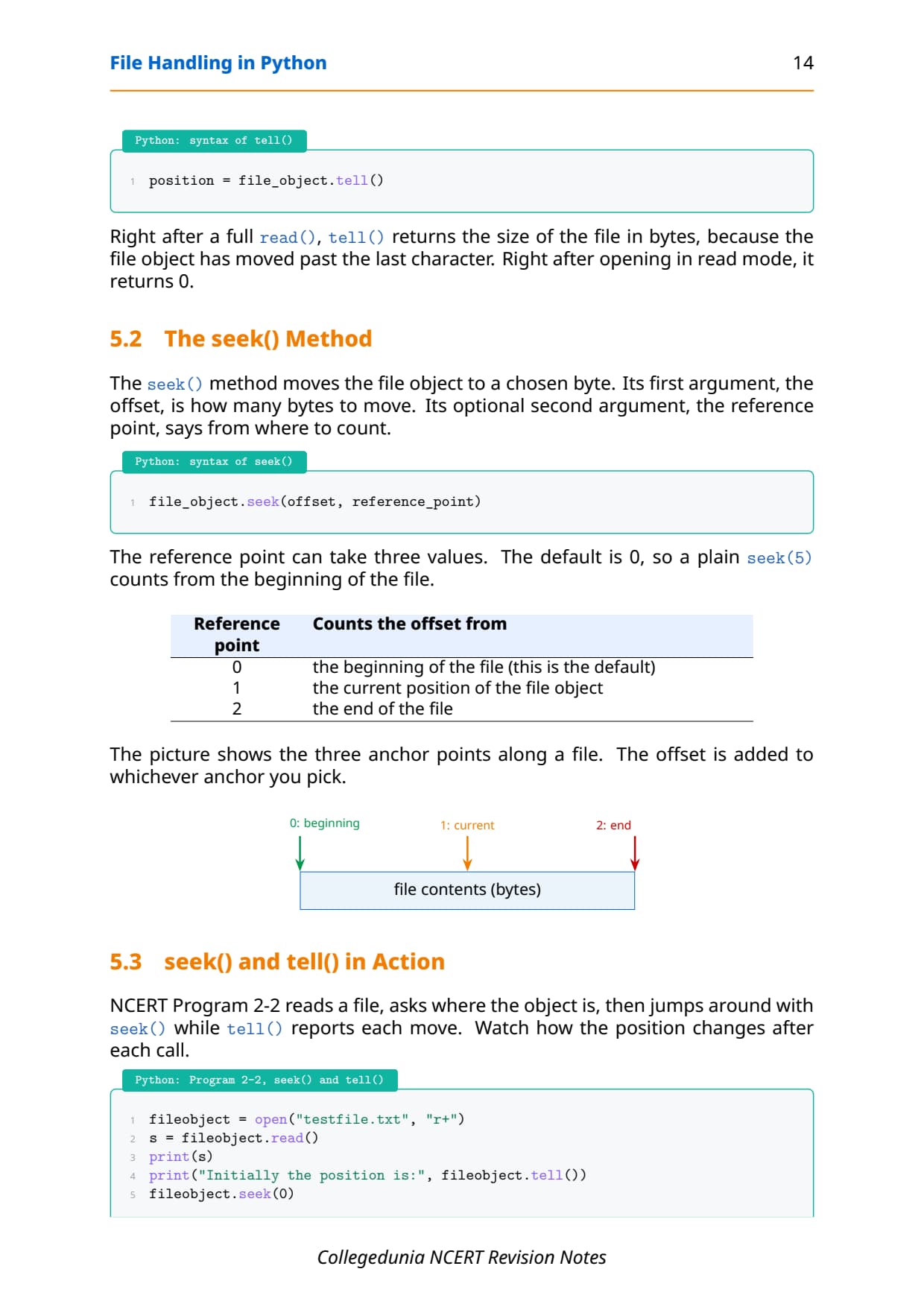
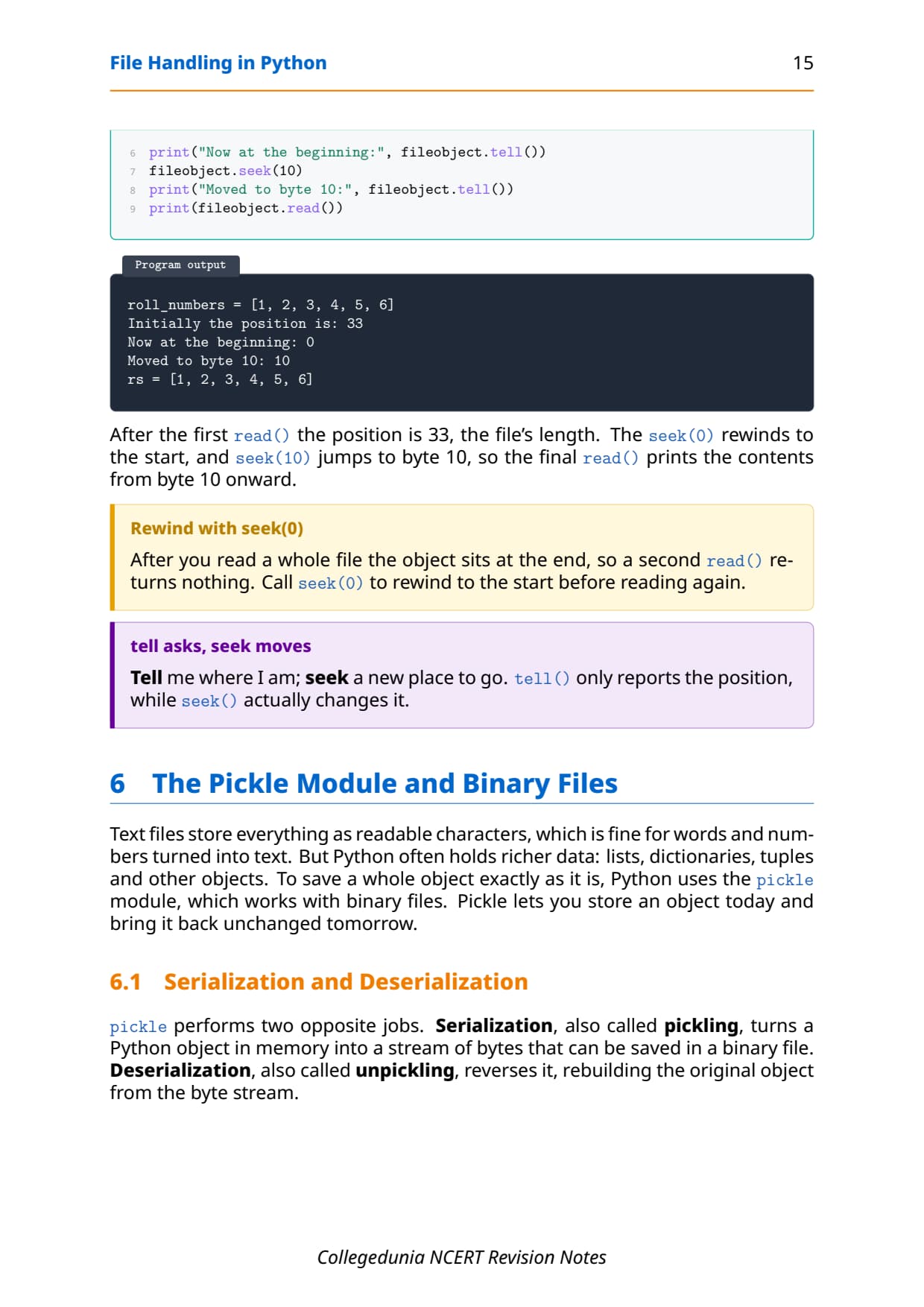
Every open file keeps a file offset, the position of the next byte to be read or written. Two methods work with it. The tell() method reports the current offset, and the seek() method moves the offset to a new spot. Together they let you jump around inside a file instead of always reading from the start.
- tell(): returns the current position of the offset as a number of bytes from the start of the file.
- seek(offset, from): moves the offset;
fromis 0 for the start, 1 for the current spot, and 2 for the end. - Default:
seek(0)rewinds to the very beginning, which is handy before re-reading a file.
with open("hello.txt", "r") as f:
    print(f.tell())     # 0  (offset at the start)
    print(f.read(5))    # reads 5 characters
    print(f.tell())     # 5  (offset moved forward)
    f.seek(0)           # rewind to the beginning
    print(f.tell())     # 0  (back at the start)
After reading five characters the offset is at position 5, which tell() reports. Calling seek(0) then rewinds it to 0, so the next read starts fresh. In text mode the second argument of seek() is usually 0, because moving relative to the current spot or the end is reliable only in binary mode.
The Pickle Module and Binary Files in Python
A text file stores only characters, so a list or a dictionary would lose its structure if you wrote it as text. The pickle module solves this by saving a whole Python object to a binary file and reading it back exactly as it was. You must import pickle and open the file in a binary mode.
Serialization and deserialization
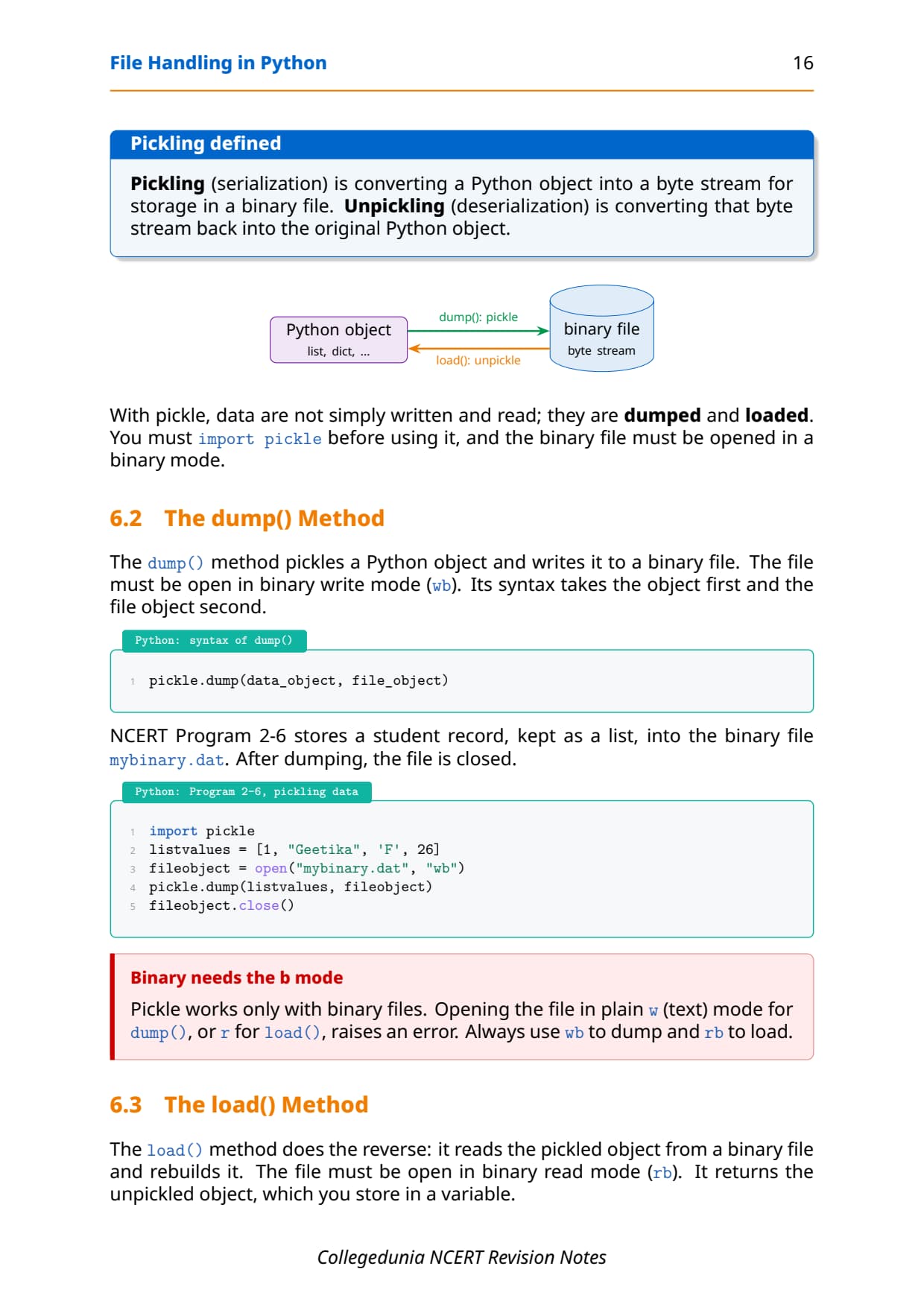
Pickling means turning a Python object into a byte stream so it can be stored in a binary file. Serialization is this conversion of an object into a stream of bytes, and deserialization (unpickling) is the reverse, rebuilding the object from those bytes. The two methods that do the work are dump() and load().
| Method | Direction | Syntax |
|---|---|---|
pickle.dump() | Object to file (serialize) | pickle.dump(object, file_object) |
pickle.load() | File to object (deserialize) | object = pickle.load(file_object) |
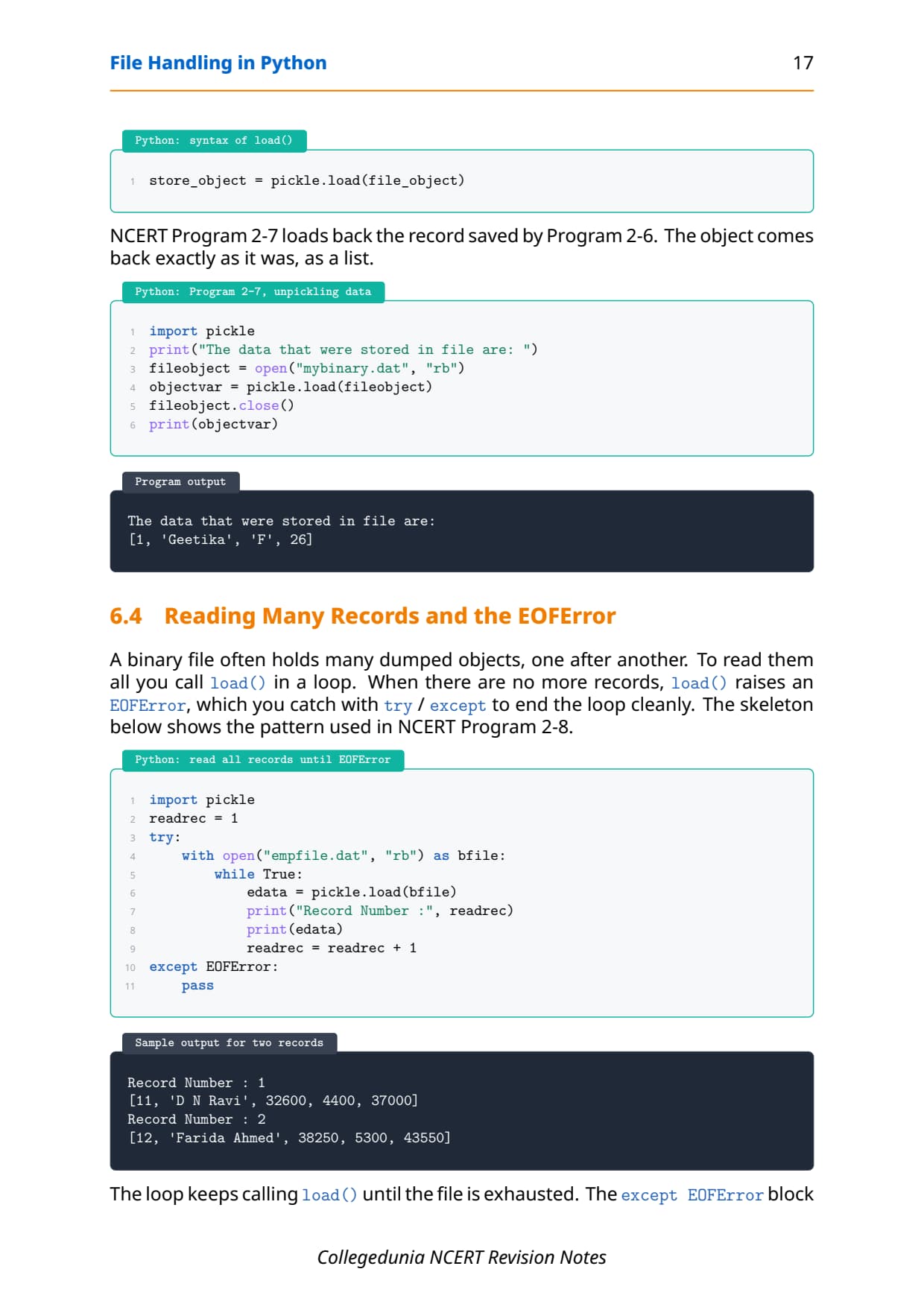
import pickle

record = {"ItemNo": 1, "Name": "Pen", "Qty": 50, "Price": 8.5}
with open("stock.dat", "wb") as f:    # wb = write binary
    pickle.dump(record, f)            # object saved to disk

with open("stock.dat", "rb") as f:    # rb = read binary
    data = pickle.load(f)             # object rebuilt
print(data["Name"])                   # Pen
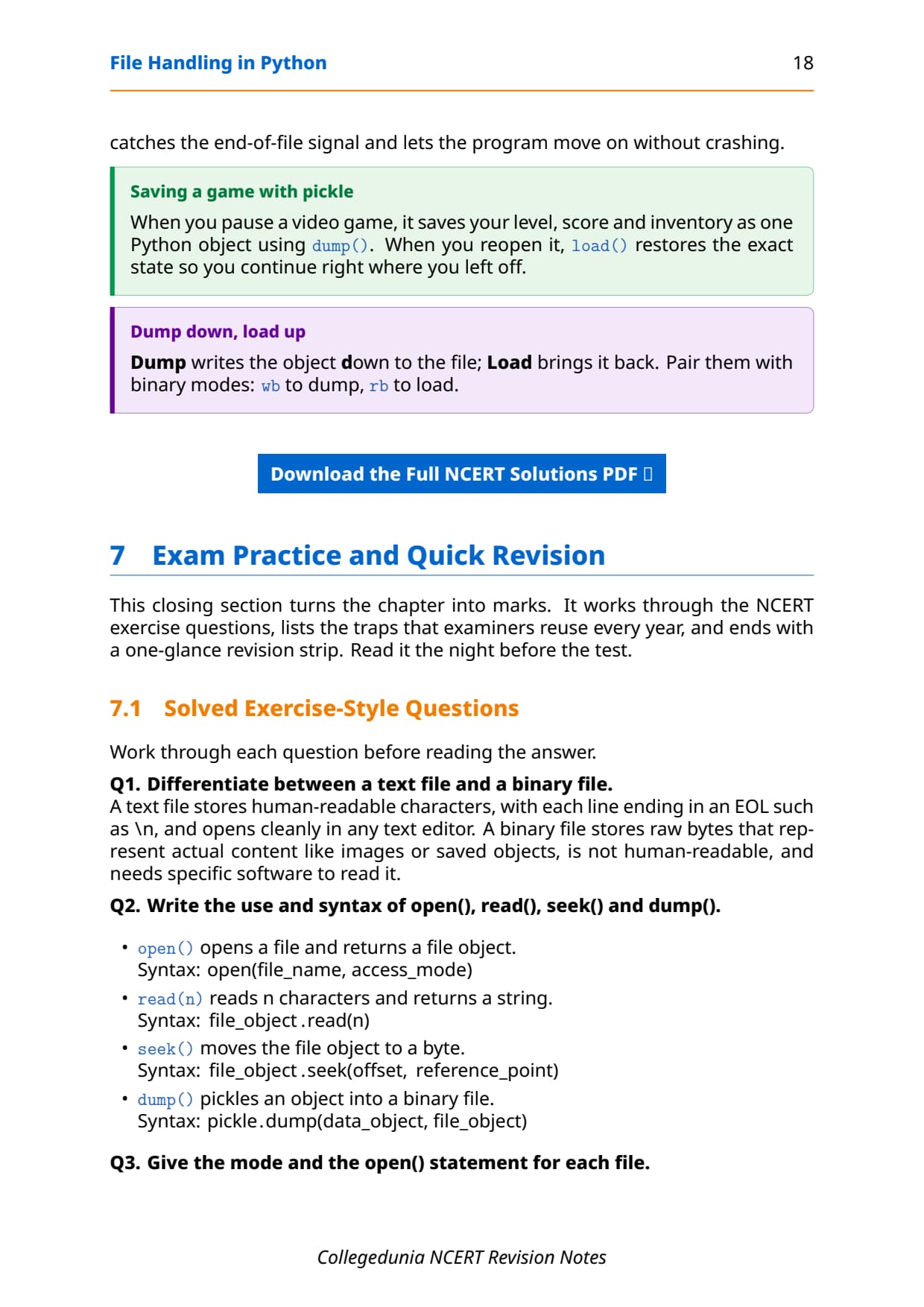
To read many records back, call load() in a loop. When there are no more records, load() raises an EOFError, so a try-except around the loop is the clean way to stop at the end of the file. This EOFError trap is the most common 3-mark binary-file question, so practise it from the PDF.
wb, rb, ab), never in text mode. Reading past the last record raises EOFError, which you catch with try-except to end the read loop cleanly.
One-Glance Revision Strip and Common Exam Traps
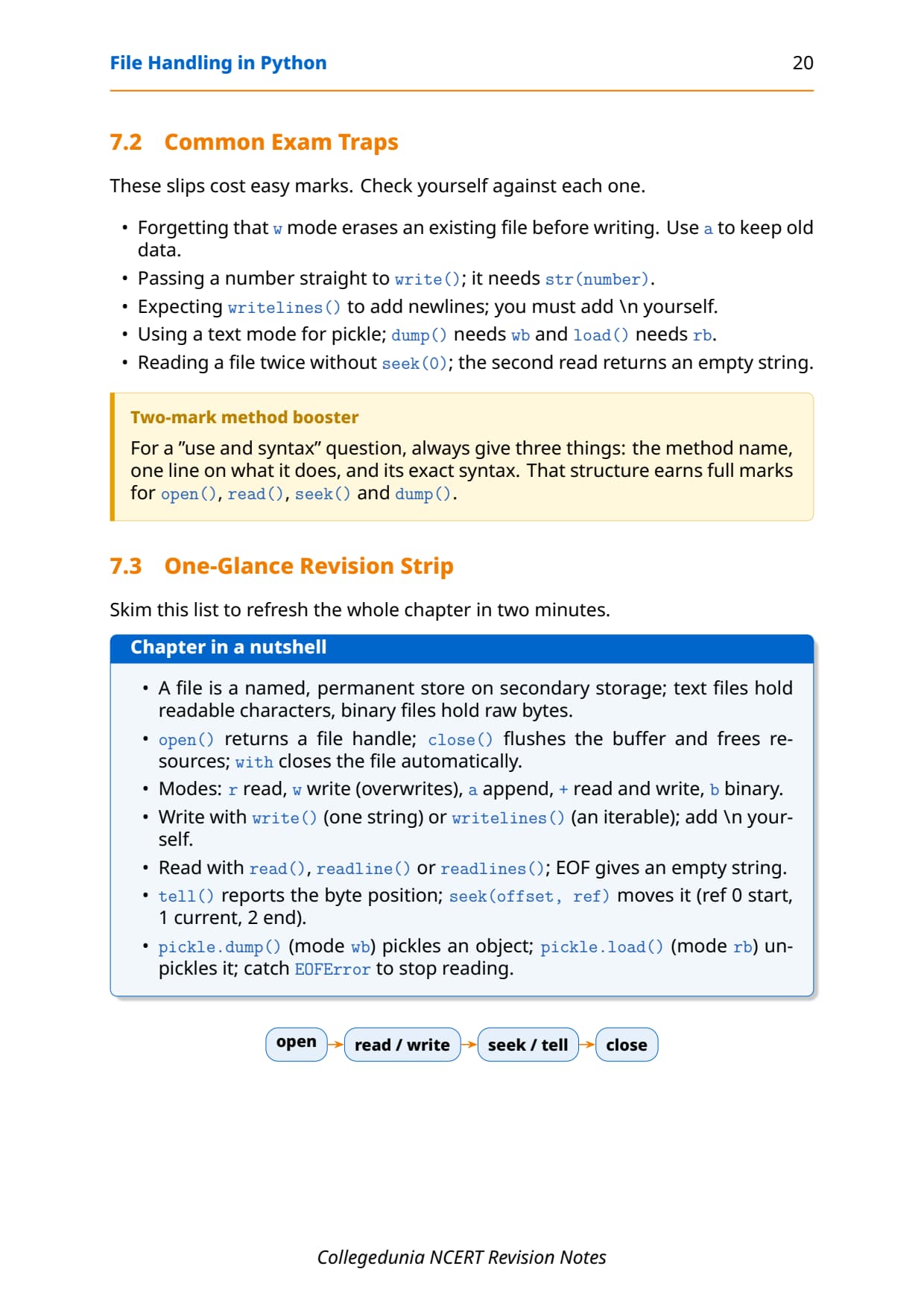
This is the strip to read in the last five minutes before the exam. It lines up every method with its one-line role, then lists the traps that cost students marks every year in the File Handling chapter.
| Method | One-line role |
|---|---|
open() | Links the program to a file and returns the file object |
close() | Flushes the buffer and saves the file to disk |
write() | Writes one string to the file |
writelines() | Writes a list of strings, no newline added |
read() / readline() / readlines() | Whole text / one line / list of all lines |
seek() / tell() | Moves the offset / reports the offset |
dump() / load() | Saves a Python object to / reads it from a binary file |
The repeat-offender mistakes in File Handling chapter board answers:
- Confusing write and append mode:
werases the file first;aadds at the end and keeps the old data. - Mixing readline() and readlines():
readline()returns one line as a string,readlines()returns a list of all lines. - Forgetting newlines:
write()andwritelines()do not add\n, so lines run together unless you add it. - Using text mode for pickle: pickle files need binary modes such as
wbandrb, notworr. - Ignoring EOFError: reading binary records past the end raises
EOFError; catch it with try-except to stop the loop.
Previous Year Question Trends from the File Handling Chapter
The File Handling chapter is tested in CBSE board papers through differences between methods, output-tracing, and a full program on text or binary files. The table below maps the asked question types across recent board papers, so your revision can target the high-frequency areas.
| Year | Question type asked | Marks |
|---|---|---|
| 2025 | Difference between text file and binary file; name two file modes | 2 + 1 |
| 2024 | Write a program to count lines or words in a text file | 3 |
| 2023 | Use of seek() and tell(); fill in the blanks in a file-read code | 1 + 3 |
| 2022 | Define pickling; write a program using pickle dump and load | 2 + 3 |
| 2021 | Difference between write() and writelines(); when is EOFError raised | 2 + 1 |
Also Check: The full set of CBSE board paper questions for this chapter, with step-by-step answers, is included in the downloadable PDF above, updated for the 2026-27 cycle.
Other Resources for Class 12 Computer Science Chapter 2 File Handling in Python
Pair these revision notes with the matching NCERT Solutions, handwritten notes and the official NCERT book chapter. All resources for Class 12 Computer Science Chapter 2 File Handling in Python are linked below.
| Resource | What it covers | Open |
|---|---|---|
| Notes | Concept-first revision notes on text vs binary files, access modes, read and write methods, seek/tell and pickle. | You are here |
| NCERT Solutions | Step-by-step answers to all 10 exercise questions, with an Expert Solution for each. | Class 12 Computer Science Chapter 2 NCERT Solutions |
| Handwritten Notes | Scanned-style handwritten pages for last-minute board revision. | Class 12 Computer Science Chapter 2 Handwritten Notes |
| NCERT Book PDF | Official NCERT Computer Science Chapter 2 File Handling in Python textbook in PDF form. | Class 12 Computer Science Chapter 2 NCERT Book PDF |
Notes for Class 12 Computer Science: All Chapters
Related Links: Use the table below to open the revision notes for the other chapters of Class 12 Computer Science. Every chapter ships with the same concept-first notes style, full PDF download, and revision FAQ.
| Chapter | Notes link |
|---|---|
| Chapter 1 | Exception Handling in Python Notes |
| Chapter 2 | File Handling in Python Notes (You are here) |
| Chapter 3 | Stack Notes |
| Chapter 4 | Queue Notes |
| Chapter 5 | Sorting Notes |
| Chapter 6 | Searching Notes |
| Chapter 7 | Understanding Data Notes |
| Chapter 8 | Database Concepts Notes |
| Chapter 9 | Structured Query Language (SQL) Notes |
| Chapter 10 | Computer Networks Notes |
| Chapter 11 | Data Communication Notes |
| Chapter 12 | Security Aspects Notes |
Notes Class 12 Computer Science Chapter 2 File Handling in Python FAQs
Ques. What does Chapter 2 File Handling in Python cover in Class 12 Computer Science?
Ans. Chapter 2 covers how a Python program keeps its data after the program stops by saving it in a file on disk. The notes explain the difference between a text file and a binary file, the file access modes such as r, w, a and their binary forms, and how to open and close a file with open() and close() or the with clause. They also cover the write() and writelines() methods, the read(), readline() and readlines() methods, the seek() and tell() offset methods, and the pickle module that serialises a whole Python object to a binary file, all according to the 2026-27 CBSE syllabus.
Ques. What is the difference between a text file and a binary file in Python?
Ans. A text file stores human-readable characters such as letters, digits and symbols, with each line ending in the newline character \n, and it opens cleanly in an editor like Notepad. Common text extensions are .txt, .csv and .py. A binary file stores raw bytes that stand for actual content such as an image, audio, video or a saved Python object, and it is not human-readable, so a text editor would show garbage values. Binary files often use the .dat extension and must be opened in binary modes such as rb or wb.
Ques. What is the difference between write mode and append mode?
Ans. Write mode (w) places the file offset at the beginning, so opening an existing file in w mode erases all of its old contents before a single character is written. Append mode (a) places the offset at the end of the file, so new data is added after the existing contents and nothing is lost. Both modes create the file if it does not already exist. The quick rule for the exam is that w can wipe your file while a always keeps the old data and adds to it, which is why append mode is the safe choice when you want to extend a file.
Ques. What is the difference between readline() and readlines() in Python?
Ans. The readline() method reads one line from the file and returns it as a single string, including its trailing newline character. Calling it again reads the next line, and it returns an empty string when the end of the file is reached. The readlines() method reads the whole file and returns a list where each element is one line as a string, again with its newline. So readline() gives you one line at a time, which is useful inside a loop, while readlines() gives you every line at once in a list that you can index or iterate over.
Ques. What do the seek() and tell() methods do?
Ans. Every open file keeps a file offset, which is the position of the next byte to be read or written. The tell() method returns this current offset as a number of bytes counted from the start of the file. The seek() method moves the offset to a new position; its form is seek(offset, from), where from is 0 for the start of the file, 1 for the current position, and 2 for the end. A common use is seek(0), which rewinds the offset to the very beginning so the file can be read again from the start. In text mode the from value is usually 0.
Ques. What is pickling in Python and which methods are used?
Ans. Pickling means converting a Python object, such as a list or a dictionary, into a byte stream so that it can be stored in a binary file. This conversion of an object into bytes is called serialization, and the reverse process of rebuilding the object from those bytes is called deserialization or unpickling. The pickle module provides two methods: pickle.dump(object, file_object) writes the object to a binary file, and pickle.load(file_object) reads it back. The file must be opened in a binary mode such as wb for writing or rb for reading. Reading past the last record raises an EOFError, which is caught with try-except to end the read loop.
Ques. How many pages is the Class 12th Computer Science File Handling in Python Notes PDF?
Ans. The File Handling in Python Notes PDF runs about 21 pages and covers the full chapter in concept-first revision blocks, with Python code, sample output, tables of file modes and methods, common traps and a one-glance revision strip. The PDF is free to download for the 2026-27 session, and a green Handwritten Notes button on this page opens the scanned-style version for last-minute revision.
Ques. Are these Notes for Class 12 Computer Science Chapter 2 aligned with the 2026-27 syllabus?
Ans. Yes. This page reflects the current 2026-27 CBSE syllabus for Class 12 Computer Science. The File Handling in Python chapter is part of the current cycle, and these notes follow the NCERT textbook, covering text versus binary files, the file access modes, opening and closing files, the write and read methods, seek and tell, and the pickle module for binary files. The notes are useful for the CBSE board exam, and the same ideas help with JEE-level programming and CUET Computer Science.



Comments