




These Notes for Class 12 Computer Science Chapter 1 Exception Handling in Python give you a fast, concept-first revision of the whole chapter, built on the latest 2026-27 CBSE syllabus. They cover the difference between a syntax error and an exception, the common built-in exceptions, and how try, except, raise, assert, else and finally keep a Python program from crashing.
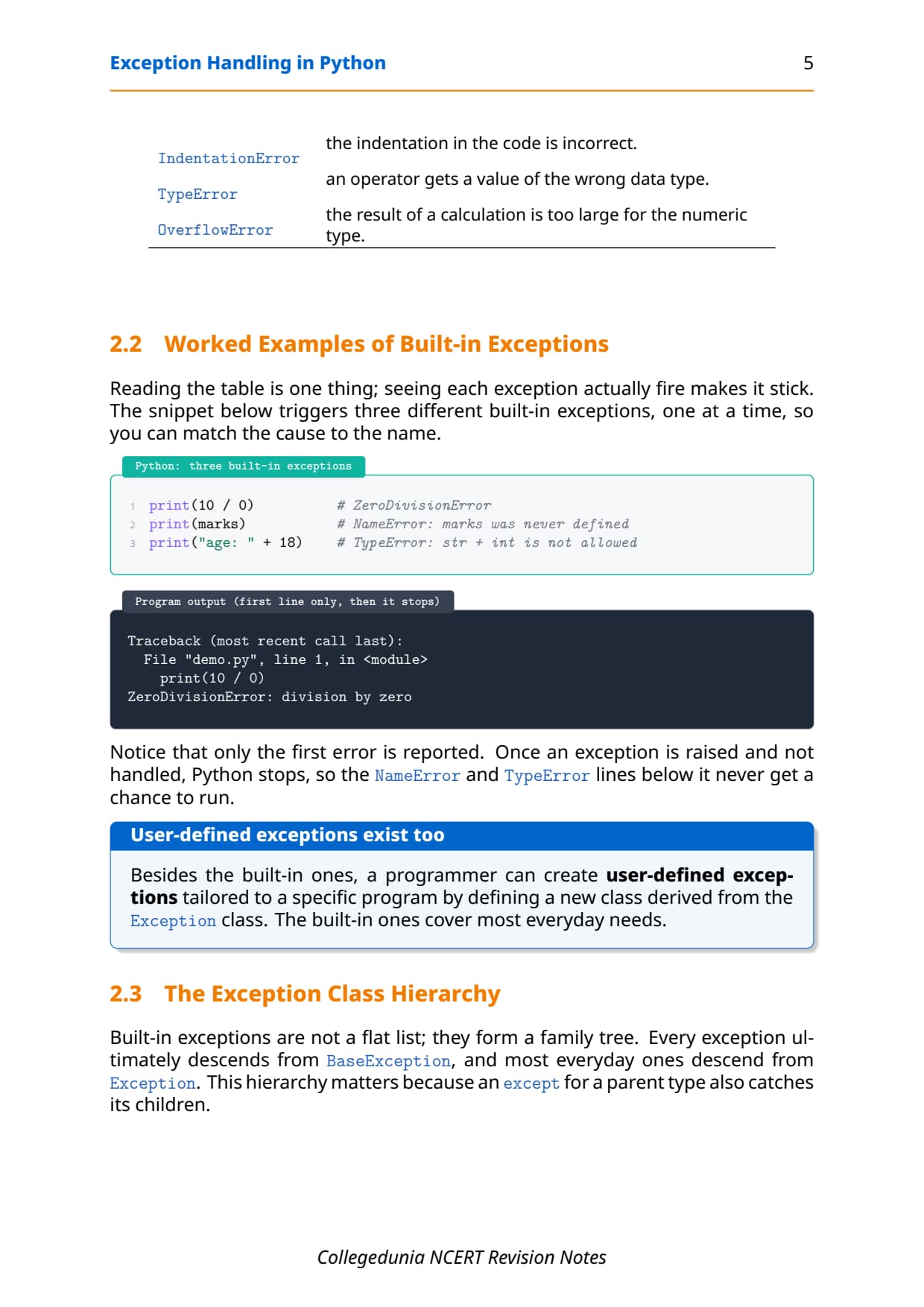
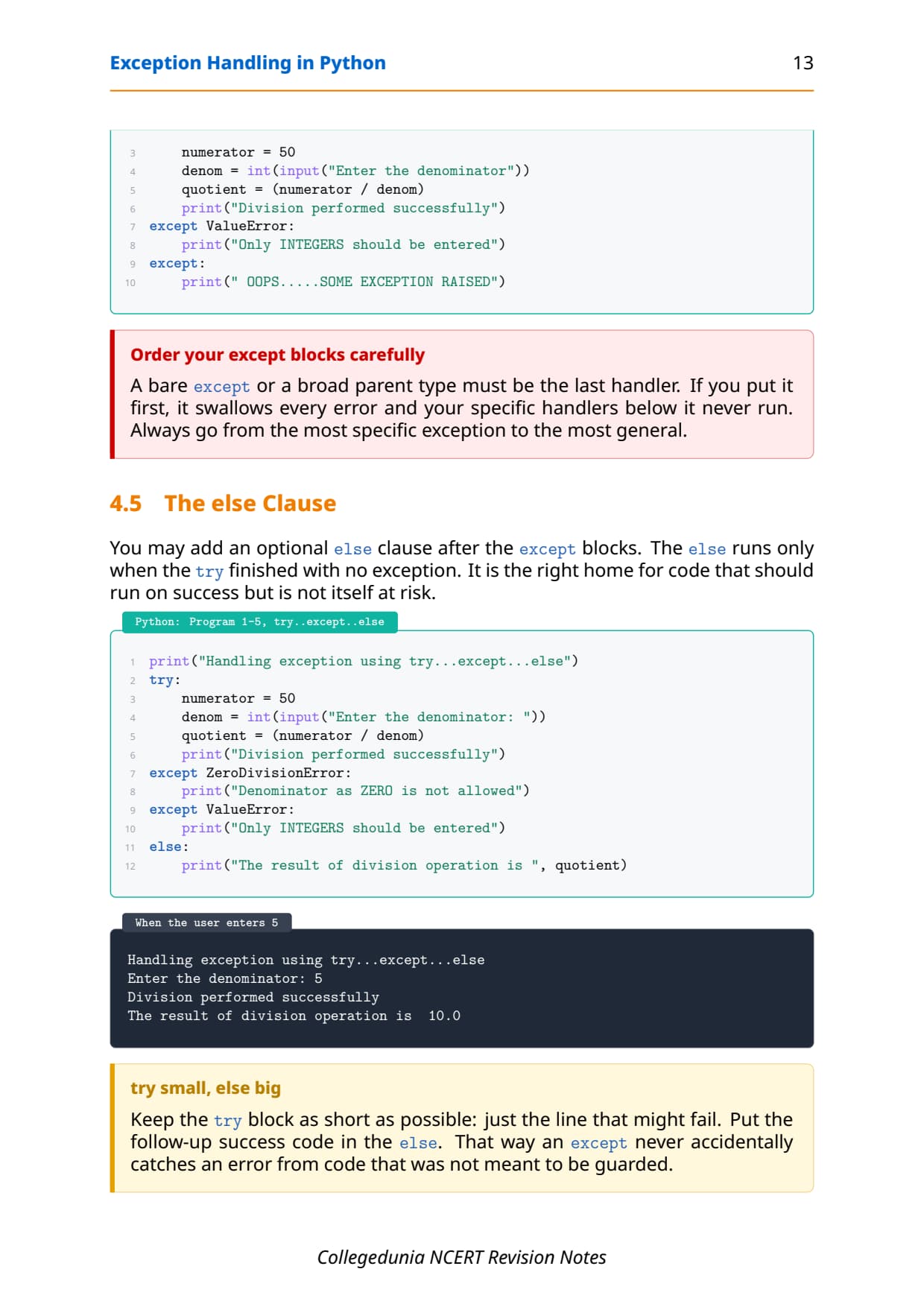
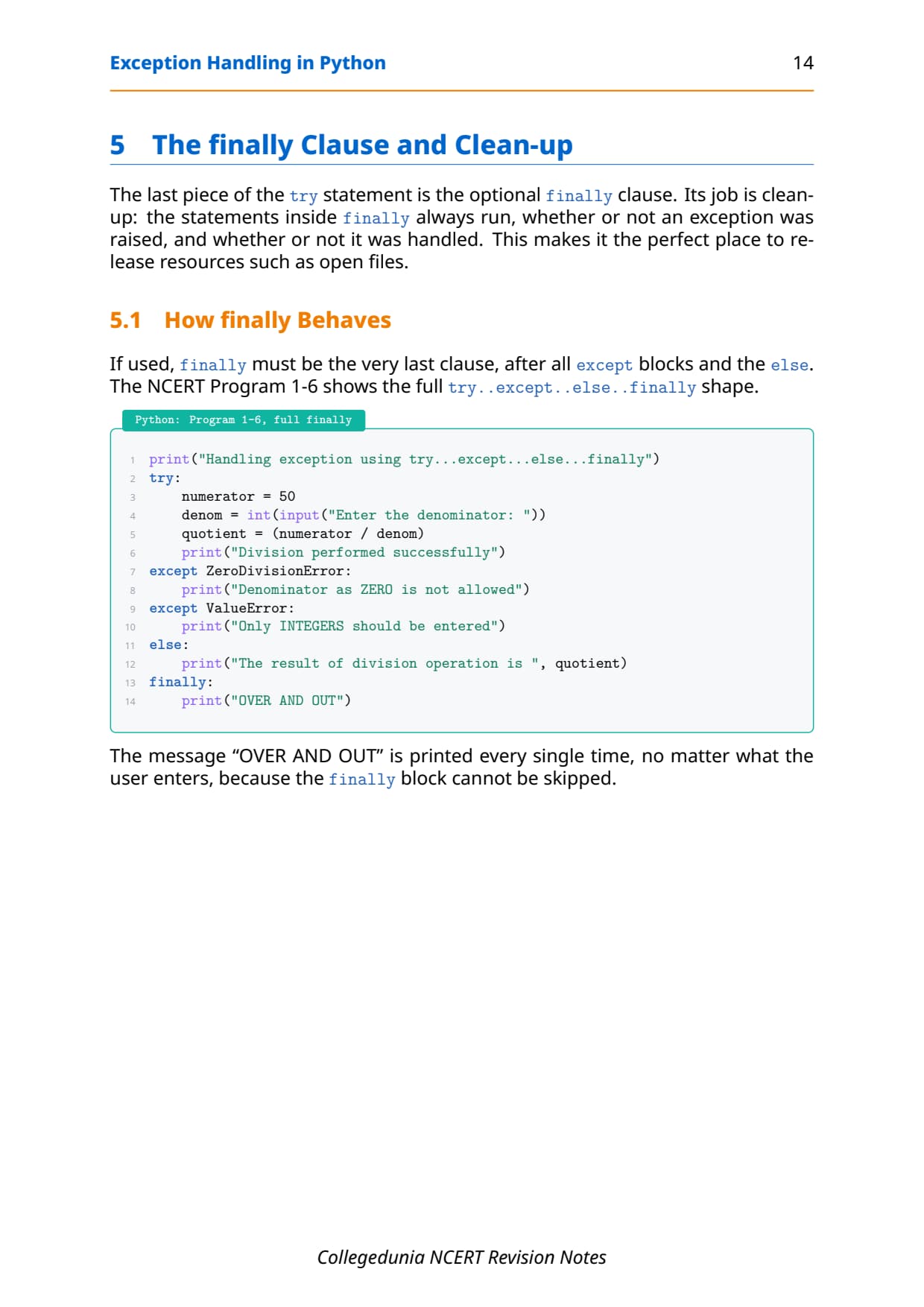
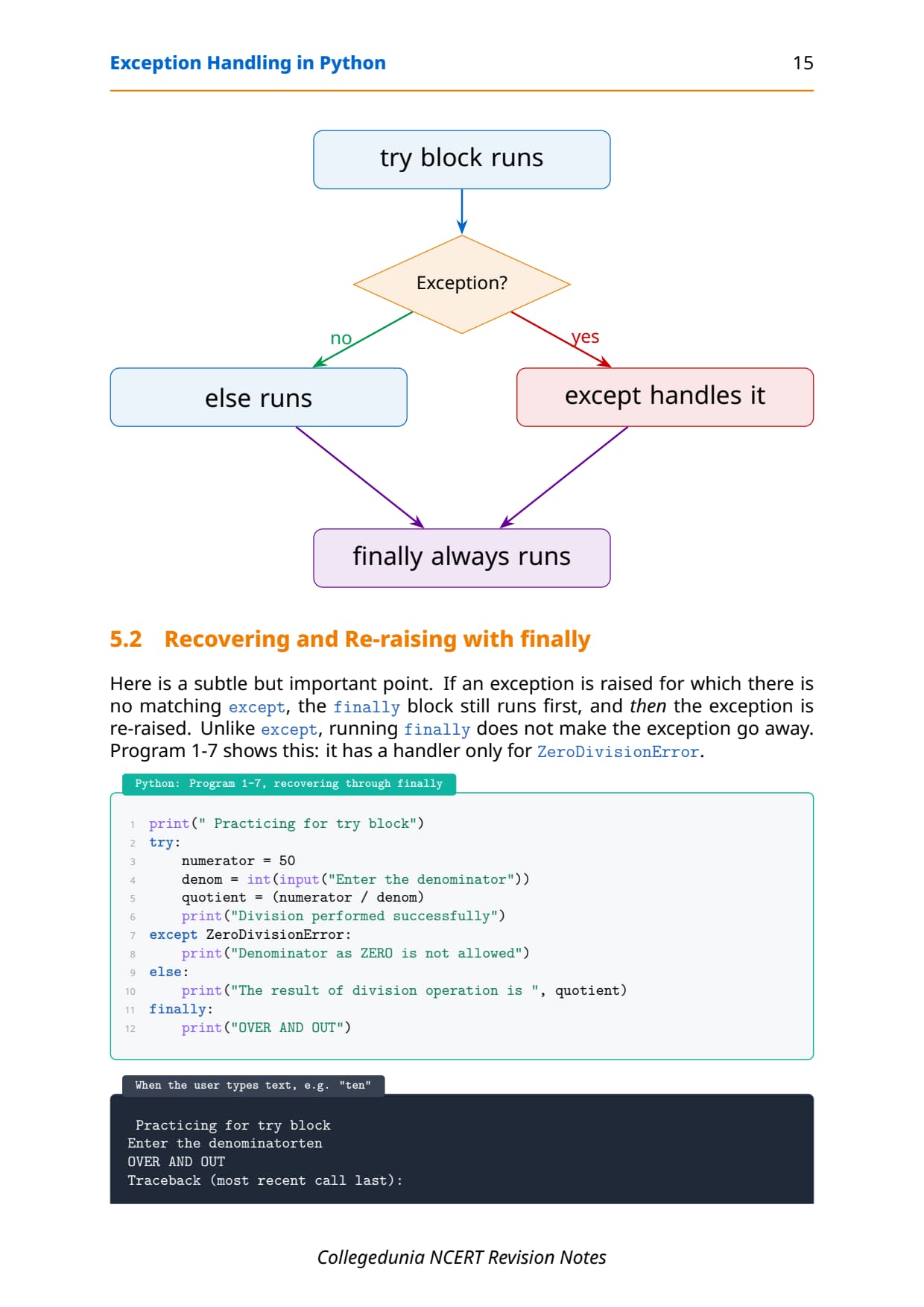
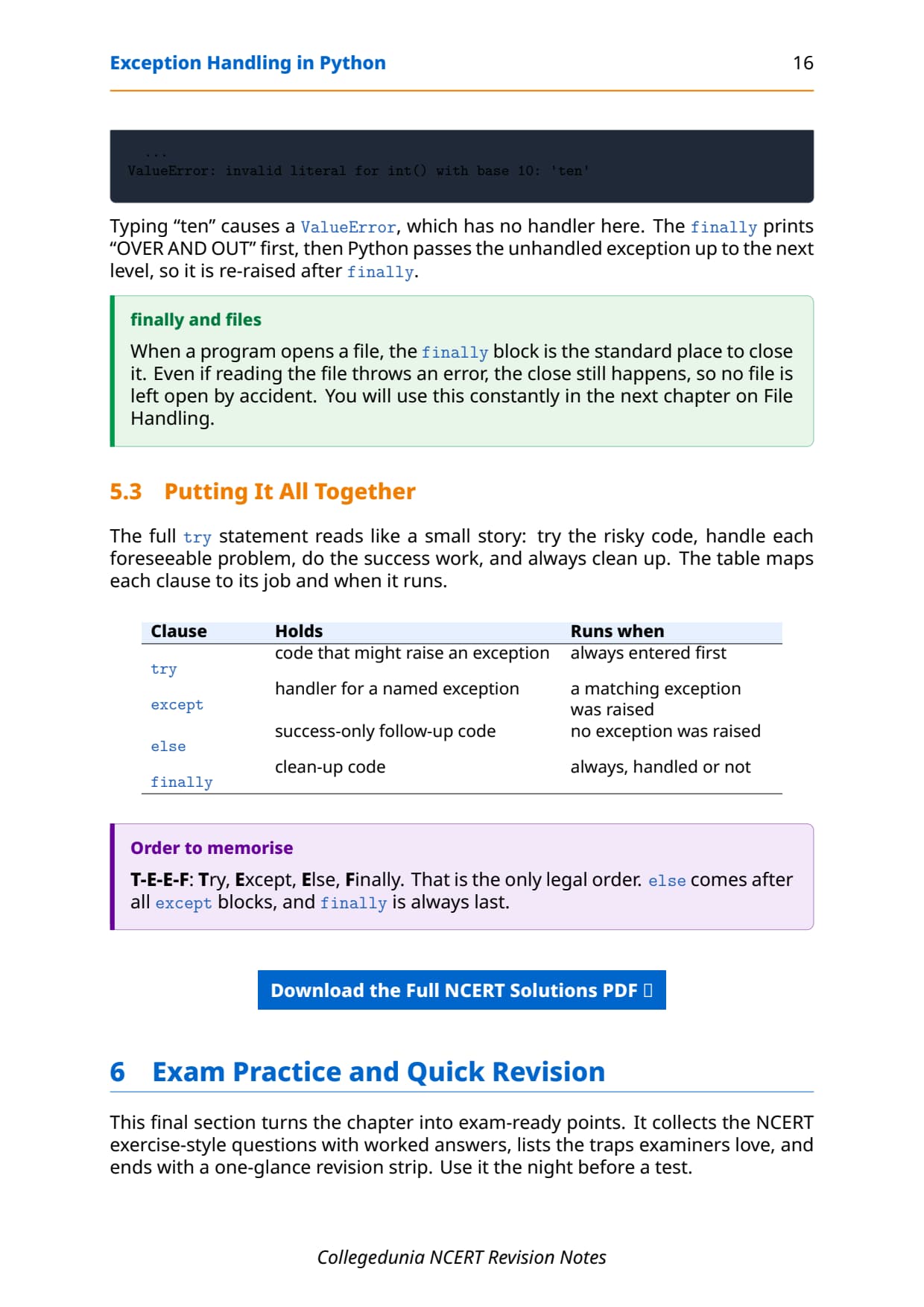
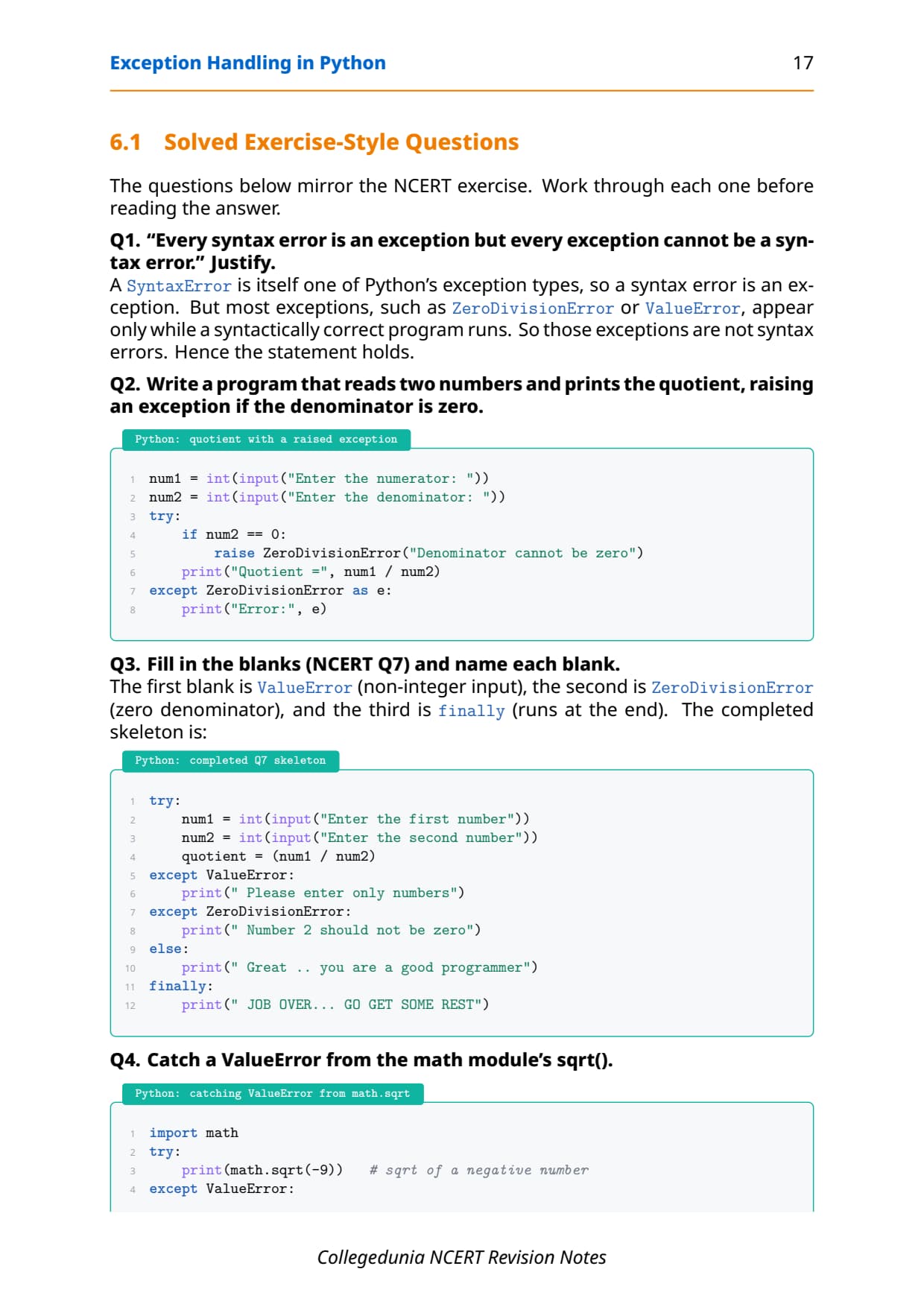
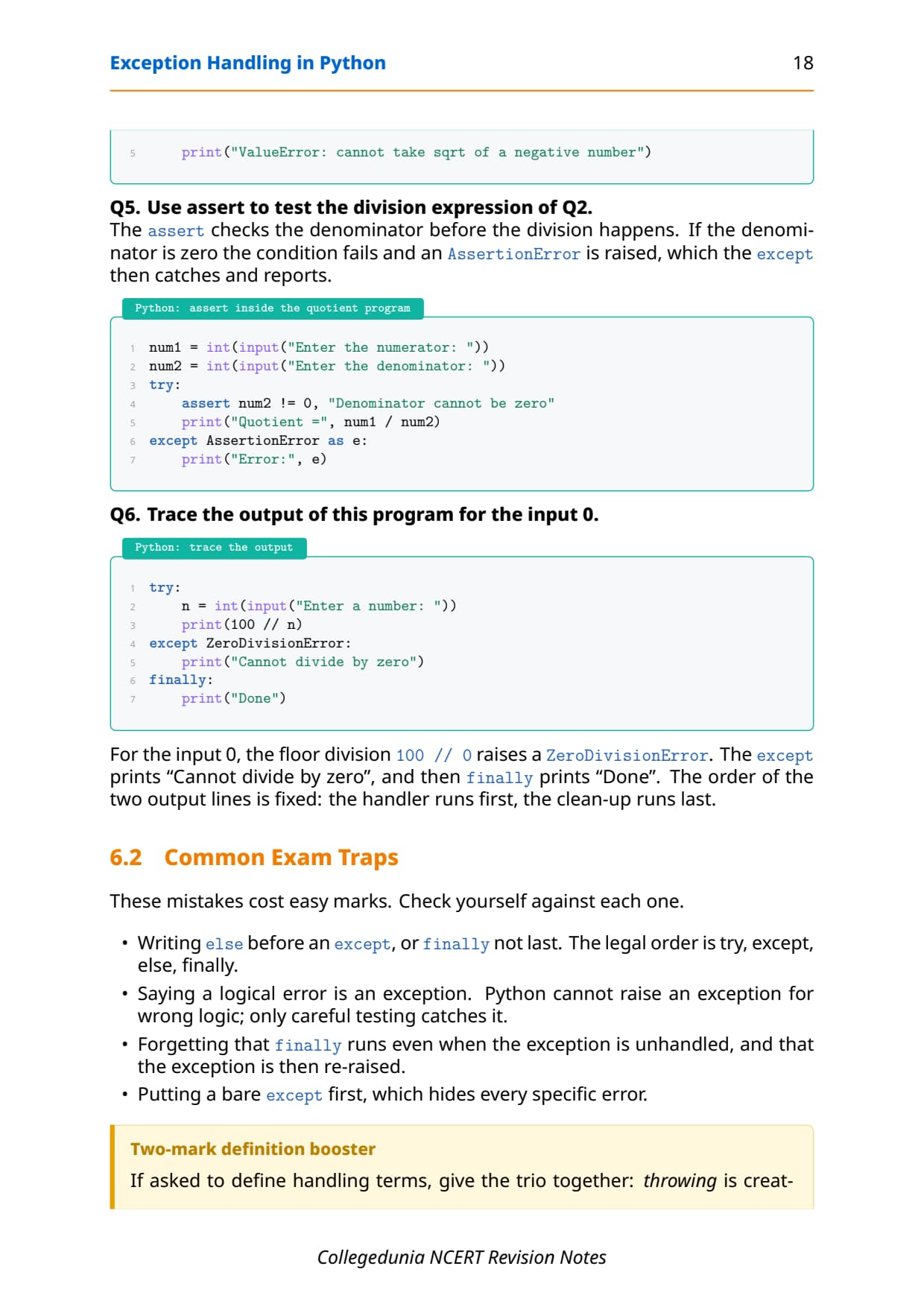
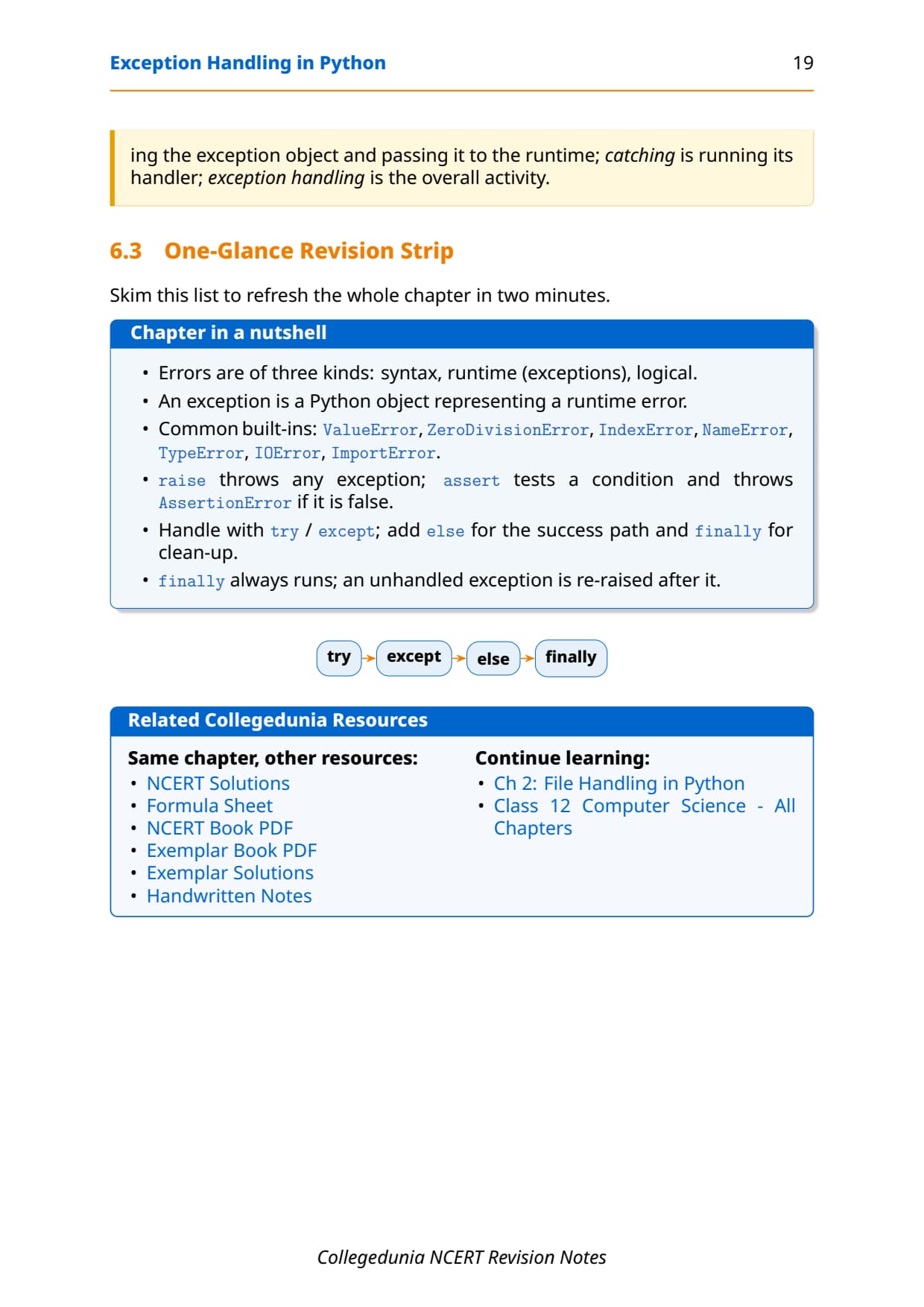
- Every keyword explained with a one-line meaning, a short Python code block, and the exact line that triggers each error.
- Full coverage of ValueError, ZeroDivisionError, NameError, ImportError and the try-except-else-finally flow that the CBSE board paper tests directly.
- Notes aligned with the 2026-27 CBSE Class 12 Computer Science syllabus and useful for JEE and CUET programming questions; no NEET references because Computer Science is not a medical subject.
These Collegedunia revision notes are curated by Computer Science subject experts, mapped to the 2026-27 NCERT textbook, and refined against the last five years of CBSE Class 12 Computer Science board papers.
Student Feedback: What 12,100 students told us about this chapter
71% of Class 12 students said they confused the else and finally clauses while revising the try block. 3 out of 5 students told us a one-page summary of the keyword roles helped them lock the chapter the night before the exam.
Toppers found that a quick revision pass that lists each built-in exception with its trigger line saved 10 to 15 minutes in the exam, and the average student spent 1 to 2 hours on these notes across the first read and the final revision.
Source: 2026-27 Class 12 Computer Science student poll. Sample of 12,100 students from CBSE schools across 14 states, conducted before the 2026 boards.
What the Notes for Class 12 Computer Science Chapter 1 Exception Handling in Python Cover
This chapter answers one question: how does a Python program deal with run-time errors without crashing? These notes keep the NCERT order but compress it into revision-ready blocks, so you can read the whole chapter in one sitting and recall it fast in the exam.
- Syntax error vs exception: a syntax error is caught while Python reads the code; an exception happens while a correct program runs.
- Built-in exceptions:
ValueError,ZeroDivisionError,NameError,ImportErrorandIOError, each tied to the exact line that triggers it. - The try-except block: risky code goes in
try, handlers go inexcept, and the program continues instead of stopping. - raise, assert, else and finally: throwing an error on demand, testing a condition, running code only on success, and running clean-up code in every case.
Source: Magnet Brains on YouTube
Errors and Exceptions: The Big Picture for Class 12 Computer Science
Before the keywords, fix the vocabulary. An error is anything that stops a program from doing its job. Python sorts errors into a few groups, and only one group can be caught and handled at run time. Getting these labels right is what the first two exam questions reward.
| Kind of error | When it appears | Can you catch it? |
|---|---|---|
| Syntax error | While Python parses the code, before it runs | Not in the file you run; the file refuses to load |
| Run-time error (exception) | While a correct program is running | Yes, with a try-except block |
| Logical error | The program runs but gives a wrong answer | No exception is raised; you fix the logic |
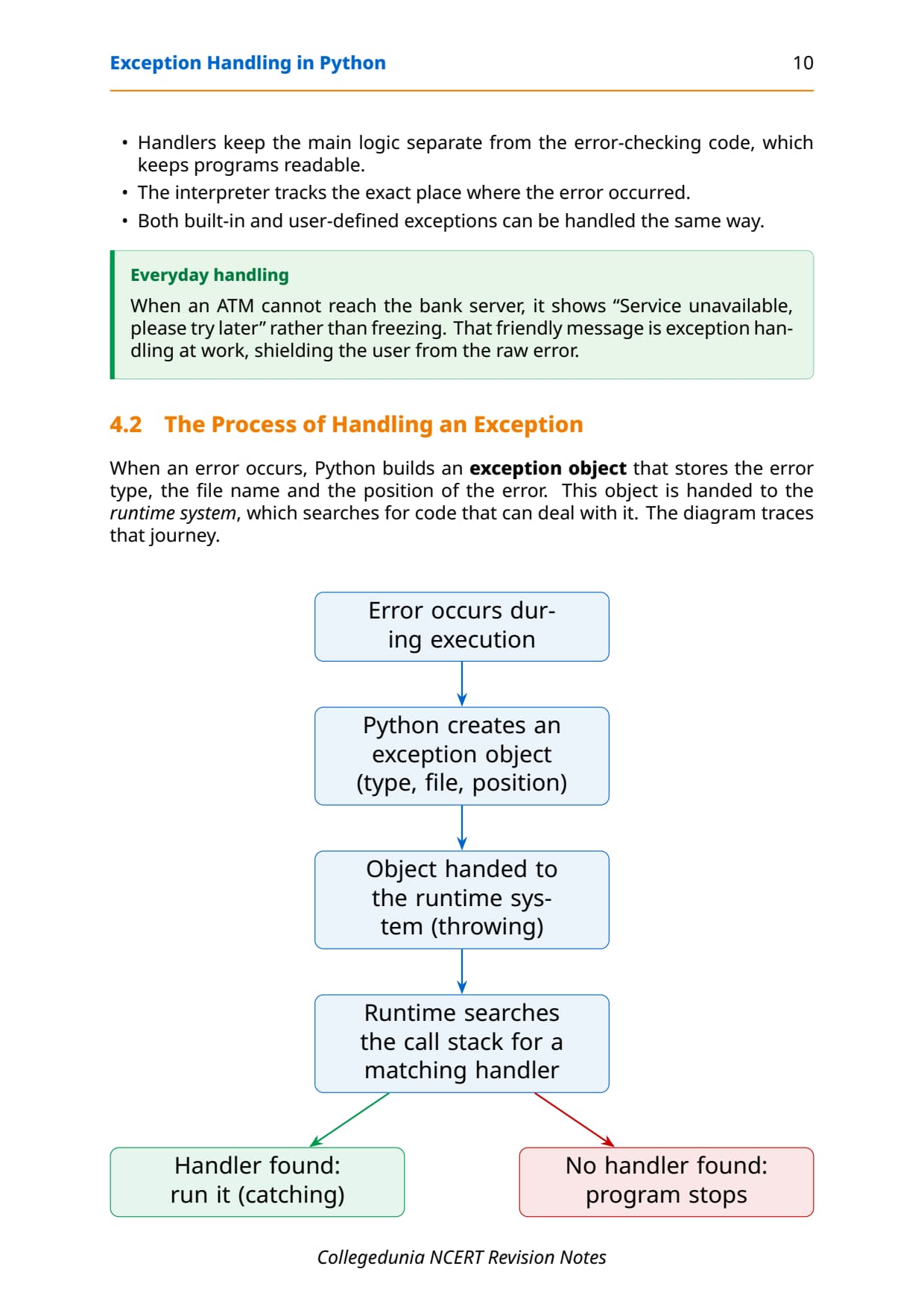
The word exception means an exceptional event that breaks the normal flow of a running program. Python represents every exception as an object of a class, and all of those classes descend from BaseException. This class idea is the thread that ties the whole chapter together, so keep it in mind as you read on.
Syntax Error vs Exception in Python
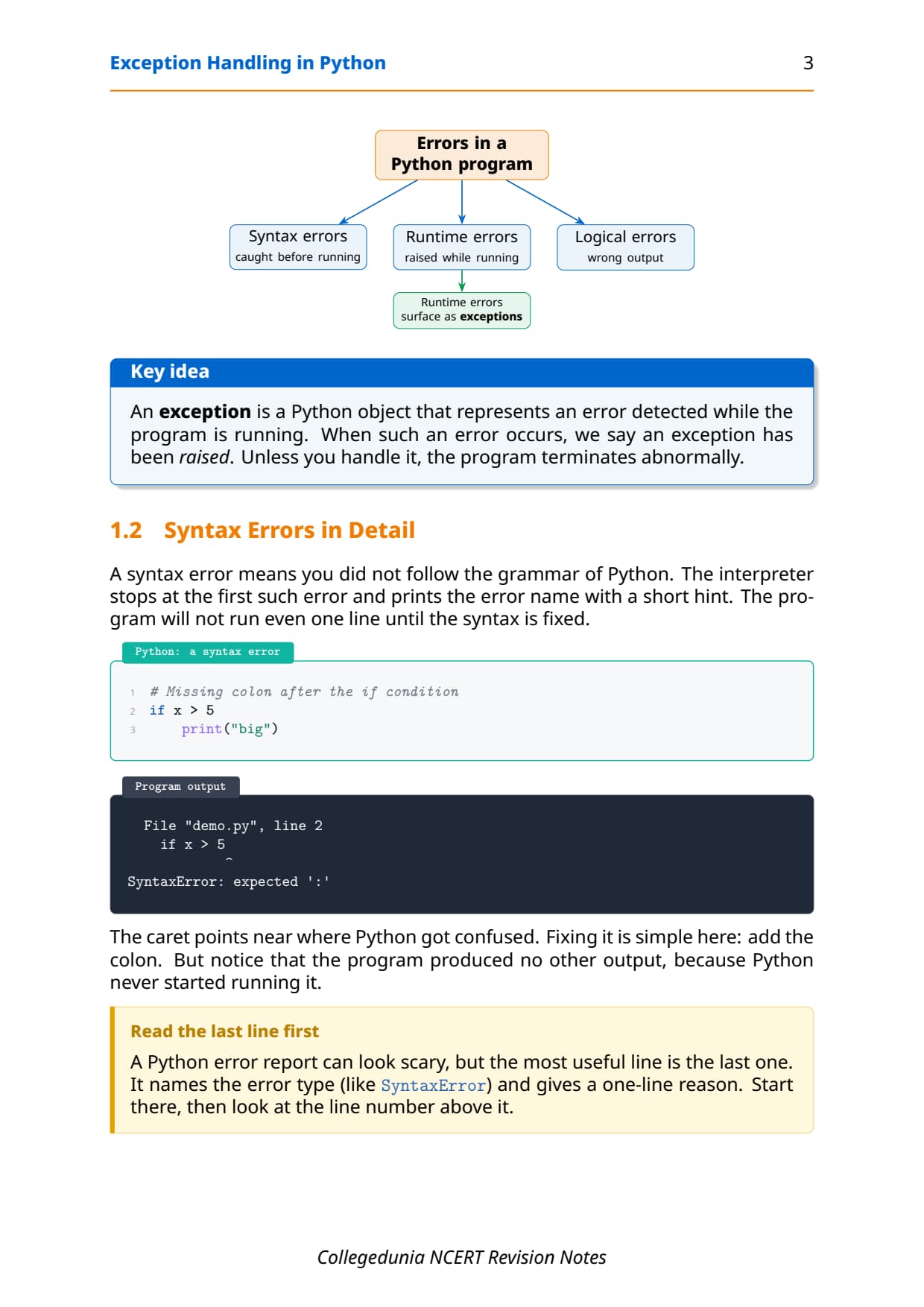
A syntax error is an error Python finds while it reads (parses) your code, before the program runs. It breaks the grammar of the language, for example a missing colon or an unmatched bracket. An exception is an error that happens while a syntactically correct program is running, such as dividing by zero or using a name that was never defined.
- Detection time: a syntax error is caught before any line runs; an exception surfaces only during execution.
- Class tree: in Python every error type is a class.
SyntaxErroris a subclass ofException, so a syntax error is itself a kind of exception. - One-way rule: every syntax error is an exception, but most exceptions (like
ZeroDivisionError) are not syntax errors.
A syntax error stops parsing, so Python refuses to run the file at all. A run-time exception, by contrast, happens in grammatically correct code. The two short blocks below show the split clearly:
if x > 5      # missing colon, breaks grammar
    print(x)
SyntaxError: expected ':'Common Built-in Exceptions in Class 12 Computer Science
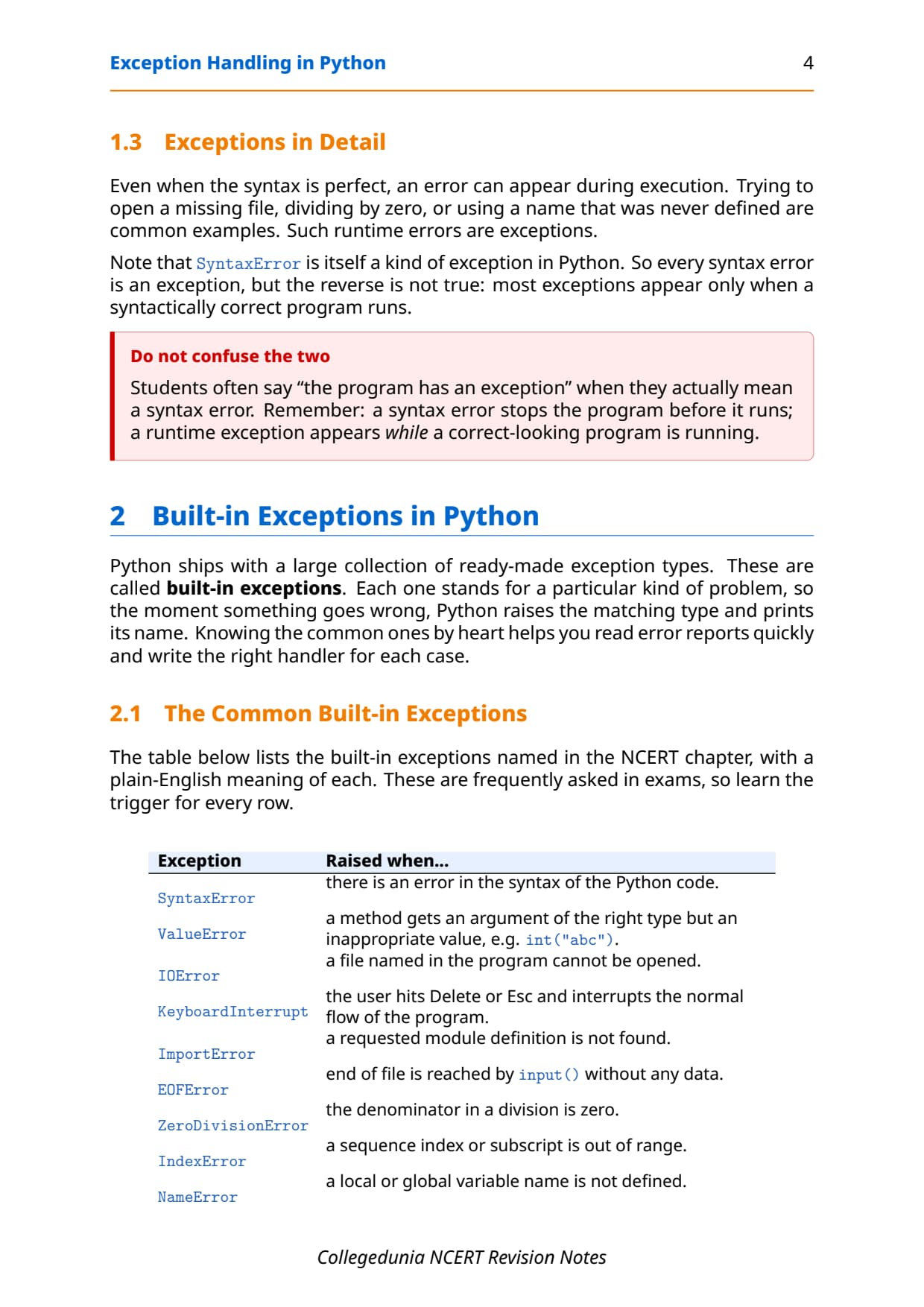
A built-in exception is an error class that Python already provides and raises automatically when a specific bad situation happens at run time. The class name describes the problem, so naming the right exception in the exam is mostly about reading the trigger line carefully.
| Exception | Raised when | Example trigger |
|---|---|---|
ImportError | An import fails to find the module or a name inside it | import mymodule (no such module) |
IOError | An input or output action fails, like opening a missing file | open("data.txt", "r") when the file is absent |
NameError | The program uses a name that was never defined | print(marks + 10) with marks unset |
ZeroDivisionError | A number is divided or taken modulo by zero | result = 25 / 0 |
ValueError | The type is right but the value is unacceptable | int("abc") or math.sqrt(-25) |
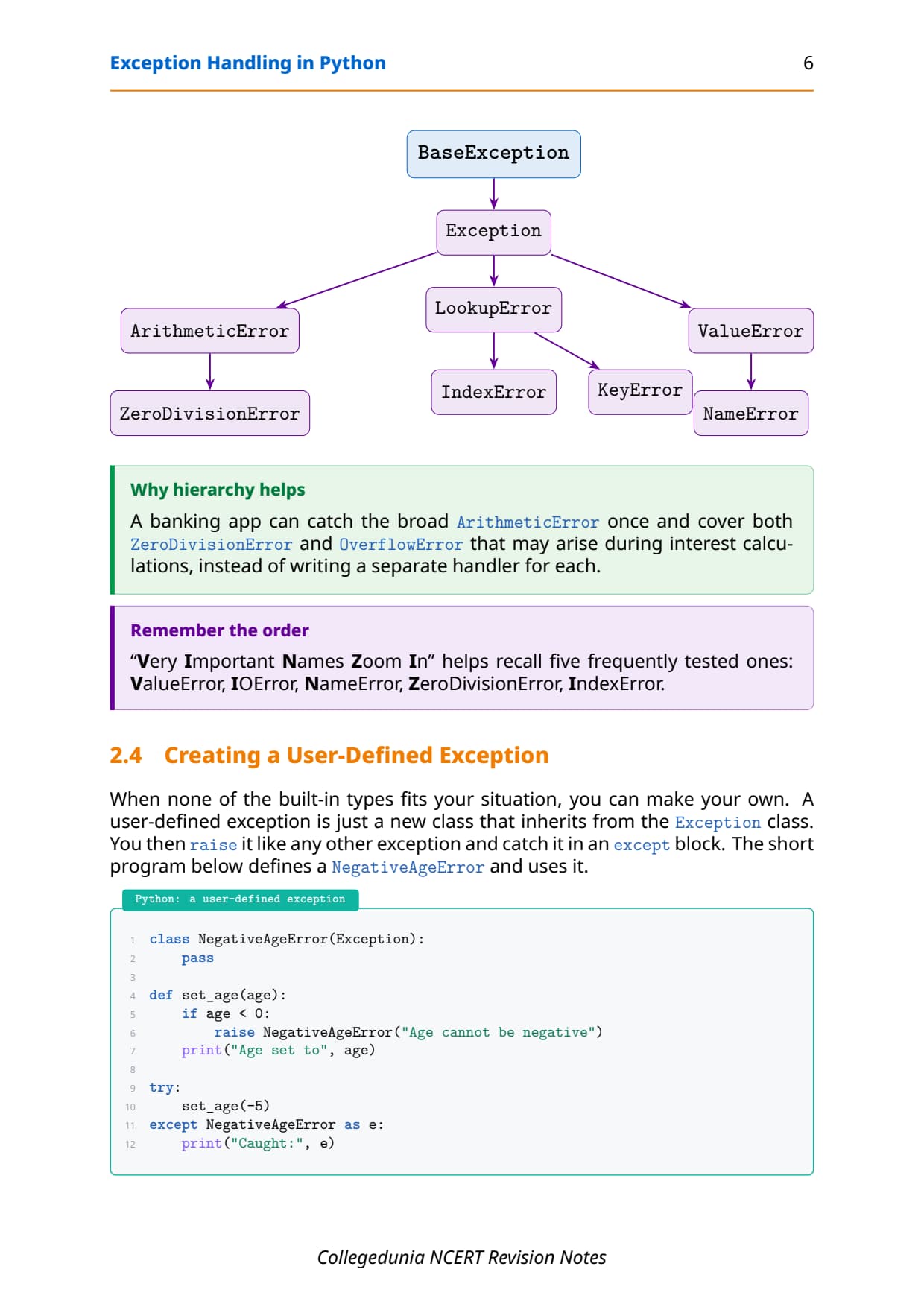
Two modern aliases earn full marks. Since Python 3.6 a missing module raises ModuleNotFoundError, a subclass of ImportError. Since Python 3.3 IOError is an alias of OSError, and a missing file raises FileNotFoundError. Writing except IOError still works because the alias catches the same family. The class hierarchy below is why a parent name can stand in for its children.
BaseException
 └── Exception
      ├── ArithmeticError
      │    └── ZeroDivisionError
      ├── ImportError
      │    └── ModuleNotFoundError
      ├── NameError
      ├── OSError  (alias: IOError)
      │    └── FileNotFoundError
      └── ValueError
The try-except Block: Catching Exceptions in Python
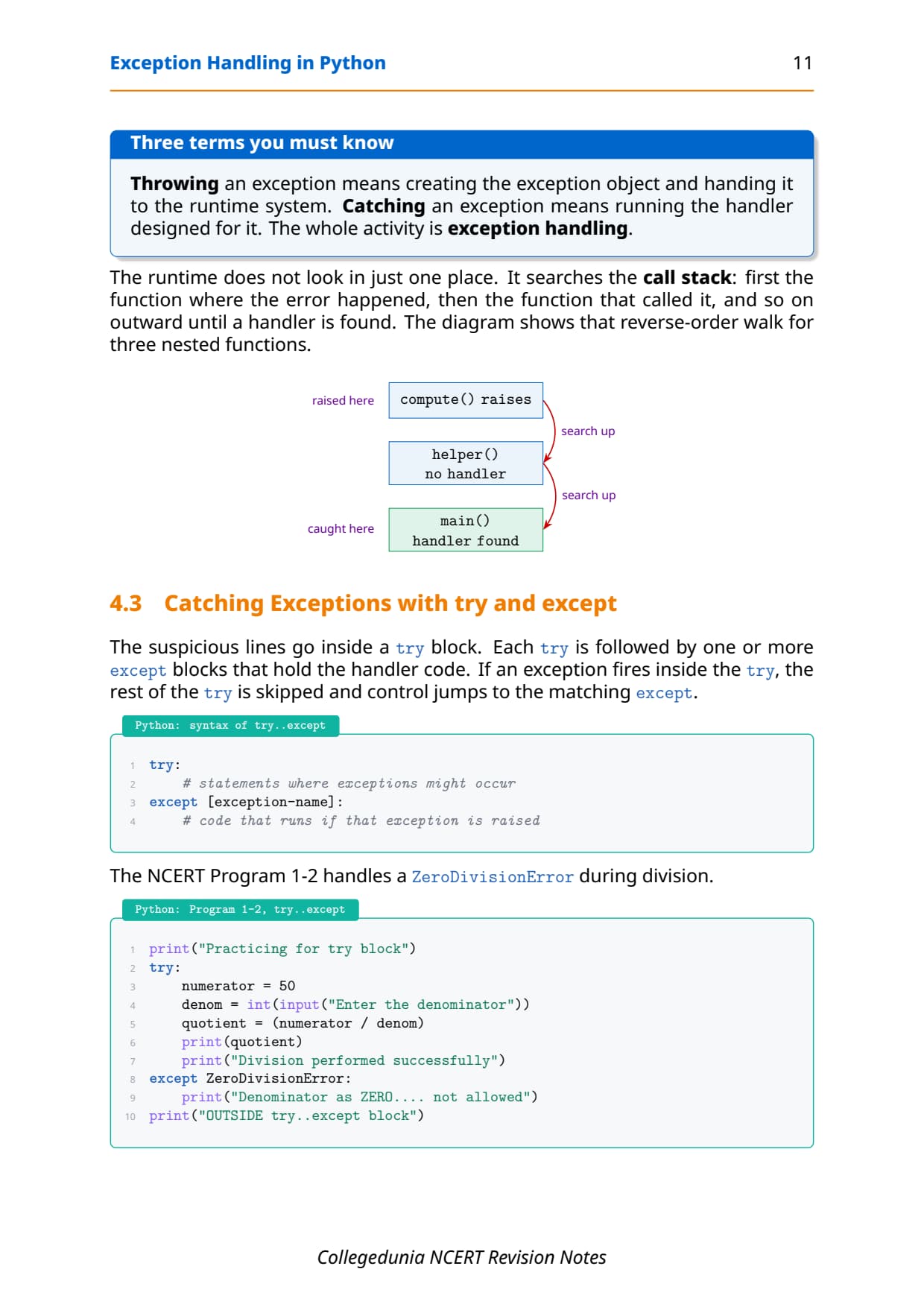
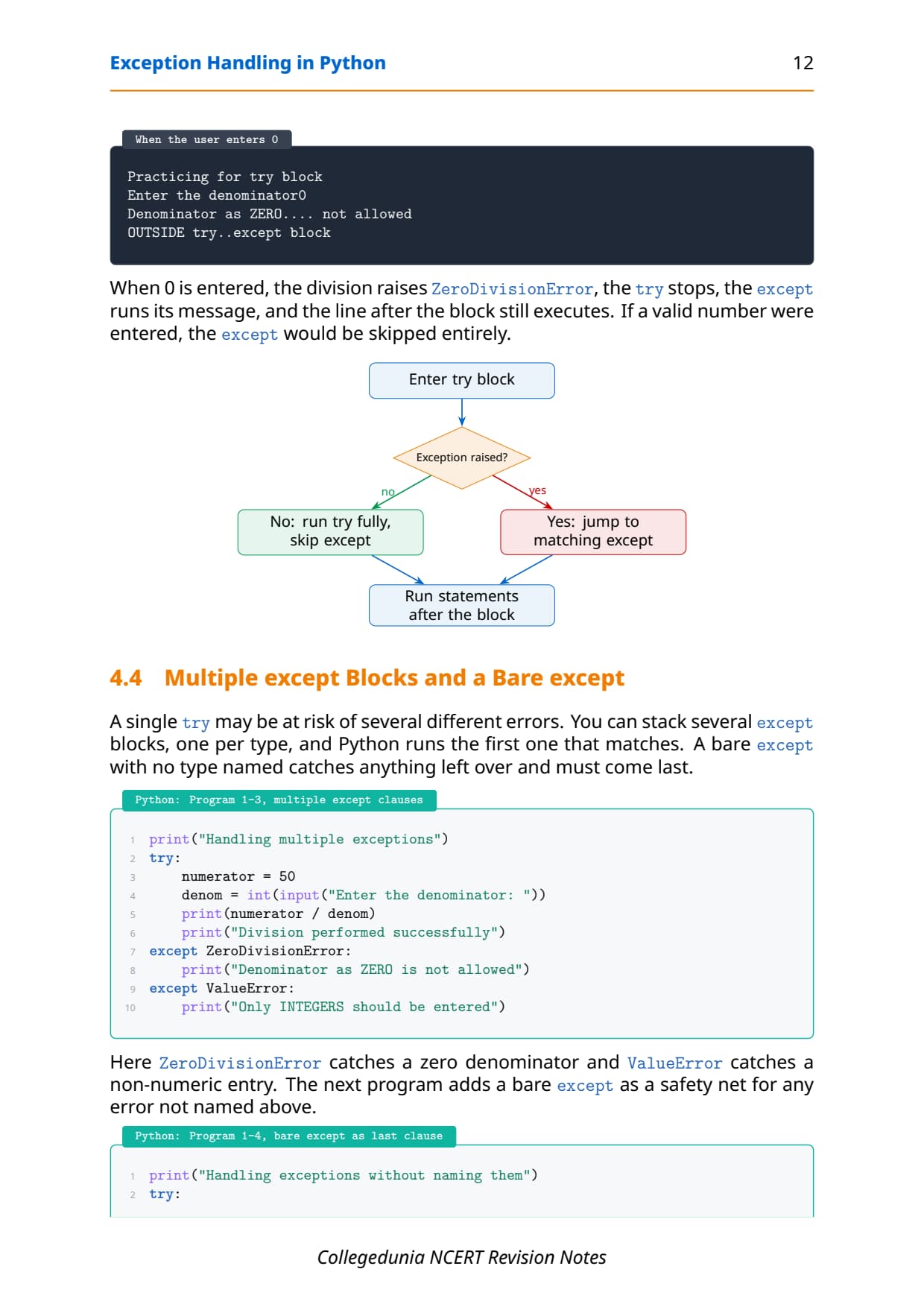
The try-except block is Python's main tool for catching exceptions. Risky code goes inside try. If a statement raises an exception, Python leaves the try block at that point and checks each except clause in order. The first clause whose type matches runs, then the program continues. If nothing fails, the except blocks are skipped.
try:
    a = int(input("Enter a number: "))
    b = int(input("Enter another number: "))
    print("Result =", a / b)
except ValueError:
    print("Please enter only whole numbers")
except ZeroDivisionError:
    print("The second number must not be zero")
Matching is by class, so an except that names a parent class also catches its children. Because except Exception catches almost everything, a broad handler must come last, after the specific ones, or it will swallow exceptions the specific handlers were meant to catch.
try block small. Put only the line that can fail inside it, because the try stops at the first error and skips the safe lines after it, which can hide where the problem really is.
raise and assert: Throwing Errors on Purpose
Sometimes you want to signal an error yourself instead of waiting for Python. Two keywords do this, but in different ways, so keep their rules separate.
The raise statement
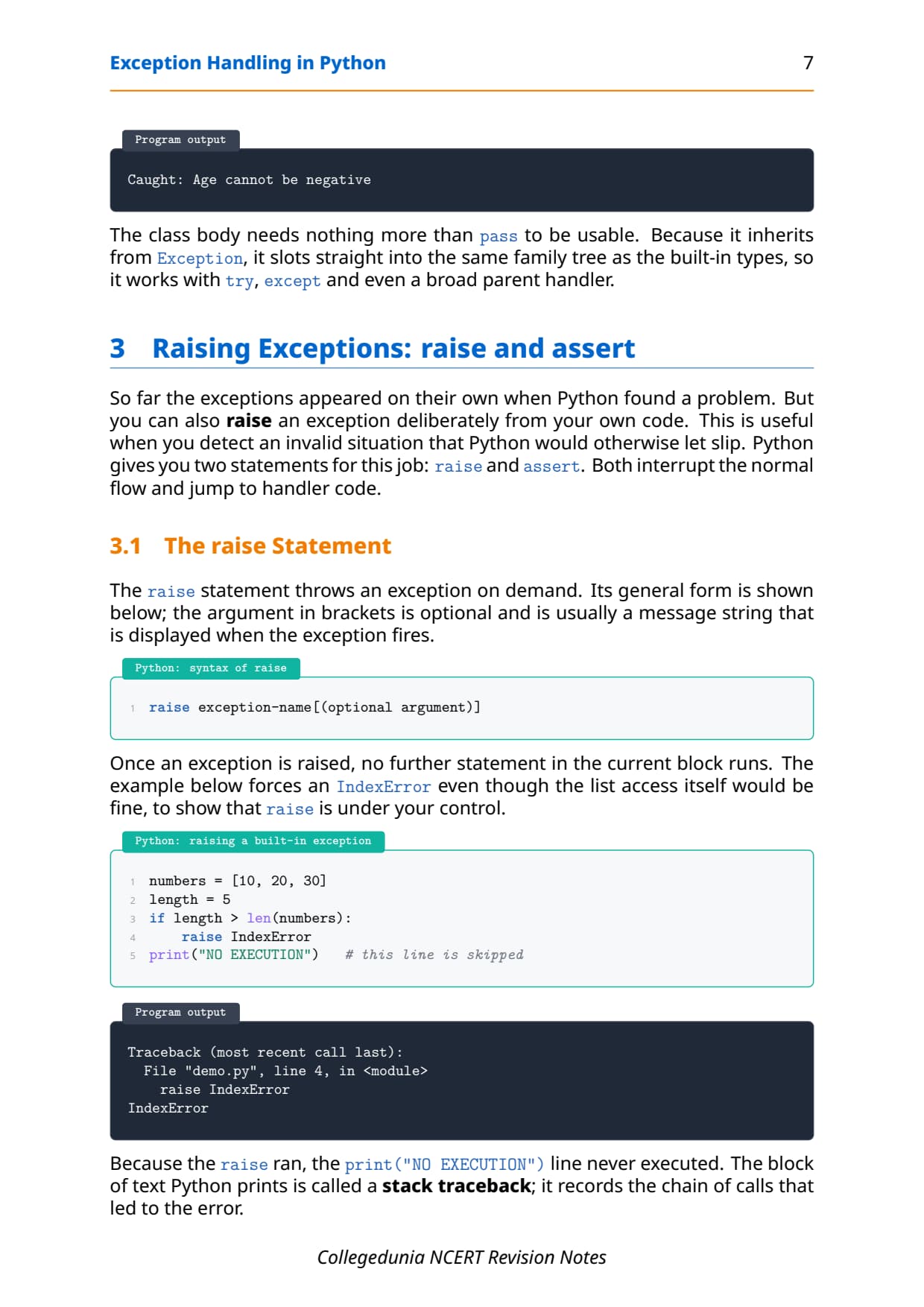
The raise statement throws an exception on demand. The form is raise ExceptionName("message"). It is most useful for a rule Python does not know about, such as refusing a negative denominator. Once raised, control jumps to the nearest matching except block.
num2 = int(input("Enter the denominator: "))
if num2 == 0:
    raise ZeroDivisionError("Denominator cannot be zero")
Writing except ZeroDivisionError as e stores the exception object in e, so print(e) shows the exact message you passed to raise. A clear message like "Denominator cannot be zero" beats the generic "division by zero" Python prints on its own.
The assert statement
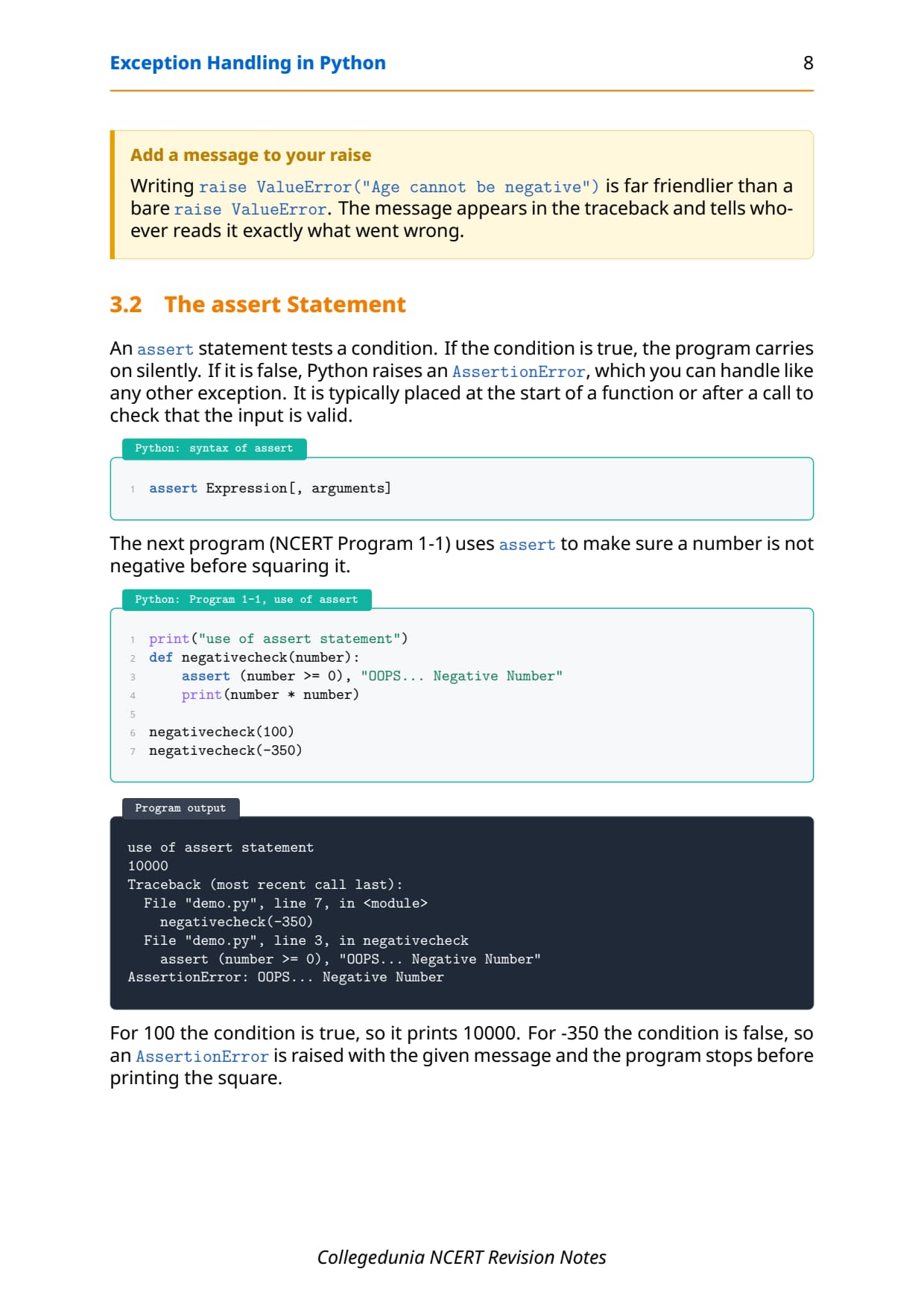
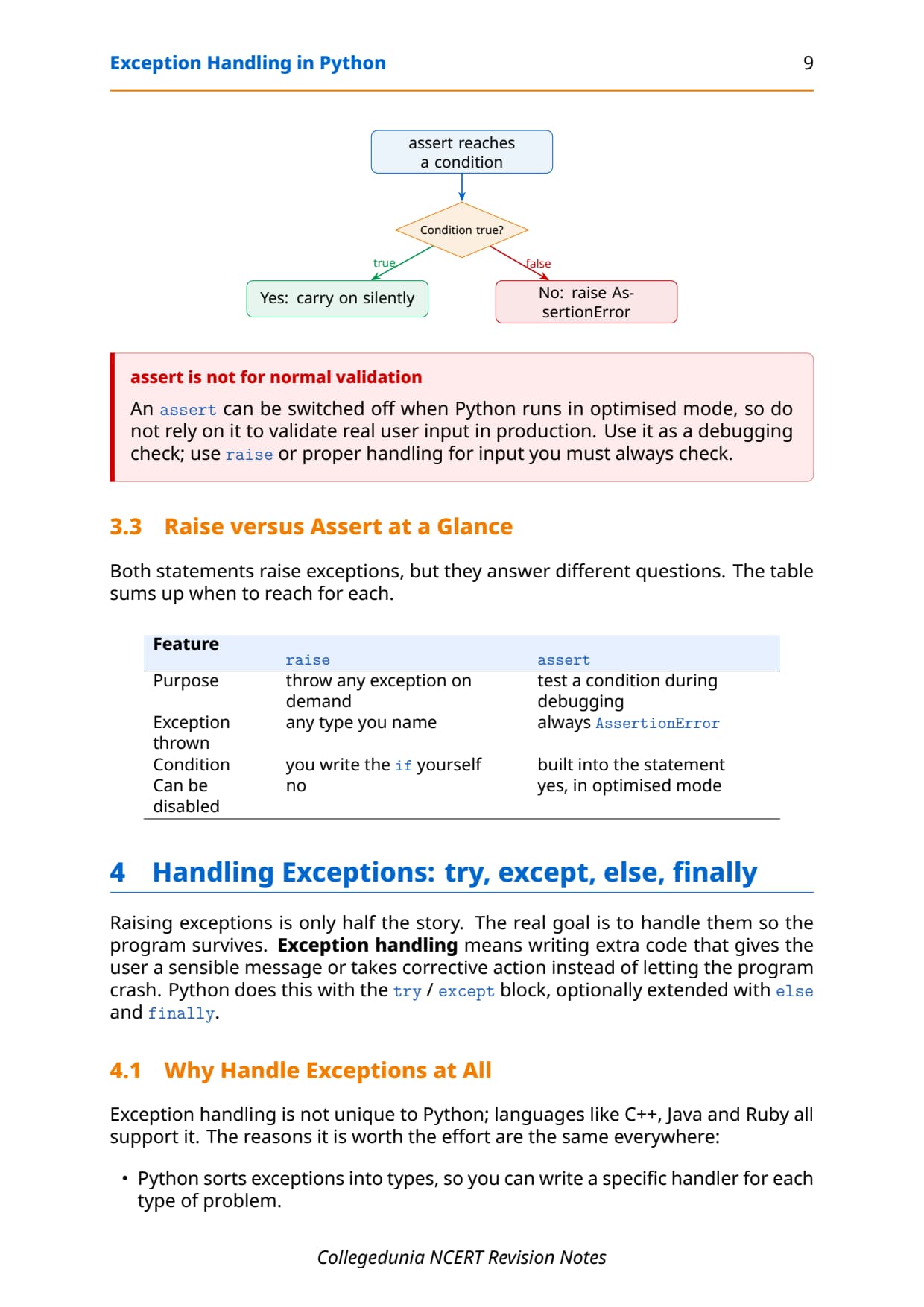
The assert statement checks that a condition is true. The form is assert condition, message. If the condition is true, the program continues silently; if it is false, Python raises an AssertionError with the message. It is a development-time check.
assert num2 != 0, "Denominator cannot be zero"tests the division before it runs.- Assertions can be switched off with the
-O(optimise) flag, so never rely onassertfor real user-input validation in a shipped program.
Tip: Use assert for sanity checks during development and raise (or a plain if) for permanent input validation, because only raise cannot be disabled by the optimise flag.
else and finally: Success-Only and Always-Run Blocks
Two extra blocks attach to try, and mixing them up is the single most common error students make in this chapter. Map each one to exactly when it runs.
- else: runs only when the
tryblock finishes with no exception. It is conditional on success. - finally: runs on every exit path, whether an exception was raised, caught, or is about to propagate. It is unconditional.
try:
    quotient = num1 / num2
except ZeroDivisionError:
    print("Number 2 should not be zero")
else:
    print("Great, you are a good programmer")   # only on success
finally:
    print("JOB OVER, GO GET SOME REST")         # always runs
With valid input the try body runs, then else, then finally: three messages print. With a zero denominator the except handler runs, else is skipped, and finally still runs: two messages print. So the "JOB OVER" line from finally appears in both runs, while the "Great" line from else appears only in the clean run.
One-Glance Revision Strip and Common Exam Traps
This is the strip to read in the last five minutes before the exam. It lines up every keyword with its one-line role, then lists the traps that cost students marks every year.
| Keyword | One-line role |
|---|---|
try | Holds the risky code that might raise an exception |
except | Catches a matching exception and handles it |
raise | Throws an exception on purpose |
assert | Checks a condition; raises AssertionError if false |
else | Runs only if the try block had no exception |
finally | Runs on every exit, success or failure |
The repeat-offender mistakes in Exception Handling chapter board answers:
- Calling a syntax error "not an exception":
SyntaxErroris a subclass ofException, so a syntax error is an exception; it is just detected at parse time. - Wrong exception in the blanks: bad text for
int()isValueError, a zero denominator isZeroDivisionError, and the always-run blank isfinally. - Thinking else runs every time:
elseruns only on a cleantry;finallyruns unconditionally. - Confusing ValueError and TypeError: a wrong value (a negative number for
math.sqrt) givesValueError; a wrong type or argument count givesTypeError. - Ordering handlers wrong: a broad
except Exceptionmust come last, or it swallows the specific exceptions you meant to catch.
How to Use the Exception Handling Notes PDF for Board Revision
The Exception Handling chapter is short but definition-heavy and trap-heavy. The best approach is two passes: one for the vocabulary and the keyword roles, one for tracing the small programs by hand.
First pass: vocabulary and keywords
Read these notes and note the syntax-error-versus-exception split, the five common built-in exceptions, and the role of each keyword: try, except, raise, assert, else, finally. Say one line of meaning aloud for each so the words stick before you start tracing code.
Second pass: trace the programs
Take the try-except-else-finally block above and trace it twice on paper: once with a valid denominator and once with a zero. Write the exact lines that print in each run. That single exercise covers the most common 3-mark board question on this chapter.
JEE and CUET angle
For students preparing competitive exams, exception handling appears in Python-based programming rounds and in CUET Computer Science. The try-except flow and the difference between value errors and type errors are exactly the kind of concept questions those papers reuse, so this revision doubles as competitive prep.
Previous Year Question Trends from the Exception Handling Chapter
The Exception Handling chapter is tested in CBSE board papers mainly through definition and output questions, with a program question on raising or catching an exception. The table below maps the asked question types across recent board papers, so your revision can target the high-frequency areas.
| Year | Question type asked | Marks |
|---|---|---|
| 2025 | Difference between syntax error and exception; name two built-in exceptions | 2 + 1 |
| 2024 | Write a program using try-except to handle ZeroDivisionError | 3 |
| 2023 | Use of finally clause; fill in the blanks in a try-except code | 1 + 3 |
| 2022 | Define exception handling; what does raise do | 2 + 1 |
| 2021 | When is ValueError raised; difference between else and finally | 2 + 2 |
Also Check: The full set of CBSE board paper questions for this chapter, with step-by-step answers, is included in the downloadable PDF above, updated for the 2026-27 cycle.
Other Resources for Class 12 Computer Science Chapter 1 Exception Handling in Python
Pair these revision notes with the matching NCERT Solutions, handwritten notes and the official NCERT book chapter. All resources for Class 12 Computer Science Chapter 1 Exception Handling in Python are linked below.
| Resource | What it covers | Open |
|---|---|---|
| Notes | Concept-first revision notes on syntax errors, built-in exceptions, and the try-except-else-finally flow. | You are here |
| NCERT Solutions | Step-by-step answers to all 9 exercise questions, with an Expert Solution for each. | Class 12 Computer Science Chapter 1 NCERT Solutions |
| Handwritten Notes | Scanned-style handwritten pages for last-minute board revision. | Class 12 Computer Science Chapter 1 Handwritten Notes |
| NCERT Book PDF | Official NCERT Computer Science Chapter 1 Exception Handling in Python textbook in PDF form. | Class 12 Computer Science Chapter 1 NCERT Book PDF |
Notes for Class 12 Computer Science: All Chapters
Related Links: Use the table below to open the revision notes for the other chapters of Class 12 Computer Science. Every chapter ships with the same concept-first notes style, full PDF download, and revision FAQ.
| Chapter | Notes link |
|---|---|
| Chapter 1 | Exception Handling in Python Notes (You are here) |
| Chapter 2 | File Handling in Python Notes |
| Chapter 3 | Stack Notes |
| Chapter 4 | Queue Notes |
| Chapter 5 | Sorting Notes |
| Chapter 6 | Searching Notes |
| Chapter 7 | Understanding Data Notes |
| Chapter 8 | Database Concepts Notes |
| Chapter 9 | Structured Query Language (SQL) Notes |
| Chapter 10 | Computer Networks Notes |
| Chapter 11 | Data Communication Notes |
| Chapter 12 | Security Aspects Notes |
Notes Class 12 Computer Science Chapter 1 Exception Handling in Python FAQs
Ques. What does Chapter 1 Exception Handling in Python cover in Class 12 Computer Science?
Ans. Chapter 1 covers how a Python program deals with run-time errors without crashing. The notes explain the difference between a syntax error and an exception, the common built-in exceptions such as ValueError, ZeroDivisionError, NameError and ImportError, and the role of every keyword in the try-except-else-finally block. They also cover the raise statement for throwing an exception on purpose and the assert statement for development-time checks, all aligned with the 2026-27 CBSE syllabus.
Ques. What is the difference between a syntax error and an exception in Python?
Ans. A syntax error is found while Python reads (parses) the code, before the program runs, and it breaks the grammar rules of the language, for example a missing colon. An exception is an error that happens while a syntactically correct program is running, such as dividing by zero. In Python's class tree, SyntaxError is itself a subclass of Exception, so every syntax error is an exception, but most exceptions like ZeroDivisionError arise at run time and are not syntax errors. The quick test is whether the error appears before the program runs or while it runs.
Ques. When is a ValueError raised in Class 12 Computer Science?
Ans. A ValueError is raised when a function receives an argument of the right type but an unacceptable value. The classic example is int("abc"), where the text is a string but cannot be turned into a whole number, and math.sqrt(-25), where the type is a number but a negative value is outside the square-root domain. This is different from a TypeError, which is raised when the kind of the argument is wrong, such as passing text where a number is expected or passing the wrong number of arguments.
Ques. What is the difference between the else and finally clauses?
Ans. The else block runs only when the try block completes with no exception, so it is conditional on success. The finally block runs on every exit path from the try statement, whether an exception was raised, caught, or is about to propagate, so it is unconditional. With valid input the try body runs, then else, then finally, while a zero denominator runs the except handler, skips else, and still runs finally. This is why the finally message appears in every run but the else message appears only in the clean run.
Ques. What is the use of the raise statement in Python?
Ans. The raise statement lets the programmer throw an exception on purpose, using the form raise ExceptionName("message"). It is most useful for enforcing a rule that Python does not know about, such as refusing a negative denominator or a value above a limit, because in those cases there is no automatic exception. Once raised, control jumps to the nearest matching except block. A clear custom message such as "Denominator cannot be zero" is more helpful than the generic message Python prints on its own.
Ques. How many pages is the Class 12th Computer Science Exception Handling in Python Notes PDF?
Ans. The Exception Handling in Python Notes PDF runs about 22 pages and covers the full chapter in concept-first revision blocks, with Python code, sample output, flow diagrams, common traps and a one-glance revision strip. The PDF is free to download for the 2026-27 session, and a green Handwritten Notes button on this page opens the scanned-style version for last-minute revision.
Ques. Are these Notes for Class 12 Computer Science Chapter 1 aligned with the 2026-27 syllabus?
Ans. Yes. This page reflects the current 2026-27 CBSE syllabus for Class 12 Computer Science. The Exception Handling in Python chapter is unchanged for the current cycle, and these notes follow the NCERT textbook, covering syntax errors versus exceptions, built-in exceptions, the try-except block, and the raise, assert, else and finally keywords. The notes are useful for the CBSE board exam, and the same ideas help with JEE-level programming and CUET Computer Science.
Ques. Why must the assert statement be used carefully in Python?
Ans. The assert statement checks a condition and raises an AssertionError if it is false, which makes it a good development-time sanity check. The catch is that assertions can be switched off: if Python is run with the -O (optimise) flag, every assert line is skipped entirely. This means you should never rely on assert for checks that must happen in the final shipped program, such as validating real user input. For permanent validation, a plain if condition with a raise statement is safer, because it cannot be disabled.



Comments