



Candidates need to know their application number and password to login to Odisha NEET Counselling 2026 portal at ojee.nic.in/couselling-for-mbbs bds courses.
- You need to check the official portal of Odisha NEET Counselling 2026 for notification regarding the schedule and complete the registration process before login.
- Students need to create a new password through the forgotten password link on the official portal, in case they have forgotten their password.
- If the login issue persists after trying all the required steps as described below, then you are advised to contact the helpdesk through the official website.
Related Articles:
- Check Odisha NEET Counselling 2026: Expected Registration on July, Eligibility, Seat Allotment and Cutoff
- List of Top Colleges in India Accepting Odisha 2026 NEET Counselling Based on 2026 Ranking

Key Summary
- Candidates NEET UG Roll number as per your admit card will be the login ID for Odisha NEET Counselling 2026.
- The password can be easily reset through an OTP sent to your registered mobile or email ID after clicking on the forgotton password link.
- The common login issues and way to fix your password has been described below which will help you to login for Odisha NEET Counselling 2026.
How to Login to the Odisha NEET Counselling 2026 Portal
The ways to login to the Odisha NEET Counselling 2026 portal has been discussed below:
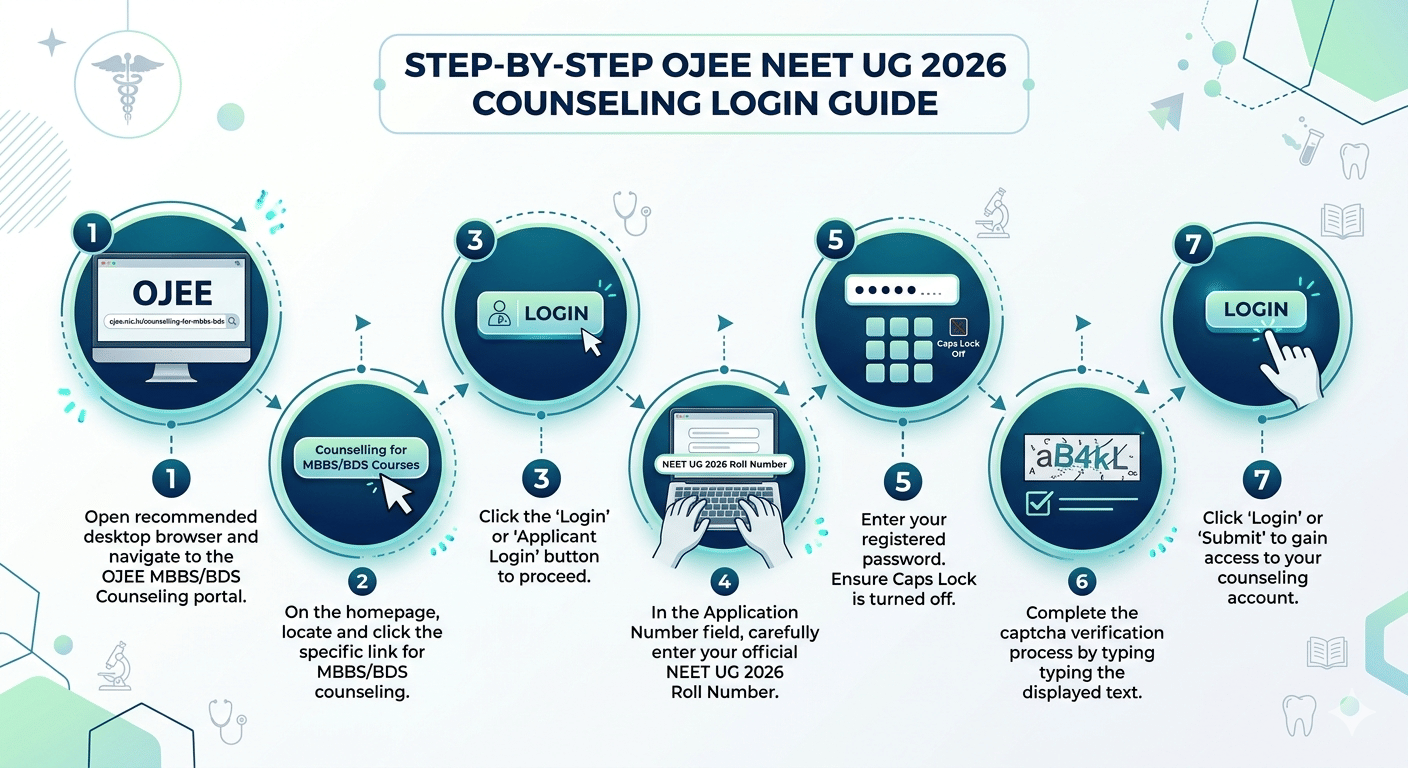
- Step-1 Open ojee.nic.in/couselling-for-mbbs bds courses in a desktop browser recommended.
- Step- 2 Click on the "Counselling for MBBS/BDS Courses" link on the homepage.
- Step- 3 Click the "Login" or "Applicant Login" button on the counselling page.
- Step- 4 Enter your NEET UG 2026 Roll Number in the Application Number field.
- Step- 5 Enter your registered password in the Password field. Ensure Caps Lock is off.
- Step- 6 Complete the captcha verification shown on screen.
- Step- 7 Click "Login" or "Submit".
After a successful login, your counselling dashboard opens. From there you can complete your profile, upload required documents, pay the counselling fee, and fill in college and course preferences.
Ques. How can I reset my NEET Password 2026?
Ans. You can reset your NEET Password 2026 by clicking on the forgotten password link at Odisha NEET Counselling 2026 portal. You need to give your NEET UG Roll number and an OTP will be sent to your registered email, and you can reset your Odisha NEEET Password 2026.
What You Need to Login to the Odisha NEET Counselling 2026 Portal?
The table below explains exactly what to enter in each login field on the OJEE counselling portal.
| Login Field | What to Enter |
|---|---|
| Application Number / Login ID | Your NEET UG 2026 Roll Number as printed on your NEET admit card |
| Password (returning user) | The password you set during OJEE counselling registration |
| Captcha | Type the characters shown (click the refresh icon if the captcha is unreadable) |
| Mobile / Email (for OTP) | The number and email you provided during OJEE registration is used for password reset only |
Ques. What is the last date for Odisha NEET Counselling registration?
Ans. The Odisha NEET Counselling registration dates have not been released yet. It will be released on the official website of OJEE. The expected date of NEET Counselling will take place after the NEET results are out, typically around July or August 2026.
Odisha NEET Couselling 2026: Common Login Errors and How to Fix Them
The following are the most frequent login problems students face on the OJEE portal and the steps to resolve each one.
| Error / Problem | Likely Cause | Fix |
|---|---|---|
| Application Number Not Found | Wrong roll number entered or registration not completed | Cross-check your NEET 2026 Roll Number from your NEET admit card. If you have not registered on the OJEE portal, complete registration first. |
| Invalid Password | Incorrect password | Retype carefully with Caps Lock off. If still failing, use the Forgot Password option to reset. |
| OTP Not Received | Network delay or wrong number registered. You can also chek the spam message | Wait 3 minutes and retry. Check the mobile number used at registration. For email, check your spam or promotions folder. |
| Account Temporarily Locked | Too many failed login attempts | Wait 30 minutes before trying again. If the lock persists beyond an hour, contact the OJEE helpdesk. |
| Page Not Loading or Slow Portal | High server traffic, especially on registration deadlines | Try logging in during early morning hours (6- 9 AM). Clear your browser cache and cookies, or use incognito mode. |
| Captcha Not Refreshing | Browser or cache issue | Refresh the page or switch to a different browser if the problem continues. |
| Session Expired Error | Portal timed out due to inactivity | Log in again. Save your progress frequently, especially during choice filling, to avoid losing data. |
Ques. Do I need to register separately on the OJEE portal if I have appeared in NEET 2026?
Ans. Yes, appearing in NEET 2026 and registering on the OJEE counselling portal are two separate steps. You must visit ojee.nic.in, complete the OJEE counselling registration using your NEET Roll Number, and only then can you log in to the portal to participate in Odisha MBBS and BDS seat allotment.
How to Reset a Forgotten Password on ojee.nic.in
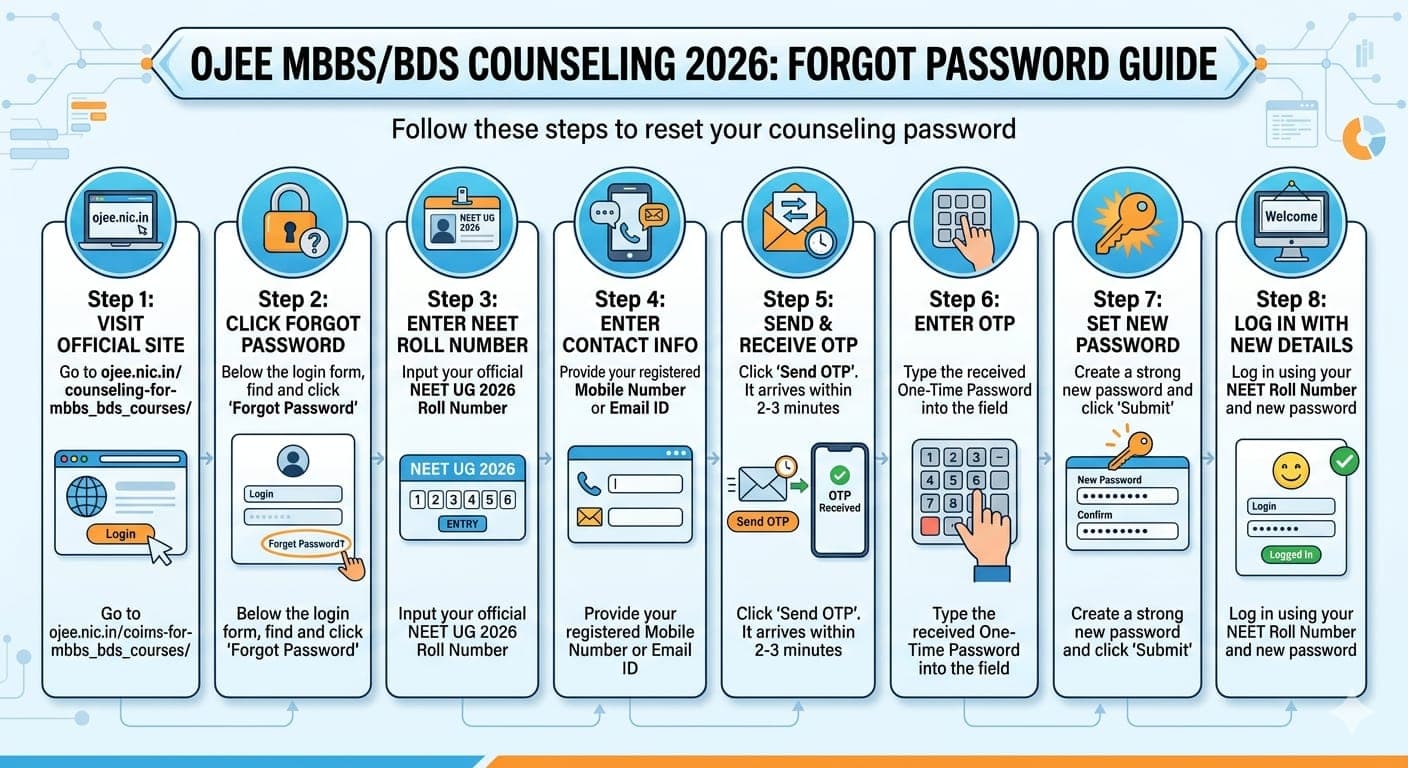
If you do not remember your OJEE counselling portal password then follow these steps to reset your password through OTP:
- Step- 1 Go to ojee.nic.in/couselling-for-mbbs_bds_courses/ and click "Login".
- Step- 2 Below the login form, click "Forgot Password".
- Step- 3 Enter your NEET UG 2026 Roll Number.
- Step- 4 Enter the mobile number or email ID you registered with on the OJEE portal.
- Step- 5 Click "Send OTP" and it will arrive within 2–3 minutes.
- Step- 6 Enter the OTP in the verification field provided.
- Step- 7 Set a new password and click on "Submit".
- Step- 8 Login using your NEET Roll Number and the new password you just created.
Note: If your registered mobile number is no longer active, you will not receive the OTP. In this case, contact the OJEE helpdesk directly with your NEET Roll Number and identity proof so they can update your contact details.
As per a Reddit post, a user shared the documents required for Odisha NEET Counselling. So based on this post, candidates appearing for Odisha NEET Counselling 2026 must keep the documents ready which includes NEET admit card and score card, Class 10 and 12 marksheet, Odisha Domicile Certificate, Caste Certificate if applicable, transfer certificate, passport- size photographs, ID Proof and ex- servicemen certificate if applicable.
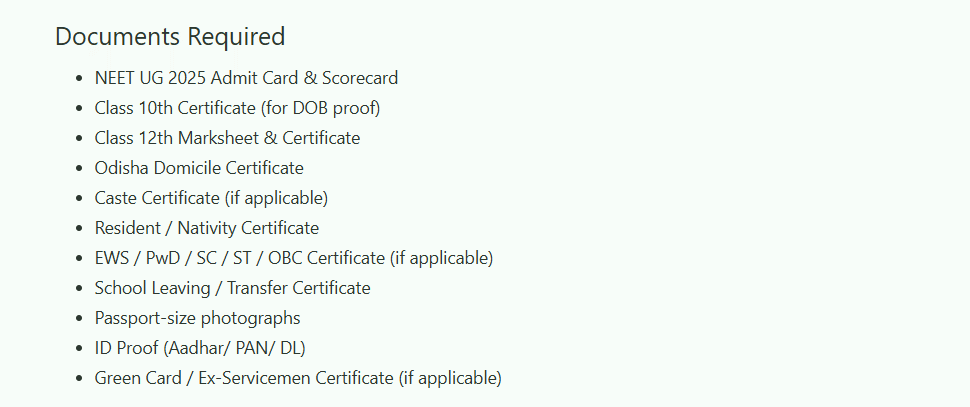
Source: Reddit
OJEE Helpdesk Contact for Login Problems
If none of the above steps resolve your login issue, reach out to the OJEE Board through official channels. Keep your NEET Roll Number and registered contact details ready before you call or write.
| Contact Mode | Details |
|---|---|
| Phone | 7205288121/ 7205266121 |
| odishaojee@gmail.com | |
| Official Portal | ojee.nic.in |
| Working Hours | 10:00 AM to 5:00 PM |
When you contact the helpdesk, mention your NEET 2026 Roll Number, the specific error message you see, and the browser you are using. This information helps the team resolve your issue faster.
Source: Official Website
Odisha NEET Counselling 2026 Login FAQs
Ques. What is the application number for logging in to the Odisha NEET Counselling 2026 portal?
Ans. Your NEET UG 2026 Roll Number as printed on your NEET admit card is the application number used to log in to the OJEE counselling portal at ojee.nic.in.
Ques. My application number is not being accepted on ojee.nic.in. What should I do?
Ans. First verify that you are entering the exact NEET 2026 Roll Number with no extra spaces or characters. If the portal still does not recognise it, you may not have completed the OJEE counselling registration. So after completion of the registration process try to log in. If the error continues after registration, contact the OJEE helpdesk.
Ques. I forgot my OJEE counselling portal password. How do I reset it?
Ans. On the login page at ojee.nic.in, click "Forgot Password". Enter your NEET Roll Number and your registered mobile number or email. An OTP will be sent to that contact number. With the help of the OTP ,set a new password, then log in with your updated credentials.
Ques. I am not receiving the OTP for password reset. What can I do?
Ans. Wait 3 minutes and try resending the OTP. Make sure you are checking the mobile number and email address you used at the time of OJEE counselling registration. For email OTPs, check your spam folder. If the registered number is no longer accessible, contact the OJEE helpdesk at ojee@nic.in with your NEET Roll Number.
Ques. Can I log in to the Odisha NEET Counselling portal on a mobile phone?
Ans. Yes, ojee.nic.in is accessible on mobile browsers. However, a desktop or laptop with Chrome or Firefox is strongly recommended for tasks like document uploads and choice filling to avoid display and upload errors.



Comments