



| KdTvCV - Jun 8, 2026
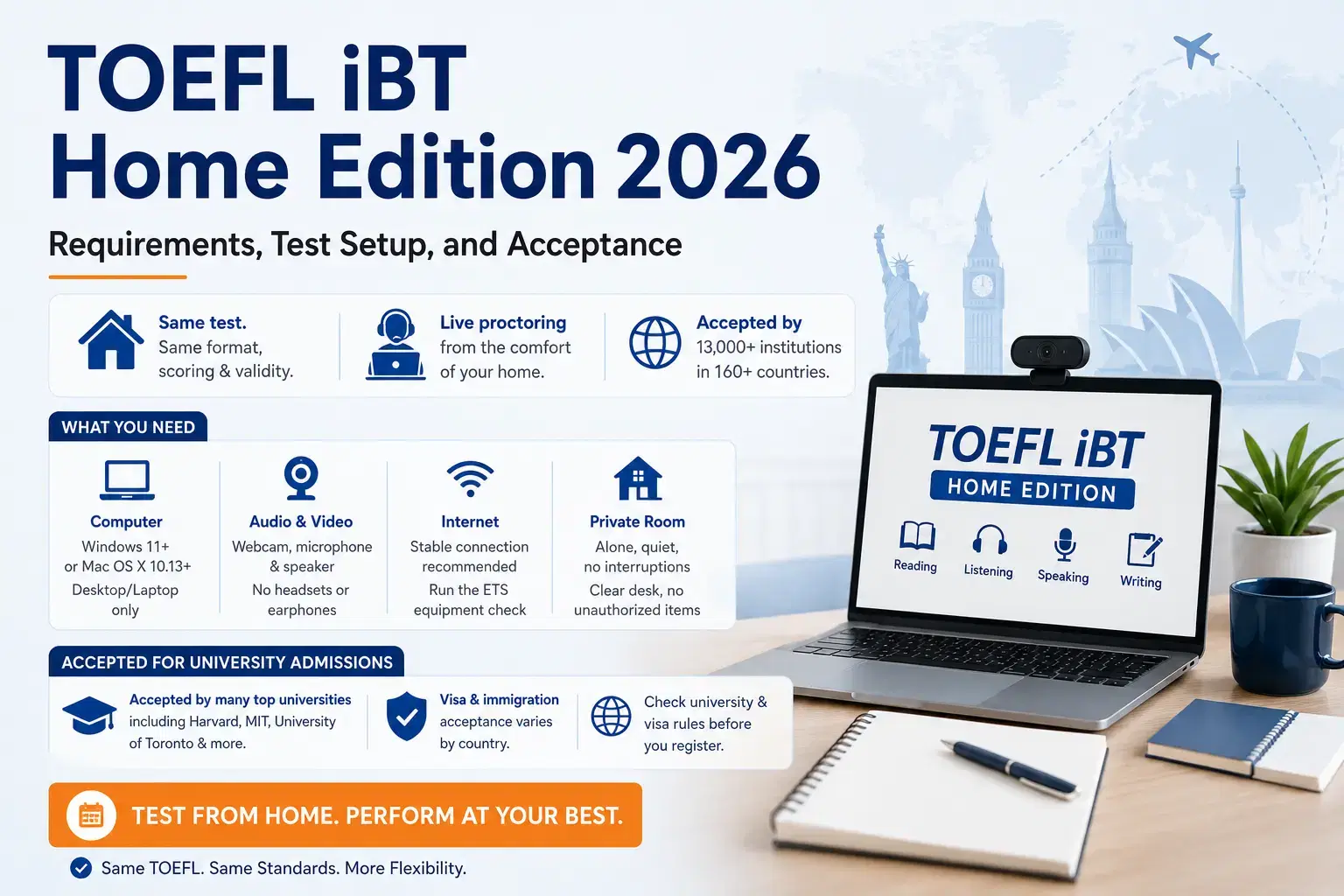
TOEFL iBT Home Edition is the at-home version of the TOEFL iBT that allows candidates to take the same test from a private location under live online proctoring. It includes the same Reading, Listening, Speaking, and Writing sections, follows the same scoring system, and has the same validity as the test-center version.
To take the TOEFL iBT Home Edition, candidates must use a Windows or Mac computer that meets ETS requirements, along with a stable internet connection, webcam, microphone, and a private room with no interruptions. The session is monitored live, and strict rules apply for room setup, equipment use, and personal items.
Acceptance of the TOEFL Home Edition varies by institution and country, especially for visa and immigration purposes in destinations such as the US, UK, Canada, Australia, and New Zealand, where requirements may differ from university admission policies.
- What is the TOEFL iBT Home Edition?
- Computer and Equipment Requirements
2.1 Computer
2.2 Audio and Video
2.3 Second Camera (If Required)
- How to Check Your Equipment Before the Test
- Room and Environment Requirements
4.1 Privacy Rules
4.2 Desk and Seating
- Test Day: Step-by-Step Process
- Rules During the Test
- What Happens If There Is a Technical Issue?
- Scores: When Will You Get Them?
- Is the TOEFL iBT Home Edition Accepted?
- TOEFL iBT Home Edition FAQs
What is the TOEFL iBT Home Edition?
The Home Edition is the at-home version of the TOEFL iBT test. It is the same test you would take at a TOEFL test center — same format, same scoring, same validity.
- Accepted by 13,000+ institutions in 160+ countries.
- Available any day, any time — no travel needed.
- A live proctor monitors you throughout the test via webcam and chat.
For Indian students: This is a great option if there is no test centre near you, or if you prefer testing from home.
Check: TOEFL Score Validity 2026
Computer and Equipment Requirements
Before you register for the TOEFL iBT Home Edition, make sure your computer meets these requirements. If your equipment fails on test day, you will not get a refund or a free reschedule.
Here is what you need:
Computer
- Desktop or laptop only — tablets and mobile phones are not allowed.
- Only one monitor or screen — dual screens are not permitted.
- Operating system:
- PC: Windows 11 or higher
- Mac: Mac OS X 10.13 or higher
- Must be a licensed OS — test-mode or unlicensed versions are not allowed.
- Must be connected to a power source throughout the test.
Audio and Video
- Webcam — built-in or external; must be able to show a 360-degree view of the room.
- Microphone — internal or external; headsets and earphones are NOT allowed.
- Speaker — internal or external; again, no headsets or earphones.
Second Camera (If Required)
A second camera may be needed for additional monitoring. You will need:
- A smartphone or tablet with a working camera.
- Running iOS 12 or later or Android 8 or later.
- Fully charged, with a stable internet connection.
- A sturdy object to keep it in place.
How to Check Your Equipment Before the Test
ETS provides a built-in tool to check your setup before test day.
- Go to your My TOEFL Home dashboard.
- Under Upcoming Tests, click Install the TOEFL Test App.
- Download and install the app for Windows or Mac.
- Open the app and click Equipment Check.
The check will test your camera, microphone, internet bandwidth, and system settings. Run this check at the same time of day as your actual test — bandwidth can vary by time.
If any part fails, you will see a red triangle. Click the "+" icon for tips to fix the issue.
Room and Environment Requirements
Your testing space must meet specific rules. The proctor will scan your room before the test begins.
Privacy Rules
- You must be alone in the room — no one may enter during the test.
- No public spaces — cafes, libraries, or open areas are not allowed.
- All doors must be closed.
- Transparent walls or large windows must be covered.
- Walls must be clear of any study material.
Desk and Seating
- Computer must be on a desk or table, connected to power.
- Position your desk so the room door is visible to the proctor's camera.
- Desk must be completely clear — no notes, phones, or extra items.
- Sit in a standard chair — no beds, couches, or soft chairs.
- No food or drinks during the test.
Clothing and Appearance
- Ears and face must be visible at all times.
- Religious headwear is allowed only if ears remain visible.
- Remove all jewellery, watches, smartwatches, hair accessories — wedding/engagement rings are allowed.
- No face masks during check-in or the test.
- Dress appropriately — your photo is shared with institutions that receive your scores.
Note-Taking Materials
- Paper notes are NOT allowed.
- You may use one of the following:
- A small whiteboard with an erasable marker.
- One blank sheet of paper inside a transparent sheet protector, with an erasable marker.
- At the end of the test, you must erase all notes and show the proctor.
Test Day: Step-by-Step Process
Here is exactly what happens on your test day, from start to finish.
Step 1 — Prepare Your Room: Clear your desk, close all doors, cover windows, and make sure the room is private and quiet.
Step 2 — Set Up Your Computer: Close all apps and browser tabs. Disable screen-sharing software like Zoom, Skype, Teams, Grammarly, or Anydesk. These must stay off throughout the test.
Step 3 — Personal Items Check: Remove all jewellery and accessories. Keep only your ID and note-taking material.
Step 4 — Check In: Open the TOEFL Test App and click Start Test. You will:
- Enter a virtual waiting room.
- Connect your second camera (if required).
- Complete identity verification with the proctor.
- Scan your room for the proctor.
Step 5 — Room Scan: The proctor will guide you to show:
- All walls and corners of the room.
- Under your desk and your work surface.
- Your entire workspace.
Step 6 — Take the Test: The timer starts only after the proctor completes the equipment check. The proctor is available throughout via webcam and chat.
Rules During the Test
Breaking these rules can lead to score cancellation with no refund.
- Do not talk — except during the Speaking section.
- Do not look away from the screen.
- Stay seated and visible on camera at all times.
- No breaks are allowed.
- No one may enter the room.
- No unauthorised materials — no notes, textbooks, or recording devices.
- Keep your hands visible at all times.
What Happens If There Is a Technical Issue?
ETS has a process for handling technical problems during the test.
| Issue | What Happens |
|---|---|
| Internet disconnects briefly | You are automatically reconnected |
| Second camera disconnects | Proctor pauses the test; you rescan the QR code |
| Technical issue during test | Wave and speak to get the proctor's attention |
| Can't reconnect at all | Restart the check-in process |
Important: The test timer does not start until the proctor confirms your equipment is working. So a pre-test technical issue will not eat into your test time.
Scores: When Will You Get Them?
- Reading and Listening scores are available at the end of the test (unofficial).
- You can choose to report or cancel your scores at the end.
- The official TOEFL score date is shown at the end of the test and on your My TOEFL Home dashboard.
Is the TOEFL iBT Home Edition Accepted?
The TOEFL iBT Home Edition is accepted by most universities that accept TOEFL scores and is generally treated the same as the test-center version for admissions. However, visa and immigration authorities in some countries may have separate requirements.
University Admissions
The TOEFL Home Edition is accepted by many universities in the US, Canada, the UK, and other countries, including institutions such as Harvard, MIT, the University of Toronto, and UBC. However, some universities may have restrictions. For example, the University of Manchester requires test-center TOEFL scores. Some institutions in Germany and the Netherlands may also be cautious about Home Edition scores.
Visa and Immigration
| Country | TOEFL Home Edition Accepted for Student Visa? | TOEFL Home Edition Accepted for Other Visas? |
|---|---|---|
| US | A separate English test is not required. If the university accepts, the Letter of Acceptance (LOA) will work. | An English test is not required for any US visa. The main focus is usually on your job offer, qualifications, education, skills, and visa eligibility criteria. |
| UK | Indian students discuss that if a university accepts your scores and provides you with the CAS letter, you do not need a separate English test for a student visa. | UK visa authorities may specifically ask for a Secure English Language Test (SELT) like IELTS for UKVI and PTE UKVI. |
| Canada | No separate English test is required; if your university accepts it, the IRCC will accept it. | No |
| Australia | No | No |
| New Zealand | No separate English test is required; an LOA from your university works. | No |
Before You Register
- Check your university's admission requirements.
- Verify visa and immigration rules for your destination country.
- Use ETS's TOEFL Destinations Search tool and confirm Home Edition acceptance if needed.
TOEFL iBT Home Edition follows the same test format, scoring, and validity as the test-center TOEFL iBT, but it is taken from a private location under live online proctoring. Its acceptance is generally the same for university admissions, while visa and immigration requirements can vary by country and may still require approved in-person tests in some cases. It is suitable only if your computer setup, internet, and testing environment fully meet ETS requirements.
FAQs
Ques. Can I take the TOEFL iBT Home Edition from India?
Ans. Yes, you can take it from India. The Home Edition is available worldwide, including India. You just need to meet the equipment and room requirements set by ETS.
Ques. What ID is accepted for the TOEFL iBT Home Edition?
Ans. You can use a passport, government-issued ID, or driver's licence. It must be valid and match your registration details exactly.
Ques. Can I use a Wi-Fi connection, or do I need a wired connection?
Ans. ETS does not mandate a wired connection, but a stable internet connection is required. Run the equipment check at the same time of day as your test to check your bandwidth. Other devices using the internet in your home can cause issues, so shut them down before the test.
Ques. What happens if I fail the equipment check on test day?
Ans. If your equipment does not meet requirements on test day, you will not be able to take the test. ETS will not give a refund or a free reschedule. ETS recommends taking the test at a test centre if your equipment is unreliable.
Ques. Is the second camera mandatory for all test takers?
Ans. The second camera requirement applies to some test takers. ETS will inform you if it is required for your session. If needed, you will need a smartphone or tablet running iOS 12+ or Android 8+.
Ques. Can I use a Chromebook or iPad to take the TOEFL iBT Home Edition?
Ans. No. Only Windows (version 11 or higher) or Mac (OS X 10.13 or higher) computers are allowed. Tablets, iPads, and Chromebooks are not permitted.


1787567517.png?tr=w-305,h-145,c-force?h=175&w=350&mode=stretch)



Comments