


| Updated On - Jul 4, 2026
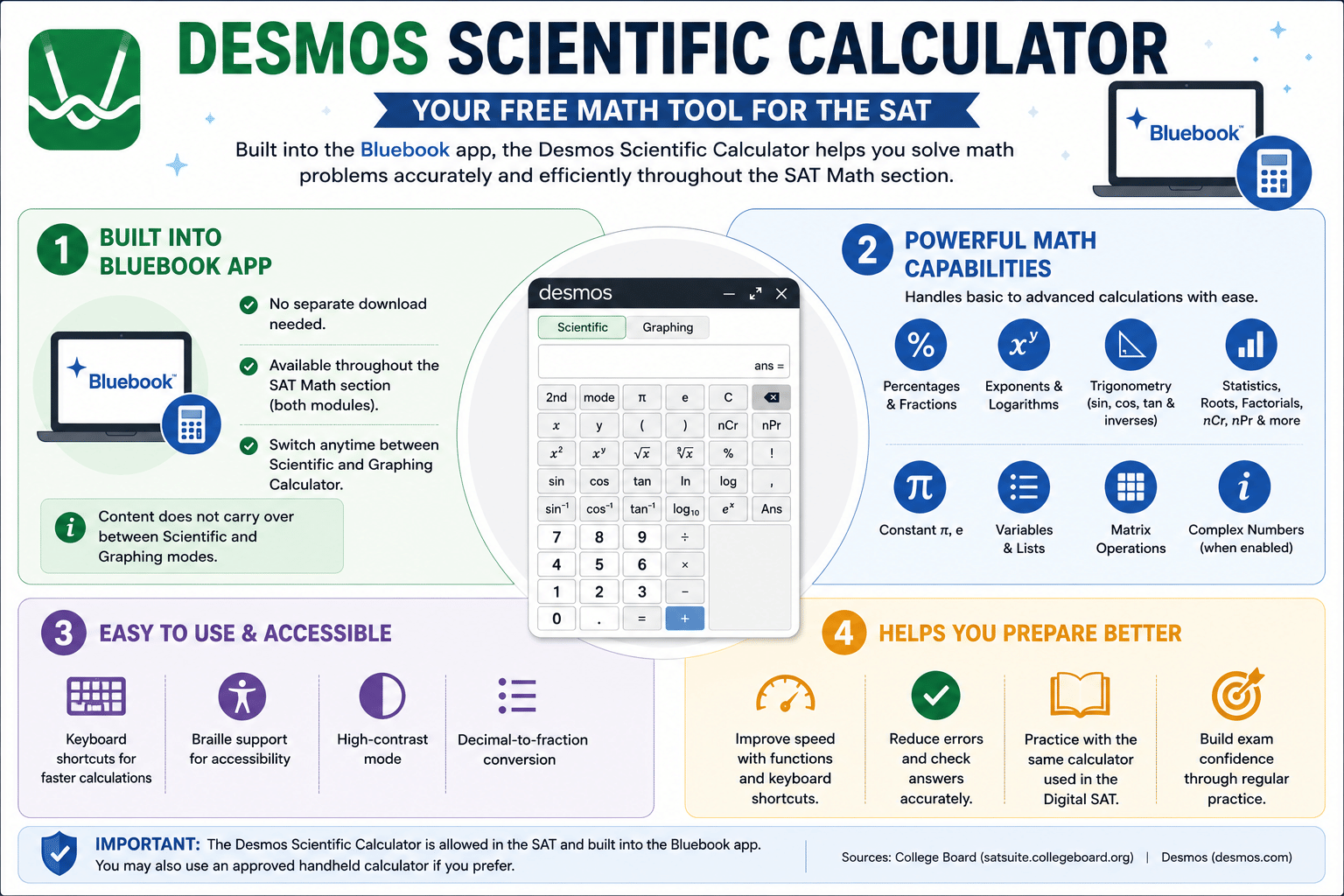
The Desmos Scientific Calculator is a free online calculator that is built into the Bluebook app and can be used throughout the SAT Math section. It helps students solve basic and advanced mathematical problems, including percentages, fractions, exponents, logarithms, and trigonometric functions.
For Indian students preparing for the Digital SAT, learning to use the Desmos Scientific Calculator can improve calculation speed and accuracy. Since the same calculator is available during the exam, practicing with its features and keyboard shortcuts can help students become familiar with the test environment before exam day.
- What is the Desmos Scientific Calculator?
- How to Access the Desmos Scientific Calculator in Bluebook?
- Key Features of the Desmos Scientific Calculator 2026
- Is the Desmos Scientific Calculator Allowed in the SAT Exam 2026?
4.1 Is the Desmos Scientific Calculator Free?
- Desmos Scientific Calculator Keyboard Shortcuts
5.1 General Keyboard Shortcuts
- Mathematical Functions Available in Desmos Scientific Calculator 2026
6.1 Does Bluebook Support Advanced Functions?
- Advantages and Limitations of Desmos Scientific Calculator
- How Indian Students Can Use Desmos for Exam Preparation 2026
- FAQs
What is the Desmos Scientific Calculator?
The Desmos scientific calculator is a free online calculator that helps students solve mathematical problems accurately. This can be used in the SAT exam for solving math problems. Desmos scientific calculator does not create any graphs like the Desmos graphing calculator.
The Desmos scientific calculator performs basic and advanced calculations like:
- Percentages
- Fractions
- Exponents
- Logarithms
- Trigonometry (sine, cosine, and tangent)
How to Access the Desmos Scientific Calculator in Bluebook?
To use the Desmos scientific calculator during the SAT exam in the Bluebook app, applicants need not download the calculator separately, as it is already built into the app. Follow these steps to get access to the Desmos calculator in the Bluebook app:
Step 1: Log in to your Bluebook app on the testing device, such as a laptop, computer, or mobile phone.
Step 2: Go to any SAT Math question, the Desmos scientific calculator is available throughout the Math test for both modules.
Step 3: Look for the calculator icon and open the calculator. The Desmos calculator will be open as a movable window.
Step 4: While solving the sums, check which mode the calculator is in. Desmos has 2 calculators, Scientific and Graphing. Switch to the scientific calculator to use it during the SAT Math exam.
Step 5: Adjust the calculator anywhere on the screen, make sure it doesn’t hide the questions on the screen.
Note: Content typed in Scientific mode does not carry over to Graphing mode and vice versa. Always check which mode you are in.
Key Features of the Desmos Scientific Calculator 2026
Applicants can use the Desmos scientific calculator for simple and complex calculations such as addition and trigonometric sums. The following are the key features of the Desmos scientific calculator:
- Basic keypad: Perform everyday calculations such as addition, subtraction, multiplication, and division.
- Full keyboard: Type numbers, letters, mathematical symbols, and special characters like π (pi).
- Advanced function keys: Access trigonometric, logarithmic, exponential, and statistical functions.
- Complex number support: Solve calculations involving imaginary numbers and other complex number operations.
- Variables and lists: Store values in variables and work with lists for repeated calculations.
- Decimal-to-fraction conversion: Easily convert decimal values into fractions.
- Accessibility features: Includes Braille support and high-contrast display options for better accessibility.
- Advanced calculations: Handle a wide range of mathematical problems, from basic arithmetic to higher-level scientific calculations.
Is the Desmos Scientific Calculator Allowed in the SAT Exam 2026?
Yes, the Desmos scientific calculator is allowed in the SAT exam. The organising body, College Board, permits the use of a calculator in the SAT exam. The official Bluebook app has the Desmos calculator built into it.
Applicants can use the Desmos scientific calculator in the SAT exam directly through the Bluebook app. Applicants are advised to keep the calculator open on their screen before the SAT Math section begins.
Is the Desmos Scientific Calculator Free?
Yes, the Desmos Scientific Calculator is free. Desmos Studio offers free graphing, scientific, 3D, and geometry calculators used globally. No cost is mentioned for standard access or use.
Desmos Scientific Calculator Keyboard Shortcuts
Applicants appearing for the SAT exam should practice these shortcut keys of the Desmos scientific calculator. This can save their time and help them to get their answers faster. The tables below list the major keywords and their functions:
| Function | Keyboard Shortcut |
|---|---|
| Previous answer | Ans |
| Fraction | / or frac |
| Square root | sqrt |
| Cube root | cbrt |
| nth Root | nthroot |
| Pi (π) | pi |
| Theta (θ) | theta |
| Superscript (Exponent) | ^ (Shift + 6) |
| Subscript | _ (Shift + -) |
General Keyboard Shortcuts
| Action | Windows | Mac |
|---|---|---|
| Open Keyboard Shortcuts | Ctrl + / | Cmd + / |
| Close Dialog | Esc | Esc |
| Undo | Ctrl + Z | Cmd + Z |
| Redo | Ctrl + Shift + Z | Cmd + Shift + Z |
| Clear Calculator | Ctrl + Shift + L | Cmd + Shift + L |
Mathematical Functions Available in Desmos Scientific Calculator 2026
The Desmos scientific calculator supports multiple mathematical calculation functions. Applicants must be familiar with these functions so that they can use the calculator efficiently during the SAT exam. Here’s a list of all available mathematical functions in the Desmos scientific calculator:
- Basic arithmetic: Addition, subtraction, multiplication, and division.
- Fractions: Create and calculate fractions.
- Percent (%): Perform percentage calculations.
- Absolute value (|x|): Find the absolute value of a number.
- Pi (π): Use the mathematical constant π.
- Roots: Calculate square roots, cube roots, and nth roots.
- Exponents: Raise numbers to powers.
- Factorials (!): Compute factorial values.
- Permutations (nPr): Solve permutation problems.
- Combinations (nCr): Solve combination problems.
- Logarithms: Use common logarithms (log) and natural logarithms (ln).
- Exponential function (eˣ): Perform exponential calculations using Euler's number (e).
- Trigonometric functions: sin, cos, tan, and their inverse functions (sin⁻¹, cos⁻¹, tan⁻¹).
- Statistical functions: Calculate the mean, sample standard deviation, and population standard deviation.
- Rounding: Round numbers to the required number of decimal places.
- Matrix operations: Perform matrix calculations where supported by the calculator.
- Variables and lists: Store values in variables and work with lists for repeated calculations.
- Complex numbers: Perform calculations involving imaginary numbers (i) and related functions.
Does Bluebook Support Advanced Functions?
Yes, the Desmos calculator in the Bluebook app supports a wide range of scientific, trigonometric, statistical, list, and matrix functions. The SAT Bluebook now allows students to switch between the scientific calculator and the graphing calculator. Students also have access to additional graphing functions when needed.
Advantages and Limitations of Desmos Scientific Calculator
Indian students who are willing to learn the Desmos scientific calculator should know its pros and cons. The Desmos calculator is free but cannot work without an internet connection. Here’s a detailed breakdown of the advantages and disadvantages of the Desmos scientific calculator:
| Advantages | Disadvantages |
|---|---|
|
|
How Indian Students Can Use Desmos for Exam Preparation 2026
Indian students must familiarize themselves with these online application-built calculators, like the Desmos scientific calculator, as these are not yet in the Indian curriculum. While practicing and preparing for the SAT exam, they can use it to get used to it. Here are some tips for them:
- Practice SAT Math questions: Use Desmos to solve algebra, geometry, trigonometry, and statistics questions similar to those in the Digital SAT.
- Prepare for the GRE: Solve quantitative reasoning problems involving percentages, fractions, exponents, logarithms, and data interpretation.
- Improve calculation speed: Learn keyboard shortcuts and calculator functions to solve questions more quickly during timed practice.
- Check answers: Verify manual calculations while practicing mock tests and sample questions.
- Strengthen math concepts: Use scientific functions such as trigonometry, logarithms, roots, and exponents to better understand mathematical concepts.
- Practice with official test formats: Students preparing for the Digital SAT can use the same Desmos Scientific Calculator available in the Bluebook app to become familiar with its interface before exam day.
- Reduce calculation errors: Use the calculator for complex calculations to minimize mistakes and improve accuracy during practice.
- Build exam confidence: Regular practice with Desmos helps students become comfortable with its features, allowing them to focus more on solving questions efficiently during the exam.
Also read: SAT Subject Test Books 2926: Check List of Best SAT Subject Test Books
The Desmos Scientific Calculator is a free tool available in the Bluebook app throughout the SAT Math section. It supports a wide range of mathematical functions, including fractions, percentages, logarithms, trigonometry, and statistics, helping students solve questions more efficiently. Practicing with its features and keyboard shortcuts before the exam can improve speed, accuracy, and familiarity with the calculator used on test day.
FAQs
Ques. Do I need to download the Desmos Scientific Calculator separately for the SAT?
Ans. No. The Desmos calculator is already built into the Bluebook app. Students do not need to install any separate calculator software before taking the SAT.
Ques. Is the Desmos Scientific Calculator in Bluebook the same as the one on desmos.com?
Ans. Yes. According to Desmos, the Four-Function and Scientific Calculators used in Bluebook are the same as those available on desmos.com. Only some Graphing Calculator features are modified for testing environments.
Ques. Does the Desmos Scientific Calculator support advanced mathematical functions?
Ans. Yes. The calculator supports a wide range of scientific functions, including fractions, exponents, logarithms, trigonometric functions, statistics, lists, matrices, and complex numbers.
Ques. Can I practice with the same Desmos calculator before the SAT exam?
Ans. Yes. The College Board recommends that students become familiar with the built-in Desmos calculator by using Bluebook practice tests or the Desmos testing calculators before exam day.
Ques. Can I use my own calculator instead of the Desmos calculator in Bluebook?
Ans. Yes. The College Board allows students to use an approved handheld calculator instead of, or in addition to, the built-in Desmos calculator during the SAT Math section.
Ques. Can I use the Desmos Scientific Calculator on a mobile device?
Ans. Yes. The Desmos Scientific Calculator can be accessed through a web browser and is also available as a mobile app for Android and iOS devices. Students can use it to practice calculations before the SAT exam.
Ques. Does the Desmos Scientific Calculator include accessibility features?
Ans. Yes. The calculator includes accessibility options such as Braille support (UEB and Nemeth) and Reverse Contrast Mode to improve usability for students with different accessibility needs.








Comments