



| Updated On - Aug 27, 2026
NEHU has reopened PG admission 2026 against vacant seats across Shillong and Tura campuses. Candidates with a valid CUET PG 2026 score can apply on the official portal at nehu.ac.in by September 3, 2026 with a fee of Rs 1,000.

The North-Eastern Hill University (NEHU) has opened PG admission against vacant seats. The notice covers programmes for the 2026-27 academic year. It is live on the official portal at nehu.ac.in. Candidates can apply online for the next round by September 3, 2026.
The admission drive follows the completion of Phase II counselling. Vacant seats remain across master's programmes at the Shillong and Tura campuses. Only CUET PG 2026 qualifiers can apply in this round.
| Direct Link: NEHU PG Admission 2026 Registration Portal |
NEHU PG 2026 Vacant Seat Round Key Details
| Particular | Detail |
| Application status | Open |
| Last date to apply | September 3, 2026 |
| Application fee | Rs 1,000 |
| Mode of application | Online |
| Score required | Valid CUET PG 2026 score |
| Campuses covered | Shillong and Tura |
| Official portal | nehu.ac.in |
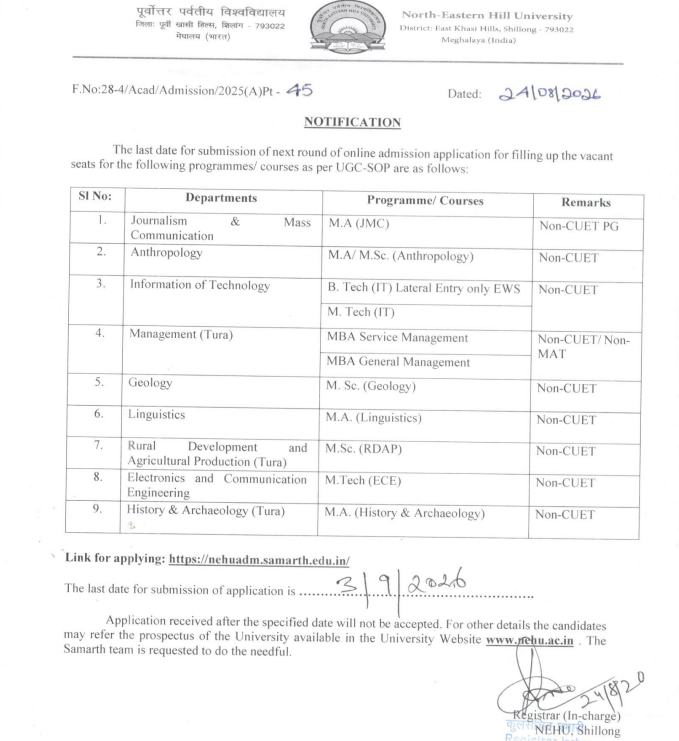
Programmes with Vacant Seats
The vacant seat round covers a wide range of master's programmes. Applicants can choose from academic and professional streams. Some of the listed courses are given below.
- Master of Arts (MA) in Hindi, Geography, Anthropology, and Education
- Master of Science (MSc) in Geography, Biotechnology, and Biochemistry
- Master of Business Administration (MBA)
- Master of Education (MEd)
- Master of Laws (LLM)
- Master of Commerce (MCom)
- Master of Library and Information Science (MLibISc)
- Master of Social Work (MSW)
- Selected PG diploma programmes
Also Check: DU CSAS PG Spot Round 3 Vacancy List 2026 Out; Check Last Date to Apply
Who Is Eligible to Apply?
The round is open only to CUET PG 2026 qualifiers. Applicants must also meet the programme-specific eligibility criteria set by NEHU. This includes a recognised bachelor's degree in the relevant discipline.
Reservation norms apply to SC, ST, OBC, EWS, and PwD candidates. Students from the North-East region receive weightage as per university rules.
Also Check: DCECE 2026 Mop-Up Round Cutoff Released at bceceboard.bihar.gov.in
How to Apply for NEHU PG Vacant Seats 2026?
Candidates must apply through the official NEHU admission portal. The process is fully online and requires document uploads. The Rs 1,000 application fee is payable digitally.
- Visit the official portal at nehu.ac.in.
- Open the PG admission link for the vacant seat round.
- Register using a valid email address and mobile number.
- Enter the CUET PG 2026 score and personal details.
- Upload the degree marksheet, certificates, and photograph.
- Pay the Rs 1,000 fee through the online payment gateway.
- Submit the form and save the confirmation page for future reference.
Also Check: DCECE 2026 Mop-Up Round Cutoff Released at bceceboard.bihar.gov.in
Support Helpdesk for Applicants
NEHU has published a helpdesk contact for applicants facing portal issues. Candidates can call 0364-2307930, extensions 4000 or 5000, for support. Queries can also be sent to helpdesk@nehu.ac.in.
This is a fresh chance for CUET PG 2026 qualifiers. Many missed the earlier rounds due to programme or score limits. Seats often close quickly after Phase II ends. Applying early improves the chance of a favourable allotment.
Action Plan for Candidates
- Check the vacant seat notice on nehu.ac.in.
- Confirm eligibility for your chosen master's programme.
- Keep your CUET PG 2026 scorecard ready for upload.
- Arrange the Rs 1,000 fee for online payment.
- Submit the completed form well before September 3, 2026.
Watch nehu.ac.in for the next merit and counselling list after September 3. Programme-wise seat allotments will follow soon after.
Also Check



.jpeg?h=127&w=254&mode=stretch)


.jpeg?h=40&w=40&mode=stretch)


.jpeg?h=40&w=40&mode=stretch)


.png?h=40&w=40&mode=stretch)



Comments