



Content Writer | Updated On - May 16, 2026
BITSAT 2026 Session 2 slot booking window is now closed. The slot booking facility was available from May 14 to May 15, 2026. Candidates who did not complete the slot booking process within the given deadline will now receive automatic slot allotment.
- BITS authorities will assign the exam date, shift timing, and test centre based on seat availability.
- The BITSAT 2026 Session 2 exam has also been revised and will now be held from May 25 to May 27, 2026.
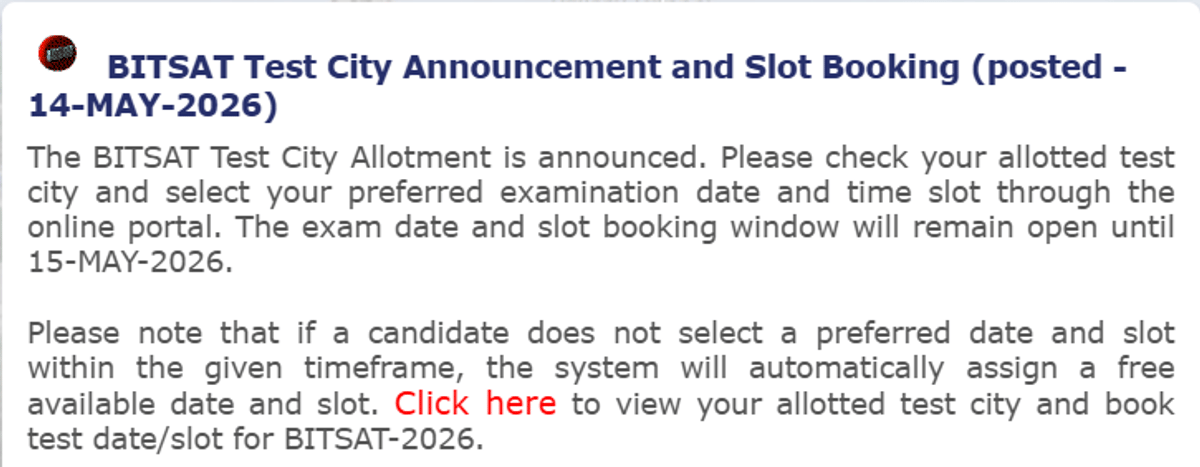
The test city allotment has been announced, and candidates can check their allotted test city and book their test slots and date through the online portal using their application number and password.
Source: admissions.bits-pilani.ac.in
- BITS Pilani has postponed the Session 2 slot booking from May 13 to May 14, 2026; the window closes on May 15, 2026.
- Candidates need their BITSAT 2026 Application Number and Password to log in and book their preferred exam slot.
- The BITSAT 2026 Session 2 exam city allotment was released on May 12, 2026 — candidates must check their city before booking slots.
- Slot allotment is done on a first-come, first-served basis — early booking ensures a preferred date and time.
- Last year (BITSAT 2025), Session 2 slot booking was held in a similar two-day window before the exam.
Note: Slot booking is separate from admit card download. The BITSAT 2026 Session 2 Admit Card will be released on May 20, 2026, after slot booking closes.
In this article, we will cover all live updates on the BITSAT 2026 Session 2 Slot Booking, including the direct link, how-to steps, login issues, shift timings, and what happens if you miss the deadline.
- BITSAT 2026 Session 2 examination will be conducted from May 24 to May 26.
- The exam will be held in multiple shifts across test centres.
- Candidates should regularly check official updates for instructions.
- BITSAT 2026 Session 2 admit card will be released from May 20.
- Candidates can download hall tickets through the official portal.
- Admit cards will mention allotted exam date, shift, and centre details.
- BITSAT 2026 Session 2 slot booking window is now closed.
- The slot booking facility was active from May 14 to May 15.
- Candidates who missed booking will get automatic slot allotment.
- Authorities will assign exam date and timing based on availability.


With 280 marks, you have decent options across campuses. You may get ECE at BITS Goa or BITS Hyderabad.
At Pilani, you might have to settle for slightly lower branches or wait for later rounds, as top branches usually close higher.
Yes, with 250 marks, you have a good chance of getting into BITS Pilani, but mostly in core branches like Mechanical, Civil, or Chemical.
Highly competitive branches like CSE, ECE, or MnC are unlikely at this score because their cutoffs are significantly higher.
| Campus | Program | Expected Cutoff Range (Out of 390) |
|---|---|---|
| BITS Pilani | Computer Science (CSE) | 310–320 |
| BITS Pilani | Mathematics & Computing | 295–300 |
| BITS Pilani | Electrical & Electronics | 255–265 |
| BITS Pilani | Mechanical Engineering | 235–245 |
| BITS Pilani | Chemical Engineering | 200–205 |
| BITS Goa | Computer Science (CSE) | 290–295 |
| BITS Goa | Electrical & Electronics | 305–310 |
| BITS Goa | Mechanical Engineering | 200–205 |
| BITS Goa | Electronics & Communication (ECE) | 255–265 |
| BITS Hyderabad | Computer Science (CSE) | 275–280 |
| BITS Hyderabad | Electronics & Communication (ECE) | 255–265 |
| BITS Hyderabad | Mathematics & Computing | 255–265 |
| BITS Hyderabad | Mechanical Engineering | 215–220 |
- BITSAT OTBS for Session 2 is active on the official website.
- Candidates can book preferred exam slots through the OTBS portal.
- Automatic slot allotment will happen if booking is not completed.
- Students who miss slot booking will get automatic slot allotment.
- Authorities will assign slots based on seat availability.
- Candidates should still complete booking early to avoid random allotment.
- Visit admissions.bits-pilani.ac.in to access slot booking.
- Log in using application number and password.
- Click on the Session 2 slot booking link.
- Select preferred exam date and timing before submission.
- Candidates cannot change exam date or time after confirmation.
- Students are advised to choose slots carefully before submission.
- No correction or edit facility will be available later.
- BITSAT 2026 Session 2 slot booking will close on May 15.
- Candidates should complete slot booking early for preferred timings.
- Slots are allotted on a first-come, first-served basis.
- Early booking increases chances of getting preferred exam dates.
- Candidates can access the BITSAT Session 2 slot booking link online.
- Students must complete slot booking before May 15 deadline.
- Preferred slots are allotted on a first-come, first-served basis.
- BITSAT 2026 does not allow changes after slot booking submission.
- Candidates must carefully select their exam date and slot.
- No edit or correction window will be provided later.
- Students are advised to confirm details before final submission.

- Candidates should immediately contact the BITS admission authorities.
- Errors in name, photograph, or exam details must be corrected quickly.
- Students should not appear for the exam with incorrect details.
- Official support channels can help resolve hall ticket issues.
- BITSAT 2026 admit card will be available from May 20.
- Candidates can download the hall ticket online only.
- Slot booking must be completed before downloading the admit card.
- The hall ticket will contain exam date, shift, and centre details.
- BITSAT 2026 Session 2 slot booking has started online.
- Candidates can now select their preferred exam date and slot.
- The slot booking facility will remain active till May 15.
- Students are advised to complete booking early for better slot options
- Morning shift will be conducted from 9 AM to 12 PM.
- Afternoon shift timing is scheduled from 2 PM to 5 PM.
- Candidates should report before the gate closing time.
- Shift details will be mentioned on the BITSAT admit card.
- BITSAT 2026 admit card will be released on May 20.
- Candidates should complete slot booking as early as possible.
- Preferred exam date and timing depend on slot availability.
- The admit card will mention allotted shift and exam centre details.

- Around 1.7 lakh to 1.8 lakh unique candidates registered for BITSAT 2026.
- Total registrations across both sessions are estimated above 3 lakh.
- Many students opted for both BITSAT 2026 sessions.

- Candidates who fail to book a slot will get automatic allotment.
- BITSAT 2026 slots are allotted on a first-come, first-served basis.
- Students should complete slot booking early for preferred timings.
- Candidates can download the admit card after slot booking.
- The BITSAT 2026 admit card will be available online only.
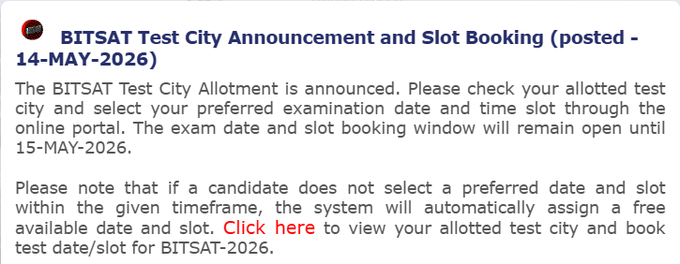
The BITSAT session 2 slot booking link has been made live, and candidates can now check their allotted test city and book their test date and slot through the online portal using their application number and password.

Source: BITSAT Slot Booking
Candidates can log in to the BITSAT login portal to check their allotted test city and book their test slots and test date. The direct link to the BITSAT login portal is given below:
Source: admissions.bits-pilani.ac.in
Yes, the BITSAT slot booking is now open for candidates to book their test slots and exam date through the online portal using their application number and password.

Source: admissions.bits-pilani.ac.in
Candidates facing any difficulty in logging in or have any query regarding the BITSAT slot booking for session 2 can contact the BITSAT helpdesk on the following contact details:
| Helpline Number | 022-61087545 |
| Email ID | bitsat@pilani.bits |
Candidates have to log in to the BITSAT OTBS for session 2 using their application number and password to book their test slots. The link to the BITS OTBS will be provided soon. The student login link is given below:
The BITSAT 2026 slot booking has not started yet. The login page is still showing 'unavailable'. Earlier today, the authorities announced a temporary site maintenance, which is causing the delay.
If a candidate does not book the test slot and date, then the system will automatically allocate the test slot as per the preferences and the available slots and dates.

BITS Pilani conducts the BITSAT exam in two shifts each day. Candidates can choose either shift during slot booking based on their preference and availability:
| Shift | Timing | Recommended For |
| Shift 1 (Morning) | 9:00 AM – 12:00 PM | Candidates who are sharp in the morning; less travel traffic |
| Shift 2 (Afternoon) | 2:00 PM – 5:00 PM | Candidates who need extra travel time; those staying far from exam centre |
Once a shift is selected and submitted, it cannot be changed. Choose wisely based on your test centre distance and personal performance rhythm.
No. Once a slot is booked and submitted, BITS Pilani does not allow any changes to the exam date, shift, or exam centre. The slot booking is final and irrevocable. Candidates are advised to:
- Double-check the exam date, shift, and centre before clicking Submit.
- Ensure the selected date does not clash with other board or entrance exams.
- Preview the confirmation screen carefully before final submission.
In rare cases of a genuine emergency, candidates may try contacting the BITSAT helpdesk, but the chances of a slot change are extremely slim.
Candidates who do not complete slot booking by May 15, 2026 need not panic, but should be aware of the following:
-
BITS Pilani will automatically assign a random exam date, shift, and test centre to candidates who miss the slot booking window.
- The random allotment will be based on available seats — not the candidate's preferred city or timing.
- Details of the auto-allotted slot will be reflected on the BITSAT 2026 Session 2 Admit Card (releasing May 20).
- No requests for changes will be entertained after slot booking closes.
Advice: Even if you face technical difficulties, try multiple times and use both official portals. Missing slot booking can lead to an inconvenient exam assignment.
BITSAT 2026 slot booking is conducted on a first-come, first-served basis. This means:
- Popular exam dates (like May 25) and preferred shifts (e.g., morning Shift 1) may fill up quickly.
- Late bookings risk being left with only less-preferred dates or shifts.
- In the worst case, a preferred exam centre may be completely unavailable by the time you log in.
- The slot booking window is only open for 2 days (May 14–15) — there is no extension.
Candidates are strongly advised to log in on May 14 as early as possible to secure their preferred slot.
The BITSAT 2026 Session 2 Admit Card will be released on May 20, 2026 on the official website admissions.bits-pilani.ac.in. The admit card will be available for download only after the slot booking process is complete for all candidates. Key details to check on the admit card:
-
Candidate's name, photograph, and signature
- Allotted exam date and shift
- Exam centre address (full details visible only on admit card, not city allotment)
- Reporting time and exam guidelines
No candidate will be permitted to appear for BITSAT 2026 without a valid admit card and a government-issued photo ID proof
BITS Pilani has released the BITSAT 2026 Session 2 exam city allotment on May 12, 2026 on the official website. Candidates must check their allotted city before the slot booking window opens. The exam centre details will only be visible on the admit card, but the city allotment confirms in which city the candidate will appear. Steps to check city allotment:
- Click on "BITSAT 2026 Exam City Allotment" link
- Log in with Application Number and Password
- Your allotted city will be displayed on the screen
Note: The exam city cannot be changed after allotment. If you have a genuine concern, contact the BITSAT helpdesk immediately.
To access the BITSAT 2026 slot booking window, candidates must log in using the following credentials:
| Credential | Details |
| Application Number | As received during BITSAT 2026 registration |
| Password | Set during BITSAT 2026 application form submission |
Important: Do NOT share your login credentials with anyone. BITS Pilani will never ask for your password over call, email, or SMS.
Source: admissions.bits-pilani.ac.in
| Link | Details |
| BITSAT 2026 Slot Booking Link | Active from May 14, 2026 |
| BITS Admission Portal (Mirror) | Active from May 14, 2026 |
| BITSAT 2026 City Allotment Link | Already released — check now |
Tip: Both admissions.bits-pilani.ac.in and bitsadmission.com are official portals. Use either to book your slot. If one is slow due to heavy traffic, try the other.
Source: admissions.bits-pilani.ac.in
No. The BITSAT 2026 Session 2 slot booking link is NOT active today, May 13. BITS Pilani has officially postponed the slot booking window by one day. The direct link will be activated on May 14, 2026 on the official website admissions.bits-pilani.ac.in.
No official reason has been provided for the delay. Candidates should keep checking the portal and this page for the live link.
Along with the slot booking postponement, BITS Pilani has also revised the BITSAT 2026 Session 2 exam dates. The new schedule is as follows:
| Event | Earlier Date | Revised Date |
| Session 2 Slot Booking Opens | May 13, 2026 | May 14, 2026 |
| Session 2 Slot Booking Closes | May 15, 2026 | May 15, 2026 |
| Session 2 Admit Card Release | — | May 20, 2026 |
| Session 2 Exam Dates | May 24–26, 2026 | May 25–27, 2026 |



.png?h=127&w=254&mode=stretch)
.png?h=127&w=254&mode=stretch)
.png?h=127&w=254&mode=stretch)
.png?h=127&w=254&mode=stretch)
.png?h=127&w=254&mode=stretch)
.png?h=127&w=254&mode=stretch)
%20-%202026-03-25T162243.641.png?h=40&w=40&mode=stretch)
.jpeg?h=40&w=40&mode=stretch)

%20-%202026-03-25T152034.118.png?h=40&w=40&mode=stretch)
.png?h=40&w=40&mode=stretch)
%20-%202026-03-25T181032.829.png?h=40&w=40&mode=stretch)


%20-%202026-03-25T173400.303.png?h=40&w=40&mode=stretch)


.jpeg?h=40&w=40&mode=stretch)
.jpeg?h=40&w=40&mode=stretch)
.png?h=40&w=40&mode=stretch)



Comments