



Content Writer | Updated On - May 20, 2026
BITS Pilani has released the BITSAT admit card 2026 session 2 today, May 20, 2026, on its official BITSAT login portal, admissions.bits-pilani.ac.in.
Candidates can use their Application Number and Password to log in and download the admit card.
- The BITSAT 2026 Session 2 admit card contains the candidate's name, application number, exam date, shift timing, test centre name and address, reporting time, photograph, and signature.
- The Session 2 exam is scheduled from May 25 to 27, 2026, and candidates must download and carry a printed copy of the hall ticket to the examination centre.
Note: The city intimation slip for BITSAT Session 2 was released on May 12, 2026. The BITSAT session 2 admit card is a separate document that will be released today and is the mandatory hall ticket to carry to the exam. The city intimation slip is NOT the admit card.
In this article, we will cover all live updates on the BITSAT 2026 Session 2 Admit Card, including the direct download link, step-by-step download guide, login credentials, details on the hall ticket, documents to carry, exam day instructions, and technical troubleshooting tips.
Related Articles:
- BITSAT 2026 Admit Card: Release Date, Direct Link & Exam Guidelines
- BITSAT 2026: Session 2 Exam Dates, Mock Test & Result
- BITSAT 2026 Cutoff: Check Course & Campus-wise Expected Cutoff Scores
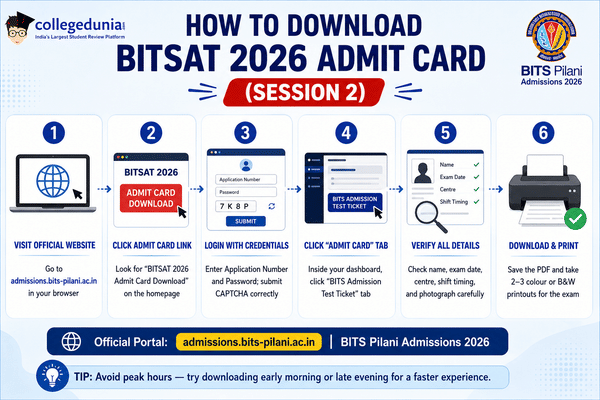
How to Download BITSAT Admit Card 2026 Session 2
| Step | Process |
|---|---|
| Step 1 | Visit the official website: admissions.bits-pilani.ac.in |
| Step 2 | Click on the “BITSAT 2026 Admit Card” link |
| Step 3 | Log in using your application number and password |
| Step 4 | The BITSAT admit card will appear on the screen |
| Step 5 | Download and print the admit card for future use |
- BITSAT 2026 Session 2 admit card download link is now activated officially.
- Candidates can download the BITSAT hall ticket from admissions.bits-pilani.ac.in.
- Students need application number and password to access the admit card login portal.
- The BITSAT 2026 Session 2 exam will be conducted from May 25 to May 27.
- Candidates are advised to download and print multiple copies of the hall ticket immediately.
- Candidates who missed BITSAT slot booking will still receive admit cards.
- Authorities will automatically allot exam date and timing based on availability.
- Students do not need to panic if they could not complete slot booking earlier.
- Candidates should visit the official BITSAT website at admissions.bits-pilani.ac.in in for all updates.
- The BITSAT official website hosts admit card download link, slot booking, and exam notifications.
- Students are advised to avoid unofficial websites and rely only on the official portal for updates.
- BITSAT admit card download link for Session 2 is expected to become active shortly.
- Candidates can download the BITSAT 2026 hall ticket through the official login portal.
- Students need application number and password to access the admit card online.
- Printed copy of the BITSAT admit card is mandatory for exam day entry.
- The BITSAT 2026 Session 2 admit card has not been released yet.
- Candidates are advised to stay tuned for the latest hall ticket updates.
- Authorities are expected to activate the admit card link anytime soon.
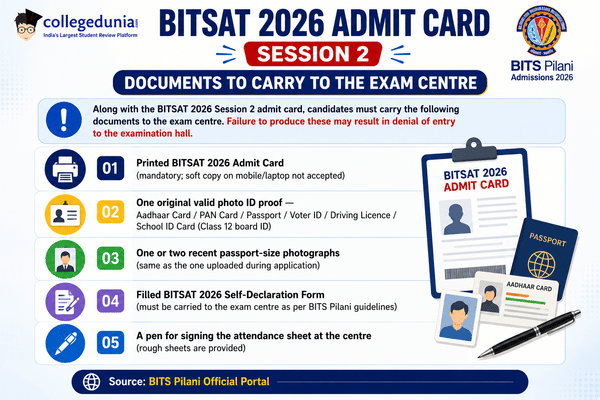

- Candidates must carry one passport-size photograph along with admit card.
- A valid government photo ID such as Aadhaar Card, PAN Card, Voter ID, or Driving Licence is mandatory.
- Students should ensure all documents are carried in printed and valid format on exam day.
- BITSAT 2026 Session 2 admit card release date is May 20, 2026.
- Officials have not yet confirmed the exact release timing for hall tickets.
- Candidates are advised to keep checking the official website regularly for updates.
- BITS Pilani offers Computer Science, Electronics, Mechanical, and Chemical Engineering through BITSAT scores.
- Mathematics and Computing, Civil, Electrical, and Environmental Engineering are also available.
- Admission to these first-degree programmes is based on BITSAT 2026 performance.
- BITSAT Session 2 admit card 2026 release date is May 20, 2026.
- BITS Pilani has confirmed that the hall ticket will be available online only.
- Candidates can download the BITSAT Session 2 admit card using their application number and password.
- The BITSAT 2026 Session 2 examination is scheduled from May 25 to May 27, 2026.
- Students are advised to regularly check the BITSAT login portal as the login window may temporarily show “unavailable” due to heavy traffic.
- Soft copy of BITSAT admit card will not be accepted at the exam centre.
- Candidates must carry a printed copy of the BITSAT hall ticket Session 2.
- Entry without printed admit card may not be permitted inside the examination hall.
- Candidates trying to access the BITSAT 2026 Session 2 admit card portal are currently seeing an “unavailable” message.
- The issue has created confusion among students waiting for the BITSAT admit card download link to activate.
- Authorities are expected to release the BITSAT 2026 Session 2 admit card shortly today.
Candidates must follow the official BITS Pilani exam day guidelines while appearing for the BITSAT 2026 Session 2 exam (May 25–27, 2026).
These instructions are also printed on the admit card:
- Reporting Time: Reach the test centre at least 60 minutes before the scheduled exam time. Late entry is strictly restricted.
- Prohibited Items: Mobile phones, calculators, smartwatches, electronic devices, eatables, study material, and bags are strictly prohibited inside the exam hall.
- Printed Admit Card Mandatory: Only a printed copy is accepted. Soft copies shown on mobile/tablet/laptop are not accepted.
- Self-Declaration Form: Carry the filled BITSAT 2026 Self-Declaration Form to the centre along with the admit card.
- Valid Photo ID: Carry at least one original valid government-issued photo ID proof.
- Rough Sheets: These will be provided at the centre. No personal paper allowed inside.
- Malpractice: Candidates found violating exam rules or engaging in malpractice will be disqualified from BITSAT 2026.
- Post-Exam: Keep the admit card safely after the exam - it may be required during BITSAT counselling and seat allotment.
| Step | Process |
|---|---|
| 1 | Visit admissions.bits-pilani.ac.in and click on Login |
| 2 | Click on the "Forgot Password" link on the login page |
| 3 | Enter your registered email address or mobile number |
| 4 | Receive an OTP or reset link on your registered email / mobile |
| 5 | Set a new password and log in using the updated credentials |
| 6 | If the issue persists, contact the BITS Pilani admission helpdesk on the official website |
The BITSAT 2026 Session 2 exam will be conducted in two shifts each day from May 25 to 27, 2026. The shift details are as follows:
| Shift | Exam Timing | Reporting Time |
|---|---|---|
| Shift 1 (Morning) | 9:00 AM to 12:00 PM | By 8:00 AM |
| Shift 2 (Afternoon) | 2:00 PM to 5:00 PM | By 1:00 PM |
- The specific shift allotted to a candidate will be mentioned on the BITSAT 2026 Session 2 Admit Card.
- Candidates who did not complete slot booking by May 15, 2026, will have an auto-assigned shift.
| Feature | City Intimation Slip | Admit Card (Hall Ticket) |
|---|---|---|
| Purpose | Informs candidate about their allotted exam city | Official document for entry to exam hall |
| Release Date | May 12, 2026 (already released) | May 20, 2026 (today) |
| Contains Exam Centre Address | Only exam city name | Full test centre name and address |
| Contains Slot/Timing | No | Yes - shift, date, reporting time |
| Valid for Exam Hall Entry | Not accepted alone | Mandatory for entry |
| Must be Printed? | Not mandatory | Yes - printed copy mandatory |
The BITSAT 2026 Session 2 admit card will be available exclusively on BITS Pilani's official admissions portals. Candidates should only visit the following verified official URLs and avoid third-party or unofficial links:
- Primary portal: admissions.bits-pilani.ac.in : official BITS Pilani admissions website
- Alternative portal: bits-pilani.admissions.ac.in (redirects to the main portal)
Important:
- The admit card is released only online.
- BITS Pilani does NOT send it by post, email, or SMS.
- Beware of fraudulent calls or messages claiming to provide admit card links
- The only official website is admissions.bits-pilani.ac.in.
Candidates will need the following credentials to log in and access the BITSAT 2026 Session 2 admit card on the BITS Pilani admissions portal:
- Application Number (User ID): The 8-digit unique ID provided during BITSAT 2026 registration
- Password: Set by the candidate at the time of registration
Candidates who completed the BITSAT 2026 Session 2 slot booking between May 14–15, 2026, will find the admit card reflecting their chosen exam date, shift, and test centre.
Candidates who did not complete slot booking will find auto-assigned slot details on the admit card.
- Visit the official BITS admission portal at admissions.bits-pilani.ac.in.
- Click on the BITSAT 2026 Session 2 admit card link.
- Login using application number and password credentials.
- Download and print multiple copies of the hall ticket for exam day.
| Event | Date |
|---|---|
| BITSAT 2026 Session 1 Admit Card Released | April 10, 2026 |
| BITSAT 2026 Session 1 Exam | April 15–16, 2026 |
| BITSAT 2026 Session 2 City Intimation Slip | May 12, 2026 |
| BITSAT 2026 Session 2 Slot Booking | May 14–15, 2026 |
| BITSAT 2026 Session 2 Admit Card | May 20, 2026 (Today) |
| BITSAT 2026 Session 2 Exam | May 25–27, 2026 |
| BITSAT 2026 Result (Expected) | June 2026 (Tentative) |
- BITSAT admit card 2026 Session 2 will be available only in online mode.
- Candidates should carefully verify personal details and exam centre information.
- Any discrepancy in the admit card should be reported immediately to authorities.
- The BITSAT 2026 Session 1 admit card was released on April 10, 2026, approximately 5 days before the Session 1 exam (April 15–16, 2026).
- Similarly, the Session 2 admit card for 2026 is being released on May 20, 2026, which is 5 days before the Session 2 exam (May 25–27, 2026).
- In previous year (BITSAT 2025), the Session 2 admit card was also released in a similar window before the exam.
- This consistent pattern means candidates can now proceed to download their hall tickets without delay.
- As of 12:20 PM today, the BITSAT 2026 Session 2 admit card download link has not yet been activated on the official portal, admissions.bits-pilani.ac.in.
- The official release time has not been communicated by BITS Pilani.
- Candidates are advised to keep refreshing the portal and monitor this page for the direct link as soon as it goes live.
- Reports indicate the link is expected to be activated in the afternoon hours today.



.png?h=127&w=254&mode=stretch)
.png?h=127&w=254&mode=stretch)
.png?h=127&w=254&mode=stretch)
.png?h=127&w=254&mode=stretch)
.png?h=127&w=254&mode=stretch)
.png?h=127&w=254&mode=stretch)
%20-%202026-03-25T162243.641.png?h=40&w=40&mode=stretch)
.jpeg?h=40&w=40&mode=stretch)

%20-%202026-03-25T152034.118.png?h=40&w=40&mode=stretch)
.png?h=40&w=40&mode=stretch)
%20-%202026-03-25T181032.829.png?h=40&w=40&mode=stretch)


%20-%202026-03-25T173400.303.png?h=40&w=40&mode=stretch)


.jpeg?h=40&w=40&mode=stretch)
.jpeg?h=40&w=40&mode=stretch)
.png?h=40&w=40&mode=stretch)



Comments