




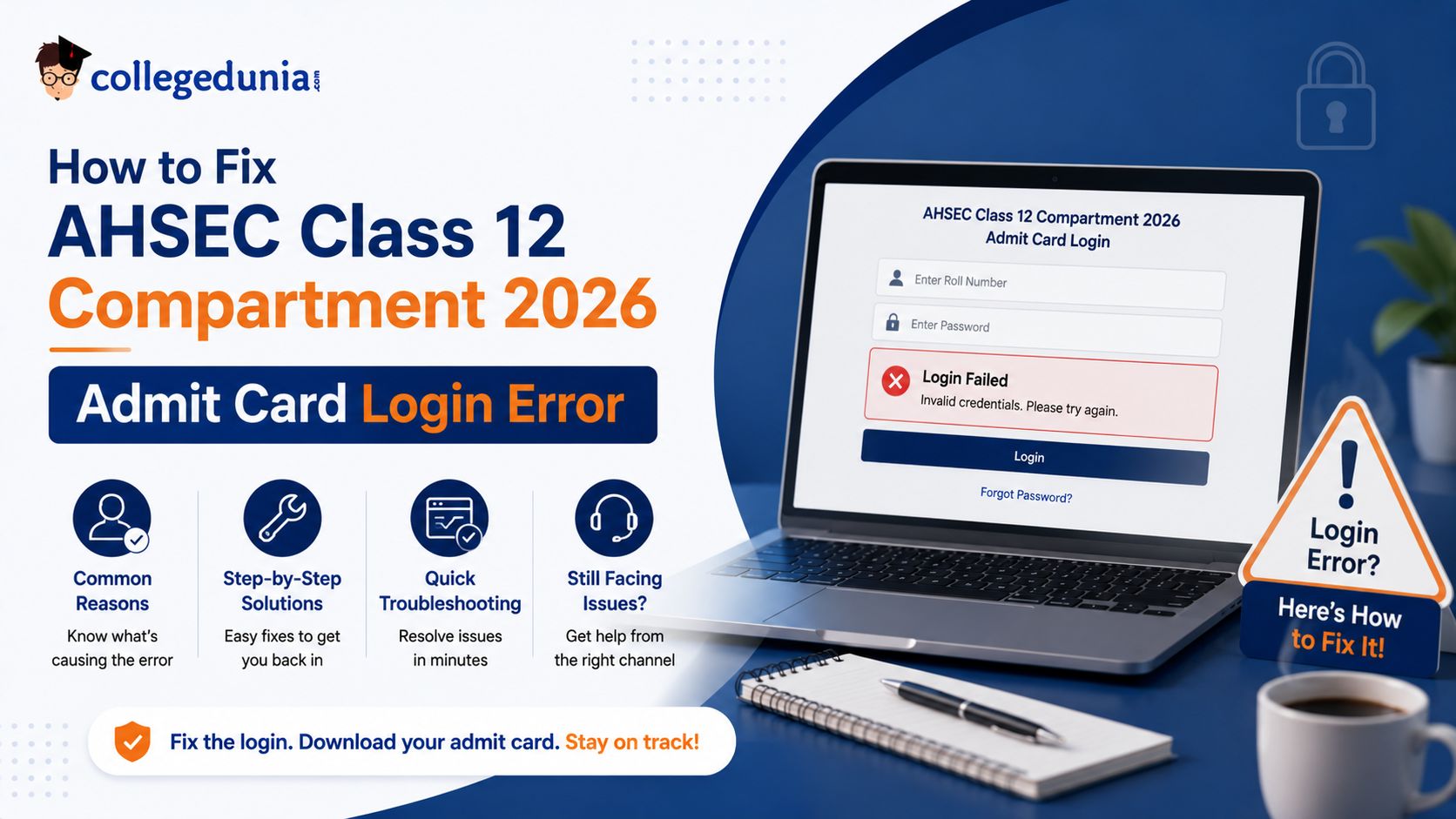
Students facing login issues while downloading the AHSEC Class 12 Compartment 2026 Admit Card can resolve the problem by recovering their application number or resetting their password.
| Direct Link to AHSEC Class 12 Compartment 2026 Admit Card (Official Website) |
- Students can retrieve their application number from the registration SMS, confirmation email, acknowledgement receipt or through their school records.
- Another solution that the school can offer to the students for the issue is to download and give them the AHSEC Class 12 Compartment 2026 Admit Card.
- The AHSEC Compartment 2026 Admit Card is released through the official portal and requires valid login credentials for access.
Related Links:
- AHSEC Class 12 Exam 2026: Result Out, Compartment Exam Dates, Toppers and Pass Percentage
- AHSEC HS Compartment Exam 2026: Routine Expected Soon, Eligibility, Dates and How to Apply
- AHSEC Class 12 Compartment 2026 Exam Day: Documents to Carry, Reporting Time and Centre Rules
Key Summary
- Temporary login issues may occur during periods of high traffic on the portal. Students can wait for some time and try again using a different browser if required.
- Students who have forgotten their password can use the Forgot Password option available on the admit card login page and complete the verification process through the registered mobile number.
- Downloading the latest version of Google Chrome and Mozilla Firefox could solve the login problem.
Common Login Errors on the AHSEC Compartment 2026 Admit Card Portal
Students facing difficulties while accessing the portal should first identify the exact login error displayed on the screen.
- Different login issues may require different solutions, depending on whether the problem is related to credentials, OTP verification, password recovery, or portal access.
- The table below highlights the most commonly reported login errors and the steps that can help resolve them.
| Error | Likely Cause | Quick Fix |
|---|---|---|
| Invalid Application Number or Password | Wrong credentials entered |
Recheck your registration SMS or email for the exact application number |
| Server Not Responding or Page Not Loading | High traffic on the portal |
Wait 10 to 15 minutes and try a different browser |
| OTP Not Received | Wrong mobile number or network delay |
Wait 2 minutes, click Resend OTP; check if your number is under DND |
| Account Locked | Too many failed login attempts |
Wait 30 minutes or contact the AHSEC helpdesk |
| Admit Card Not Generated | Incomplete form submission or unpaid fee |
Contact your school or AHSEC office with your main HS roll number |
Also Check: AHSEC HS Compartment Exam 2026 Pass Marks: Minimum Marks in Theory and Practical Per Subject
Ques. What should I do if my AHSEC Compartment 2026 account gets locked after multiple login attempts?
Ans. If your account is locked due to repeated incorrect login attempts, wait for the lockout period specified on the portal, which is typically around 30 minutes. After that, try logging in with the correct credentials. If the issue persists, students should contact the AHSEC helpdesk or their school authorities for assistance in restoring access.
Ques. Can I access my AHSEC Compartment 2026 admit card from a mobile phone?
Ans. Yes. Students can access and download the AHSEC Compartment 2026 admit card using a mobile phone, tablet, or computer with an internet connection. However, if the portal does not load properly on a mobile browser, students should switch to a desktop browser or try an alternative browser such as Chrome or Firefox for better compatibility.
How to Recover Your Application Number for AHSEC Compartment 2026
Students who have forgotten their AHSEC Class 12 Compartment 2026 Application Number can retrieve it through the records generated during the application process.
- Step 1: Check the confirmation SMS received on the registered mobile number at the time of compartment form submission.
- Step 2: Search the registered email inbox, including the spam and promotions folders, for the application confirmation message.
- Step 3: Review the application acknowledgement receipt or form submission printout, where the application number is usually mentioned.
- Step 4: Contact the school or institution through which the compartment examination form was submitted, as schools generally maintain application records.
- Step 5: If the application number is still unavailable, visit the concerned AHSEC office with the HS roll number and a valid photo ID for further assistance.
Also Check: AHSEC Class 12 Compartment Exam 2026: Who Can Apply After Failing
How to Reset Your Password for AHSEC Class 12 Compartment 2026
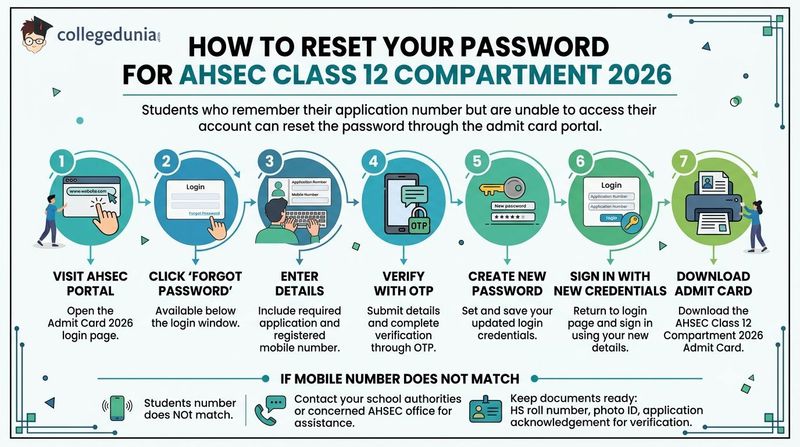
Students who remember their application number but are unable to access their account can reset the password through the admit card portal.
- Step 1: Visit the AHSEC portal and open the Compartment Admit Card 2026 login page.
- Step 2: Click on the Forgot Password option available below the login window.
- Step 3: Enter the required details, including the application number and registered mobile number.
- Step 4: Submit the details and complete the verification process through the OTP sent to the registered mobile number.
- Step 5: Create a new password and save the updated login credentials.
- Step 6: Return to the login page and sign in using the application number and the newly created password.
- Step 7: Download the AHSEC Class 12 Compartment 2026 Admit Card after successful login.
- Students whose current mobile number does not match the registered number should contact their school authorities or the concerned AHSEC office for assistance.
- While seeking support, students should keep documents such as the HS roll number, photo ID, and application acknowledgement details ready for verification.
Also Check: AHSEC Class 12 Compartment 2026 Chapter Weightage: Maths, Science
Ques. What should I do if I forget both my AHSEC Compartment 2026 password and application number?
Ans. Students who have forgotten both credentials should first recover their application number from the registration acknowledgement, SMS, email, or school records. Once the application number is retrieved, they can use the Forgot Password option on the portal. If neither recovery method works, students should contact their school or the AHSEC office with their HS roll number and valid photo ID.
Ques. Why is the AHSEC Compartment 2026 password reset OTP not working?
Ans. The OTP may fail due to network delays, expired verification codes, or entry of an incorrect OTP. Students should request a fresh OTP, ensure they enter it within the validity period, and verify that they are using the registered mobile number. If the problem continues, they should seek assistance from their school or the AHSEC office for account verification and password recovery.
Steps to Download AHSEC Compartment 2026 Admit Card After Successful Login
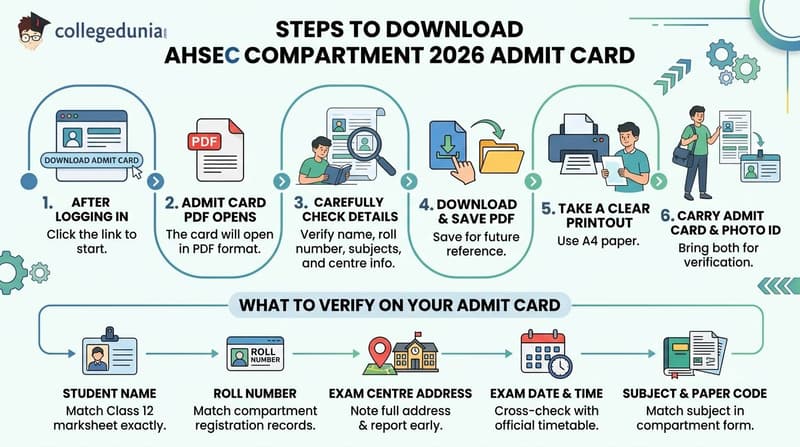
Students can follow these steps to save and print their AHSEC Class 12 Compartment 2026 admit card:
- Step 1: After logging in, click on the Download Admit Card link available on the dashboard.
- Step 2: The AHSEC Class 12 Compartment 2026 Admit Card will open in PDF format.
- Step 3: Check all the details mentioned on the admit card carefully, including the student's name, roll number, subjects, and examination centre information.
- Step 4: Download and save the PDF file on your device for future use.
- Step 5: Take a clear printout of the admit card on A4-size paper.
- Step 6: Carry the printed admit card along with a valid photo ID proof to the examination centre on the day of the exam.
| Detail on Admit Card | What to Verify |
|---|---|
| Student Name | Must match student’s Class 12 marksheet exactly |
| Roll Number | Should match student’s compartment registration records |
| Exam Centre Address | Note the full address and report at least 30 minutes before the start time |
| Exam Date and Time | Cross-check with the official AHSEC compartment timetable |
| Subject and Paper Code | Must match the subject that student applied for in the compartment form |
Also Check: AHSEC HS Compartment 2026 Admit Card: Correct Wrong Name or DOB
Ques. What should I do if there is a mistake in my name, subject, or exam centre on the AHSEC Compartment 2026 admit card?
Ans. Students should immediately report any error in their name, roll number, subject details, paper code, exam date, or examination centre to their school authorities and the AHSEC office. Such discrepancies should be corrected before the examination begins, as incorrect details on the admit card may create problems during verification at the exam centre.
Ques. Is a digital copy of the AHSEC Compartment 2026 admit card accepted at the examination centre?
Ans. No. Students are generally required to carry a printed copy of the AHSEC Class 12 Compartment 2026 admit card to the examination centre. A digital copy stored on a mobile phone may not be accepted for entry. Students should print the admit card clearly on A4-size paper and keep an extra copy as a backup for exam day.
What to Do If Login Still Fails
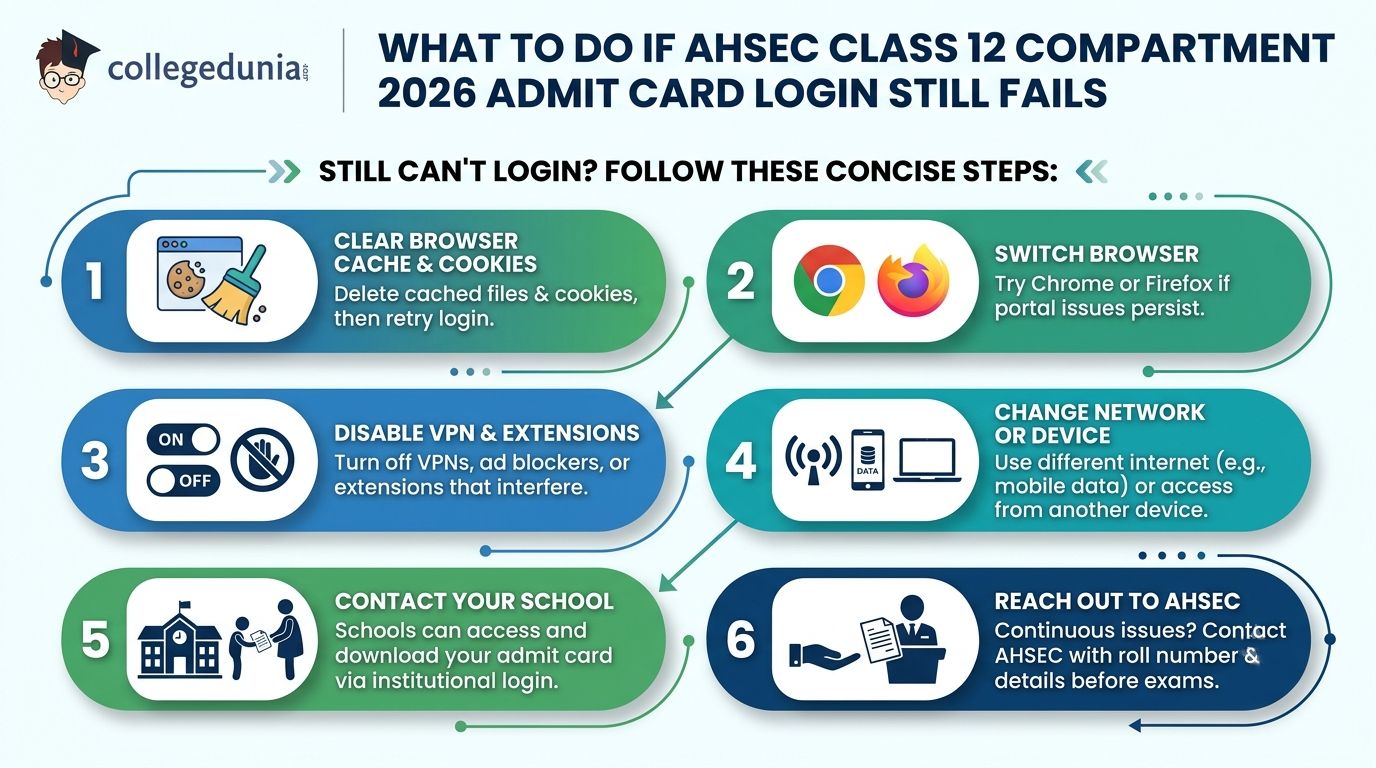
If students have tried all the previous steps and still cannot log in to download the AHSEC Class 12 Compartment 2026 admit card, can follow these steps given below:
- Clear Browser Cache and Cookies: Delete cached files and cookies from your browser settings, then reopen the AHSEC admit card portal and try logging in again.
- Switch Browser: If the portal is not working properly, try accessing it through Google Chrome or Mozilla Firefox.
- Disable VPN and Extensions: Turn off any VPN service, ad blocker, or browser extension that may interfere with the admit card portal.
- Change Network or Device: Try using a different internet connection, such as mobile data, or access the portal from another device.
- Contact Your School: Schools can often access and download the AHSEC Class 12 Compartment 2026 Admit Card through their institutional login and provide a printed copy to students.
- Reach Out to AHSEC: Students who continue to face login issues should contact AHSEC with their roll number and personal details before the examination date.
Also Check: AHSEC Class 12 Compartment Exam 2026 Fee: Regular and Ex-Students
Ques. Can a VPN or browser extension prevent access to the AHSEC Compartment 2026 admit card portal?
Ans. Yes. VPN services, ad blockers, privacy extensions, and some browser security tools can interfere with the AHSEC admit card portal and cause login or page-loading issues. Students facing repeated access problems should temporarily disable such services, refresh the page, and try logging in again using a standard browser configuration.
Ques. How long before the examination should I resolve AHSEC Compartment 2026 admit card login issues?
Ans. Students should resolve admit card login issues as early as possible and avoid waiting until the last few days before the examination. Delays in downloading the admit card can leave limited time to correct technical errors or data mismatches. If login problems continue, students should immediately contact their school or AHSEC to ensure they receive the admit card before the exam date.
AHSEC Class 12 Compartment 2026 Admit Card: Reddit Discussion
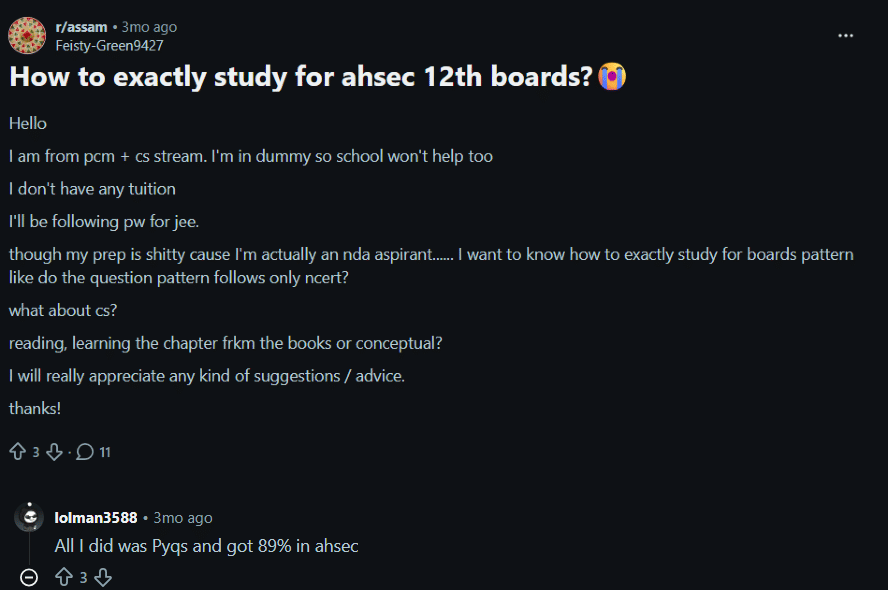
- The discussion focused on AHSEC Class 12 board preparation for a PCM + Computer Science student, covering concerns related to board exam patterns, NCERT-based questions, Computer Science preparation, conceptual learning, and balancing board studies with JEE and NDA preparation.
- Another Reddit user shared a simple preparation approach, stating that they primarily focused on previous years' question papers (PYQs) and were able to score 89% in the AHSEC board examinations, suggesting that PYQ practice can be an effective strategy for board preparation.
AHSEC Class 12 Compartment 2026 Admit Card FAQs
Ques. Where can I find my AHSEC Class 12 Compartment 2026 application number?
Ans. Your application number was sent to your registered mobile number and email when the compartment form was submitted. Check your SMS inbox, email (including spam/promotions folder), or your form acknowledgement printout. Your school also has a record of your application number and can provide it on request.
Ques. What should I do if the AHSEC admit card portal shows Invalid Credentials?
Ans. Make sure you are entering your application number with no extra spaces or typos. If you are certain the number is correct, your password may be wrong — use the Forgot Password option on the login page to reset it via OTP sent to your registered mobile number.
Ques. I am not receiving the OTP on my mobile number. What should I do?
Ans. Wait two minutes and click Resend OTP. Make sure your number is not registered under DND services, which can block transactional SMS. If the issue continues, ask your school to download the admit card using the institutional login on the AHSEC portal.
Ques. Can my school download the AHSEC Compartment 2026 admit card on my behalf?
Ans. Yes. Schools and colleges have an institutional login to the AHSEC portal and can download and print the admit card for you. Contact your school’s examination coordinator immediately if you are unable to access the portal on your own.
Ques. The portal shows Admit Card Not Generated for my login. What does this mean?
Ans. This message usually means the compartment form was not completed correctly, the examination fee was not paid, or there is a data mismatch in your records. Contact your school and the AHSEC office with your main HS roll number to get it resolved before your exam date.
Ques. What documents should I carry with the AHSEC Compartment 2026 admit card to the exam hall?
Ans. You must carry a printed copy of your admit card and a valid photo ID such as an Aadhaar card, voter ID, or school identity card. Entry to the exam hall will not be permitted without both documents.



Comments