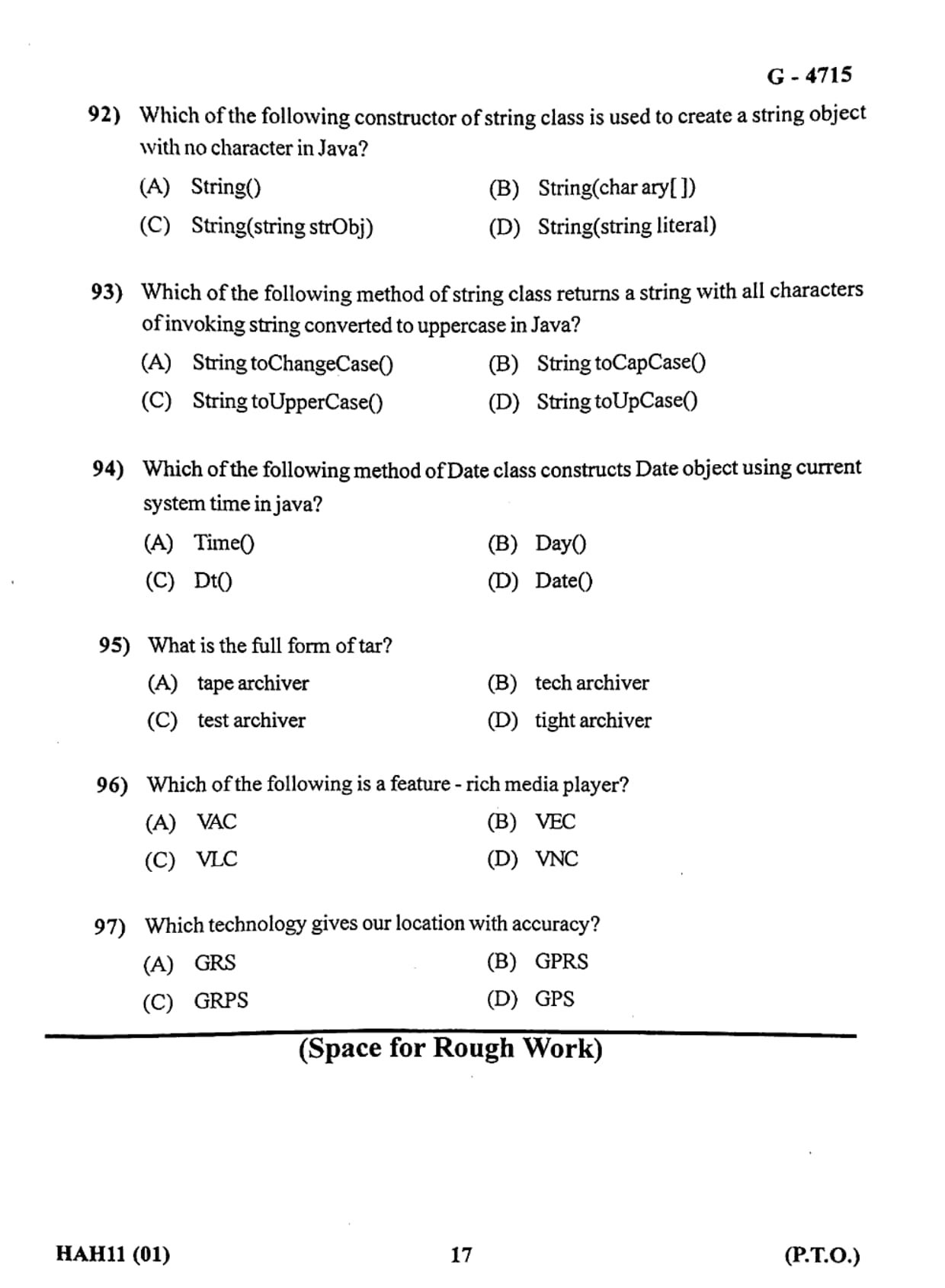
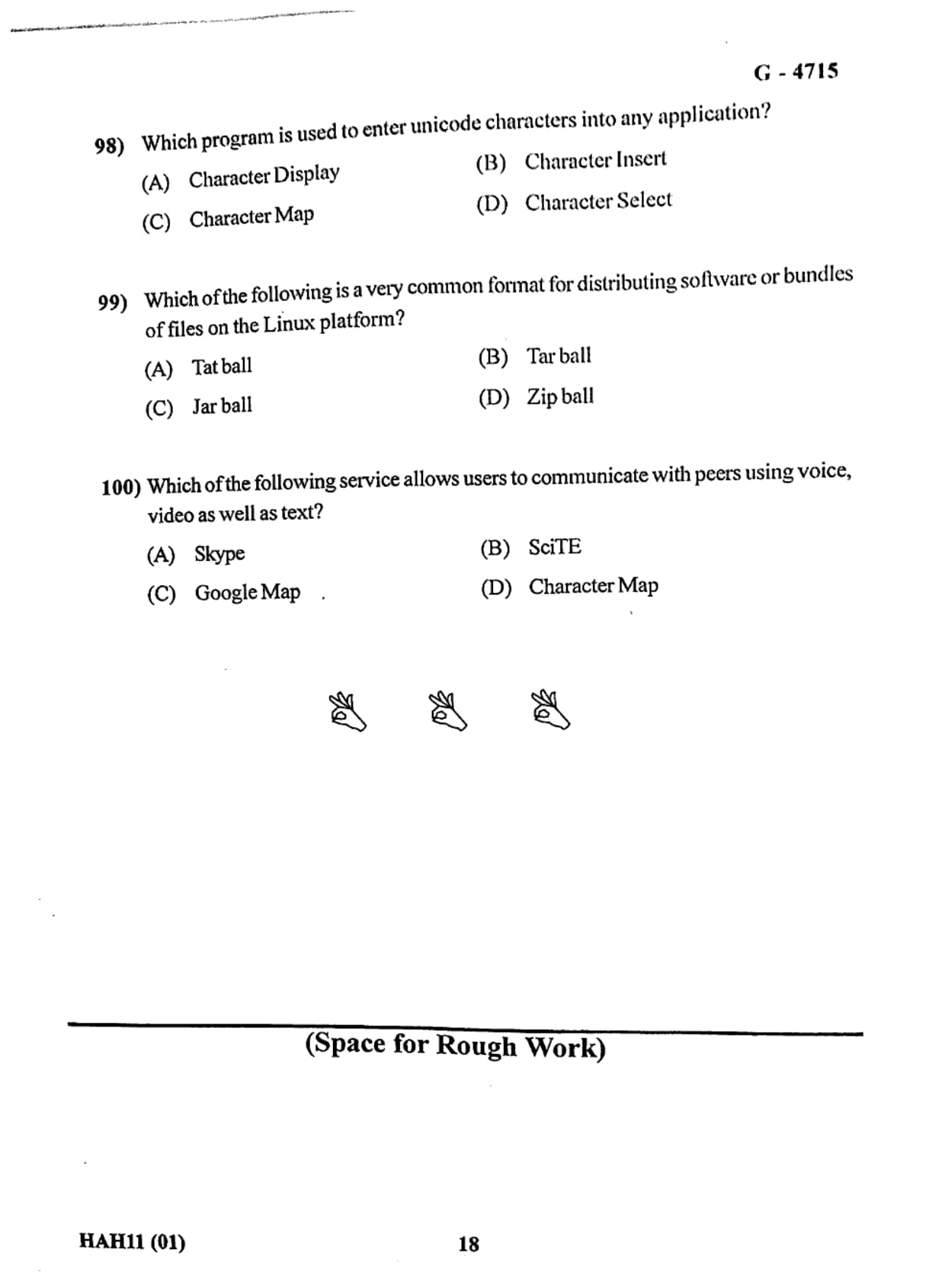
Gujarat Board conducted the Class 12 Computer Studies Board Exam 2026 on March 14, 2026. Class 12 Computer Studies Question Paper with Solution PDF is available here for download.
The Gujarat Board Class 12 Computer Studies paper covered key topics from programming concepts, database management, web technologies, and computer applications. Students should focus on understanding programming logic, practicing database queries, and learning basic web development concepts.
Gujarat Board Class 12 2026 Computer Studies Question Paper with Solution PDF
| Gujarat Board Class 12 Computer Studies Question Paper 2026 | Download PDF | Check Solution |

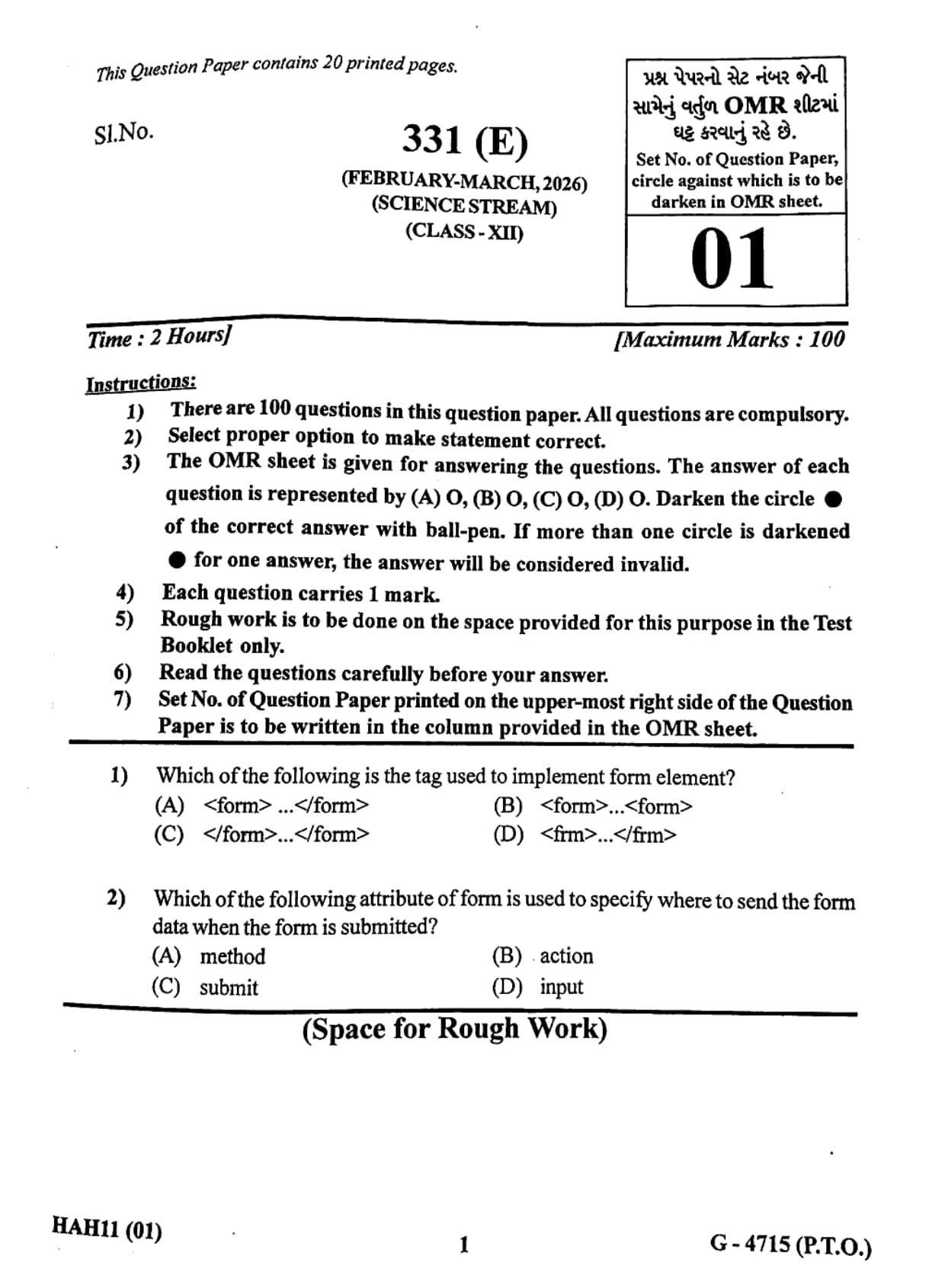
Which of the following attribute of form is used to specify where to send the form data when the form is submitted?
View Solution
Step 1: Understand form attributes in HTML.
HTML forms use different attributes to control how form data is processed and submitted. These attributes define how and where the form information is sent after the user submits it.
Step 2: Explain the action attribute.
The \texttt{action attribute specifies the destination URL where the form data will be sent after submission.
Example:
\[ \texttt{} \]
In this example, the form data will be sent to the file \texttt{submit.php for processing.
Step 3: Analyze the other options.
method: This attribute specifies how the data will be sent (GET or POST), but not where it will be sent.
submit: This is not a form attribute; it is related to the submit button.
input: This is a form element used to accept user input, not an attribute of the form tag.
Step 4: Conclusion.
Therefore the attribute used to specify the destination where form data is sent is the \texttt{action attribute.
Quick Tip: Remember: \texttt{action} defines where the form data goes, while \texttt{method} defines how the data is sent (GET or POST).
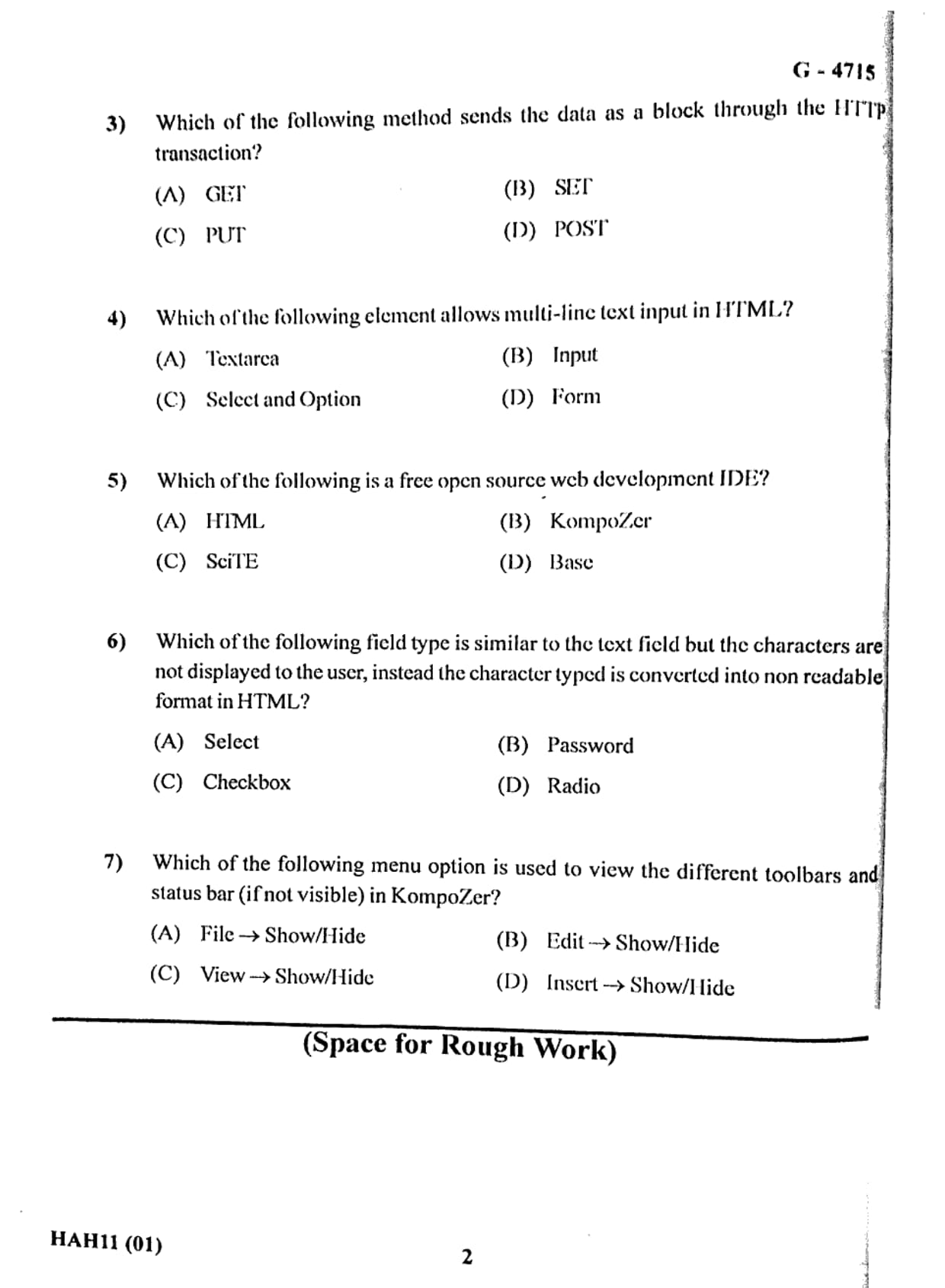
Which of the following method sends the data as a block through the HTTP transaction?
View Solution
Step 1: Understand HTTP request methods.
When data is sent from a client (browser) to a server through a web form, HTTP request methods are used.
The most commonly used methods are GET and POST.
Step 2: Explain the GET method.
The GET method sends data through the URL as query parameters.
This means the data becomes visible in the address bar of the browser.
Because of this limitation, GET is not suitable for sending large or sensitive data.
Step 3: Explain the POST method.
The POST method sends data inside the body of the HTTP request instead of the URL.
In this case, the data is transmitted as a block during the HTTP transaction.
This method is preferred when sending large amounts of data or sensitive information.
Step 4: Conclusion.
Since the question asks which method sends data as a block through the HTTP transaction, the correct answer is the POST method.
Quick Tip: Use GET when retrieving small amounts of data and POST when sending larger or sensitive data through forms.
Which of the following element allows multi-line text input in HTML?
View Solution
Step 1: Understand HTML input elements.
HTML provides different elements to collect user input in web forms.
Each element serves a specific purpose depending on the type of input required.
Step 2: Explain the textarea element.
The \texttt{
Which of the following is a free open source web development IDE?
View Solution
Step 1: Understand what an IDE is.
An IDE (Integrated Development Environment) is a software application used by developers to write, edit, test, and debug code efficiently.
It usually includes tools such as code editors, debugging tools, and project management features.
Step 2: Identify the web development IDE.
KompoZer is a free and open-source web development IDE used for designing and editing web pages.
It provides a visual editor and HTML editing features, making it useful for web developers.
Step 3: Analyze other options.
HTML: HTML is a markup language used to create web pages, not an IDE.
SciTE: SciTE is a general-purpose text editor, not specifically designed as a web development IDE.
Base: Base is related to database management tools rather than web development.
Step 4: Conclusion.
Therefore the correct answer is KompoZer, which is a free open-source web development IDE.
Quick Tip: KompoZer is a WYSIWYG (What You See Is What You Get) web editor that allows users to design web pages visually without writing complex HTML code.
Which of the following field type is similar to the text field but the characters are not displayed to the user, instead the character typed is converted into non readable format in HTML?
View Solution
Step 1: Understand HTML input field types.
HTML forms provide several types of input fields that allow users to enter different types of data.
The \texttt{ tag supports many types such as text, password, checkbox, radio button, and others.
Each input type serves a specific purpose depending on the nature of the information being collected.
Step 2: Explain the password field.
The password field type is used when sensitive information such as passwords or confidential data is entered by the user.
Instead of displaying the actual characters typed by the user, the browser replaces them with symbols such as dots or asterisks.
This prevents other people from easily viewing the entered characters on the screen.
Example of password input field:
\[
\texttt{}
\]
When a user types a password in this field, the characters are hidden and appear as masked symbols.
Step 3: Analyze the other options.
Select: This element is used to create a dropdown list for selecting options. It does not hide characters.
Checkbox: This allows users to select multiple choices using small square boxes. It is not related to text input.
Radio: Radio buttons allow users to choose only one option from a group. They are also not used for hiding typed characters.
Step 4: Conclusion.
Since the question asks for a field similar to a text field but where characters are not visible, the correct answer is the Password field type.
Quick Tip: Use the \texttt{type="password"} input field whenever sensitive information such as login passwords needs to be entered securely in a web form.
Which of the following menu option is used to view the different toolbars and status bar (if not visible) in KompoZer?
View Solution
Step 1: Understand KompoZer software.
KompoZer is a free and open-source web development tool used for creating and editing web pages.
It provides a visual editor and HTML editing features that help users design websites easily without writing complex code manually.
Like many software applications, KompoZer includes several toolbars and interface elements such as the status bar, formatting toolbar, and editing toolbar.
Step 2: Explain the purpose of the View menu.
The View menu in KompoZer is responsible for controlling how different elements of the interface are displayed.
Using this menu, users can show or hide various components of the program such as toolbars and the status bar.
When certain interface elements are hidden, they can be restored through the following path:
\[
\textbf{View → Show/Hide}
\]
This option allows users to toggle the visibility of toolbars and other interface components.
Step 3: Analyze the other options.
File menu: Mainly used for file-related operations such as creating, opening, saving, or printing documents.
Edit menu: Used for editing tasks like copy, paste, undo, and redo.
Insert menu: Used to insert elements such as images, tables, or links into a web page.
None of these menus control the visibility of toolbars or the status bar.
Step 4: Conclusion.
Therefore, the correct menu option used to show or hide toolbars and the status bar in KompoZer is
\[
\textbf{View → Show/Hide}
\] Quick Tip: In most software applications, the View menu is used to control the appearance of the interface such as toolbars, panels, and status bars.
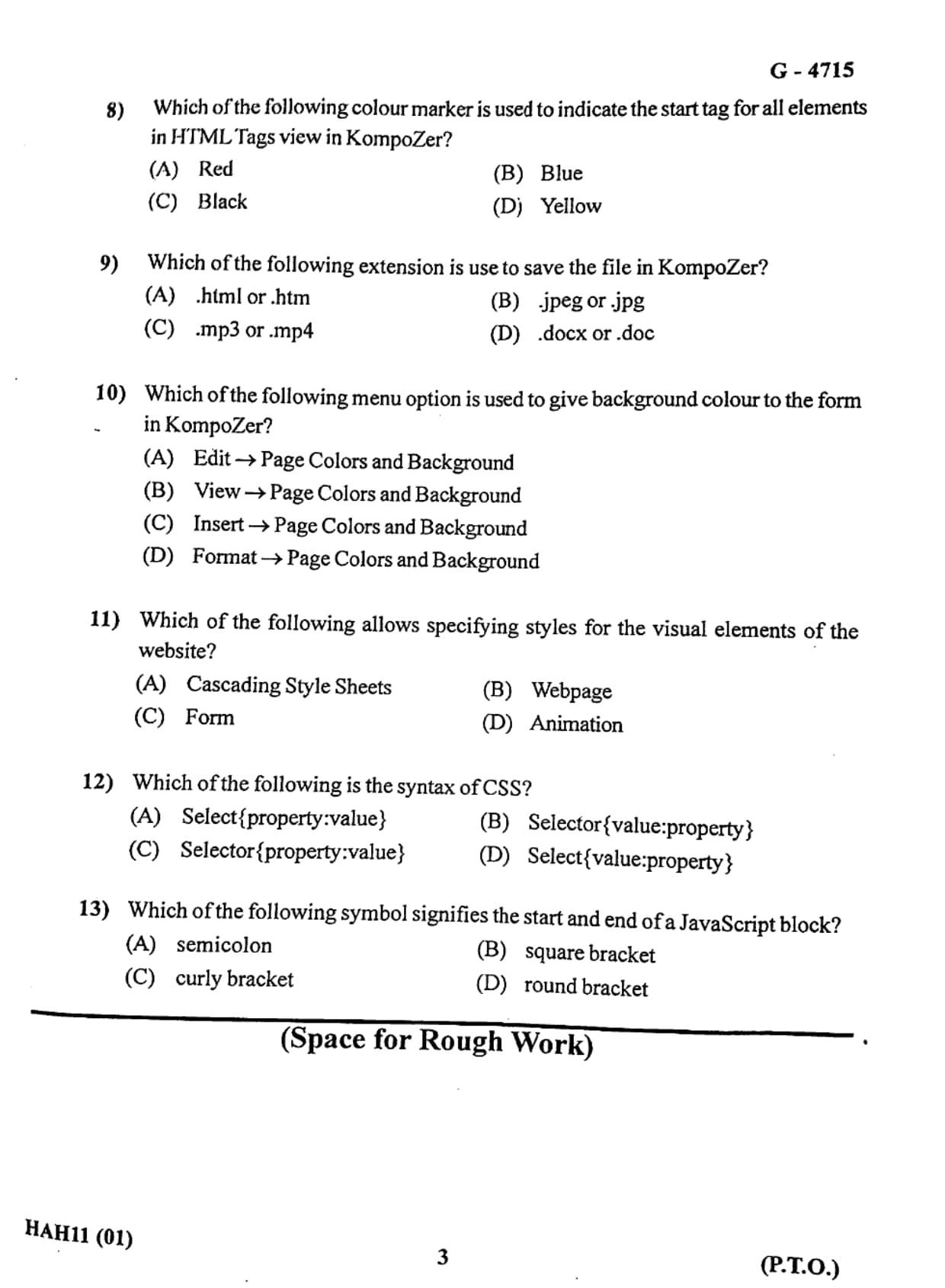
Which of the following colour marker is used to indicate the start tag for all elements in HTML Tags view in KompoZer?
View Solution
Step 1: Understand the Tags View in KompoZer.
KompoZer is a web development editor that allows users to design and edit HTML web pages visually as well as through source code.
In the Tags View mode, HTML elements are displayed in a structured format so that developers can easily identify different HTML tags and elements used in the webpage.
This view also uses colour markers to distinguish between different parts of HTML elements such as start tags, end tags, and content.
Step 2: Identify the colour used for start tags.
In KompoZer’s Tags View, the start tag of an HTML element is highlighted using the blue colour marker.
This helps developers quickly identify where an HTML element begins in the document structure.
For example, in the element
\[
\texttt{
This is a paragraph
} \]The start tag \texttt{
is highlighted with a blue marker in Tags View.
Step 3: Analyze other options.
Red: This colour is not used as the default marker for start tags in KompoZer.
Black: Black is generally used for plain text or content, not specifically for tag highlighting.
Yellow: Yellow is not used as a standard marker for start tags in HTML Tags View.
Step 4: Conclusion.
Therefore, the colour marker used to indicate the start tag for HTML elements in KompoZer Tags View is Blue.
Quick Tip: Tags View in KompoZer helps developers understand the structure of HTML documents by visually highlighting start and end tags.
Which of the following extension is used to save the file in KompoZer?
View Solution
Step 1: Understand file extensions in web development.
File extensions identify the type of file and the software used to open or process it.
In web development, HTML files are used to create the structure of a web page.
These files must be saved with the .html or .htm extension so that web browsers can correctly interpret and display the webpage.
Step 2: Explain the role of KompoZer.
KompoZer is a web page editor used to design and develop websites.
When a webpage is created using KompoZer, it must be saved in HTML format so that it can be displayed in web browsers such as Chrome, Firefox, or Edge.
Therefore KompoZer saves web pages using the extensions
\[
\textbf{.html} \quad or \quad \textbf{.htm}
\]
Step 3: Analyze other options.
.jpeg or .jpg: These extensions are used for image files, not web pages.
.mp3 or .mp4: These extensions are used for audio and video files.
.docx or .doc: These extensions are used for Microsoft Word documents.
Step 4: Conclusion.
Since KompoZer is used for creating web pages, the correct file extension used to save files is .html or .htm.
Quick Tip: Always save web pages with the .html extension so that browsers can correctly interpret and render the webpage.
Which of the following menu option is used to give background colour to the form in KompoZer?
View Solution
Step 1: Understand formatting options in KompoZer.
KompoZer provides several menu options that allow users to modify the appearance of a webpage.
These options include changing font styles, formatting text, adjusting layout, and modifying colours of the page background.
Step 2: Explain the Format menu.
The Format menu in KompoZer is used to control the visual formatting of the web page.
Through this menu, users can change the page colour, background image, and other visual properties.
To change the background colour of a page or form in KompoZer, the following menu path is used:
\[
\textbf{Format → Page Colors and Background}
\]
This option opens a dialog box where users can select the desired background colour or image.
Step 3: Evaluate other options.
Edit menu: Used mainly for editing tasks such as copy, paste, and undo.
View menu: Used to control how elements appear on the screen but not for changing colours.
Insert menu: Used to insert elements such as images, tables, or links.
Therefore these options are not used to change background colours.
Step 4: Conclusion.
Thus the correct menu option used to change the background colour of a form or page in KompoZer is
\[
\textbf{Format → Page Colors and Background}
\] Quick Tip: The Format menu in web editors usually controls styling and appearance such as colours, fonts, and page layout.
Which of the following allows specifying styles for the visual elements of the website?
View Solution
Step 1: Understand the concept of styling in web development.
In web development, the appearance of a webpage such as colors, fonts, layout, spacing, and visual design is controlled through styling languages.
These styles determine how the HTML elements appear on the screen.
Step 2: Explain Cascading Style Sheets (CSS).
Cascading Style Sheets, commonly known as CSS, is a style sheet language used to define the presentation and visual design of HTML documents.
CSS allows developers to control the layout and appearance of multiple web pages simultaneously.
For example, CSS can control:
• Text color and font style
• Background color and images
• Layout and positioning of elements
• Spacing and alignment
Example CSS rule:
\[
\texttt{p \{ color: blue; font-size: 16px; \}}
\]
This rule changes the color and size of paragraph text.
Step 3: Evaluate the other options.
Webpage: A webpage is simply a document displayed in a browser and does not define styling rules.
Form: A form is used to collect user input, not to define visual styles.
Animation: Animation can enhance visuals but does not control the overall styling of website elements.
Step 4: Conclusion.
Therefore, the correct technology used to specify styles for visual elements of a website is Cascading Style Sheets (CSS).
Quick Tip: CSS separates content from design. HTML defines the structure of a webpage, while CSS controls how the webpage looks.
Which of the following is the syntax of CSS?
View Solution
Step 1: Understand the structure of a CSS rule.
CSS works by applying styling rules to HTML elements.
Each CSS rule consists of two main parts:
• Selector – identifies the HTML element to which the style will be applied.
• Declaration block – contains the property and value that define the style.
Step 2: Explain the correct CSS syntax.
The general structure of CSS syntax is:
\[
\texttt{Selector \{ property : value ; \}}
\]
Example:
\[
\texttt{h1 \{ color: red; font-size: 24px; \}}
\]
Here:
• h1 is the selector.
• color and font-size are properties.
• red and 24px are values.
Step 3: Evaluate the other options.
Select{property:value} is incorrect because the correct keyword is Selector.
Selector{value:property} is incorrect because CSS always uses property:value.
Select{value:property} is incorrect because both the selector and order are wrong.
Step 4: Conclusion.
Therefore, the correct syntax of CSS is
\[
\textbf{Selector\{property:value\}}
\] Quick Tip: Always remember the order in CSS: Selector → Property → Value.
Which of the following symbol signifies the start and end of a JavaScript block?
View Solution
Step 1: Understand JavaScript blocks.
In JavaScript programming, a block of code refers to a group of statements that are executed together.
These blocks are commonly used in structures such as loops, conditional statements, and functions.
Step 2: Identify the symbol used for blocks.
JavaScript uses curly brackets \(\{\}\) to define the start and end of a block of code.
Everything written inside these brackets is considered part of the block.
Example:
\[
\texttt{if (x > 10) \{
\quad console.log("Number is greater than 10");
\}}
\]
Here the curly brackets define the beginning and end of the code block executed when the condition is true.
Step 3: Evaluate other symbols.
Semicolon ( ; ): Used to end individual statements, not blocks.
Square brackets [ ]: Used mainly for arrays and indexing elements.
Round brackets ( ): Used for conditions and function parameters.
Step 4: Conclusion.
Thus the symbol used to define the start and end of a JavaScript block is the curly bracket {}.
Quick Tip: Curly brackets \{\} define blocks in most programming languages such as JavaScript, C, C++, and Java.
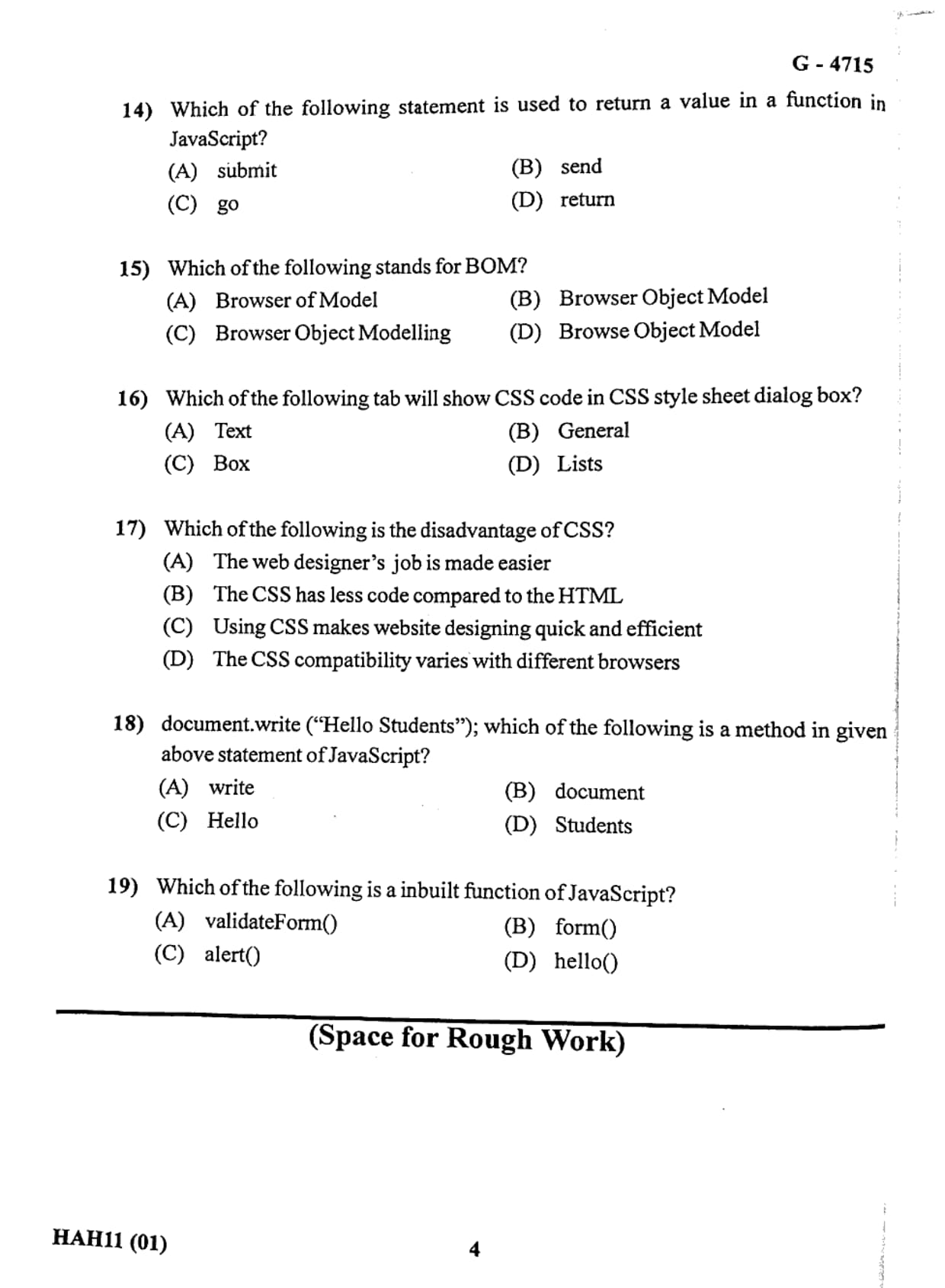
Which of the following statement is used to return a value in a function in JavaScript?
View Solution
Step 1: Understand functions in JavaScript.
A function in JavaScript is a block of reusable code that performs a specific task.
Functions may accept input values (parameters), process them, and then produce an output.
The output of a function is called the return value.
Step 2: Explain the return statement.
The return statement is used to send a value back from a function to the place where the function was called.
When the return statement is executed, the function stops running and sends the specified value as the result.
Example:
\[
\texttt{function add(a, b)}
\texttt{return a + b; }
\]
In this example, the function adds two numbers and returns the result.
Step 3: Analyze other options.
submit: Used mainly in HTML forms to submit data, not in JavaScript functions.
send: Often used in networking or APIs but not used to return values from functions.
go: This is not a valid JavaScript statement for returning values.
Step 4: Conclusion.
Therefore, the correct statement used to return a value from a JavaScript function is the return statement.
Quick Tip: The return statement not only sends a value back but also immediately stops further execution of the function.
Which of the following stands for BOM?
View Solution
Step 1: Understand BOM in web technology.
BOM stands for Browser Object Model.
It is a programming interface provided by web browsers that allows JavaScript to interact with the browser window.
Through the Browser Object Model, JavaScript can access and control different browser features such as:
• Browser window
• Browser history
• Browser location (URL)
• Screen information
• Navigation functions
Step 2: Explain how BOM works.
The BOM provides objects like:
• window – represents the browser window
• navigator – gives browser information
• location – provides URL information
• history – controls browser navigation
Example:
\[
\texttt{window.alert("Welcome to JavaScript")}
\]
Here the window object is part of the Browser Object Model.
Step 3: Analyze other options.
Browser of Model: Incorrect terminology.
Browser Object Modelling: Not the standard meaning of BOM.
Browse Object Model: Incorrect spelling and meaning.
Step 4: Conclusion.
Therefore, BOM correctly stands for Browser Object Model.
Quick Tip: The BOM allows JavaScript to interact with browser features, while the DOM controls the structure and content of web pages.
Which of the following tab will show CSS code in CSS style sheet dialog box?
View Solution
Step 1: Understand CSS style sheet dialog box.
In web development editors such as KompoZer, CSS styles can be applied through a graphical dialog box.
This dialog box contains several tabs that help users modify different aspects of webpage styling.
Each tab focuses on a specific type of styling such as text formatting, layout, spacing, or list styles.
Step 2: Explain the Text tab.
The Text tab is responsible for controlling text-related styling in CSS.
It allows developers to define properties such as:
• Font size
• Font style
• Font color
• Text alignment
• Text decoration
When these settings are applied, the corresponding CSS code appears in the style sheet dialog box.
Example CSS generated from text settings:
\[
\texttt{p \{ color: blue; font-size: 16px; \}}
\]
Step 3: Analyze other options.
General: Usually used for basic settings but does not primarily display CSS code related to text.
Box: Used for layout properties such as margin, padding, and borders.
Lists: Used to style list elements such as bullets or numbering.
Step 4: Conclusion.
Therefore, the tab used to show CSS code in the CSS style sheet dialog box is the Text tab.
Quick Tip: CSS styling tools in web editors are often divided into tabs such as Text, Box, and Lists to organize different style properties efficiently.
Which of the following is the disadvantage of CSS?
View Solution
Step 1: Understand the purpose of CSS.
CSS (Cascading Style Sheets) is a stylesheet language used to control the presentation and layout of web pages.
It helps developers separate the design of a website from its structure, which is written in HTML.
Using CSS allows developers to style multiple web pages at once and maintain consistency in design.
Step 2: Identify the advantages listed in the options.
Option (A) states that CSS makes the web designer’s job easier.
This is actually an advantage because CSS reduces repetitive styling and allows centralized design control.
Option (B) states that CSS uses less code compared to HTML.
This is also an advantage because CSS allows styles to be reused across multiple elements and pages, reducing overall code size.
Option (C) mentions that CSS makes website designing quick and efficient.
This again represents a benefit since CSS simplifies layout design and improves development efficiency.
Step 3: Identify the actual disadvantage.
Option (D) states that CSS compatibility varies with different browsers.
This means that some CSS properties may work differently or may not be fully supported in certain browsers.
Developers sometimes need to write additional code or test extensively to ensure consistent appearance across browsers.
Step 4: Conclusion.
Therefore, the disadvantage of CSS mentioned in the options is that CSS compatibility may vary between different browsers.
Quick Tip: Always test CSS designs in multiple browsers such as Chrome, Firefox, Edge, and Safari to ensure consistent appearance.
document.write("Hello Students"); which of the following is a method in the given JavaScript statement?
View Solution
Step 1: Understand JavaScript objects and methods.
In JavaScript, objects contain properties and methods.
A method is a function that belongs to an object and performs a specific action.
The statement given in the question is:
\[
\texttt{document.write("Hello Students");}
\]
Here, \texttt{document is an object representing the HTML document, and \texttt{write() is a method associated with that object.
Step 2: Explain how the method works.
The write() method is used to display text directly on a web page.
When the browser executes the JavaScript code, the text inside the parentheses is written into the HTML document.
Example:
\[
\texttt{document.write("Welcome to JavaScript");}
\]
This will display the message on the webpage.
Step 3: Analyze other parts of the statement.
document: This is an object representing the webpage.
Hello and Students: These are simply words inside the string that will be displayed as text.
They are not JavaScript methods.
Step 4: Conclusion.
Therefore, the method used in the given statement is write.
Quick Tip: In JavaScript, a method is a function attached to an object, such as document.write() or console.log().
Which of the following is an inbuilt function of JavaScript?
View Solution
Step 1: Understand built-in functions in JavaScript.
JavaScript provides several built-in functions that are already defined within the language.
These functions allow developers to perform common tasks such as displaying messages, handling data, and interacting with the browser.
Step 2: Explain the alert() function.
The alert() function is a built-in JavaScript function used to display a popup message box on the screen.
It is commonly used for notifications, warnings, or debugging purposes.
Example:
\[
\texttt{alert("Welcome to the website");}
\]
When executed, this statement shows a dialog box containing the message.
Step 3: Analyze other options.
validateForm(): This is usually a user-defined function created by developers for validating form inputs.
form(): This is not a standard JavaScript built-in function.
hello(): This is also not a built-in function and would normally be defined by a programmer if needed.
Step 4: Conclusion.
Therefore, the correct inbuilt function of JavaScript among the given options is alert().
Quick Tip: Common built-in JavaScript dialog functions include alert(), confirm(), and prompt().
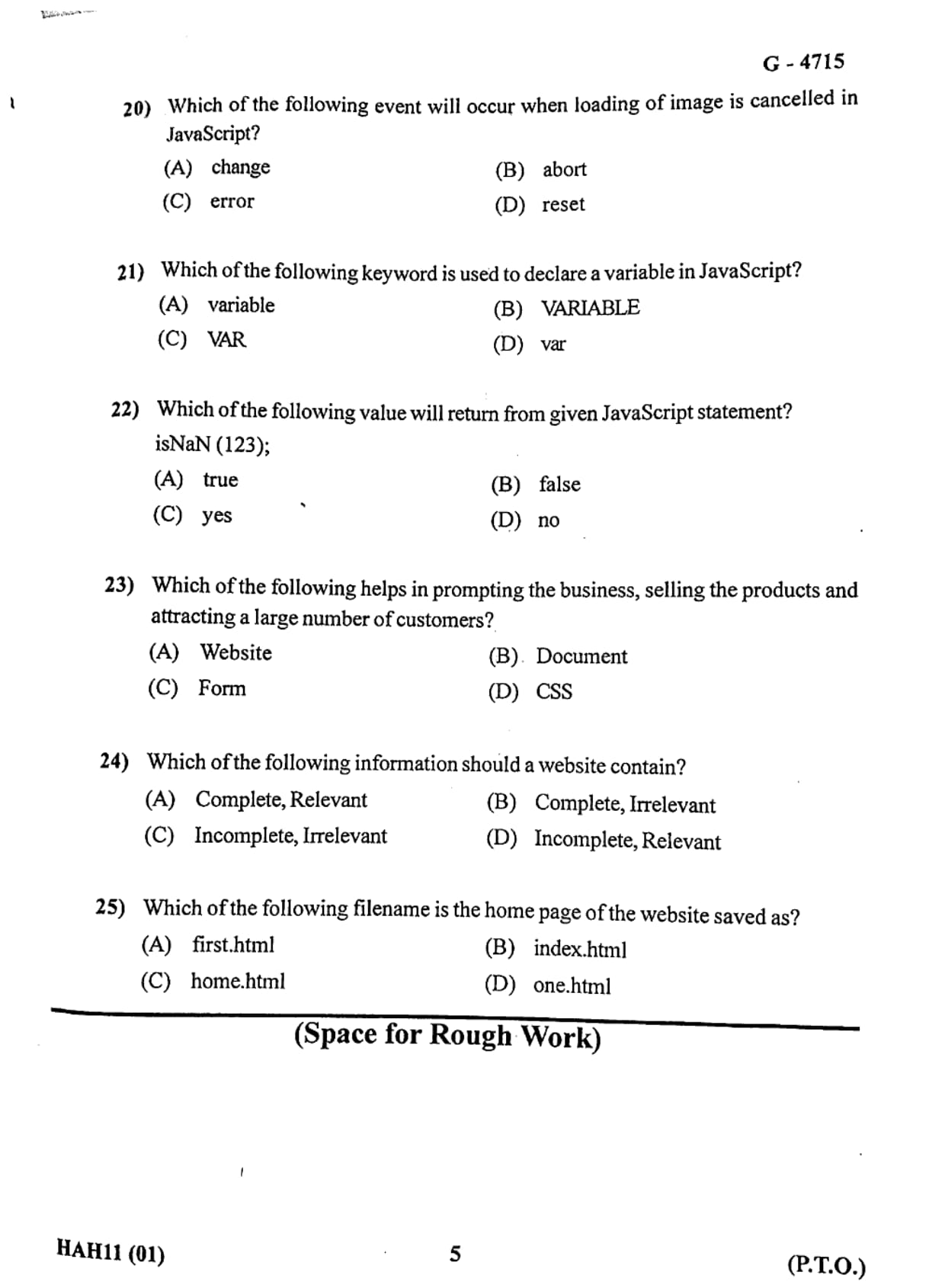
Which of the following event will occur when loading of image is cancelled in JavaScript?
View Solution
Step 1: Understand JavaScript events.
JavaScript events are actions or occurrences that happen in the browser and can be detected by JavaScript code.
Examples of events include clicking a button, loading a webpage, submitting a form, or cancelling a resource while it is loading.
These events allow developers to execute specific code when certain actions take place.
Step 2: Explain the abort event.
The abort event occurs when the loading of a resource such as an image, audio file, or video file is intentionally stopped before it finishes loading.
For example, if a browser begins loading an image but the user stops the loading process or navigates away from the page, the abort event is triggered.
Example:
\[
\texttt{
}
\]
In this case, if the image loading is cancelled, the abort event is activated.
Step 3: Analyze other options.
change: Triggered when the value of an input element changes.
error: Triggered when an error occurs during loading, such as a missing file.
reset: Occurs when a form reset button is clicked.
Step 4: Conclusion.
Therefore, when the loading of an image is cancelled, the JavaScript event that occurs is the abort event.
Quick Tip: The abort event occurs when the loading of a media resource such as an image or video is interrupted before completion.
Which of the following keyword is used to declare a variable in JavaScript?
View Solution
Step 1: Understand variables in programming.
A variable is a container used to store data values in a program.
In JavaScript, variables are used to store numbers, strings, objects, and other types of information that may change during program execution.
Step 2: Explain the var keyword.
In JavaScript, the keyword var is traditionally used to declare a variable.
When a variable is declared using var, memory is allocated to store the value associated with that variable.
Example:
\[
\texttt{var x = 10;}
\]
Here, a variable named x is declared and assigned the value 10.
Step 3: Analyze other options.
variable: This is not a valid JavaScript keyword.
VARIABLE: JavaScript keywords are case-sensitive, so this is invalid.
VAR: This is also incorrect because JavaScript keywords must be written in lowercase.
Step 4: Conclusion.
Therefore, the correct keyword used to declare a variable in JavaScript is var.
Quick Tip: Modern JavaScript also uses let and const to declare variables, but var is the traditional keyword used in earlier JavaScript versions.
Which of the following value will return from given JavaScript statement? isNaN(123);
View Solution
Step 1: Understand the isNaN() function.
In JavaScript, isNaN() is a built-in function used to check whether a value is "Not-a-Number".
If the value passed to this function is not a number, the function returns true.
If the value is a valid number, the function returns false.
Step 2: Evaluate the given statement.
The statement given in the question is:
\[
\texttt{isNaN(123);}
\]
Here, the value 123 is clearly a numeric value.
Since 123 is a valid number, it is not NaN (Not-a-Number).
Step 3: Determine the result.
Because the value is a valid number, the function returns false.
Example:
\[
\texttt{isNaN("Hello")} \rightarrow true
\]
\[
\texttt{isNaN(123)} \rightarrow false
\]
Step 4: Conclusion.
Therefore, the JavaScript statement \texttt{isNaN(123) returns false.
Quick Tip: The isNaN() function returns true only when the value cannot be converted into a valid number.
Which of the following helps in promoting the business, selling the products and attracting a large number of customers?
View Solution
Step 1: Understand the role of websites in business.
In the modern digital world, businesses rely heavily on the internet to reach customers.
A website acts as an online platform where companies can present their products, services, and brand identity to people all around the world.
Websites allow businesses to share detailed information, promote their products, and interact with potential customers at any time.
Unlike traditional marketing methods, websites can reach a global audience instantly.
Step 2: Explain how websites help in promotion and sales.
A website supports business growth in several ways:
• It provides information about products and services.
• It allows customers to purchase products online.
• It helps businesses advertise and promote their brand.
• It increases customer reach and engagement.
Through websites, companies can also integrate online payment systems, product catalogs, and customer support services.
Step 3: Analyze other options.
Document: A document only contains information and cannot actively promote or sell products.
Form: A form is used to collect user input but does not itself promote business activities.
CSS: CSS is used for styling webpages and does not directly help in promoting products or attracting customers.
Step 4: Conclusion.
Therefore, the correct answer is Website, which helps businesses promote products, sell goods, and attract a large number of customers online.
Quick Tip: A website acts as a digital storefront for businesses, enabling them to promote products and reach customers worldwide.
Which of the following information should a website contain?
View Solution
Step 1: Understand the importance of website content.
The information presented on a website plays a crucial role in communicating with visitors.
Users visit websites to obtain useful and accurate information about products, services, organizations, or topics.
If the content of a website is incomplete or irrelevant, users may become confused and leave the site quickly.
Therefore, the quality and relevance of website content are very important.
Step 2: Explain the meaning of complete and relevant information.
Complete information means that the website provides all necessary details required by users.
This includes clear explanations, contact information, product descriptions, and other important data.
Relevant information means that the content is directly related to the purpose of the website and useful for visitors.
For example, a business website should include:
• Product or service details
• Pricing information
• Contact information
• Customer support details
Step 3: Analyze other options.
Complete, Irrelevant: Even if information is complete, it becomes useless if it is not relevant to the topic.
Incomplete, Irrelevant: This type of content is neither helpful nor informative.
Incomplete, Relevant: Although relevant, incomplete information can confuse users and reduce website credibility.
Step 4: Conclusion.
Therefore, a website should contain Complete and Relevant information to provide value and clarity to its visitors.
Quick Tip: Good websites always provide accurate, complete, and relevant information to ensure a better user experience.
Which of the following filename is the home page of the website saved as?
View Solution
Step 1: Understand the concept of a homepage.
The homepage is the main or default page of a website that users see when they visit the website's main URL.
It usually contains navigation links, general information, and an overview of the website content.
Web servers are typically configured to automatically load a specific file as the homepage when no specific file is mentioned in the URL.
Step 2: Explain the standard homepage filename.
By convention, most web servers recognize the file named index.html as the default homepage of a website.
For example:
If a user enters
\[
\texttt{www.example.com}
\]
the server automatically loads
\[
\texttt{www.example.com/index.html}
\]
without the user needing to type the file name explicitly.
Step 3: Analyze other options.
first.html: This is not a standard default homepage name.
home.html: Although sometimes used, it is not the default file automatically recognized by most web servers.
one.html: This filename has no standard meaning for web servers.
Step 4: Conclusion.
Therefore, the standard filename used for the homepage of a website is index.html.
Quick Tip: Most web servers automatically load index.html as the default homepage when users visit a website domain.
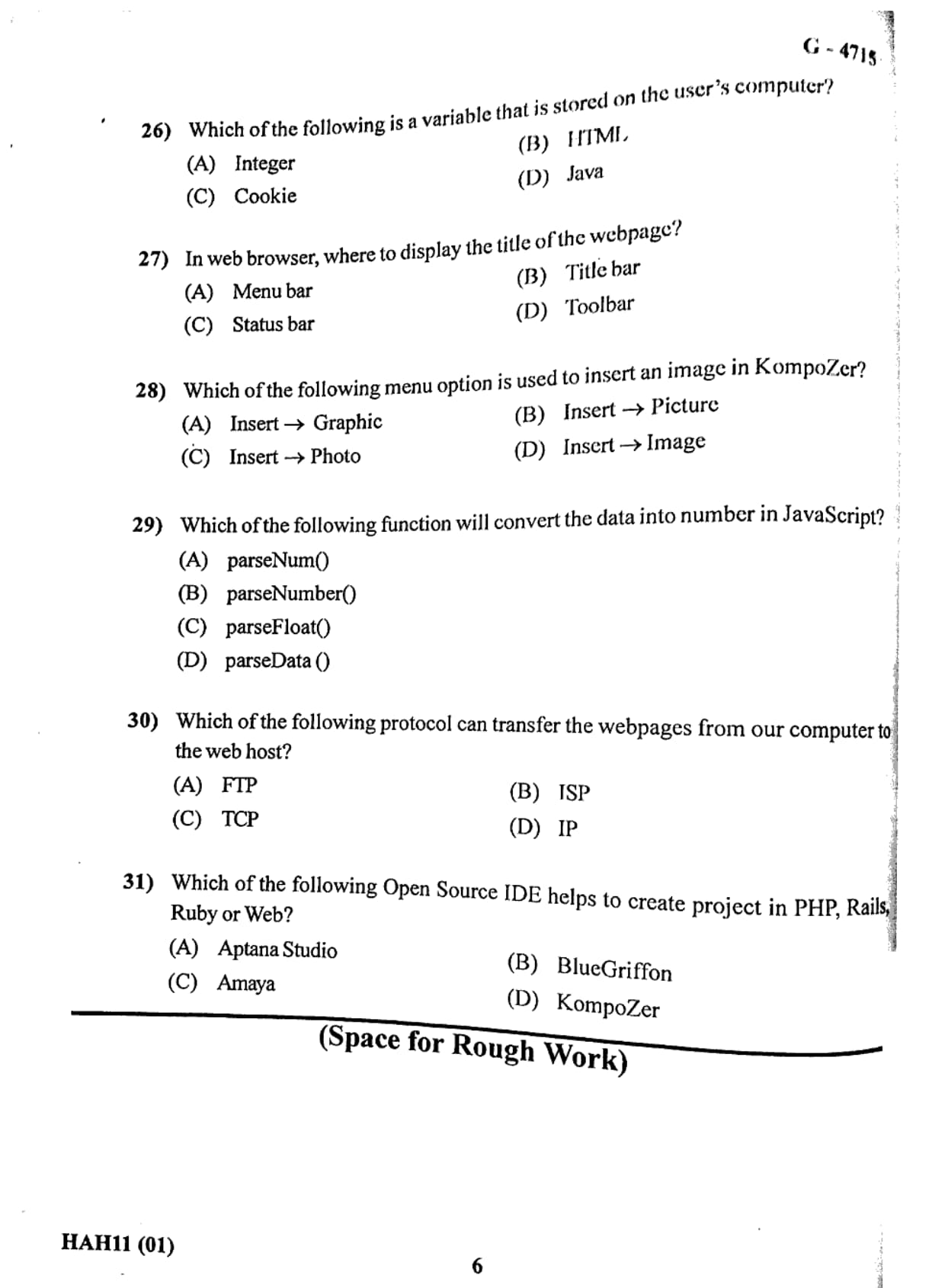
Which of the following is a variable that is stored on the user’s computer?
View Solution
Step 1: Understand the concept of cookies in web technology.
A cookie is a small piece of data that a website stores on a user’s computer through the web browser.
Cookies are created by web servers and saved locally on the user’s device.
They are commonly used to remember information about the user while browsing a website.
Step 2: Explain the purpose of cookies.
Cookies help websites store and retrieve user-related information such as:
• Login session information
• User preferences and settings
• Shopping cart details in online stores
• Tracking user activity for analytics
For example, when a user logs into a website and chooses the option “Remember Me”, the website stores a cookie on the user’s computer so that the user does not have to log in again every time they visit the site.
Step 3: Analyze the other options.
Integer: This is a data type used in programming and is not stored on the user's computer as a browser variable.
HTML: HTML is a markup language used to create web pages, not a variable stored on a user's computer.
Java: Java is a programming language and does not represent a variable stored in the browser.
Step 4: Conclusion.
Therefore, the variable stored on the user’s computer that helps websites remember information is called a Cookie.
Quick Tip: Cookies are small text files stored in a browser that allow websites to remember user information and preferences.
In web browser, where is the title of the webpage displayed?
View Solution
Step 1: Understand webpage titles.
Every webpage contains a title that describes the content of the page.
This title is defined using the HTML \texttt{
Example:
\[
\texttt{
This title helps users identify the page and is also important for search engines.
Step 2: Identify where the title appears in the browser.
When a webpage is opened in a browser, the title defined in the HTML code is displayed at the top of the browser window.
This area is known as the Title Bar.
The title bar usually shows:
• The webpage title
• The browser name
• The active tab title
Step 3: Analyze the other options.
Menu bar: Contains menus like File, Edit, View, etc.
Status bar: Displays status messages such as loading progress or link information.
Toolbar: Contains navigation buttons like Back, Forward, and Refresh.
None of these areas display the webpage title.
Step 4: Conclusion.
Therefore, the title of the webpage is displayed in the Title Bar of the web browser.
Quick Tip: The text inside the HTML
Which of the following menu option is used to insert an image in KompoZer?
View Solution
Step 1: Understand KompoZer as a web development tool.
KompoZer is a free open-source web page editor that allows users to create and design websites visually without writing complex HTML code manually.
It provides menus and toolbars that help insert elements such as images, tables, links, and forms into a webpage.
Step 2: Explain how images are inserted.
Images are an important part of web design because they make webpages visually attractive and informative.
In KompoZer, images can be inserted using the menu option provided in the software interface.
The correct menu path is:
\[
\textbf{Insert → Image}
\]
When this option is selected, a dialog box appears allowing the user to choose an image file from the computer and place it into the webpage.
Step 3: Analyze other options.
Insert → Graphic: This option does not exist in the standard KompoZer menu.
Insert → Picture: Not the correct terminology used in KompoZer.
Insert → Photo: This option is also not available in the menu.
Step 4: Conclusion.
Therefore, the correct menu option used to insert an image in KompoZer is Insert → Image.
Quick Tip: Images can also be inserted in HTML manually using the tag along with the src attribute.
Which of the following function will convert the data into number in JavaScript?
View Solution
Step 1: Understand type conversion in JavaScript.
JavaScript often needs to convert data from one type to another.
For example, sometimes a value entered by the user is received as a string but needs to be converted into a number for mathematical calculations.
This process is called type conversion or type casting.
Step 2: Explain the parseFloat() function.
The parseFloat() function is a built-in JavaScript function used to convert a string value into a floating-point number.
It reads the numeric part of a string and converts it into a number.
Example:
\[
\texttt{parseFloat("25.75")}
\]
Output will be
\[
25.75
\]
This function is useful when numbers contain decimal values.
Step 3: Analyze other options.
parseNum(): This function does not exist in JavaScript.
parseNumber(): This is also not a valid JavaScript built-in function.
parseData(): This function is not used for numeric conversion in JavaScript.
Step 4: Conclusion.
Therefore, the correct function used to convert data into a number in JavaScript is parseFloat().
Quick Tip: JavaScript commonly uses parseInt() for integers and parseFloat() for decimal numbers when converting strings into numeric values.
Which of the following protocol can transfer the webpages from our computer to the web host?
View Solution
Step 1: Understand protocols in networking.
A protocol is a set of rules that allows computers to communicate with each other over a network.
Different protocols are designed for different purposes such as transferring files, sending emails, or browsing the web.
Step 2: Explain FTP (File Transfer Protocol).
FTP stands for File Transfer Protocol.
It is specifically designed to transfer files between a computer and a web server.
Web developers commonly use FTP to upload website files such as HTML, CSS, JavaScript, and images from their computer to a web hosting server.
Example tools that use FTP include:
• FileZilla
• Cyberduck
• WinSCP
Step 3: Analyze other options.
ISP: Internet Service Provider gives internet connectivity but is not a protocol.
TCP: Transmission Control Protocol manages data transmission but is not directly used to upload webpages.
IP: Internet Protocol helps identify devices on a network but does not transfer website files directly.
Step 4: Conclusion.
Therefore, the protocol used to transfer webpages from a computer to a web host is FTP.
Quick Tip: FTP is widely used by web developers to upload website files from local computers to web servers.
Which of the following Open Source IDE helps to create project in PHP, Rails, Ruby or Web?
View Solution
Step 1: Understand IDE (Integrated Development Environment).
An IDE is a software application that provides programmers with tools for writing, editing, testing, and debugging code efficiently.
It often includes features such as code editors, syntax highlighting, debugging tools, and project management capabilities.
Step 2: Explain Aptana Studio.
Aptana Studio is an open-source IDE designed for web development.
It supports several programming languages and frameworks such as:
• PHP
• Ruby
• Ruby on Rails
• HTML
• CSS
• JavaScript
Aptana Studio provides features like intelligent code completion, debugging tools, and integration with web servers.
Step 3: Analyze other options.
BlueGriffon: Mainly used as a web page editor for HTML and CSS.
Amaya: A web editor and browser mainly used for testing web standards.
KompoZer: A visual HTML editor used for designing web pages but not a full IDE for multiple programming languages.
Step 4: Conclusion.
Therefore, the open-source IDE that helps create projects in PHP, Rails, Ruby, and Web development is Aptana Studio.
Quick Tip: Aptana Studio is popular among web developers because it supports multiple web programming languages within a single development environment.
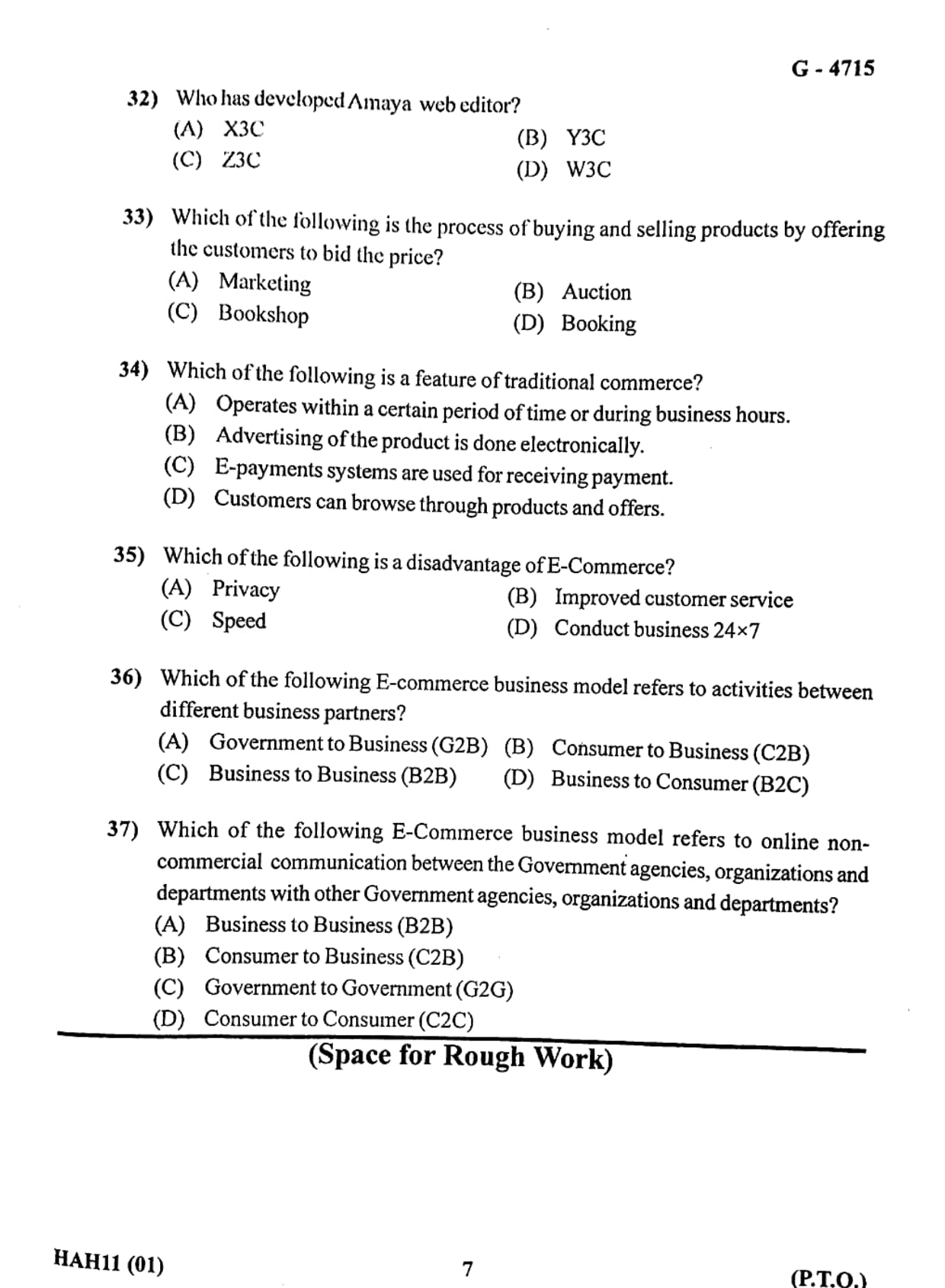
Who has developed Amaya web editor?
View Solution
Step 1: Understanding Amaya Web Editor.
Amaya is a web browser and web editor that was designed to demonstrate and test web standards. It allows users to create, edit, and browse web pages using standard technologies such as HTML, CSS, and XML.
Step 2: Role of W3C.
The World Wide Web Consortium (W3C) is an international organization responsible for developing web standards that ensure the long-term growth of the web. W3C was founded by Tim Berners-Lee, the inventor of the World Wide Web.
Amaya was developed by the W3C to serve as a test platform for new web technologies. It helps developers verify how standards such as HTML and CSS should be implemented correctly in browsers.
Step 3: Evaluating the options.
(A) X3C: Incorrect. This is not a real organization related to web standards.
(B) Y3C: Incorrect. This option does not correspond to any web development standards body.
(C) Z3C: Incorrect. This is also not related to the development of web technologies.
(D) W3C: Correct. The World Wide Web Consortium developed the Amaya web editor to support and test web standards.
Step 4: Conclusion.
Therefore, the Amaya web editor was developed by the World Wide Web Consortium (W3C).
Final Answer: W3C.
Quick Tip: \textbf{W3C (World Wide Web Consortium)} develops important web standards such as HTML, CSS, XML, and accessibility guidelines that help keep the web open and standardized.
Which of the following is the process of buying and selling products by offering the customers to bid the price?
View Solution
Step 1: Understanding bidding in commerce.
The question describes a process where customers are allowed to offer a price for a product through competitive bidding. In this process, multiple buyers compete by offering higher prices, and the product is sold to the highest bidder.
Step 2: Meaning of Auction.
An auction is a method of buying and selling goods or services where buyers place bids, and the highest bidder wins the item. Auctions are commonly used for selling antiques, artworks, rare collectibles, and even online products through platforms such as eBay.
Step 3: Analysis of the options.
(A) Marketing: Incorrect. Marketing refers to promoting and advertising products rather than bidding for them.
(B) Auction: Correct. Auction involves customers bidding to determine the final selling price of a product.
(C) Bookshop: Incorrect. A bookshop is simply a store where books are sold at fixed prices.
(D) Booking: Incorrect. Booking refers to reserving services such as tickets or hotel rooms.
Step 4: Conclusion.
Since the process described involves customers offering bids to determine the price, the correct answer is Auction.
Final Answer: Auction.
Quick Tip: In an \textbf{auction system}, the final price of an item is decided by competitive bidding among buyers rather than by a fixed price.
Which of the following is a feature of traditional commerce?
View Solution
Step 1: Understanding traditional commerce.
Traditional commerce refers to the buying and selling of goods through physical stores, markets, and face-to-face interactions. This system existed long before the development of online commerce and relies on physical presence of both buyer and seller.
Step 2: Key features of traditional commerce.
Traditional commerce has several defining characteristics. One of the most important features is that it operates only during fixed business hours. Physical shops usually open and close at specific times of the day, which means customers must visit during those hours to purchase goods.
Other common characteristics include direct interaction with the seller, physical inspection of products, and payments made through cash or traditional banking methods.
Step 3: Evaluation of options.
(A) Operates within a certain period of time or during business hours: Correct. Physical shops function only during fixed working hours.
(B) Advertising of the product is done electronically: Incorrect. Electronic advertising is mainly associated with e-commerce.
(C) E-payments systems are used for receiving payment: Incorrect. E-payments are a feature of online commerce.
(D) Customers can browse through products and offers: Incorrect. This feature is commonly associated with online shopping websites.
Step 4: Conclusion.
Thus, the correct feature of traditional commerce is that it operates during fixed business hours.
Final Answer: Operates within a certain period of time or during business hours.
Quick Tip: \textbf{Traditional commerce} involves physical stores and fixed business hours, while \textbf{e-commerce} allows customers to shop anytime through the internet.
Which of the following is a disadvantage of E-Commerce?
View Solution
Step 1: Understanding E-Commerce.
E-Commerce (Electronic Commerce) refers to the process of buying and selling goods and services through electronic networks, mainly the internet. It allows businesses and customers to perform transactions online without needing a physical marketplace.
Step 2: Advantages of E-Commerce.
E-commerce offers several benefits such as faster transactions, convenience, global reach, and the ability to conduct business at any time. Features like improved customer service, high speed of transactions, and 24\(\times\)7 availability are considered major advantages of online commerce.
Step 3: Identifying the disadvantage.
Despite its advantages, e-commerce also has some disadvantages. One of the most significant issues is privacy and security. When customers make online transactions, they must share sensitive information such as credit card numbers, banking details, and personal data. This information can sometimes be misused or hacked if proper security measures are not implemented.
Step 4: Evaluating the options.
(A) Privacy: Correct. Privacy and security risks are major disadvantages of e-commerce.
(B) Improved customer service: Incorrect. This is an advantage of e-commerce.
(C) Speed: Incorrect. Online transactions are usually fast and efficient.
(D) Conduct business 24\(\times\)7: Incorrect. This is a key benefit of e-commerce.
Step 5: Conclusion.
Therefore, the correct answer is Privacy, as concerns related to personal data security are considered a disadvantage of e-commerce systems.
Final Answer: Privacy.
Quick Tip: A major challenge of e-commerce is \textbf{data security and privacy protection}. Businesses must use encryption, secure payment gateways, and authentication methods to protect user information.
Which of the following E-commerce business model refers to activities between different business partners?
View Solution
Step 1: Understanding E-Commerce Business Models.
E-commerce involves different types of transactions depending on the participants involved in the transaction. These participants may include businesses, consumers, or government organizations. The structure of these interactions is known as an E-Commerce business model.
Step 2: Meaning of Business to Business (B2B).
Business to Business (B2B) refers to commercial transactions that occur between two or more businesses. In this model, companies buy products, raw materials, or services from other companies through electronic platforms.
Examples of B2B transactions include manufacturers purchasing raw materials from suppliers or retailers buying products from wholesalers through online platforms.
Step 3: Evaluating the options.
(A) Government to Business (G2B): Incorrect. This refers to transactions between government agencies and businesses.
(B) Consumer to Business (C2B): Incorrect. In this model, individuals offer products or services to businesses.
(C) Business to Business (B2B): Correct. This model refers to transactions between different businesses or business partners.
(D) Business to Consumer (B2C): Incorrect. This model refers to businesses selling products directly to customers.
Step 4: Conclusion.
Thus, when activities occur between different business partners through online platforms, the correct model is Business to Business (B2B).
Final Answer: Business to Business (B2B).
Quick Tip: \textbf{B2B E-commerce} is widely used in supply chains where manufacturers, wholesalers, and retailers conduct transactions electronically.
Which of the following E-Commerce business model refers to online non-commercial communication between the Government agencies, organizations and departments with other Government agencies, organizations and departments?
View Solution
Step 1: Understanding Government-based E-Commerce models.
In e-governance and digital administration, different types of interactions occur between government entities, businesses, and citizens. These interactions are categorized into different models such as G2G, G2B, and G2C.
Step 2: Meaning of Government to Government (G2G).
Government to Government (G2G) refers to the electronic sharing of information, services, or communication between different government departments, agencies, or organizations. This interaction helps improve coordination and efficiency within the public sector.
Examples include sharing administrative data between ministries, coordination between state and central governments, and electronic communication between departments.
Step 3: Evaluation of options.
(A) Business to Business (B2B): Incorrect. This refers to transactions between businesses.
(B) Consumer to Business (C2B): Incorrect. This refers to individuals providing products or services to businesses.
(C) Government to Government (G2G): Correct. This refers to digital communication and transactions between government agencies.
(D) Consumer to Consumer (C2C): Incorrect. This refers to transactions between individual consumers.
Step 4: Conclusion.
Therefore, the model that describes online communication between different government agencies and departments is Government to Government (G2G).
Final Answer: Government to Government (G2G).
Quick Tip: \textbf{G2G systems} help governments improve administrative efficiency by enabling fast and secure communication between departments and public institutions.
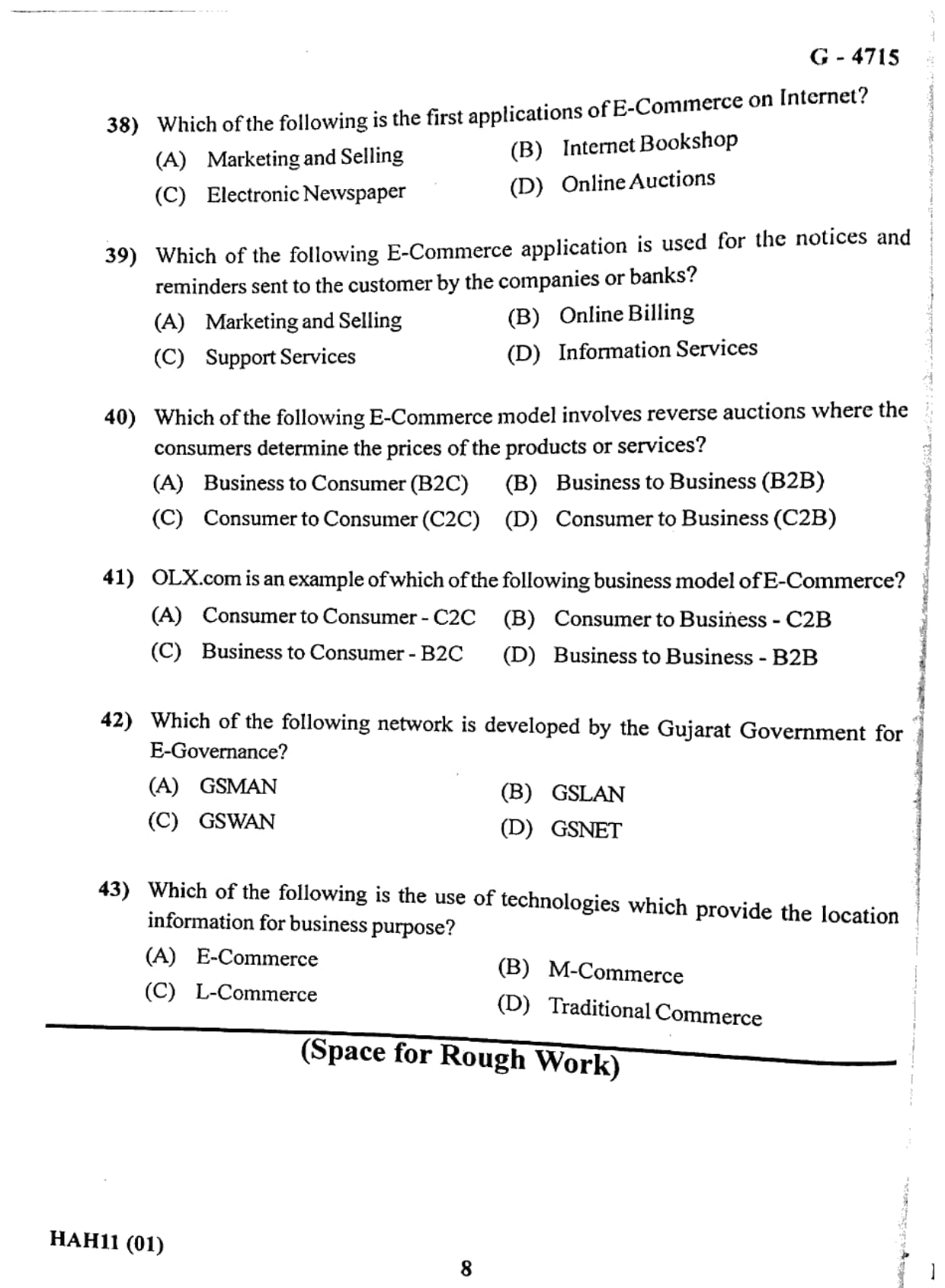
Which of the following is the first application of E-Commerce on Internet?
View Solution
Step 1: Understanding early applications of E-Commerce.
E-Commerce refers to the buying, selling, and exchange of goods and services through electronic networks such as the internet. However, in the early stages of the internet, commercial activities were limited. The first practical applications of internet-based services were related to information distribution.
Step 2: Role of electronic publishing.
Before online shopping platforms became common, the internet was mainly used to distribute information digitally. One of the earliest uses of the internet for commercial purposes was the electronic newspaper. Newspapers started publishing their content online so that readers could access news instantly from anywhere in the world.
This development marked the beginning of electronic information services and later paved the way for other forms of online commerce such as digital marketing, online stores, and online payment systems.
Step 3: Evaluating the options.
(A) Marketing and Selling: Incorrect. These developed later as e-commerce platforms evolved.
(B) Internet Bookshop: Incorrect. Online bookstores appeared after the early internet information services.
(C) Electronic Newspaper: Correct. One of the earliest internet applications related to electronic commerce was the digital publication of newspapers.
(D) Online Auctions: Incorrect. Online auctions became popular later with platforms like eBay.
Step 4: Conclusion.
Thus, the earliest application of E-Commerce on the internet was the Electronic Newspaper, which enabled digital information distribution.
Final Answer: Electronic Newspaper.
Quick Tip: The earliest use of the internet in commerce was mainly for \textbf{information services}, such as digital newspapers and online information portals.
Which of the following E-Commerce application is used for the notices and reminders sent to the customer by the companies or banks?
View Solution
Step 1: Understanding customer communication in E-Commerce.
In E-Commerce systems, businesses and financial institutions often communicate with customers through electronic means. These communications include notifications, reminders, alerts, and service-related messages. Such communications help customers stay informed about transactions, payment deadlines, and service updates.
Step 2: Role of Support Services.
Support Services in E-Commerce provide assistance and information to customers. These services include sending reminders about payment due dates, informing customers about policy updates, and providing notifications regarding account activity or order status.
Banks and companies frequently use automated systems to send such reminders via email, SMS, or app notifications.
Step 3: Evaluating the options.
(A) Marketing and Selling: Incorrect. This focuses on promoting and selling products.
(B) Online Billing: Incorrect. This relates to generating and paying bills online.
(C) Support Services: Correct. Support services include customer communication such as reminders and notices.
(D) Information Services: Incorrect. This mainly provides general information rather than reminders.
Step 4: Conclusion.
Thus, the E-Commerce application used for sending notices and reminders to customers is Support Services.
Final Answer: Support Services.
Quick Tip: Customer reminders such as payment alerts, service notifications, and account updates are part of \textbf{E-Commerce support services}.
Which of the following E-Commerce model involves reverse auctions where the consumers determine the prices of the products or services?
View Solution
Step 1: Understanding reverse auctions.
A reverse auction is a type of transaction where the buyer determines the price of the product or service. Instead of sellers setting the price, the customer proposes a price and businesses compete to provide the product or service at that price.
Step 2: Understanding the C2B model.
In the Consumer to Business (C2B) model, individuals offer products or services to businesses. In many cases, customers determine the price they are willing to pay, and companies respond by accepting or negotiating the offer.
Examples of this model include freelance marketplaces, crowdsourcing platforms, and reverse auction websites where customers decide the price they want to pay for services such as travel, design, or digital marketing.
Step 3: Evaluating the options.
(A) Business to Consumer (B2C): Incorrect. Businesses sell products directly to consumers.
(B) Business to Business (B2B): Incorrect. Transactions occur between companies.
(C) Consumer to Consumer (C2C): Incorrect. Individuals sell products directly to other individuals.
(D) Consumer to Business (C2B): Correct. Consumers determine the price, and businesses respond to the offer.
Step 4: Conclusion.
Therefore, the E-Commerce model that involves reverse auctions where consumers determine prices is Consumer to Business (C2B).
Final Answer: Consumer to Business (C2B).
Quick Tip: In the \textbf{C2B model}, the consumer has greater control over pricing and can offer services or propose prices to businesses.
OLX.com is an example of which of the following business model of E-Commerce?
View Solution
Step 1: Understanding the OLX platform.
OLX.com is a popular online marketplace that allows individuals to buy and sell products directly with other individuals through the internet. Users can post advertisements for products such as cars, electronics, furniture, and many other items.
Step 2: Understanding the C2C model.
The Consumer to Consumer (C2C) business model refers to transactions that occur directly between individual consumers without the involvement of a traditional business seller. Online platforms such as OLX act as intermediaries that facilitate these transactions by providing a digital marketplace.
Step 3: Evaluating the options.
(A) Consumer to Consumer (C2C): Correct. OLX allows individual consumers to sell products to other consumers.
(B) Consumer to Business (C2B): Incorrect. In this model, individuals sell products or services to businesses.
(C) Business to Consumer (B2C): Incorrect. This involves businesses selling products directly to customers, such as Amazon or Flipkart.
(D) Business to Business (B2B): Incorrect. This involves transactions between companies.
Step 4: Conclusion.
Since OLX allows individuals to sell and purchase goods directly from other individuals, it follows the Consumer to Consumer (C2C) e-commerce model.
Final Answer: Consumer to Consumer (C2C).
Quick Tip: Platforms such as \textbf{OLX, eBay, and Quikr} are common examples of the \textbf{C2C E-Commerce model}.
Which of the following network is developed by the Gujarat Government for E-Governance?
View Solution
Step 1: Understanding E-Governance networks.
E-Governance refers to the use of information and communication technologies to provide government services efficiently to citizens, businesses, and other government agencies. To support these services, governments often develop dedicated digital networks.
Step 2: Gujarat State Wide Area Network (GSWAN).
GSWAN (Gujarat State Wide Area Network) is an important infrastructure project developed by the Government of Gujarat to support e-governance initiatives. It connects various government departments, district offices, and administrative centers through a high-speed communication network.
This network helps improve coordination between government departments and enables efficient delivery of digital services to citizens.
Step 3: Evaluating the options.
(A) GSMAN: Incorrect. This is not a recognized e-governance network of Gujarat.
(B) GSLAN: Incorrect. This option does not represent the official government network.
(C) GSWAN: Correct. It is the official Gujarat State Wide Area Network used for e-governance.
(D) GSNET: Incorrect. This is not the correct name of the government network.
Step 4: Conclusion.
Therefore, the network developed by the Gujarat Government for e-governance services is GSWAN.
Final Answer: GSWAN.
Quick Tip: \textbf{GSWAN (Gujarat State Wide Area Network)} connects government offices across the state and supports efficient digital governance services.
Which of the following is the use of technologies which provide the location information for business purpose?
View Solution
Step 1: Understanding location-based commerce.
L-Commerce (Location Commerce) refers to a type of electronic commerce that uses location-based technologies such as GPS, mobile networks, and wireless communication to provide services based on the user's geographical location.
Step 2: Role of location technology in business.
Businesses use location-based technologies to offer personalized services to customers depending on their location. For example, mobile applications may show nearby restaurants, stores, or offers when a user enters a particular area.
These services help businesses target customers more effectively and improve marketing strategies by providing location-specific information.
Step 3: Evaluating the options.
(A) E-Commerce: Incorrect. This refers to online buying and selling in general.
(B) M-Commerce: Incorrect. Mobile commerce involves transactions through mobile devices but does not necessarily depend on location data.
(C) L-Commerce: Correct. This model uses location information for business and service delivery.
(D) Traditional Commerce: Incorrect. Traditional commerce does not involve digital location-based technologies.
Step 4: Conclusion.
Thus, the use of technologies that provide location information for business purposes is called Location Commerce (L-Commerce).
Final Answer: L-Commerce.
Quick Tip: \textbf{L-Commerce} uses technologies like \textbf{GPS and mobile networks} to deliver location-based services and advertisements to customers.
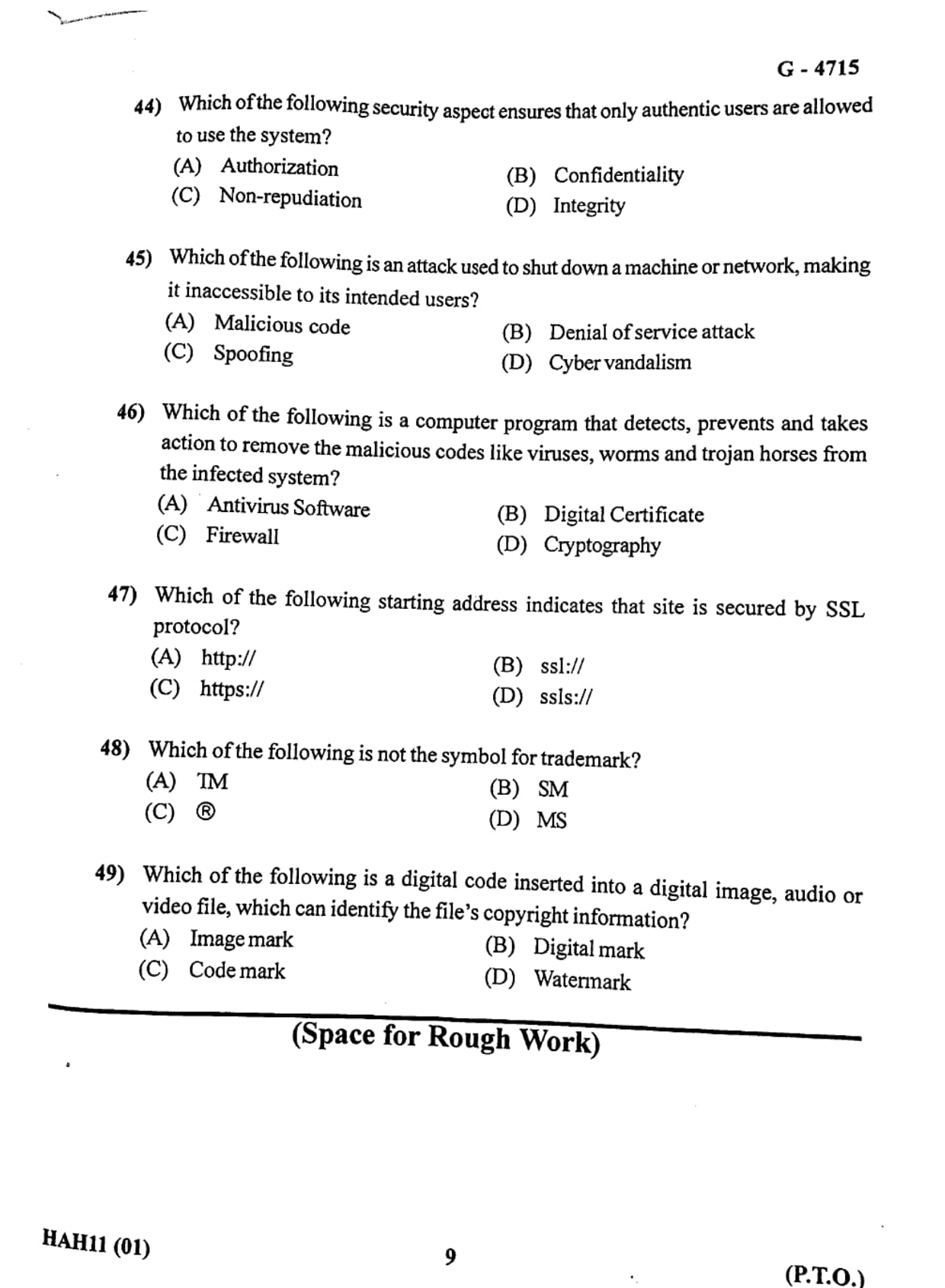
Which of the following security aspect ensures that only authentic users are allowed to use the system?
View Solution
Step 1: Understanding information security aspects.
In computer security, several principles are used to protect systems and data. These principles include confidentiality, integrity, authorization, authentication, and non-repudiation. Each principle ensures that information systems remain secure and accessible only to legitimate users.
Step 2: Meaning of Authorization.
Authorization refers to the process of granting or denying specific permissions to a user after their identity has been verified. Once a user is authenticated, the system determines what resources and services the user is allowed to access.
This ensures that only authorized and authentic users can use certain system functions or data. For example, administrators may have more permissions than regular users.
Step 3: Evaluation of options.
(A) Authorization: Correct. It ensures that only permitted users can access system resources.
(B) Confidentiality: Incorrect. It ensures that sensitive information is accessible only to authorized individuals but does not control system usage directly.
(C) Non-repudiation: Incorrect. It ensures that a sender cannot deny sending a message or performing a transaction.
(D) Integrity: Incorrect. It ensures that data remains accurate and unaltered.
Step 4: Conclusion.
Thus, the security aspect that ensures only authentic users are allowed to use the system is Authorization.
Final Answer: Authorization.
Quick Tip: \textbf{Authorization} controls user permissions in a system, ensuring that users can only access the resources they are allowed to use.
Which of the following is an attack used to shut down a machine or network, making it inaccessible to its intended users?
View Solution
Step 1: Understanding cyber attacks.
Cyber attacks are malicious activities performed to damage, disrupt, or gain unauthorized access to computer systems and networks. These attacks can affect websites, servers, or entire networks.
Step 2: Meaning of Denial of Service (DoS).
A Denial of Service (DoS) attack is a cyber attack in which an attacker attempts to make a machine, website, or network unavailable to its legitimate users. This is usually done by flooding the system with a huge number of requests so that it cannot respond to normal users.
As a result, the system becomes slow or completely inaccessible.
Step 3: Evaluation of options.
(A) Malicious code: Incorrect. It refers to harmful software such as viruses or worms but does not specifically shut down networks.
(B) Denial of service attack: Correct. It intentionally blocks access to a system or network.
(C) Spoofing: Incorrect. Spoofing involves impersonating another user or device.
(D) Cyber vandalism: Incorrect. It generally refers to defacing websites or damaging digital property.
Step 4: Conclusion.
Therefore, the attack used to shut down a machine or network and make it inaccessible to legitimate users is a Denial of Service attack.
Final Answer: Denial of service attack.
Quick Tip: A \textbf{DoS attack} overwhelms a system with excessive traffic so that legitimate users cannot access the service.
Which of the following is a computer program that detects, prevents and takes action to remove malicious codes like viruses, worms and trojan horses from the infected system?
View Solution
Step 1: Understanding malicious software.
Malicious software, commonly known as malware, includes harmful programs such as viruses, worms, and Trojan horses. These programs can damage files, steal information, or disrupt computer operations.
Step 2: Role of Antivirus Software.
Antivirus software is designed to protect computers from malware. It scans files and programs in the system, identifies suspicious or harmful code, and removes or quarantines them.
Modern antivirus programs also provide real-time protection by continuously monitoring system activities and blocking potential threats before they infect the system.
Step 3: Evaluation of options.
(A) Antivirus Software: Correct. It detects, prevents, and removes malicious software.
(B) Digital Certificate: Incorrect. It is used for verifying identity and secure communication.
(C) Firewall: Incorrect. It controls network traffic but does not remove viruses.
(D) Cryptography: Incorrect. It protects data through encryption techniques.
Step 4: Conclusion.
Thus, the computer program used to detect and remove malicious codes from a system is Antivirus Software.
Final Answer: Antivirus Software.
Quick Tip: \textbf{Antivirus software} protects computers from malware by scanning, detecting, and removing threats such as viruses, worms, and Trojan horses.
Which of the following starting address indicates that site is secured by SSL protocol?
View Solution
Step 1: Understanding website security protocols.
When users browse websites on the internet, data such as login credentials, payment details, and personal information may be transmitted between the user's browser and the web server. To protect this sensitive information from hackers or attackers, secure communication protocols are used.
Step 2: Role of SSL (Secure Socket Layer).
SSL (Secure Socket Layer) is a security technology that encrypts the communication between a web browser and a web server. Encryption ensures that even if data is intercepted, it cannot be easily read or misused.
Websites that use SSL display a secure protocol in their web address. Instead of starting with http://, they begin with https://. The extra "s" stands for secure.
Step 3: Analysis of the options.
(A) http:// Incorrect. This protocol does not provide encrypted communication.
(B) ssl:// Incorrect. This is not a valid URL protocol used by websites.
(C) https:// Correct. This indicates that the website uses SSL or TLS encryption to secure communication.
(D) ssls:// Incorrect. This is not a valid protocol.
Step 4: Conclusion.
Therefore, the web address starting with https:// indicates that the website is secured using SSL encryption.
Final Answer: https://
Quick Tip: Always look for \textbf{https:// and the lock symbol} in the browser address bar when entering passwords or payment details on websites.
Which of the following is not the symbol for trademark?
View Solution
Step 1: Understanding trademarks.
A trademark is a symbol, word, phrase, or design that legally identifies and distinguishes the products or services of one company from those of others. Trademarks help protect brand identity and prevent unauthorized use of a company's name or logo.
Step 2: Common trademark symbols.
There are several symbols used to represent trademarks depending on their legal status.
TM (Trademark): This symbol indicates that a word, logo, or phrase is being claimed as a trademark even if it has not yet been officially registered.
SM (Service Mark): This symbol is used for services rather than physical products but functions similarly to a trademark.
® (Registered Trademark): This symbol indicates that the trademark has been officially registered with the appropriate government authority.
Step 3: Evaluating the options.
(A) TM: Correct trademark symbol used for goods.
(B) SM: Correct symbol used for service marks.
(C) ®: Correct symbol used for registered trademarks.
(D) MS: Incorrect. This is not a recognized trademark symbol.
Step 4: Conclusion.
Therefore, MS is not a symbol used to represent a trademark.
Final Answer: MS
Quick Tip: \textbf{TM} is used for trademarks, \textbf{SM} for service marks, and \textbf{®} indicates a registered trademark.
Which of the following is a digital code inserted into a digital image, audio or video file, which can identify the file’s copyright information?
View Solution
Step 1: Understanding copyright protection in digital media.
Digital files such as images, videos, and audio recordings can easily be copied and shared on the internet. Because of this, it is important to protect the ownership rights of the creator or copyright holder.
Step 2: Meaning of Digital Watermarking.
A digital watermark is a hidden or visible code embedded into a digital file. This watermark contains information about the creator, copyright owner, or source of the content.
Digital watermarks help identify the ownership of the file and discourage unauthorized copying or distribution. They are widely used in photography, music, movies, and digital documents.
Step 3: Evaluation of the options.
(A) Image mark: Incorrect. This is not a recognized technical term for copyright identification.
(B) Digital mark: Incorrect. This is not a standard term in copyright protection.
(C) Code mark: Incorrect. This is not used to identify digital ownership.
(D) Watermark: Correct. A digital watermark is inserted into multimedia files to identify copyright information.
Step 4: Conclusion.
Therefore, the digital code used to identify copyright information in multimedia files is called a Watermark.
Final Answer: Watermark
Quick Tip: A \textbf{digital watermark} is used to embed ownership information inside digital media such as images, audio, or video files.
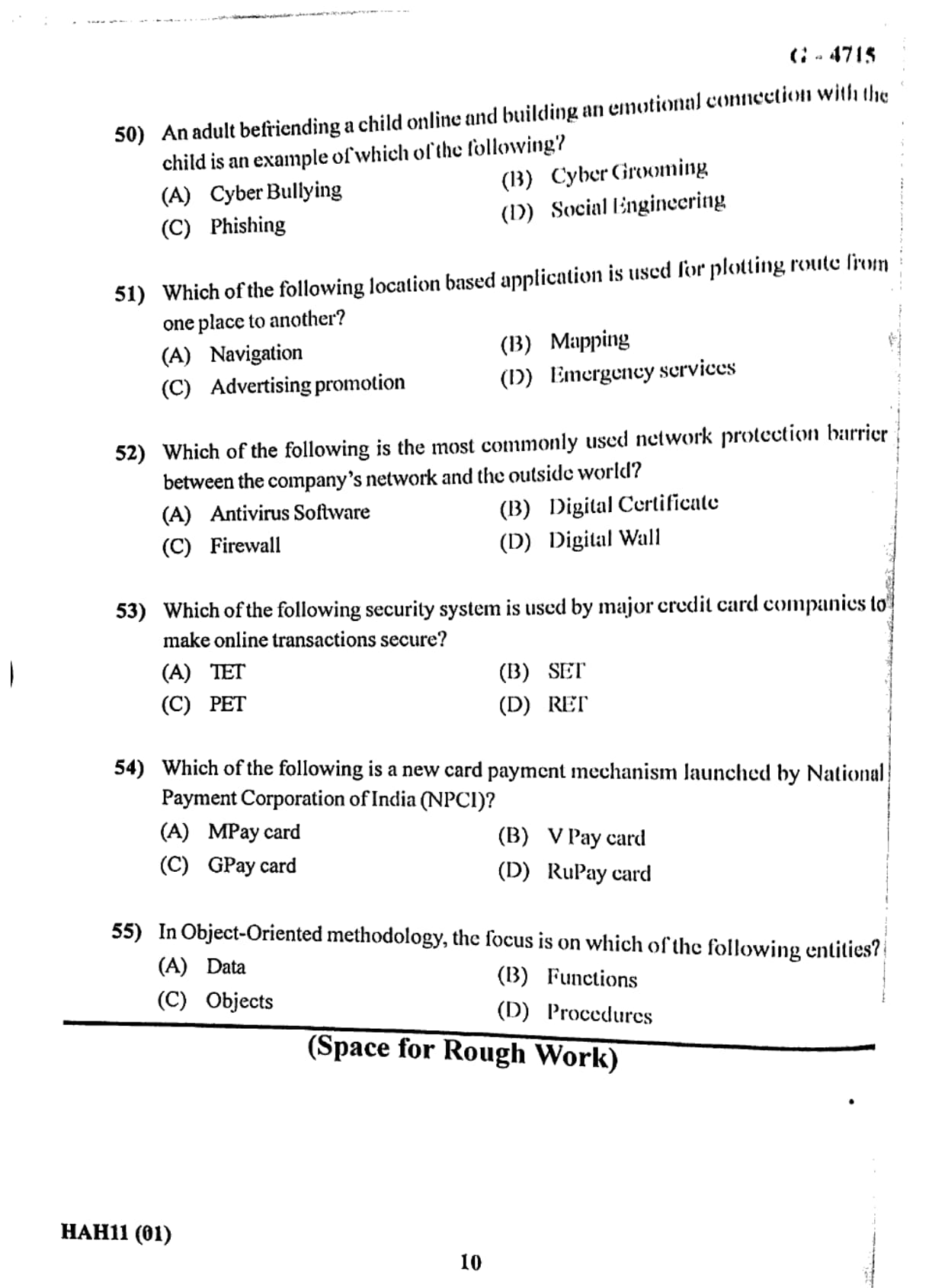
An adult befriending a child online and building an emotional connection with the child is an example of which of the following?
View Solution
Step 1: Understanding online safety threats.
With the widespread use of the internet and social media platforms, children often interact with unknown individuals online. While many interactions may be harmless, some individuals misuse these platforms to manipulate or exploit children. This has created the need to understand different types of online threats.
Step 2: Meaning of Cyber Grooming.
Cyber Grooming refers to a dangerous online activity where an adult builds trust and emotional connection with a child through online communication platforms such as chat rooms, social media, gaming platforms, or messaging applications.
The intention of the adult is usually to manipulate, exploit, or abuse the child. The groomer may pretend to be friendly, supportive, or even pretend to be another child in order to gain the child's trust.
Step 3: Analysis of the options.
(A) Cyber Bullying: Incorrect. Cyber bullying involves harassing or threatening someone online.
(B) Cyber Grooming: Correct. It specifically refers to adults forming emotional relationships with children online to exploit them.
(C) Phishing: Incorrect. Phishing involves tricking users into revealing sensitive information like passwords or bank details.
(D) Social Engineering: Incorrect. Social engineering is a broader technique used to manipulate people into revealing confidential information.
Step 4: Conclusion.
Therefore, the act of an adult befriending a child online and building an emotional relationship with the child is known as Cyber Grooming.
Final Answer: Cyber Grooming.
Quick Tip: \textbf{Cyber Grooming} is a serious online safety threat where predators manipulate children through emotional connections on the internet.
Which of the following location based application is used for plotting route from one place to another?
View Solution
Step 1: Understanding location-based applications.
Location-based applications use technologies such as GPS (Global Positioning System), mobile networks, and mapping software to determine the geographical location of a user. These technologies help users perform tasks such as navigation, searching nearby places, and tracking routes.
Step 2: Meaning of Navigation.
Navigation applications help users determine the best route from one location to another. They provide directions, distance information, estimated travel time, and traffic conditions. Popular navigation applications include Google Maps, Apple Maps, and Waze.
These applications calculate the optimal path and guide the user step-by-step during travel.
Step 3: Evaluation of options.
(A) Navigation: Correct. Navigation systems plot routes and guide users from one place to another.
(B) Mapping: Incorrect. Mapping provides geographic information but does not necessarily guide routes.
(C) Advertising promotion: Incorrect. This refers to marketing activities based on location data.
(D) Emergency services: Incorrect. These services provide assistance during emergencies but are not primarily used for route plotting.
Step 4: Conclusion.
Thus, the location-based application used for plotting routes between locations is Navigation.
Final Answer: Navigation.
Quick Tip: \textbf{Navigation applications} such as Google Maps use GPS technology to provide real-time directions and route guidance.
Which of the following is the most commonly used network protection barrier between the company's network and the outside world?
View Solution
Step 1: Understanding network security.
Organizations connect their internal networks to the internet in order to access online services, share information, and communicate with other systems. However, this connection also exposes the network to potential cyber threats such as hackers, malware, and unauthorized access.
To protect internal systems from these threats, organizations use security mechanisms that act as barriers between the internal network and external networks.
Step 2: Role of a Firewall.
A Firewall is a network security system that monitors and controls incoming and outgoing network traffic based on predetermined security rules. It acts as a protective barrier between a trusted internal network and untrusted external networks such as the internet.
Firewalls allow legitimate data to pass while blocking suspicious or harmful traffic.
Step 3: Analysis of options.
(A) Antivirus Software: Incorrect. Antivirus protects individual systems from malware but does not control network traffic.
(B) Digital Certificate: Incorrect. Digital certificates are used to verify identity in secure communication.
(C) Firewall: Correct. It acts as the main security barrier between internal networks and the internet.
(D) Digital Wall: Incorrect. This is not a standard security technology.
Step 4: Conclusion.
Therefore, the most commonly used protection barrier between a company's network and the outside world is a Firewall.
Final Answer: Firewall.
Quick Tip: A \textbf{Firewall} filters network traffic and prevents unauthorized access to internal networks.
Which of the following security system is used by major credit card companies to make online transactions secure?
View Solution
Step 1: Understanding online payment security.
With the rapid growth of E-Commerce, online transactions using credit cards have become very common. However, transmitting sensitive information such as credit card numbers, passwords, and personal details over the internet can expose users to cyber threats like hacking and data theft.
Therefore, special security systems and protocols are used by credit card companies and financial institutions to ensure that online transactions remain safe and protected.
Step 2: Meaning of SET (Secure Electronic Transaction).
SET (Secure Electronic Transaction) is a security protocol developed by major credit card companies such as Visa and MasterCard. It was designed specifically to secure credit card transactions over the internet.
SET uses advanced encryption techniques to ensure that payment information remains confidential and cannot be intercepted by unauthorized users during transmission. It also authenticates both the merchant and the cardholder, ensuring that both parties involved in the transaction are legitimate.
Step 3: Analysis of the options.
(A) TET: Incorrect. This is not a recognized online transaction security protocol.
(B) SET: Correct. It stands for Secure Electronic Transaction and is used to protect online credit card payments.
(C) PET: Incorrect. This does not represent a payment security protocol.
(D) RET: Incorrect. This is not related to online transaction security.
Step 4: Conclusion.
Thus, the security system used by major credit card companies to make online transactions secure is SET.
Final Answer: SET
Quick Tip: \textbf{SET (Secure Electronic Transaction)} was developed by credit card companies to ensure secure payment processing on the internet.
Which of the following is a new card payment mechanism launched by National Payment Corporation of India (NPCI)?
View Solution
Step 1: Understanding digital payment systems in India.
India has experienced rapid growth in digital payment systems due to government initiatives such as Digital India. To promote domestic card payment systems and reduce dependency on international networks like Visa and MasterCard, the National Payments Corporation of India introduced a new card system.
Step 2: Introduction of RuPay card.
RuPay is an indigenous card payment network launched by the National Payments Corporation of India (NPCI). The name RuPay is derived from the words Rupee and Payment.
It is designed to facilitate electronic payment at ATMs, POS machines, and online platforms. RuPay cards are widely used in government financial inclusion schemes such as Pradhan Mantri Jan Dhan Yojana.
Step 3: Analysis of options.
(A) MPay card: Incorrect. This is not a recognized national card payment network.
(B) V Pay card: Incorrect. This option does not correspond to an NPCI payment system.
(C) GPay card: Incorrect. Google Pay is a digital payment application, not a card network.
(D) RuPay card: Correct. It is India's domestic card payment network developed by NPCI.
Step 4: Conclusion.
Therefore, the card payment mechanism launched by the National Payments Corporation of India is the RuPay card.
Final Answer: RuPay card
Quick Tip: \textbf{RuPay} is India’s domestic card payment network developed by \textbf{NPCI} to promote digital payments within the country.
In Object-Oriented methodology, the focus is on which of the following entities?
View Solution
Step 1: Understanding Object-Oriented methodology.
Object-Oriented Programming (OOP) is a programming methodology that organizes software design around objects rather than functions or procedures. It focuses on representing real-world entities in the form of objects that contain both data and behavior.
Step 2: Meaning of objects in OOP.
An object is a fundamental unit of an object-oriented system. It consists of two main components:
Attributes (Data): These represent the properties or characteristics of the object.
Methods (Functions): These define the actions or behaviors that the object can perform.
For example, in a student management system, a Student object may contain attributes such as name, roll number, and marks, along with methods to calculate grades or update records.
Step 3: Analysis of options.
(A) Data: Incorrect. Traditional programming focuses mainly on data structures rather than objects.
(B) Functions: Incorrect. Procedural programming focuses on functions.
(C) Objects: Correct. Object-oriented methodology centers around objects and their interactions.
(D) Procedures: Incorrect. Procedural programming focuses on procedures rather than objects.
Step 4: Conclusion.
Therefore, in object-oriented methodology, the primary focus is on objects.
Final Answer: Objects
Quick Tip: In \textbf{Object-Oriented Programming}, programs are designed around \textbf{objects} that combine both data and functions.
Which of the following is not a visibility symbol?
View Solution
Step 1: Understanding visibility symbols in Object-Oriented Programming.
In Object-Oriented Programming (OOP) and particularly in UML class diagrams, visibility symbols are used to represent the accessibility of attributes and methods within a class. These symbols indicate whether a variable or method can be accessed from other classes or only within the same class.
Visibility symbols are an important concept in encapsulation, which is one of the fundamental principles of object-oriented programming.
Step 2: Common visibility symbols used in UML.
There are four common visibility indicators used in class diagrams:
+ (Public): Accessible from any other class.
- (Private): Accessible only within the same class.
\# (Protected): Accessible within the class and its subclasses.
\(\sim\) (Package): Accessible within the same package.
Step 3: Evaluating the given options.
(A) * : Incorrect as a visibility symbol. The asterisk (*) is generally used in programming for multiplication or pointer representation but not as a visibility symbol in UML diagrams.
(B) \(\sim\) : Correct visibility symbol representing package-level access.
(C) \# : Correct symbol representing protected visibility.
(D) + : Correct symbol representing public visibility.
Step 4: Conclusion.
Thus, the symbol that is not used as a visibility symbol in UML class diagrams is the asterisk (*).
Final Answer: *
Quick Tip: Common UML visibility symbols are \textbf{+ (public), - (private), \# (protected), and \(\sim\) (package)}.
In class diagram, composition is represented using which of the following symbols?
View Solution
Step 1: Understanding relationships in UML class diagrams.
In Unified Modeling Language (UML), class diagrams are used to visually represent the structure of a system. These diagrams show classes, attributes, methods, and relationships between classes.
Several types of relationships exist in UML diagrams such as association, aggregation, inheritance, and composition. Each relationship has its own graphical symbol.
Step 2: Meaning of composition.
Composition represents a strong "whole–part" relationship between two classes. In this relationship, the contained object cannot exist independently of the parent object. If the parent object is destroyed, the contained objects are also destroyed.
For example, a House class may contain Room objects. If the house is destroyed, the rooms cannot exist independently.
Step 3: Representation of composition in UML.
Composition is represented in UML diagrams using a filled (solid) diamond symbol. The filled diamond is placed near the class that represents the whole object.
Step 4: Evaluating the options.
(A) Empty diamond symbol: Incorrect. This represents aggregation, which is a weaker relationship.
(B) Filled diamond symbol: Correct. It represents composition.
(C) Empty triangle symbol: Incorrect. This is used for inheritance.
(D) Filled triangle symbol: Incorrect. Not used for composition in UML diagrams.
Step 5: Conclusion.
Therefore, composition in a UML class diagram is represented by a filled diamond symbol.
Final Answer: Filled diamond symbol
Quick Tip: In UML diagrams, \textbf{aggregation uses an empty diamond} while \textbf{composition uses a filled diamond}.
Which of the following option is referred to attributes that describe the object, in Object Oriented Programming?
View Solution
Step 1: Understanding objects in Object-Oriented Programming.
In Object-Oriented Programming (OOP), an object represents a real-world entity. Each object contains two important components:
Attributes (Data): These represent the properties or characteristics of the object.
Methods (Functions): These define the actions or behavior that the object can perform.
Step 2: Meaning of attributes.
Attributes describe the state of an object. For example, in a Student object, attributes may include name, roll number, age, and marks. These attributes store the information related to that object.
In programming terminology, such attributes are stored in data fields. These fields contain the actual values representing the object's properties.
Step 3: Evaluating the options.
(A) Character field: Incorrect. This refers to a data type rather than a concept describing object attributes.
(B) Text field: Incorrect. This is commonly used in user interfaces but not specifically for object attributes.
(C) Meta field: Incorrect. This term is not used for describing attributes of objects in OOP.
(D) Data field: Correct. Data fields store the attributes that describe the object.
Step 4: Conclusion.
Thus, the attributes that describe an object in object-oriented programming are referred to as data fields.
Final Answer: Data field
Quick Tip: In OOP, an \textbf{object} consists of \textbf{data fields (attributes)} and \textbf{methods (functions)}.
Which of the following stands for OMG?
View Solution
Step 1: Understanding OMG in software development.
In the field of software engineering and object-oriented technology, OMG is an important international organization. It develops standards that help different software systems communicate and work together efficiently.
Step 2: Meaning of OMG.
OMG stands for Object Management Group. It is an international, non-profit technology standards consortium that was founded in 1989.
The organization focuses on creating standards for distributed object systems, modeling languages, and system interoperability. One of its most well-known contributions is the development and promotion of the Unified Modeling Language (UML).
Step 3: Analysis of the options.
(A) Object Manager Group: Incorrect. This is not the correct expansion of OMG.
(B) Object Managed Group: Incorrect. This phrase is not used as a recognized technology organization.
(C) Object Management Group: Correct. This is the official name of the organization responsible for UML and many other standards.
(D) Object Managing Group: Incorrect. This is not the correct term used in the technology industry.
Step 4: Conclusion.
Therefore, the correct expansion of OMG is Object Management Group.
Final Answer: Object Management Group
Quick Tip: The \textbf{Object Management Group (OMG)} developed and maintains standards such as \textbf{UML (Unified Modeling Language)} used in software modeling.
Which of the following option protects data by making them inaccessible from outside in Object Oriented Programming?
View Solution
Step 1: Understanding data protection in Object-Oriented Programming.
Object-Oriented Programming (OOP) is based on several important principles such as encapsulation, abstraction, inheritance, and polymorphism. These principles help developers design secure, reusable, and maintainable programs.
Step 2: Meaning of Encapsulation.
Encapsulation is the process of combining data and the methods that operate on that data into a single unit called a class. It also restricts direct access to certain components of the object, which helps protect the internal data of the object.
Through encapsulation, sensitive data is hidden from outside access and can only be modified through controlled methods. This concept is also known as data hiding.
Step 3: Evaluation of options.
(A) Abstraction: Incorrect. Abstraction hides implementation details but does not primarily focus on protecting data from outside access.
(B) Encapsulation: Correct. It protects object data by restricting direct access and exposing it only through methods.
(C) Polymorphism: Incorrect. Polymorphism allows methods to behave differently depending on the object.
(D) Inheritance: Incorrect. Inheritance allows a class to inherit properties and behaviors from another class.
Step 4: Conclusion.
Thus, the concept that protects data by making it inaccessible from outside the class is Encapsulation.
Final Answer: Encapsulation
Quick Tip: \textbf{Encapsulation} protects object data by restricting direct access and allowing interaction only through defined methods.
Which of the following option enables to represent data in which the implementation details are hidden in Object Oriented Programming?
View Solution
Step 1: Understanding abstraction in programming.
In Object-Oriented Programming, developers often need to simplify complex systems. Instead of exposing every internal detail of a program, only the necessary features are shown to the user while the internal implementation remains hidden.
This concept is called abstraction.
Step 2: Meaning of Abstraction.
Abstraction refers to the process of hiding the complex implementation details of a system and showing only the essential features required for interaction. It helps reduce programming complexity and increases code clarity.
For example, when a user drives a car, they use the steering wheel, accelerator, and brake without needing to understand the complex internal mechanisms of the engine. Similarly, in programming, abstraction hides internal logic while presenting a simple interface.
Step 3: Evaluation of options.
(A) Abstraction: Correct. It hides implementation details and presents only the necessary functionality.
(B) Encapsulation: Incorrect. Encapsulation mainly protects data by restricting direct access.
(C) Polymorphism: Incorrect. Polymorphism allows objects to take multiple forms or behaviors.
(D) Inheritance: Incorrect. Inheritance allows one class to acquire properties and behaviors from another class.
Step 4: Conclusion.
Therefore, the concept that represents data while hiding implementation details in object-oriented programming is Abstraction.
Final Answer: Abstraction
Quick Tip: \textbf{Abstraction} simplifies complex systems by hiding implementation details and exposing only essential features.
Which of the following feature allows defining more than one method having same name but different signatures in a single class in Object Oriented Programming?
View Solution
Step 1: Understanding functions and methods in Object-Oriented Programming.
In Object-Oriented Programming (OOP), methods are functions that are associated with a class. These methods define the behavior of objects created from that class. In many situations, a programmer may want to perform similar operations using the same method name but with different types or numbers of parameters.
Step 2: Concept of Method Overloading.
Method Overloading is a feature of object-oriented programming that allows multiple methods to have the same name but different parameter lists within the same class. The difference may be in the number of parameters, type of parameters, or order of parameters.
This helps improve code readability and reusability because the same method name can perform different operations depending on the input arguments.
For example, a method named add() can be used to add two integers, three integers, or two floating point numbers depending on the parameters provided.
Step 3: Analysis of the options.
(A) File overloading: Incorrect. This is not a recognized concept in object-oriented programming.
(B) Object overloading: Incorrect. This term is not used in OOP terminology.
(C) Class overloading: Incorrect. Classes themselves are not overloaded.
(D) Method overloading: Correct. It allows multiple methods with the same name but different signatures within a class.
Step 4: Conclusion.
Therefore, the feature that allows multiple methods with the same name but different signatures in a single class is called Method Overloading.
Final Answer: Method overloading
Quick Tip: \textbf{Method overloading} improves program flexibility by allowing multiple methods with the same name but different parameters within the same class.
Which of the following represents non-exclusive relationship between two classes in Object Oriented Programming?
View Solution
Step 1: Understanding relationships between classes.
In Object-Oriented Programming, classes often interact with each other through relationships. These relationships help describe how objects of one class are connected to objects of another class.
Common relationships include association, aggregation, composition, and inheritance.
Step 2: Meaning of Aggregation.
Aggregation represents a weak or non-exclusive relationship between two classes. In this relationship, one class contains or uses objects of another class, but the contained objects can exist independently of the parent object.
For example, a Department class may contain Teacher objects. Even if the department is removed, teachers can still exist independently.
Step 3: Comparison with composition.
Composition represents a strong relationship where the contained object cannot exist independently.
However, aggregation represents a weaker relationship where objects can exist independently of each other.
Step 4: Evaluation of options.
(A) Composition: Incorrect. Composition represents a strong exclusive relationship.
(B) Aggregation: Correct. Aggregation represents a non-exclusive or weak relationship between classes.
(C) Polymorphism: Incorrect. Polymorphism refers to the ability of objects to take multiple forms.
(D) Abstraction: Incorrect. Abstraction hides implementation details.
Step 5: Conclusion.
Thus, the non-exclusive relationship between two classes in object-oriented programming is called Aggregation.
Final Answer: Aggregation
Quick Tip: \textbf{Aggregation} represents a weak relationship where objects can exist independently, while \textbf{composition} represents a strong dependency.
Which of the following option is known as existing class in Object Oriented Programming?
View Solution
Step 1: Understanding inheritance in Object-Oriented Programming.
Inheritance is an important concept in Object-Oriented Programming where one class acquires the properties and methods of another class. This allows programmers to reuse existing code and extend functionality.
In inheritance, there are two main classes involved:
Base class (or parent class) and Derived class (or child class).
Step 2: Meaning of Base Class.
A Base Class is the already existing class whose properties and methods are inherited by another class. It contains the original definitions of attributes and behaviors.
The new class that inherits from it is called the derived or child class.
Step 3: Explanation of other options.
(A) Base class: Correct. It is the existing class from which other classes inherit properties and methods.
(B) Subclass: Incorrect. A subclass is the class that inherits from another class.
(C) Child class: Incorrect. It refers to the derived class created from a base class.
(D) Derived class: Incorrect. This is the new class created through inheritance.
Step 4: Conclusion.
Therefore, the class that already exists and provides properties and methods to other classes is known as the Base Class.
Final Answer: Base class
Quick Tip: In inheritance, the \textbf{Base class} provides properties while the \textbf{Derived class} inherits and extends those properties.
How many basic (primitive) data types are supported in Java?
View Solution
Step 1: Understanding primitive data types in Java.
In the Java programming language, data types are broadly classified into two main categories: Primitive Data Types and Non-Primitive (Reference) Data Types. Primitive data types are the most basic data types that store simple values directly in memory.
Step 2: List of primitive data types in Java.
Java supports a total of eight primitive data types. These are used to store numbers, characters, and logical values.
The eight primitive data types in Java are:
1. byte – used to store small integers.
2. short – used to store slightly larger integer values.
3. int – the most commonly used integer type.
4. long – used for very large integer values.
5. float – used to store single-precision decimal numbers.
6. double – used to store double-precision decimal numbers.
7. char – used to store a single character.
8. boolean – used to store logical values such as true or false.
Step 3: Evaluating the options.
(A) 2: Incorrect. Java supports more than two primitive types.
(B) 4: Incorrect. Java supports more than four primitive types.
(C) 8: Correct. Java provides eight primitive data types.
(D) 16: Incorrect. The number of primitive types in Java is not sixteen.
Step 4: Conclusion.
Therefore, the number of primitive data types supported in Java is eight.
Final Answer: 8
Quick Tip: Java has \textbf{8 primitive data types}: byte, short, int, long, float, double, char, and boolean.
Which of the following is not allowed as first character in valid variable name in Java?
View Solution
Step 1: Understanding variable naming rules in Java.
In Java programming, variables are used to store data values. Each variable must have a valid name that follows certain rules defined by the Java language. These rules ensure that the compiler can correctly identify variables in a program.
Step 2: Rules for naming variables in Java.
A valid Java variable name must follow these important rules:
1. The variable name must start with a letter (A–Z or a–z), underscore (_), or dollar sign (
)).
2. It cannot begin with a numeric digit.
3. After the first character, the name can include letters, digits, underscores, or dollar symbols.
4. The variable name cannot be a reserved keyword such as int, class, or public.
Step 3: Analysis of the options.
(A) Underscore (_): Allowed as the first character in a variable name.
(B) Digit: Not allowed as the first character in a Java variable name.
(C) Letter: Allowed as the first character of a variable name.
(D) Dollar (
(): Also allowed as the first character in Java identifiers.
Step 4: Conclusion.
Therefore, the option that cannot be used as the first character in a valid Java variable name is a digit.
Final Answer: Digit
Quick Tip: In Java, variable names can start with a \textbf{letter, underscore (\_), or dollar (
))}, but \textbf{not with a digit}.
What will be the result of arithmetic expression –7%2 in Java?
View Solution
Step 1: Understanding the modulus operator.
In Java, the symbol % represents the modulus operator. The modulus operator is used to find the remainder after division of one number by another.
For example:
10 % 3 = 1 because when 10 is divided by 3, the remainder is 1.
Step 2: Evaluating the given expression.
The expression given is:
-7 % 2
First divide 7 by 2.
\[
7 \div 2 = 3 remainder 1
\]
Now apply the sign rule in Java. The result of the modulus operation takes the sign of the dividend. In this case, the dividend is -7.
Therefore:
\[
-7 % 2 = -1
\]
Step 3: Checking the options.
(A) -3: Incorrect because modulus gives remainder, not quotient.
(B) -1: Correct remainder when -7 is divided by 2.
(C) 1: Incorrect because Java keeps the sign of the dividend.
(D) -3.5: Incorrect because modulus operation does not produce decimal values.
Step 4: Conclusion.
Thus, the result of the arithmetic expression -7%2 in Java is -1.
Final Answer: -1
Quick Tip: In Java, the modulus operator \textbf{%} returns the remainder and keeps the \textbf{sign of the dividend}.
When the Java program gets compiled without errors, compiler creates a file with which of the following extension?
View Solution
Step 1: Understanding the Java compilation process.
In Java programming, a program is first written in a source file that has the extension .java. This source file contains the human-readable Java code written by the programmer.
Before the program can run, the Java compiler must convert this source code into a format that the Java Virtual Machine (JVM) can understand.
Step 2: Role of the Java Compiler.
The Java compiler, known as javac, translates the Java source code into an intermediate form called bytecode. This bytecode is stored in a file that has the extension .class.
This compiled file contains platform-independent instructions that can be executed by the Java Virtual Machine on different operating systems.
Step 3: Evaluation of options.
(A) .class: Correct. This is the bytecode file generated by the Java compiler.
(B) .txt: Incorrect. This extension represents a plain text file.
(C) .obj: Incorrect. This extension is used in some other programming languages such as C or C++.
(D) .exe: Incorrect. This extension is used for executable programs in Windows systems.
Step 4: Conclusion.
Therefore, when a Java program is compiled successfully, the compiler generates a file with the extension .class.
Final Answer: .class
Quick Tip: A Java program is written in a \textbf{.java} file and compiled into a \textbf{.class} bytecode file which runs on the JVM.
Which of the following menu option is used to execute Java program in SciTE editor?
View Solution
Step 1: Understanding SciTE editor.
SciTE is a lightweight text editor commonly used for programming languages such as C, C++, Python, and Java. It provides tools for editing, compiling, and running programs within the editor environment.
Step 2: Executing programs in SciTE.
In SciTE, once the program is written and saved, the user can execute the program using specific options available in the Tools menu. These menu commands allow the program to be compiled and executed easily without leaving the editor.
The command used to run or execute the program in SciTE is Tools → Go. This command compiles the code and then runs the program.
Step 3: Evaluation of options.
(A) Tools → Play: Incorrect. This option does not exist in SciTE for program execution.
(B) Tools → Run: Incorrect. Although many IDEs use this term, SciTE specifically uses the Go command.
(C) Tools → Execute: Incorrect. This option is not used in SciTE.
(D) Tools → Go: Correct. This option is used to execute the program in SciTE.
Step 4: Conclusion.
Therefore, the correct menu option used to execute a Java program in the SciTE editor is Tools → Go.
Final Answer: Tools → Go
Quick Tip: In the \textbf{SciTE editor}, the shortcut \textbf{F5} or the option \textbf{Tools → Go} is commonly used to compile and run programs.
Which of the following symbol is used to write single line comment in Java program?
View Solution
Step 1: Understanding comments in programming.
Comments are lines in a program that are ignored by the compiler. They are used by programmers to explain code, provide documentation, or make the program easier to understand.
Comments do not affect the execution of the program.
Step 2: Types of comments in Java.
Java supports two main types of comments:
Single-line comments: These comments start with the symbol //. Everything written after this symbol on the same line is treated as a comment.
Multi-line comments: These comments start with /* and end with */. They can span multiple lines.
Step 3: Evaluation of options.
(A) /* : Incorrect. This symbol begins a multi-line comment but does not represent a single-line comment.
(B) *\textbackslash : Incorrect. This symbol does not represent a comment in Java.
(C) // : Correct. It is used to write a single-line comment in Java.
(D) \textbackslash\textbackslash : Incorrect. This symbol is not used for comments in Java.
Step 4: Conclusion.
Thus, the symbol used to write a single-line comment in Java is //.
Final Answer: //
Quick Tip: In Java, \textbf{//} is used for single-line comments while \textbf{/* ... */} is used for multi-line comments.
Which of the following unary operator is called as increment operator in Java?
View Solution
Step 1: Understanding unary operators in Java.
In Java programming, an operator is a symbol used to perform operations on variables and values. Operators can be categorized into several types such as arithmetic operators, relational operators, logical operators, and unary operators.
A unary operator operates on only one operand. These operators are commonly used to increment, decrement, or negate a value.
Step 2: Meaning of increment operator.
The increment operator (++) is a unary operator used in Java to increase the value of a variable by 1. It can be used in two ways:
Pre-increment (++x): The value is increased first and then used in the expression.
Post-increment (x++): The current value is used first and then increased.
For example:
int x = 5;
x++;
After execution, the value of x becomes 6.
Step 3: Evaluation of options.
(A) \#\#: Incorrect. This symbol is not a valid operator in Java.
(B) ++: Correct. This is the increment operator in Java.
(C)
(
): Incorrect. This symbol is not used as an operator in Java.
(D) --: Incorrect. This represents the decrement operator, which decreases the value by 1.
Step 4: Conclusion.
Therefore, the unary operator called the increment operator in Java is ++.
Final Answer: ++
Quick Tip: The \textbf{++ operator} increases a variable by 1, while the \textbf{-- operator} decreases a variable by 1.
Which of the following statement is used when there are many alternative actions to be taken depending upon the value of a variable or expression in Java?
View Solution
Step 1: Understanding decision-making statements in Java.
In Java programming, decision-making statements allow the program to execute different blocks of code depending on certain conditions. These statements help control the flow of the program based on variable values or logical expressions.
Step 2: Purpose of the switch statement.
The switch statement is used when a program must choose between many possible actions depending on the value of a variable or expression. Instead of writing multiple if–else conditions, a switch statement provides a more organized and readable way to handle multiple choices.
The switch statement compares the value of a variable with different case labels and executes the matching block of code.
Example structure:
switch(expression)
{
case value1:
statements;
break;
case value2:
statements;
break;
default:
statements;
}
Step 3: Evaluation of options.
(A) switch: Correct. It is used for multiple alternative choices based on the value of an expression.
(B) for: Incorrect. It is used for looping, not decision making.
(C) while: Incorrect. It is also used for looping.
(D) do...while: Incorrect. This is another looping statement.
Step 4: Conclusion.
Thus, when many alternative actions must be taken depending on the value of a variable, the appropriate statement in Java is the switch statement.
Final Answer: switch
Quick Tip: The \textbf{switch statement} is useful when multiple conditions depend on the value of the same variable.
Which of the following loop is exit-controlled loop in Java?
View Solution
Step 1: Understanding loops in Java.
Loops are used in programming to execute a block of code repeatedly until a certain condition becomes false. Java provides several looping constructs such as for, while, and do...while.
Loops can be categorized as entry-controlled loops or exit-controlled loops.
Step 2: Entry-controlled vs exit-controlled loops.
In an entry-controlled loop, the condition is checked before executing the loop body. Examples include the for loop and while loop.
In an exit-controlled loop, the loop body executes first and the condition is checked afterward. This ensures that the loop executes at least once regardless of the condition.
Step 3: Understanding the do...while loop.
The do...while loop is the only exit-controlled loop in Java. Its structure is:
do
{
statements;
}
while(condition);
In this loop, the statements inside the loop are executed first and then the condition is evaluated.
Step 4: Evaluation of options.
(A) for: Incorrect. It is an entry-controlled loop.
(B) while: Incorrect. It is also an entry-controlled loop.
(C) do...while: Correct. This is an exit-controlled loop.
(D) until: Incorrect. Java does not have an until loop.
Step 5: Conclusion.
Therefore, the loop that is classified as an exit-controlled loop in Java is the do...while loop.
Final Answer: do...while
Quick Tip: A \textbf{do...while loop} executes at least once because the condition is checked after the loop body.
Which of the following statement is used to transfer the control outside switch or loop structure in Java?
View Solution
Step 1: Understanding control statements in Java.
In Java programming, control statements are used to manage the flow of execution of a program. These statements determine how and when specific blocks of code should be executed. Some common control statements include break, continue, return, and switch.
Step 2: Role of the break statement.
The break statement is used to terminate the execution of a loop or switch statement immediately. When the break statement is encountered, the program control exits the loop or switch block and continues execution with the next statement following that block.
This statement is particularly useful when a certain condition is satisfied and there is no need to continue executing the remaining iterations of a loop or cases of a switch statement.
Step 3: Evaluation of options.
(A) send: Incorrect. This is not a valid control statement in Java.
(B) back: Incorrect. Java does not have a statement called back.
(C) continue: Incorrect. The continue statement skips the current iteration but does not exit the loop entirely.
(D) break: Correct. It immediately transfers control outside the loop or switch structure.
Step 4: Conclusion.
Thus, the statement used to transfer control outside a switch or loop structure in Java is the break statement.
Final Answer: break
Quick Tip: The \textbf{break statement} exits a loop or switch block immediately and continues program execution with the next statement.
Which of the following defines attributes and methods in Java?
View Solution
Step 1: Understanding classes in Java.
In Object-Oriented Programming, a class is a blueprint or template used to create objects. It defines the structure and behavior that the objects created from it will possess.
A class contains two major components:
Attributes (Variables): These represent the properties or characteristics of an object.
Methods (Functions): These define the actions or behaviors that objects can perform.
Step 2: Role of class in Java programs.
When a class is created, it acts as a design for objects. Multiple objects can be created using the same class, and each object will have its own set of attribute values but share the same methods defined in the class.
For example, a Student class may define attributes such as name, roll number, and marks, along with methods such as displayDetails().
Step 3: Evaluation of options.
(A) Class: Correct. A class defines attributes and methods in Java.
(B) Object: Incorrect. An object is an instance of a class, not the definition of attributes and methods.
(C) Instance: Incorrect. Instance is another term for an object created from a class.
(D) Variable: Incorrect. A variable stores a value but does not define methods.
Step 4: Conclusion.
Therefore, the entity that defines attributes and methods in Java is the Class.
Final Answer: Class
Quick Tip: A \textbf{class} defines the properties (attributes) and behaviors (methods) that objects will have in Java.
Which of the following operator creates an object and returns its reference in Java?
View Solution
Step 1: Understanding object creation in Java.
In Java programming, objects are created from classes. A class provides the blueprint, but the actual memory allocation and creation of an object occurs when a special operator is used.
Step 2: Role of the new operator.
The new operator is used to create objects in Java. When this operator is used, it performs the following actions:
1. Allocates memory for the object in the heap.
2. Initializes the object by calling the class constructor.
3. Returns a reference to the newly created object.
For example:
Student s = new Student();
Here, the new operator creates an object of the Student class and returns its reference, which is stored in variable s.
Step 3: Evaluation of options.
(A) dot (.): Incorrect. This operator is used to access members of an object.
(B) new: Correct. It creates an object and returns its reference.
(C) colon (:): Incorrect. This operator is not used for object creation in Java.
(D) assignment (=): Incorrect. This operator assigns values but does not create objects.
Step 4: Conclusion.
Thus, the operator used in Java to create an object and return its reference is the new operator.
Final Answer: new
Quick Tip: The \textbf{new keyword} in Java is used to create objects and allocate memory for them at runtime.
Which method is invoked automatically with creation of an object in Java?
View Solution
Step 1: Understanding object creation in Java.
In Java programming, objects are created from classes. When an object is created using the new keyword, Java automatically initializes the object so that it can be used properly within the program.
During this process, a special method known as a constructor is automatically called. The constructor prepares the object by initializing its variables and setting up the initial state of the object.
Step 2: Understanding constructors.
A constructor is a special method in Java that has the same name as the class and does not have a return type. Its main purpose is to initialize objects when they are created.
For example:
class Student
{
Student()
{
System.out.println("Object Created");
}
}
When an object of the Student class is created, the constructor Student() is automatically executed.
Step 3: Evaluation of options.
(A) Instance method: Incorrect. Instance methods must be called explicitly using an object.
(B) Constructor: Correct. It is automatically invoked when an object is created.
(C) Class method: Incorrect. Class methods must be called explicitly and are not automatically executed during object creation.
(D) Object method: Incorrect. This is not a standard term used for automatic invocation in Java.
Step 4: Conclusion.
Therefore, the method that is automatically invoked when an object is created in Java is the constructor.
Final Answer: Constructor
Quick Tip: A \textbf{constructor} in Java is automatically called when an object is created and is used to initialize the object's data.
Which of the following option is a special portion of memory, where the objects live in Java?
View Solution
Step 1: Understanding memory management in Java.
Java uses different types of memory areas to store program data. These memory areas include the stack memory, heap memory, and method area. Each of these memory areas serves a different purpose in storing program information.
Step 2: Role of heap memory.
The heap is a special memory region used by Java to store objects that are created during program execution. Whenever an object is created using the new keyword, the memory required for that object is allocated in the heap memory.
Heap memory allows dynamic memory allocation, meaning that objects can be created and destroyed while the program is running.
Step 3: Automatic memory management.
Java automatically manages heap memory using a process called garbage collection. The garbage collector identifies objects that are no longer being used and frees their memory.
Step 4: Evaluation of options.
(A) leap: Incorrect. This is not a valid memory area in Java.
(B) deap: Incorrect. This is not a recognized Java memory structure.
(C) heap: Correct. Objects in Java are stored in heap memory.
(D) meap: Incorrect. This term is not used in Java memory management.
Step 5: Conclusion.
Therefore, the special portion of memory where objects are stored in Java is called the heap.
Final Answer: heap
Quick Tip: All objects created using the \textbf{new keyword} in Java are stored in the \textbf{heap memory}.
Which of the following option looks for unused objects and reclaims the memory that those objects are using in Java?
View Solution
Step 1: Understanding memory management in Java.
One of the most important features of Java is its automatic memory management system. Unlike some programming languages where programmers must manually free memory, Java automatically manages memory allocation and deallocation.
Step 2: Role of garbage collection.
Java uses a mechanism called Garbage Collection. This mechanism identifies objects that are no longer being used by the program and removes them from memory.
When the garbage collector removes these unused objects, it frees the memory space so that it can be reused for new objects.
Step 3: Working of the garbage collector.
The garbage collector continuously monitors objects stored in heap memory. If it finds objects that no longer have references pointing to them, it considers them unused and removes them automatically.
This process helps prevent memory leaks and improves the efficiency of Java programs.
Step 4: Evaluation of options.
(A) garbage collector: Correct. It identifies unused objects and reclaims memory.
(B) garbage bin: Incorrect. This is not a Java memory management term.
(C) recycle collector: Incorrect. This is not used in Java.
(D) recycle bin: Incorrect. This term is related to operating systems, not Java memory management.
Step 5: Conclusion.
Thus, the component that finds unused objects and reclaims their memory in Java is the Garbage Collector.
Final Answer: garbage collector
Quick Tip: The \textbf{Garbage Collector} automatically removes unused objects from heap memory in Java.
Which of the following variables defined inside methods or blocks in Java?
View Solution
Step 1: Understanding variables in Java.
In Java programming, variables are used to store data values that can be used and modified during program execution. Java supports different types of variables depending on where they are declared and how they are used in a program.
Step 2: Types of variables in Java.
There are mainly three common types of variables in Java:
Local variables: These variables are declared inside a method, constructor, or block of code. They are accessible only within that specific block where they are defined.
Instance variables: These variables are declared inside a class but outside methods. They belong to objects of the class.
Class variables (static variables): These are declared using the static keyword and are shared by all objects of the class.
Step 3: Evaluating the options.
(A) File variable: Incorrect. Java does not define a variable type called file variable.
(B) Class variable: Incorrect. These are declared inside a class but outside methods.
(C) Instance variable: Incorrect. These belong to objects of a class and are declared outside methods.
(D) Local variable: Correct. These variables are declared inside methods or blocks.
Step 4: Conclusion.
Thus, the variable defined inside methods or blocks in Java is called a Local Variable.
Final Answer: Local variable
Quick Tip: \textbf{Local variables} exist only within the method or block where they are declared and cannot be accessed outside it.
Which of the following is not the four P’s of protection in Java?
View Solution
Step 1: Understanding access protection in Java.
Java provides access control mechanisms that help restrict how classes, variables, and methods can be accessed from different parts of a program. These mechanisms ensure data security and proper encapsulation in object-oriented programming.
Step 2: The four P’s of protection.
Java commonly refers to its access control modifiers as the four P’s of protection. These include:
Public: Members declared as public can be accessed from anywhere in the program.
Protected: Members declared as protected can be accessed within the same package and also by subclasses in other packages.
Private: Members declared as private can only be accessed within the same class.
Package (Default): Members without an access modifier are accessible only within the same package.
Step 3: Evaluating the options.
(A) Public: Correct access modifier in Java.
(B) Packed: Incorrect. This is not an access modifier in Java.
(C) Protected: Correct access modifier.
(D) Private: Correct access modifier.
Step 4: Conclusion.
Therefore, the option that is not part of the four P’s of protection in Java is Packed.
Final Answer: Packed
Quick Tip: Java access modifiers include \textbf{public, protected, private, and default (package-level)} access.
Which of the following level is the highest level of protection in Java?
View Solution
Step 1: Understanding access levels in Java.
Access modifiers in Java determine the visibility and accessibility of classes, methods, and variables. These modifiers control how different parts of a program can interact with each other.
Step 2: Types of access modifiers.
Java provides four main access levels:
Public: Accessible from anywhere in the program and by all classes.
Protected: Accessible within the same package and also by subclasses.
Default (Package): Accessible only within the same package.
Private: Accessible only within the same class.
Step 3: Highest level of protection.
Among all these access levels, private provides the highest level of protection because the members declared as private cannot be accessed outside the class in which they are defined.
This ensures strong encapsulation and data hiding, which are important principles of object-oriented programming.
Step 4: Evaluation of options.
(A) Public: Least restrictive access level.
(B) Packed: Not a valid access modifier.
(C) Protected: Allows access within package and subclasses.
(D) Private: Correct. It provides the highest level of protection.
Step 5: Conclusion.
Thus, the highest level of protection in Java is provided by the private access modifier.
Final Answer: Private
Quick Tip: The \textbf{private} modifier restricts access so that the member can only be used within the same class.
Which of the following method is used to allow data to be modified by others in Java?
View Solution
Step 1: Understanding methods in Object-Oriented Programming.
In Java and other Object-Oriented Programming languages, methods are used to access and manipulate the data stored inside objects. These methods help maintain data security and control how the internal data of a class is accessed or modified.
Step 2: Types of commonly used methods.
Two important types of methods related to object data are:
Accessor methods: These methods are used to read or retrieve the value of variables. They are often called getter methods.
Mutator methods: These methods are used to modify or change the value of variables. They are commonly called setter methods.
Step 3: Role of mutator methods.
A mutator method allows other parts of the program to modify the value of an object's data member. This controlled modification ensures proper data management while still maintaining encapsulation.
Example:
public void setAge(int age)
{
this.age = age;
}
Here, the method changes the value of the variable age.
Step 4: Evaluation of options.
(A) tutator: Incorrect. This is not a valid programming term.
(B) messor: Incorrect. This is not a recognized method type.
(C) mutator: Correct. It modifies the value of an object's data.
(D) accessor: Incorrect. Accessor methods only retrieve values but do not modify them.
Step 5: Conclusion.
Thus, the method used to allow data to be modified in Java is called a Mutator Method.
Final Answer: mutator
Quick Tip: \textbf{Mutator methods} modify data, while \textbf{Accessor methods} retrieve data from objects.
In Java, which of the following keyword is used to create a subclass in the class definition?
View Solution
Step 1: Understanding inheritance in Java.
Inheritance is an important concept in Object-Oriented Programming that allows one class to acquire the properties and behaviors of another class. This helps in code reuse and improves program structure.
Step 2: Role of the extends keyword.
In Java, inheritance is implemented using the extends keyword. When a class extends another class, it becomes a subclass and inherits the attributes and methods of the parent class.
Example:
class Animal
{
void eat()
{
System.out.println("Animal eats");
}
}
class Dog extends Animal
{
void bark()
{
System.out.println("Dog barks");
}
}
Here, the Dog class inherits properties from the Animal class.
Step 3: Evaluation of options.
(A) sub: Incorrect. This keyword does not exist in Java.
(B) extends: Correct. Used to create a subclass.
(C) child: Incorrect. This term is used conceptually but not as a keyword.
(D) derived: Incorrect. This is a concept but not a Java keyword.
Step 4: Conclusion.
Therefore, the keyword used to create a subclass in Java is extends.
Final Answer: extends
Quick Tip: The \textbf{extends keyword} allows one class to inherit properties and methods from another class in Java.
Which of the following refer to the starting index value in arrays of Java program?
View Solution
Step 1: Understanding arrays in Java.
An array in Java is a data structure that stores multiple values of the same type in a single variable. Each value in the array is stored in a specific position known as an index.
Step 2: Indexing in arrays.
Java uses zero-based indexing. This means that the first element of an array is stored at index position 0. The second element is stored at index 1, and so on.
Example:
int arr[] = {10, 20, 30};
Here:
arr[0] = 10
arr[1] = 20
arr[2] = 30
Step 3: Evaluation of options.
(A) 0: Correct. Arrays in Java start from index 0.
(B) 1: Incorrect. Java does not use 1-based indexing.
(C) null: Incorrect. Null represents absence of value, not index.
(D) -1: Incorrect. Negative indices are not valid in Java arrays.
Step 4: Conclusion.
Thus, the starting index value in Java arrays is 0.
Final Answer: 0
Quick Tip: Java arrays always begin with index \textbf{0}, which is called zero-based indexing.
If ‘str’ is the object of string class and its content is “Best-Luck”, then what is the value of str.length() in Java?
View Solution
Step 1: Understanding the String length() method.
In Java, the String class provides a method called length() that returns the number of characters present in a string. Every character in the string is counted, including letters, numbers, spaces, and special symbols.
Step 2: Analyzing the given string.
The string provided is:
"Best-Luck"
Now we count the characters:
B = 1
e = 2
s = 3
t = 4
- = 5
L = 6
u = 7
c = 8
k = 9
Step 3: Determining the result.
The total number of characters in the string is 9. Therefore, the method str.length() will return the value 9.
Step 4: Conclusion.
Thus, the length of the string "Best-Luck" is 9 characters.
Final Answer: 9
Quick Tip: The \textbf{length()} method of the String class returns the total number of characters in a string, including spaces and special characters.
What type of value is returned when we use get method of Calendar class with constant DAY_OF_WEEK as an argument in Java?
View Solution
Step 1: Understanding the Calendar class in Java.
The Calendar class in Java is part of the java.util package. It is used to manipulate dates and times such as retrieving the current date, time, month, or day of the week.
Step 2: Understanding the get() method.
The get() method of the Calendar class is used to obtain a specific field of date or time. It takes a constant as an argument such as Calendar.YEAR, Calendar.MONTH, or Calendar.DAY_OF_WEEK.
Example:
Calendar cal = Calendar.getInstance();
int day = cal.get(Calendar.DAY_OF_WEEK);
Here, the method returns the day of the week as a number.
Step 3: Return type of the get() method.
The value returned by the get() method is always of type integer. The integer represents a numeric value corresponding to the field requested.
For example:
1 = Sunday
2 = Monday
3 = Tuesday
and so on.
Step 4: Evaluation of options.
(A) int: Correct. The get() method returns an integer value.
(B) char: Incorrect. The method does not return a character value.
(C) string: Incorrect. The return type is not a string.
(D) boolean: Incorrect. The method does not return a boolean value.
Step 5: Conclusion.
Thus, the value returned when using the get() method with DAY_OF_WEEK is of type int.
Final Answer: int
Quick Tip: The \textbf{Calendar.get()} method in Java always returns an \textbf{integer value} representing the requested date or time field.
Which of the following option is useful to represent vector, matrix and other multi-dimensional data in Java?
View Solution
Step 1: Understanding data structures in Java.
In Java programming, data structures are used to store and manage collections of data efficiently. One of the most commonly used data structures for storing multiple values is the array.
Step 2: Understanding arrays.
An array is a collection of elements of the same data type stored in contiguous memory locations. Arrays allow programmers to store multiple values in a single variable.
Arrays can also be multi-dimensional.
One-dimensional arrays represent lists or vectors.
Two-dimensional arrays represent matrices or tables.
Step 3: Example of multi-dimensional array.
Example of a matrix in Java:
int matrix[][] = {{1,2,3}, {4,5,6}};
Here the matrix is a two-dimensional array used to represent rows and columns.
Step 4: Evaluation of options.
(A) class: Incorrect. A class defines objects but does not directly represent multi-dimensional data structures.
(B) object: Incorrect. An object represents an instance of a class.
(C) instance: Incorrect. Instance refers to an object created from a class.
(D) array: Correct. Arrays are used to represent vectors, matrices, and other multi-dimensional data.
Step 5: Conclusion.
Therefore, the option used to represent vectors, matrices, and multi-dimensional data in Java is Array.
Final Answer: array
Quick Tip: A \textbf{multi-dimensional array} in Java can represent complex data structures such as matrices and tables.
int marks[] = {90, 60, 70, 65, 80};
From the above given Java statement which of the following value is returned by int marks[4]?
View Solution
Step 1: Understanding array indexing in Java.
In Java, arrays follow the concept of zero-based indexing. This means that the first element of the array starts at index 0.
Therefore, the elements of the array will be stored as follows:
marks[0] = 90
marks[1] = 60
marks[2] = 70
marks[3] = 65
marks[4] = 80
Step 2: Finding the requested element.
The question asks for the value stored at marks[4]. According to the indexing shown above, the value at position 4 is 80.
Step 3: Evaluation of options.
(A) 60: Incorrect. This is the value at index 1.
(B) 70: Incorrect. This is the value at index 2.
(C) 65: Incorrect. This is the value at index 3.
(D) 80: Correct. This is the value stored at index 4.
Step 4: Conclusion.
Thus, the value returned by marks[4] is 80.
Final Answer: 80
Quick Tip: Java arrays use \textbf{zero-based indexing}, meaning the first element starts at index 0.
Which of the following method of Arrays class is used to fill the whole or partial array with specified value in Java?
View Solution
Step 1: Understanding the Arrays class in Java.
Java provides a utility class called Arrays in the package java.util. This class contains many static methods used to manipulate arrays easily, such as sorting arrays, searching elements, comparing arrays, and filling arrays with values.
Step 2: Purpose of the fill() method.
The Arrays.fill() method is used to assign a specified value to every element of an array or to a specific range within the array. This method is useful when programmers want to initialize or reset all elements of an array to a particular value.
Example:
int arr[] = new int[5];
Arrays.fill(arr, 10);
After execution, the array becomes:
[10, 10, 10, 10, 10]
It can also fill a specific portion of the array:
Arrays.fill(arr, 1, 3, 5);
This fills the array from index 1 to index 2 with value 5.
Step 3: Evaluation of options.
(A) sort(): Incorrect. This method sorts elements of an array.
(B) binarySort(): Incorrect. This is not a valid method in the Arrays class.
(C) fill(): Correct. It fills an array or part of an array with a specified value.
(D) binaryFill(): Incorrect. This is not a valid Java method.
Step 4: Conclusion.
Thus, the method used to fill the whole or part of an array with a specified value is fill().
Final Answer: fill()
Quick Tip: The \textbf{Arrays.fill()} method quickly initializes or resets all elements of an array to the same value.
If array is declared as given below Java statement, how many bytes require to store it in memory?
int marks[][] = new int[5][3];
View Solution
Step 1: Understanding the array declaration.
The statement given in the question is:
int marks[][] = new int[5][3];
This means that the array has:
5 rows
3 columns
So the total number of elements in the array will be:
5 × 3 = 15 elements
Step 2: Memory required for each element.
In Java, the data type int occupies 4 bytes of memory.
Therefore each element of the array requires 4 bytes.
Step 3: Total memory required.
Total elements = 15
Memory per element = 4 bytes
Total memory required =
15 × 4 = 60 bytes
Step 4: Evaluation of options.
(A) 15: Incorrect. This represents the number of elements, not memory size.
(B) 60: Correct. This is the total memory required in bytes.
(C) 5: Incorrect. This is the number of rows only.
(D) 3: Incorrect. This is the number of columns only.
Step 5: Conclusion.
Thus, the total memory required to store the array marks[5][3] is 60 bytes.
Final Answer: 60
Quick Tip: Memory required for arrays can be calculated as:
\textbf{Number of elements × Size of data type}.
Which of the following constructor of string class is used to create a string object with no character in Java?
View Solution
Step 1: Understanding constructors in the String class.
In Java, the String class provides multiple constructors that allow programmers to create string objects in different ways. Constructors are special methods used to initialize objects when they are created.
Step 2: Purpose of String() constructor.
The constructor String() creates an empty string object. This means that the string object will be initialized but will contain no characters.
Example:
String s = new String();
Here, the variable s holds an empty string. The length of this string will be 0.
Step 3: Evaluation of options.
(A) String(): Correct. It creates an empty string with no characters.
(B) String(char ary[]): Incorrect. This constructor creates a string using the characters stored in the given character array.
(C) String(string strObj): Incorrect. This constructor creates a string using another string object.
(D) String(string literal): Incorrect. This creates a string using a literal value.
Step 4: Conclusion.
Thus, the constructor used to create a string object with no characters is String().
Final Answer: String()
Quick Tip: The constructor \textbf{String()} creates an empty string whose length is \textbf{0}.
Which of the following method of string class returns a string with all characters of invoking string converted to uppercase in Java?
View Solution
Step 1: Understanding string manipulation methods.
The Java String class provides several built-in methods that allow programmers to manipulate string values. These methods can change the format of strings, search for characters, compare strings, and convert letter cases.
Step 2: Understanding the toUpperCase() method.
The toUpperCase() method converts all characters in a string to uppercase letters. This method does not change the original string because strings in Java are immutable. Instead, it returns a new string containing the converted characters.
Example:
String text = "hello";
System.out.println(text.toUpperCase());
Output:
HELLO
Step 3: Evaluation of options.
(A) String toChangeCase(): Incorrect. This method does not exist in Java.
(B) String toCapCase(): Incorrect. This is not a valid Java method.
(C) String toUpperCase(): Correct. This method converts all characters of a string to uppercase.
(D) String toUpCase(): Incorrect. This method is not defined in Java.
Step 4: Conclusion.
Therefore, the method used to convert all characters of a string to uppercase is toUpperCase().
Final Answer: toUpperCase()
Quick Tip: The \textbf{toUpperCase()} method converts all letters in a string to uppercase while leaving the original string unchanged.
Which of the following method of Date class constructs Date object using current system time in Java?
View Solution
Step 1: Understanding the Date class in Java.
The Date class in Java belongs to the java.util package and is used to represent date and time information. It provides constructors and methods to work with dates and system time.
Step 2: Purpose of the Date() constructor.
The constructor Date() creates a Date object that represents the current date and time according to the system clock. When this constructor is used, Java automatically retrieves the current system time.
Example:
Date today = new Date();
This statement creates a Date object containing the current date and time of the system.
Step 3: Evaluation of options.
(A) Time(): Incorrect. This is not a valid constructor of the Date class.
(B) Day(): Incorrect. This method does not create a Date object.
(C) Dt(): Incorrect. This is not a valid Java method.
(D) Date(): Correct. It constructs a Date object using the current system time.
Step 4: Conclusion.
Thus, the constructor used to create a Date object with the current system time is Date().
Final Answer: Date()
Quick Tip: The constructor \textbf{Date()} initializes a Date object with the current system date and time.
What is the full form of TAR?
View Solution
Step 1: Understanding TAR.
The term TAR stands for Tape Archiver. It is a widely used file archiving utility commonly found in Unix and Linux operating systems. TAR is used to combine multiple files and directories into a single archive file for easier storage and transfer.
Step 2: Purpose of TAR files.
The TAR utility was originally developed to store files on magnetic tape drives, which is why it was named Tape Archiver. Today, it is commonly used to package files together before compression or distribution.
For example, multiple files can be stored in a single archive file such as:
backup.tar
Sometimes TAR files are combined with compression tools like gzip or bzip2, producing files like:
.tar.gz or .tar.bz2.
Step 3: Evaluation of options.
(A) tape archiver: Correct. TAR stands for Tape Archiver.
(B) tech archiver: Incorrect. This is not the correct expansion.
(C) test archiver: Incorrect. This term is not related to TAR.
(D) tight archiver: Incorrect. This is not the correct meaning.
Step 4: Conclusion.
Therefore, the correct full form of TAR is Tape Archiver.
Final Answer: tape archiver
Quick Tip: \textbf{TAR files} combine multiple files into a single archive but usually require compression tools like \textbf{gzip} for reducing file size.
Which of the following is a feature-rich media player?
View Solution
Step 1: Understanding media players.
A media player is a software application used to play audio and video files. Modern media players support a wide variety of formats and provide many additional features such as streaming, subtitles, and playback controls.
Step 2: Understanding VLC Media Player.
VLC stands for VideoLAN Client. It is one of the most popular open-source multimedia players available for multiple platforms including Windows, Linux, and macOS.
VLC is considered a feature-rich media player because it supports many features such as:
Playing almost all video and audio formats
Streaming media over networks
Converting media formats
Supporting subtitles and plugins
Step 3: Evaluation of options.
(A) VAC: Incorrect. This is not a well-known media player.
(B) VEC: Incorrect. This is not a media player.
(C) VLC: Correct. VLC is a popular feature-rich media player.
(D) VNC: Incorrect. VNC is used for remote desktop access, not for playing media files.
Step 4: Conclusion.
Thus, the feature-rich media player mentioned in the options is VLC.
Final Answer: VLC
Quick Tip: \textbf{VLC Media Player} supports almost every audio and video format without needing additional codecs.
Which technology gives our location with accuracy?
View Solution
Step 1: Understanding location technologies.
Modern technology allows devices such as smartphones, vehicles, and navigation systems to determine their geographic location accurately. This is made possible through satellite-based positioning systems.
Step 2: Understanding GPS.
GPS stands for Global Positioning System. It is a satellite-based navigation system developed by the United States that allows users to determine their exact location on Earth.
The GPS system works by receiving signals from multiple satellites orbiting the Earth. By calculating the distance from these satellites, a GPS receiver can determine the precise position of the user.
Step 3: Applications of GPS.
GPS technology is widely used in many applications such as:
Navigation systems in vehicles
Location tracking in smartphones
Mapping services such as Google Maps
Emergency rescue services
Step 4: Evaluation of options.
(A) GRS: Incorrect. This is not a recognized location technology.
(B) GPRS: Incorrect. GPRS is used for mobile data communication.
(C) GRPS: Incorrect. This is not a standard technology.
(D) GPS: Correct. GPS provides accurate geographic location information.
Step 5: Conclusion.
Therefore, the technology that provides accurate location information is GPS.
Final Answer: GPS
Quick Tip: \textbf{GPS (Global Positioning System)} uses satellites to determine the precise location of a device anywhere on Earth.
Which program is used to enter unicode characters into any application?
View Solution
Step 1: Understanding Unicode characters.
Unicode characters are special symbols, letters, and signs that represent text in different languages across computer systems. Unicode ensures that characters from different languages and scripts can be displayed and used correctly in applications.
Step 2: Role of Character Map.
The Character Map is a utility program available in many operating systems such as Microsoft Windows. It allows users to view and insert special characters and Unicode symbols into documents or applications.
Using Character Map, users can copy characters such as mathematical symbols, accented letters, currency symbols, and other Unicode characters that are not available directly on the keyboard.
Step 3: Evaluation of options.
(A) Character Display: Incorrect. This is not a standard tool used for inserting Unicode characters.
(B) Character Insert: Incorrect. This program name does not exist as a standard utility.
(C) Character Map: Correct. It allows users to view and insert Unicode characters.
(D) Character Select: Incorrect. This is not a recognized application.
Step 4: Conclusion.
Thus, the program used to enter Unicode characters into any application is Character Map.
Final Answer: Character Map
Quick Tip: The \textbf{Character Map utility} helps insert special characters and Unicode symbols that are not available directly on the keyboard.
Which of the following is a very common format for distributing software or bundles of files on the Linux platform?
View Solution
Step 1: Understanding software distribution formats.
In Linux and Unix operating systems, software and collections of files are often distributed in compressed archive formats. These formats allow multiple files and directories to be bundled together into a single file for easier storage and transfer.
Step 2: Understanding TAR and Tarball.
A Tarball is a file created using the tar (Tape Archiver) utility. It bundles multiple files into a single archive file. Tarballs are commonly used in Linux systems for distributing source code and software packages.
Typical tarball extensions include:
.tar
.tar.gz
.tar.bz2
These files may also be compressed using utilities such as gzip or bzip2.
Step 3: Evaluation of options.
(A) Tat ball: Incorrect. This is not a valid archive format.
(B) Tar ball: Correct. This is a common format used on Linux for distributing bundled files.
(C) Jar ball: Incorrect. JAR files are used in Java but “Jar ball” is not a standard Linux distribution format.
(D) Zip ball: Incorrect. ZIP files exist but the term “Zip ball” is not used.
Step 4: Conclusion.
Thus, the common format used in Linux for distributing bundles of files is Tarball.
Final Answer: Tar ball
Quick Tip: A \textbf{tarball} is a compressed archive created using the \textbf{tar} utility and is widely used in Linux systems.
Which of the following service allows users to communicate with peers using voice, video as well as text?
View Solution
Step 1: Understanding communication services.
Modern communication platforms allow users to interact with others through various methods such as voice calls, video calls, and instant messaging. These services are widely used for personal communication, online meetings, and remote collaboration.
Step 2: Understanding Skype.
Skype is a popular communication software developed for internet-based communication. It allows users to connect with others through voice calls, video calls, and text messaging using the internet.
Skype supports many features including:
Voice communication
Video conferencing
Instant messaging
File sharing
Step 3: Evaluation of options.
(A) Skype: Correct. It supports voice, video, and text communication.
(B) SciTE: Incorrect. SciTE is a source code editor used for programming.
(C) Google Map: Incorrect. Google Maps is used for navigation and location services.
(D) Character Map: Incorrect. Character Map is used to insert special characters.
Step 4: Conclusion.
Therefore, the service that allows users to communicate using voice, video, and text is Skype.
Final Answer: Skype
Quick Tip: Applications like \textbf{Skype}, \textbf{Zoom}, and \textbf{Google Meet} allow real-time communication using voice, video, and messaging.

.jpg?h=56&w=56&mode=stretch)


Comments