




AP EDCET 2026 counselling is being conducted through the official counselling portal for candidates seeking admission to BEd programmes.
- Candidates must log in using their hall ticket number and date of birth to access the counselling dashboard and complete the admission process.
- The AP EDCET 2026 counselling website is used for payment of fees, verification of certificates, submission of web options and other admission related procedures.
- Submission of web options within the notified counselling schedule is mandatory for consideration in seat allotment.
Related Links:
- AP EDCET 2026: Counselling Registration Open, Eligibility, Syllabus, Exam Pattern and Cutoff
- AP EDCET 2026 Upgrade or Freeze Seat After Round 1 Allotment
- AP EDCET 2026 Counselling Registration: How to Register and Submit Web Options
Key Summary
- Candidates must complete the prescribed counselling/processing fee payment before the web options facility becomes available.
- Using updated versions of Google Chrome or Mozilla Firefox can help avoid browser-related issues while accessing the portal.
- Candidates should regularly monitor the official portal for the latest updates regarding counselling dates, web options, seat allotment and admission deadlines.
- Candidates are advised to keep their login credentials and required documents ready before accessing the counselling portal.
How to Log in to AP EDCET 2026 Counselling Portal
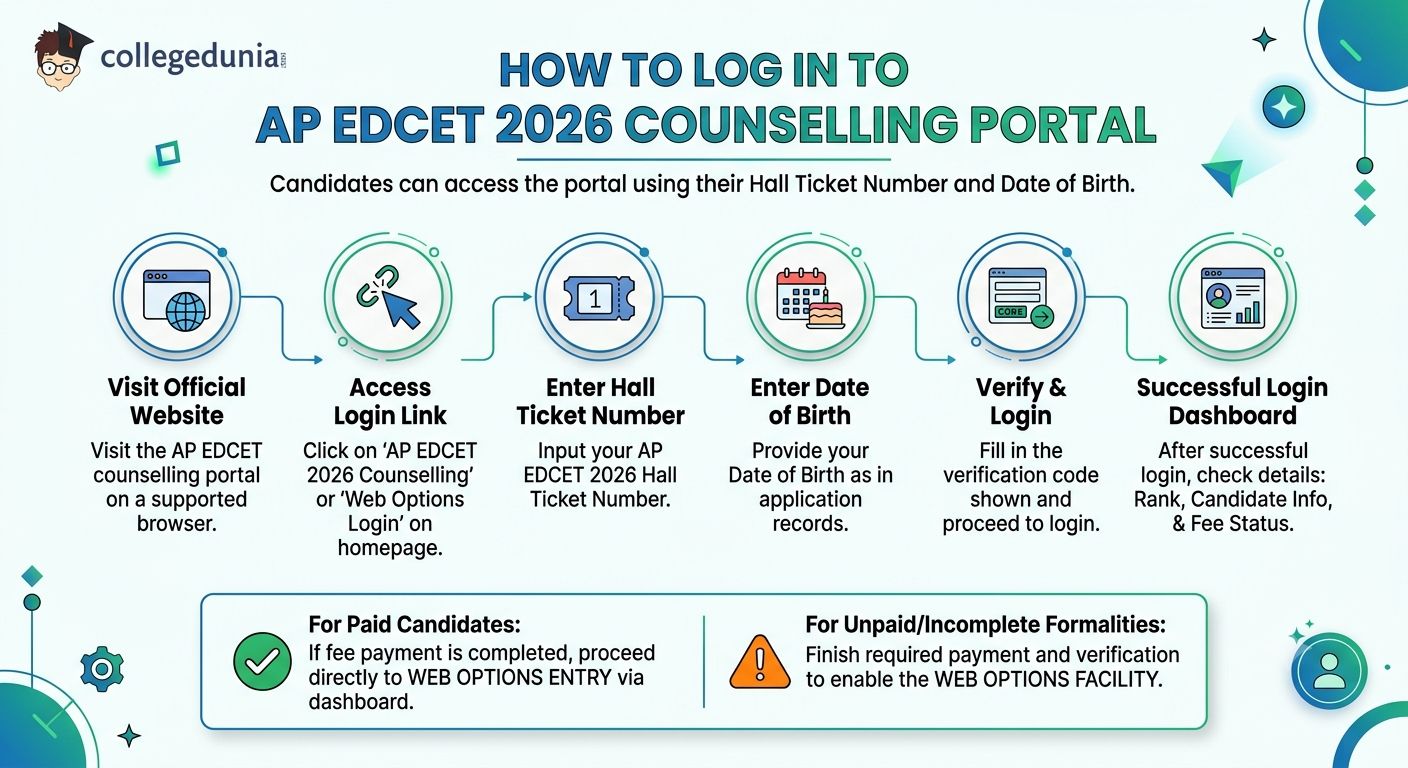
Candidates can access the AP EDCET 2026 counselling portal by using their hall ticket number and date of birth.
- Step 1: Visit the official AP EDCET counselling portal through a supported web browser.
- Step 2: Click on the AP EDCET 2026 Counselling or Web Options Login link available on the homepage.
- Step 3: Enter the AP EDCET 2026 Hall Ticket Number in the required field.
- Step 4: Enter the Date of Birth as mentioned in the application records.
- Step 5: Fill in the verification code displayed on the screen and proceed to login.
- Step 6: After successful login, verify details such as rank, candidate information, and counselling fee payment status.
- Candidates who have completed the required fee payment can proceed to the web options entry process through the dashboard.
- Candidates who have not completed the counselling formalities may need to finish the required payment and verification process before the web options facility becomes available.
Also Check: AP EDCET 2026 Social Studies Web Options: Colleges to Fill and Ranks Needed
Ques. Why can't I access the AP EDCET 2026 web options page after logging in successfully?
Ans. Candidates may be unable to access the web options page if the counselling fee payment has not been completed or certificate verification is still pending. The web options facility is generally activated only after all mandatory counselling formalities are successfully completed. Candidates should check their dashboard for payment status and verification updates before proceeding.
Ques. What details should I verify immediately after logging in to the AP EDCET 2026 counselling portal?
Ans. After logging in, candidates should verify their name, rank, hall ticket number, category, counselling fee payment status, and eligibility details displayed on the dashboard. Any discrepancy should be reported to the counselling authorities before exercising web options, as incorrect information may affect seat allotment and admission eligibility during the counselling process.
Credentials Needed for Login
Candidates are advised to keep all required certificates and supporting documents ready before starting the AP EDCET 2026 counselling process.
- Scanned copies of important documents may be required during registration, certificate verification, web options entry, or admission confirmation stages.
- Preparing the documents in advance can help candidates complete the counselling process without delays.
- Candidates should also keep their login credentials, academic records, and category certificates readily available before accessing the counselling portal.
- The list below outlines the key documents and details that candidates should keep ready before logging in to the AP EDCET 2026 counselling portal.
| Detail Required | Where to Find It |
|---|---|
| AP EDCET 2026 Hall Ticket Number | Your AP EDCET 2026 admit card |
| Date of Birth | Class 10 certificate or admit card |
| Registered Mobile Number |
Number used at the time of AP EDCET registration (needed for OTP, if prompted) |
| Counselling Fee Payment Receipt | Generated on the portal after successful fee payment |
| Scanned Certificates |
Community, study, income certificates in JPG or PDF format (usually below 200 KB) |
Also Check: AP EDCET 2026 Seat Matrix: B.Ed Seats College-Wise and Category-Wise in AP
Ques. Is the AP EDCET 2026 counselling fee payment receipt required during the admission process?
Ans. Yes. Candidates should keep a copy of the AP EDCET 2026 counselling fee payment receipt as proof of successful registration. The receipt may be required during certificate verification, web options processing, seat allotment, or admission reporting. It is advisable to save both a digital and printed copy for future reference.
Ques. Which certificates should reserved-category candidates keep ready for AP EDCET 2026 counselling?
Ans. Candidates claiming reservation benefits should keep their community certificate, income certificate, study certificates, and any other category-related documents ready in the prescribed format. These documents are typically verified during the counselling process and must match the details submitted in the application. Missing or invalid certificates may affect reservation eligibility and seat allotment.
How to Access and Submit Web Options
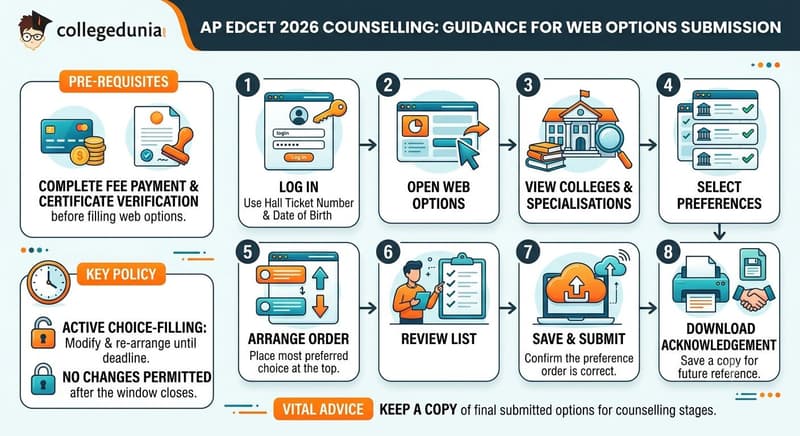
Candidates can modify and re-arrange their web options during the active choice-filling period before the deadline.
- No changes are permitted after the web options window closes.
- Candidates should complete the required fee payment and certificate verification process before attempting to enter web options.
- Keeping a copy of the final submitted options can help during later stages of the counselling process.
- Candidates need to follow these steps given below:
- Step 1: Log in to the AP EDCET 2026 counselling portal using hall ticket number and date of birth.
- Step 2: Open the Web Options section available on the counselling dashboard.
- Step 3: View the list of available B.Ed colleges and specialisations offered through the counselling process.
- Step 4: Select the colleges and courses you wish to consider for admission.
- Step 5: Arrange all selected options in candidates preferred order, placing the most preferred choice at the top of the list.
- Step 6: Review the entire preference list carefully before proceeding with submission.
- Step 7: Save and submit the web options after confirming that the preference order is correct.
- Step 8: Download or save the submission acknowledgement for future reference.
Also Check: AP EDCET 2026 Choice Filling Strategy: How to Order Web Options for Best B.Ed Seat Allotment
Ques. How should candidates arrange college preferences in AP EDCET 2026 web options?
Ans. Candidates should place their most preferred B.Ed college and specialisation at the top of the web options list, followed by other choices in descending order of preference. Since seat allotment is based on rank, reservation criteria, seat availability, and option priority, a well-planned preference order can improve the chances of securing a desired seat.
Ques. Is it necessary to download the AP EDCET 2026 web options submission acknowledgement?
Ans. Yes. Candidates should download and save the web options submission acknowledgement immediately after final submission. The acknowledgement serves as proof that the options were successfully submitted and may be useful during seat allotment, grievance resolution, or future counselling stages. Keeping both a digital and printed copy is recommended for reference.
Common Login Issues and How to Fix Them
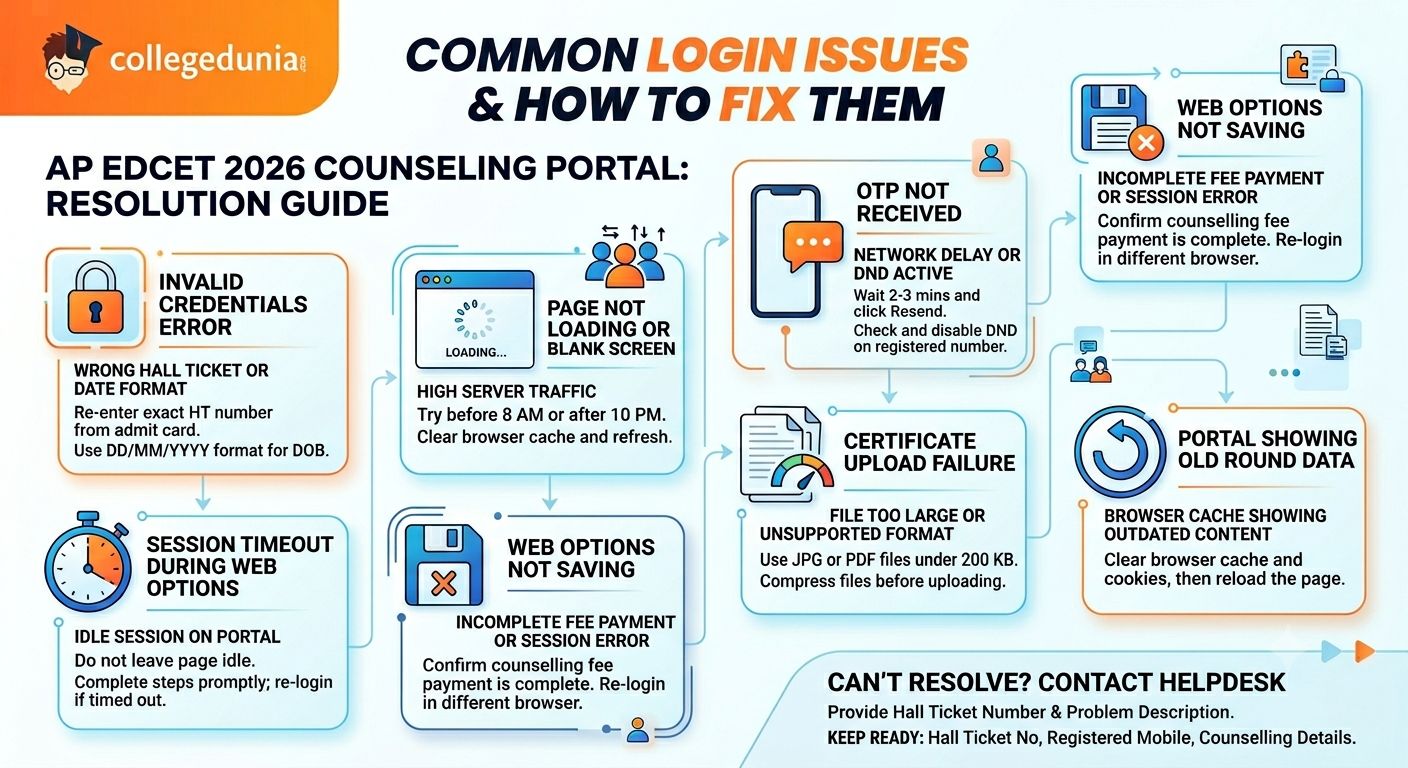
Candidates may occasionally face login, payment, or web options issues on the AP EDCET 2026 counselling portal, especially during periods of heavy traffic.
- Most portal-related issues can be resolved by verifying login credentials, refreshing the page, or trying again after some time.
- Candidates whose issue remains unresolved after attempting the recommended fixes should contact the AP EDCET counselling helpdesk with their hall ticket number and a brief description of the problem.
- While seeking support, candidates should keep details such as the hall ticket number, registered mobile number, and counselling information readily available for verification.
- The table below highlights some of the most commonly reported AP EDCET 2026 counselling portal issues along with the corresponding solutions.
| Issue | Likely Cause | Fix |
|---|---|---|
| Invalid credentials error | Wrong hall ticket number or incorrect date of birth format | Re-enter the hall ticket number exactly as on your admit card; use DD/MM/YYYY for date of birth |
| Page not loading or blank screen | High server traffic during peak counselling hours | Try accessing the portal before 8 AM or after 10 PM; clear browser cache and refresh |
| OTP not received | Network delay or DND active on registered number | Wait 2 to 3 minutes and click Resend OTP; check if your number has DND activated and disable it |
| Captcha not loading | Browser extension conflict or slow internet |
Disable ad-blockers and browser extensions; switch to Chrome or Firefox and refresh |
| Session timeout during web options | Idle session on the portal |
Do not leave the page idle for long; complete each step promptly and re-login if timed out |
| Web options not saving | Incomplete fee payment or browser session error | Confirm counselling fee payment is complete; re-login in a different browser and try again |
| Certificate upload failure | File too large or unsupported format | Use JPG or PDF files below 200 KB; compress the file before uploading |
| Portal showing old counselling round data | Browser cache showing outdated content | Clear browser cache and cookies, then reload the page |
AP EDCET 2026 Counselling Login FAQs
Ques. What is the official login URL for AP EDCET 2026 counselling?
Ans. The official AP EDCET 2026 counselling portal is cets.apsche.ap.gov.in/EDCET/. Visit this URL directly in your browser and click the counselling or web options login link on the homepage.
Ques. What credentials do I need to log in to the AP EDCET 2026 counselling portal?
Ans. You need your AP EDCET 2026 hall ticket number and your date of birth in DD/MM/YYYY format. Keep your registered mobile number handy in case an OTP is required during the session.
Ques. I am seeing an invalid credentials error on the AP EDCET portal. What should I do?
Ans. Check that your hall ticket number is entered exactly as printed on your admit card without any spaces. Enter your date of birth in DD/MM/YYYY format. Clear your browser cache and try again. If the error continues, contact the APSCHE helpdesk.
Ques. Can I change my AP EDCET 2026 web options after submitting them?
Ans. Yes. You can edit and re-submit your web options as many times as you want before the web options window closes. After the deadline, no changes are possible, so review your preference order carefully before the final submission.
Ques. The AP EDCET counselling portal is not loading. What should I do?
Ans. The portal may be slow due to heavy traffic. Try accessing it during off-peak hours such as early morning before 8 AM or late at night. Clear your browser cache, disable any ad-blockers, and use Chrome or Firefox for the best experience.
Ques. Is counselling fee payment mandatory before filling web options in AP EDCET 2026?
Ans. Yes. You must pay the AP EDCET 2026 counselling/processing fee on the official portal before the web options form is activated on your dashboard. Keep the payment receipt safe as proof of registration.



Comments