




The Kerala MCA 2026 answer key was published on June 28, 2026 and the expected date for Kerala MCA 2026 result is around July 2026. Candidates need to log in at lbsapplications.kerala.gov.in/mca2026/ with their Registration ID (or registered email) and password to download their rank card.
- LBS Centre for Science and Technology conducts the Kerala MCA Entrance Examination each year for MCA admissions across Kerala.
- Candidates need to login at the official portal to download their Kerala MCA 2026 result.
- In case you have forgotten your application number, you can recover it by clicking on the “Forgot Registration ID?” and providing details to retrieve it.
- Students can fix their Kerala MCA 2026 password by selecting "Forgot Password?" option, and a reset link will be sent to their registered email ID.
Check out the details below to get a step-by-step guide on how to recover application number and password , which will be required to log in to check your Kerala MCA 2026 result login.
Related Articles:
- Kerala MCA 2026: Answer Key Out, Rank List Expected July 10, Cutoff and CAP Counselling
- Kerala MCA 2026 Rank List: Expected Release Date and Official Schedule
Key Summary
- The Kerala MCA 2025 exam was conducted on June 28, 2026.
- Some of the common login errors are invalid login crediantials or network interruptions due to heavy traffic, in that case you need to wait a bit to reload.
- If you still face login errors while checking your Kerala MCA 2026 result login contact the helpdesk number mentioned in the website at lbsapplications.kerala.gov.in/mca2026/.
How to Log In to Check Kerala MCA 2026 Result
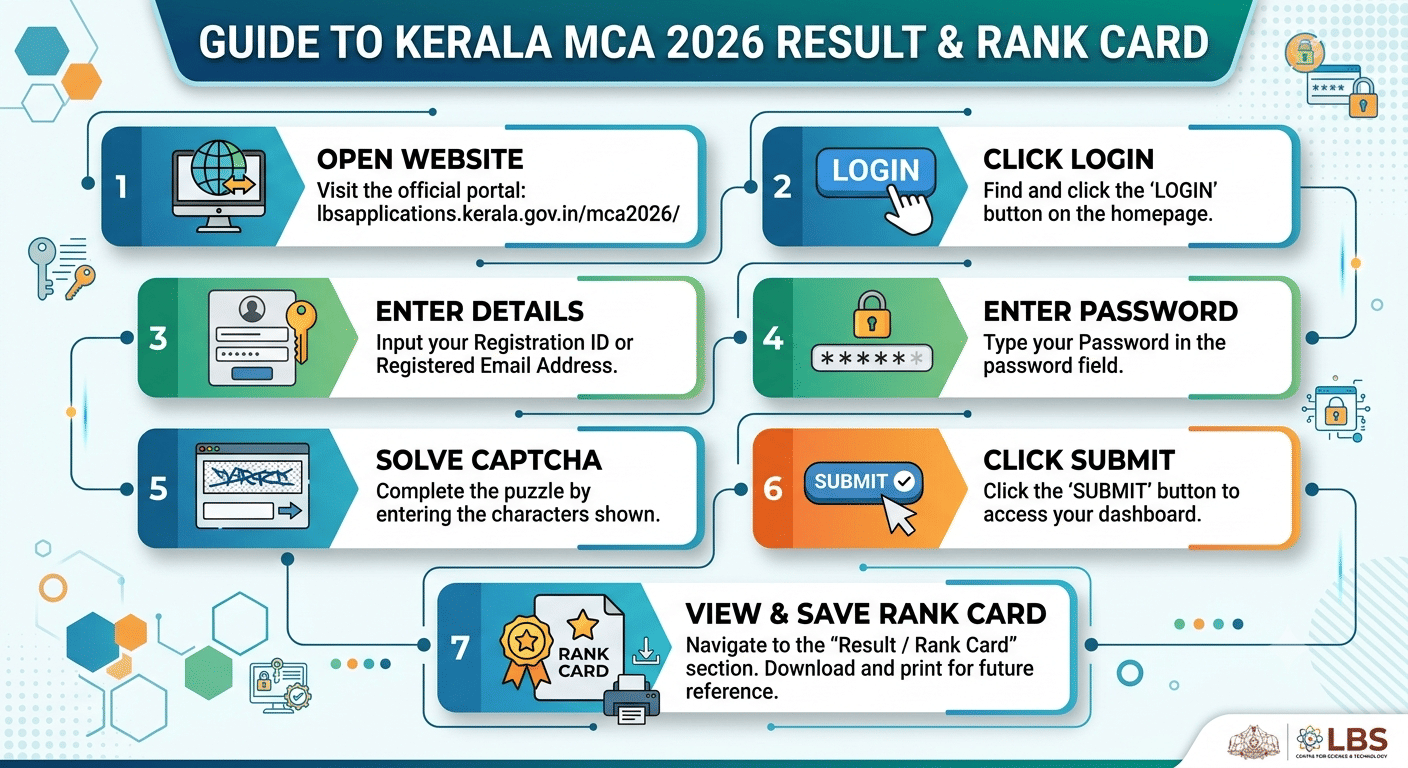
Follow these steps on the official LBS portal to access your Kerala MCA 2026 result login:
- Step- 1: Open lbsapplications.kerala.gov.in/mca2026/ in your browser.
- Step- 2: Click the Login button on the homepage.
- Step- 3: Enter your Registration ID or registered email address in the first field.
- Step- 4: Type your password in the password field.
- Step- 5: Solve the captcha by entering the characters shown in the image.
- Step- 6: Click Submit to reach your account dashboard.
- Step- 7: Go to the Result / Rank Card section to view and save your Kerala MCA 2026 rank card.
If the portal is slow on result day, clear your browser cache, switch to Chrome or Firefox, and try during off-peak hours. High traffic right after result publication is normal and settles within an hour.
Related Article: Kerala MCA 2026 Rank Card: How to Download and Verify Your Score
Ques. What do I need to log in to the Kerala MCA 2026 result portal?
Ans. You need your Registration ID or the email address used during registration, your password, and the captcha code shown on the login page at lbsapplications.kerala.gov.in/mca2026/.
Kerala MCA 2026 Result Login: How to Recover Your Registration ID (Application Number)
Your Registration ID is assigned at the time of application and is your primary login crediantial. If you cannot find it, follow these steps to recover your Kerala MCA 2026 application number:
- Step- 1: Go to lbsapplications.kerala.gov.in/mca2026/ and click Login.
- Step- 2: On the login screen, click "Forgot Registration ID?"
- Step- 3: Enter the email address you used during registration.
- Step- 4: Submit the form your Registration ID will be sent to that email address.
- Step- 5: Check your inbox and your spam or junk folder if the email does not arrive within 15 minutes.
- Step- 6: Use the recovered Registration ID to log in.
| Situation | Fix |
|---|---|
| Application confirmation email deleted | Use the "Forgot Registration ID?" link on the login page |
| Recovery email not arriving | Check spam folder; wait 10–15 minutes and retry |
| Registered email no longer accessible | Contact LBS Centre helpdesk with your name, date of birth, and exam details |
Note: If your registered email account is inaccessible, contact the LBS Centre for Science and Technology through their official contact page. Keep your name, date of birth, and exam centre details ready for identity verification.
Related Article: Kerala MCA 2026 Result: What to Do Next for Counselling and Documents
According to a quora post, a user wanted to know the best MCA colleges in Kerala. As per discussion, FITSAT and KTU University is best MCA colleges as per excellent teaching, placement cell and eco friendly campus.
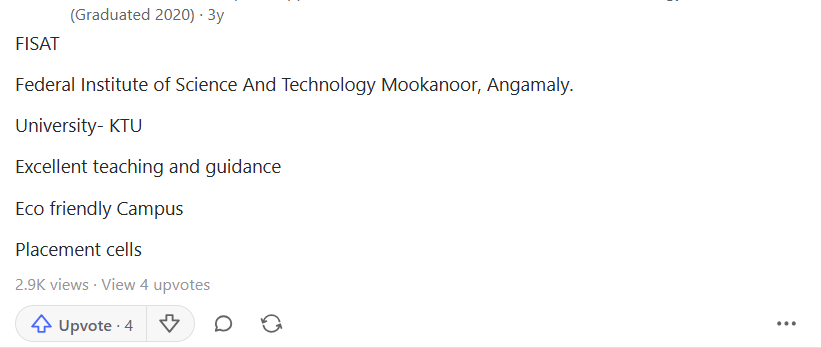
Source: Quora
Ques. How do I find my Kerala MCA 2026 application number (Registration ID)?
Ans. Click "Forgot Registration ID?" on the login page and enter your registered email address. Your Registration ID will be sent to that email. Also check your original application confirmation email from LBS Centre.
Kerala MCA 2026 Result Login: How to Reset Your Kerala MCA 2026 Password
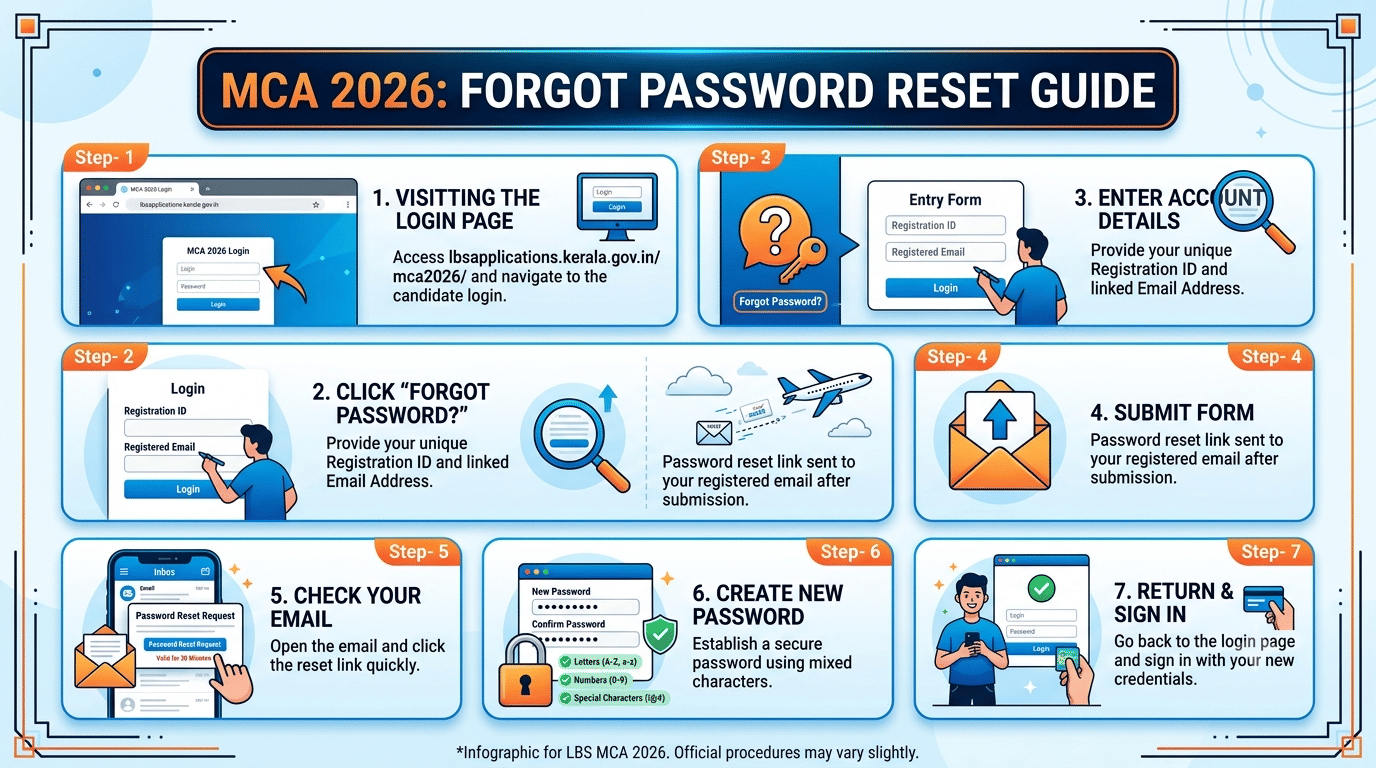
If you have your Registration ID but cannot recall your password, Follow these steps to reset your Kerala MCA 2026 password:
- Step- 1: Visit lbsapplications.kerala.gov.in/mca2026/ and open the login page.
- Step- 2: Click "Forgot Password?" below the login fields.
- Step- 3: Enter your Registration ID and the email address linked to your account.
- Step- 4: Submit the form a password reset link will be sent to your registered email.
- Step- 5: Open the email and click the reset link within its validity window (typically 30 minutes).
- Step- 6: Create a new password using letters, numbers, and special characters.
- Step- 7: Return to the login page and sign in with your new credentials.
Note: If no reset email arrives: check your spam folder first. Confirm you are looking in the same mailbox used during Kerala MCA 2026 registration. If the issue persists, contact LBS Centre support.
Related Article: Kerala MCA 2026: Total Appeared vs Qualified Candidates Stats
Ques. What should I do if I forgot my Kerala MCA 2026 password?
Ans. Click "Forgot Password?" on the login page at lbsapplications.kerala.gov.in/mca2026/, enter your Registration ID and registered email, and follow the reset link sent to your inbox. Complete the reset within 30 minutes.
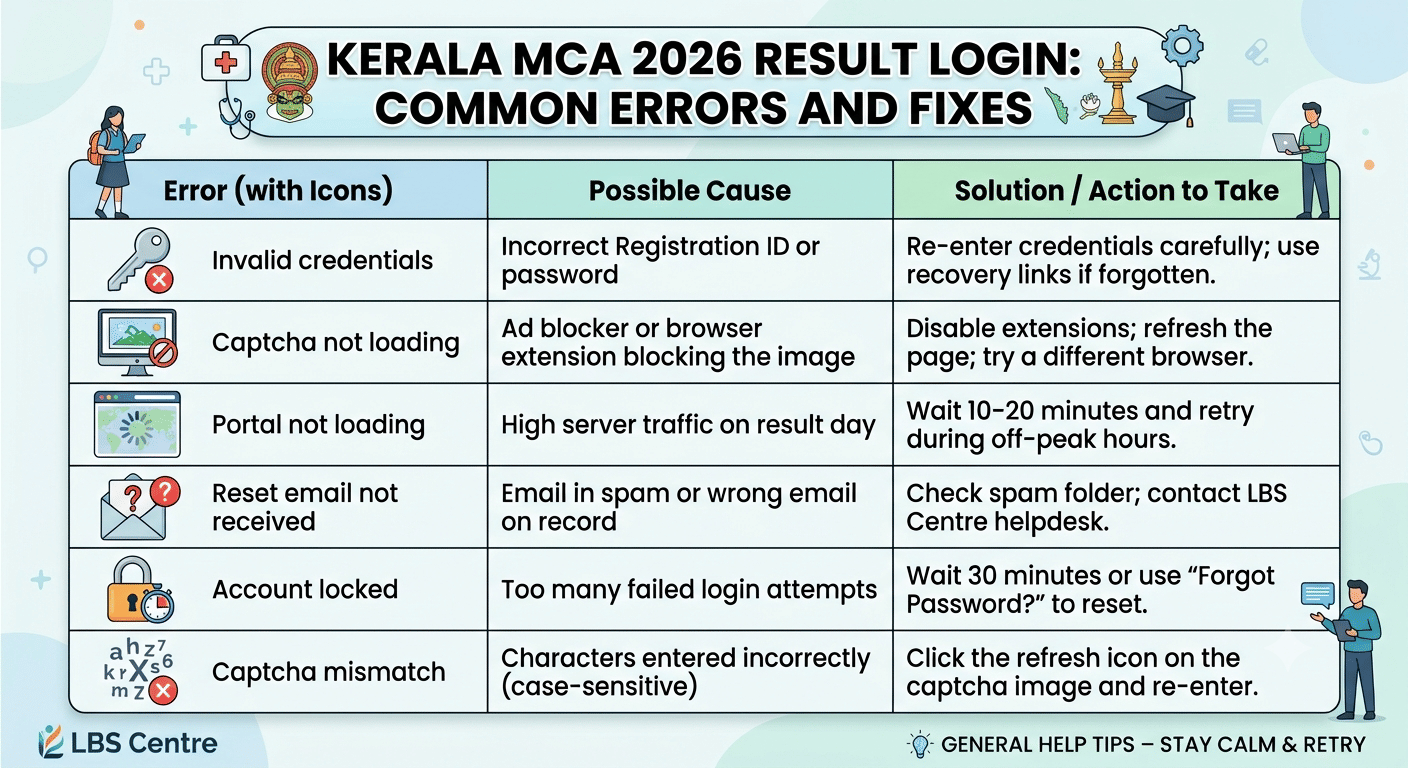
Kerala MCA 2026 Result Login: Common Errors and Fixes
These are the most frequently reported issues on the Kerala MCA result portal and ways to fix the login issue is tabulated below:
| Error | Cause | Fix |
|---|---|---|
| Invalid credentials | Incorrect Registration ID or password | Re-enter credentials carefully; use recovery links if forgotten |
| Captcha not loading | Ad blocker or browser extension blocking the image | Disable extensions; refresh the page; try a different browser |
| Portal not loading | High server traffic on result day | Wait 10–20 minutes and retry during off-peak hours |
| Reset email not received | Email in spam or wrong email on record | Check spam folder; contact LBS Centre helpdesk |
| Account locked | Too many failed login attempts | Wait 30 minutes or use "Forgot Password?" to reset |
| Captcha mismatch | Characters entered incorrectly (case-sensitive) | Click the refresh icon on the captcha image and re-enter |
Note: For issues not resolved by the portal’s self-service tools, contact the LBS Centre for Science and Technology directly via their contact page at lbsapplications.kerala.gov.in.
Related Articles:
- Kerala MCA 2026: 100 Marks Expected Rank and College Chances
- Kerala MCA 2026: 90 Marks Expected Rank and College Chances
Kerala MCA 2026 Result Login FAQs
Ques. The Kerala MCA 2026 portal is not opening. What should I do?
Ans. Portal slowdowns are normal on result day due to heavy traffic. Clear your cache, switch to Chrome or Firefox, and retry after 10–20 minutes. Accessing the site during off-peak hours usually resolves the issue.
Ques. When is the Kerala MCA 2026 result expected?
Ans. Based on the official exam schedule, the Kerala MCA 2026 result is expected in the first week of July 2026. The entrance exam was held on June 28, 2026. Monitor lbsapplications.kerala.gov.in/mca2026/ for the official announcement.
Ques. Who should I contact if I cannot recover my Kerala MCA 2026 login credentials?
Ans. Contact the LBS Centre for Science and Technology directly via the contact details on lbsapplications.kerala.gov.in. Keep your full name, date of birth, and exam registration details ready for verification.



Comments