



Candidates facing SRCC GBO 2026 login issues can usually resolve the problem by recovering their application number or using the "Forgot Password" option available on the login page.
- Candidates should complete the login process early to check their merit list status and complete the admission formalities within the time limit.
- The login ID for SRCC GBO 2026 is the application or registration number that is generated during the registration process.
- If Candidates cannot find the password reset email in their inbox should check their spam or junk folder as it was sent to their registered email address
- The Third List of Provisionally Admitted Candidates and the Waiting List were released on June 20 2026.
- For a smoother login experience candidates are advised to use the latest version of Google Chrome or Mozilla Firefox and log in during off peak hours such as early morning or late evening if admission portal is slowly responding
Related Article:
- SRCC GBO 2026 Seat Acceptance: How to Confirm and Freeze Your Allotted Seat
- SRCC GBO 2026 CUET Score Required: Category-wise Minimum Marks
- SRCC GBO 2026 Category-Wise Cutoff for OBC, SC, ST and EWS

Key Summary
- SRCC GBO 2026–28 admissions are conducted through the official portals srccgbo.edu.in and srcc.edu.
- The First Merit List for SRCC GBO 2026 was released on May 19, 2026.
- The Second Merit List was published on June 2–3, 2026.
- Candidates should rely only on the official SRCC websites for updates related to merit lists, waiting lists and admission schedules.
- Candidates may face login issues because of forgotten credentials, browser related problems or heavy traffic on the admission portal.
What You Need to Log In to SRCC GBO 2026 Portal
Candidates must keep their SRCC GBO 2026 Application Number/Login ID and password ready before accessing the admission portal as both credentials are required for successful login.
- The registered email ID or mobile number is required for recovering the application number or resetting the password through the OTP verification process.
- Candidates who cannot find their registration details should first check the confirmation email, spam folder or trash folder before starting the credential recovery process.
| Credential | Details |
|---|---|
| Application Number / Login ID |
Generated when you completed the SRCC GBO 2026 registration form. It was displayed on screen and sent to your registered email. |
| Password |
The password you created during registration. It is case-sensitive — check Caps Lock before retrying. |
| Registered Email / Mobile |
Needed for OTP-based password reset or application number retrieval. |
Also Check: SRCC GBO 2026 Seat Confirmation: How to Lock Your Allotted Seat Before the Last Date
How to Recover SRCC GBO 2026 Application Number
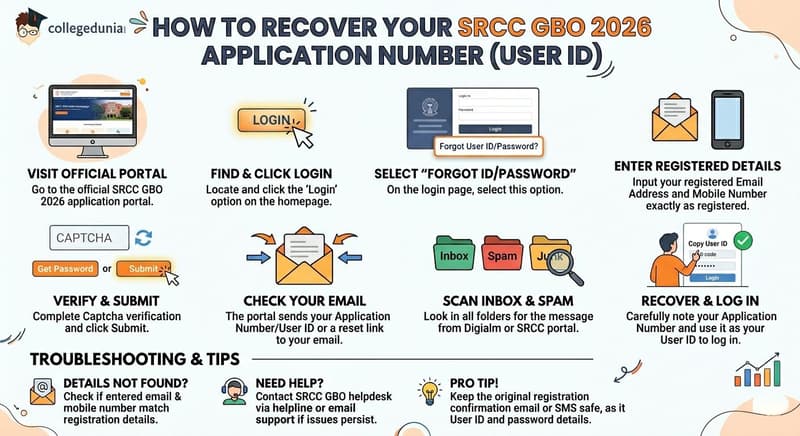
Candidates who are unable to find their SRCC GBO 2026 Application Number or User ID can recover it through the official admission portal by following the steps given below.
- Step 1: Visit the SRCC GBO 2026 application portal.
- Step 2: Click on the "Login" option available on the homepage or open the login page directly.
- Step 3: Select the "Forgot User ID/Password" option on the login page.
- Step 4: Enter the registered email address and registered mobile number exactly as provided during the application process.
- Step 5: Complete the Captcha verification and click on "Get Password" or "Submit".
- Step 6: The portal will send the Application Number (User ID) or a password reset link to the registered email address.
- Step 7: Check the Inbox, Spam, and Junk folders for the email sent by the Digialm or SRCC admission portal.
- Step 8: Copy the Application Number carefully and use it as the User ID while logging into the admission portal.
- If the portal displays a "Details Not Found" message, candidates should verify whether the registered email address and mobile number match the details used during registration.
- Candidates who are still unable to recover their credentials should contact the SRCC GBO helpdesk through the official helpline number or email support without delay.
- Candidates are advised to keep the original registration confirmation email or SMS safe as it contains the User ID and password details required for future login and admission-related activities.
Also Check: Low CUET Score for SRCC GBO 2026 Best BCom Alternatives in DU
Ques. What should I do if the SRCC GBO 2026 portal shows "Details Not Found" while recovering my Application Number?
Ans. If the SRCC GBO 2026 portal displays a "Details Not Found" message, candidates should first verify that the registered email address and mobile number entered match the details used during registration. If the issue persists, they should check their original registration email or SMS and contact the official SRCC GBO helpdesk for assistance in recovering their Application Number or login credentials.
Ques. Where can I find my SRCC GBO 2026 Application Number if I do not receive the recovery email?
Ans. If the recovery email is not received after submitting the request, candidates should check their Inbox, Spam, Junk, and Promotions folders, as the message may be sent by the admission portal or Digialm. If the email is still unavailable after some time, candidates should use the official support channels to recover their Application Number, which is required for future login and admission-related activities.
How to Reset SRCC GBO 2026 Portal Password
Candidates who have their SRCC GBO 2026 Application Number (User ID) can reset their password by following the steps given below.
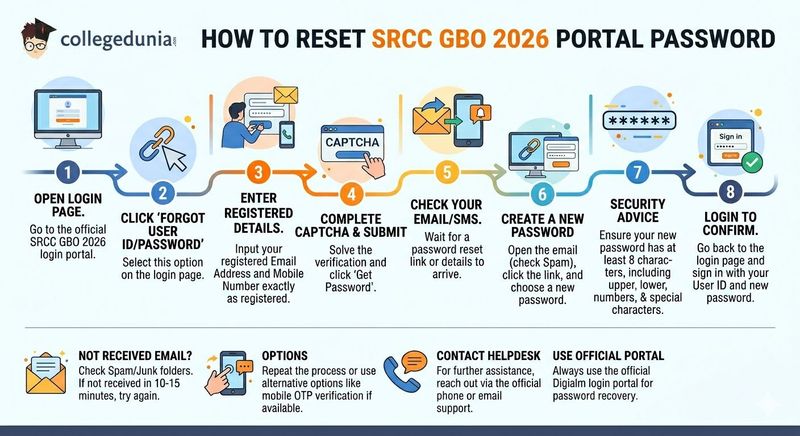
- Step 1: Open the official SRCC GBO 2026 login page.
- Step 2: Click on the "Forgot User ID/Password" option available on the login page.
- Step 3: Enter the registered email address and registered mobile number exactly as submitted during the registration process.
- Step 4: Complete the Captcha verification and click on the "Get Password" button.
- Step 5: A password reset link or password recovery details will be sent to the registered email address or mobile number.
- Step 6: Open the email, check the Spam or Junk folder if required, click the password reset link, and create a new password.
- Step 7: Create a password with at least eight characters, including uppercase letters, lowercase letters, numbers, and a special character, for better security.
- Step 8: Return to the login page and sign in using the Application Number and the new password to confirm that the password has been updated successfully.
- If the password reset email or SMS is not received within 10–15 minutes, candidates should check the Spam and Junk folders before trying again.
- Candidates can repeat the password recovery process or use the alternate recovery option, such as mobile OTP verification, if it is available on the portal.
- Candidates who continue to face login issues should contact the SRCC GBO helpdesk through the official phone number or email support for further assistance.
- Candidates are advised to use the official Digialm login portal for password recovery and login instead of accessing the portal through other sources.
Ques. What should I do if I do not receive the SRCC GBO 2026 password reset email or SMS?
Ans. If the SRCC GBO 2026 password reset email or SMS is not received within 10–15 minutes, candidates should first check their Spam and Junk folders. If the recovery message is still unavailable, they can repeat the password recovery process or use the mobile OTP verification option, if available. Candidates facing persistent issues should contact the official SRCC GBO helpdesk for assistance.
Ques. What are the password requirements for creating a new SRCC GBO 2026 login password?
Ans. While resetting the SRCC GBO 2026 portal password, candidates should create a strong password with at least eight characters, including uppercase letters, lowercase letters, numbers, and a special character. Using a secure password helps protect the admission account and prevents unauthorized access during the application and counselling process.
Common Login Errors and Fixes
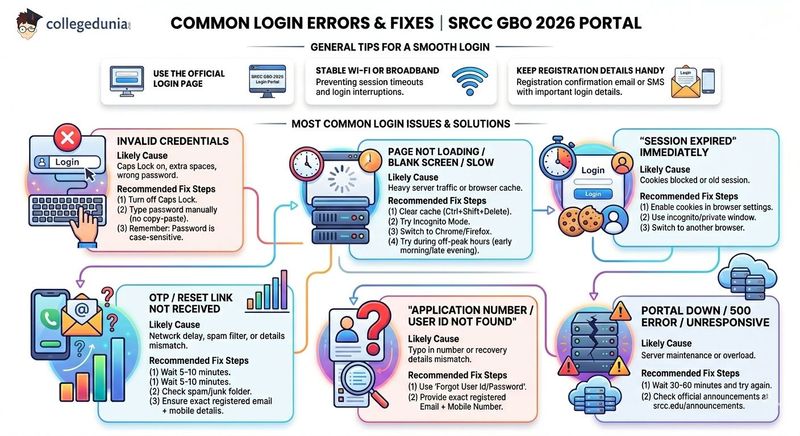
Candidates should always use the official SRCC GBO 2026 login page while accessing the admission portal.
- Using a stable Wi-Fi or broadband connection can help prevent session timeouts and login interruptions during the login process.
- Candidates are advised to keep their original registration confirmation email or SMS readily available, as it contains important login details and application information.
- The table below highlights the most common SRCC GBO 2026 portal login issues along with the recommended solutions to resolve them quickly.
| Error / Symptom | Likely Cause | Fix |
|---|---|---|
|
"Invalid credentials" |
Caps Lock on, extra spaces, or wrong password |
Turn off Caps Lock, type password manually (no copy-paste). Password is case-sensitive. |
|
Page not loading / blank screen / slow |
Heavy server traffic or browser cache |
Try during off-peak hours (early morning/late evening). Clear cache (Ctrl+Shift+Delete), try incognito mode, or switch to Chrome/Firefox. |
|
"Session expired" immediately |
Cookies blocked or old session |
Enable cookies, use incognito/private window, or switch browser. |
|
OTP / Reset link not received |
Network delay, spam filter, or mismatch in details |
Wait 5–10 minutes, check spam/junk. Ensure you entered exact registered email + mobile. |
|
"Application number / User ID not found" |
Typo in number or mismatch in recovery details |
Use Forgot User Id/Password with exact registered Email + Mobile Number. |
|
Portal down / 500 error / unresponsive |
Server maintenance or overload |
Wait 30–60 minutes and try again. Check official announcements on srcc.edu/announcements. |
Also Check: SRCC GBO 2026 Seat Upgradation: When to Freeze Allotment or Wait for a Better Round
Ques. How can I fix the "Invalid Credentials" error while logging into the SRCC GBO 2026 portal?
Ans. If the SRCC GBO 2026 portal displays an "Invalid Credentials" error, candidates should ensure that Caps Lock is turned off, avoid copy-pasting the password, and enter the password manually since it is case-sensitive. They should also verify that there are no extra spaces before or after the Application Number or password and use the "Forgot User ID/Password" option if the issue persists.
Ques. What should I do if the SRCC GBO 2026 login page is not loading or shows a session expired error?
Ans. Candidates facing a blank page, slow loading, or "Session Expired" error should try accessing the portal during off-peak hours, clear their browser cache and cookies, or use an incognito/private browsing window. Switching to an updated browser such as Chrome or Firefox and using a stable internet connection can also help resolve most login-related issues.
SRCC GBO 2026 Merit List Login Not Working: Reddit Discussion
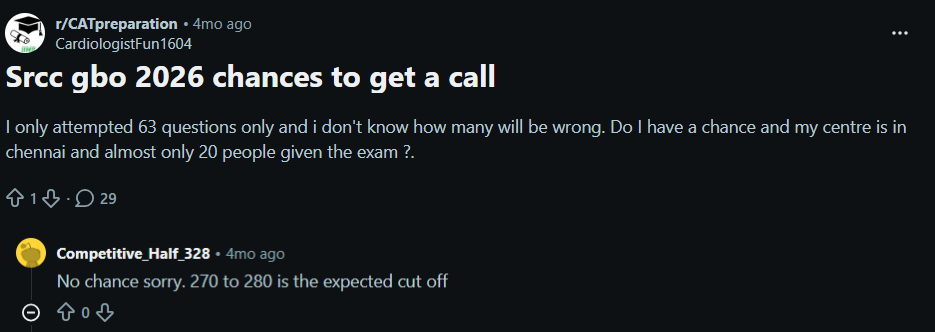
- The discussion focused on the chances of receiving an SRCC GBO 2026 admission call after attempting 63 questions, with the candidate seeking opinions on expected cutoff trends and overall selection prospects.
- Another Reddit user expressed the view that the candidate's chances are quite low, predicting that the expected SRCC GBO 2026 cutoff may remain around 270–280 marks for receiving a call.
Source: Reddit
How to Check SRCC GBO 2026 Merit List After Login
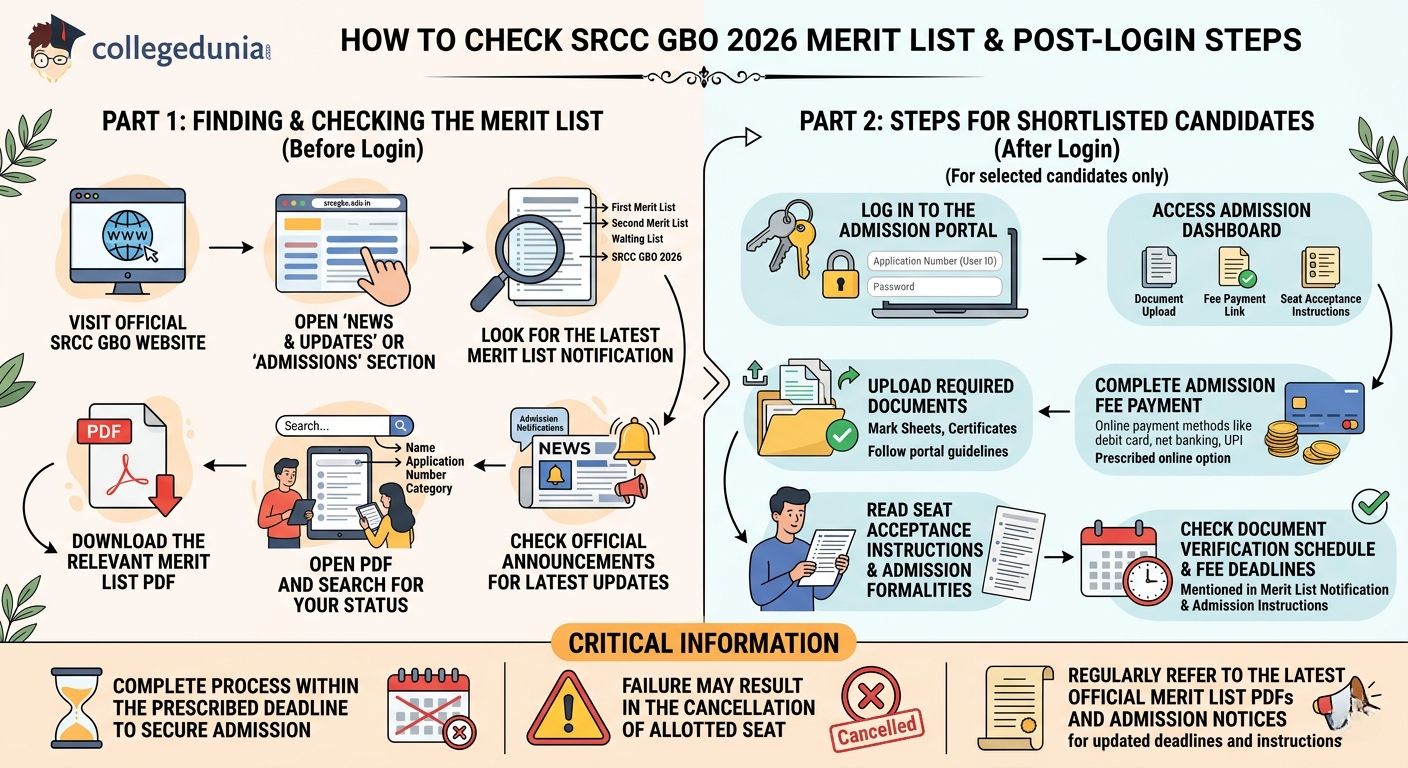
SRCC GBO 2026–28 merit lists are released in PDF format on the official admission website, and candidates can check their admission status by following the steps given below.
- Step 1: Visit the official SRCC GBO website.
- Step 2: Open the "News & Updates" or "Admissions" section available on the homepage.
- Step 3: Look for the latest SRCC GBO 2026 merit list notification, including the First Merit List, Second Merit List, or the Third List of Provisionally Admitted Candidates and Waiting List, depending on the current admission round.
- Step 4: Download the relevant merit list PDF released for the admission cycle.
- Step 5: Open the PDF file and search for your name, application number, or category to check your admission status.
- Step 6: Candidates can also check the official announcements section for the latest updates related to merit lists, waiting lists, and admission notifications.
After Login (for selected candidates only):
Candidates who are shortlisted for SRCC GBO 2026 admission should complete the admission process by following the steps given below.
- Step 1: Log in to the SRCC GBO admission portal using the Application Number (User ID) and Password.
- Step 2: Access the admission dashboard, where the document upload section, fee payment link, and seat acceptance instructions will be available.
- Step 3: Upload the required documents as per the admission guidelines provided on the portal.
- Step 4: Complete the admission fee payment through the prescribed online payment option.
- Step 5: Carefully read the seat acceptance instructions and follow all the admission formalities mentioned on the portal.
- Step 6: Check the document verification schedule and fee payment deadline mentioned in the merit list notification and admission instructions.
- Candidates included in the merit list or waiting list must complete the document upload and fee payment process within the prescribed deadline to secure their admission.
- Failure to complete the admission formalities within the stipulated time may result in the cancellation of the allotted seat.
- Candidates should regularly refer to the latest official merit list PDFs and admission notices for updated deadlines and admission-related instructions.
Ques. What should I do after my name appears in the SRCC GBO 2026 merit list?
Ans. Candidates whose names appear in the SRCC GBO 2026 merit list should immediately log in to the admission portal using their Application Number and Password, upload the required documents, complete the admission fee payment, and follow the seat acceptance instructions. All admission formalities must be completed within the prescribed deadline, as failure to do so may lead to cancellation of the allotted seat.
Ques. How can I check if I am included in the SRCC GBO 2026 waiting list or merit list?
Ans. Candidates can check their admission status by downloading the latest SRCC GBO 2026 merit list or waiting list PDF from the official admission website and searching for their name, application number, or category. They should also regularly monitor the News & Updates or Admissions section for subsequent merit lists, waiting list notifications, and important admission deadlines.
SRCC GBO Login Issues 2026 FAQs
Ques. What is the login ID for the SRCC GBO 2026 merit list portal?
Ans. Your login ID (User ID) is the Application Number assigned to you when you submitted the SRCC GBO 2026 registration form. It was displayed on the confirmation screen and emailed to your registered address.
Ques. I did not receive the OTP for password reset. What should I do?
Ans. Wait up to 10–15 minutes and check your spam/junk folder. Try the process again. The recovery uses your registered Email + Registered Mobile Number. If still not received, contact the SRCC GBO helpdesk.
Ques. My registered email ID is no longer active. How do I recover my account?
Ans. Use the mobile OTP option during recovery (if available). If both email and mobile are inaccessible, email the SRCC admissions office directly at pgdgbo@srcc.du.ac.in with your full name, date of birth, application number (if known), and any registration proof (screenshot/PDF of confirmation email) for manual assistance.
Ques. When will the SRCC GBO 2026 merit list be released?
Ans. Multiple merit lists have already been released:
- First Merit List: 19 May 2026
- Second Merit List: 2–3 June 2026
- Third List of Provisionally Admitted Students & Waiting List: 20 June 2026 (latest)
Check the official announcements page regularly for further lists or updates.
Ques. The SRCC GBO portal is very slow on merit list day. Is there an alternative way to check?
Ans. Yes, Merit lists are published as public PDFs. You do not need to log in to check your name. Download the latest merit/waiting list PDFs from:
For login-related work (seat acceptance, fee payment), try early morning or late evening, use incognito mode, and a stable Wi-Fi connection.
Ques. I keep getting "Invalid credentials" even after resetting my password. What next?
Ans. Type the password manually (do not copy-paste, as hidden spaces can cause errors). Ensure Caps Lock is off. After resetting, log in immediately in the same browser tab. If the issue persists, clear browser cache/cookies or try incognito mode / another browser (Chrome/Firefox latest version).



Comments