



Content Writer | Updated On - Apr 28, 2026
BCECEB opens DCECE 2026 application correction window till April 29, 11:59 PM. Candidates registered for polytechnic engineering, paramedical, and paramedical matric level exams can edit their application forms using registration number and password.

The Bihar Combined Entrance Competitive Examination Board (BCECEB) has opened the application correction window for DCECE 2026. Candidates who registered for the Diploma Certificate Entrance Competitive Examination can make changes to their application forms through the official website at bceceboard.bihar.gov.in.
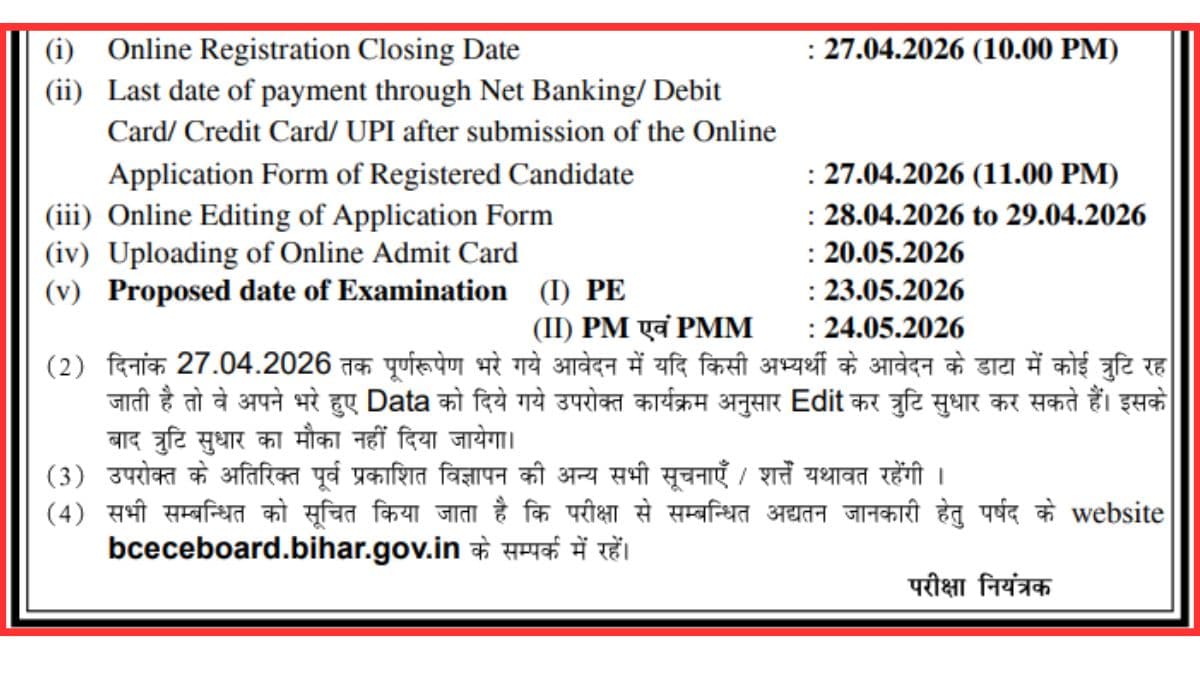
The correction window will remain open until April 29, 2026, at 11:59 PM, giving candidates limited time to rectify any errors in their submitted applications.
DCECE 2026 is a pen-and-paper entrance examination for admission to diploma engineering and paramedical courses across Bihar institutes.
The exam consists of 90 multiple-choice questions (MCQs) with a total of 450 marks and a duration of 2 hours and 15 minutes. Candidates must use their registration number and password to access the correction portal and update necessary details before the deadline expires.
| Direct Link: DCECE 2026 Application Correction Window Open |
DCECE 2026 Important Dates
| Event | Date |
|---|---|
| Application Correction Window Opens | April 28, 2026 |
| Application Correction Window Closes | April 29, 2026 (11:59 PM) |
| Admit Card Release | May 20, 2026 |
| Polytechnic Engineering (PE) Exam | May 23, 2026 |
| Paramedical (PM) & Paramedical Matric (PMM) Exam | May 24, 2026 |
How to Edit DCECE 2026 Application Form?
Candidates must follow a simple four-step process to correct their application details during the correction window.
- Visit the official BCECEB website at bceceboard.bihar.gov.in and locate the "Online Application Form Correction for DCECE 2026" link on the dashboard.
- Enter the valid registration number and password to log into your account.
- Carefully review and update the necessary details in the application form, ensuring all information is accurate and complete.
- Review all modifications one last time before submitting the corrected form to avoid any further errors.
Candidates can make corrections to various details in their DCECE 2026 application form during this window. Common corrections include personal information, contact details, educational qualifications, category selection, and exam center preferences.
It is crucial to verify all information thoroughly before submission, as this will be your final opportunity to make changes before the admit card is issued. Any errors remaining after the correction window closes cannot be modified later.
DCECE 2026 Exam Format and Structure Details
The DCECE 2026 examination follows a standardized format designed to assess candidates' knowledge across multiple subjects. The exam is conducted in pen-and-paper mode with 90 objective-type questions covering physics, chemistry, mathematics, and biology depending on the stream selected.
Each correct answer carries marks, and the total examination duration is 2 hours and 15 minutes, requiring candidates to manage their time efficiently. The admit card, which will be released on May 20, 2026, will contain essential information including exam center location, timing, and candidate-specific details.
What’s Next for Students
After the correction window closes on April 29, 2026, candidates must wait for the admit card release on May 20, 2026. The admit card will be available on the official BCECEB website and must be downloaded and printed by each candidate before the exam date.
Candidates appearing for the Polytechnic Engineering exam should prepare for May 23, 2026, while those taking Paramedical or Paramedical Matric exams should focus on May 24, 2026. It is advisable to use the time between now and the exam dates for final revision and practice to maximize performance in the entrance examination.
Also Read:
- BCECE 2026 Registration Begins @bceceboard.bihar.gov.in; Exam on May 30 and 31
- BCECE LE 2026 Registration Begins; Apply Till May 7, Exam Scheduled for May 31
- UP B.Ed JEE 2026 Registration Extended Till April 30; Exam on May 31
- IEC Greater Noida Admission 2026 Begins; Apply Now
Subscribe to Collegedunia to get the latest news and updates –












Comments