



| Updated On - Jun 8, 2026
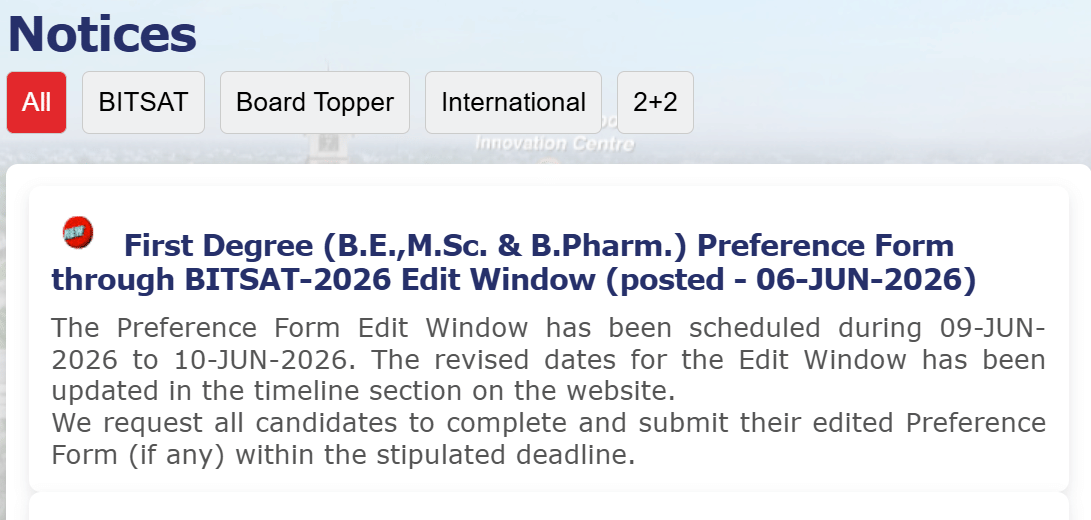
BITS Pilani will open the BITSAT 2026 Preference Form edit window from June 9 to June 10 2026. Candidates can revise their programme priority order and update Class 12 marks by logging in at admissions.bits-pilani.ac.in.

The Birla Institute of Technology and Science (BITS) Pilani has issued an update on the BITSAT 2026 Preference Form edit window. The window will be active on June 9 and 10, 2026. Candidates can revise their submitted forms at admissions.bits-pilani.ac.in.
The BITS Admission Test (BITSAT) is the entry route to integrated first-degree programmes. It covers BITS Pilani, K K Birla Goa, and Hyderabad campuses.
Only candidates who already filled the Preference Form can use the window. No fresh registrations will be allowed during these two days.
Candidates can revise the priority order of their programme and campus choices. They can also update their Class 12 board examination marks. No other fields can be changed during this window.
BITS Pilani had postponed the edit window after the Preference Form deadline. The institute has now confirmed the revised two-day schedule.
BITSAT 2026 Edit Window Key Details
| Particulars | Details |
| Issuing body | Birla Institute of Technology and Science (BITS) Pilani |
| Event | BITSAT 2026 Preference Form Edit Window |
| Start date | June 9, 2026 |
| End date | June 10, 2026 |
| Editable fields | Programme and campus priority order; Class 12 marks |
| Mode | Online |
| Official portal | admissions.bits-pilani.ac.in |
Also Check: BITS Pilani Opens Direct Admission for Board Toppers 2026 at admissions.bits-pilani.ac.in
How to Edit the BITSAT 2026 Preference Form?
- Open the official portal at admissions.bits-pilani.ac.in.
- Click on the BITSAT 2026 candidate login link.
- Enter your application number and password to sign in.
- Open the Preference Form section on your dashboard.
- Reorder the priority list of programmes and campuses.
- Revise your Class 12 marks if the board result has been declared.
- Save the changes and download the updated preview copy.
Read More: BITSAT 2026 Session 2 Result Out at admissions.bits-pilani.ac.in
What Candidates Can and Cannot Change?
The edit window covers only two fields in the Preference Form. The first is the priority order of programmes and campus choices. The second is the Class 12 marks entry.
Personal details, exam centre, and BITSAT score data remain locked. Candidates must use the saved login credentials from the application stage.
Programme and campus priority drives the BITSAT 2026 seat allotment process. A small change in choice order can shift the offered campus and branch.
Action Plan for Candidates
- Log in to admissions.bits-pilani.ac.in on June 9, 2026.
- Review your existing programme and campus priority list.
- Reorder the choices based on your latest preferences.
- Enter your final Class 12 board marks if updated.
- Save the revised form and download a printed copy.
BITS Pilani is expected to release the first BITSAT 2026 iteration admit list soon. Watch the admissions portal for the seat allotment schedule.
Also Read:
- JoSAA 2026 Counselling Registration and Choice Filling Begins at josaa.nic.in
- BITSAT 2026 Iteration 1 Admit List and Waitlist on June 20 at admissions.bits-pilani.ac.in; Check Counselling Schedule
- TNEA Counselling 2026 Registration Deadline Extended at tneaonline.org
- CEPT University BArch and BUD Admissions 2026 Open at cept.ac.in





.jpeg?h=40&w=40&mode=stretch)



Comments